claude-react-web
Health Warn
- License — License: MIT
- Description — Repository has a description
- Active repo — Last push 0 days ago
- Low visibility — Only 5 GitHub stars
Code Pass
- Code scan — Scanned 12 files during light audit, no dangerous patterns found
Permissions Pass
- Permissions — No dangerous permissions requested
No AI report is available for this listing yet.
Local browser UI for @anthropic-ai/claude-agent-sdk — multi-session, 3-panel grid, persistence
claude-react-web
Run and steer Claude agents from your browser — multi-session, permission-gated, git-aware.




Quick start · Features · Screenshots · CLI · Architecture · Contributing · Changelog
English · 简体中文 · User manual
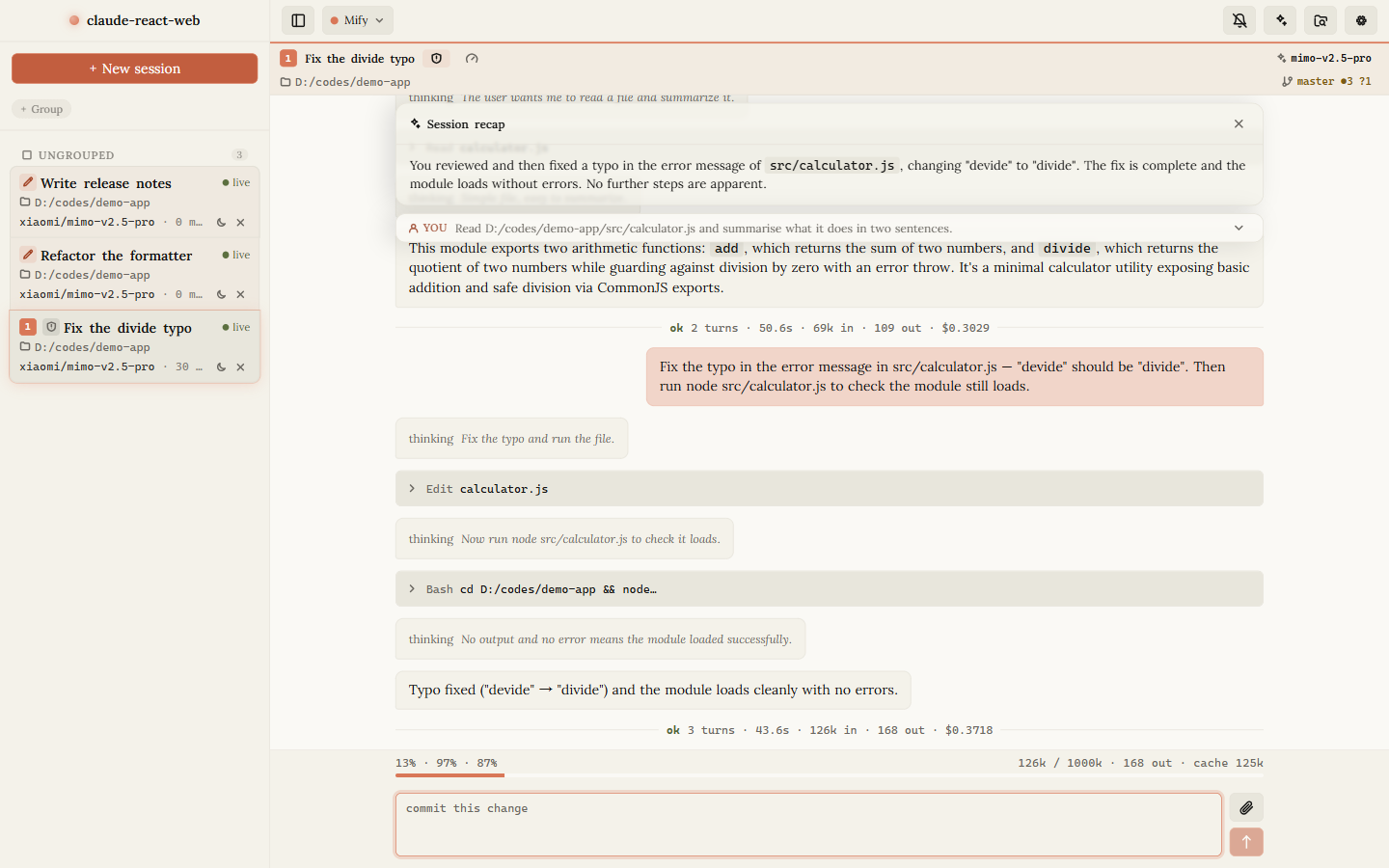
A local browser UI for @anthropic-ai/claude-agent-sdk. Ships as a single npx binary that serves both the API and a built React client — a full Claude Code-style experience, in a real browser.
Each chat session holds its own stateful SDK Query on the server, so multi-turn conversations, mid-run interruption, model switching, and permission-mode changes all drive a live claude CLI subprocess. What you do in the browser is reflected in a real agent process.
Why claude-react-web?
- Sessions that outlive the terminal. Conversations persist across restarts and resume from disk. Keep up to three side-by-side, and come back to any of them later.
- Not a chat wrapper. It drives the real agent loop — tool calls, subagents, background tasks, plan mode, MCP, hooks — rather than reimplementing a chatbot. A few CLI capabilities are deliberately not surfaced yet; the manual appendix tracks them.
- Safety you can see. In the default mode every tool call is a reviewable dialog — allow once, allow for the session, or deny with a reason. Plan mode, file rewind, and per-session approvals give you an undo path a terminal doesn't.
- Runs entirely on your machine. One process, one port, no account, no telemetry. Credentials stay in your local config file.
- Reachable from your phone. Bind to your LAN and scan a QR code to pick up the same session on another device.
Requirements
- Node.js ≥ 20
- The
claudeCLI — by default the native binary bundled with@anthropic-ai/claude-agent-sdkis spawned, pinning the running Claude Code to the version locked inpackage-lock.json.CLAUDE_CODE_BINARY/--claude-binaryoverride it; as a last resort it falls back towhich claudeonPATH. - An Anthropic credential (
authToken, plus an optionalbaseUrl). See Quick start.
Quick start
npm i -g claude-react-web
claude-react-web
Or run it without installing:
npx claude-react-web
Either way the server starts on http://127.0.0.1:3456 and opens your browser.
git clone https://github.com/LoopGe/claude-react-web.git
cd claude-react-web
npm install
npm run build
npm run start
On first run a starter ~/.claude-react-web/config.json is scaffolded. Set your credentials there before sending messages — the server forwards them to the Claude SDK subprocess:
{
  "authToken": "sk-ant-...",
  "baseUrl": "https://api.anthropic.com"
}
authToken is sent as a Bearer token, so it works against both the official API and Anthropic-compatible proxies (point baseUrl at the relay). You can also fill these in from the in-app settings panel. See CONFIG.md for every field.
Features
Chat & sessions
- Up to three conversations side-by-side, organised into reorderable groups that persist across refreshes
- Streaming over a single multiplexed WebSocket per tab, with fine-grained status (thinking / writing / tool use)
- Paste or drop images straight into the composer — sent inline as multimodal content
- Full-text message search, one-click AI recaps, and predicted next-prompt suggestions
- A command palette (
Cmd/Ctrl+K) for fuzzy search across sessions and actions, plus a full set of global shortcuts
Agents & background work
- Launch subagents and watch them in flight — the swarm pill expands into per-agent progress, current tool, and elapsed time
- Background an in-flight task with
Ctrl+Band follow the whole task list live - Sessions keep working while you move between panels
Control & safety
- In the default permission mode every tool call is approval-gated: allow once, allow for session, or deny with a message — the model re-plans instead of aborting
- Plan mode with review-and-take-over, and
Shift+Tabcycling through the permission modes (auto-accept, bypass) when you want less friction - Interrupt a running turn at any time; switch model or permission mode mid-conversation
- Adaptive extended thinking and effort control on models that support them
Git & workspace
- Branch + dirty / ahead / behind chip in every panel header, with a full panel for status, diff, branches, and stashes
- Stage, unstage, discard, commit, stash, checkout, and abort merges or rebases without leaving the app
- AI-generated commit messages written from your actual diff
- Rewind tracked files to any point in the conversation — with a dry-run preview before anything is touched
Extensibility
- MCP — global servers, dynamic per-session servers, runtime reconnect / toggle, and inline OAuth elicitation
- App Plugins (Mods) — install from a marketplace or a local directory to add menus, commands, settings, and panels to the app shell
- Claude plugins, skills, hooks, and custom agents, managed per session
- Composer snippets and slash-command discovery
Ops & access
- Dark / light / system themes with selectable skins
- LAN access — scan a QR code and use the same instance from your phone, protected by an access token
- Per-session cost, token, and context usage, plus a live performance panel and structured logs
doctorfor environment checks andupdatefor upgrade detection
Screenshots
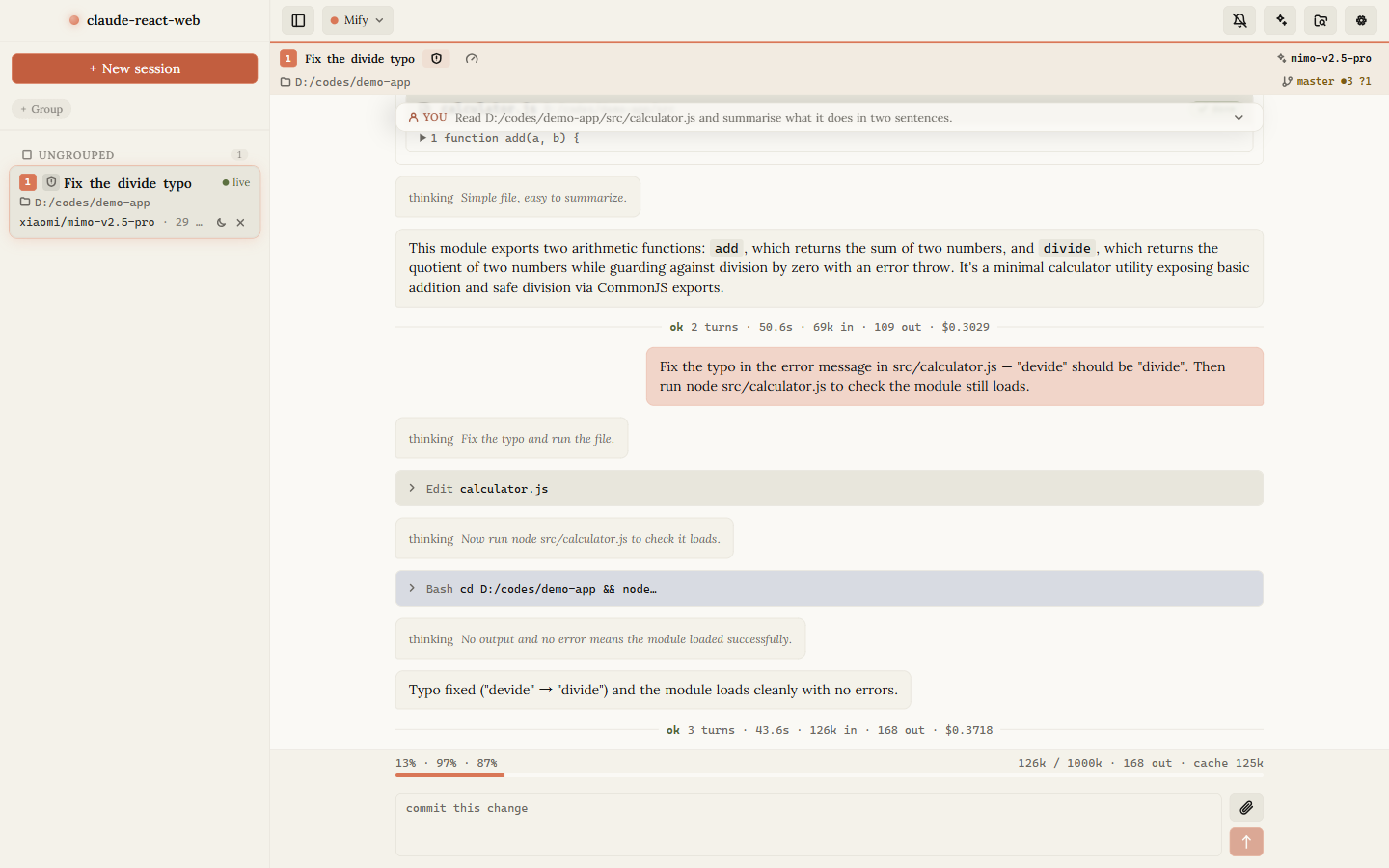 Transcript & tool cards Collapsible tool calls, thinking lines, and per-turn cost — manual §3 |
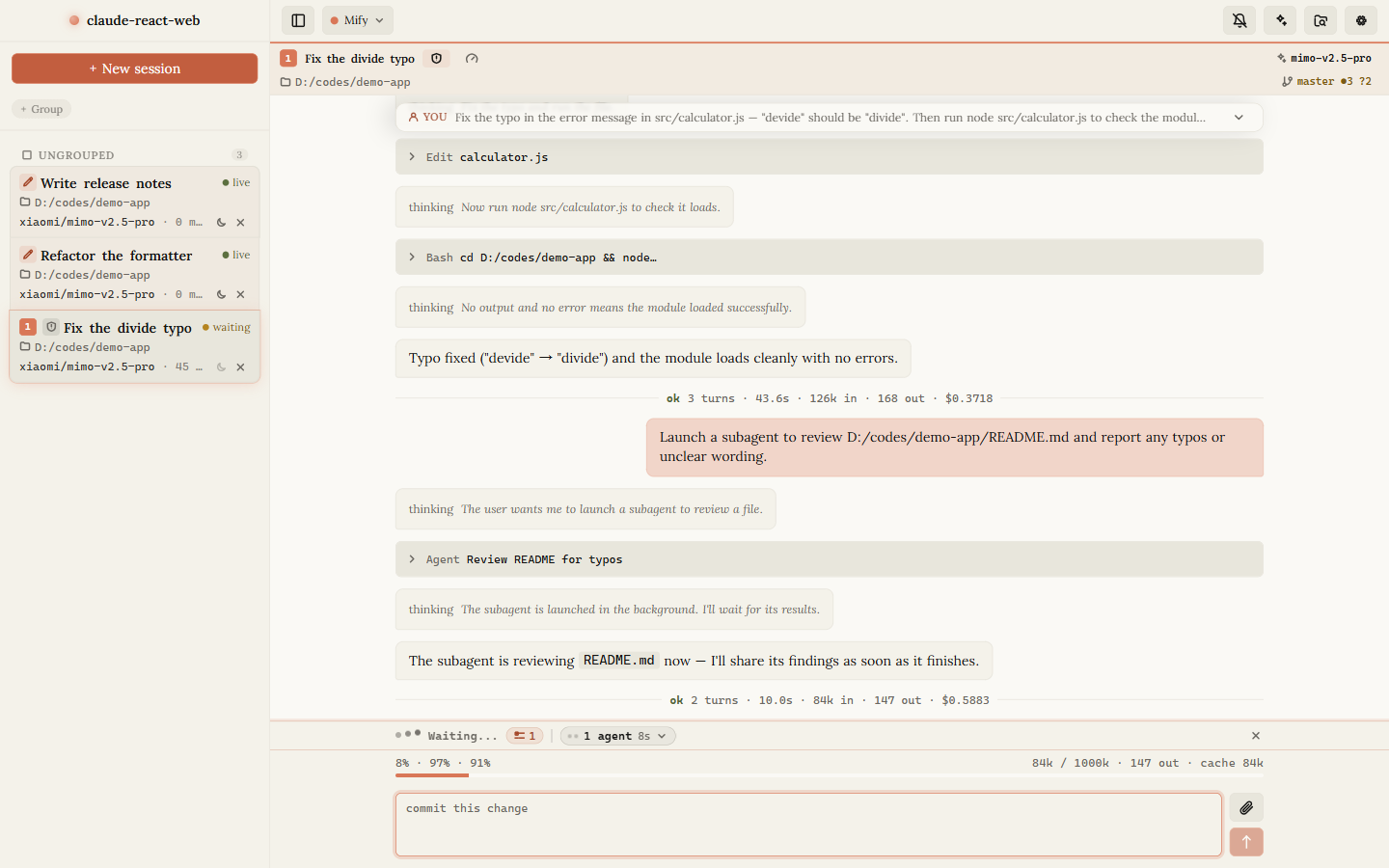 Subagents in flight Launch an agent, keep working, follow it live — manual §6 |
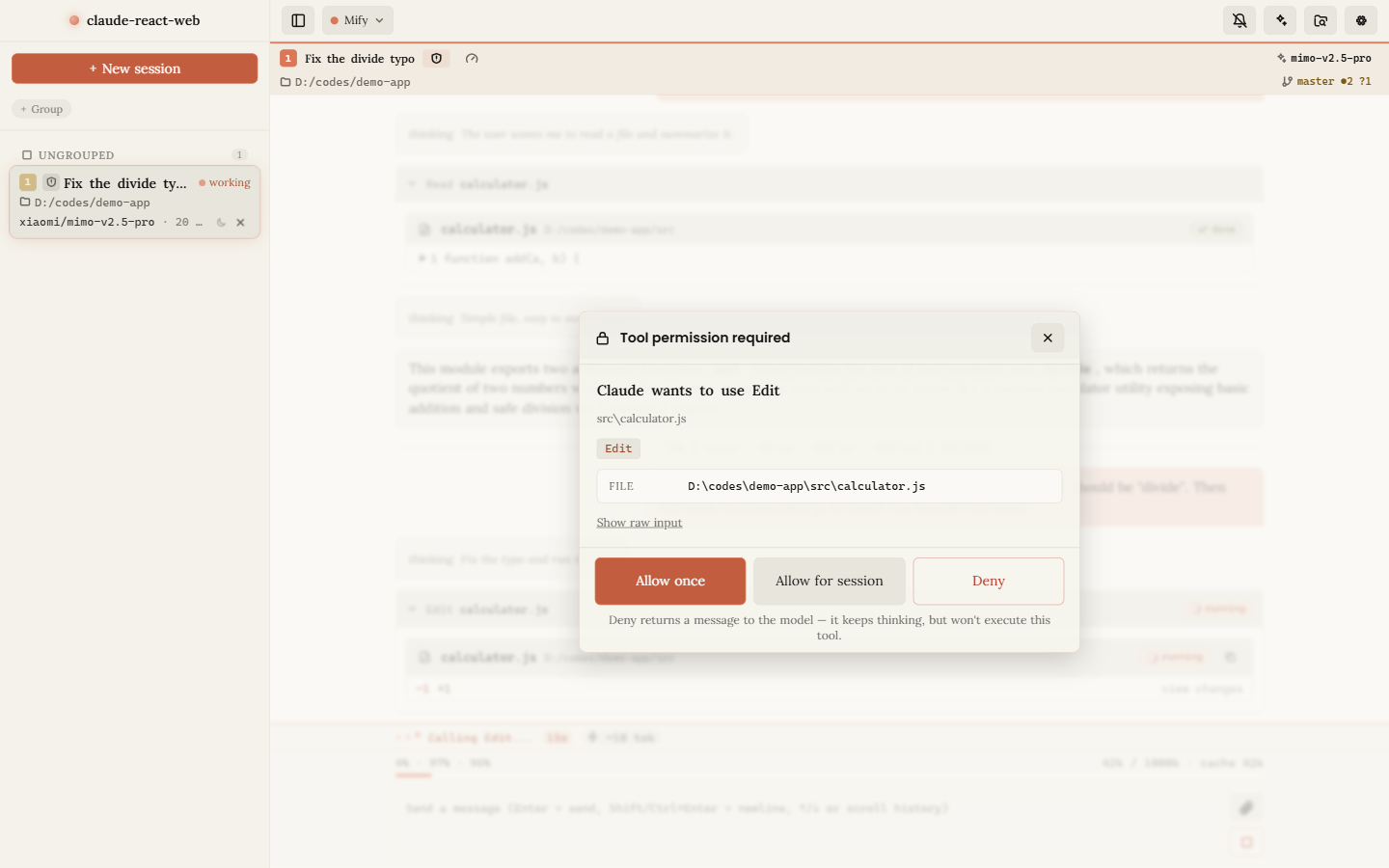 Tool permission dialog Approve once, for the session, or deny with a reason — manual §5 |
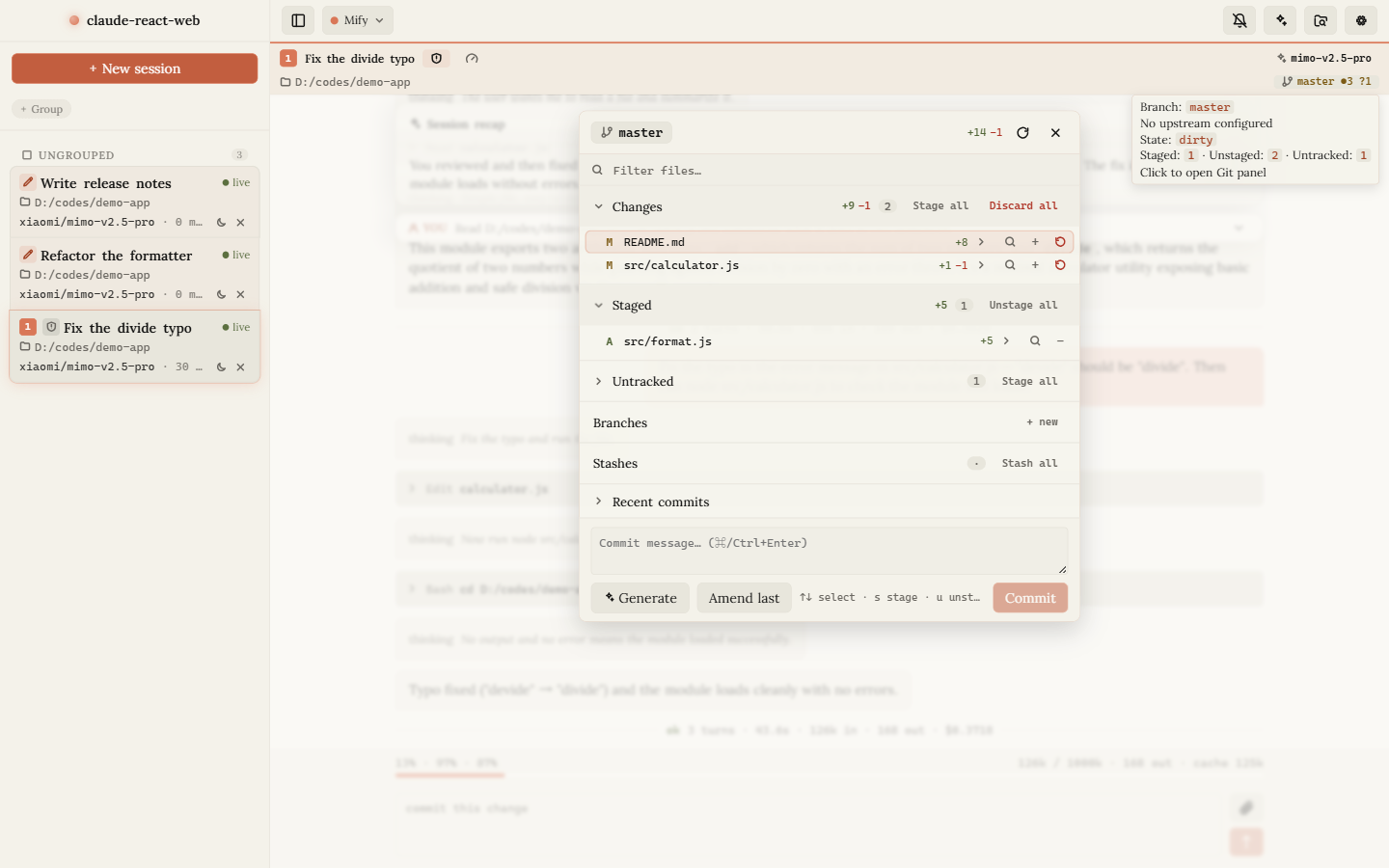 Git panel Stage, commit, branch, stash, and generate messages — manual §7 |
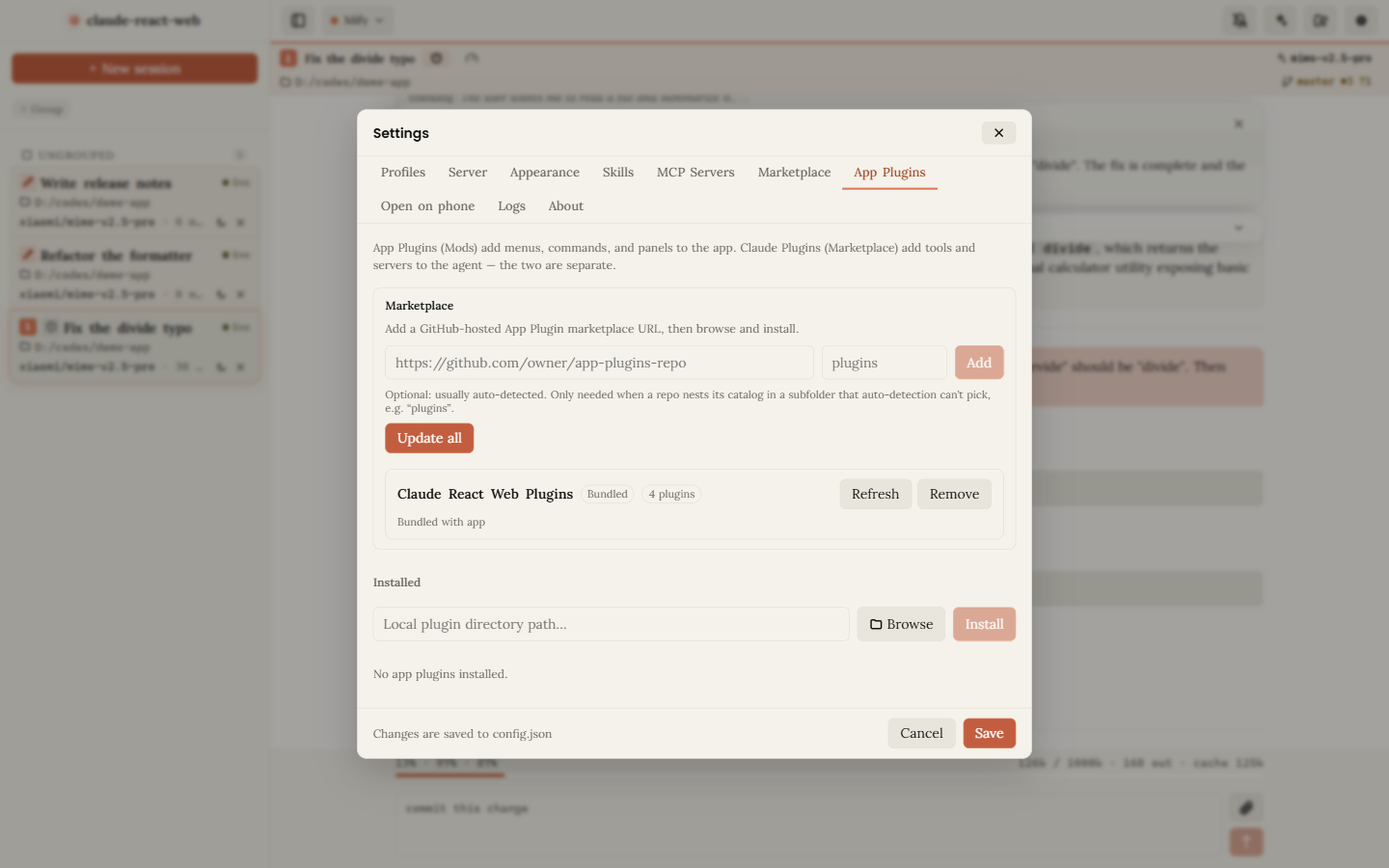 App Plugins (Mods) Marketplace or local installs — manual §8 |
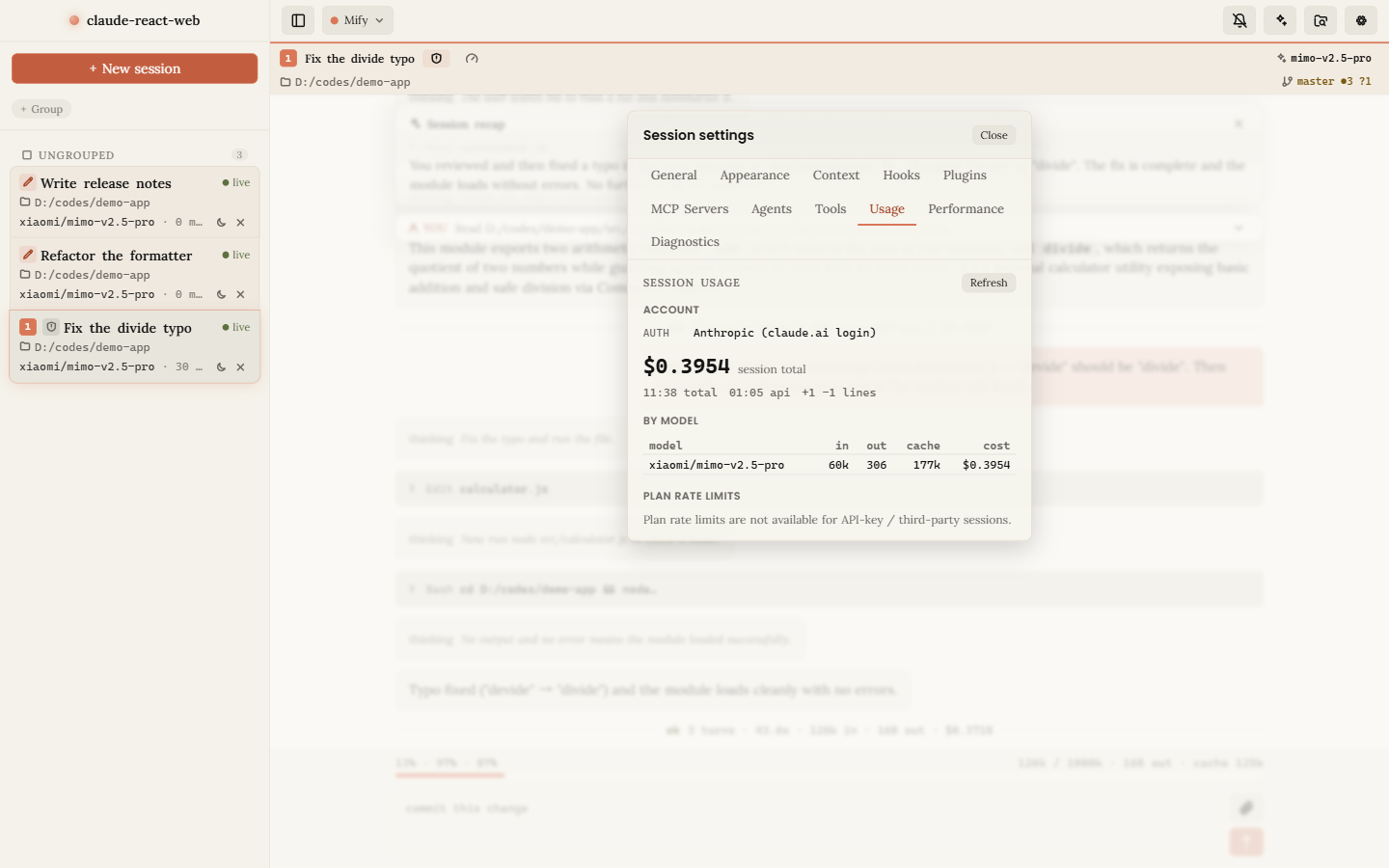 Session usage & cost Tokens, cache, spend, and plan limits — manual §9 |
📖 User manual — a guided tour of every screen, with screenshots (中文版).
CLI reference
| Flag | Description |
|---|---|
-p, --port <port> |
Server port (default: 3456) |
--host <host> |
Bind host (default: 127.0.0.1). 0.0.0.0 allows LAN access and requires a web access token, auto-generated if --token is omitted. Requests must address the server as loopback, a LAN interface IP, or the bound host on the bound port; to reach it through an mDNS .local hostname bind with --host <that-hostname>; a tunnel / reverse proxy must rewrite Host to 127.0.0.1:<port> and strip or rewrite Origin to http://127.0.0.1:<port> |
--token <token> |
Shared web access token. Visitors supply it once via /?token=<token> and a cookie is set. Pin a stable value here or as accessToken in config.json |
-o, --open / --no-open |
Open a browser on start (default: open) |
--cwd <path> |
Default workspace for sessions created without a cwd |
--model <name> |
Default model advertised to new sessions (informational) |
--state-dir <path> |
Where session metadata and config.json live (default: ~/.claude-react-web) |
--config <path> |
Read/write config.json at an explicit path instead of <state-dir>/config.json (a leading ~ expands to the home dir). Handy to share one config across worktrees or dev/prod runs |
--claude-binary <path> |
Path to the claude CLI binary. Overrides the SDK-bundled binary, CLAUDE_CODE_BINARY, and PATH auto-detection — useful when you need a specific native build (e.g. a newer CLI than the pinned SDK bundle) |
--dev / --no-dev |
Register the dev-only appdebug introspection tools (logs, metrics, session internals). Default: on when running from TypeScript source, off for dist/cli.mjs |
--disable-app-plugins |
Disable the App Plugins (Mods) subsystem entirely |
--safe-mode |
Load App Plugins without background subprocesses — static UI contributions only |
-V, --version / -h, --help |
Print version / help |
--help output
claude-react-web — local interactive chat powered by @anthropic-ai/claude-agent-sdk

Usage:
  claude-react-web [options]

Options:
  -p, --port <port>    Server port (default: 3456)
      --host <host>    Bind host (default: 127.0.0.1). Use 0.0.0.0 to allow
                       LAN access (e.g. from a phone) — this REQUIRES a web
                       access token (auto-generated if --token is omitted).
      --token <token>  Shared web access token required to use the UI. When
                       set, every visitor must supply it via /?token=<token>
                       once (a cookie is then set). Auto-generated when the
                       host is non-loopback and no token is configured. Pin
                       a stable value here or as "accessToken" in config.json.
  -o, --open           Open browser on start (default)
      --no-open        Do not open a browser window
      --cwd <path>     Default workspace for sessions created without a cwd
      --model <name>   Default model advertised to new sessions (informational)
      --state-dir <p>  Where to keep session metadata and config.json
                       (default: ~/.claude-react-web)
      --claude-binary <path>
                       Path to the claude CLI binary. Default: the native
                       binary bundled with @anthropic-ai/claude-agent-sdk
                       (pinned to the lockfile version); falls back to
                       CLAUDE_CODE_BINARY env or `which claude`. Use this
                       if you need a specific native build.
      --dev            Register the dev-only `appdebug` introspection tools
                       (logs, metrics, session internals). Default: auto —
                       on when the server runs from TypeScript source
                       (npm run dev / dev:server), off for dist/cli.mjs.
      --no-dev         Force the dev tools off even when running from source.
      --disable-app-plugins
                       Disable the App Plugins (Mods) subsystem entirely.
      --safe-mode      Load App Plugins without activating their background
                       subprocesses — static UI contributions only.
  -V, --version        Print version and exit
  -h, --help           Show this help and exit
When bound to a non-loopback host the server prints a token-bearing URL (plus a scannable QR code) so you can open the already-authenticated UI from a phone on the same network.
Terminal commands
Run with no command to start the web server. Pass a subcommand to manage the same persisted config the UI edits — headless and scriptable (--json for structured output, --yes to confirm destructive verbs, --state-dir <path> to target a non-default state dir):
claude-react-web mcp list | add <name> | update <name> | remove <name> | enable <name> | disable <name> | test <name>
claude-react-web marketplace add <url> | list | remove <id-or-url>
claude-react-web app-plugin marketplace add <url> | list | remove <id>
claude-react-web app-plugin list | install <marketplaceId>:<pluginName> | uninstall <id>
claude-react-web config get [key] | set <key> <value>
claude-react-web sessions list | delete <id>
claude-react-web doctor
claude-react-web update
claude-react-web doctor runs local environment checks and exits non-zero when something is broken; claude-react-web update checks the npm registry for a newer release. claude-react-web <command> --help prints the full flags for a command.
Environment variables
Anthropic credentials live in config.json (authToken / baseUrl), not in env vars — the server injects them into each SDK subprocess. The variables below tune the server itself and are all optional:
| Variable | What it does | Default |
|---|---|---|
CLAUDE_CODE_BINARY |
Path to the claude CLI binary (same as --claude-binary) |
SDK-bundled binary is used first |
CLAUDE_CONFIG_DIR |
Relocates the CLI's entire config directory. Transcripts, settings.json, and user-scope skills all resolve under it, and the value is relayed to the SDK subprocess |
~/.claude |
LOG_LEVEL |
Log verbosity (error / warn / info / debug / trace) |
info |
LOG_SCOPES |
Comma-separated scope filter for logs (* matches all) |
all scopes |
DEBUG_SESSION |
Set to 1 to force LOG_LEVEL=debug (back-compat alias) |
— |
EVENT_LOOP_PROBE |
Set to 0 to disable the event-loop stall probe |
enabled |
EVENT_LOOP_PROBE_MS |
Event-loop probe sample interval, in milliseconds | 5000 |
EVENT_LOOP_PROBE_QUIET_MS |
Blocking threshold above which a probe window is reported | 100 |
METRICS |
Set to 0 to disable metrics collection (GET /api/metrics returns an empty snapshot) |
enabled |
Any other ANTHROPIC_* variable in the environment is forwarded to the SDK subprocess as-is (except ANTHROPIC_API_KEY, which is intentionally stripped in favour of the authToken Bearer flow).
Setting CLAUDE_CONFIG_DIR moves the CLI's whole state consistently: session transcripts, settings.json, user-scope skills, and the CLI's global config (.config.json when present, else .claude.json) all resolve through it, and the resolved path is relayed to the CLI subprocess so it writes exactly where the SDK and the UI read. Set it for the server process — a per-session env.CLAUDE_CONFIG_DIR is rejected, since that would split one session away from every reader. Project-scope skills stay under the project (<cwd>/.claude/skills).
Configuration file
Most server-side defaults (model list, recap model, commit-message model, upload limits, history cap, max group panels, etc.) are configured via ~/.claude-react-web/config.json. See CONFIG.md for the full field reference, or copy config.example.json to get started:
mkdir -p ~/.claude-react-web
cp config.example.json ~/.claude-react-web/config.json
Architecture
The server keeps one live provider session per tab. The default claude provider wraps an SDK Query; a background pump drains it and fans every message out to each WebSocket subscriber over a single multiplexed connection per tab.
flowchart LR
  Browser["Browser UI<br/>React 19"]
  Server["Hono server :3456<br/>session pool · pump · brokers"]
  SDK["Claude Agent SDK<br/>spawns the claude CLI"]
  Disk[("transcripts<br/>~/.claude/projects")]

  Browser <-->|"WebSocket + REST /api"| Server
  Server -->|"one Query per session"| SDK
  SDK --> Disk
  Server -.->|"history-reader · resume / fork"| Disk
Metadata is persisted in ~/.claude-react-web/sessions.json, so sessions survive restarts; the SDK itself stores full conversation history in the CLI's config directory — ~/.claude/projects/ unless CLAUDE_CONFIG_DIR moves it — and resumes it via options.resume.
graph TB
  Browser["Browser UI<br/>React 19 · components · hooks · session-store"]
  Browser <-->|"WebSocket (multiplexed) + REST /api"| Routers

  subgraph Server["Hono Server · port 3456"]
    direction TB
    Gate["Auth gate (web token / LAN) · CORS · body-limit"]
    Routers["REST routers /api/* + WebSocket hub"]
    Gate --> Routers
  end

  subgraph SM["Session Manager — one live session per tab"]
    direction TB
    Pool["Session pool"]
    Pump["Session Pump → history ring (500) → fan-out + task state"]
    Broker["Permission Broker (canUseTool)"]
    Dialogs["Dialog / Elicitation brokers<br/>(refusal fallback · MCP OAuth)"]
    Health["Health Monitor (stuck-session GC)"]
    Pool --> Pump & Broker & Dialogs & Health
  end

  Reg["Provider Registry<br/>(pluggable AgentProvider)"]
  Claude["claude provider → SDK Query"]
  SDK["Claude Agent SDK<br/>spawns claude CLI subprocess"]
  Anthro["Anthropic Messages API<br/>recap · commit-message · plugin ai-broker"]
  Stores["Disk-backed stores<br/>sessions.json · config.json · MCP · marketplace→plugins · snippets · UI state · app-plugins"]
  Plugins["App Plugins (Mods)<br/>marketplace · local installs · per-plugin Node service"]
  Git["Git Layer — git.ts owns all execution"]
  Disk[("~/.claude/projects/<br/>full transcripts · resumed via options.resume")]

  Routers --> Pool
  Pool --> Reg --> Claude --> SDK
  Broker -.->|canUseTool| Claude
  Dialogs -.->|onUserDialog / elicitation| Claude
  Routers --> Anthro
  Routers --> Stores
  Routers --> Plugins
  Pump --> Git
  Claude --> Disk
  Pump -.->|history-reader| Disk
server/
  cli.ts                # bin entry — argv, startup banner, QR, browser open
  app.ts                # Hono app: auth gate, CORS, body-limit, route mounting, static serve
  routes/               # REST routers: sessions, permissions, uploads, recap, config, health,
                        # marketplace (mp), git-write, update, search, skills, hooks, dialog,
                        # elicitation, reset, usage, ui-state
  session-manager.ts    # multi-session pool, provider wiring, WS fan-out, idle GC
  session-pump.ts       # drains each provider stream → history ring + subscribers + task state
  providers/            # AgentProvider interface + registry; claude provider wraps the SDK Query
  permission-broker.ts  # parks canUseTool requests until the client decides
  elicitation-broker.ts # MCP OAuth elicitation requests
  user-dialog-broker.ts # user dialogs (refusal-fallback prompt)
  subagent-watcher.ts   # tracks background Agent dispatches → TaskRecordUi seeds
  session-health.ts     # stuck-session detector (mid-turn silence GC)
  recap.ts              # AI session summaries, via anthropic-api.ts
  commit-message.ts     # AI commit messages, via anthropic-api.ts
  compact-summary.ts    # session compaction summaries
  history-reader.ts     # reads the CLI's transcripts; resume / fork anchors
  ws.ts                 # WebSocket hub (single connection, multiplexed channels)
  git.ts                # owns ALL git execution (runGit); git-broadcast.ts debounces mutations
  git-routes.ts         # read-only git endpoints (status, diff, log)
  fs-routes.ts          # directory-only browser for the cwd picker
  mcp-config.ts         # global MCP server store; mcp-routes.ts exposes it
  mp-store.ts           # homegrown git-repo marketplace → injects Options.plugins
  snippet-store.ts      # composer text macros (snippet-routes.ts)
  ui-state-store.ts     # session groups + sidebar order (json-file-store.ts backed)
  app-plugins/          # Mods: manager, store, per-plugin Node process, marketplace, host API
  config.ts             # centralised defaults from config.json
  persistence.ts        # ~/.claude-react-web/sessions.json read/write
  auth.ts               # web-access token gating (LAN)
  exec.ts               # child_process helpers; process-monitor.ts watches subprocesses
  update-checker.ts     # in-app upgrade detection (update-routes.ts)
  log.ts                # createLogger(scope) — all diagnostics go through this

shared/                 # types + logic shared by server and client
                        # ws-protocol, tasks, elicitation, user-dialog, rewind, reset, usage,
                        # account-info, app-plugins, hooks, skills, mcp-types, permission-request,
                        # search/, …

src/
  App.tsx               # multi-panel chat grid, sidebar, settings overlay, command palette
  components/           # Chat, Composer, MessageList, SessionList, GitPanel, TasksPanel,
                        # CommandPalette, MarketplaceTab, McpInstaller, AppPluginsTab,
                        # UsagePanel, RecapWindow, SubagentOverlay, …
  hooks/                # useWsHub, useChatStream, usePastedImages, usePermissionChannel,
                        # useGitStatus, useUpdateInfo, useUiState, useSessionRecap, useTaskInfo, …
  session-store/        # client-side message store (reducer + selectors, IDB transcript cache)
  search/               # full-text message search (extract, match, highlight)
  app-plugins/          # plugin UI contributions (menus, commands, panels)
The separate App Plugins (Mods) system (server/app-plugins/, shared/app-plugins/, src/app-plugins/) lets plugins extend the app shell with menus, commands, settings, and panels. Each plugin's background code runs in its own trusted Node subprocess over JSON-RPC/stdio; plugins are installed from a marketplace repo (the official catalog lives in plugins/, published as a separate lightweight GitHub repo) or a local directory.
Develop
npm install
npm run dev         # tsx watch server (:3456) + vite (:5174, /api proxied)
npm run typecheck
npm run lint
npm test
| Script | What it does |
|---|---|
npm run dev |
Hot-reloading server + Vite dev server side by side |
npm run build |
vite build → dist/client and esbuild → dist/cli.mjs, run concurrently |
npm run typecheck |
tsc --noEmit for both browser and Node tsconfigs |
npm run lint |
ESLint (includes react-hooks) |
npm run format |
Prettier write |
npm test |
Vitest (server unit tests + client hook tests) |
npm run verify |
typecheck + lint + test + build in one go |
npm run release |
Cut a release: bump, changelog, tag, push — see RELEASING.md |
Contributing
Issues and pull requests are welcome. The suite covers the session pool, persistence, git execution, permission broker, WebSocket hub, app-plugin runtime, keyboard shortcuts, and the client hooks — 320+ test files with 4,000+ cases. Please keep them green before opening a PR:
npm run verify
npm test must pass. Add tests alongside behaviour changes — the repo uses Vitest for both the Node server and the jsdom-based client hooks.
Commits follow Conventional Commits (type(scope): subject), enforced by a commit-msg hook and by CI. Record user-visible changes under CHANGELOG.md's [Unreleased] section as you go; RELEASING.md covers how a version is cut.
Disclaimer
This is an unofficial, community-built project. It is not affiliated with, endorsed by, or sponsored by Anthropic. "Claude" and "Claude Code" are trademarks of Anthropic PBC. You are responsible for ensuring your use complies with Anthropic's terms of service and any applicable usage policies.
Your authToken is stored in ~/.claude-react-web/config.json on your own machine. It is injected into the local SDK subprocess, and is also sent as a Bearer token from the server to the baseUrl you configure, for the server's own auxiliary API calls: session recaps, AI commit messages, compaction summaries, the auto-classifier, the App Plugin ai.request broker, and the settings connection test. It goes nowhere you have not configured.
Changelog
See CHANGELOG.md for release history. The release process is documented in RELEASING.md.
License
Reviews (0)
Sign in to leave a review.
Leave a reviewNo results found