dsh-timer-agent
Health Warn
- License — License: MIT
- Description — Repository has a description
- Active repo — Last push 0 days ago
- Low visibility — Only 5 GitHub stars
Code Warn
- network request — Outbound network request in scripts/e2e-jump-probe.mjs
- network request — Outbound network request in scripts/e2e-jump-probe2.mjs
- network request — Outbound network request in scripts/e2e-shot.mjs
Permissions Pass
- Permissions — No dangerous permissions requested
No AI report is available for this listing yet.
DSH plugin: host-resident scheduled-jobs × AI-agent engine (hermes-agent cron inspired) — 60s ticker fires real agent sessions via cron; pinned-session / project-workdir / default-workspace targeting; timer_agent model tool + web board
dsh-timer-agent — DSH 定时任务 × AI Agent 引擎
中文 | English
一个 DeepSeek Harness (DSH) Web GUI 插件:调研 NousResearch/hermes-agent 的 cron 系统后,按其「定时器 ↔ Agent 协同」思路实现的 host 常驻定时任务引擎——dsh web 服务启动即生效,GUI 页面关闭也照常触发。
它做什么
到点(5 段 cron)通过真实 agent 会话执行你写好的 prompt:
- 指定已有会话 → 每次触发继续该对话,具备上下文连续性(hermes cron 的 continuity 形态)
- 指定项目 workdir → 每次在该项目内新建会话运行(自动加载其 AGENTS.md)
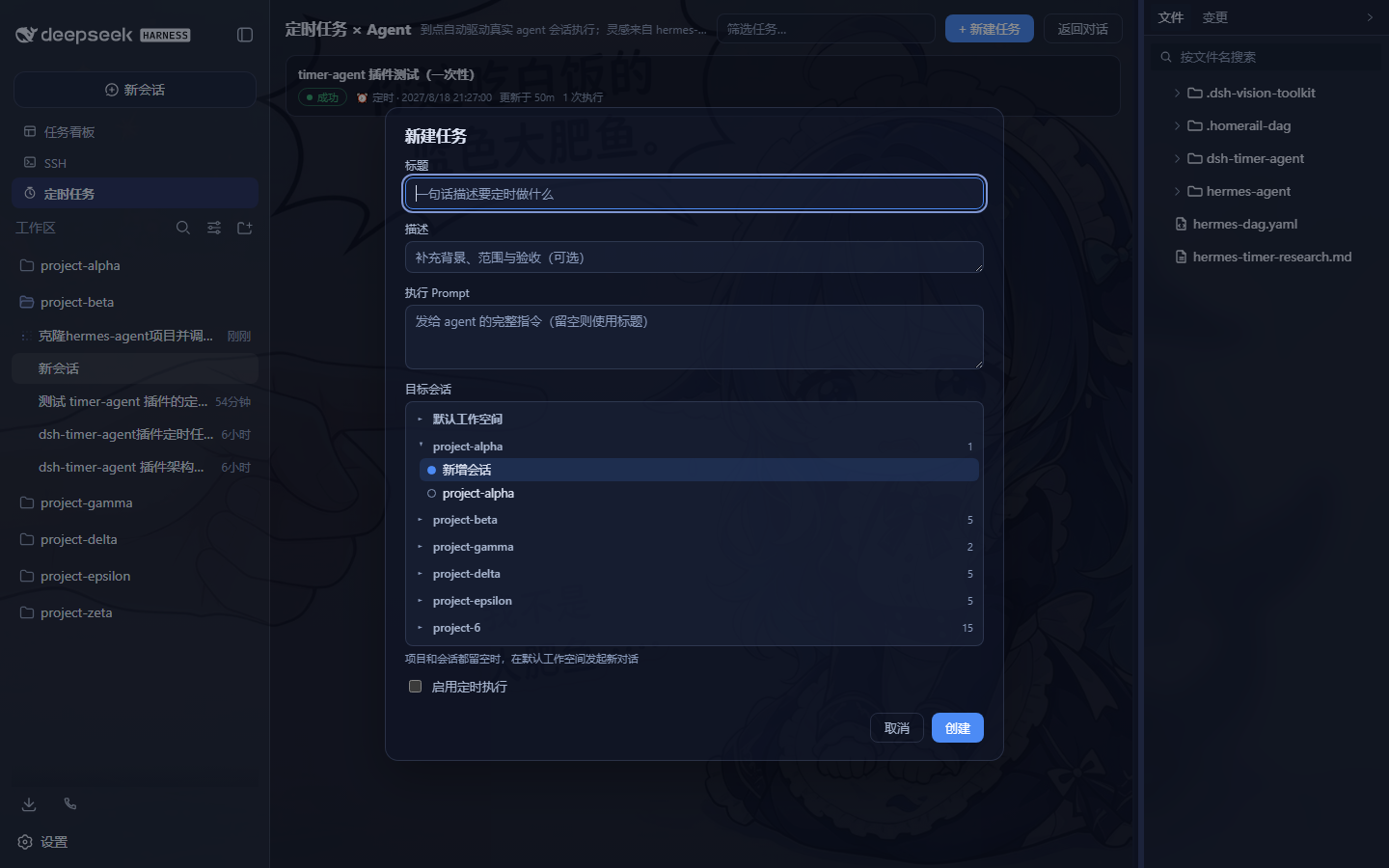
- 两者都留空 → 每次触发在默认工作空间新建会话发起新对话
对话中可直接用 timer_agent 工具管理任务(create / list / update / pause / resume / remove / run);Web GUI 侧边栏「定时任务」面板管理同一批任务——一个台账,三个入口(工具 / WebUI / 文件)。
两种任务类型
- AI Agent 任务(默认):到点驱动真实 agent 会话执行 prompt,消耗 API 额度
- 普通任务(命令):到点直接 spawn 运行你指定的
命令 + 参数(可选工作目录、超时),不经过 AI、不消耗额度;stdout/stderr 尾部(≤16k 字符)与退出码随执行记录入账。适合自包含的脚本(下载、导出、续期等)
[!WARNING]
普通任务会在你的机器上以当前用户权限执行任意命令,没有任何沙箱或白名单。 任何能新建/编辑任务的人(你自己、能调用timer_agent工具的 agent 会话、能访问回环 API 的本机进程)都能让任意程序定时运行。请只填入你审查过的、无人值守安全的命令;不要把该插件暴露给不可信环境;任务台账jobs.json可被篡改即等价于本机任意代码执行。谨慎使用。
架构(hermes-agent cron 同构)
┌─ dsh web 宿主进程 ────────────────────────────────┐
│  60s ticker(常驻,GUI 关闭也运行)                  │
│   ├─ HostJobStore   ~/.dsh/timer-agent/jobs.json  │
│   │                 (原子写,损坏降级不崩溃)        │
│   ├─ TimerRunner    at-most-once:先顺延 nextRunAt │
│   │                 再触发;运行中跳过;错过即跳过   │
│   │   ├─ agents.resume(钉住会话)                  │
│   │   └─ agents.create + workspaceRegistry        │
│   │       (新会话挂到正确项目)                     │
│   ├─ timer_agent 工具(模型可调用)                 │
│   └─ /api/dsh-timer-agent/* 路由(仅回环)          │
└────────────────────────┬──────────────────────────┘
                         │ HTTP 轮询镜像(5s)
┌─ 浏览器半边(薄)────────┴──────────────────────────┐
│  侧边栏入口 + 任务面板(React)                      │
│  可折叠项目/会话树 · cron 预设 · 执行历史           │
└───────────────────────────────────────────────────┘
执行结算通过 session/event(turn/end 的 reason.kind)判定成功/失败,失败原因精确写入台账。
功能
- 定时执行:5 段 cron(分 时 日 月 周,支持
*/*/n/a-b/ 逗号列表)+ 预设下拉(每天 09:00 / 每小时 / 每 10 分钟 / 每周一 09:00,新建与编辑页均有) - 目标树选择器:按项目分组的可折叠树,每组含「新增会话」+ 该项目已有会话(按最近活跃排序);选中会话即钉住该对话
- 任务面板:列表(标题/状态/下次运行/执行次数)、搜索过滤、详情页(cron 编辑/执行历史/跳转会话 transcript/立即执行/重置/删除)
- 模型工具:任何对话中
timer_agent直接创建与管理定时任务 - 系统提示注入:host 半边注册
plugin:timer-agent播报段,agent 知晓本插件能力与协作方式 - 安全:API 路由仅回环 + 同源可访问(与 dsh-ssh 同防线)
安装
dsh plugin --profile web add link:<本目录绝对路径>
安装后重启 dsh web,侧边栏出现「定时任务」入口即生效(浏览器侧改动强刷 Ctrl+F5 即可)。
Configuration
| Option | Type | Default | Description |
|---|---|---|---|
| enabled | boolean | true | Master switch: ticker + tool + routes. Set false to disable the engine without uninstalling. |
| announceToAgent | boolean | true | Inject a system-prompt section announcing the plugin's capabilities to the agent. |
Tools
timer_agent
Manage the scheduled jobs the host ticker owns (the same rows the web GUI「定时任务」panel renders).
Parameters:
action(string, required):create/list/update/pause/resume/archive/restart/remove/runjob_id(string): job id, required for all actions exceptcreate/list(get ids fromlist; never guess)prompt(string): forcreate— the full self-contained prompt the scheduled run executes; forupdate— replacement; forrun— transient context for that single fireschedule(string): 5-field cron, e.g.0 9 * * *; required forcreatename(string): short human titleworkdir(string): absolute project directory the run's session works in (empty = default workspace)session(string): pin an existing session id — every run continues that conversation
Returns: { kind, job?, jobs?, error? } — summarized job row(s) or a structured error message.
构建
pnpm install
pnpm run build      # lib/index.js(host) + lib/client.js(浏览器,CSS 已内联)
pnpm run typecheck
pnpm test           # 49 项行为级 E2E(fake host faces,无需 dsh 运行时)
pnpm run smoke-test # 静态结构冒烟(23 项)
E2E 覆盖:cron 解析与下次运行计算(本地时间语义)、台账原子写与损坏降级、at-most-once 调度触发、钉住会话 resume、turn/end 成功/失败结算(含失败原因入账)、运行中拒绝重复触发、禁用调度不触发、手动触发通道、workdir 传递、timer_agent 工具全动作(含非法参数拒绝)、HTTP 路由 CRUD + run + 回环/同源防线 + 非法输入 400。
与 hermes-agent cron 的对应关系
| hermes-agent | 本插件 |
|---|---|
| gateway 进程内 60s ticker | dsh web 宿主进程内 60s ticker |
| 触发即新 AIAgent(platform=cron) 会话 | agents.create/resume 真实 dsh 会话 |
| ~/.hermes/cron/jobs.json 台账 | ~/.dsh/timer-agent/jobs.json(原子写) |
| at-most-once(先推进 next_run_at) | 先顺延 nextRunAt 再触发 |
| claim 去重 + 心跳 | 运行中跳过 + 5s 手动触发快通道 |
| deliver 回投/指定平台续跑 | 钉住会话 / workdir 新会话 / 默认空间 |
| cron_hint → notepad → script 组装 prompt | 自包含 prompt(无人在场,不可提问) |
| turn/end reason.kind=error 结算 | 同款 session/event 结算 |
已知限制
- 定时执行依赖
dsh web服务进程存活(服务停了自然不触发;重启后只跑已顺延到期的任务,错过即跳过) - 任务运行中到点跳过本次,等下一个 cron 匹配点
- 执行消耗 API 额度;定时执行无人在场,prompt 必须自包含、不可提问
致谢
- NousResearch/hermes-agent — cron 架构范本
- dsh-web-ui 全家桶(dsh-ssh / dsh-client-ui-task-board)— host 服务、路由注册、侧边栏注入与预设下拉的工程先例
License
Reviews (0)
Sign in to leave a review.
Leave a reviewNo results found