ccli
Health Warn
- No license — Repository has no license file
- Description — Repository has a description
- Active repo — Last push 0 days ago
- Low visibility — Only 7 GitHub stars
Code Fail
- rm -rf — Recursive force deletion command in scripts/screenshots.sh
Permissions Pass
- Permissions — No dangerous permissions requested
No AI report is available for this listing yet.
Terminal view of every Claude Code session across all your accounts: tokens, list-price cost, subagent trees, rate limits, and copying sessions between accounts.
ccli
A terminal tool for every Claude Code session on your machine, across all of
your accounts. It shows what each session used and what that would cost at API
list price, turn by turn: every prompt you typed, what the model did with it,
which subagents and workflow runs it started and what they cost. It also shows
where your subscription limits stand, and it moves a session from one account
to another and back without mixing up whose usage is whose.
An account is one Claude Code config dir: ~/.claude (shown as default) or~/.claude-<name> (shown as <name>), the dir you select withCLAUDE_CONFIG_DIR. If you keep a personal and a work login side by side,
ccli sees both and keeps their usage apart.
Install
Requires Go 1.26 or later.
go install github.com/lr00rl/ccli@latest
Or from a checkout: go build -o ~/.local/bin/ccli .
The first command indexes every transcript. That takes about 10 seconds for
3.7 GB on an M-series Mac. Later commands read only what was added since and
return in well under a second.
What it shows
Accounts
ccli accounts

Each account with its signed-in email, session count, usage over the last 30
days, and the Claude Code processes running in it right now.
Sessions
ccli sessions                         # active in the last 30 days, newest first
ccli sessions -a work --days 7 --sort cost -n 20
ccli sessions --project checkout -q "retry"
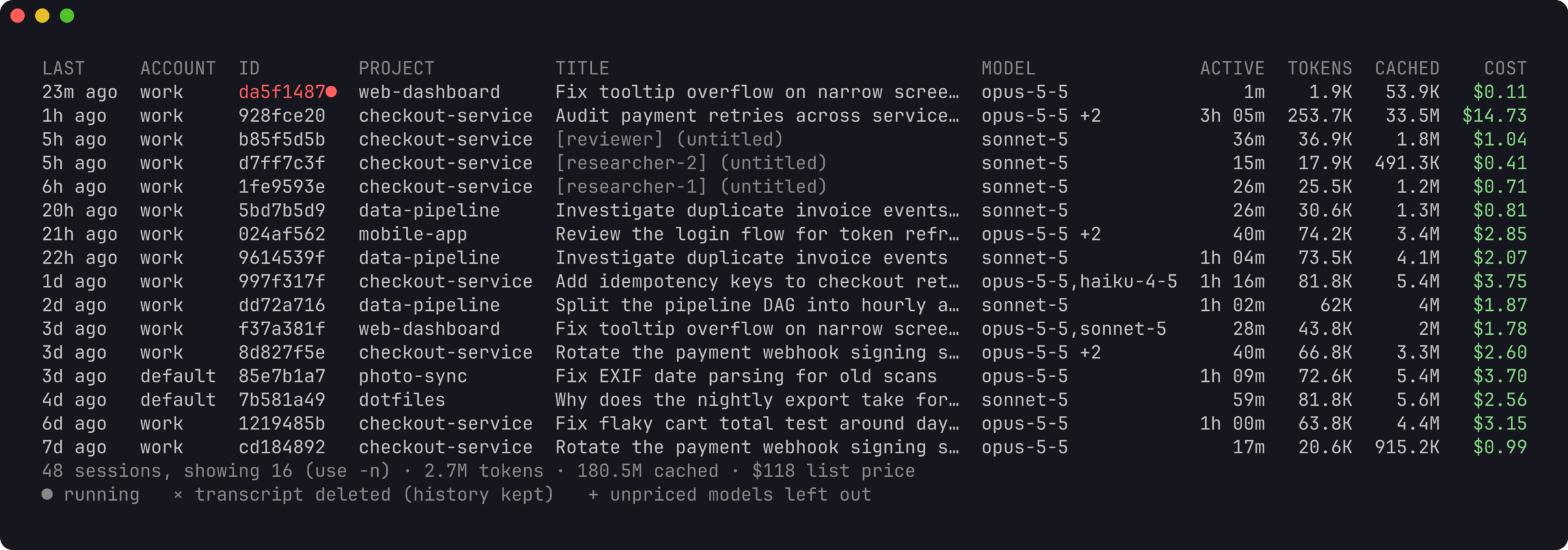
Teammates of an agent team appear with their name in brackets. A red id is a
session that is running now.
One session
ccli show 928fce20            # an id prefix is enough
ccli show work:928fce20       # name the account when a session exists in two
ccli resume 928fce20          # cd to its folder and run claude --resume in its account
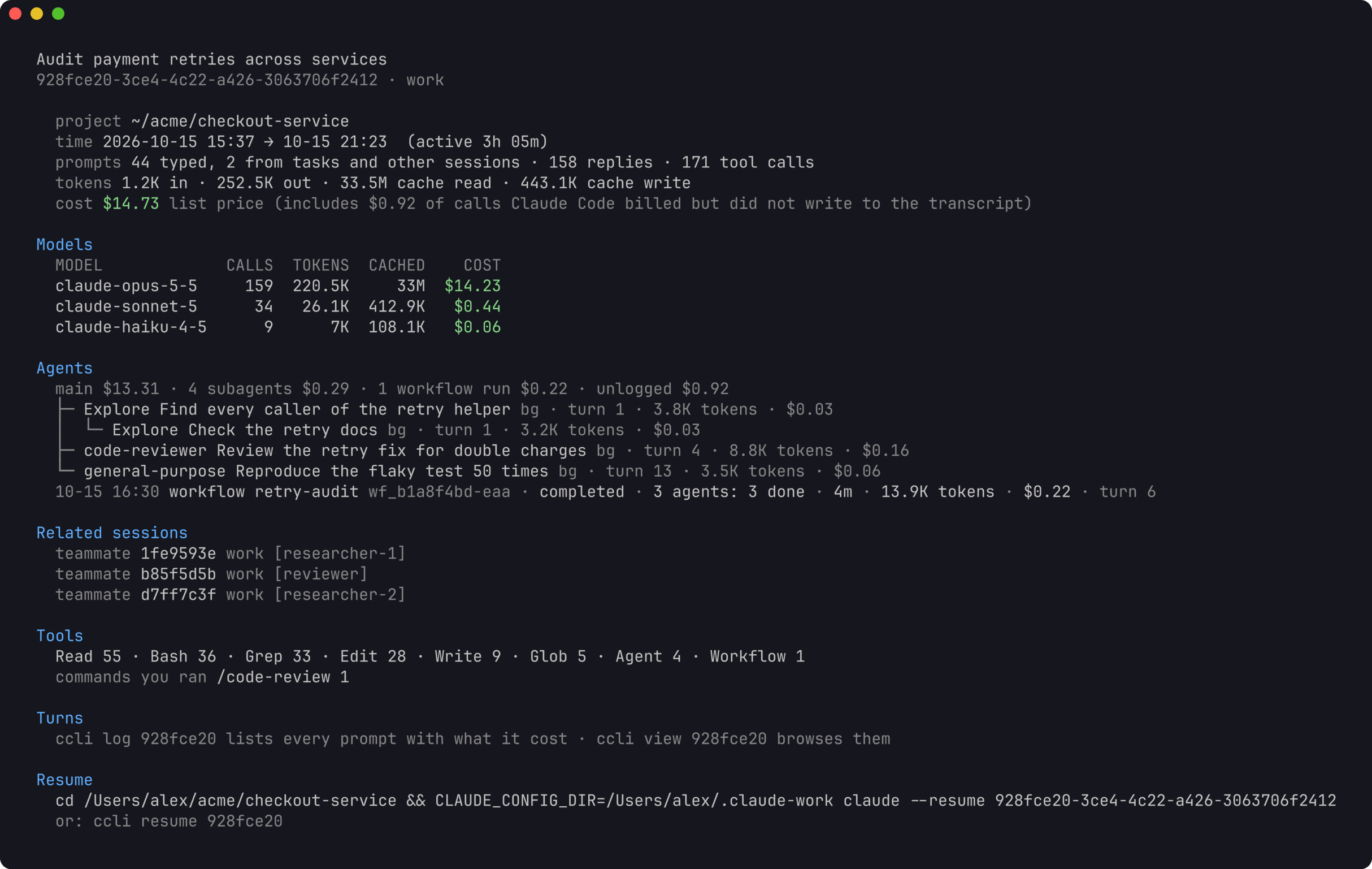
show prints the models used, then a line that splits the cost between the
main conversation, its subagents, its workflow runs, and calls Claude Code
billed but did not log; the parts add up to the total. Below it come the tree
of subagents (including subagents started by subagents), each with the turn
that started it, and the workflow runs with their name, status and how their
agents ended. Then teammates and continued sessions, the tools the model
called, the slash commands you ran, and the exact command to resume the
session under the right account.
Turn by turn
ccli log 928fce20             # every prompt you typed, with what its turn cost
ccli log 928fce20 3           # one turn in full; 3-6 for a range, last for the latest
ccli log 928fce20 3 --tools   # with tool inputs and outputs
ccli log 928fce20 --sort cost # the costliest turns first
ccli log 928fce20 --agent 55fe21fd   # a subagent's own transcript
ccli log 928fce20 --run wf_b1a8      # a workflow run's agents and how each ended
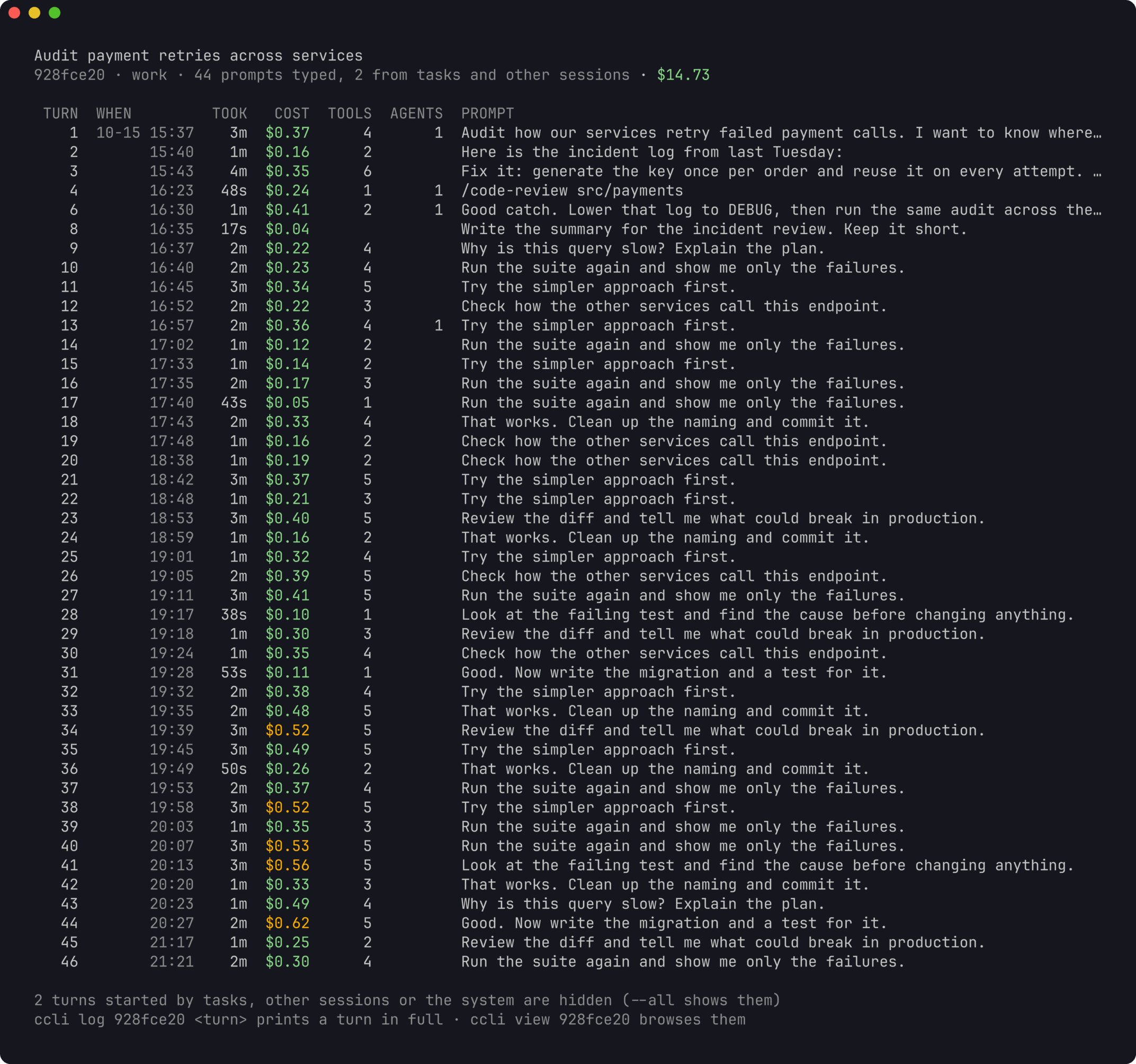
A turn is a prompt and everything up to the next one. Its cost includes the
subagents and workflow runs it started, so a two-word "go on" that launched a
large workflow shows up as the expensive prompt it was. The costliest tenth of
your turns is marked in amber. Turns started by background task reports,
messages from other sessions and the system are hidden unless you add --all.
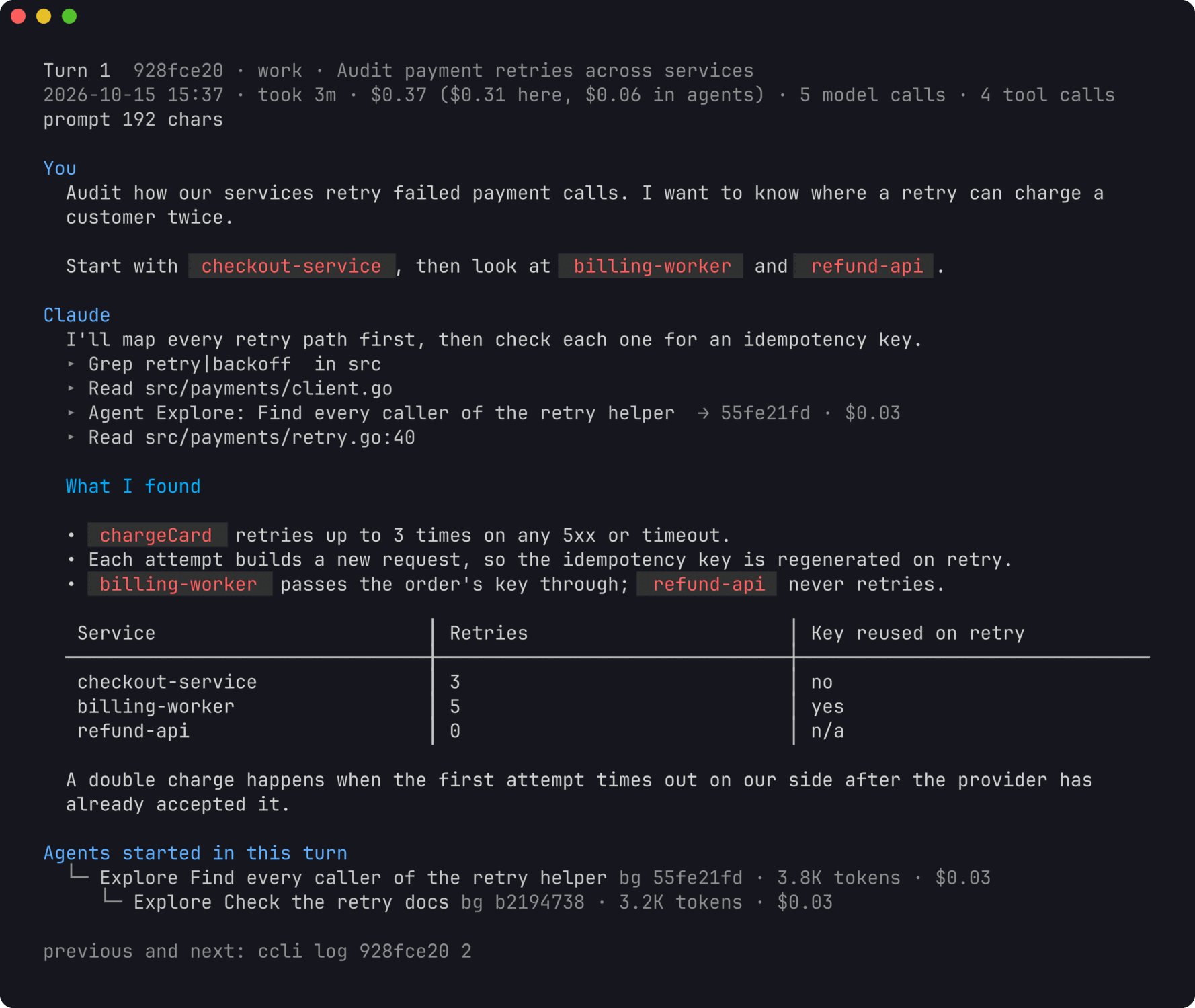
One turn prints your prompt and the model's replies rendered as markdown, a
line per tool call (with --tools, its input and output), the prompt each
subagent was given, and the agents and workflow runs the turn started.--thinking adds the model's thinking and --context the text Claude Code
added on its own: skill bodies, reminders and messages from other sessions.
Long output goes through your pager.
ccli view                     # browse all sessions
ccli view 928fce20            # start at one session's turns
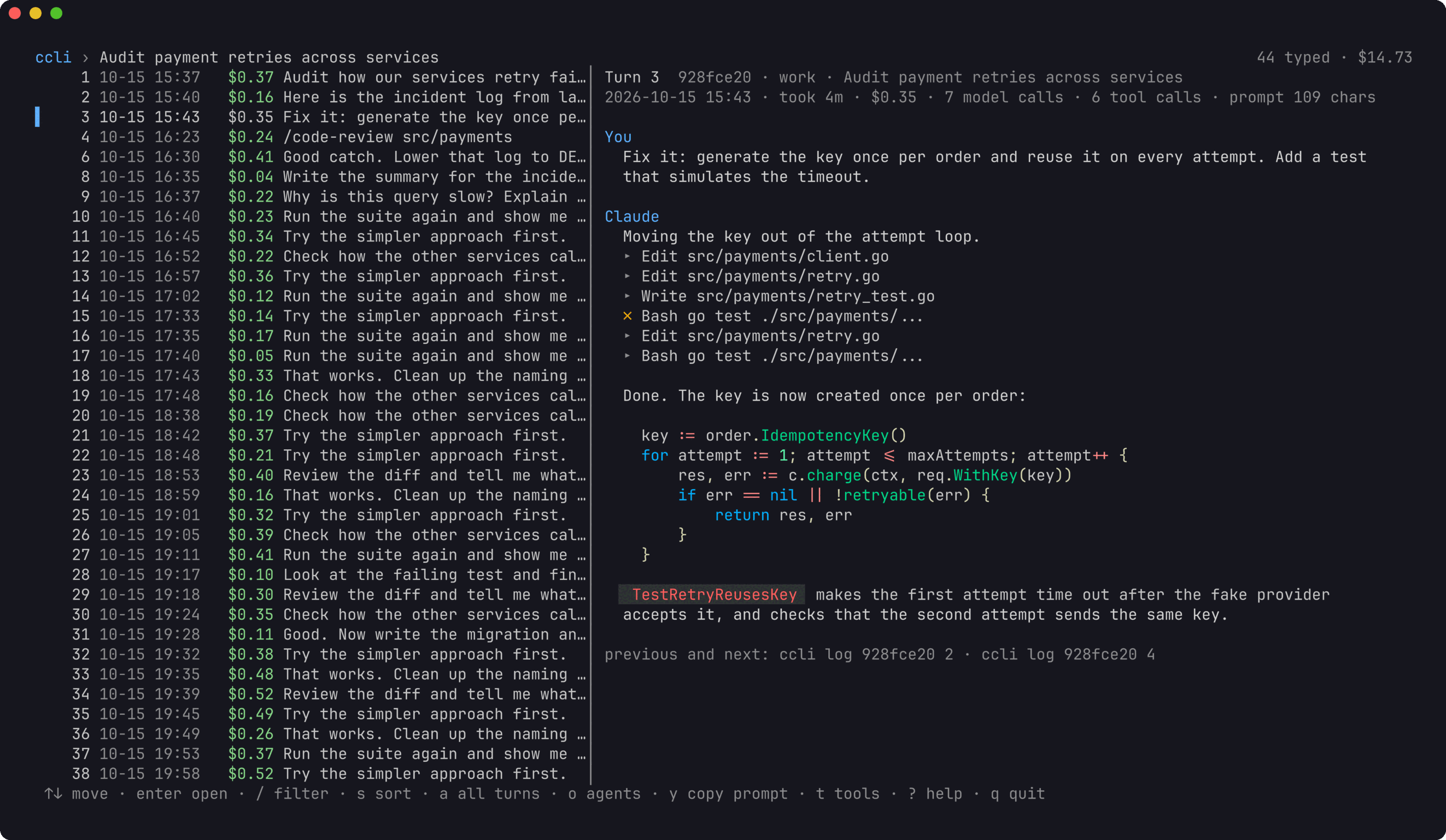
view is the same in an interactive browser: sessions, then a session's
turns, then the agents a turn started (o), then an agent's transcript or a
workflow run's agents. The preview follows the selection. / filters by what
the prompt says, s sorts by cost, y copies the prompt to the clipboard,
and t, T and c toggle tool details, thinking and added context. The
mouse wheel scrolls the pane under the pointer; ? lists every key.
ccli prompts --sort cost      # your costliest prompts across all sessions
ccli prompts -q "migration" --days 7
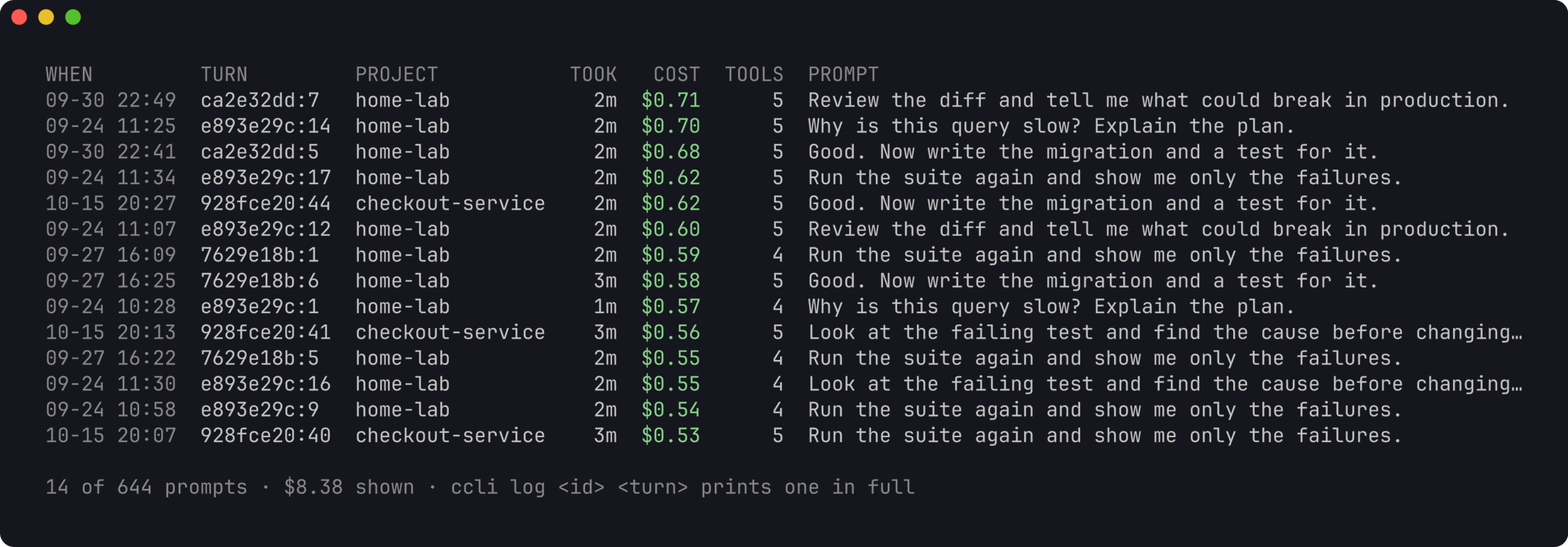
prompts lists what you typed across every session, which is the quickest way
to find the prompts worth rewriting. Each row names the session and turn to
open with ccli log.
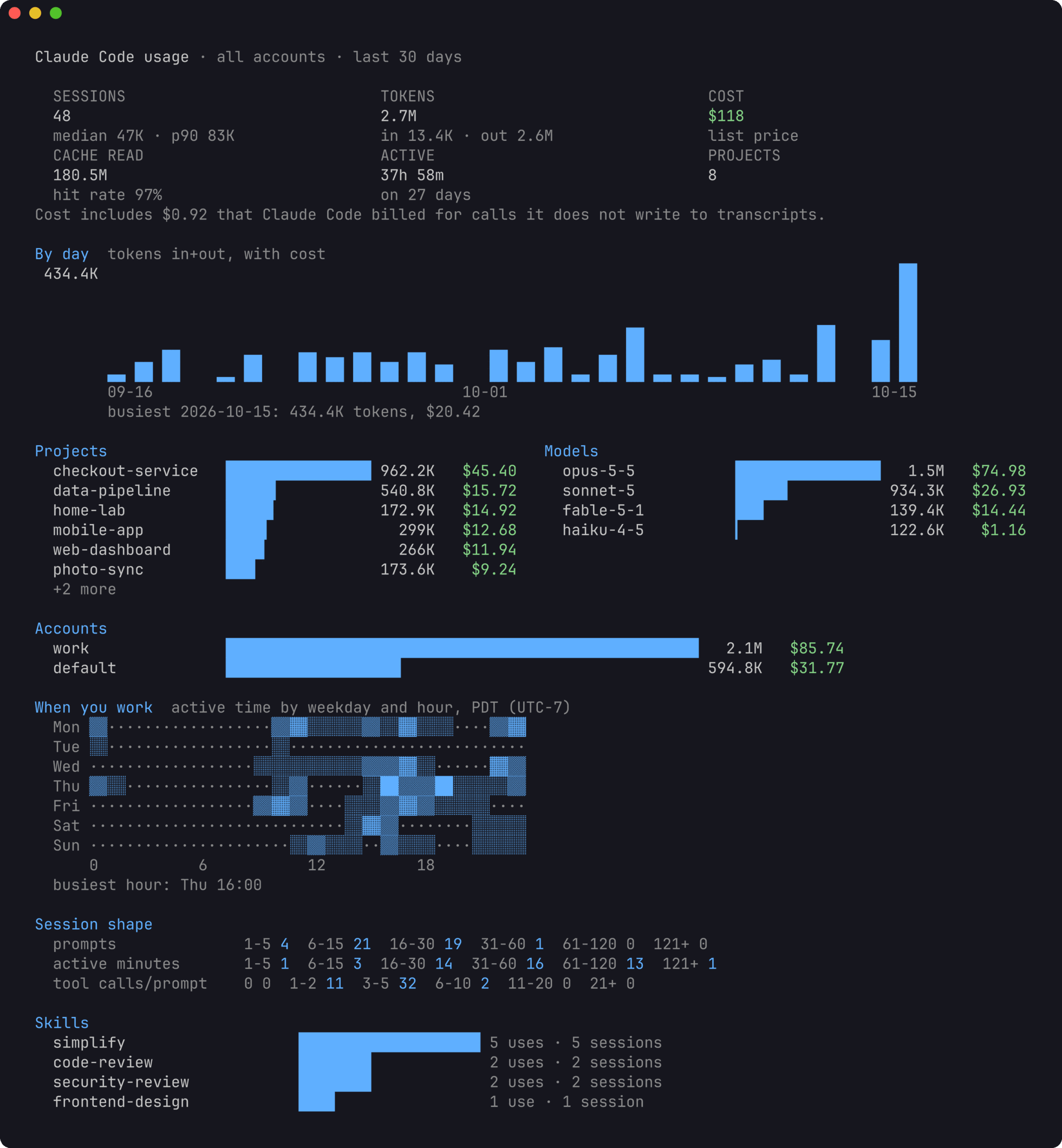
Dashboard
ccli stats                    # last 30 days (shown at the top of this page)
ccli stats --days 0           # all time
ccli stats -a work --project checkout
Totals, a daily chart, the top projects and models, usage per account, a grid
of the hours you work, how long sessions run, and which skills you call.
Subscription limits
ccli quota
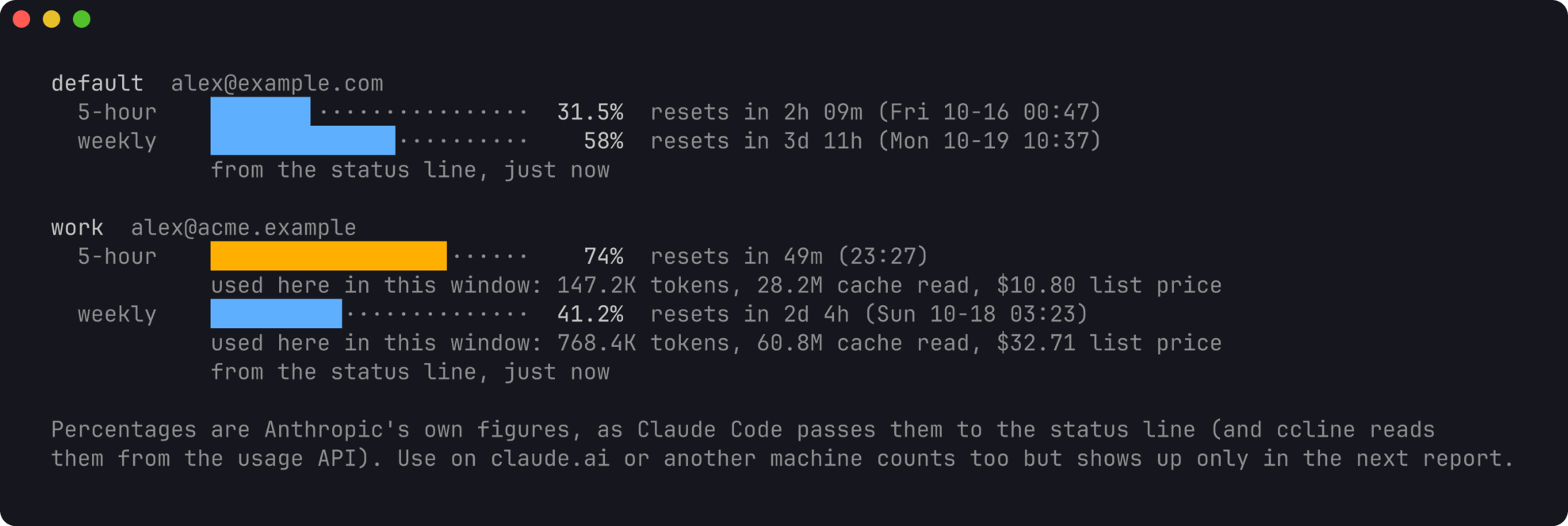
For each account: how much of the 5-hour and the weekly window is used, when
each resets, and what this machine used inside each window, counted from the
window's real start. The percentages are Anthropic's own figures. ccli takes
them from two places, whichever reported last:
Claude Code passes
rate_limitsto your status line command after each
reply. To let ccli record them, putccli statusline --in front of your
status line command in each account'ssettings.json. The wrapper passes
input and output through unchanged and adds about 10 ms."statusLine": { "type": "command", "command": "ccli statusline -- <your current command>" }If you use ccline, its cache
in<config dir>/ccline/.api_usage_cache.jsonholds the same percentages
from the usage API, often fresher when an account has been idle. ccli reads
only those numbers.
Use on claude.ai, the desktop app or another machine counts toward the same
limits but appears only in the next report. When a window has reset since the
last report, quota says so, and whether anything was used here since.
Moving between accounts
ccli diff default work                    # which sessions are in one account, both, or ahead
ccli copy dfaae500 --from work --to default
ccli move --from work --to default --project checkout --apply
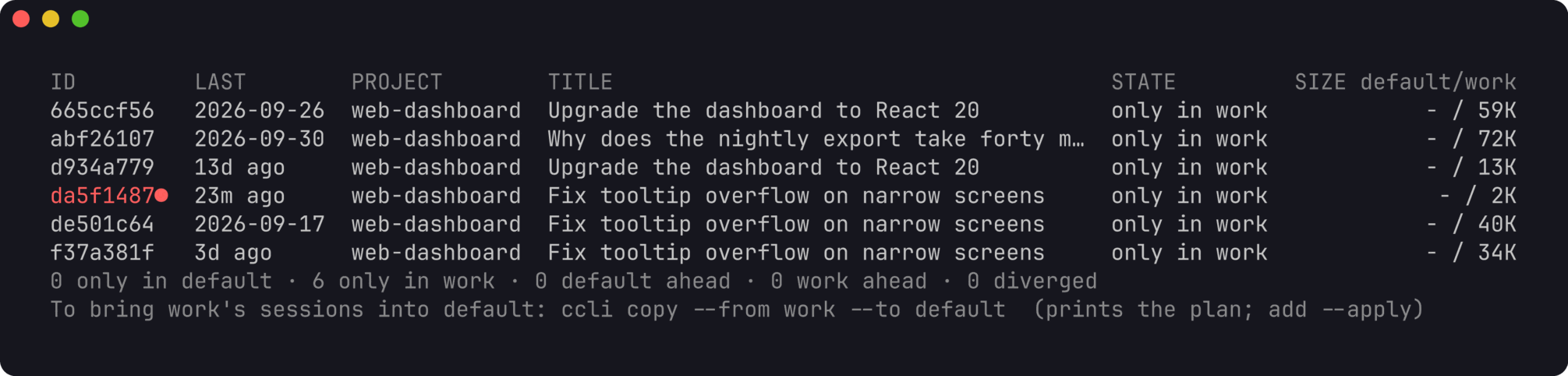

copy and move print a plan and change nothing until you add --apply.
A copy extends the target only when the target's transcript is an exact
prefix of the source (a fast-forward). It refuses when the target is newer,
when the two have diverged, or when a Claude Code process is running the
session in any account. move copies, checks every file byte for byte, and
then archives the source under ~/.local/share/ccli/archive/ instead of
deleting it. Sessions whose working folder changed have folders under several
project keys; all of them travel with the session.
To keep working on one session from two accounts, switch with resume:
ccli resume dfaae500 -a default --sync    # bring default's copy up to date, then resume there
# ... work in default, then later:
ccli resume dfaae500 -a work --sync       # back to work, with what you did in default
Without --sync, resume -a tells you when that account's copy is behind
and changes nothing. If both copies went on separately they have diverged,
and ccli will not merge them: resume -a resumes that account's own copy and
notes the other one. To continue the other copy here, fork it into a new
session:
ccli fork 60748107 --from work --to default --apply
A fork copies the transcript and its folders under a new session id, so the
copy and the original each go on.
Usage stays with the account that made it, however often a session goes back
and forth. ccli records every byte range it copies into an account, and a
response that came in with a copy never counts toward the account it was
copied into. A forked session starts at $0 in its new account.
Every command takes --json and prints the same structures, for scripts and
for a web view that can be added later on top of the same query layer.
How it counts
Costs are list prices from an embedded table, plus $0.01 per server-side web
search. Override any model in ~/.config/ccli/prices.json. Subscriptions are
not billed per token; the figure says what the same work would cost on the
API. Calls to a model the table does not know are counted in tokens and left
out of cost, never counted as zero.
Claude Code writes one API response as several transcript lines. ccli counts
each response once. A response that also appears in another file belongs to
the file that made it: never to one ccli copied it into, and otherwise to the
file created first.
Claude Code also makes calls it never writes to the transcript. Each process
records its own running totals (cost-state), and where those show tokens the
transcript lacks, ccli adds the missing tokens to the session at base list
price. ccli show says how much of a session's cost came from such calls.
A prompt counts as typed when a person sent it: typed, a slash command, an
accepted suggestion, or sent from the desktop or a phone. Background task
reports, messages from other Claude sessions and system prompts start turns
of their own but are counted apart. When Claude Code writes part of a
conversation again on resume, the repeat is recognised by its prompt ids and
counted once.
What it touches
ccli reads transcripts and keeps its own index in~/.local/share/ccli/ccli.db. It never reads credentials or the Keychain,
never writes settings.json or .claude.json, and never calls a model. Onlycopy, move, fork and resume --sync write into an account, and only the
files of the session involved. A transcript that cannot be read is reported
and retried on the next run. DESIGN.md has the full contract, the
transcript fields used and the store schema.
Retention
Claude Code deletes transcripts that have not changed for cleanupPeriodDays
(30 by default). ccli keeps its totals and your prompts after that, so the
history stays complete, but opening an old turn, resuming or copying a session
needs its transcript. To keep them longer, raise the setting in each account'ssettings.json:
"cleanupPeriodDays": 180
Screenshots and demo data
The screenshots on this page come from a made-up home directory with two
accounts, generated by scripts/demo. You can try ccli on it without touching
your own data:
go run ./scripts/demo -home /tmp/ccli-demo
HOME=/tmp/ccli-demo XDG_DATA_HOME=/tmp/ccli-demo/.local/share ccli stats
scripts/screenshots.sh regenerates the images (it needs jq, tmux and
freeze).
Development
go vet ./...
go test -race ./...
Tested on macOS. It builds for Linux, which uses statx for file creation
times, but has not been run there yet.
Reviews (0)
Sign in to leave a review.
Leave a reviewNo results found