dsh-computer-use
Health Warn
- License — License: MIT
- Description — Repository has a description
- Active repo — Last push 0 days ago
- Low visibility — Only 6 GitHub stars
Code Fail
- os.homedir — User home directory access in build/desktop-acceptance.mjs
- process.env — Environment variable access in build/desktop-acceptance.mjs
- spawnSync — Synchronous process spawning in build/private-desktop-test.mjs
- fs.rmSync — Destructive file system operation in build/private-desktop-test.mjs
- process.env — Environment variable access in build/private-desktop-test.mjs
- fs.rmSync — Destructive file system operation in build/test-agent-pointer.mjs
- process.env — Environment variable access in build/test-agent-pointer.mjs
Permissions Pass
- Permissions — No dangerous permissions requested
No AI report is available for this listing yet.
The most precise Windows computer use for DeepSeek Harness: 19 tools address controls by exact UI Automation identity, and numbered marks are checked against the live window before input, so a stale target is refused instead of mis-clicked. Batches, incremental observations and compact receipts cut round trips and token cost.
Codex-style Computer Use
The most precise way to drive Windows from DeepSeek Harness — and the cheapest per task.
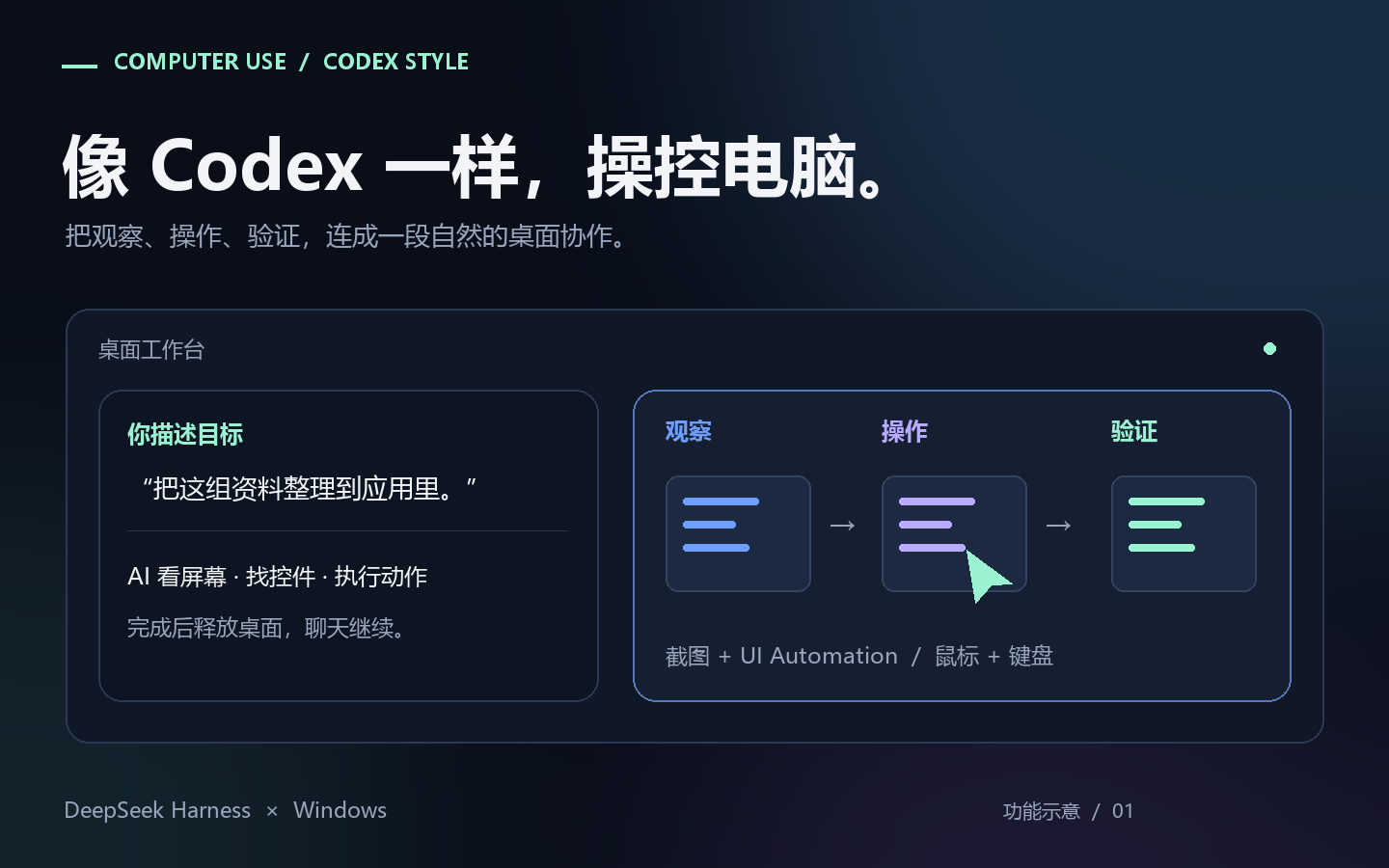
Describe the goal. Your agent reads exact control identities, acts through the controls themselves, verifies the result — and finishes a known sequence in one model round trip instead of ten.
English | 中文 · Install · Changelog · 2.0.0 changes
Why it is the precise one
- Identity, not guesswork. UI Automation exposes the real control tree with exact
AutomationIds, and actions can drive a control through its own UI Automation patterns instead of clicking coordinates. - Marks are checked, not trusted. A numbered mark is validated against window identity and sampled pixels before any input is dispatched, so a stale mark is refused rather than clicked at the wrong place. When an animated neighbour keeps invalidating the pixel signature,
uiaOnlypins identity to the window handle and geometry while the dispatch-time occlusion check still applies. - Queries stay bounded. UIA queries default to depth 6, 120 nodes and a 1200 ms soft budget; deeper or larger queries require a measured
anchor, so a query cannot quietly sweep the wrong region. - When the app hides it, read it.
computer_ocrreturns lines and per-word boxes in absolute screen pixels, so zero-UIA applications can be located by name.
Why it costs less
- One round trip for a known sequence. One
computer_batchcall runs a list of actions serially, stops at the first failure, and costs one model round trip instead of one per action. - Only the delta comes back. Pass the previous observation ID as
sinceand receive additions, changes, removals and ordering — not the whole tree again. - Compact receipts by default in 2.0.0. Post-action text normally adds at most 6 KiB to the action receipt;
feedback: fullis still there when detail matters more. - Evidence stays out of the conversation. Complete point evidence can live in a bounded local cache (4 MiB memory, 32 MiB disk, 64 records, 24-hour expiry) and be pulled on demand.
- Local work stays local. UI Automation, screen OCR and pixel checks run in the prebuilt native worker — no extra vision bill per step.
Built for a desktop you still use
- It waits for you. A 1-second notice before input (0.1 second within a rolling 3-minute window) hands the desktop back immediately; after you finish, the agent re-observes and continues the original task.
- The brake reaches the model.
Ctrl+Escpauses,Ctrl+Alt+Rresumes,Ctrl+Alt+Qexits, and a stop is pushed into the running session. Approvals stay on by default and password fields are refused. - It reports what it cannot do. The Windows secure desktop (UAC prompt or lock screen) is detected, reported and resumed after — not blind-retried.
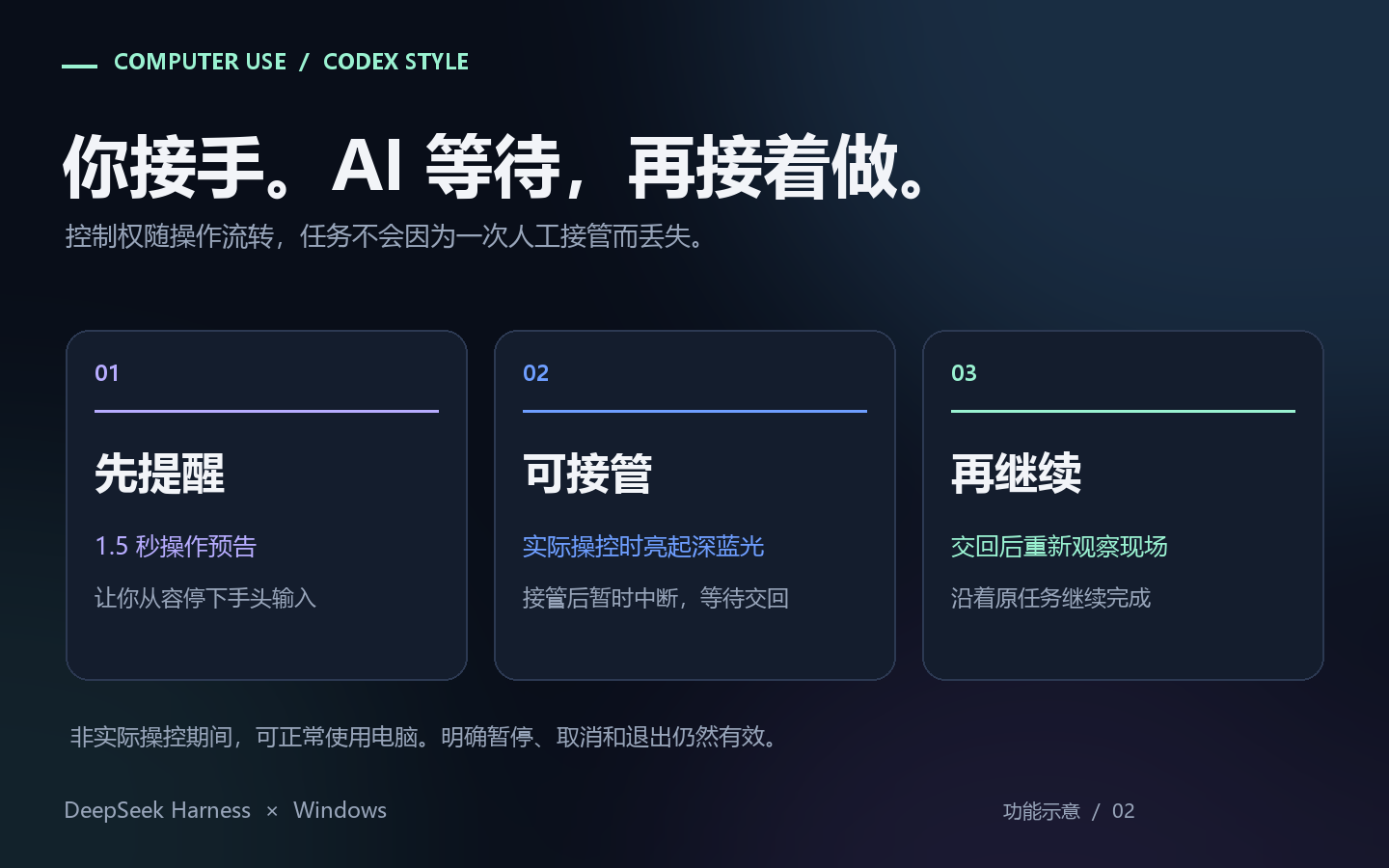
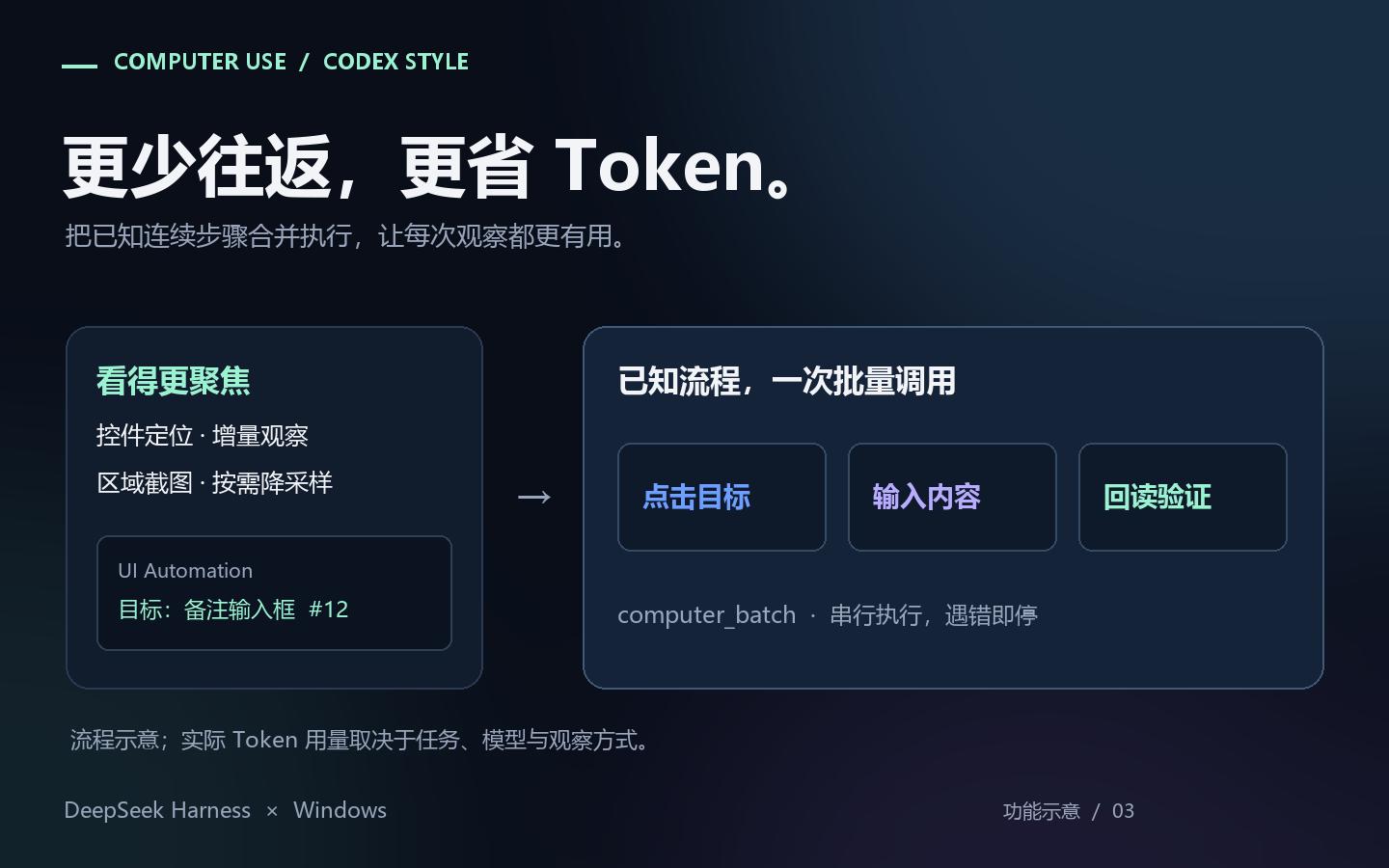
The illustrations above show the interaction model introduced in 1.3.0; the 2.0.0 kite pointer, bounded queries and compact receipts are described above. Actual token use depends on the task, model and observation strategy. Approvals remain enabled by default; explicit pause, cancellation and exit remain authoritative.
Ready to install. 19 desktop tools, with native helpers included. No SDK or install-time compilation. Requires Windows, Node.js ≥ 22 and the .NET Framework 4.x included with Windows. An independent community plugin; Codex describes the interaction style.
New in 2.0.0
- Compact receipts by default — post-action text normally adds at most 6 KiB to the action receipt;
feedback: fullandfeedback: noneare explicit alternatives. - Bounded, anchored UIA queries — depth 6, 120 nodes and a 1200 ms soft budget by default; deeper or larger queries need a measured
anchor. - Evidence on demand — 4 MiB memory + 32 MiB disk, 64 records, 24-hour expiry; a disk failure falls back to bounded memory.
- Adaptive preparation notice — 1 second initially, 0.1 second within a rolling 3-minute window; the tilted kite marks the agent's click point.
- Hardened input path — guarded window-management chords, worker backpressure/recovery, stale-target checks and cancellation cleanup.
2.0.0 is the new major release, initially distributed on npm next while the 24-hour release gate runs. See 2.0.0 changes and migration. Check registry tags for current stable availability.
Version 1.3.1 reads text from the screen by name, notices the Windows secure desktop and resumes on its own, and keeps every colour on the same DPI-derived edge rail with a visible breathing floor. Version 1.3.0 releases desktop control when work ends while the chat continues.
Earlier fixes: 1.2.3 approval attribution · 1.2.1 native attention · standalone host patch.
What it does
Version 2.0.0 also uses a compact blue kite pointer during AI operation and scene hold. Its tilted tip marks the click point, with small text/resize symbols inside the kite. A breathing kite means the page and pointer position should stay in place; free mode restores the application's normal cursor. The user's Windows cursor theme is preserved.
Version 2.0.0 bounds UIA traversal and defaults to compact post-action text. Existing image feedback remains available; feedback: compact|full|none controls detail, and click verificationRegion: "x,y,w,h" names the expected effect area independently of the input point. Compact text normally adds at most 6 KiB to the original action receipt. Complete point evidence can be retained in a bounded, expiring local cache and retrieved on demand. Disk failure falls back to bounded memory; if no retrievable snapshot can be retained, the current evidence is returned inline in full, outside that compact budget, without another observation or input.
Filtered UIA queries require hwnd. Defaults are depth 6, 120 nodes and a 1200 ms soft budget. A query deeper than 6 or larger than 300 nodes requires a measured anchor:"x,y" in that window; an exact id does not bypass this rule. A provider call can exceed the soft budget, and partial results cannot establish absence or uniqueness. After a window-management shortcut, inspect computer_state {windows:true}, activate the intended window successfully, then observe it before more keyboard input.
- Observe — window list, screenshots (region / JPEG / PNG / downscaled), a Set-of-Marks map of
clickable elements, and the UI Automation tree with exactAutomationIds. - Act — click, move, drag, scroll, select a text range, type, press keys, and drive controls
through their own UI Automation patterns instead of blind coordinates. - Batch — one
computer_batchcall runs a list of actions serially and stops at the first
failure, so a known sequence costs one model round trip instead of ten. - Ask —
computer_askraises a question on the same chat card DSH uses forask_user_question,
with no countdown. - A human brake that reaches the model — a stop is pushed into the running session, so the agent
learns it was interrupted instead of discovering it on the next turn.
The tools observe the desktop rather than crawl user documents. The plugin manages native helpers in%LOCALAPPDATA%\dsh-computer-use\worker\, and audit logs, screenshots and its own boundedobservation-cache under $DSH_HOME/data/computer-use/. computer_ctrl {action:"clear_cache"} clears
this Agent's observation cache; it does not delete screenshots, attachments or user documents.
Install and update in dsh-market
Search computer-use or Codex-style in the market. Look for repository ltmroberthk915/dsh-computer-use and npm package dsh-codex-style-computer-use (maintainer: ltmroberthk), then click Install. Use Update or Update all for stable-channel updates. Both native helpers are included; no PowerShell 7 or build permission is needed.
Alternatively, enter dsh-codex-style-computer-use in Settings → Plugins → Add plugin for the current stable channel, or [email protected] for the version described here. Enter the npm package spec directly. Your host may apply a waiting period to fresh versions; follow its indication. A newly added bundle can load live on supported hosts; check that its tools and skill appear. Restart from the tray when replacing a loaded version, when the client remains stale, or when DSH reports restart-required.
Releases less than 24 hours old
The default non-strict pnpm 11.7.0 configuration automatically records a single-version exception and installs. A successful install on one machine does not establish that another machine permits fresh versions.
With minimumReleaseAgeStrict: true (or a host policy that enables strict release-age checks), and no applicable exception, a version below the configured age is rejected before plugin code runs. The bare name, an exact @1.2.0 pin, and the npm tarball URL were all verified to fail with ERR_PNPM_NO_MATURE_MATCHING_VERSION under that policy. Explicitly setting minimumReleaseAge: 1440 also enables strict behavior in pnpm 11.7.0 unless minimumReleaseAgeStrict is separately set to false. Restarting DSH, installing PowerShell, or retrying the same command does not fix a strict-policy refusal. The official desktop bridge does not accept extra pnpm flags.
If a strict policy blocks installation, wait until the version meets the configured age to install without changing policy. Version 1.2.0 was published at 2026-10-03T03:50:11.586Z; it meets a 24-hour cutoff after 2026-10-04 03:50:12 UTC (11:50:12 in China). A longer custom cutoff or a lagging registry mirror can delay availability further. Default non-strict users do not need to wait or edit configuration for this package.
If you explicitly choose to install earlier, merge this single-version exception into the target profile's existing pnpm-workspace.yaml, then retry the market install. Preserve other entries; do not disable the global age policy:
minimumReleaseAgeExclude:
  - [email protected]
The default desktop path is %USERPROFILE%\.dsh\profiles\desktop\pnpm-workspace.yaml; use the actual directory if DSH_HOME is customized. Remove this one exception after the version matures if desired.
The earlier documentation and publisher-check corrections did not change the 1.2.0 runtime and needed no reinstall. The native attention fix in 1.2.1 does require an update. Re-adding the same source can produce a host ambiguous-install error on some installation paths; reinstalling 1.2.0 will not apply the 1.2.1 fix.
Migrating an older Git/tarball installation from this repository: remove the old dsh-computer-use entry in the market, then install dsh-codex-style-computer-use. The unscoped npm name dsh-computer-use belongs to a different repository; do not install it as an upgrade of this plugin. A Git installation cannot switch its dependency identity just by fetching a new commit. After this one-time UI migration, use normal market updates. Existing computer_* tool names and the computer-use settings namespace are retained.
Preserve your saved configuration too: back up the profile's cordis.patch.yml, then change only name: dsh-computer-use on an override with id: computer-use to name: dsh-codex-style-computer-use. Keep its entire config and disabled fields. Retaining the settings namespace alone is insufficient: a name mismatch makes DSH skip even read-only, dryRun, and disabled-state overrides. Do not replace other plugins or a shared home patch globally. The repository's scripts/migrate-profile.mjs previews by default; --apply creates a backup and replaces the file atomically, refusing concurrent edits.
Alternatively, download the configuration migration utility, extract it and double-click migrate-profile.cmd. It locates the installed official Desktop app and uses Windows PowerShell 5.1 plus DSH's bundled Node to repair the default desktop profile. It stops if the new bundle is absent or the old bundle is still selected. It does not change release-age policy. For another profile, run migrate-profile.ps1 -ProfileDirectory <absolute-directory> to preview, then add -Apply when ready.
The GitHub Release also includes dsh-computer-use.tgz for offline/manual installation; registry installation is the default for market updates.
CLI users (web profile):
dsh plugin --profile web add dsh-codex-style-computer-use
Desktop diagnostics must use the CLI bundled with the official Desktop app:
$CuDshInstall = Join-Path $env:LOCALAPPDATA 'Programs\DeepSeek Harness'
& "$CuDshInstall\resources\runtime\cli\bin\dsh.cmd" plugin --profile desktop why dsh-codex-style-computer-use
For a custom installation, set $CuDshInstall to the directory in the Desktop shortcut's target. An older global npm dsh can reject the desktop profile. Do not add resources/runtime/bin to the global PATH or install a separate pnpm for this task. Prefer the plugin UI for installation.
The bundled skill
The driving tools stay locked until the session produces a receipt phrase that exists only insideskills/computer-use/SKILL.md. That is deliberate — it is the strongest honest version of "read the
manual before driving", because no tool layer can see whether a model read a document.
The plugin registers the bundled skill through ctx.skills.register() when available. If that service is absent, computer_use_activate returns the same manual, its absolute source path and the scoped tool list. The receipt and all existing approval/brake checks still apply.
Shared input in 1.2.0-rc.2
This pre-release introduces immediate human takeover, automatic waiting after 2 seconds of continued input, and continuation after 3 quiet seconds. Waiting happens locally without model polling. Interrupted writes require a fresh readback and are never blindly replayed. Host cancellation releases accepted automation-owned input without creating a new persistent pause. Existing DSH Pet/main-window and original-topmost handling is retained.
The configured GLM 5.3 Max, GLM 5.3 Flash and DeepSeek Flash routes passed a controlled continuation-protocol test. Native input and physical hotkeys were verified separately; this is not a general desktop or vision benchmark. See release verification for scope.
On-demand controls in 1.1
- Per-Agent tools: idle Agents see
computer_use_activate,computer_ctrlandcomputer_ask. A successful computer-use skill load, receipt or activation exposes the 19 desktop tools plus the activation entry to that Agent. Other Agents and children activate independently. Native calls and Noderun_codeare supported. Activation does not start control or release a human brake. - Observed UIA targets: a scoped name/id query returns an opaque target handle. Use it for pattern actions; opt-in
rebind:trueallows unique identity or semantic recovery after replacement in the same window. Changed context, ambiguity and incomplete scans refuse. Broad queries skip recovery handles unlesstargets:true; creating witnesses for a large list costs extra native work. - Incremental observations: pass the previous observation ID as
sincewith the same query. Deltas preserve additions, changes, removals and ordering. Snapshots are isolated by Agent, with at most 64 indexed observations and 4 MiB of retained JSON per store.snapshotretrieves a retained historical result;offsetandlimitpage its arrays. Missing bases, changed scope, incomplete evidence or a larger delta fall back to full output.
See the detailed protocol for cache limits and recovery boundaries. UIA snapshots preserve provider-returned fields within existing provider limits; historical retrieval is not fresh outcome verification.
Tools
| Group | Tools |
|---|---|
| Activate | computer_use_activate |
| Observe | computer_state computer_shot computer_ocr computer_marks computer_uia |
| Act | computer_click computer_move computer_drag computer_scroll computer_select computer_key computer_type computer_uia_act computer_window computer_clip |
| Flow | computer_wait computer_batch |
| Meta | computer_ask computer_ctrl |
computer_marks returns numbered marks for the elements it found on screen; computer_marks {shot:true} also saves an annotated image. computer_shot returns a plain screenshot and, on image-capable routes, a native image attachment. A mark is a snapshot ID: it is validated against window
identity and sampled pixels before any input is dispatched, so a stale mark is refused rather than
clicked at the wrong place.
Approval modes
For a host that reports a disabled-prompt automatic refusal as “the user rejected tool”, see the DSH approval attribution patch and regression test.
automationMode is set in the plugin's settings and defaults to standard:
| Mode | Observation | Actuation |
|---|---|---|
read-only |
allowed | denied |
standard |
allowed | every action asks through the host's approval card |
autonomous |
allowed | allowed, high-risk operations still ask |
unrestricted |
allowed | allowed (worker failsafe and rate limit still apply) |
High-risk operations (closing a window, alt+f4, win+r, and the like) ask in every mode. Password
fields are detected through UI Automation's IsPassword and refused by default.
Safety model
- Shared input — ordinary user activity is allowed while the agent is thinking, observing or preparing. During actual actuation, typing, scrolling and buttons yield immediately; pointer movement has a 16-pixel displacement tolerance. Continued input or a held key/button for 2 seconds enters automatic waiting. After release and 3 quiet seconds, the agent must inspect the current target and continue the original task, without blindly replaying partial writes. A gentle pale-yellow edge gradient shows human ownership.
- Manual pause — only physical
Ctrl+Escraises a persistent input brake;Ctrl+Alt+Rresumes. Ordinary Esc, typing, scrolling, pointer distance/frequency and the screen corner do not create this pause. Explicit question/diagnostic holds remain separate. - Exit —
Ctrl+Alt+Qends the session: the overlay goes away, its listeners are torn down, and
further actuation is refused until a later turn opens a new one. - The brake is a fact about the machine, not one process — the engaged state is persisted, and
every worker adopts it, including one started later from a shell. - Audit — every actuation is appended to
$DSH_HOME/data/computer-use/audit.jsonlwith argument
sanitisation. - Kill switch for the plugin itself —
DSH_COMPUTER_USE_KILL=1makes the plugin refuse to start;dryRun: truesimulates actuations and only logs them.
Configuration
| Key | Default | Meaning |
|---|---|---|
automationMode |
standard |
approval mode (above) |
progressiveTools |
true |
per-Agent activation; false exposes the 19 desktop tools globally |
actionFeedback |
true |
automatically observe after direct actions and batches |
actionFeedbackDetail |
compact |
compact, full or none; a call's feedback overrides this default; uncached evidence falls back to full inline output |
dryRun |
false |
simulate actuations, log only |
maxActionsPerMinute |
60 |
core-level actuation rate limit |
annotateMarks |
true |
draw Set-of-Marks boxes on screenshots |
workerExe |
"" |
explicit worker path; empty = autodiscover or compile |
snapshotDir |
"" |
screenshot directory; empty = $DSH_HOME/data/computer-use/shots |
MCP server
mcp/ is a zero-dependency MCP stdio server over the same core, for clients that speak MCP rather
than Cordis:
node mcp/src/index.js
The embedded server reports the version of this root package. It starts with observation only.
The launching host may set DSH_CU_ALLOW_INPUT=1 when it owns authorization for desktop actions;
MCP tool calls cannot enable input. The compatibility tool cu_approve only reports this rule and
never grants consent. DSH's automationMode policy belongs to the Cordis adapter and is not an
MCP approval service. DSH_CU_DRY_RUN=1 simulates input that the host has already enabled.
Both adapters use the same key-command grammar, batch failure and continuation rules, and image
coordinate mapping. MCP returns structured capture metadata and one latest PNG/JPEG image, without
serializing image bytes into JSON text. cu_hold / cu_free reserve or release the scene between
actions; cu_release ends the desktop cycle. cu_drag accepts expectCursor and hwnd checks.
MCP exposes a smaller tool surface; DSH-specific human-question and host-lifecycle integration are
provided by the Cordis adapter.
Development
Publisher release checks use npm's official registry by default. If that origin is unreachable on your network, CU_REGISTRY selects an explicit mirror for the read-only check command; the JSON result includes registry and authoritative. Example in PowerShell (this changes only the current shell):
$env:CU_REGISTRY = 'https://registry.npmmirror.com'
node scripts/release-channel.mjs check 1.2.0
Remove-Item Env:CU_REGISTRY
Exit code 0 means the version has passed the 24-hour publisher check, 2 means it is still cooling, and 1 means the check failed. A network failure does not establish that a package is unpublished, and mirrors can lag. promote always rechecks and writes https://registry.npmjs.org, ignoring CU_REGISTRY; it needs access to that origin, using npm's proxy configuration when necessary. This publisher tool is not part of end-user installation. See the release procedure.
The repository ships the guard suite that protects the invariants above — the cycle lifetime, the
ask/brake protocol, the operation classification, the skill gate, and the bundled-skill wiring:
pwsh -NoProfile -ExecutionPolicy Bypass -File build/run-guards.ps1   # all guards
node build/verify-tools-schema.mjs                                   # tool-schema load guard
The tool definitions are compiled through the real @deepseek-ai/dsh-tools DSL, so a schema mistake
fails here instead of taking the host's plugin tree down on restart. Some guards compile the native
worker and are Windows-only.
License
MIT — see LICENSE.
Reviews (0)
Sign in to leave a review.
Leave a reviewNo results found