spritekiln
Health Pass
- License — License: NOASSERTION
- Description — Repository has a description
- Active repo — Last push 0 days ago
- Community trust — 151 GitHub stars
Code Pass
- Code scan — Scanned 12 files during light audit, no dangerous patterns found
Permissions Pass
- Permissions — No dangerous permissions requested
No AI report is available for this listing yet.
Animated pixel-art sprites (8-direction top-down or side view) from procedural 3D models in YAML, built to be driven by coding AIs. Exports to Godot, Unity, MonoGame or any engine.
SpriteKiln
English | Português (BR) | 한국어 | 日本語 | 简体中文
Animated pixel-art sprites from procedural 3D models, made to be driven by coding AIs.
A character is a small YAML file: a skeleton, 3D shapes, materials and animations. SpriteKiln renders
it into pixel art in 8 directions (top-down 3/4) or in profile (side view), with exact frame timing,
gameplay events, attachment points, a normal map for dynamic light and an emissive layer, ready for Godot,
Unity, MonoGame or any engine that reads Aseprite sheets.
You do not have to write the YAML. Your coding assistant (Claude Code, Codex, Gemini, Copilot, Cursor) does,
from a description or a splash art: it edits the spec, renders, looks at the images and fixes what it
sees. You direct.
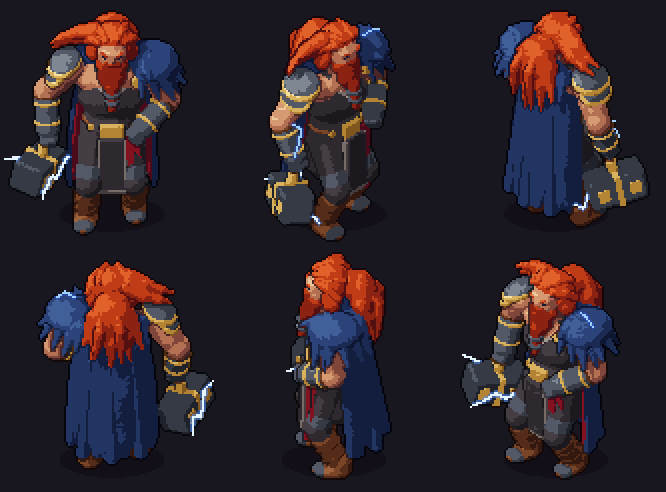
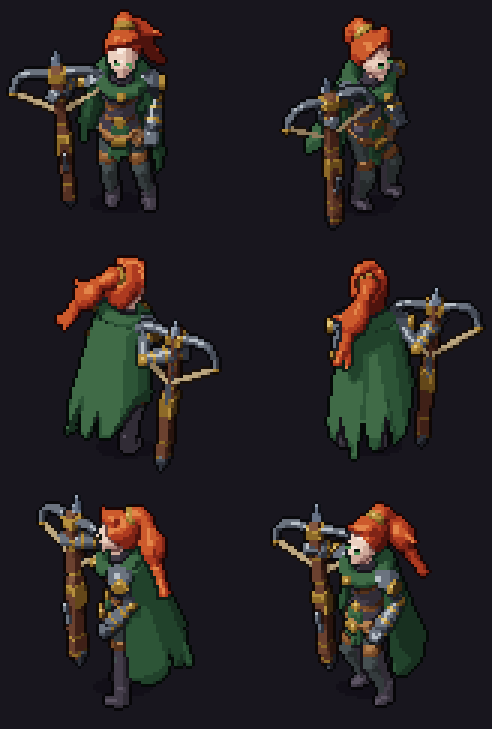
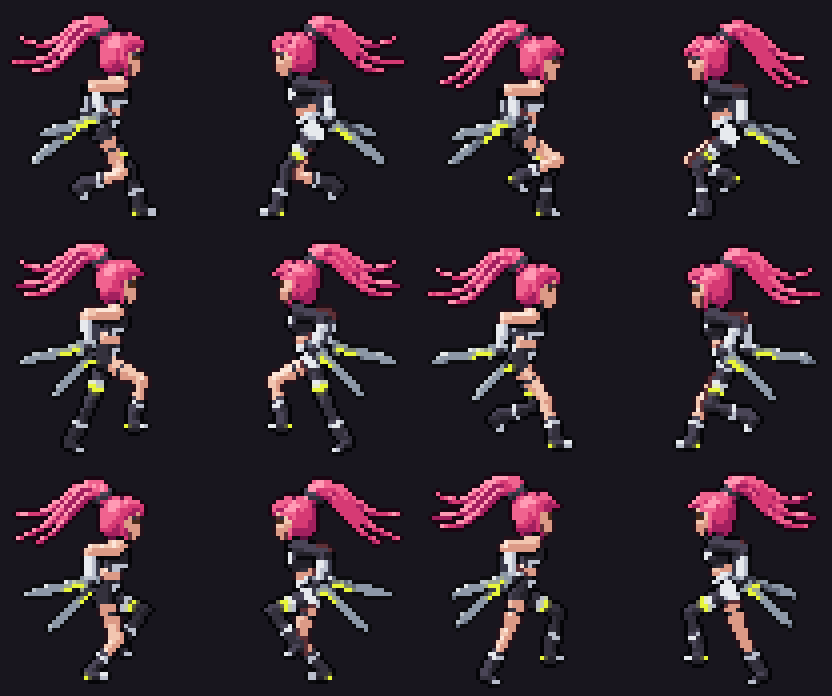
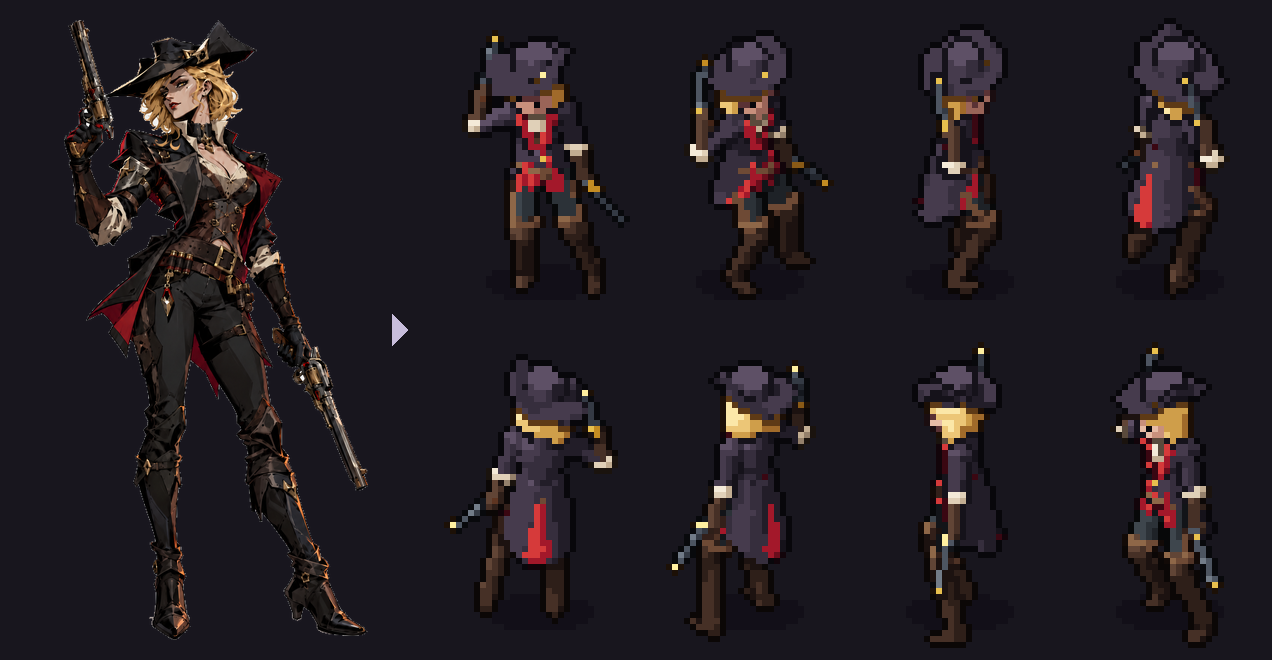
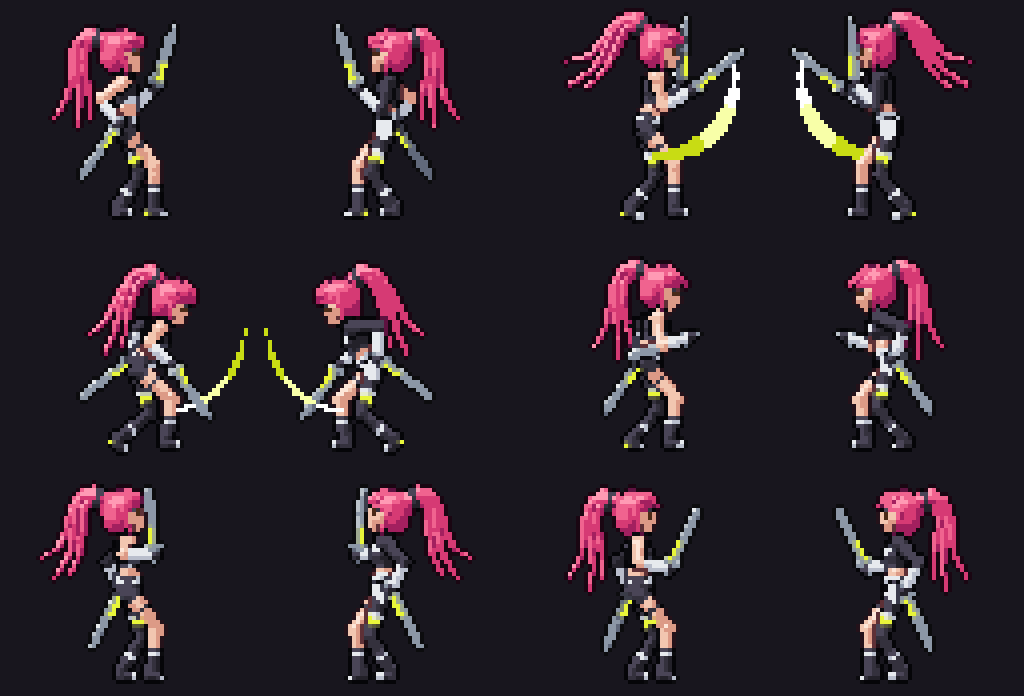
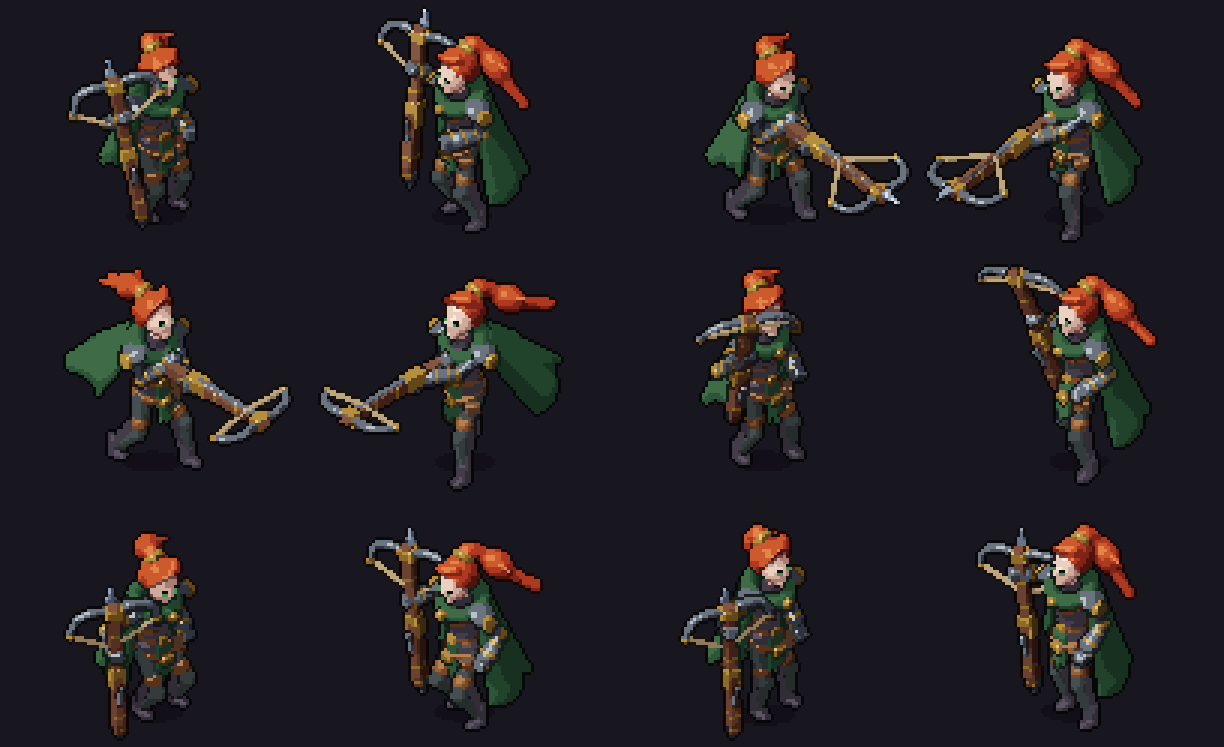
Thor (top-down, 100 px tall) · the Ranger (top-down, 64 px) · RIN-7 (side view, 48 px): made from splash arts by Claude Code with SpriteKiln. More below.
Why
- Consistent by construction. One camera, one light and one palette for every asset, in every
direction and frame. No drift between the north-east walk and the south-west attack. - Cheap to change. "Make the hat bigger" or "slow down the windup" is a one-line edit, not a redraw of
300 frames. - Game-ready. Per-frame durations, events (
hit,step_l,windup) on the right frame, sockets
(muzzles, hands, impact points), the pivot on the ground for y-sorting, normal and emissive maps. - Made for AIs. One set of instructions for every assistant, an MCP server whose tools return images,
a JSON Schema for the spec, errors withfile:line:column, and an art-direction review in numbers for
assistants that cannot see. - Pure Python, any OS. numpy, Pillow and PyYAML; no GPU, no Blender. Tested on Windows, macOS and
Linux.
Install
Python 3.10 or newer. Install the spritekiln command with pipx, which keeps it
isolated and on your PATH:
Windows (PowerShell; no Python yet? winget install Python.Python.3.13, then open a new terminal)
py -m pip install --user pipx
py -m pipx ensurepath
py -m pipx install "spritekiln[mcp]"
macOS (Terminal, with Homebrew)
brew install pipx
pipx ensurepath
pipx install "spritekiln[mcp]"
Linux (Debian/Ubuntu shown; Fedora: sudo dnf install pipx, Arch: sudo pacman -S python-pipx)
sudo apt install pipx
pipx ensurepath
pipx install "spritekiln[mcp]"
Then open a new terminal and check with spritekiln --version. [mcp] adds the tools for AI assistants;pipx install spritekiln is enough for the command line alone. For renders about 6× faster, install"spritekiln[mcp,fast]" instead (a compiled renderer; Intel Macs keep the plain one). uv, a virtual
environment, upgrading and troubleshooting: Install SpriteKiln.
Upgrade
| You have | Run |
|---|---|
| 0.2 or later | spritekiln update in a game folder (it upgrades the way you installed and refreshes that folder's AI instructions), then spritekiln update --files in your other game folders |
| 0.1.0 | pipx upgrade spritekiln (or uv tool upgrade spritekiln), then spritekiln update --files in each game folder |
| any, to add the fast renderer | pipx install --force "spritekiln[mcp,fast]" (or uv tool install --force "spritekiln[mcp,fast]") |
In a virtual environment on Windows, run python -m spritekiln update. Assets rendered again with a new
version can look different (0.3 changed the shading): the changelog says what changed.
Quick start
The commands are the same on every system.
1. Set up your folder (once)
Open a terminal in your game's folder, or in an empty folder if you only want sprites, and tell SpriteKiln
which engine the sprites are for and which AI assistant will make them:
spritekiln init --engine godot --ai claude
--engine |
For | Exports go to |
|---|---|---|
godot |
Godot 4 | assets/spritekiln/, with SpriteFrames and a ready scene |
unity |
Unity 2022.3+ | Assets/SpriteKiln/ |
monogame |
MonoGame | Content/sprites/ |
generic |
any other engine, or no game yet | sprites/: PNG atlas and Aseprite-compatible JSON |
--ai |
Assistant |
|---|---|
claude |
Claude Code |
codex |
Codex |
gemini |
Gemini CLI |
copilot |
GitHub Copilot |
cursor |
Cursor |
generic |
any other agent that reads AGENTS.md |
Name several assistants with commas: --ai claude,cursor. init writes spritekiln.toml (specs go toart/specs/, exports to the folder above), the instructions your assistant reads before it starts, and the
config of the MCP server through which it calls SpriteKiln. Details:
Use SpriteKiln with your AI.
2. Ask your assistant for a sprite
Open the folder in your assistant and describe the character:
Make a hooded goblin scout with a short sword. Start from the template, check all 8 directions, then
render idle, walk and attack and export them.
The first time, before it makes anything, the assistant interviews you about the art style: top-down or
side view, how many pixels tall a character is on screen, directions, colours, outline and shading,
proportions, how much face a character shows, the feel of the animation and your references. The answers
go to spritekiln.toml (spritekiln style shows them); every later sprite follows them, and they change
only when you ask ("from now on, no outlines").
Then it writes the spec, renders, looks at the images and fixes what it sees. You review the GIFs inart/specs/characters/<name>/out/<name>/preview/ and ask for changes ("bigger hat", "faster swing"). Have a
splash art? Hand it over: From your splash art, with an AI.
3. Or do it by hand
The same commands your assistant runs:
spritekiln style set --height 48 --outline selective                 # the art style, once (all answers: -h)
spritekiln new knight                                                # art/specs/characters/knight/knight.yaml
spritekiln pose art/specs/characters/knight/knight.yaml --dirs all   # one pose in 8 directions, ~1 s each
spritekiln render art/specs/characters/knight/knight.yaml --export   # all animations, exported to the engine
Edit the YAML between pose runs: Your first character in 10 minutes
walks through it.
Showcase
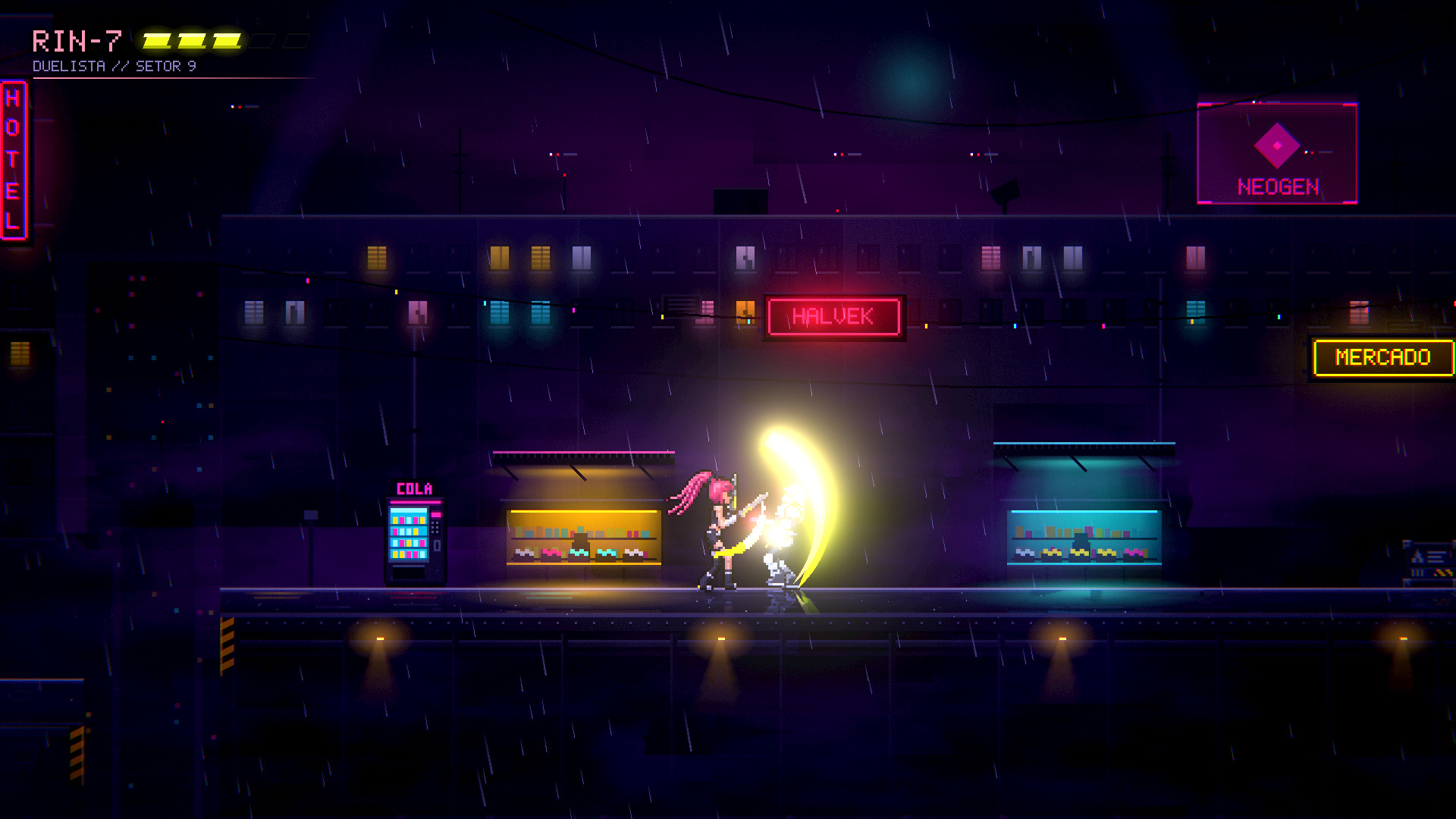
RIN-7 and the guard in a Godot test scene: SpriteKiln sprites lit by the neon through their normal maps. The city, the rain and the slash glow are the scene's.
| RIN-7 · side view, 48 px | The Ranger · top-down, 64 px | Thor · top-down, 100 px |
|---|---|---|
 |
 |
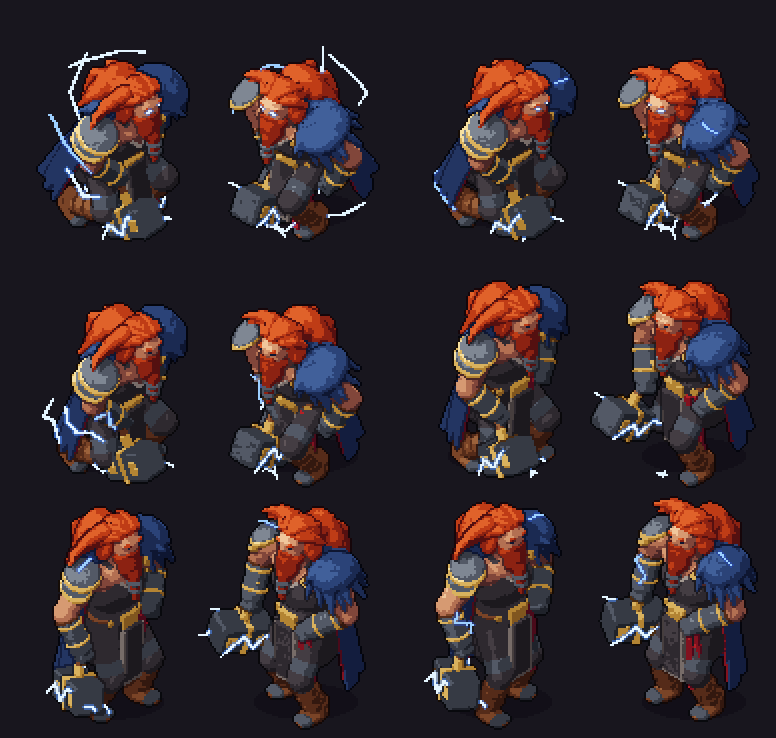 |
| 7 clips (idle, run, jump, rise, fall, land, attack), 84 frames | 4 clips in 8 directions (idle, run, dash, attack), 288 frames | 13 clips in 8 directions, 696 frames in a 128 px frame |
| splash → sprite | splash → sprite | splash → sprite |
Made by Claude Code following the recipe (modeler, art director, animator). RIN-7 and
the Ranger come from test projects of 0.3, Thor from one of 0.1; the Templar and the Huntress were made for
the game Hunt Tower. All of them, with more animations: showcase/.
What's new
0.4 (2026-11-11)
- Traits that stay: tie what must not be lost ("the amber lens") to its parts with
review.keep, and
every render's QA says where it stops reading.validatewarns about parts that float off the body, and QA
names the parts that vanish in some frames of a clip. - Motion on one sheet:
spritekiln arcsdraws a clip's frames as ghosts with the paths of hands, feet
and sockets, and a walk reports the ground speed to move the character at so its feet do not slide. - Closer to the splash:
ref comparesays where the sprite's colour departs from the art. - Lighter on your AI:
pose --changesshows only the directions an edit changed; Claude Code agents read
what their role needs, and fixes go back to the agent that did the work;spritekiln usagemeasures a
session.
0.3 (2026-10-30)
- Sharper forms: extruded and revolved profiles, tubes, shells and cuts give blades, plates, brims and
capes crisp edges instead of inflated blobs. - Materials that read: finishes (metal, soft, matte, glossy) with highlights, creases and edge lights,
and surface paint for bands, rivets and emblems. - Your style, applied: the renderer applies the project's outline, shading (soft, flat, toon), inner
lines, dither and light to every asset;spritekiln style previewshows the choices side by side. - Bases and kits:
extends: humanoidand 20 built-in kits (weapons, shields, headwear, capes, belts,
heads and hair), so a character states only what is its own. - Better first characters: head and hair kits, a question about faces in the style interview, and
pose --focus headclose-ups. - Faster: frames 1.5–3× faster with tighter bounds, about 6× more with
[fast], and--draft
previews.
0.2 (2026-10-25)
- Before the first asset, the assistant interviews you about the art style and records it in
spritekiln.toml; every later asset follows it. spritekiln updateupgrades SpriteKiln and refreshes the AI instructions of your game folders.
Everything else: CHANGELOG.
How it works
spec.yaml ──► skeleton + IK ──► SDF shapes ──► raymarched render ──► pixelize ──► atlas + JSON
 (bones,      (expressions per   (ellipsoids,   (colour, normals,     (palette ramps,   + normal map
  shapes,      frame: cycles,     extrudes,      depth, paint;         outlines, lines,  + emissive map
  kits,        keys, events)      revolves,      3x supersampled,      the project's     + GIFs, QA
  animations)                     tubes, cuts)   fixed world light)    style)            -> your engine
The light is fixed in the world and the model turns, so shading stays coherent across directions. Every
render writes a QA report (clipping, palette, silhouette stability) and contact sheets to review.
Features
- Art style: before the first asset, the assistant asks about view, size on screen, directions,
colours, outline, shading, proportions, faces and animation; the project keeps the answers and the
renderer applies the look (outline, soft/flat/toon shading, inner lines, highlights, dither, light) to
every asset.spritekiln style previewshows the choices side by side. - Modeling: bones with expressions (
"0.045*sin(p)"), 2-bone IK, mirrored_L/_Rparts, and shapes
with crisp forms: extruded and revolved profiles, tubes, shells, plane cuts, chamfered and stepped blends.
Materials with palette ramps and finishes (metal, soft, matte, glossy), creases and edge highlights,
surface paint (bands, rivets, crosses without new geometry), emissive and glow, two-sided membranes. - Bases and kits:
extends: humanoidand 20 built-in kits (weapons, shields, headwear, capes, belts,
heads and hair) with params, so a character states only what is its own: the knight example is about 20
lines. - Animation: cycles from expressions or keyframes with per-frame timing, tweens and easing, smears,
per-direction cheats, events, timing targets checked byvalidate(e.g. "impact at 300 ms"). - Views: top-down 3/4 in 8 (or 4, or 1) directions, or a side view for platformers (
view: side, with
a template that has run, jump, rise, fall and land);mirror: truerenders only the right-facing
directions (the engine flips the rest) for symmetric designs. - From a splash art:
ref prepcuts the character out and extracts its palette;ref comparescores
the silhouette against the model (pitch-corrected IoU) and says what to change. - Review:
spritekiln reviewmeasures value range, contrast, pixels per material and legibility, and
previews the sprite over your game's floor (--bg) under its light (--tint);pose --focus head
shows a face up close. - Speed: a compiled renderer (
[fast], about 6× faster), draft previews, and a render cache that
re-lights a frame without tracing it again. - Output: atlas, normal and emissive maps, Aseprite-compatible JSON (format), sockets
per frame, GIFs and contact sheets.
Engines
| Engine | What you get | Guide |
|---|---|---|
| Godot 4 | KilnSprite2D node, SpriteFrames and a ready scene; an editor plugin builds them from a dropped JSON |
godot.md · example |
| Unity 2022.3+ | UPM package: .kiln importer (sprites, normal map, AnimationClips) and KilnAnimator |
unity.md |
| MonoGame | KilnSprite.cs runtime and the KilnLit.fx normal-mapped light shader |
monogame.md · example |
| Anything else | Aseprite-compatible JSON: Phaser, LÖVE, Defold, GameMaker... | generic.md |
All runtimes play the same way: exact durations, events on the frame they belong to, sockets, the direction
nearest to a velocity, mirrored directions.
AI assistants
| Assistant | --ai |
Instructions | MCP tools |
|---|---|---|---|
| Claude Code | claude |
CLAUDE.md, skills, and modeler / animator / art-director agents |
.mcp.json |
| Codex | codex |
AGENTS.md |
~/.codex/config.toml (added by hand) |
| Gemini CLI | gemini |
GEMINI.md |
.gemini/settings.json |
| GitHub Copilot | copilot |
.github/copilot-instructions.md |
.vscode/mcp.json |
| Cursor | cursor |
.cursor/rules/spritekiln.mdc |
.cursor/mcp.json |
| Any other agent | generic |
AGENTS.md |
spritekiln init --ai claude,codex,... writes them from one source (docs/agent/). The
recipe for a new character from a splash art: a modeler builds the shape, an art director reviews it
against the art, the modeler fixes, an animator animates, the director reviews again
(recipe.md).
Learn more
- Install SpriteKiln (Windows, macOS, Linux; pipx, uv or a virtual environment)
- Your first character in 10 minutes
- From your splash art, with an AI
- Animations and events
- A platformer character (side view)
- Use SpriteKiln with your AI (instructions files and MCP tools)
- Spec reference · Output format · Roadmap
- Showcase · Contributing · Changelog · Translations: Português (BR), 한국어, 日本語,
简体中文
License
Code, docs and integrations: MIT. Example assets (the gargoyle, the hunter, the knight, Wren, the
crates, gas lamp and training dummy props, the templates and kits, the gothic and props palettes, the
examples' sprites): CC0 1.0. Showcase assets (Templar and Huntress from Hunt Tower,
with the Huntress's mine: specs, splash arts, palettes, renders and game captures; RIN-7, the Ranger and
Thor: splash arts, renders and captures): © 2026 Lucas Ramos (Hunt Tower: Lucas Ramos / PlayRPG), all rights
reserved, included for demonstration only (terms).REUSE.toml maps every path to its license.
Reviews (0)
Sign in to leave a review.
Leave a reviewNo results found