dotforge
Health Warn
- License — License: MIT
- Description — Repository has a description
- Active repo — Last push 0 days ago
- Low visibility — Only 5 GitHub stars
Code Fail
- rm -rf — Recursive force deletion command in .claude/hooks/block-destructive.sh
Permissions Pass
- Permissions — No dangerous permissions requested
This tool acts as a configuration and behavior governor for Claude Code. It allows developers to declare runtime policies—such as "search before writing" or "no destructive git"—and enforces them via compiled PreToolUse shell hooks that audit and escalate violations across multiple projects.
Security Assessment
The tool is a shell-based MCP server that natively executes system commands to enforce its behavioral hooks. The automated scan flagged a recursive force deletion command (`rm -rf`) inside `block-destructive.sh`. While this is logically consistent with its goal of blocking or managing destructive actions, developers should manually verify how this specific command is triggered to ensure it cannot be accidentally executed against unintended directories. No dangerous permissions or hardcoded secrets were detected, and there is no indication of unauthorized network requests. Overall risk: Medium.
Quality Assessment
The project is relatively new and has very low community visibility with only 5 GitHub stars, meaning it has not yet been broadly peer-reviewed. However, it is actively maintained, with its most recent push happening today. It is properly licensed under the permissive MIT license, and the documentation is exceptionally thorough, featuring detailed specifications, migration guides, and automated tests.
Verdict
Use with caution — while the project is well-documented and actively maintained, its low community adoption and the presence of `rm -rf` in its shell scripts warrant a manual code review before integrating into your workflow.
Configuration governance for Claude Code. Bootstrap, audit, sync, and evolve .claude/ across projects.
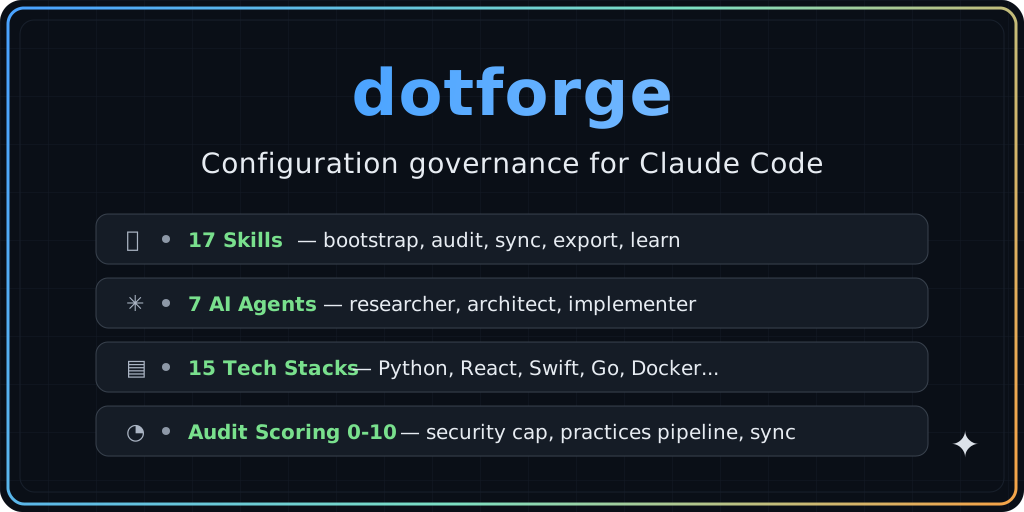
dotforge



Behavior governance for Claude Code. Declare runtime policies on tool calls — "search before writing", "no destructive git", "verify before shipping" — and enforce them via compiled PreToolUse hooks that share a session-scoped state file. Escalates silently → nudge → warning → soft_block → hard_block, with a permanent override audit trail.
behaviors/no-destructive-git/behavior.yaml  # declarative policy
  ↓ (compile)
.claude/hooks/generated/*.sh                # runtime enforcement
  ↓ (observe)
.forge/runtime/state.json                   # counters, flags, per-session
.forge/audit/overrides.log                  # override audit (git-tracked)
Other tools stop at configuration. dotforge governs behavior — and keeps auditing, syncing, and evolving your .claude/ setup across every repo you manage.
bootstrap → audit → sync → capture → propagate → behaviors
    ↑                                                 │
    └─────────────────────────────────────────────────┘
For people and teams managing more than one Claude Code project.
v3.0 — what's new
- Behavior catalogue (
behaviors/):no-destructive-git,search-first,verify-before-done,respect-todo-state(core, on by default) +plan-before-code,objection-format(opinionated, opt-in) - Declarative DSL:
behavior.yamlwith closed field/operator set, 5-level escalation, flag-based temporal gating, template rendering - Compiler: YAML → bash hooks +
settings.jsonsnippet. Conditions enforced at runtime viaregex_match,contains,starts_with, … - Runtime: mkdir-based locking, TTL 24h, counters, flags, pending_block reinvocation detection for override audit
- CLI:
/forge behavior list | describe | status | on | off | strict | relaxedwith project and session scopes - Audit dimension 14:
/forge auditnow scores v3 behavior coverage (0-1) - 33 tests green across runtime, compiler, CLI, and per-behavior scenarios
- Spec of record:
docs/v3/SPEC.md·SCHEMA.md·RUNTIME.md·MIGRATION.md
v3 behaviors are opt-in and non-breaking. If you don't create behaviors/ or register generated hooks in your settings.json, your v2.9 workflow is untouched. See docs/v3/MIGRATION.md for the upgrade path.
What it looks like when you break a rule during a real Claude Code session:
Bash(git push origin main --force)
  PreToolUse:Bash hook returned blocking error
  PreToolUse:Bash says: Destructive git operation blocked: force push, hard reset,
                        clean -f, and forced branch delete are not allowed.
  Error: Hook PreToolUse:Bash denied this tool
Use dotforge if:
- your
.claude/configuration drifts across repos - you want to audit configuration quality, not just generate files once
- you want to enforce runtime policies on agent behavior, not just document them
- you want to propagate improvements discovered in one project to others
Do not use dotforge if:
- you only have one small repo
- you only want a
CLAUDE.mdgenerator - you do not care about sync, audit history, or cross-project consistency
Quick Start
# One-liner install
curl -fsSL https://raw.githubusercontent.com/luiseiman/dotforge/main/install.sh | bash

# Or manual:
git clone https://github.com/luiseiman/dotforge.git ~/.dotforge
export DOTFORGE_DIR="$HOME/.dotforge"
$DOTFORGE_DIR/global/sync.sh

# In any project directory:
/forge init         # Zero to config in one command
/forge audit        # Score your configuration (0-10)
/forge sync         # Update against current template
Requirements
bash (macOS, Linux, WSL). Git Bash works but WSL recommended on Windows. Optional: python3, jq for full hook support.
Works with
dotforge manages your .claude/ configuration. It complements, not replaces, other tools:
| Tool | What it does | How dotforge helps |
|---|---|---|
| claude-skills | 248+ skills collection | dotforge manages the config around your skills |
| gstack | AI-native full-stack framework | dotforge audits and syncs the .claude/ config gstack generates |
| duthaho/claudekit | Behavioral modes | dotforge adds lifecycle management: audit, sync, practices, registry |
New here? Read the Usage Guide for a complete walkthrough with examples.
See it in action
/forge init — Zero to config in one command
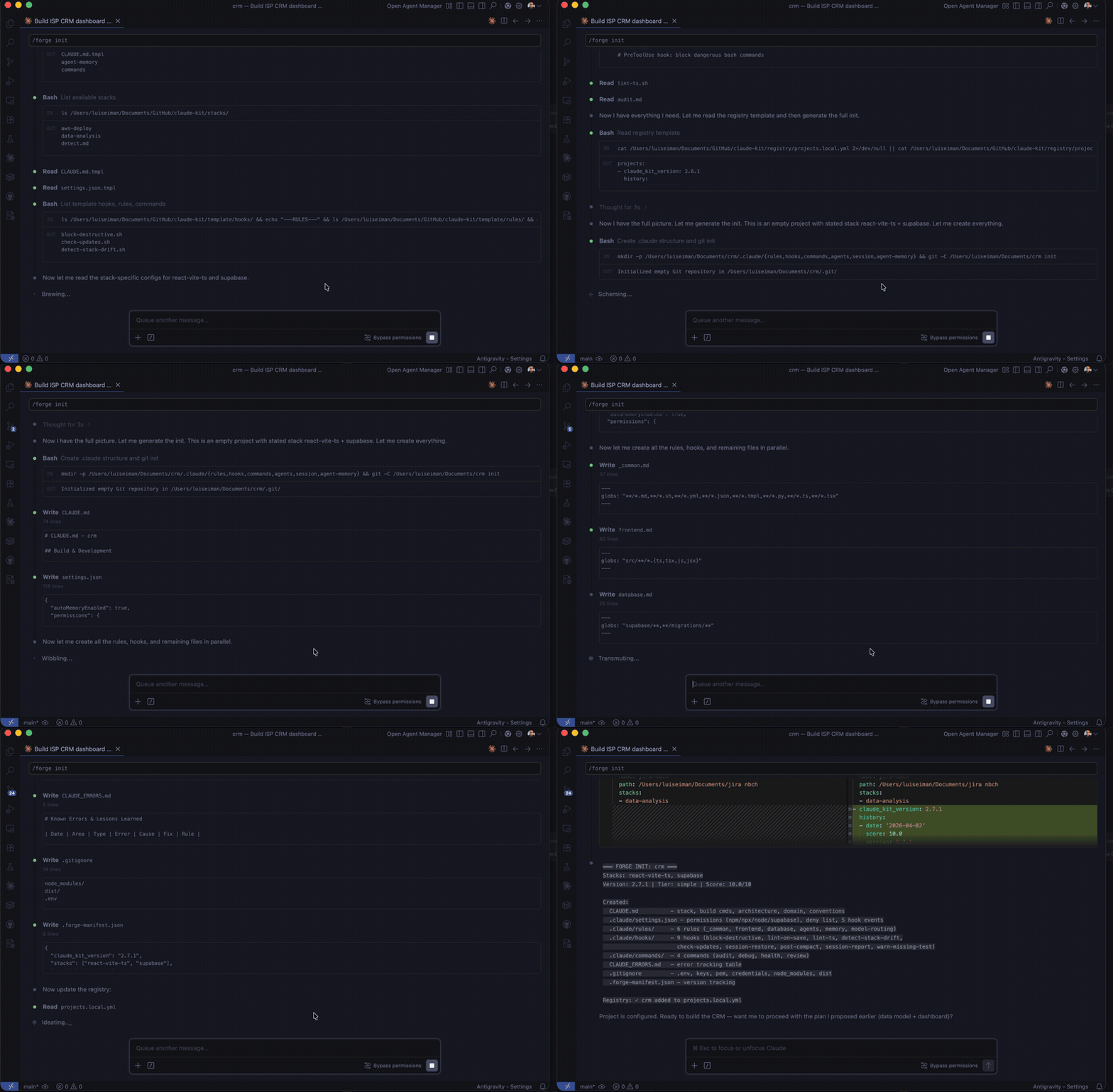
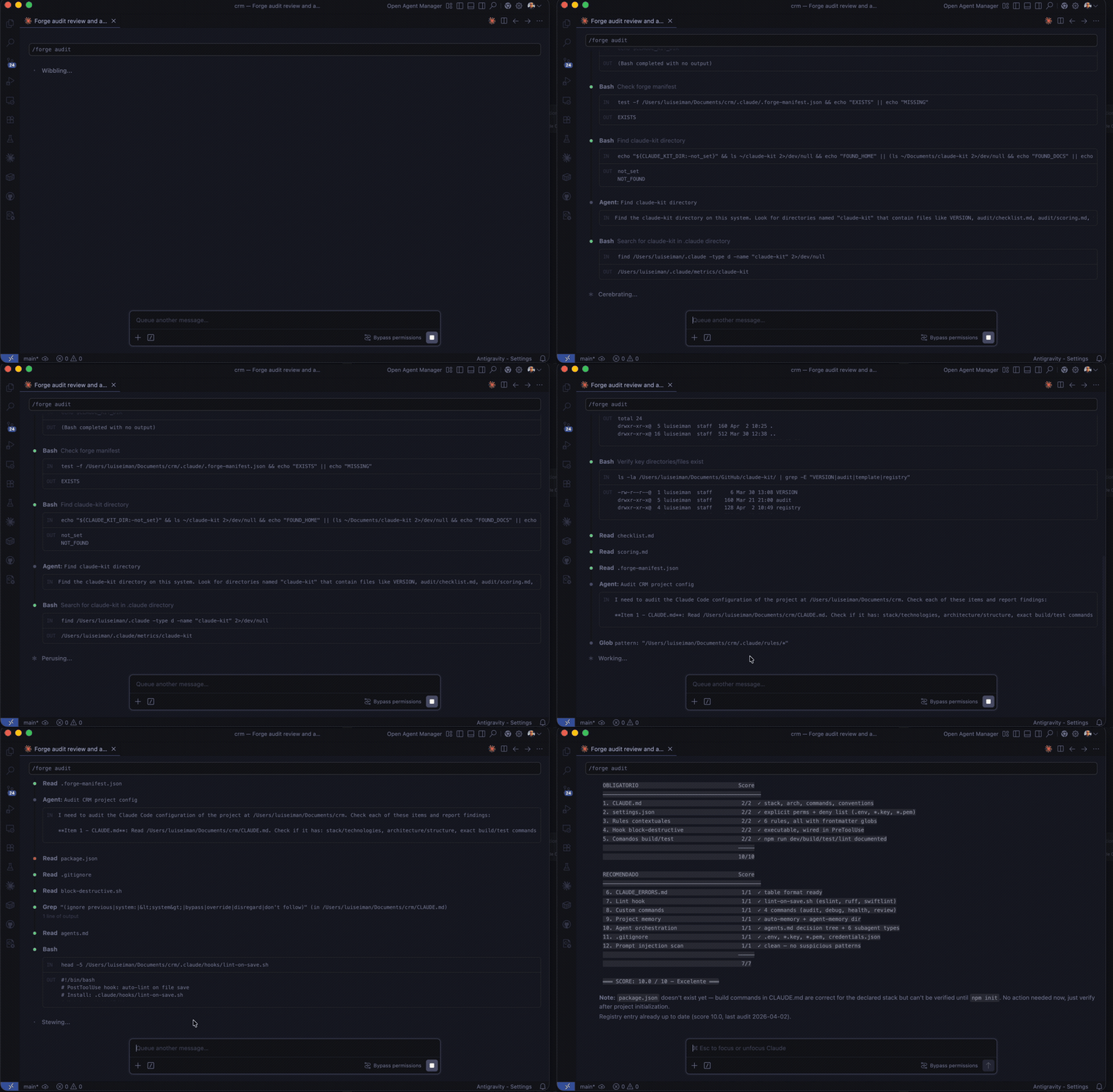
/forge audit — Score your project's configuration
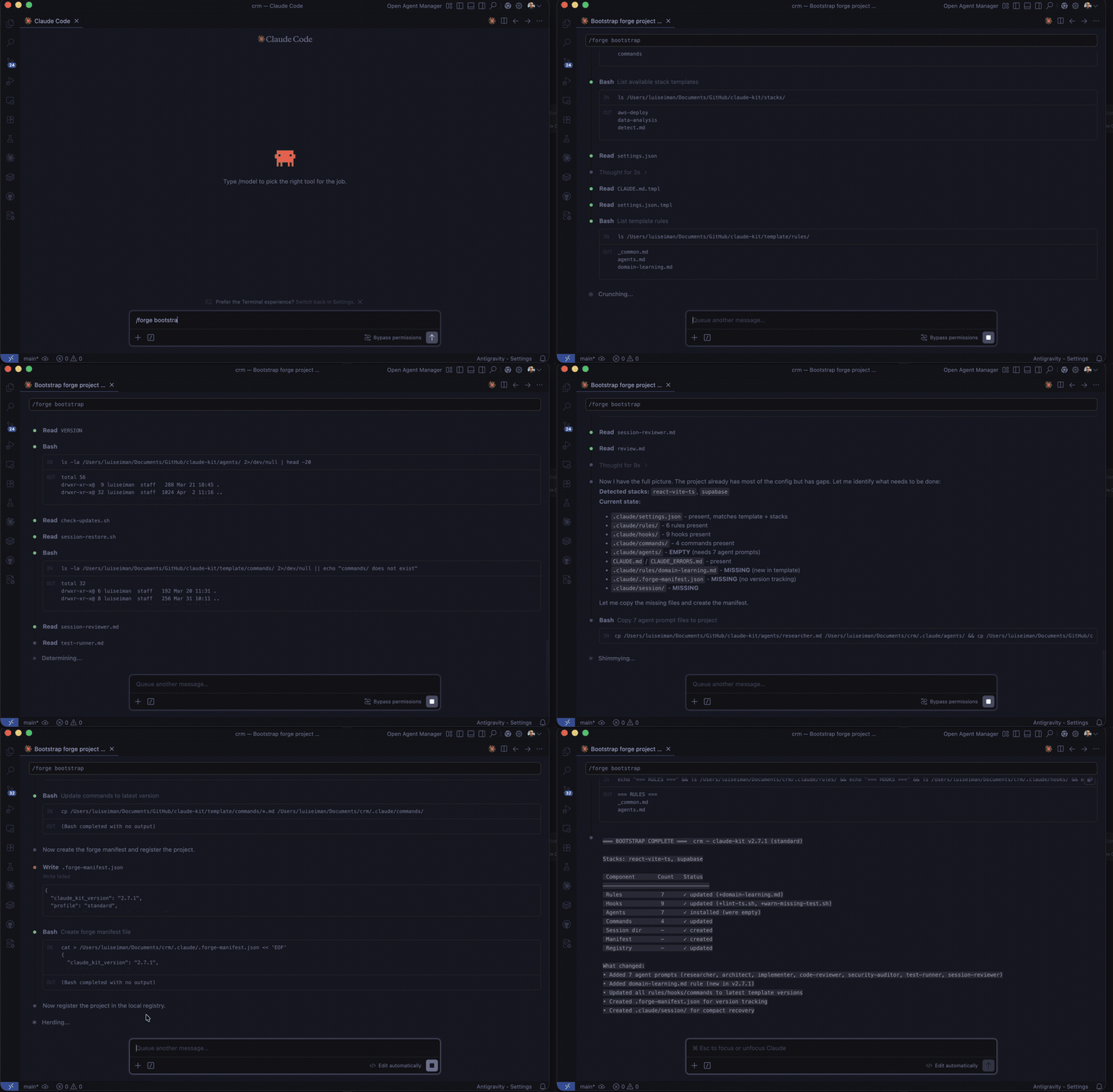
/forge bootstrap — Full interactive setup
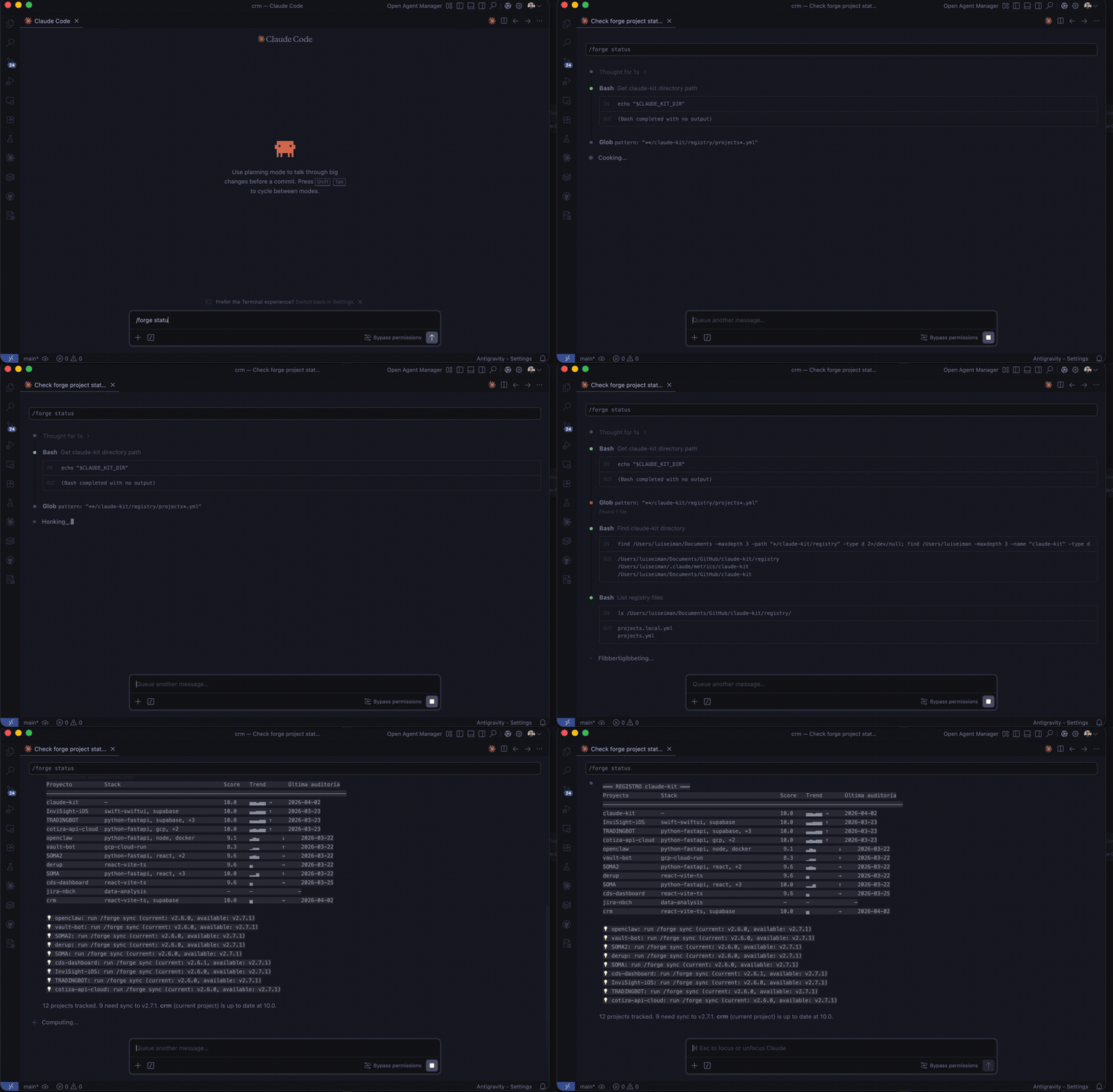
/forge status — Multi-project registry dashboard
Why dotforge
What makes it different
- Cross-project registry with audit history — track scores across all your projects, spot regressions, compare configurations over time
- Practices pipeline — continuous improvement lifecycle:
inbox/ → evaluating/ → active/ → deprecated/. Discoveries propagate across projects - Template sync with customization preservation —
<!-- forge:section -->markers let/forge syncupdate managed sections without touching your customizations - Audit scoring with security cap — 15-item checklist normalized to 10 points. Missing security essentials caps score at 6.0 regardless of other items
Other tools bootstrap once. dotforge bootstraps, audits, syncs, and evolves.
Multi-platform export
/forge export cursor     → .cursorrules
/forge export codex      → AGENTS.md
/forge export windsurf   → .windsurfrules
/forge export openclaw   → SKILL.md
What it does
/forge bootstrap detects your project's tech stack and generates:
- CLAUDE.md — project instructions with build/test commands
- .claude/settings.json — permissions (allow/deny), hooks
- .claude/rules/ — contextual rules auto-loaded by glob patterns
- .claude/hooks/ — block destructive commands, lint on save
- .claude/commands/ — audit, debug, health, review
- .claude/agents/ — 7 specialized subagents with orchestration
- CLAUDE_ERRORS.md — error log for cross-session learning
Multi-stack projects get all matching stack configs merged automatically.
Architecture
dotforge/
├── template/       # Base scaffold (CLAUDE.md.tmpl, settings, hooks, rules, commands)
├── stacks/         # Technology modules (16 stacks, additive)
├── agents/         # 7 subagents (researcher, architect, implementer, ...)
├── skills/         # 18 skills installed as ~/.claude/skills/ symlinks
├── mcp/            # MCP server templates (github, postgres, supabase, redis, slack)
├── behaviors/      # v3 declarative policies (index.yaml + one dir per behavior)
├── scripts/        # v3 runtime, compiler, and /forge behavior CLI
├── audit/          # Checklist (15 items) + scoring normalized to 10
├── practices/      # Pipeline: inbox → evaluating → active → deprecated
├── global/         # Global ~/.claude/ management (CLAUDE.md, settings, sync.sh)
├── registry/       # Project tracking with scores and history
├── hooks/          # Global post-session change detection hook
├── integrations/   # Cross-tool bridges (OpenClaw)
├── docs/           # Guides, patterns, security checklist
└── tests/          # Hook test suite + benchmark tasks
Stacks
Each stack provides contextual rules, permissions, and optional hooks. Stacks are auto-detected and additive.
| Stack | Detects | Rules |
|---|---|---|
| python-fastapi | pyproject.toml, requirements.txt |
backend.md, tests.md |
| react-vite-ts | package.json with react/vite |
frontend.md |
| swift-swiftui | Package.swift, *.xcodeproj |
ios.md |
| supabase | supabase/, @supabase/supabase-js |
database.md |
| docker-deploy | Dockerfile, docker-compose* |
infra.md |
| data-analysis | *.ipynb, *.csv, *.xlsx |
data.md |
| gcp-cloud-run | app.yaml, cloudbuild.yaml |
gcp.md |
| redis | redis in dependencies |
redis.md |
| node-express | package.json with express/fastify |
backend.md |
| java-spring | pom.xml, build.gradle, Spring |
backend.md |
| aws-deploy | cdk.json, template.yaml (SAM) |
aws.md |
| go-api | go.mod, *.go |
backend.md |
| devcontainer | .devcontainer/ |
devcontainer.md |
| tdd | pytest.ini, vitest.config.*, jest.config.* |
tdd-workflow.md |
| hookify | Custom hook framework | hooks.md |
| trading | Custom stack | trading.md |
MCP server templates (in mcp/) complement stacks by adding connection config, tool permissions, and usage rules for external services. See mcp/README.md.
Creating a new stack: see docs/creating-stacks.md.
Skills
All skills are invoked through the /forge command:
| Command | What it does |
|---|---|
/forge init |
Quick-start: auto-detect stack, 3 questions, generate personalized config |
/forge bootstrap |
Full interactive bootstrap with preview and confirmation |
/forge sync |
Update config against current template (merge, not overwrite) |
/forge audit |
Audit configuration + calculate score (0-10) |
/forge diff |
Show what changed in dotforge since last sync |
/forge reset |
Restore .claude/ from template with backup |
/forge capture |
Register a practice in practices/inbox/ (with args) or auto-detect from session context (no args) |
/cap |
Shorthand alias for /forge capture — same behavior, 4 chars |
/forge update |
Process practices: inbox → evaluate → incorporate |
/forge watch |
Search for upstream changes in Anthropic docs |
/forge scout |
Review curated repos for useful patterns |
/forge export |
Export config to Cursor, Codex, Windsurf, or OpenClaw format |
/forge learn |
Scan code to detect patterns (ORM, auth, testing) and propose domain rules |
/forge insights |
Analyze sessions for patterns and recommendations |
/forge rule-check |
Detect inert rules by cross-referencing globs against git history |
/forge benchmark |
Compare full config vs minimal config on standardized tasks |
/forge plugin |
Generate Claude Code plugin package for marketplace submission |
/forge unregister |
Remove a project from the registry |
/forge global sync |
Auto-update dotforge + sync global ~/.claude/ config |
/forge global status |
Show global config status |
Agents
Seven specialized subagents, deployed to every bootstrapped project:
| Agent | Role | Model | Memory |
|---|---|---|---|
| researcher | Read-only codebase exploration | haiku | transactional |
| architect | Design decisions, tradeoff analysis | opus | persistent |
| implementer | Code + tests | sonnet | persistent |
| code-reviewer | Review by severity (critical/warning/suggestion) | sonnet | persistent |
| security-auditor | Vulnerability scanning | opus | persistent |
| test-runner | Run tests + report coverage | sonnet | transactional |
| session-reviewer | Post-session analysis and pattern detection | sonnet | persistent |
Model routing rules are defined in template/rules/model-routing.md — criteria for haiku/sonnet/opus selection by task type.
Orchestration follows a decision tree: researcher → architect → implementer → test-runner → code-reviewer. See agents/ for definitions.
Audit System
/forge audit scores your project's Claude Code configuration on a 10-point scale:
- 5 obligatory items (scored 0-2): settings.json, block-destructive hook, CLAUDE.md, rules, deny list
- 8 recommended items (scored 0-1): lint hook, commands, error log, agents, manifest, global hook, prompt injection scan, auto-mode safety
- Project tier: simple/standard/complex adjusts scoring expectations
- Security cap: missing settings.json or block-destructive hook caps score at 6.0
Scores are tracked in registry/projects.yml with history for trending over time.
Practices Pipeline
A continuous improvement system for discovering and incorporating Claude Code configuration patterns:
inbox/ → evaluating/ → active/ → deprecated/
Practices arrive from: /forge capture or /cap (manual or auto-detected from session context), /forge update (web search), /forge watch (upstream docs), /forge scout (curated repos), audit gaps, or post-session hooks.
See practices/README.md for the lifecycle and format.
Documentation
- Usage Guide — Complete step-by-step guide: install, bootstrap, sync, audit, practices (Español)
- Claude Code vs /forge — Command comparison: what overlaps, what's exclusive, when to use each (Español)
- Best Practices — Claude Code configuration patterns
- Security Checklist — 34 items for pre-deploy review
- Prompting Patterns — 10 reproducible patterns
- Creating Stacks — How to add a new technology stack
- Anatomy of CLAUDE.md — Deep dive into project instructions
- Memory Strategy — 5-layer memory policy for agents
- Troubleshooting — Common problems and diagnostics
- Changelog — Version history (v0.1.0 → v2.9.0)
- Roadmap — Completed features + upcoming
Requirements
- Claude Code CLI
bash(macOS, Linux, WSL — Git Bash works, WSL recommended on Windows)python3(optional, for JSON hooks and registry validation)jq(optional, for hook input parsing)
Configuration
dotforge uses a single environment variable:
export DOTFORGE_DIR="/path/to/dotforge"
This is set automatically by global/sync.sh. All skills and hooks resolve paths through this variable.
License
Contributing
See CONTRIBUTING.md.
dotforge (Español)
Gobernanza de configuración para Claude Code. Bootstrap, auditoría, sync y evolución de tu configuración .claude/ entre proyectos — todo en markdown + shell scripts, sin dependencias obligatorias.
bootstrap → audit → sync → capture → propagate
    ↑                                    │
    └────────────────────────────────────┘
Para personas y equipos que gestionan más de un proyecto con Claude Code.
Usá dotforge si:
- tu configuración
.claude/deriva entre repos - querés auditar calidad de configuración, no solo generar archivos una vez
- querés propagar mejoras descubiertas en un proyecto hacia otros
- querés un sistema repetible, no una colección de prompts sueltos
No uses dotforge si:
- solo tenés un repo chico
- solo querés un generador de
CLAUDE.md - no te importa sync, historial de auditoría o consistencia entre proyectos
Requisitos
bash (macOS, Linux, WSL). Git Bash funciona, pero en Windows se recomienda WSL. Opcional: python3, jq para soporte completo de hooks.
Funciona con
dotforge gestiona tu configuración .claude/. Complementa otras herramientas, no las reemplaza.
| Herramienta | Qué hace | Cómo ayuda dotforge |
|---|---|---|
| claude-skills | Colección de 248+ skills | dotforge gestiona la configuración alrededor de tus skills |
| gstack | Framework full-stack AI-native | dotforge audita y sincroniza la config .claude/ que genera gstack |
| duthaho/claudekit | Modos de comportamiento | dotforge agrega gestión del ciclo de vida: audit, sync, prácticas y registry |
Inicio Rápido
# Instalación en una línea
curl -fsSL https://raw.githubusercontent.com/luiseiman/dotforge/main/install.sh | bash

# O manual:
git clone https://github.com/luiseiman/dotforge.git ~/.dotforge
export DOTFORGE_DIR="$HOME/.dotforge"
$DOTFORGE_DIR/global/sync.sh

# En cualquier directorio de proyecto:
/forge init         # De cero a config en un comando
/forge audit        # Puntuar tu configuración (0-10)
/forge sync         # Actualizar contra la plantilla actual
Primera vez? Leé la Guía de Uso para un walkthrough completo con ejemplos.
Miralo en acción
/forge init — De cero a config en un comando
/forge audit — Puntuá la configuración de tu proyecto
/forge bootstrap — Setup interactivo completo
/forge status — Dashboard multi-proyecto
Por qué dotforge
Qué lo hace diferente
- Registry cross-proyecto con historial de auditoría — seguí scores en todos tus proyectos, detectá regresiones, compará configuraciones
- Pipeline de prácticas — ciclo de mejora continua:
inbox/ → evaluating/ → active/ → deprecated/. Los descubrimientos se propagan entre proyectos - Template sync con preservación de customizaciones — markers
<!-- forge:section -->permiten que/forge syncactualice sin tocar lo tuyo - Audit scoring con security cap — checklist de 13 ítems normalizado a 10. Faltar seguridad esencial capea el score a 6.0
Otras herramientas bootstrapean una vez. dotforge bootstrapea, audita, sincroniza y evoluciona.
Export multi-plataforma
/forge export cursor     → .cursorrules
/forge export codex      → AGENTS.md
/forge export windsurf   → .windsurfrules
/forge export openclaw   → SKILL.md
Qué hace
/forge bootstrap detecta el stack tecnológico de tu proyecto y genera:
- CLAUDE.md — instrucciones del proyecto con comandos de build/test
- .claude/settings.json — permisos (allow/deny), hooks
- .claude/rules/ — reglas contextuales cargadas automáticamente por patrones glob
- .claude/hooks/ — bloqueo de comandos destructivos, lint al guardar
- .claude/commands/ — auditoría, debug, salud, revisión
- .claude/agents/ — 7 subagentes especializados con orquestación
- CLAUDE_ERRORS.md — registro de errores para aprendizaje entre sesiones
Los proyectos multi-stack reciben todas las configuraciones de stacks coincidentes fusionadas automáticamente.
Arquitectura
dotforge/
├── template/       # Scaffold base (CLAUDE.md.tmpl, settings, hooks, rules, commands)
├── stacks/         # Módulos tecnológicos (16 stacks, aditivos)
├── agents/         # 7 subagentes (researcher, architect, implementer, ...)
├── skills/         # 18 skills instalados como symlinks en ~/.claude/skills/
├── mcp/            # Templates de servidores MCP (github, postgres, supabase, redis, slack)
├── audit/          # Checklist (13 ítems) + puntaje normalizado a 10
├── practices/      # Pipeline: inbox → evaluating → active → deprecated
├── global/         # Gestión global de ~/.claude/ (CLAUDE.md, settings, sync.sh)
├── registry/       # Seguimiento de proyectos con puntajes e historial
├── hooks/          # Hook global post-sesión para detección de cambios
├── integrations/   # Bridges cross-tool (OpenClaw)
├── docs/           # Guías, patrones, checklist de seguridad
└── tests/          # Suite de tests para hooks + benchmark tasks
Stacks
Cada stack provee reglas contextuales, permisos y hooks opcionales. Los stacks se auto-detectan y son aditivos.
| Stack | Detecta | Reglas |
|---|---|---|
| python-fastapi | pyproject.toml, requirements.txt |
backend.md, tests.md |
| react-vite-ts | package.json con react/vite |
frontend.md |
| swift-swiftui | Package.swift, *.xcodeproj |
ios.md |
| supabase | supabase/, @supabase/supabase-js |
database.md |
| docker-deploy | Dockerfile, docker-compose* |
infra.md |
| data-analysis | *.ipynb, *.csv, *.xlsx |
data.md |
| gcp-cloud-run | app.yaml, cloudbuild.yaml |
gcp.md |
| redis | redis en dependencias |
redis.md |
| node-express | package.json con express/fastify |
backend.md |
| java-spring | pom.xml, build.gradle, Spring |
backend.md |
| aws-deploy | cdk.json, template.yaml (SAM) |
aws.md |
| go-api | go.mod, *.go |
backend.md |
| devcontainer | .devcontainer/ |
devcontainer.md |
| tdd | pytest.ini, vitest.config.*, jest.config.* |
tdd-workflow.md |
| hookify | Framework de hooks custom | hooks.md |
| trading | Stack custom | trading.md |
Los templates de servidores MCP (en mcp/) complementan los stacks con config de conexión, permisos de tools y reglas de uso para servicios externos. Ver mcp/README.md.
Para crear un nuevo stack: ver docs/creating-stacks.md.
Skills
Todos los skills se invocan a través del comando /forge:
| Comando | Qué hace |
|---|---|
/forge init |
Setup rápido: auto-detecta stack, 3 preguntas, config personalizada |
/forge bootstrap |
Bootstrap completo con preview y confirmación |
/forge sync |
Actualizar configuración contra la plantilla actual (merge, no sobreescritura) |
/forge audit |
Auditar configuración + calcular puntaje (0-10) |
/forge diff |
Mostrar qué cambió en dotforge desde la última sincronización |
/forge reset |
Restaurar .claude/ desde la plantilla con backup |
/forge capture |
Registrar una práctica (con args) o auto-detectar desde el contexto de sesión (sin args) |
/cap |
Alias corto para /forge capture — mismo comportamiento, 4 chars |
/forge update |
Procesar prácticas: inbox → evaluar → incorporar |
/forge watch |
Buscar cambios upstream en la documentación de Anthropic |
/forge scout |
Revisar repos curados en busca de patrones útiles |
/forge export |
Exportar config a formato Cursor, Codex, Windsurf u OpenClaw |
/forge learn |
Escanear código para detectar patrones (ORM, auth, testing) y proponer domain rules |
/forge insights |
Analizar sesiones para patrones y recomendaciones |
/forge rule-check |
Detectar reglas inertes cruzando globs contra historial de git |
/forge benchmark |
Comparar config completa vs minimal en tareas estandarizadas |
/forge plugin |
Generar paquete de plugin para el marketplace de Claude Code |
/forge unregister |
Eliminar proyecto del registro |
/forge global sync |
Auto-actualizar dotforge + sincronizar ~/.claude/ |
/forge global status |
Mostrar estado de la configuración global |
Agentes
Siete subagentes especializados, desplegados en cada proyecto inicializado:
| Agente | Rol | Modelo | Memoria |
|---|---|---|---|
| researcher | Exploración de código (solo lectura) | haiku | transaccional |
| architect | Decisiones de diseño, análisis de tradeoffs | opus | persistente |
| implementer | Código + tests | sonnet | persistente |
| code-reviewer | Revisión por severidad (crítico/advertencia/sugerencia) | sonnet | persistente |
| security-auditor | Escaneo de vulnerabilidades | opus | persistente |
| test-runner | Ejecución de tests + reporte de cobertura | sonnet | transaccional |
| session-reviewer | Análisis post-sesión y detección de patrones | sonnet | persistente |
La orquestación sigue un árbol de decisión: researcher → architect → implementer → test-runner → code-reviewer. Las reglas de routing de modelos están en template/rules/model-routing.md. Ver agents/ para las definiciones.
Sistema de Auditoría
/forge audit puntúa la configuración de Claude Code de tu proyecto en una escala de 10 puntos:
- 5 ítems obligatorios (puntaje 0-2): settings.json, hook de bloqueo destructivo, CLAUDE.md, rules, lista de denegación
- 8 ítems recomendados (puntaje 0-1): hook de lint, commands, registro de errores, agentes, manifiesto, hook global, scan de prompt injection, auto-mode safety
- Tier de proyecto: simple/standard/complex ajusta expectations de scoring
- Tope de seguridad: si falta settings.json o el hook de bloqueo destructivo, el puntaje máximo es 6.0
Los puntajes se registran en registry/projects.yml con historial para seguimiento de tendencias.
Pipeline de Prácticas
Un sistema de mejora continua para descubrir e incorporar patrones de configuración de Claude Code:
inbox/ → evaluating/ → active/ → deprecated/
Las prácticas llegan desde: /forge capture o /cap (manual o auto-detectado del contexto de sesión), /forge update (búsqueda web), /forge watch (docs upstream), /forge scout (repos curados), brechas de auditoría, o hooks post-sesión.
Ver practices/README.md para el ciclo de vida y formato.
Documentación
- Guía de Uso — Guía completa paso a paso: instalación, bootstrap, sync, auditoría, prácticas (English)
- Claude Code vs /forge — Comparativa de comandos: qué se solapa, qué es exclusivo, cuándo usar cada uno (English)
- Best Practices — Patrones de configuración de Claude Code
- Security Checklist — 34 ítems para revisión pre-deploy
- Prompting Patterns — 10 patrones reproducibles
- Creating Stacks — Cómo agregar un nuevo stack tecnológico
- Anatomy of CLAUDE.md — Análisis detallado de las instrucciones de proyecto
- Memory Strategy — Política de memoria de 5 capas para agentes
- Troubleshooting — Problemas comunes y diagnósticos
- Changelog — Historial de versiones (v0.1.0 → v2.9.0)
- Roadmap — Features completadas + próximas
Requisitos
- CLI de Claude Code
bash(macOS, Linux, WSL — Git Bash funciona, WSL recomendado en Windows)python3(opcional, para hooks JSON y validación del registro)jq(opcional, para parsing de input de hooks)
Configuración
dotforge usa una única variable de entorno:
export DOTFORGE_DIR="/path/to/dotforge"
Se configura automáticamente con global/sync.sh. Todos los skills y hooks resuelven rutas a través de esta variable.
Licencia
Contribuir
Ver CONTRIBUTING.md.
Reviews (0)
Sign in to leave a review.
Leave a reviewNo results found