turbofig
Health Warn
- License — License: MIT
- Description — Repository has a description
- Active repo — Last push 0 days ago
- Low visibility — Only 5 GitHub stars
Code Pass
- Code scan — Scanned 12 files during light audit, no dangerous patterns found
Permissions Pass
- Permissions — No dangerous permissions requested
No AI report is available for this listing yet.
Let AI drive Figma. Instant, lightweight and free: no paid Figma seat, no quota, no Figma token. Open source, for macOS.

Let AI design in Figma for you
Free for Claude Code, Cursor, Codex and Copilot. No paid seat, no Figma token, no MCP server.




turbofig is a free, open-source Figma plugin and bridge that lets AI agents design in Figma Desktop on macOS. It works through plain files, with no MCP server, no Figma token and no paid seat.
Designers and creative technologists: ask Claude Code, Cursor, Codex or
Copilot to design in Figma in plain English. Get a landing page, a slide
deck or a component library from a written brief, built in the file you
have open. Works on a free Figma Starter team (tested 2026-10-10). An MCP
mode is there if you prefer.
Install in 2 Terminal lines, no coding needed. See Get started.
- Fast, start to finish. Ready the moment your AI starts and already
connected, so your first request lands in your file in seconds. Nothing
to start, nothing to reconnect, no approval stops in the middle of a
job. In a side-by-side design session, it finished in half the time (one run, see
Benchmark). - Far lighter on tokens. The same design session used 2.8× fewer
tokens. Each screenshot costs 2.7× fewer, and your AI learns 4
actions instead of the 121 in figma-console-mcp (NPX mode). Tokens are
the units your AI plan counts. Less of your plan goes on overhead, so
long sessions go further. - Free to use. No paid Figma seat, no monthly quota.
See how turbofig compares and the benchmark.
Why turbofig
- Easy. A small native app, with no Node. One Homebrew command
installs it, andbrew upgrade turbofigupdates it. Import the plugin
into Figma once, paste the connect prompt into your agent, and you are done. No Figma token, no sign-in, no
shared billing, so a whole team or class can run it side by side. - Connects by itself, stays connected. Open the plugin and it finds
turbofig. No restarting plugins or gateways to get a connection. If the
link drops, it reconnects on its own. - Screenshots stay small. Screenshots are saved as files and shrunk
to 800 px by default, so they do not fill up your AI's memory. Full size
is there when your AI asks for it. - Multi-file. Several files and several agent sessions can run at
once, handy when you juggle clients. - No approval clicks, if your setup asks for them. Some setups ask you
to approve every tool call, or block adding MCP servers. turbofig talks
to your AI through plain files, so it avoids both and a long job can
run without you. See why long jobs never stop for approval.
Why I made it
I build in Figma with AI agents every day, and two things kept getting in
the way: speed and cost. The bridges I tried were slow to respond, and
they spent a big part of my AI plan just loading their tools before any
work began, so long sessions filled up and needed compacting. In my setup
they also often needed restarts before they would connect.
turbofig is the bridge I wanted. It is always on and answers straight
away, so big jobs move fast. It gives the AI only what it needs, so less
of every session goes on overhead. Since switching, I no longer have to
compact long design sessions in Claude Code, and I give it big jobs without
worrying about the cost.
What you can ask it
- Build a first mockup from a written brief.
- Lay out a slide deck or a storyboard from a text outline.
- Build a pricing page frame from my existing components.
- Make a dark-mode variant of this frame.
- Resize one master frame into a full set of ad and social formats.
- Swap copy across dozens of frames and keep every text style intact.
- Create a set of button components with size and state variants.
- Update a text style or a color variable everywhere it is used.
- Rename or restyle hundreds of layers to match a naming rule.
- Generate a grid of frames from a CSV or JSON list.
- Match a coded component's spacing, colors and type in Figma so design
and code agree.
turbofig can run any script a Figma plugin could run, so variables,
components, component sets and styles all work. Scriptable too: any process that
can write a job file to the bridge folder can drive turbofig, not only a
chat agent. Creative technologists: see the 4 tools and turbofig_execute examples.
Get started
Takes a few minutes, most of it waiting for Homebrew.
You need an AI agent that can work with files on your Mac (for example
Claude Code, Cursor or Copilot CLI). A chat app in a browser does not work.
Install. New to the terminal? No coding needed: open the Terminal
app, paste these 2 lines, and press Return after each. Need Homebrew
first? Get it from brew.sh.brew install LukeHawkins/tap/turbofig turbofigThe first command installs turbofig. The second command opens
turbofig.appand starts it in the background. A tf icon appears in your menu bar. Click it and choose About
turbofig… to get started.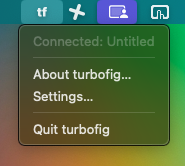
Seeing
turbofig: command not foundright after installing? Open a
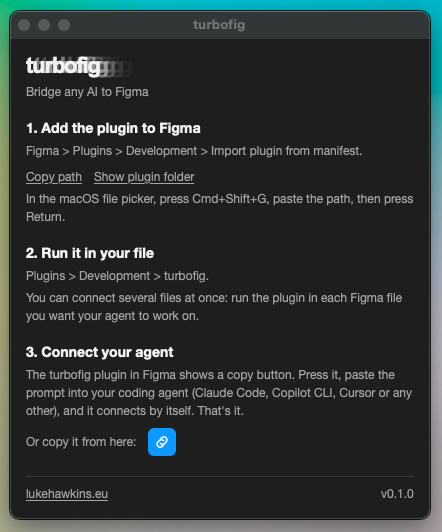
new Terminal window, or run the PATH line Homebrew printed.Add the plugin to Figma (once). In the About window, click Copy
path. In Figma Desktop, choose Plugins > Development > Import
plugin from manifest…. In the file picker, press Cmd+Shift+G, paste
the path, and press Return. This menu item exists only in Figma
Desktop, not the web app. Then open a file and run turbofig from
Plugins > Development > turbofig once, and leave the panel open.
(Instead of Copy path, Show plugin folder opens the folder in
Finder.)Connect your agent. In the plugin panel, press the link icon next
to the file name (Copy connect prompt), and paste the prompt into Claude
Code, Cursor, Copilot, or any other agent with local file access. This
needs no MCP setup. Using Claude Desktop? Use its Code tab (the file
bridge), or set up MCP with docs/mcp-clients.md. See
docs/agents.md for an agent-neutral version of the
same prompt. The prompt is tiny: it tells the agent to runturbofig js --guide, which prints the full guide for your installed
version. Chat apps that run in a browser cannot reach your Mac, so
they cannot use turbofig.Claude Code tip: to stop it asking before every Figma job, run
which turbofigin the Terminal. Then type/permissionsin Claude Code
and add the allow ruleBash(<path> js *), with that path. On Apple
Silicon the path is/opt/homebrew/bin/turbofig. On Intel it is/usr/local/bin/turbofig. This lets the agent edit your open Figma file
without asking each time.Verify. In the Terminal, run
turbofig status. It printsturbofig daemon: version X, up Ns, then- <file name> (<file key>) plugin Xfor each connected Figma file. If it printsNo Figma file connected., run the plugin in your file.
Update. Run brew upgrade turbofig. turbofig restarts itself on the new
version within about 30 seconds. You do not need Terminal, and the menu bar
app follows. Figma reloads the plugin by itself, or the plugin shows
"turbofig was updated" with a Reload button (press ⌥⌘P to reopen it). If
you added the HTTP MCP transport by hand, switch Connection to MCP once.
Uninstall. Run turbofig uninstall (add --purge to remove settings),
then brew uninstall turbofig. Homebrew alone leaves the app and the login
item.
Coding agent? Steps 2 and 3 need GUI clicks, so stop and ask the user
to do them. Use the prompt in docs/agents.md.
Let your AI install it. Give your agent this prompt. It installs
turbofig the right way and adds no MCP server. The bare turbofig command
prints the Figma steps and an "AI agents" line.
Install turbofig for me. Run `brew install LukeHawkins/tap/turbofig`, then run `turbofig` and tell me the Figma steps it prints. Do not add an MCP server.
An agent cannot click in Figma. It will hand steps 2 and 3 back to you.
Prefer MCP? (developers) MCP is a standard way for AI apps to add
tools. See docs/mcp-clients.md for the MCP setup.
Set up MCP only when the user asks for it. The default needs no MCP setup.
How turbofig compares
| turbofig | figma-console-mcp (NPX) | figma-console-mcp (Cloud) | Figma for Agents | |
|---|---|---|---|---|
| Tokens for one design session: a 4-step landing page with screenshots | ✓ 134K | ✗ 375K (2.8× more) | Not tested | Not tested |
| Time for that session | ✓ 2.9 min | ✗ 5.9 min, including approval waits | Not tested | Not tested |
| Tokens for one screenshot of the same frame | ✓ ~545 at the 800 px default (computed from the measured frame; 1,225 at 1200 px measured) | ✗ 3,264 at 2000 px, measured (6× more) | Not tested | Not tested |
| Tokens for 4 small jobs, in apps that load every tool (est.) | ✓ ~57K | ✗ ~405K (7× more) | Not tested | Not tested |
| Approval prompts in a 4-job test (tester's usual settings) | ✓ 0 | ✗ 6 | Not tested | Not tested |
| AI memory the tools take | ✓ 0.3% | ✗ 18% | ✗ 14.5% est. (96 tools) | ✗ 10.3% (41 tools) |
| Ready when your AI starts | ✓ Under 0.1 s | ✗ About 2 s (30 s first run) | Hosted, no local start | Hosted, no local start |
| Cost and limits | ✓ Free, no limits | ✓ Free | ✓ Free | ✗ Paid seat to edit (Full, or Dev in your drafts only), no writing on free Starter, read quotas, usage-based pricing coming (Figma's docs, 2026-11-25) |
| Works where MCP servers are blocked, with no MCP approval prompts | ✓ Yes, talks through plain files (an MCP server is there too, if you prefer) | ✗ No, it is an MCP server | ✗ No, it is an MCP server | ✗ No, it is an MCP server |
| Needs a Figma access token | ✓ No | ✗ Yes, you create one | ✗ Yes, you create one | Sign in with Figma |
| Extra setup | ✓ None after one plugin import | ✗ Node.js, MCP config, Desktop Bridge plugin | ✗ Pair the Desktop Bridge plugin | Connect your AI client |
| Runs any Figma plugin script | ✓ Yes | ✓ Yes | ✓ Yes | ~ Partly: no new images on its own, fonts must be uploaded |
Bottom line: if you work in Figma Desktop, turbofig is the only option
in this table that needs no MCP server, no token and no extra setup. It gives your
AI full scripting power with the lightest load, for free.
Measured: one run each, same prompts and model; time spent recovering from tool failures is left out on both sides; the cost gap is smaller than the token gap because both re-read a similar fixed context on every call; see Benchmark. est. = the measured work plus each tool list re-read on each of 10 AI calls. Repeated tool lists are cached, so the cost gap is smaller than the token gap, and Claude Code looks tools up on demand once they pass 10% of its memory. AI memory = share of a 200K-token context, counted with an OpenAI tokenizer (o200k_base), used as a proxy for Claude's; Figma for Agents measured through Copilot CLI. Facts checked 2026-10-07 (Figma for Agents tool size: 2026-10-08; its seats, plans and limits: 2026-11-25). Methods and dated sources: docs/comparison.md.
Benchmark
The same jobs, prompts and model (Claude Sonnet 5), run once with each
tool. Every turbofig result was read back from Figma and matched the spec.
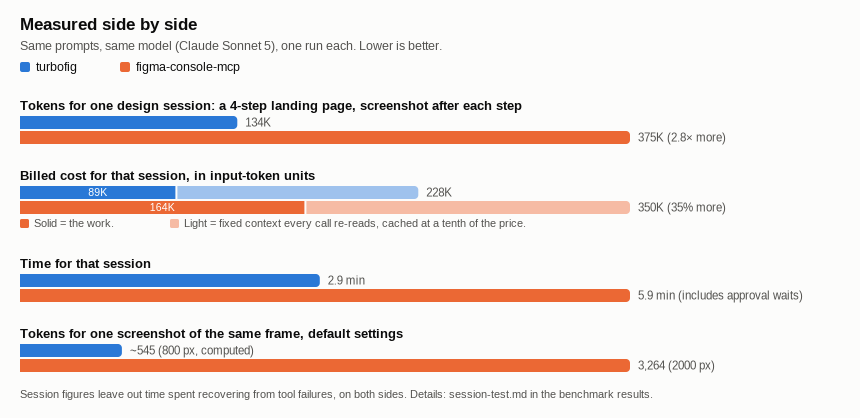
- Design session. Build a landing page in 4 steps and check a
screenshot after each one. turbofig used 2.8× fewer tokens (134K
against 375K) and about a third less in billed cost, and finished in
2.9 minutes against 5.9. Time spent recovering from tool failures is
left out on both sides. - Why. Each figma-console-mcp screenshot cost 2.7× more and stayed
in the conversation, so every later call re-read it. It also needed
more steps: 24 AI calls against 17. - Small jobs without screenshots. Both cost about the same: the same
AI writes the same kind of script. There, turbofig's edge is no
approval stops, a start in under 0.1 s, and connecting on the first
try.
One run each, so treat the results as a guide. Evidence:
design session, recount, screenshot test,
results and method, spec check,
figma-console-mcp log. The turbofig logs stay
private because they contain unrelated personal context.
FAQ
How do I get Claude Code or Cursor to design in Figma, with no Figma token?
Install turbofig, import the plugin into Figma Desktop once, then paste
the connect prompt into your agent. It drives Figma through plain files, with
no Figma token and no MCP setup. Then ask in plain English, for example
for a landing page from a written brief. Prefer MCP? See
docs/mcp-clients.md. See also
Get started and docs/agents.md.
Can I generate Figma designs with AI for free?
Yes. turbofig is free and open source, and it needs no paid Figma seat. It
works on a free Figma Starter team (tested 2026-10-10). Figma's free-plan limit of 3
pages per file still applies. You still pay for your own AI agent plan. See
how it compares.
How do I automate repetitive Figma work with AI?
Ask your agent to do it in one request. turbofig runs any script a Figma
plugin could run, so it can rename or restyle many layers, swap copy across
many frames, or resize one frame into many formats. See
What you can ask it.
Do I need to know how to code?
No coding needed. You run 2 lines in the Terminal to install. After that,
you ask your AI agent in plain words.
Is it safe for my Figma files?
turbofig runs on your Mac. The plugin edits only the files where you run it.
It connects to the daemon with a pairing token that stays on your Mac. A
script cannot read other files on your Mac. See SECURITY.md.
Is there a free alternative to Figma's MCP server?
Yes. turbofig needs no MCP server. Figma's MCP server needs a paid seat to
edit: a Full seat, or a Dev seat in your own drafts only. A free Starter plan
cannot write with it (Figma's docs, checked 2026-11-25). turbofig works on a
free Starter team (tested 2026-10-10), needs no paid seat and has no quota. In MCP mode, its tool
list is about 61× smaller (597 against about 36,600 tokens, against
figma-console-mcp in NPX mode). See docs/comparison.md.
Does Figma's MCP server have a rate limit?
Yes, for read tools. View or Collab seats get up to 20 tool calls a month, on
every plan including Starter. Full or Dev seats get 200 to 600 calls a day, by
plan. Figma says some tools are exempt, including tools that write to Figma
files. Limits checked 2026-11-25 on Figma's
rate limits page.
See docs/comparison.md.
How is turbofig different from figma-console-mcp?
turbofig gives your AI 4 tools instead of 121, needs no Node.js and no
Figma access token, and is always running. In a side-by-side design
session it used far fewer tokens and finished sooner. See
Benchmark for the numbers.
Does it work with Cursor, Codex, Copilot or other agents?
Yes. Any agent that can read and write files on your Mac can use the file
bridge, and any MCP client can use turbofig mcp. See
MCP client setup and agent guide.
Which agent is best with turbofig?
An agent with a shell, such as Claude Code. Cursor, Codex, Copilot CLI and
the Code tab in Claude Desktop also work. Why:
- Each job is one short
turbofig jscommand. A short job took 29 output
tokens, against 35 for an MCP call. A card took 162, against 167. --shotbuilds and screenshots in 1 call. A design step is 2 tool calls,
not 3 with MCP.- In Claude Code, one allow rule (
Bash(/opt/homebrew/bin/turbofig js *))
stops the approval prompts. - It works on locked-down machines where MCP servers are blocked.
- It needs no config file.
Chat apps such as Claude Desktop's chat work through MCP. That takes one
config entry (see MCP client setup), more setup, and
an extra step for each screenshot.
My agent uses Figma's own tools instead of turbofig
In Claude Code you may see "Called Figma 4 times". That is Figma's own
connector, not turbofig. See
Troubleshooting.
Can it edit designs, or only read them?
Both. turbofig runs any script a Figma plugin could run: frames, text,
components, variants, variables and styles.
Does it work in the Figma web app, or on Windows?
No. turbofig needs Figma Desktop on macOS.
For developers
- docs/how-it-works.md: architecture overview.
- docs/tools.md: the 4 tools, with
turbofig_execute
examples. - docs/mcp-clients.md: Claude Code and other MCP
client setup, including the HTTP fallback. - docs/commands.md: the full CLI command table,
includingturbofig js, which sends JS through the file bridge from a
shell. - docs/configuration.md: environment variables
and ports. - docs/menu-bar.md: the menu bar and its windows.
- docs/reliability.md: restart and retry behaviour.
- docs/troubleshooting.md: common problems and
fixes. - docs/comparison.md: the full comparison, with
sources. - ARCHITECTURE.md and DECISIONS.md: the module layout, data flow, and the design reasoning.
- skills/file-bridge.md: the file bridge protocol.
- docs/discoverability: MCP directory listing files and the agent snippet.
For teams
- MIT license. Everything runs locally: there is no turbofig server. The
plugin makes one HTTPS GET toapi.github.comonce a day to read the latest
release version. It sends no user or file data. Switch it off in Advanced
under "Update check". - Release binaries are not notarized. The Homebrew formula pins a SHA256
checksum, andbrew installverifies it. - To remove it, see Uninstall in Get started.
- Read the threat model in SECURITY.md.
Security
A script run through turbofig_execute runs inside Figma's own plugin
sandbox: it can change the open file, but it cannot read files on your
Mac. The plugin is allowed network access, because Figma rejects a rule
that allows only one port. Release binaries are not notarized; Homebrew
checks a SHA256 checksum before installing. See
SECURITY.md for the full threat model and how to report a
vulnerability.
Roadmap
- A screencast of a brief becoming a full Figma page.
- Wider platform support: Linux and Windows builds,
cargo install, and acurl | shinstaller. - A community-safe command vocabulary alongside the eval-first tool.
- An optional job audit log.
- Notarized binaries, for a company that needs them.
- Narrow the plugin's network access to the daemon's own local port.
Contributing
See CONTRIBUTING.md for setup, checks, and the PR
process, and CODE_OF_CONDUCT.md for the project's
code of conduct. Maintained by one person; issues and PRs are reviewed
best-effort.
License
MIT. See LICENSE.
turbofig is an independent project. It is not affiliated with or endorsed
by Figma, Inc.
Reviews (0)
Sign in to leave a review.
Leave a reviewNo results found