CodexFlow
Health Pass
- License — License: Apache-2.0
- Description — Repository has a description
- Active repo — Last push 0 days ago
- Community trust — 55 GitHub stars
Code Warn
- fs module — File system access in .github/workflows/enforce-npm.yml
Permissions Pass
- Permissions — No dangerous permissions requested
This is a unified desktop workbench built with Electron and React that provides a graphical interface for managing AI coding agents like Codex, Claude, and Gemini. It allows users to organize chat sessions by project, run parallel tasks using Git worktrees, and build complex prompts using rich media input.
Security Assessment
Risk: Medium. The application's core design involves executing shell commands and interacting with local AI engines via a terminal bridge (node-pty). Because it acts as a graphical wrapper for your local command line, it inherently handles file system access and command execution. No dangerous permissions or hardcoded secrets were found in the main application code. There is a minor automated warning regarding file system access within a GitHub Actions workflow, but this is standard for automated npm package enforcement and poses no direct threat to the end user.
Quality Assessment
The project is actively maintained, with its most recent code push occurring today. It utilizes an approved, permissive open-source license (Apache-2.0). Community trust is currently emerging but positive, demonstrated by 55 GitHub stars. The codebase is well-structured, offering comprehensive documentation, robust error logging, and detailed security guidelines for its users.
Verdict
Safe to use, though developers should remain aware that the tool naturally interacts with their local terminal environment and file system.
CodexFlow is a unified desktop workbench for AI coding agents (Codex/Claude/Gemini) across Windows and WSL. Organize chats by project, run parallel tasks via Git worktrees, build rich prompts with files/@refs, and resume any session in one click.





| English | 简体中文 |
|---|
CodexFlow
A "Unified Workbench" crafted for AI Coding Agents — switch between Codex / Claude / Gemini (and custom engines) in one click, organize sessions and history by project directories, run parallel tasks with Git Worktree, browse and resume conversations with Markdown rendering, and provide a graphical input box for CLI with support for pasting images / dragging files / @project files / full-screen input for efficient prompting.
- Platform Recommendation: Windows 11 + WSL (Default Distro: Ubuntu-24.04); provides the best experience when WSL is installed and engines are available within it. PowerShell Mode (PS5 / PS7 / CMD) is also fully supported.
- Project Structure: UI Host with a Minimal Terminal Bridge (Electron + React + Vite + node-pty + xterm).
Table of Contents
- Core Features
- Interface Overview
- Quick Start
- Usage Tips
- Development & Build
- Internationalization (i18n)
- Directory Structure (Summary)
- Runtime Notes & Indexes
- Verification Steps
- Security & Paths
- Diagnostics & Logs
- Community & Contributions
- License
- Resources & Conventions
✨ Core Features
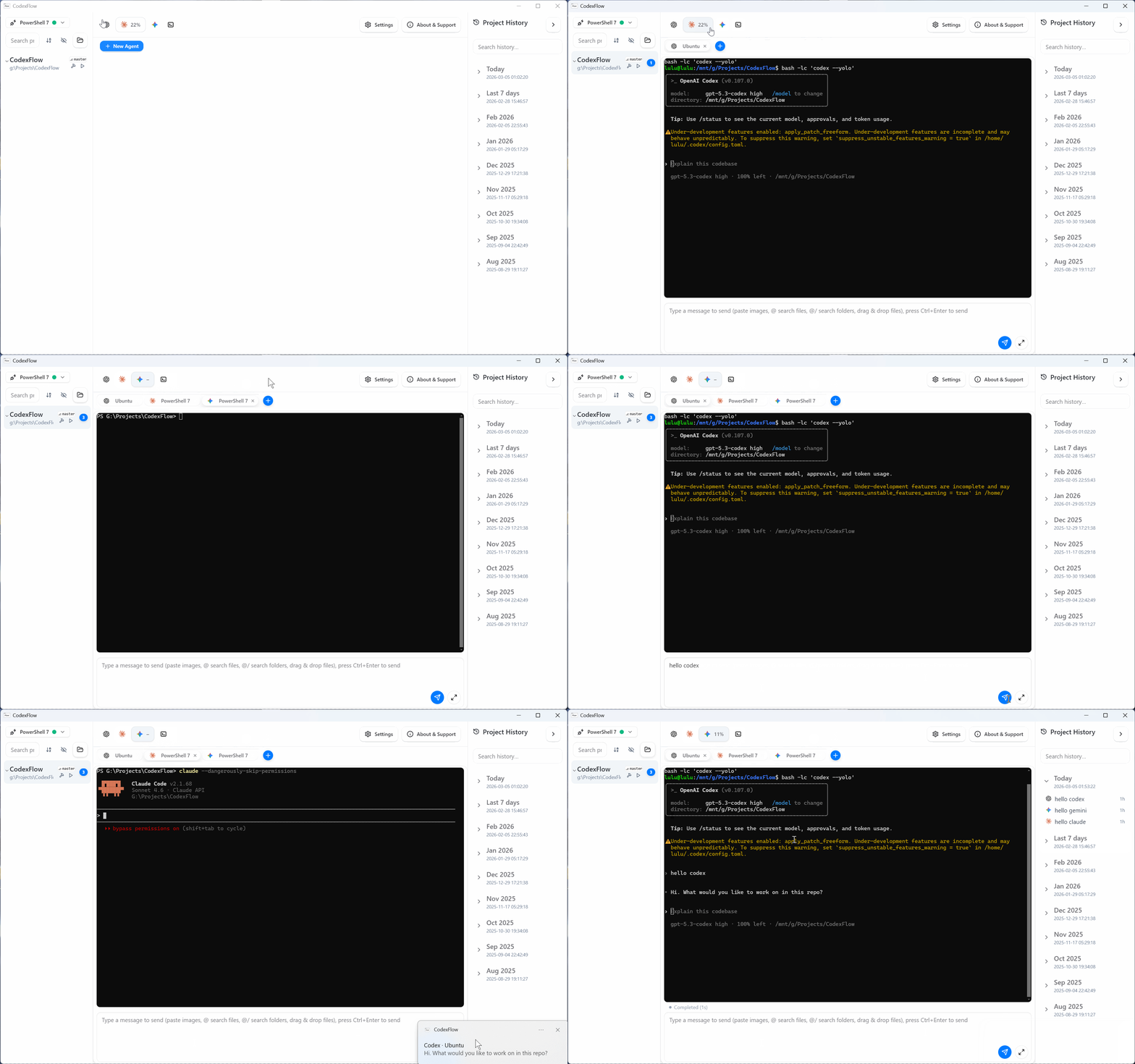
- Unified Multi-Engine Workbench (Codex / Claude / Gemini / Terminal + Custom)
Switch engines instantly via the top bar. Built-in engines support usage monitoring and completion notifications (taskbar badges/system notifications/alert sounds). Each engine can be independently configured with startup commands, light/dark icons, and execution environments (WSL / Windows / Windows PowerShell / PowerShell 7 / specific WSL distro), with support for custom engine extensions. - Cross-Engine History Center
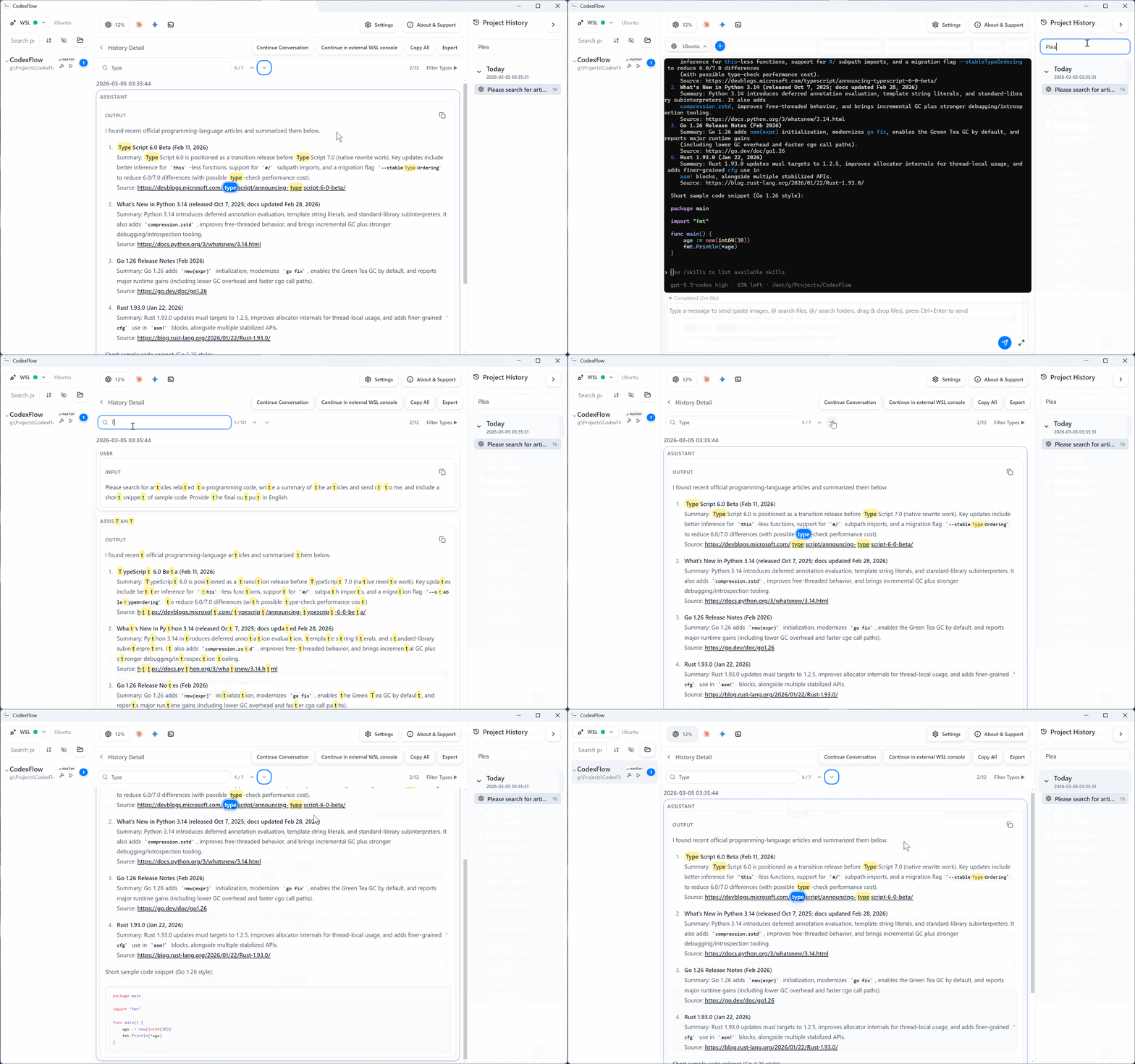
Read-only incremental indexing of native session records across multiple engines (Codex / Claude / Gemini) with full support for both Windows and WSL paths. Sessions are aggregated by project directory with one-click creation of new sessions. Features include filtering, quick search, and time-grouped previews. The detail view supports Markdown rendering (with syntax highlighting) and in-page search highlighting for efficient history lookups. - Native Git Worktree Parallel Workflow (Designed for Parallel Agents, Recommended)
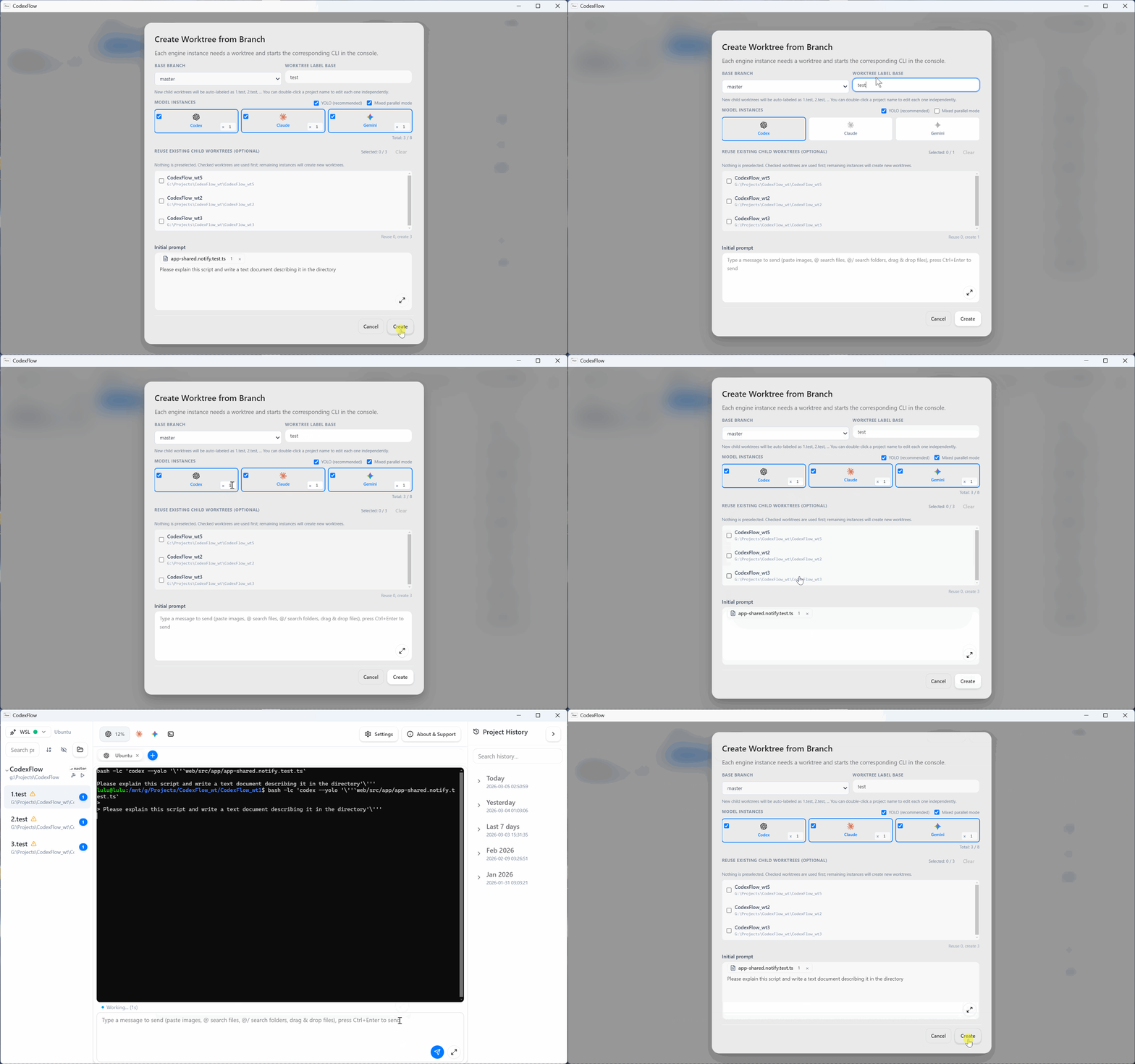
Create or reuse worktrees directly from branches (branch badge⎇). Supports single or hybrid parallel workflows across multiple engines (Codex / Claude / Gemini) with a concurrent progress panel, cancellation, and rollback cleanup. Provides a seamless loop of "Create → Run → Merge → Clean" after task completion. - GUI Input for CLI: @Files / @Rules / Images / Drag-and-Drop
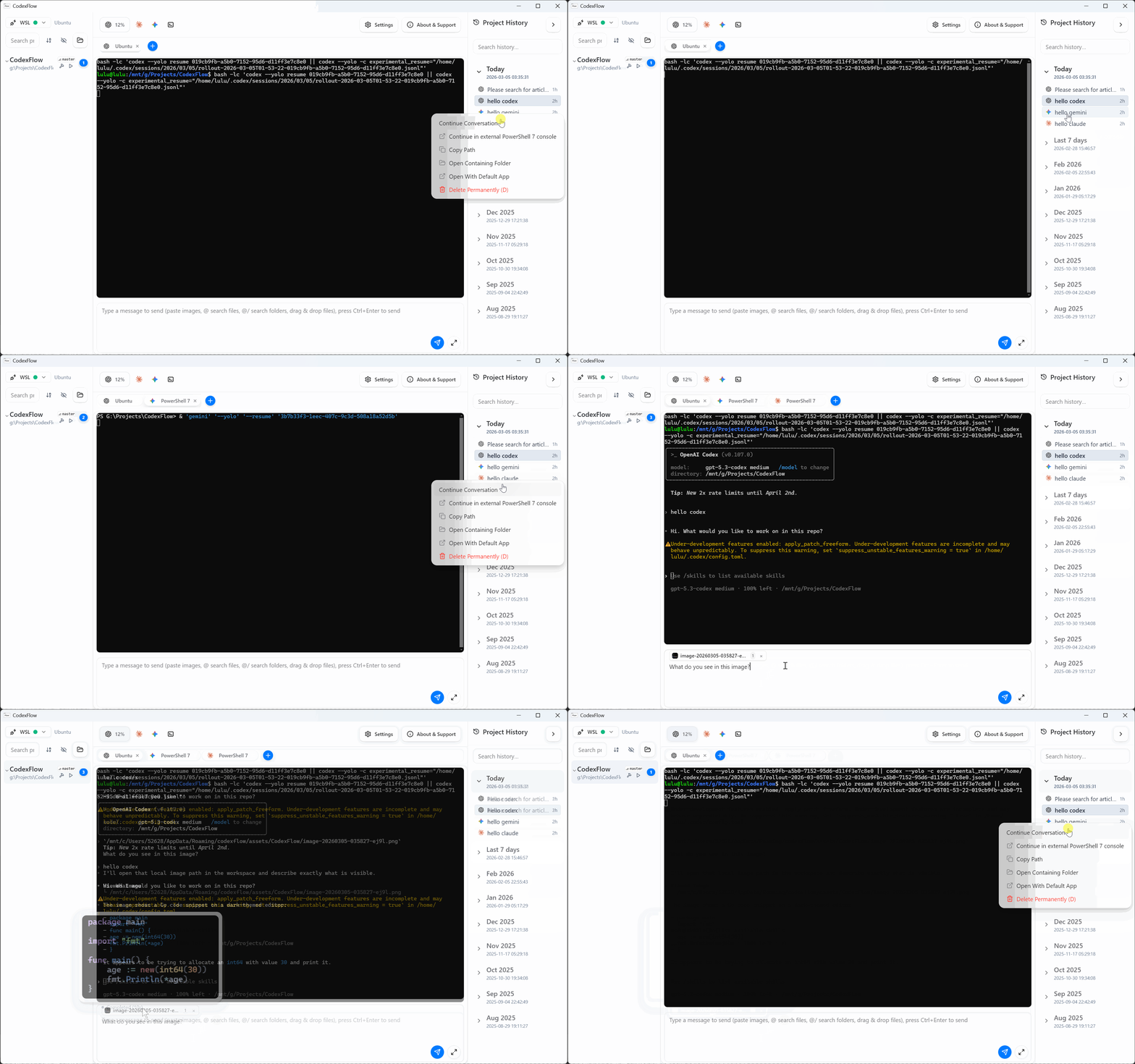
The input box supports pasting images (with inline previews), dragging files/directories, and@quick selection for project files/directories. AGENTS.md / CLAUDE.md / GEMINI.md can be quickly edited and referenced. Supports full-screen expansion for crafting long and complex prompts. - One-Click Resume for History Sessions
Compatible with various CLI resume strategies; handles WSL/Windows path differences gracefully. Allows resuming conversations within the app or in an external console with one click. - Engine Completion Notifications
Integrated system notifications, alert sounds, and taskbar badges with project-level navigation. When an engine finishes its task, you can jump directly back to the corresponding project and tab, ensuring you never miss a completion message. - Usage & Account Management
Real-time monitoring of quotas and usage for each engine in the top bar. Supports multi-account configuration and quick switching (independent management of history and sessions per engine). - Polished Experience & Deep Customization
Supports Light/Dark/System-matching themes. Customizable terminal fonts, themes, scrollbars, and overall appearance. Project management includes sorting, hiding, drag-and-drop grouping, and custom nicknames. Full network proxy support is also included.
🖼️ Interface Overview
1) Overview (Engine Switcher + Project Tabs + History Entry)
2) Git Worktree Workflow (Create / Parallel / Merge & Recycle)
3) History Center (Pagination + Markdown Rendering + Search Highlighting)
4) One-Click Resume + Input Enhancement (@Files/@Rules + Drag + Paste Image)
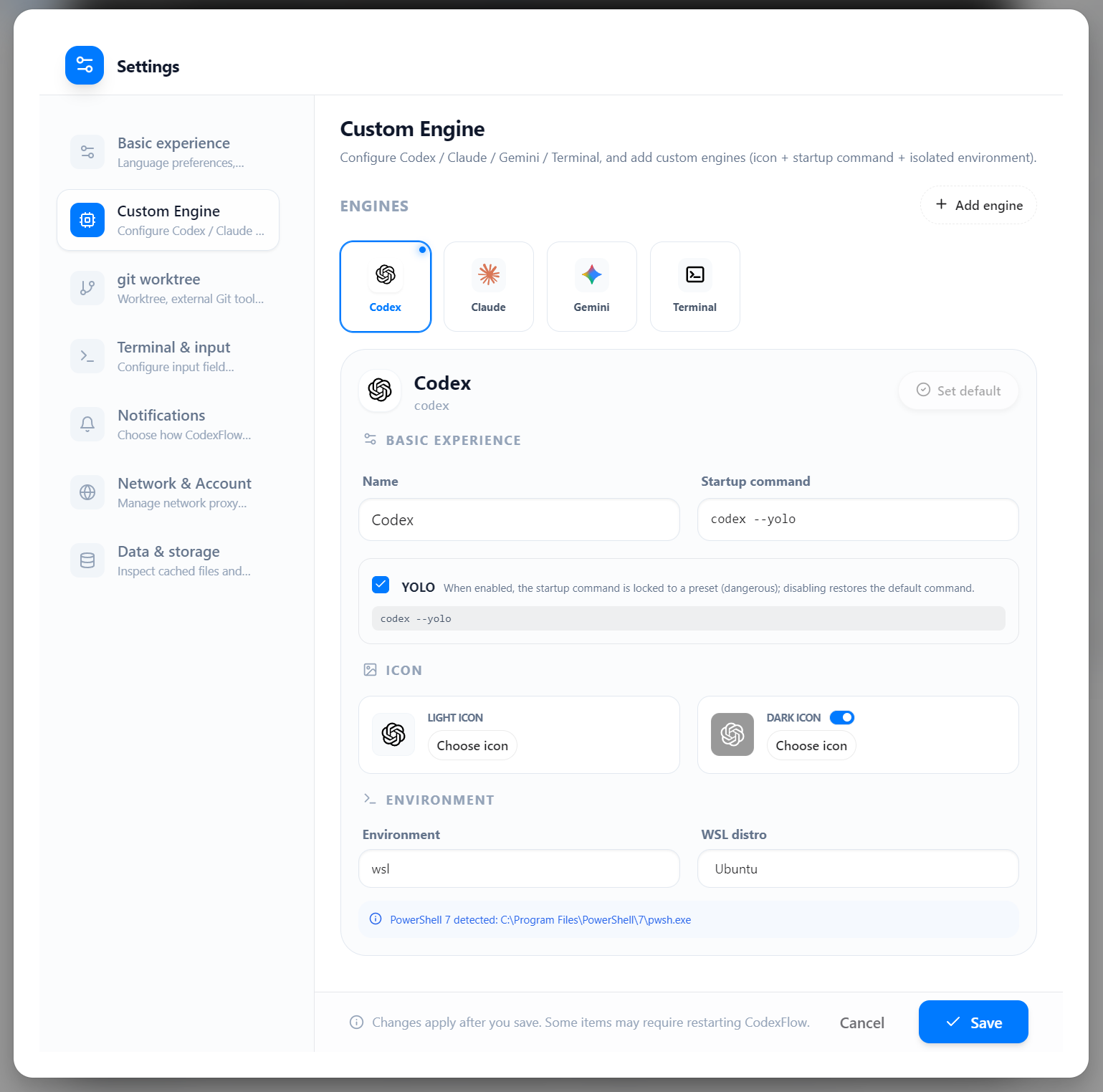
5) Settings & Engines (Custom Engines, Icons, Execution Environment)
🚀 Quick Start
Environment Preparation
- Windows 11 with WSL installed (Default distro
Ubuntu-24.04, configurable in settings; falls back to system default if specified distro is invalid). - At least one AI Programming Agent CLI runnable in WSL or PowerShell (e.g.,
codex,claude, orgemini). - For
codex, WSL Terminal Mode is recommended; PowerShell Mode (PS5 / PS7) is also available.
Setup Tutorials
Installation
- If a release version is available, download the latest installer from Releases.
- Otherwise, follow the "Development & Build" section below to package it locally.
First-Time Use
- Click the Settings (gear icon) in the top right to configure the environment: Select WSL / PowerShell, specify the correct WSL distro, and save.
- Choose your desired engine from the top bar (Codex / Claude / Gemini / Terminal / Custom).
- Select (or add) a project directory and click + to start a new session.
- Log in or provide API credentials in the terminal as required.
- Paste images, use
@for project files or rules, drag files in, and start your collaborative coding journey.
🧪 Usage Tips
- One-Click Resume: Select any conversation from the history list and click "Continue" to pick up where you left off — supported across all engines.
- Filter & Copy History: Supports filtering and direct copying of rendered content; Markdown rendering makes history easy to read.
- Input Boosters: Pasted images automatically show inline previews; use full-screen mode for composing long prompts.
- Worktree Workflow: Create worktrees from the project sidebar to run agents in parallel, then merge results back to the base branch.
- Multi-Project Management: The left sidebar shows active session counts, helping you keep track of multiple tasks.
- Multiple Instances (Profiles): Enable "Experimental Features" in settings (requires restart) to open multiple application instances. For a persistent profile, use
--profile <name>(e.g.,CodexFlow.exe --profile work). - Keyboard Shortcuts: Hover over list items to see available shortcuts; dialogs support keyboard navigation.
🛠️ Development & Build
Development Environment
- Node.js ≥ 18
- WSL installed with an available distro (Default:
Ubuntu-24.04)
Start Development
# Install dependencies (compiles Electron main process and rebuilds native modules)
npm i

# Launch Vite (web) and Electron (main process) concurrently
npm run dev
# During development, the main process loads from DEV_SERVER_URL=http://localhost:5173
Production Build
# Equivalent to: npm run build:web && electron-builder
npm run build
- The
postinstallscript compiles the main process todist/electronand rebuilds native modules (likenode-pty) before packaging. - On Windows, you can run
build-release.bat(passingskip-installto skip reinstalling dependencies). - If you modify
/electron/*source code, rerunnpm ior manually runnpx tsc -p tsconfig.jsonto refreshdist/electron. Ifnode-ptyreports an ABI mismatch, runnpm run postinstallto rebuild native dependencies.
Common Scripts
npm run test        # Run unit tests with Vitest
npm run i18n:report # Check key differences against the English baseline
npm run i18n:check  # Strict key validation used in CI
🌐 Internationalization (i18n)
- Tech Stack: i18next + react-i18next + ICU; namespaces are split by module:
common,settings,projects,terminal,history,at. - Component Usage Example:
import { useTranslation } from 'react-i18next'
const { t } = useTranslation('settings')
t('settings:language.label')
- Resource Directory:
web/src/locales/<lng>/<namespace>.json - Switch Language: Settings page → "Interface Language", or via DevTools:
await window.host.i18n.setLocale('zh')
Scanning & Validation
# Report key differences against the English baseline (en)
npm run i18n:report

# Strict check for missing keys (used in CI)
npm run i18n:check
- Set the baseline language via the
BASE_LNG=xxenvironment variable (defaults toen). - Missing keys fall back to
en, avoiding empty string rendering (returnNull/returnEmptyString=false).
External Language Packs (Customizable without code changes)
- Windows:
%APPDATA%/codexflow/locales/<lng>/<namespace>.json
Example:C:\Users\you\AppData\Roaming\codexflow\locales\ja\common.json - WSL:
/mnt/c/Users/you/AppData/Roaming/codexflow/locales/ja/common.json
The settings page language list automatically merges "built-in locales" with "user directory locales"; user directory files have higher priority for local overrides.
📁 Directory Structure (Summary)
/electron/
  main.ts
  preload.ts
  pty.ts
  wsl.ts                        # Windows/WSL path & distro utilities
  i18n.ts                       # Main process language state & IPC bridge
  history.ts                    # History reader (JSONL)
  indexer.ts                    # History indexer (incremental cache + watchers)
  fileIndex.ts                  # File/Directory index (ripgrep + chokidar)
  notifications.ts              # System notification management
  storage.ts                    # App data & cache management
  debugConfig.ts                # Unified debug config (debug.config.jsonc)
  security/
    rendererHeaders.ts          # CSP & Security response headers
  git/
    exec.ts                     # Git command execution wrapper
    worktreeOps.ts              # Worktree create/recycle/delete
    worktreeCreateTasks.ts      # Concurrent creation tasks
    worktreeRecycleTasks.ts     # Merge & recycle tasks
    worktreeStateSnapshot.ts    # Transactional state snapshots
  codex/
    bridge.ts                   # Codex CLI bridge (auth, usage, rate limits)
    authBackups.ts              # Multi-account backup & switching
    config.ts                   # Codex config.toml management
  agentSessions/
    claude/                     # Claude session discovery & parsing
    gemini/                     # Gemini session discovery & parsing
  providers/
    runtime.ts                  # Engine runtime resolution
  projects/
    index.ts                    # Unified entry point (default fast implementation)
  stores/
    dirTreeStore.ts             # Directory tree persistence
    worktreeMetaStore.ts        # Worktree metadata persistence
    buildRunStore.ts            # Build/Run config persistence
/web/
  index.html
  src/
    App.tsx
    main.tsx
    index.css
    boot/theme-bootstrap.ts     # Theme pre-loading (prevents flickering)
    i18n/setup.ts
    adapters/TerminalAdapter.tsx
    features/
      settings/settings-dialog.tsx
      history/
        renderers/history-markdown.tsx   # Markdown + Shiki rendering
        find/history-find.ts             # In-page search highlighting
    components/
      topbar/
        provider-switcher.tsx            # Engine switcher
        codex-status.tsx                 # Codex usage panel
        claude-status.tsx                # Claude usage panel
        gemini-status.tsx                # Gemini usage panel
      ui/*
    lib/
      providers/                # Engine definitions & YOLO presets
      theme.ts                  # Theme management
      font-utils.ts             # Font enumeration & detection
      engine-rules.ts           # Rule file path resolution
      shell.ts                  # Shell command builder
      dir-tree-dnd.ts           # Directory tree drag-and-drop sorting
    providers/
      codex/commands.ts
      claude/commands.ts
      gemini/commands.ts
    types/host.d.ts
    vite.config.mts
/tailwind.config.js
/postcss.config.js
/package.json
/tsconfig.json
/.gitignore
/docs/
  i18n.md
  diagnostics.md
⚙️ Runtime Notes & Indexes
- Default Distro:
distro = 'Ubuntu-24.04' - Terminal Mode:
terminal = 'wsl' | 'windows' | 'pwsh'(PowerShell 5 / PowerShell 7 / CMD auto-detected) - Engine Commands: Each engine independently stores its startup command (e.g.,
codex,claude,gemini), with optional YOLO presets. - Execution:
- WSL:
bash -lc "<engineCmd>" - Windows: Executed within PowerShell (or pwsh / cmd).
- WSL:
- Project Path Example:
wslPath = '/mnt/c/Users/you/code/demo' - History Indexing:
electron/indexer.tsperforms background incremental indexing of all engine sessions and writes to a local cache; accessible via IPC with support for paginated loading. - File Indexing:
electron/fileIndex.tsuses ripgrep for initial full scans and chokidar for incremental updates (recommended to place ripgrep invendor/bin/rg.exe). Search is performed in the main process to avoid UI lag. - Git Worktree:
electron/git/worktreeOps.tsmanages the worktree lifecycle using transactional state snapshots. Metadata is stored inelectron/stores/worktreeMetaStore.ts. - Projects Module: Unified entry point via
electron/projects/index.ts, defaulting to theprojects.fast.tsimplementation; the active implementation is logged inperf.logat startup.
✅ Verification Steps (Recommended Self-Check)
- Open the app and click "New Agent": Verify the WSL prompt or command output appears.
- Type
uname -aorpwdin the input box and press Enter: Verify expected echo back. - Window Scaling: Verify terminal content automatically fits the window (FitAddon active).
- Switch Engines: Select different engines from the top bar and verify new sessions start correctly.
- (Optional) Create a worktree from the sidebar and verify the agent starts in the new worktree directory.
- (Optional) If
codexis installed, runcodex .and verify it starts and outputs logs.
🔐 Security & Paths
- Renderer Security:
contextIsolation: true,nodeIntegration: false; all capabilities exposed via a minimal API inelectron/preload.ts(Type definitions inweb/src/types/host.d.ts). - Content Security Policy (CSP): Strict resource loading policies enforced via both meta tags and response headers (
electron/security/rendererHeaders.ts), includingframe-ancestors 'none'andX-Frame-Options: DENY. - Path Conversion: See
electron/wsl.tsfor conversion between Windows drive letters/\\wsl.localhost\Distro\...and WSL paths.
🩺 Diagnostics & Logs
- See
docs/diagnostics.mdfor details. - Unified Debug Config: Place
debug.config.jsoncin the app data directory to enable per-module diagnostics. - Main Process: Set environment variable
CODEX_DIAG_LOG=1to write logs to%APPDATA%/codexflow/perf.log. - Renderer: Run
localStorage.setItem('CF_DIAG_LOG','1')in the console.
🤝 Community & Contributions
- 💬 Q&A / Discussions: GitHub Discussions
- 🐞 Bugs / Feature Requests: GitHub Issues (please use the template and include system info/reproduction steps)
- 🤲 Contribution Workflow: See
CONTRIBUTING.mdorCONTRIBUTING.zh-CN.md - 🔐 Security Issues: See
SECURITY.md(do not disclose in public issues) - 🔏 Privacy Policy: See
PRIVACY.md
Stars ⭐, Pull Requests, and Language Pack translations are all welcome.
📄 License
This project is open-source under the Apache License 2.0. See the LICENSE file for details. For redistribution, please retain the additional notices in the NOTICE file.
🧾 Resources & Conventions (Copy Ready)
- App Screenshots:
assets/screenshots/<feature-name>.(gif|png) - Branding: Always use CodexFlow; do not abbreviate.
- Reference Links:
- Repository: https://github.com/lulu-sk/CodexFlow
- Releases: https://github.com/lulu-sk/CodexFlow/releases
Reviews (0)
Sign in to leave a review.
Leave a reviewNo results found