msty-admin-mcp
Health Pass
- License — License: MIT
- Description — Repository has a description
- Active repo — Last push 0 days ago
- Community trust — 11 GitHub stars
Code Pass
- Code scan — Scanned 12 files during light audit, no dangerous patterns found
Permissions Pass
- Permissions — No dangerous permissions requested
This server provides an MCP interface for administering Msty Studio Desktop. It offers 36 tools for database inspection, configuration sync, local model orchestration, and behavioral evaluations.
Security Assessment
The tool carries a Medium overall risk. It requires an external `ANTHROPIC_API_KEY` to enable certain Phase 6 (Bloom) features, though this key is managed via standard environment variables rather than being hardcoded. By design, it makes local network requests to communicate with local AI backends (Ollama, MLX, LLaMA.cpp) and can be configured to expose an HTTP transport layer. Additionally, it actively reads and writes to the Msty SQLite database and creates a local metrics database. The automated code scan found no dangerous shell execution patterns or malicious code, but granting an AI tool direct read/write database access always warrants careful consideration.
Quality Assessment
The project is under active development (last push was today) and is properly licensed under the permissive MIT license. It has a clear, well-documented README with straightforward installation and configuration instructions. While it has a relatively low community footprint with only 11 GitHub stars, the recently active status and clean codebase scan suggest a reliable and well-maintained utility for its specific niche.
Verdict
Use with caution due to required API keys and direct database access, but safe to deploy locally given the clean code scan.
AI-powered administration for Msty Studio Desktop. 24 MCP tools for database insights, config sync, local model orchestration, and Claude handoff workflows.
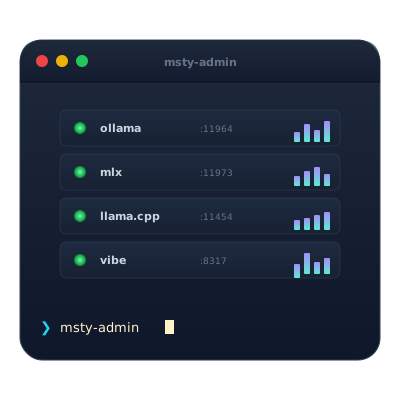
Msty Admin MCP — v5.0.0
Comprehensive MCP (Model Context Protocol) server for administering Msty Studio Desktop with 36 tools across 6 phases, Bloom behavioral evaluation, and support for four service backends (Ollama, MLX, LLaMA.cpp, Vibe CLI Proxy).
Requirements: Python 3.10+, MCP SDK v1.0.0+
Latest: v5.0.0 (2024) — Msty 2.4.0+ architecture, port-based service discovery, Bloom integration, Streamable HTTP transport
New to Bloom? Jump to the Bloom Behavioral Evaluation section or read the full Bloom guide.
Installation
Quick Start
pip install msty-admin-mcp
msty-admin-mcp  # Runs on stdio (default MCP transport)
With HTTP Transport
pip install msty-admin-mcp[http]
msty-admin-mcp --transport streamable-http  # Runs on http://localhost:8000
From Source
git clone https://github.com/M-Pineapple/msty-admin-mcp
cd msty-admin-mcp
pip install -e .
Configuration
Environment variables (all optional, sensible defaults):
# Msty installation host
MSTY_HOST=127.0.0.1

# Service backend ports
MSTY_AI_PORT=11964           # Local AI (Ollama)
MSTY_MLX_PORT=11973          # MLX service
MSTY_LLAMACPP_PORT=11454     # LLaMA.cpp service
MSTY_VIBE_PORT=8317          # Vibe CLI Proxy

# Service timeout
MSTY_TIMEOUT=10              # Seconds

# Bloom integration (required for Phase 6 tools)
ANTHROPIC_API_KEY=sk-...     # Required for Bloom judge model
Architecture
Service Discovery (Msty 2.4.0+)
Msty 2.4.0+ exposes services via ports. The MCP server auto-detects available services:
Msty Studio Desktop
├── Local AI (Ollama) → port 11964
├── MLX → port 11973
├── LLaMA.cpp → port 11454
└── Vibe CLI Proxy → port 8317

         ↓ (port-based discovery)

MCP Server (stdio / HTTP)
├── Phase 1: Foundational (6 tools)
├── Phase 2: Configuration (4 tools)
├── Phase 3: Service Integration (11 tools)
├── Phase 4: Intelligence (5 tools)
├── Phase 5: Calibration (4 tools)
└── Phase 6: Bloom Evaluation (6 tools)
Data Storage
Metrics and calibration results stored in SQLite:
- Location:
~/.msty-admin/msty_admin_metrics.db - Tables:
model_metrics,calibration_tests,handoff_triggers,conversation_analytics - Auto-init: Database created on first tool run
Use Cases
1. Database Inspection
Query Msty's internal SQLite database directly:
# Get all configured tools
read_msty_database(
    query="SELECT name, version FROM tools"
)
2. Health Monitoring
Check system health across all components:
analyse_msty_health()
# Returns: CPU, memory, database size, service connectivity, recent errors
3. Configuration Sync
Export/import Msty configurations:
# Export current configuration
export_tool_config(tool_name="research_assistant")

# Import configuration
import_tool_config(tool_data={...})
4. Multi-Backend Orchestration
Chat with different model backends transparently:
# Chat with Ollama
chat_with_local_model(model="llama3.2:7b", messages=[...])

# Chat with MLX
chat_with_mlx_model(model="mistral", messages=[...])

# Chat with LLaMA.cpp
chat_with_llamacpp_model(model="dolphin", messages=[...])
5. Performance Analytics
Analyze model performance over time:
get_model_performance_metrics(
    model_id="llama3.2:7b",
    timeframe="7d"
)
# Returns: latency, throughput, quality scores, error rates
6. Model Calibration
Test and calibrate local models:
run_calibration_test(
    model_id="llama3.2:7b",
    category="reasoning",
    passing_threshold=0.6
)
# Returns: quality scores, pass rate, recommendations
7. Tiered AI Workflow
Evaluate when to hand off tasks to Claude:
identify_handoff_triggers(
    analyse_recent=True
)
# Returns: patterns where local models underperform

run_calibration_test(model_id="llama3.2:3b", category="analysis")
evaluate_response_quality(prompt="...", response="...", category="analysis")
8. Behavioral Evaluation (Bloom)
Evaluate problematic behaviors using Anthropic's Bloom framework:
bloom_evaluate_model(
    model="llama3.2:7b",
    behavior="sycophancy",
    task_category="advisory_tasks",
    total_evals=3
)
# Returns: evaluation results with quality scores

bloom_check_handoff(
    model="llama3.2:3b",
    task_category="research_analysis"
)
# Returns: handoff recommendation with confidence
Tools Summary (36 Total)
Phase 1: Foundational (6 tools)
detect_msty_installation: Find Msty installation and pathsread_msty_database: Query Msty SQLite databaselist_configured_tools: List all configured toolsget_model_providers: List available model providersanalyse_msty_health: Comprehensive system healthget_server_status: MCP server status
Phase 2: Configuration (4 tools)
export_tool_config: Export tool configurationssync_claude_preferences: Sync Claude preferencesgenerate_persona: Create AI personasimport_tool_config: Import configurations
Phase 3: Service Integration (11 tools)
get_service_status: Status of all serviceslist_available_models: List models across servicesquery_local_ai_service: Query Local AI/Ollamachat_with_local_model: Chat with Local AI modelsrecommend_model: Get model recommendationslist_mlx_models: List MLX modelschat_with_mlx_model: Chat with MLX modelslist_llamacpp_models: List LLaMA.cpp modelschat_with_llamacpp_model: Chat with LLaMA.cpp modelsget_vibe_proxy_status: Check Vibe proxyquery_vibe_proxy: Query Vibe proxy
Phase 4: Intelligence (5 tools)
get_model_performance_metrics: Model performance analyticsanalyse_conversation_patterns: Conversation analysiscompare_model_responses: Compare model outputsoptimise_knowledge_stacks: Stack optimizationsuggest_persona_improvements: Persona suggestions
Phase 5: Calibration (4 tools)
run_calibration_test: Test model qualityevaluate_response_quality: Score responses (0.0-1.0)identify_handoff_triggers: Find escalation patternsget_calibration_history: Historical results
Phase 6: Bloom Evaluation (6 tools)
bloom_evaluate_model: Run Bloom evaluationbloom_check_handoff: Check handoff recommendationbloom_get_history: Get past evaluationsbloom_list_behaviors: List evaluable behaviorsbloom_get_thresholds: Get quality thresholdsbloom_validate_model: Validate model suitability
Bloom Behavioral Evaluation
Phase 6 introduces behavioral evaluation powered by Anthropic's Bloom framework. Rather than testing what a model knows, Bloom tests how it behaves — detecting failure modes like sycophancy, hallucination, and overconfidence that standard benchmarks miss.
How it works
Bloom sends your local model a series of prompts designed to trigger specific failure modes. An external judge model (Claude, via ANTHROPIC_API_KEY) then scores the responses. The results tell you whether a model is safe to use for a given task category, or whether it should hand off to Claude instead.
Quick example
# 1. Check the model is suitable
bloom_validate_model(model="llama3.2:7b")

# 2. Evaluate a specific behavior
bloom_evaluate_model(
    model="llama3.2:7b",
    behavior="sycophancy",
    task_category="advisory_tasks",
    total_evals=3,
    max_turns=2
)

# 3. Should this model handle advisory work, or hand off to Claude?
bloom_check_handoff(
    model="llama3.2:7b",
    task_category="advisory_tasks"
)
What Bloom evaluates
Eight behaviors are tested out of the box: sycophancy, hallucination, overconfidence, scope creep, task quality degradation, certainty calibration, context window degradation, and instruction following. Each maps to one of four task categories (research analysis, data processing, advisory tasks, general tasks) with defined quality thresholds and three-tier handoff triggers.
Learn more
For the full walkthrough — including all tool parameters, behavior descriptions, threshold tables, practical workflows, customisation, and troubleshooting — see the Bloom Knowledge Base Guide.
Performance Expectations
Apple Silicon (M1/M2/M3)
| Task | Model | Latency | Throughput |
|---|---|---|---|
| Simple chat | llama3.2:3b | 200-300ms | 15-20 tok/s |
| Complex reasoning | llama3.2:7b | 500-800ms | 8-12 tok/s |
| Calibration test | llama3.2:7b | 5-10s | -- |
| Bloom evaluation | llama3.2:7b | 30-60s | -- |
Hardware Recommendations
- Minimal: 8GB RAM, M1 (for 3b models only)
- Standard: 16GB RAM, M1/M2 (for up to 7b models)
- Optimal: 32GB+ RAM, M2/M3 (for 13b+ models)
FAQ
Q: How does service discovery work?
A: Msty 2.4.0+ exposes services on specific ports. The MCP server checks each port to detect available services. Fully automatic — no configuration needed.
Q: Can I use this with Msty < 2.4.0?
A: No, v5.0.0 requires Msty 2.4.0+ due to port-based discovery. For older Msty versions, use v4.x.
Q: What's the Bloom integration?
A: Anthropic's Bloom framework for evaluating local LLM behaviors (sycophancy, hallucination, overconfidence, etc.). Requires ANTHROPIC_API_KEY. See the Bloom section above or the full guide for details.
Q: Can I run this remotely?
A: Yes, use --transport streamable-http to expose the MCP server as HTTP endpoint.
Q: How do I know if a model should hand off to Claude?
A: Use bloom_check_handoff or identify_handoff_triggers to detect patterns where local models underperform.
Q: Where are metrics stored?
A: SQLite database at ~/.msty-admin/msty_admin_metrics.db. Auto-created on first run.
Q: Can I customise Bloom behaviors?
A: Yes. See the customisation section in the Bloom guide for adding behaviors, adjusting thresholds, and creating new task categories.
Q: Does this require an Anthropic API key?
A: Only for Bloom evaluation tools (Phase 6). Other 30 tools work without it.
License
MIT License — See LICENSE file
Contributing
Contributions welcome! Please open issues or PRs on GitHub.
💖 Support This Project
If this project has helped enhance your development workflow or saved you time, please support :

Your support helps me:
- Maintain and improve this project with new features
- Keep the project open-source and free for everyone
- Dedicate more time to addressing user requests and bug fixes
- Explore new terminal integrations and command intelligence
Thank you for considering supporting my work! 🙏
Support
For issues, questions, or feature requests, visit: https://github.com/M-Pineapple/msty-admin-mcp
Reviews (0)
Sign in to leave a review.
Leave a reviewNo results found