herdr-workspaces
Health Warn
- License — License: Apache-2.0
- Description — Repository has a description
- Active repo — Last push 0 days ago
- Low visibility — Only 7 GitHub stars
Code Fail
- rm -rf — Recursive force deletion command in install.sh
- process.env — Environment variable access in install.sh
- fs module — File system access in install.sh
- process.env — Environment variable access in mods/ws-agents/accounts.js
- exec() — Shell command execution in mods/ws-agents/acctfacts.js
- exec() — Shell command execution in mods/ws-agents/agywipe.js
- fs.rmSync — Destructive file system operation in mods/ws-agents/agywipe.js
- process.env — Environment variable access in mods/ws-agents/agywipe.js
- exec() — Shell command execution in mods/ws-agents/knobs.js
- exec() — Shell command execution in mods/ws-agents/menufacts.js
- exec() — Shell command execution in mods/ws-agents/pbfacts.js
Permissions Pass
- Permissions — No dangerous permissions requested
No AI report is available for this listing yet.
Workspaces for Herdr: multi-repo workspaces with their own agent instructions, a task board, agent presets, automations, and agents that come back after a restart
Workspaces for Herdr
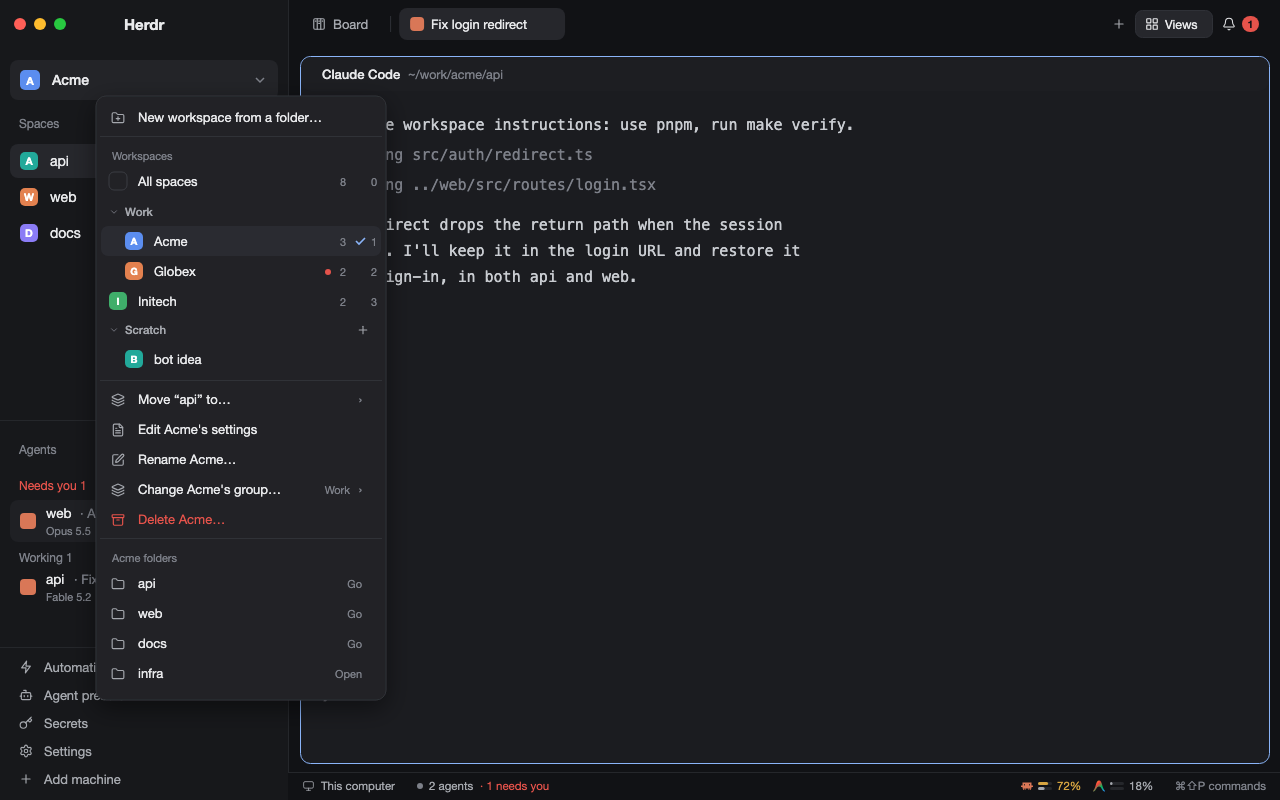
A Herdr layout for multi-repo work: workspaces with their own agent
instructions, a task board that starts agents and follows their pull requests,
your GitHub project board beside it, a worktrees tab, agent presets, automations,
and agents that come back after a restart.
The pictures here are drawings with demo names, not screenshots. RECIPE.md
describes everything in full: it's the brief an agent builds it from.
What you get
Workspaces
A workspace is a folder of repos with its own agent instructions; it groups
Herdr's spaces. The switcher at the top of the sidebar picks one, and the spaces
and agents lists show only what's in it. What needs you elsewhere is in the tab
bar's bell (below), not on the switcher.
- New space: a click on the Spaces + makes one in the workspace's root. Hold
it (or right-click) to name the space and choose its folder. - Scratch, always last in the switcher, holds throwaway spaces for ideas that
belong to no project. You name each one as you make it, and it gets a fresh
folder carrying that name, tidied away when you're done unless you keep it. - Instructions: a workspace's
AGENTS.mdgoes to the agents you start
there (Claude Code, Codex, Antigravity and Pi). ABRIEF.mdbeside it, where the work stands today, goes with it, and~/.herdr/AGENTS.mdis a guide for the agents of every workspace. - Agent numbers: a Claude Code, Pi or Antigravity agent's row in the Agents
list also shows its model, how full its context is and how many times it was
compacted (hover for the effort, tokens, last compaction and cost), and the
status bar shows how much of your Claude and Antigravity plans you've used, as
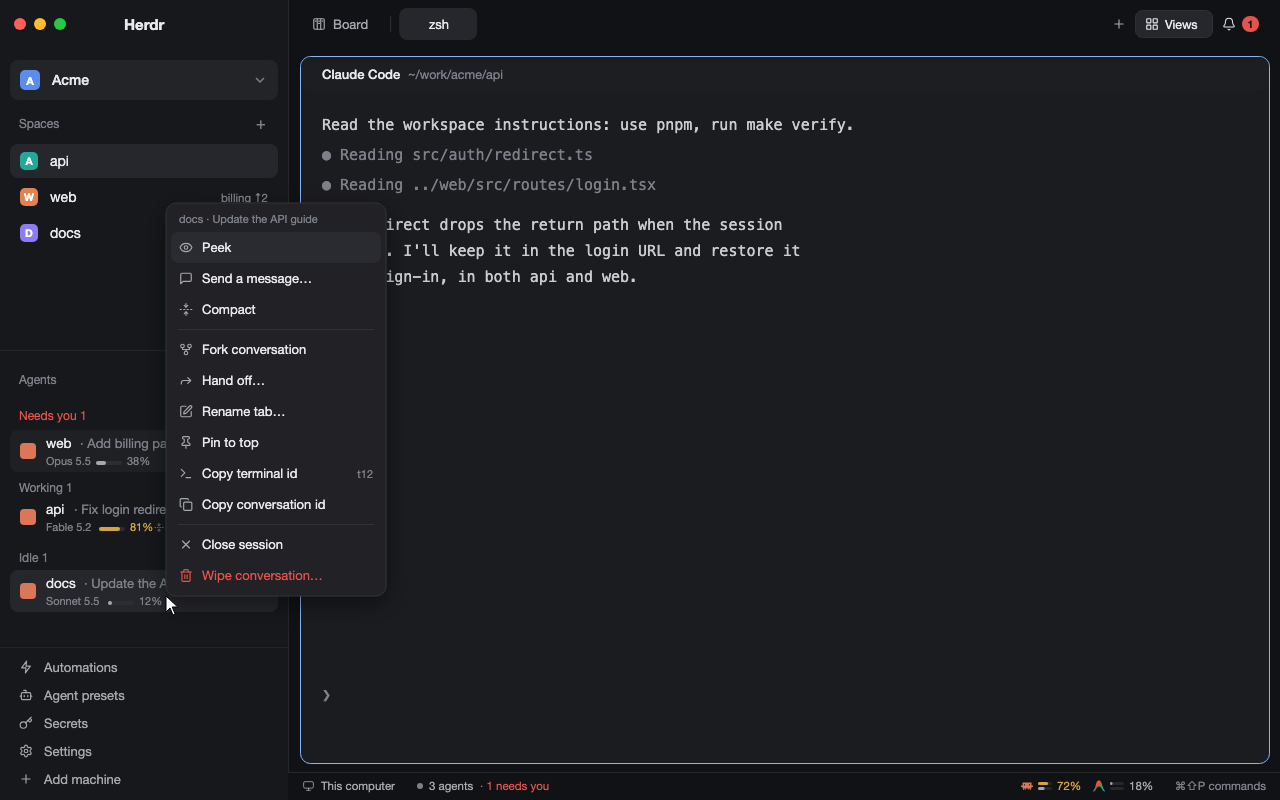
each one's own/usagegives it, with every limit and when it resets a click away. - Agent menu: right-click an agent in the Agents list (or click the ⋯ on a
hovered row) to peek at it, send it a message without going there, interrupt
or compact it, fork its conversation into a new tab, rename its tab or pin it, copy
its terminal or conversation id, close it, or wipe it (close it and move its
conversation to the Trash).
Views
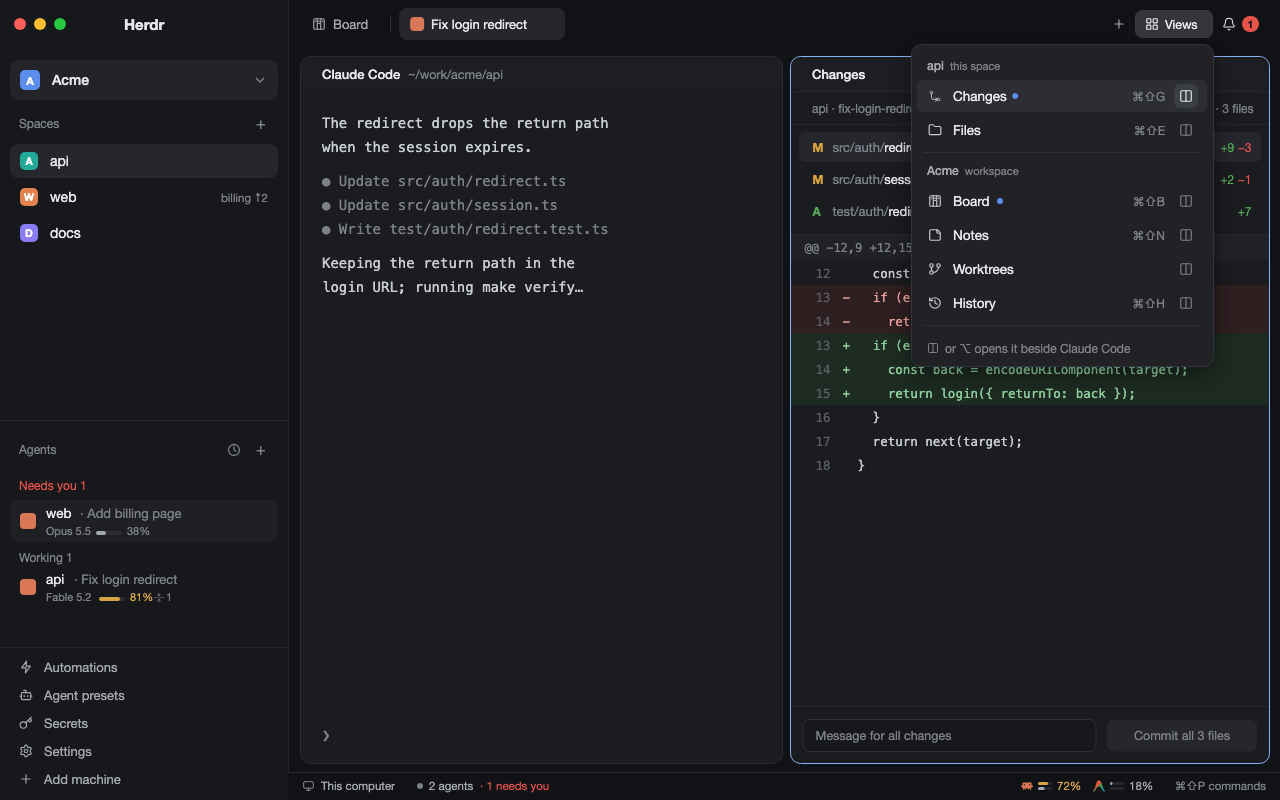
The tab bar's Views button opens the space's Changes and Files and the
workspace's Board, Notes, Worktrees and History, each full size in place of the
terminals (a pill before the tabs brings it back) or beside them as a pane.
Changes and Files follow the terminal you were using. Files edits text, code,
Markdown and SVG in place (Save, never on its own), previews Markdown, SVG and
images (Source | Preview | Split), searches the folder, and opens a file in the
app you pick (Open in … ▾, remembered per extension). Cmd-click a path in a
terminal or an agent's output and it opens in Files beside that terminal.
Notifications
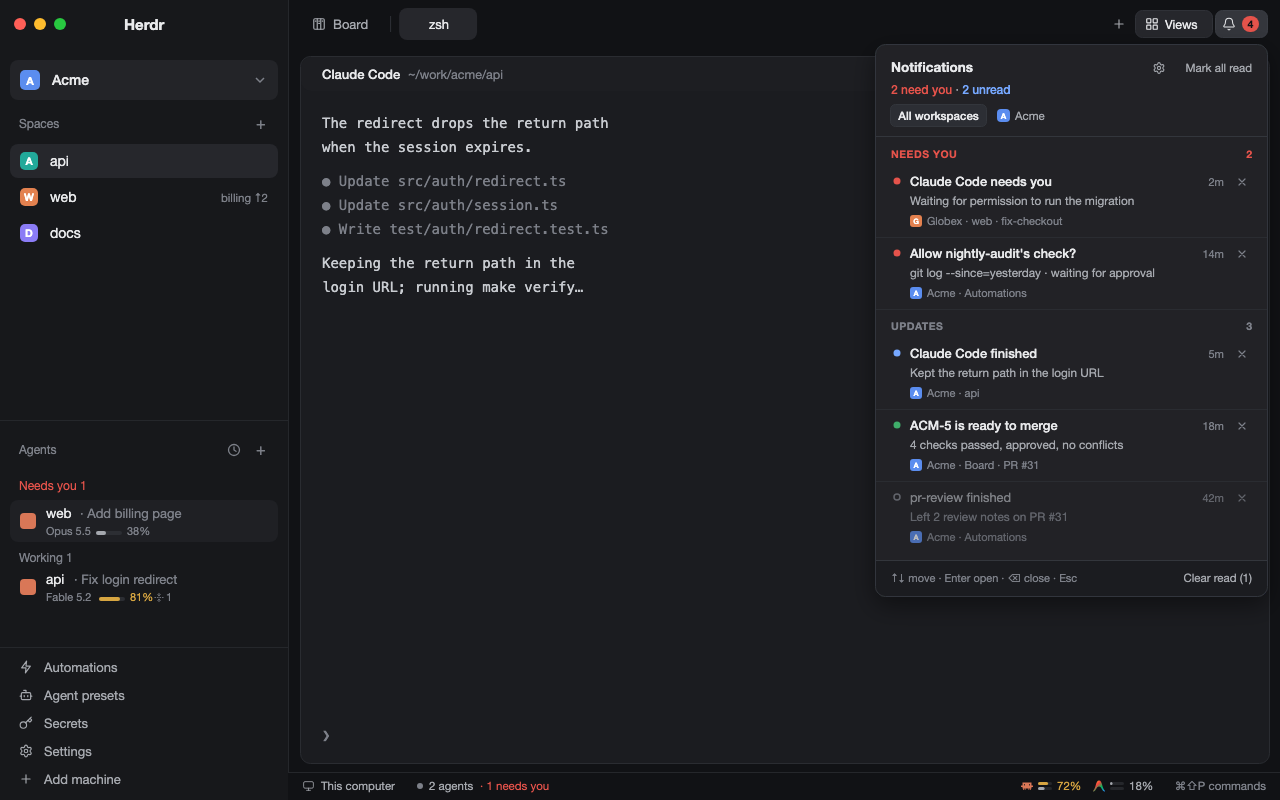
A bell at the right end of the tab bar lists what needs you and what finished,
in every workspace, with where each one is. Its count is red while anything
needs you and blue for unread updates only.
- Needs you stays at the top until it's resolved: an agent or a helper
waiting on you, an automation run stuck at a question, a check you haven't
allowed or that fails, a card's pull request failing, with changes asked for
or conflicting while no agent works on it. - Updates: an agent or an automation run that finished (not one with
nothing to do), an automation that didn't start or was missed while Herdr was
closed, a card's pull request ready to merge, merged or closed, and what only
the system says (a machine needs a login, the background runner didn't
start). Every error a toast showed is kept there too, with its whole text.
A run that failed, ended without its outcome line, didn't start or was
missed is red. - One click goes there: the agent, the run's tab or the run in History, the
card on its board, the automation. An update is read once clicked; Mark all
read and Clear read tidy the rest, and updates go after 7 days. A row's ×
(or Backspace) closes it; what still waits on you comes back the next time. - It remembers across restarts, the background runner's news from while
Herdr was closed included.
A task board
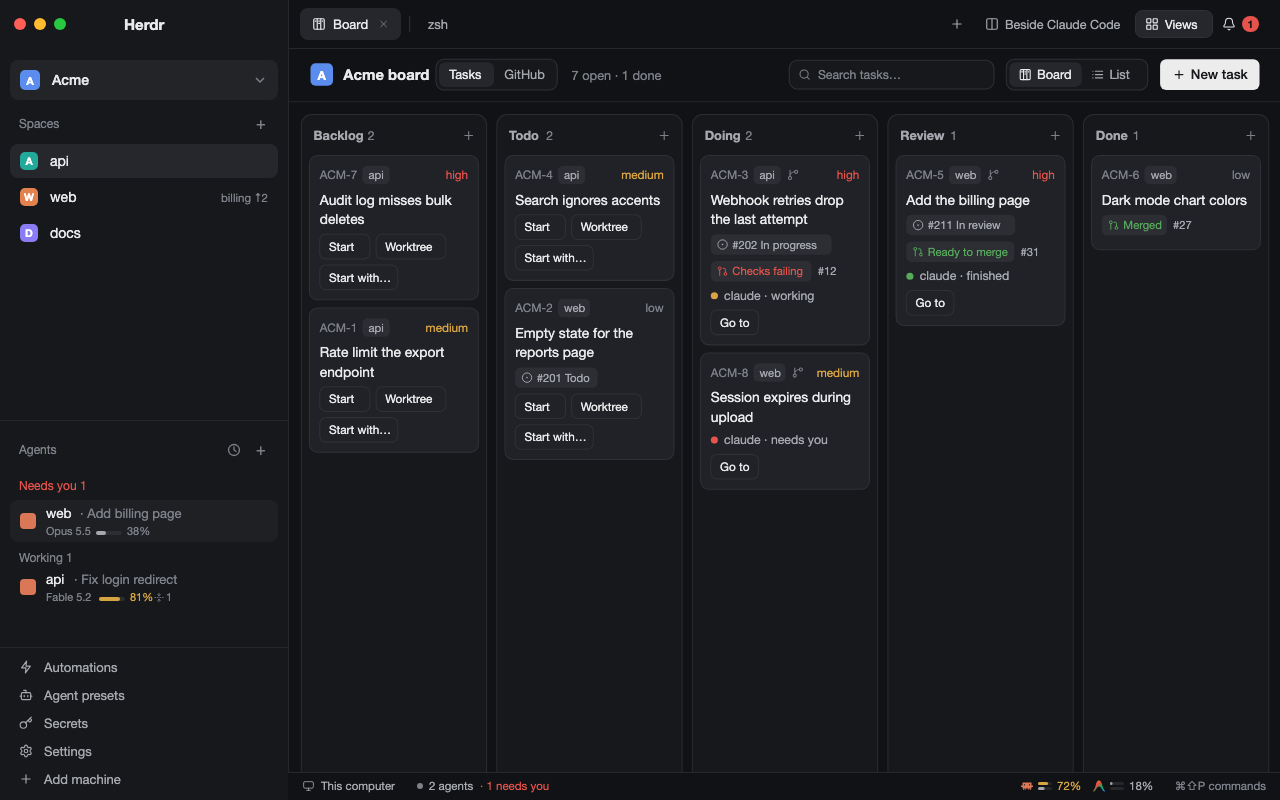
Each workspace has a board, as columns or as a list. A task is one markdown
file, so agents can read and write them too. The board belongs to the workspace,
not to one space: once opened, it's a pill before the tabs of every space of the
workspace, and it opens even when the workspace has no spaces. Open it from the
tab bar's Views, full size or beside your terminals.
- Start on a card starts an agent on its task, in the repo or in a fresh git
worktree, with the preset you pick. The card then shows that agent's live
status, and Go to takes you to it. - Start with… beside it picks, for that one start, another preset or agent,
another folder and the first message (Start's own, to edit), and starts the
card the same way. - A card follows its pull request. It shows whether checks fail, changes are
requested, it conflicts or it's ready to merge, tells the card's agent when a
check fails or a review arrives, and moves to the last column when it merges.
A card still in Todo when its pull request opens moves to Review.
Your GitHub project board
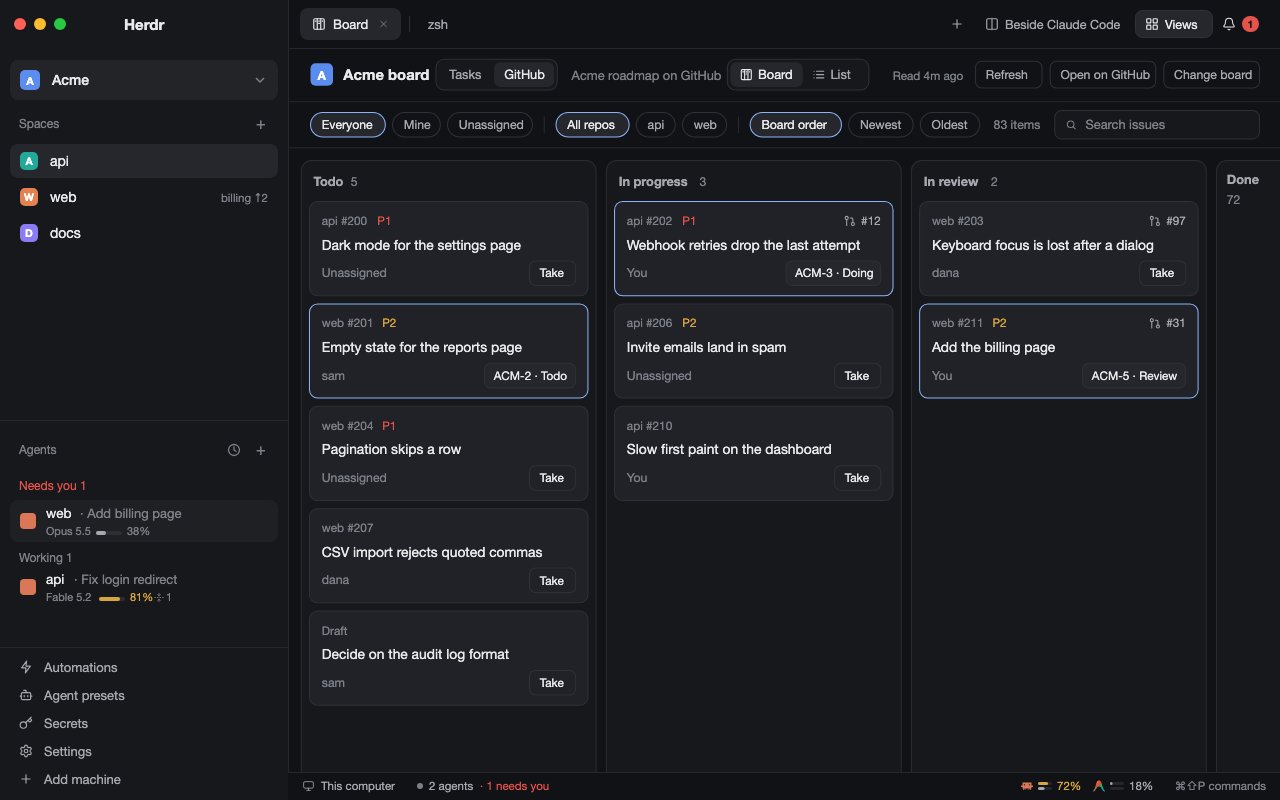
Tasks | GitHub in the board's header shows the workspace's GitHub project board
with its own status columns, or as a list with a section per status.
- Filters: Everyone, Mine or Unassigned, one repo, a search, and Newest or
Oldest in place of the board's own order. - Take on any item, yours or not, makes a card on your board with the
issue's title, text, folder and priority. The card then shows the item's
status on GitHub, follows a changed title, moves to your last column when the
issue closes, and picks up a pull request of yours that closes it. - It only reads. Nothing changes on GitHub, so assign yourself there when
your team expects it. It needsghwith theread:projectscope
(gh auth refresh -s read:project). - A read is kept for 10 minutes, so going back to the view shows the board
at once. Refresh reads it now.
Worktrees
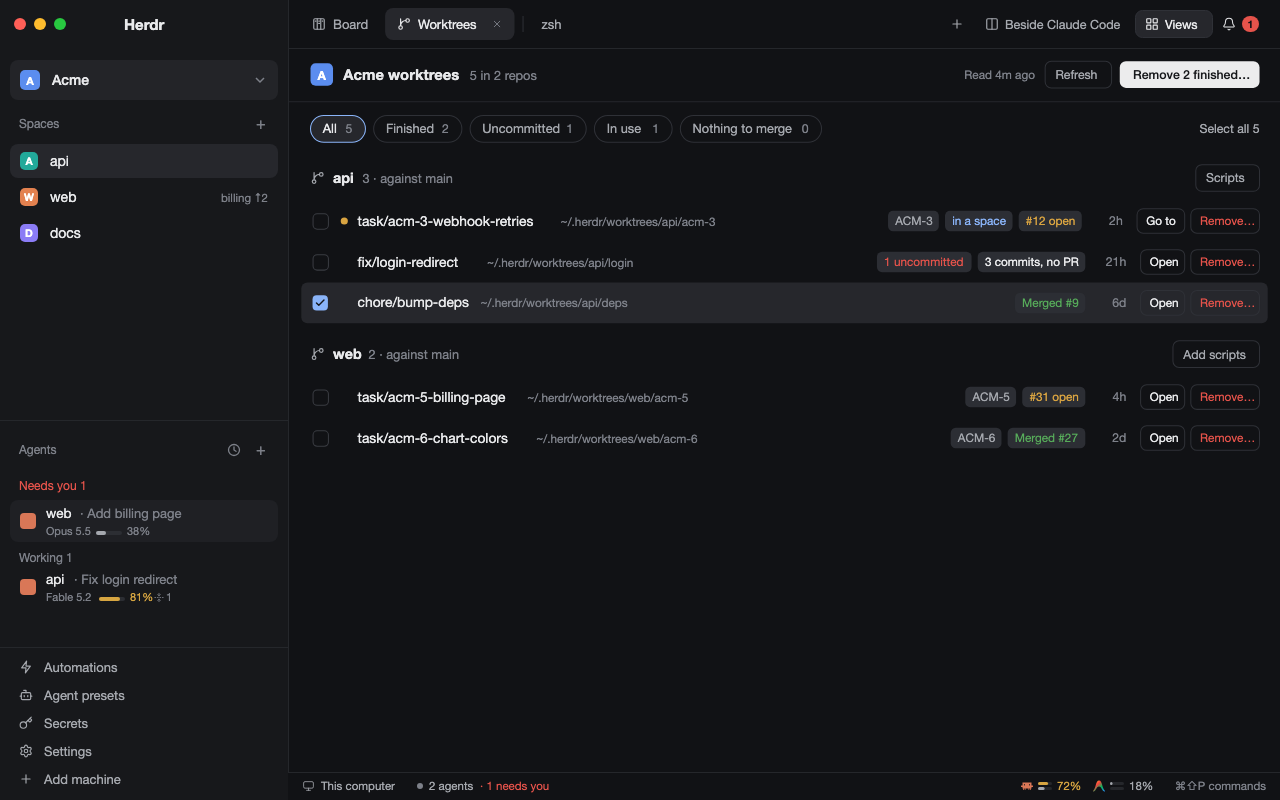
Worktrees in the tab bar's Views lists every git worktree of the
workspace's repos, wherever it was made. Like the board it belongs to the
workspace: a pill in the tab bar of each of its spaces.
- Where each one stands: merged, a pull request open, commits with no pull
request, uncommitted changes, and whether a card, a space or a terminal is in it. - Remove N finished… clears the merged, clean, unused ones; the branches
stay. Checkboxes pick any others to remove together. - Scripts per repo: a line to run in a new worktree (install, copy
.env)
and one to run before a worktree is removed. Only a line you saved or allowed
runs.
History
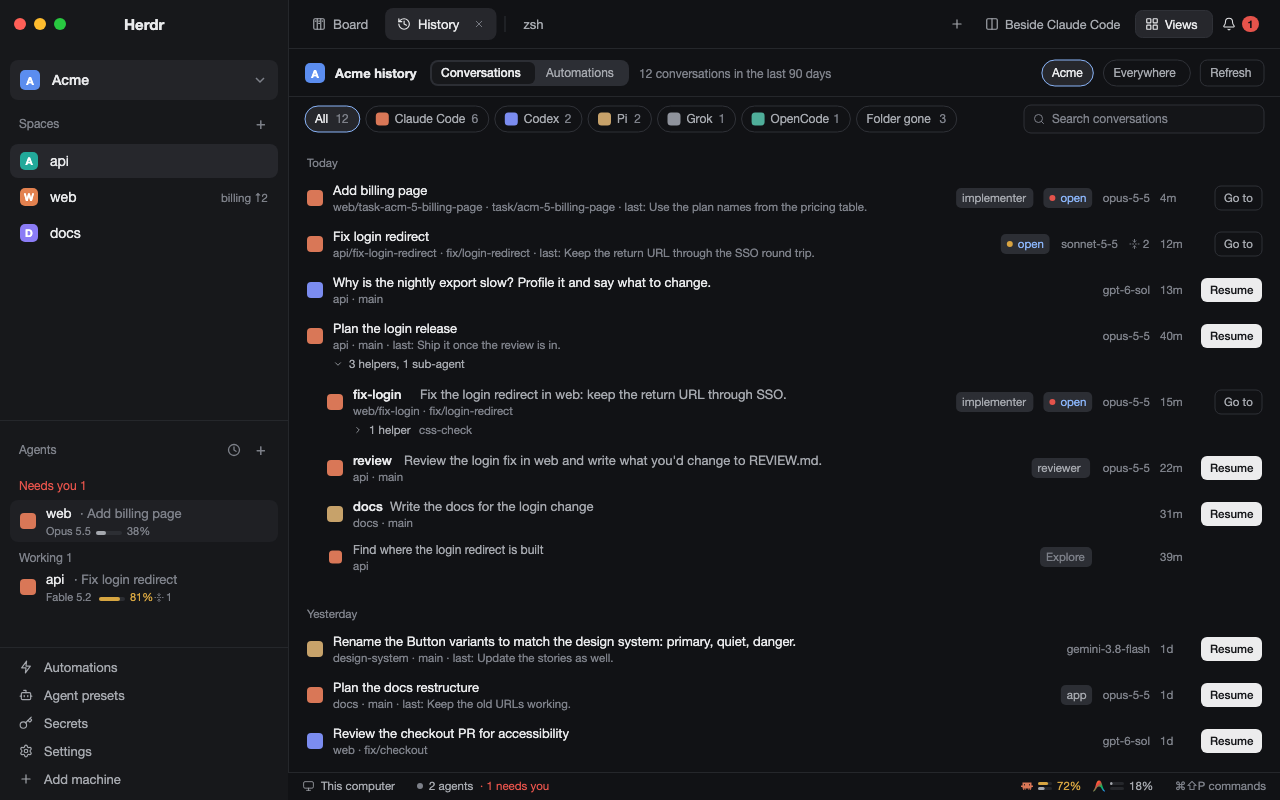
History in the tab bar's Views
lists the conversations your agents saved, newest first, whichever agent it
was: Claude Code, Codex, Pi, Grok, OpenCode and Antigravity. Like the board it belongs to
the workspace: a pill in the tab bar of each of its spaces.
- Resume continues a conversation in a new tab, in the folder it ran in.
One started from a preset comes back as that preset. - Open ones say so and offer Go to instead, so a conversation isn't opened
twice. Where History can only guess, the row says "open?" and keeps Resume. - This workspace or everywhere, a chip per agent, and search across titles,
prompts, folders and models. - Compactions: a Claude Code, Pi or Antigravity conversation shows how many
times it was compacted; opened, when each one was, how, how big the context
was before and after, and what was in it at the end. - Automations, the header's other side: each automation run with what its
agent said at the end and how it went (running, needs you, done, failed,
nothing to do), the whole report a click away, Go to while its tab is open
and Resume once it's closed. A shell script's run shows its exit code, how
long it took and its output, with Run again and Open log in Files. - It only reads what the agents already keep; nothing is copied or changed.
It needs Node 20.6 or newer.
Notes
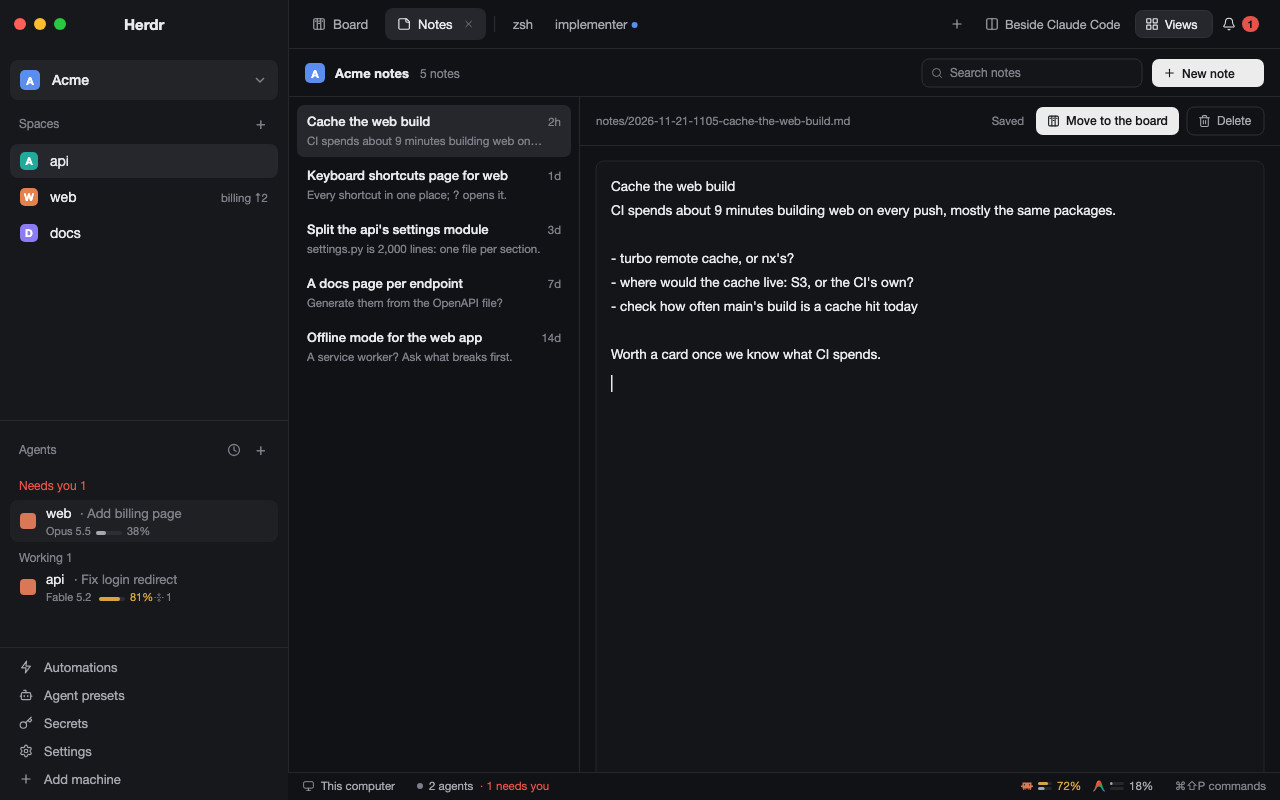
Notes in the tab bar's Views keeps a
workspace's rough ideas, the ones you don't want to start yet. A note is just
writing: its first line is its title, and it's saved as you type, one markdown
file each in the workspace's notes/ folder. Like the board it's a pill in the
tab bar of each of the workspace's spaces.
- Move to the board when it's ready to be work: it becomes a card in the
first column and leaves Notes (the note goes to the Trash), so work waits in
one place and starts from the card. - Search, newest edited first, and Delete moves a note to the Trash.
- An agent can add one too ("note this for later"), and a note an agent or an
editor changes shows as it is now, unless you're typing in it.
Automations
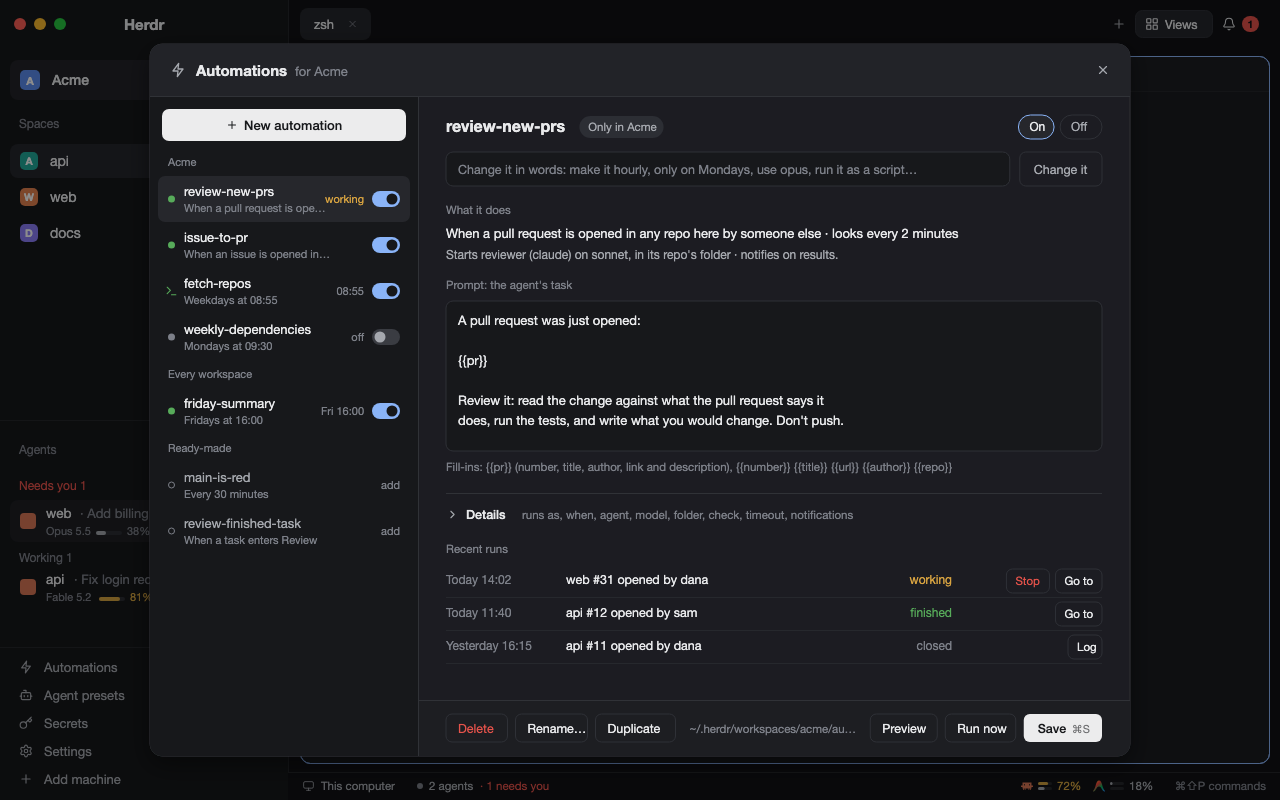
An automation starts an agent by itself, or runs a shell script with no agent
at all. You make one by saying what it should do and when, in your own words:
an agent's CLI (Claude, Codex, Antigravity or Pi, as Settings > Automations
says) drafts the trigger, the agent, its model and the prompt, or a script when
no agent is needed, and you read the draft before it's saved.
- What sets one off: a schedule (once or repeating), a task entering a board
column, an agent finishing or needing you, files changing, GitHub (a PR or
issue opened or labeled, a PR merged or waiting for your review, CI failing;
asked every 2 minutes throughgh), another automation finishing or failing,
Herdr starting or the Mac waking, or another app callingherdr-ws-run. - Shell scripts (
run: shell): fetching repos, running tests, a backup. A
script runs in the background by default (or in a tab), with what set it off
as$HERDR_…variables; History keeps its exit code and output, and the bell
pins a failure. Try it runs it on the spot; Preview shows what a run would
get without starting anything. - Guardrails: a timeout per automation (scripts 2 minutes by default), at
most two agent runs at once (the rest queue), notification levels (problems
only, results, everything, silent), quiet hours for the desktop sound, and
what to do with a missed schedule. - Seven ready-made ones to start from (issue to pull request, PR review, a
broken default branch, a morning review and more): open one, read it, and
Create adds it. - One workspace's own or for every workspace
(~/.herdr/workspaces/<id>/automations/or~/.herdr/automations/). A global
one runs in each workspace as that workspace's own, a workspace's own of the
same name replaces it there, and its switch turns it off for one workspace
alone.github * issue openedwatches every repo of the workspace it runs in. - A check first: a command that runs before the agent, so no agent starts
when there's nothing to do. It runs only once you've allowed it. - Keep running, in Settings > Automations: a background process herdr-core
keeps going while Herdr is closed (it needs Node 20.6 or newer). Start at
login runs it after a reboot without opening Herdr, from a LaunchAgent on
macOS or a systemd user unit on Linux; scripts then run without starting herdr-core. Without it
they run while Herdr is open. A schedule missed while nothing was running
runs when Herdr opens if it was due in the last 12 hours; older ones are
reported as missed, with a toast, for Run now. - Each run is a tab in the workspace's Automations space, which closes a few
seconds after its agent finishes (not while it waits on you, while its helpers
work, or while you're looking at it); History lists the run with Resume.keep: truekeeps an automation's runs open, for one that asks you questions. - Agents can add one themselves with
herdr-ws-run --add, so you can tell
one "tomorrow at 6, check X and if so do Y".
Agent presets
A preset is an agent you start by name: a command (the program, its model and
effort) plus instructions. They're herdr-core templates, global or per
workspace, managed in the Agent presets screen (open it from the sidebar
footer), and they start from the tab bar's + menu, a card's Start or an
automation.
examples/presets/ has ten to start from. Five are the usual roles: an
implementer, a reviewer, a watcher that can't push or write to GitHub (for
automations that only look), an orchestrator that splits a task across helper
agents with herdr-core's hc, and a foreman for when Claude's safety check
keeps cutting its helpers' replies. A helper shows under its orchestrator or
foreman in the Agents list, and a click on one opens it as a tab.
A foreman runs on Pi with a non-Claude model (an uncensored one by default),
cuts the work into steps of one or two tool calls, and gives each to a fresh
hand worker. It reads every stop, resumes the smallest missing step, halves
it if it is stopped again, and does it itself after a third. It also takes
Claude's "switch to Opus" offer for you. A hand works in Sonnet at low
effort and keeps its answer to a line or two; hand-strong is the same on Opus
at high effort, for a step Sonnet got wrong.
The other three are for what an agent would otherwise hand to a subagent of its
own, where you can't watch it or type to it:
- a scout finds where something is and how it works in the code, and
answers with files and lines; - a researcher answers what the repo can't, from docs, source and the web,
with a source for each finding; - a planner reads the code and writes a plan an implementer can follow.
None of them changes code. With the starter guide (see Install), Claude and
Codex start one of these where they'd use their own subagent.
Secrets
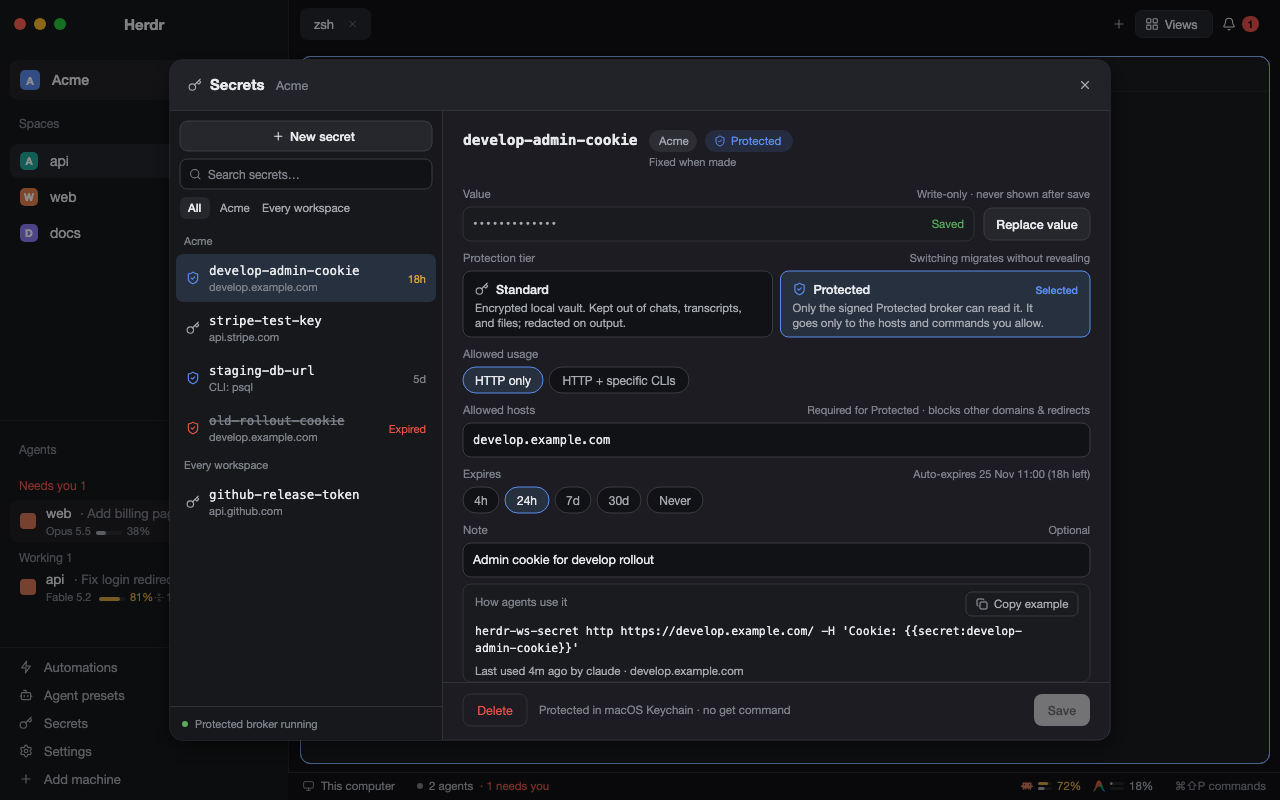
Tokens, cookies and keys that agents use by name and never see. Open Secrets from
the sidebar footer, add a secret (write-only: after Save it shows only as•••• · Saved), and an agent callsherdr-ws-secret http <url> -H 'Authorization: Bearer {{secret:name}}' orherdr-ws-secret run --env VAR=name -- <command>: the value is filled in for the
call and replaced by [secret:name] in whatever comes back (its plain, URL-encoded,
base64, hex and JSON forms; not a value inside something larger, or one the command
changed). No command prints a value, and none takes one as an argument. The starter
guide tells agents to use it instead of asking you to paste a token into the chat.
- Standard needs no setup: the value is encrypted under
~/.herdr/vault, its
key in your login Keychain (on Linux, your desktop's keyring throughsecret-tool,
else avault.keyfile beside it;HERDR_VAULT_KEY=filepicks the file). It keeps the value out of chats and of what agents
print, but any program running as you can still use it throughherdr-ws-secret, or read it. - Protected (macOS): Settings > Secrets builds and signs a small broker on your
Mac (/usr/bin/swiftc, Xcode's command line tools). Each Protected secret is a
Keychain item only that exact build can read; it goes only to the hosts you
allow, or to commands pinned to their full paths, and anything that would widen
that asks you in a macOS dialog first. A command you allow gets the value with
whatever arguments the agent gives it, so allow only tools that talk to fixed
hosts. After an update macOS asks once per Protected secret: allow that only
right after you pressed Install or Update yourself, and Deny a prompt that comes
on its own. - Each secret is for one workspace or every workspace (that's for naming and lists:
the workspace is what the agent says it's in, not a wall between projects), has an
expiry (4h to never; an expired one is refused), and says when and by whom it was
last used. Uses can show as quiet entries in the bell, and an automation can hand
secrets to its check or shell script withsecret_env:(never to an agent's own
process: an agent uses them by name).
Settings: Features, Agents, Accounts, Automations, Files, Secrets and Experimental
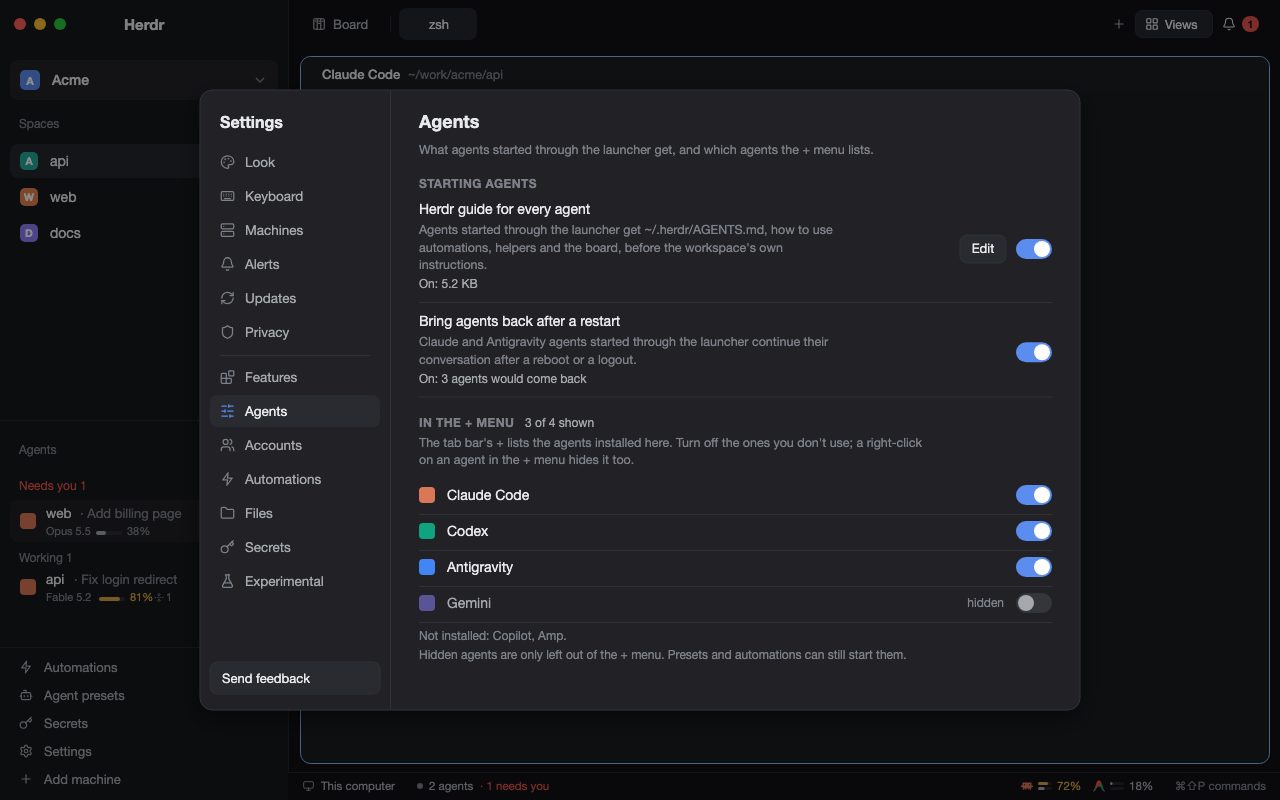
The sidebar's Settings opens Herdr's own Settings window with seven sections of
ours at the end, after Privacy:
- Features: a switch for each of the package's add-ons (Board, Notes,
Worktrees, History, Automations, Secrets, the status bar's plan usage, the agent
rows' numbers and the tab bar's notifications bell), all on to start with and one setting for every workspace. Off
hides it everywhere and stops its background work (no automation runs, no
pull request is followed, no usage is asked); nothing is deleted, so on brings
it back as it was. Each row says what it adds, and while off what's gone and
what stays. - Agents: every switch the package has for agents, in one place: Starting
agents (the Herdr guide for every agent, with Edit / Write one, and bringing
Claude and Antigravity agents back after a restart), In the + menu (which
installed agents the tab bar's + menu lists; the menu's "Choose agents…" opens
this page). - Accounts: more than one sign-in for Claude, Codex and Antigravity (a work
and a personal account, say). Each agent's accounts in one list with their plan,
how much of the most-used limit is gone and when it resets; Add account signs a
new one in from the page (the browser opens; Copy link takes the sign-in's link
to another browser, and Antigravity's sign-in gets a field for the code its page
shows); the ⋯ menu makes one the default, renames, signs out or removes it. New
agents start on the default,herdr-ws-agent --account <id>picks one, and the
Agents list's right-click menu has Switch account ▸, which restarts an agent
on another account and continues its conversation. - Automations: While Herdr is closed (Keep running for automations and
board cards' pull requests, and Start at login), how many agent runs go at
once, quiet hours for the desktop sound, and which CLI drafts automations. - Files: the Files view's defaults: what Markdown and SVG open in, the app
Open in starts with, whether ignored files show, where a Cmd-clicked path
opens (beside the terminal, full size, or off to leave it to macOS) and
whether Files takes every file or only text, images and folders. A change
applies at once, to every open Files. - Secrets: the Protected broker (Install & enable, Restart, Update, Uninstall,
with what it's doing now), the tier and expiry a new secret starts with, and
Show secret use in the bell: whether uses, and tries that were refused, leave
an entry there (off, Protected only, always). - Experimental: features that lean on things other programs don't promise to
keep the same, each off until you turn it on and saying why it's experimental
(the first: wiping Antigravity conversations from the Agents list's menu).
They're kept in~/.herdr/settings.jsonc, each with what it does in a comment
above it.
Herdr's sections are Herdr's: the package rebuilds its copy from Herdr's own
file whenever Herdr updates it. The macOS menu's Settings… still opens Herdr's
plain window; to have Cmd+, open this one (the installer asks once, or binds it
with --settings-key), set "cmd-," in the global
section of your ~/.config/herdr-app/keys.json to "mod.open:ws-settings"
(or to ws-switcher.settings/features, ws-switcher.settings/agents, ws-switcher.settings/accounts,ws-switcher.settings/automations, ws-switcher.settings/files, ws-switcher.settings/vault or ws-switcher.settings/experimental to open it on a section; ws-switcher.settings/extras opens Agents). Herdr then
leaves that file to you: new default shortcuts in its updates are added by hand.
And when you're away
- After a reboot or a logout, the Claude and Antigravity agents you hadn't closed come back
in their tabs, resumed with their conversations, helpers included. - Desktop notifications: while you're in another app, Herdr's notifications
(an agent needs you or finished, an automation's news) also show on your
desktop, and a click takes you to the agent. With Keep running on they come
while Herdr is closed too.
Platforms
- macOS: supported. It's built and used there every day.
- Linux: experimental. Tried in a VM on Ubuntu 26.04 (ARM64, GNOME on Wayland):
every screen, the background runner, automations, Files and Standard secrets
work; Protected secrets need macOS. Not yet tried on other desktops (KDE,
Sway), other distributions, a real GPU, or with signed-in agents and GitHub.
Please open an issue for what breaks. - Windows: experimental. Tried in a VM on Windows 11 (ARM64, running
Herdr's x64 build under emulation): every screen, the background runner and
Start at login, automations, Files, desktop notifications and Standard
secrets work; Protected secrets need macOS. It needs Git for Windows (itsshruns the scripts) and Node 20.6 or newer. Not yet tried on an x64 PC or
with signed-in agents and GitHub. See "On Windows" under Install.
What Linux and Windows use in macOS's place:
| macOS | Linux | Windows | |
|---|---|---|---|
| The scripts | sh |
sh |
Git for Windows' sh, through a .cmd beside each command |
| Start at login | a LaunchAgent | a systemd user unit (systemctl --user) |
a scheduled task (Task Scheduler) |
| Standard secrets' key | the login Keychain | the desktop keyring (secret-tool, package libsecret-tools), else a file |
sealed for your Windows user (DPAPI) |
| Desktop notifications | terminal-notifier, else osascript |
notify-send (libnotify-bin) |
a Windows toast (a click does nothing) |
| Open in ▸ | the apps macOS offers | your editors and the .desktop apps for the file's type (xdg-mime, gio) |
your editors, the apps Windows' Open with lists, and Notepad |
| Copy | pbcopy |
wl-copy (wl-clipboard) or xclip |
PowerShell's Set-Clipboard |
| Move to trash | trash |
gio trash, else ~/.herdr/trash |
the Recycle Bin |
| Clicking a path in a terminal | Cmd-click | Ctrl-click | Ctrl-click |
Install
One line, whether you have Herdr yet or not. On macOS and Linux:
curl -fsSL https://madtocc.github.io/herdr-workspaces/install.sh | sh
On Windows, in PowerShell:
irm https://madtocc.github.io/herdr-workspaces/install.ps1 | iex
- Herdr missing: it's installed first, with Herdr's own installer, which
adds herdr-core too. (Herdr's installer has no build for Windows on ARM or
Intel Macs: install Herdr there yourself, then run the line.) - Then the steps below, done for you: the layout and mods copied, the
commands on yourPATH, the agents you have added toprograms.json, and
Herdr opening on the layout. It asks before three things: the line that brings
agents back after a restart, the example presets and, once, whether Herdr's
Settings key (Cmd+, on macOS, Ctrl+, elsewhere) opens the package's Settings,
which makeskeys.jsonyours (Herdr's updates no longer add their new default
keys to it). Herdr writes that file when it first starts, so when the script
installs Herdr too, the next run asks. On Windows it also offers Git for
Windows and Node through winget. - It installs a release, never work in progress. The script at that
address is published from the newest release, and installs that same
version. For another one, add--version(… | sh -s -- --version 0.35.0;
PowerShell:-Version). - Run it again to update. A file you changed is kept in
~/.herdr/install/backup/before the new one takes its place. Your
workspaces, tasks, presets and automations are never touched. - Options:
--dry-runsays what would change and changes nothing,--uninstalltakes it out again,--yesasks nothing
(… | sh -s -- --yes). The top of each script lists the rest, and
PowerShell's way to pass them.
The two scripts download and run code. Read install.sh or
install.ps1 first if you prefer. From a clone, ./install.sh
(Windows: powershell -ExecutionPolicy Bypass -File install.ps1) installs
that copy.
Or ask your agent to add this layout (Herdr's own guide, ~/.config/herdr-app/AGENTS.md,
says how), or by hand:
- Copy
layouts/workspaces.jsonto~/.config/herdr-app/layouts/and the nineteen
folders inmods/to~/.config/herdr-app/mods/(rename them if a name is taken). - For agent instructions from the + menu, put the launcher on your
PATHand
point Herdr's~/.config/herdr-app/programs.jsonat it.herdr-ws-runstarts automations from other
apps and lets agents add them, andherdr-ws-notify --off/--on(or
Settings > Features > Desktop notifications) is the switch for the desktop notifications (on macOS,brew install terminal-notifier
makes a click on one go to Herdr).herdr-ws-secretis how agents use your
secrets, andherdr-ws-accountkeeps each agent's accounts (Settings > Accounts;
both need Node 20 or newer):ln -s ~/.config/herdr-app/mods/ws-switcher/bin/herdr-ws-agent ~/.local/bin/ ln -s ~/.config/herdr-app/mods/ws-switcher/bin/herdr-ws-run ~/.local/bin/ ln -s ~/.config/herdr-app/mods/ws-switcher/bin/herdr-ws-runner ~/.local/bin/ ln -s ~/.config/herdr-app/mods/ws-switcher/bin/herdr-ws-notify ~/.local/bin/ ln -s ~/.config/herdr-app/mods/ws-switcher/bin/herdr-ws-secret ~/.local/bin/ ln -s ~/.config/herdr-app/mods/ws-switcher/bin/herdr-ws-account ~/.local/bin/
If you use Antigravity, add{ "programs": { "claude": { "run": ["herdr-ws-agent", "claude"] }, "codex": { "run": ["herdr-ws-agent", "codex", "--no-daemon"] } } }"antigravity": { "run": ["herdr-ws-agent", "agy"] }
too, and for Pi,"pi": { "run": ["herdr-ws-agent", "pi"] }. Add only the agents you have: Herdr looks for the first word of the line,
here the launcher, so a missing agent would still show as installed. - To bring Claude and Antigravity agents back after a restart, add this line to
~/.config/herdr-core/config.toml. herdr-core then starts terminals throughherdr-ws-resume, which resumes a terminal's agent, else runs your usual shell.
The switch in Settings > Agents turns it off and on again
(orherdr-ws-resume --off/--on). Thelnline putsherdr-ws-resume
(--status,--list,--forget) on yourPATH:shell = ["/bin/sh", "-c", "r=\"$HOME/.config/herdr-app/mods/ws-switcher/bin/herdr-ws-resume\"; [ -x \"$r\" ] && exec \"$r\"; exec \"${SHELL:-/bin/sh}\" -l"]ln -s ~/.config/herdr-app/mods/ws-switcher/bin/herdr-ws-resume ~/.local/bin/ - Switch to it:
herdr-app do layout.switch '{"name":"workspaces"}'
(ctrl-shift-lcycles back). - Open the switcher and pick New workspace from a folder…. Views, at the
right of the tab bar, opens the workspace's board. - To start from the examples, copy them where Herdr reads them:
- presets for every workspace:
examples/presets/*.mdto~/.config/herdr-core/templates/(wherehc run <name>finds them too); - presets for one workspace: to
~/.herdr/workspaces/<id>/agents/; - the scout, the researcher and the planner run Claude in auto mode
(--permission-mode autoin their commands), so a helper never waits for
someone to answer a prompt. If you can't use auto mode, change that word
in Agent presets; - the foreman's command runs
pion the uncensored modeldeepseek-v4.1-flash-uncensored. Havepiset up with it, or change its--modelin Agent presets to another non-Claude model you have; - automations need no copying: the Automations screen lists the ready-made
ones (mods/ws-automations/starters/), and Create adds the one you open.
They're written for theimplementerandreviewerpresets; - a guide for every agent the launcher starts (how to use automations, hc
helpers and the board): open Settings > Agents and pick Write one
beside "Herdr guide for every agent", which writes the starter to~/.herdr/AGENTS.mdand opens it. The switch beside it turns it off.
- presets for every workspace:
On Windows
Herdr's folder is %USERPROFILE%\.config\herdr-app on Windows too, so step 1,
and 4 to 6, are the same (with ~ as %USERPROFILE%). herdr-core's own folder
is %APPDATA%\herdr-core: presets for every workspace go in its templates.
In place of steps 2 and 3:
- Install Git for Windows and Node 20.6 or newer, for instance
winget install Git.Git OpenJS.NodeJS.LTS. - Add
%USERPROFILE%\.config\herdr-app\mods\ws-switcher\binto your userPath(Start, "Edit environment variables for your account", Path, New).
Each command has a.cmdfile there that runs it with Git'ssh, soherdr-ws-run,herdr-ws-secretand the others work from PowerShell, andprograms.jsonis the same as in step 2. Quit and open Herdr again, so
herdr-core gets the newPath. - To bring agents back after a restart, this line in
%APPDATA%\herdr-core\config.tomlmakes herdr-core start terminals throughherdr-ws-resume.ps1, which is PowerShell, as herdr-core's own shell, with
the terminal's agent first when it has one (pwsh.exein place ofpowershell.exefor PowerShell 7):shell = ["powershell.exe", "-NoExit", "-ExecutionPolicy", "Bypass", "-Command", ". \"$env:USERPROFILE\\.config\\herdr-app\\mods\\ws-switcher\\bin\\herdr-ws-resume.ps1\""] - Keys: the recipe's Linux set doesn't suit Windows (Ctrl+Alt is AltGr there);
it gives a Windows set.
Outside those folders it registers an app id, "Herdr", for its toasts
(HKCU\Software\Classes\AppUserModelId\Herdr.Workspaces), keeps two small
compiled helpers (Open in's and the Recycle Bin's) in %LOCALAPPDATA%\herdr-ws, and Start at login adds a
task under Task Scheduler's \Herdr\, which turning it off removes.
An agent's own hc run … herdr-ws-agent … needs its task on one line there
(cmd can't take a line break in an argument); the screens handle that for you.
What the installer touches: Herdr's folder (the layout, the ws-* mods,programs.json, and shared.json only when Herdr has never run), links in~/.local/bin (Windows: your user Path), herdr-core's config.toml andtemplates when you say yes, Herdr's keys.json when you say yes to the
Settings key (a copy goes to the backup first; the uninstall gives the key
back), and ~/.herdr/install/ (the list of files it put in place, the ones it
replaced or took out, and settings-key-asked once it has asked). It reaches github.com for
the package and, when Herdr is missing, releases.herdr.dev.
What it touches: it reads ~/.herdr/workspaces and the folders of
each workspace's root. The foreman preset writes its plan under~/.herdr/scratch/ and starts hand terminals with hc run; those helpers
edit the folders they are given, by their own tasks. Two of the ready-made
automations (issue-to-pr, main-is-red) tell their agent to make git worktrees under~/.herdr/worktrees/ and to push branches and open pull requests with yourgh login; two have a check that runs git log and gh in the workspace's
folders, and morning-review's also runs git fetch in each repo. It writes ~/.herdr/workspaces/.index, a new
workspace's files when you make one, its workspace.jsonc when you rename it
or change its group, ~/.herdr/workspaces/.order.json when you drag or fold in
the switcher menu, ~/.herdr/agent-menu.json (the agents you hide from the +
menu) when you hide one or bring it back,
task files in ~/.herdr/workspaces/<id>/tasks/ and automation files in~/.herdr/workspaces/<id>/automations/ and ~/.herdr/automations/ (the
ones for every workspace; from the Automations screen, a ready-made one
included, fromherdr-ws-run --add, --off and --on, and enabled: false after a one-time
one runs). Following a card's pull request writes pr: into its task and, when
it opens on a card still before the start column or merges, its status:, and types a message into the card's agent withhc send when a check fails, a review arrives or it conflicts. With Keep running
on, that work is done by a Node process herdr-core holds as the terminalherdr-ws-runner: it writes ~/.herdr/runner/ (a shell automation's output goes to~/.herdr/runner/logs/, deleted with its run), lists the workspace, automation, card and preset files
under ~/.herdr once a minute (their size and time) and reads an automation's file again before
it starts a run, starts runs with hc run, ends
old and finished run terminals with hc kill, and reads herdr-core's terminal list, the app's
layout document, shared.json, programs.json and view.json (which tab is shown),
and connects to the app's socket to see whether Herdr is open. Start at login writes~/Library/LaunchAgents/dev.herdr.ws-runner.plist and loads it with launchctl (on Linux,~/.config/systemd/user/herdr-ws-runner.service, enabled with systemctl --user); the runner
it starts looks for herdr-core's socket before calling hc, so it doesn't start herdr-core
until an agent automation fires. A shell automation runs its script (bash, zsh or sh)
as you, in its folder, once you've allowed it. Either runner closes an
automation run's tab once its agent has finished (unless the automation says keep: true),
and reads the launcher's note of which conversation that terminal held
(~/.herdr/resume/<core>/<terminal>.session), for History's Resume, and, for an agent
asked to end with an outcome line, its screen with hc read (the line and the one before it
go into the run's record, for the bell). The bell keeps its log, what you read or dismissed
and the news only a notification said, in ~/.herdr/notifications.json. Deleting a workspace, a task or an
automation (after a confirmation) moves it to the Trash, and so does wiping an
agent from the Agents list's right-click menu: that Claude Code or Pi
conversation's transcript and the folders Claude keeps for it under~/.claude/. That menu also types into an agent with hc send (Send a message,
Compact), presses Esc there with hc keys (Interrupt) and puts a terminal or
conversation id on the clipboard (pbcopy, wl-copy or xclip). Settings > Features,
Settings > Automations, Settings > Files and Settings > Experimental write ~/.herdr/settings.jsonc (the Files
section asks the system which apps open a text file, with command -v and osascript (on Linux,xdg-mime and the .desktop files that list its type), about
a sample file it writes once under ~/.config/herdr-app/data/ws-settings/); the switcher, the background
runner (every 2 seconds), the status bar and herdr-ws-run (with node when it's
there) read it to know which add-ons are off, and the sidebar footer reads the shown
layout's file (layouts/<name>.json, at start, on a layout switch and every 30
seconds) and sizes its own block with layout.resize (Herdr keeps that inlayouts/.state/). The switcher reads Herdr's own Settings
window (frame/settings/main.js in Herdr's folder) to write its copy,mods/ws-settings/main.js. Settings > Agents' Copy the shell line puts herdr-core's
shell line on the clipboard (pbcopy, wl-copy or xclip; PowerShell on Windows). With its experiment turned on, wiping an Antigravity
agent also edits Antigravity's own index files and prompt history in~/.gemini/antigravity-cli (a copy of each, and what it removed, goes to~/.herdr/trash/ first, and the conversation's files go there too, until you
move that folder to the Trash), and runs ps and lsof to see whether
Antigravity runs or has it open; the Agents list runs ps once per Antigravity
agent's process to tell which conversation it holds. The board's Worktree runsgit worktree add on a new task/… branch; otherwise your repos aren't
touched. It runs sh (editor, Trash, symlinked folders), herdr-app do (the
board's and automations' new tabs, and pane.split for a view opened beside
the terminals) and, through the launcher, Start and
automations, your agents. Changes (ws-changes, a copy of Herdr's own) runs git reads (status, diff,
branch, worktree list) in the repo of the terminal it follows (or nested repos found up to three
levels under a non-git space folder with sh, or PowerShell on Windows), counts new files' lines
with find and grep -c, looks staged new files up with git ls-files -s and, when you press Commit,git add -A and git commit in the selected checkout, as Herdr's Changes does. A changed file's
right-click menu copies its path to the clipboard, and its Discard changes… (after it asks, naming
the file) runs git checkout HEAD -- on that one file, or for a new file git rm --cached and the
Trash (trash, gio trash, else ~/.herdr/trash); sh checks first that nothing but that file
would change. Files (ws-files)
lists folders and reads files there, as Herdr's Files does, and also writes the
file you save (on this computer only), searches with rg (else grep), runsgit reads (branch, status, ignored files), wc -c, head -c and sips (an
image's size), links images it previews under ~/.config/herdr-app/data/ws-files/
(ln -sf, unlink), asks macOS which apps open a file (osascript; on Linux,xdg-mime and the .desktop files), looks for known editors with command -v,
starts the app you pick (open; on Linux the editor's command, gio launch orxdg-open), or reveals it (open -R, xdg-open on its folder), and remembers the pick in ~/.herdr/files-prefs.json.
While a file has unsaved edits, Files keeps a copy of that unsaved text, in plain text, in~/.config/herdr-app/data/ws-files/drafts/ (one file per edited file), so closing the pane
doesn't lose it. Only you can read the copies (the folder chmod 700, each copy 600; on
Windows your profile folder is yours alone), and each is written whole (beside it, then moved
over it with mv) or not at all (on Windows without Git's sh, in place). When you open the file again, its editor stays read-only
until you press Restore or Discard on the strip that offers the copy. The copy is deleted when
you save, discard or reload the file, or press that Discard, and one nobody comes back for
after 30 days (with find, in Git's sh on Windows). While its filter box has text it lists
the names under the folder with git ls-files (else find). Its right-click menu makes,
renames (a name with a folder in it moves the entry there, the folder made with mkdir -p) and
duplicates files and folders with mkdir, mv and cp (never over an existing name), moves them to the Trash with trash or gio trash (else into ~/.herdr/trash), counts a
folder's files with find, copies paths to the clipboard and opens a terminal tab there. It and its Cmd-click handler
read their defaults from ~/.herdr/settings.jsonc. A Cmd-click
on a path in a terminal is checked with sh (on that terminal's machine) before
Files takes it. The Worktrees tab reads git in the workspace's repos and
their worktrees (worktree list, for-each-ref, status) and each repo's pull
requests with gh pr list, when it opens, on Refresh, and every 5 minutes while
it's shown full size in a window you can see. Removing a worktree there (after a confirmation)
deletes its folder with git worktree remove; the branch stays. History reads the
conversations your agents keep on this computer (~/.claude/projects, ~/.codex/state_*.sqlite,~/.pi/agent/sessions, ~/.grok/sessions, ~/.local/share/opencode/opencode.db,~/.gemini/antigravity-cli): titles, the
first and last thing asked, folder, branch, model and the newest reply's token counts, and in Claude's,
Pi's and Antigravity's transcripts the lines that record a compaction (the whole file once, then
only what it gained), never the rest, and it changes nothing there.
It runs node (and sqlite3 when Node is older than 22.13) to read them, keeps what it read in~/.herdr/cache/history/index.json, and starts your agent with its resume command when you click
Resume. With restart resume on, the launcher's hook also notes each Claude session's start command
in ~/.herdr/resume/started. For which conversation started which, it reads Claude's sub-agent
files (<session>/subagents/*.meta.json) and finds the hc run calls in Claude transcripts in
that same reading; and the launcher, starting an agent in an hc terminal, asks hc ls in the
background which terminal started it (and for up to 30 seconds which session the agent opened, from~/.claude/sessions/<pid>.json or Pi's stats note) and appends a line to ~/.herdr/resume/parents (with~/.herdr/resume/<core>/<terminal>.parent while it runs; the hook adds one when Claude or
Antigravity opens a session). Its right-click Wipe moves a Claude Code or Pi conversation's files
to the Trash as the Agents list's does (after terminal.kill on the terminal it's open in; to tell
which, it asks hc get for each agent terminal's program and reads Claude's ~/.claude/sessions/,
the launcher's notes and ps, and stat to see whether its transcript was just written; for an
Antigravity one also lsof on its presence lock, to find the terminal that has it open), puts a conversation id, a resume command or a run's report on the
clipboard for its Copy buttons, and hands an Antigravity one to the Agents list's Wipe. Nothing it reads leaves the computer. The Agents list's numbers
come from the same places, read by node every few seconds while an agent works: what Claude
Code hands its status line, which herdr-ws-statusline keeps in ~/.herdr/agents/<core>/
(the launcher sets it as the status line, in that session's --settings, where you have none),
Claude's ~/.claude/sessions/<pid>.json (which session a running Claude is) and its transcript,
the file the launcher's Pi extension writes there, and Antigravity's transcript; the launcher's
restart note says which. It reads only the newest reply's model and token counts, the
compactions and the cost, keeps where it stopped in each transcript in~/.herdr/cache/agentstats.json, asks hc get which program each agent's terminal runs, and
removes its files of terminals gone two days. For the plan usage in the status bar it runsclaude -p /usage (no session kept, hooks and MCP servers off), agy -p /usage (no
conversation kept, its log to /dev/null, and a do-nothing open first on its PATH so a signed-out
Antigravity can't open a sign-in page) and codex app-server (stdin JSON-RPC initialize andaccount/rateLimits/read, quitting as soon as it answers, with the same do-nothing open) every
10 minutes: each agent's own usage report, which it asks Anthropic, Google or OpenAI for with your
sign-in; the package never reads a sign-in itself. Until those answer, the status bar reads the
limits from Claude's status line files in ~/.herdr/agents/ and the end of the newest Codex
session log in ~/.codex/sessions/ (or $CODEX_HOME). Clicking Customize in the usage panel
writes your "usage" switches into ~/.herdr/settings.jsonc. Notes writes each note to ~/.herdr/workspaces/<id>/notes/ as you
type (a new note's file is renamed while its first line is being written) and a task file from
Move to the board; that and Delete move the note to the Trash. On its first run it makes
the Scratch workspace (~/.herdr/workspaces/scratch/); New scratch space makes folders in~/.herdr/scratch/, and there it deletes empty ones nobody is in (rmdir) and moves ones
with files to the Trash after 7 days unused, unless they have a .keep file. Keep on a
folder's row in the switcher menu writes that .keep (Don't keep takes it out), and its
Move to Trash… moves the folder to the Trash when you confirm. It looks at nothing else there. Deleting Scratch closes its spaces and moves ~/.herdr/scratch, kept
folders included, to the Trash with it. A repo's two
worktree scripts (~/.herdr/workspaces/<id>/worktrees.json) are shell lines Herdr
runs as you: setup in a new worktree the board makes, archive before a removal.
Like a check, only a line you saved or allowed in the screen runs
(~/.herdr/workspaces/.worktree-scripts.json). The launcher reads ~/.herdr/AGENTS.md, your global guide, and ~/.herdr/guide/switch, which Settings > Agents' guide switch writes; Write one there creates the guide from the starter and opens it in your editor. The launcher lets Claude, Codex and Antigravity read and edit
the workspace's root, its folders elsewhere and its tasks and notes folders; Claude gets Herdr's own folders in that one session's --settings, and no settings file is written. For Antigravity it writes the instructions as a rules file under ~/.herdr/agy/, gives Antigravity that folder, and removes the folders there that no launch has used for 90 days. Pi takes no folders, so the launcher names them in Pi's instructions, and passes your ~/.pi/agent/APPEND_SYSTEM.md, when you have one, along with them. Automations watch the folders a files automation
names, read calls herdr-ws-run leaves in ~/.herdr/workspaces/.inbox (and
delete them), and close an automation's older run tabs once their agent is done.
An automation's check: is a shell command Herdr runs by itself, as you, in the
automation's folder before each run, to see whether there's anything to do. It runs only a line you've allowed: one you saved in the Automations screen (Save, Create or Overwrite; its On / Off and the 10-minute fixes write the file without allowing anything, and Allow allows only the part it names, as the screen shows it), or one you allowed there after an agent or a file brought it. The screen's Copy puts its herdr-ws-run line on the clipboard.
For restarts, the launcher keeps notes of the Claude agents it starts in~/.herdr/resume/ (their command and session), runs hc ls to drop the notes
of closed tabs, and gives Claude two hooks (--settings) that note its session
and drop the note when you leave it. Antigravity's hook is a .agents/hooks.json in its
rules folder that notes its conversation. To offer each agent's models, the Presets and
Automations screens run, through your login shell and at most once a day each,codex debug models, pi --list-models, agy models (it asks Antigravity's server),opencode models and grok models, for those that are installed, and keep each answer
(or that the program isn't there) in ~/.herdr/cache/models-<program>.json; they still
read an older ~/.herdr/cache/agy-models.json. With the shell line in herdr-core's
config, every new terminal starts through herdr-ws-resume.
Every notification Herdr shows is also handed to herdr-ws-notify, and so is the
background runner's news while no window is open. It asks macOS which app is in
front (lsappinfo), then runs terminal-notifier, else osascript, ornotify-send on Linux, with the notification's title and text, and nothing when
none is installed. A click on a terminal-notifier one runs herdr-app do with
the toast's own action. Its switch is ~/.herdr/notify/switch, which Settings >
Features' Desktop notifications sets through it. The launcher
reads a workspace's BRIEF.md, when there is one, and puts it in the
instructions of the agents started there.
Secrets keeps ~/.herdr/vault/ (0700): meta.json (each secret's name, scope,
rules and last use, never a value), standard.enc (Standard values, encrypted),usage.jsonl (one line per use, never a value), a .lock, the broker's socket,
log and binary (bin/herdr-ws-vaultd), vault.key only where there's no Keychain,
for a moment the screen's .inbox-* handoff files, which herdr-ws-secret ingest
deletes, and screen-unfinished.json after the screen closed in the middle of a save
(which secret, its tier, what wasn't saved and when; never a value). In your login Keychain it keeps one item herdr-ws-vault-standard (Standard's
key) and one dev.herdr.ws-vault.protected item per Protected secret. Installing the
Protected broker runs /usr/bin/swiftc and codesign, writes~/Library/LaunchAgents/dev.herdr.ws-vaultd.plist and loads it with launchctl;
Uninstall unloads it and removes the plist. herdr-ws-secret run makes a 0700
folder under $TMPDIR for --file secrets and removes it when the command ends.
Settings > Secrets writes the vault block of ~/.herdr/settings.jsonc.herdr-ws-secret http sends a request to the URL an agent (or you) gives it, with a
secret only to the hosts that secret allows; nothing else in Secrets uses the network.
Accounts keeps ~/.herdr/accounts.json, each extra account's folder in~/.herdr/accounts/<agent>/<id>/ (links to your ~/.claude, ~/.codex or home
with its own sign-in files; for Antigravity a home of its own with its own
keychain, made and unlocked with macOS's security, and gh and git-over-https
shims that use your real home), ~/.herdr/accounts/on/ (which account each
terminal's agent runs on) and ~/.herdr/cache/accounts.json (who each account is
and its top limit; never a token); while a sign-in waits, its folder holds.signin, .signin-url (the link) and .signin-ask. It runs claude auth status|login|logout, codex app-server, codex login|logout, agy -p /usage
(with a do-nothing browser shim) and agy in a herdr-core terminal of its own for
Antigravity's sign-in or to read its start banner; the code you paste goes only to
that terminal. Answering agy's trust question for an account's folder adds that
folder to agy's trusted folders. Remove moves an account's folder to~/.herdr/trash/. These CLIs reach their own providers with that account's login.
Besides that, four things use the network: GitHub automations (gh api with your login, every
2 minutes per watched repo), cards with a pr: or branch: line (gh pr view
with your login, every minute per open pull request), the board's GitHub view
(gh api graphql and gh project list with your login: the linked project board
when its last read is over 10 minutes old and the view is open, and the items you
took every 5 minutes; it only reads, writes the board's link into workspace.jsonc
and keeps the board as last read in ~/.herdr/cache/github-boards/), and the Automations screen's Draft it and Change it,
which run claude -p with your Claude login and no tools (or, as Settings >
Automations' Drafter says, codex exec read-only and ephemeral, agy -p with a
do-nothing browser shim, or pi -p with no tools or session, each with its own
login). That sends that CLI's provider your words, the workspace's name, root,
folder names, GitHub repos, presets and automation names, and, for a change, the
automation as it stands.
Built for Herdr 0.1.14; ws-spaces, ws-agents, ws-tabs, ws-new-menu andws-chrome are copies of that version's spaces, agents, tabs, new-menu
and workspace-chrome. ws-toast and ws-status are copies of 0.1.16's toast
and workspace-status.
Updating
CHANGELOG.md lists what changed in each version, and your copy says which
one you have in ~/.config/herdr-app/mods/ws-switcher/VERSION (none: older
than 0.1.0's notes, so read them all). To hear about new versions, watch the
repo on GitHub for releases (Watch → Custom → Releases).
- You used the installer: run the same line again (see Install). It
replaces what changed and adds what's new. - You copied the files as they are: copy
layouts/workspaces.jsonand the
nineteen folders inmods/again, and do what the new versions' notes say
(a new script to link, say). Your workspaces, tasks, presets and automations
live elsewhere and aren't touched. - You or your agent changed them: tell your agent "apply what's in this
repo'sCHANGELOG.mdafter version , keeping my changes", withRECIPE.mdfor the details of each one.
License
Apache License 2.0. ws-spaces, ws-agents, ws-tabs, ws-new-menu,ws-chrome, ws-toast and ws-status are modified copies of Herdr's own mods, also Apache 2.0; see NOTICE.
Working on it
AGENTS.md is the checklist for a change (for you or your agent): what to update
with it, the picture, what the mods share, how to test and release.
Edit the live files in ~/.config/herdr-app, then copy them here withscripts/sync-from-home.sh.
Every change people would notice gets a line under ## [Unreleased] inCHANGELOG.md, in the same commit. scripts/release.sh <version> turns that
into a version (the middle number for anything new, the last for fixes only),
writes VERSION, commits and tags it; --publish also pushes and makes the
GitHub release from those notes.
The pictures are drawn, not screenshots: preview.png frommods/ws-switcher/preview.svg (also the picture in Herdr's layout settings), and
the ones in previews/ from the preview*.svg beside each mod. Edit the live
drawing, sync, and run scripts/render-preview.sh.
To try a change without touching your own window, scripts/sandbox.sh up
opens a second Herdr with its own core, home and two demo workspaces under/tmp/herdr-ws-sandbox, running copies of the live mods. sandbox.sh app …
and sandbox.sh hc … talk to it, sync copies the live mods in again, anddown ends and deletes it. Agents and gh aren't signed in there: Claude
stops at its first-run question, which is enough to see a run start.
Reviews (0)
Sign in to leave a review.
Leave a reviewNo results found