keepline
Health Warn
- License — License: MIT
- Description — Repository has a description
- Active repo — Last push 0 days ago
- Low visibility — Only 6 GitHub stars
Code Warn
- process.env — Environment variable access in menubar-tauri/scripts/tauri-dev.js
Permissions Pass
- Permissions — No dangerous permissions requested
No AI report is available for this listing yet.
The command center for Claude Code power users — never lose your Claude Code work

Keepline
Never lose your local agent runtime work again.
The command center for agent CLI power users


Quick Start | Features | Screenshots | Documentation

The Problem
You're deep in a coding session with one or more local agent runtimes. Everything is going great. Then...
- Terminal crashes — hours of context, gone
- Multiple sessions — which one was working on the auth bug?
- Cost anxiety — "How much have I spent today?"
- Lost progress — "What was I doing before lunch?"
The Solution
Keepline monitors local agent runtime sessions in real time, automatically recovers crashed work where supported, tracks costs where supported, and preserves context across iterations. Codex and Claude Code are the first supported runtime adapters.
For the implementation details behind the rename and Codex detection, see Keepline Rebrand and Codex Detection Spec.
bunx keepline
That is it. Open http://127.0.0.1:3377 and take control.
Why Keepline?
| Without Keepline | With Keepline | |
|---|---|---|
| Terminal crash | Lose all context, start over | One-click recovery with full context |
| Multiple sessions | Switch terminals, lose track | See all sessions in one dashboard |
| Cost tracking | Check Anthropic console manually | Real-time costs with predictions |
| Session context | Gone when terminal closes | Persisted and searchable |
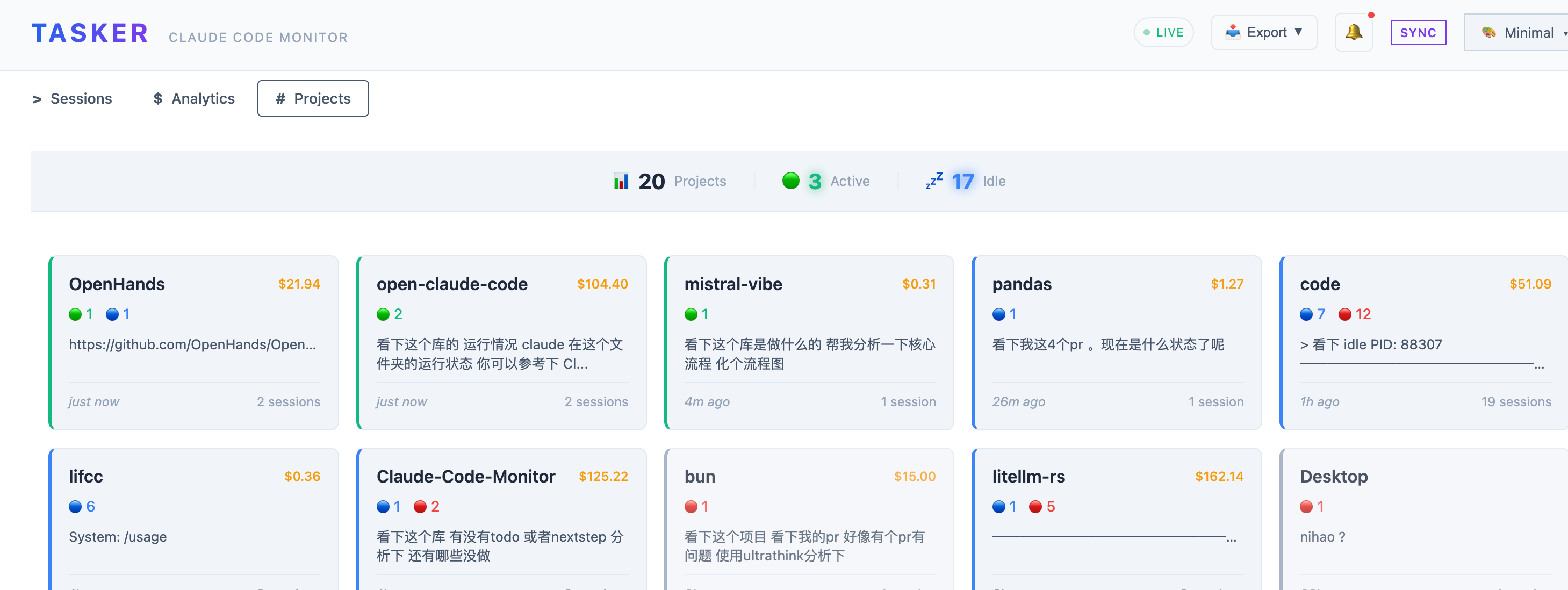
| Project overview | Scattered across directories | Aggregated by project |
Repository Scope
This repository now contains the Keepline core application and the in-repo menubar-tauri companion only.
Experimental runner workspaces that used to live here have been moved out to the sibling directory ../Claude-Code-Monitor-extracted/ and are no longer part of this repository's build or test surface.
Quick Start
Option 1: bunx (Recommended)
bunx keepline
Requires Bun 1.1+ on your machine.
Option 2: Install globally
bun install -g keepline
keepline web
Option 3: From source
git clone https://github.com/majiayu000/claude-hub.git keepline
cd keepline
bun install && bun run build
bun run start web
By default the web server binds to loopback only. To expose it intentionally, set KEEPLINE_HOST.
If you put Keepline behind a reverse proxy (Caddy, nginx, cloudflared), set KEEPLINE_PUBLIC_ORIGIN=https://your-public-host.example so the terminal WebSocket accepts the browser's public Origin. For multiple public origins, use comma-separated KEEPLINE_ALLOWED_ORIGINS.
If you also want the in-process rate limiter to identify real clients behind that proxy, set KEEPLINE_TRUST_PROXY=true. Without that flag, X-Forwarded-For is treated as untrusted input and the limiter keys on the actual TCP peer instead — this is intentional, so a malicious caller cannot bypass throttling by spoofing forwarded headers.
macOS Security Note
If you see an error like "Keepline is damaged and can't be opened" when running the desktop app, this is macOS Gatekeeper blocking unsigned apps — the app is not actually damaged.
Fix it with:
xattr -cr /Applications/Keepline.app
Or if downloaded elsewhere:
xattr -cr ~/Downloads/Keepline.app
This removes the quarantine attribute that macOS adds to downloaded files.
Features
Real-time Session Monitoring
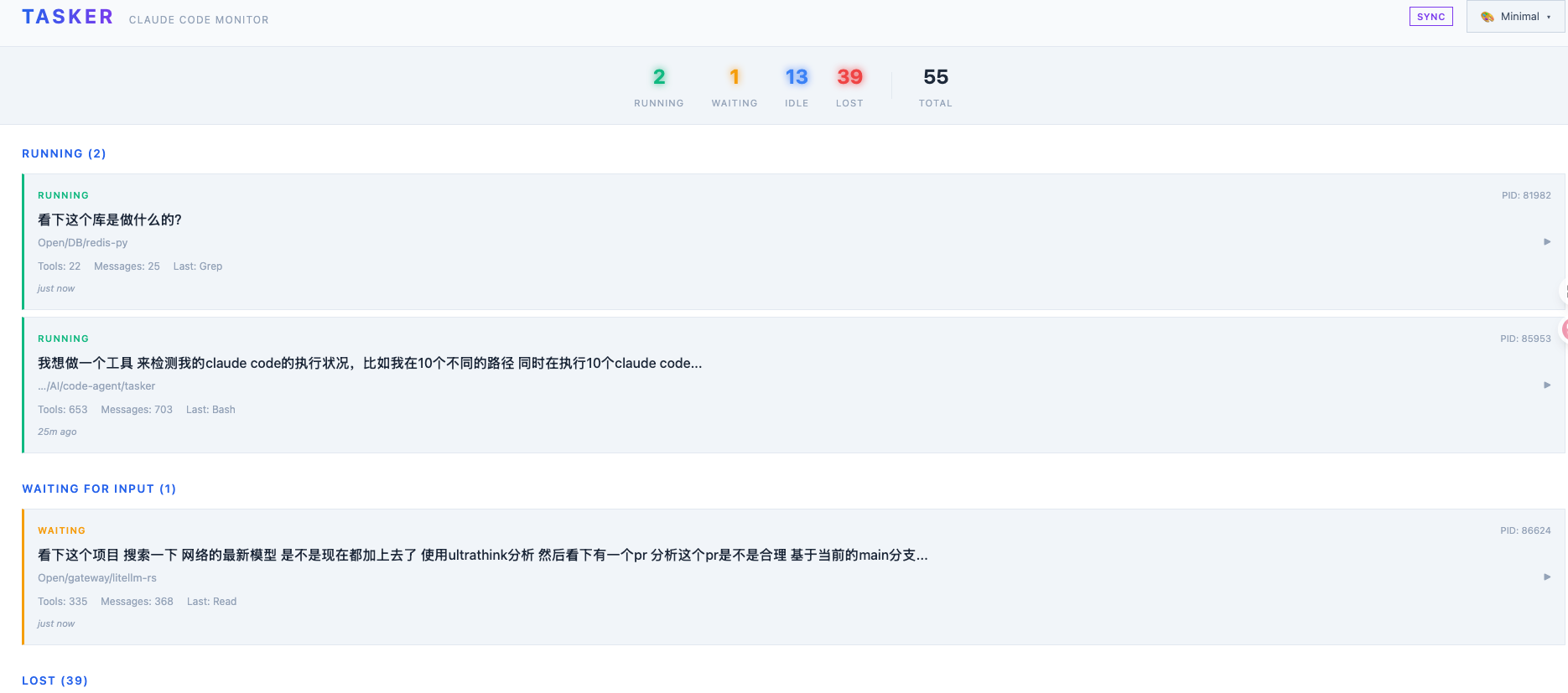
Monitor local agent runtime sessions across your system. See runtime, status, current file, last tool, and activity at a glance.
┌─────────────────────────────────────────────────────────────────┐
│ SESSIONS                                            3 active    │
├─────────────────────────────────────────────────────────────────┤
│ ● RUNNING   my-app          Edit: src/auth.ts      2s ago      │
│ ● WAITING   api-service     Read: README.md        5m ago      │
│ ○ IDLE      docs            Write: guide.md       15m ago      │
│ ✗ LOST      old-project     —                      2h ago      │
└─────────────────────────────────────────────────────────────────┘
One-Click Session Recovery
Terminal crashed? Session lost? Recover in seconds with full context preserved.
keepline recover <session-id>
Three recovery methods:
- Resume — Restore exact session state (recommended)
- Continue — New session in same directory
- New — Fresh start with original prompt
Cost Analytics & Predictions
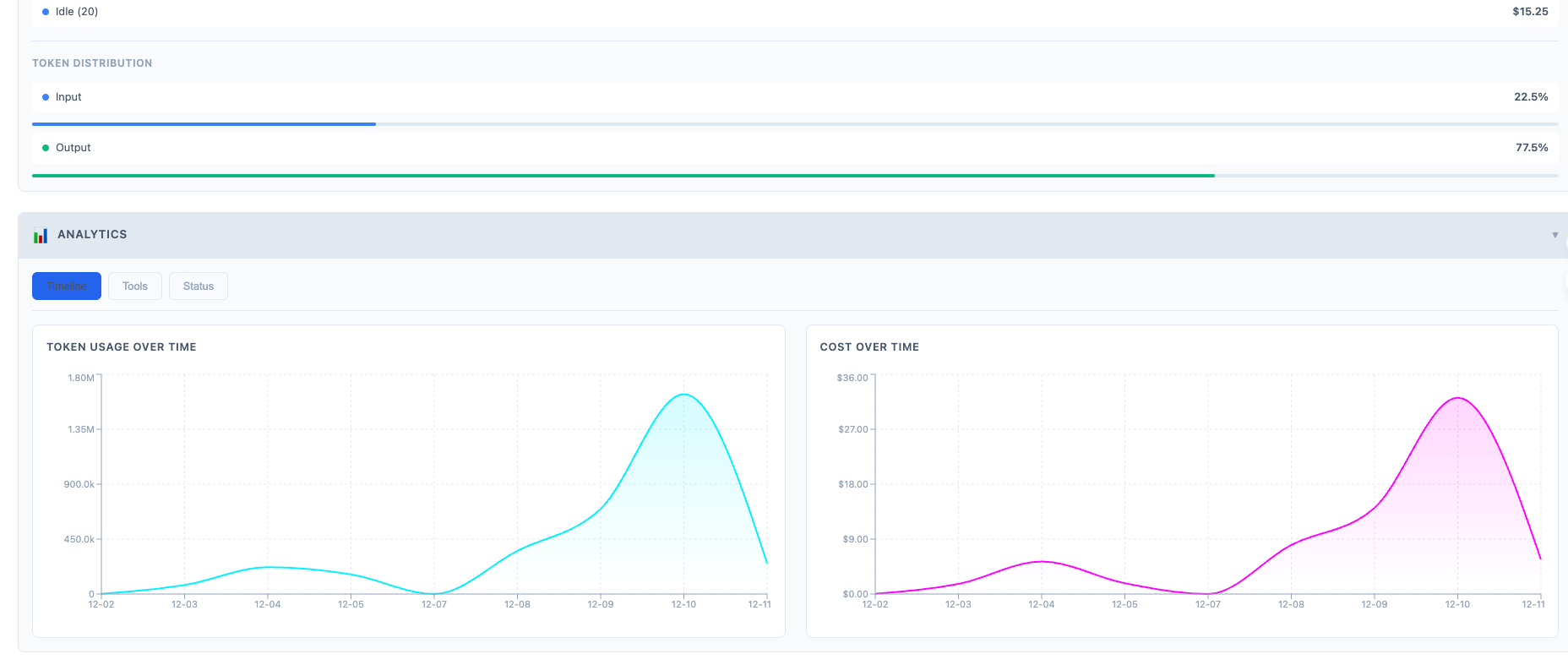
Track spending in real-time. Know exactly where your tokens go.
┌─────────────────────────────────────────────────────────────────┐
│ COST ANALYTICS                                                  │
├─────────────────────────────────────────────────────────────────┤
│ Today          $12.34  ▲ 23%                                    │
│ This Week      $67.89                                           │
│ This Month    $198.50  (Projected: $320)                        │
│                                                                 │
│ Cache Savings  $45.20  (38% of total)                           │
│ Your hit rate: 72%                                              │
└─────────────────────────────────────────────────────────────────┘
Features:
- Per-session cost breakdown
- Cache token tracking (creation 1.25x, read 0.1x)
- Multi-model support (Opus, Sonnet, Haiku)
- Daily/weekly/monthly trends
Cross-Session Memory
Keepline implements the "relay race" pattern — your progress persists across sessions.
┌─────────────────────────────────────────────────────────────────┐
│ SESSION MEMORY                               my-app             │
├─────────────────────────────────────────────────────────────────┤
│ Last Progress: Implemented OAuth2 login flow                    │
│                                                                 │
│ Completed:                                                      │
│   ✓ Database schema design                                      │
│   ✓ User model with bcrypt                                      │
│   ✓ JWT token generation                                        │
│                                                                 │
│ Pending:                                                        │
│   ○ Refresh token rotation                                      │
│   ○ Password reset flow                                         │
│                                                                 │
│ Known Issues:                                                   │
│   ! Token expiry not handled in middleware                      │
└─────────────────────────────────────────────────────────────────┘
When you recover a session, this context is automatically injected.
Plans Tracking
Track progress on Claude's implementation plans. See phases, tasks, and completion rates.
┌─────────────────────────────────────────────────────────────────┐
│ PLANS                                                           │
├─────────────────────────────────────────────────────────────────┤
│ Auth System Refactor                              ████████░░ 80% │
│   Phase 1: Database Schema                        ✓ Complete     │
│   Phase 2: API Endpoints                          ✓ Complete     │
│   Phase 3: Frontend Integration                   ● In Progress  │
│   Phase 4: Testing                                ○ Pending      │
└─────────────────────────────────────────────────────────────────┘
Web Dashboard
Beautiful, cyberpunk-themed dashboard with 5 color themes.
| Sessions | Analytics | Projects |
|---|---|---|
 |
 |
 |
Keyboard shortcuts:
r— Refresh sessionss— Sync from Claude/— Focus searcht— Cycle themes?— Show help
Themes: Cyberpunk, Matrix, Synthwave, Minimal, Tokyo
CLI Reference
# Core commands
keepline                      # Start web dashboard (default)
keepline list                 # List all sessions
keepline watch                # Live terminal monitor
keepline recover <id>         # Recover a lost session

# Session management
keepline list -s running      # Filter by status
keepline list -d ./my-app     # Filter by directory

# Memory management
keepline memory list          # List session memories
keepline memory show <id>     # Show memory details
keepline memory export <id>   # Export as recovery context

# Background service
keepline daemon start         # Start background monitor
keepline daemon stop          # Stop daemon
keepline hooks install        # Install Claude-compatible hooks
How It Works
┌─────────────────────────────────────────────────────────────────┐
│                        Keepline                                │
├─────────────┬─────────────┬─────────────┬─────────────┬─────────┤
│   Web UI    │  Terminal   │   Daemon    │   Hooks     │   API   │
│   (React)   │   (Ink)     │ (Background)│  (HTTP)     │  (REST) │
├─────────────┴─────────────┴──────┬──────┴─────────────┴─────────┤
│                                  │                               │
│  ┌───────────────────────────────▼────────────────────────────┐ │
│  │                    Session Service                          │ │
│  │  • Aggregates process state + file state                   │ │
│  │  • Detects running/waiting/idle/lost sessions              │ │
│  │  • Calculates costs with cache token support               │ │
│  └────────────────────────────────────────────────────────────┘ │
│                                  │                               │
├──────────────────────────────────┼───────────────────────────────┤
│  Process Scanner    │  Claude Parser    │  Memory System         │
│  (ps + /proc)       │  (~/.claude/)     │  (SQLite)              │
└─────────────────────┴───────────────────┴────────────────────────┘
Data flow:
- Process Scanner — Finds all running
claudeprocesses - Claude Parser — Reads JSONL session files from
~/.claude/ - Aggregator — Merges process state with file state
- Memory System — Persists progress for recovery
- Web/CLI — Presents unified view
Comparison
| Feature | Manual | claude-mem | Keepline |
|---|---|---|---|
| Multi-session monitoring | - | - | Yes |
| Session recovery | - | - | 3 methods |
| Cost tracking | - | - | Yes + predictions |
| Cache token analysis | - | - | Yes |
| Cross-session memory | - | Yes | Yes |
| Web dashboard | - | Basic | 5 themes |
| Plans tracking | - | - | Yes |
| Real-time hooks | - | Yes | Yes |
| Background daemon | - | - | Yes |
| Sub-agent tracking | - | - | Yes |
Configuration
Keepline stores data in ~/.keepline/ by default:
~/.keepline/
├── keepline.db    # SQLite database
├── config.json      # Configuration
└── logs/            # Log files
Options
{
  "scanInterval": 5000,
  "hookPort": 7890,
  "webPort": 3377,
  "logLevel": "info"
}
API
REST API available at http://localhost:3377/api
| Endpoint | Description |
|---|---|
GET /sessions |
List all sessions |
GET /sessions/:id |
Session details |
POST /sessions/:id/recover |
Recover session |
GET /memory |
List memories |
GET /memory/:id/context |
Get recovery context |
GET /plans |
List plans |
GET /usage |
Cost analytics |
WS /ws |
Real-time updates |
Contributing
Contributions welcome! See CONTRIBUTING.md.
# Development
bun run dev          # Watch mode
bun run typecheck    # Type check
bun test             # Run tests
Roadmap
- Cost alerts & budgets
- Team dashboard
- Cursor/Copilot support
- Session replay/timeline
- Plugin system
Support
Reviews (0)
Sign in to leave a review.
Leave a reviewNo results found