merl
Health Pass
- License — License: MIT
- Description — Repository has a description
- Active repo — Last push 0 days ago
- Community trust — 10 GitHub stars
Code Fail
- rm -rf — Recursive force deletion command in assets/tapes/setup.sh
Permissions Pass
- Permissions — No dangerous permissions requested
No AI report is available for this listing yet.
A terminal code navigator for when agents write the code: review a branch over the real files, go to definition and usages in 50+ languages with no language server, fix a line. No config; works over SSH.

merl
The one editor you need when agents write the code.




%22&replace=%241&label=homebrew)

An agent works in one terminal split. merl sits in the other. You read what the agent wrote, walk
its branch hunk by hunk, jump from a changed line into the code around it, fix the one line that
is wrong, and go back to reading.
That is the whole tool: find your way around a project, review a diff with the code around it,
and now and then type a secret into a .env. No setup, no config, no modes. It runs wherever a
terminal does, SSH and tmux included.
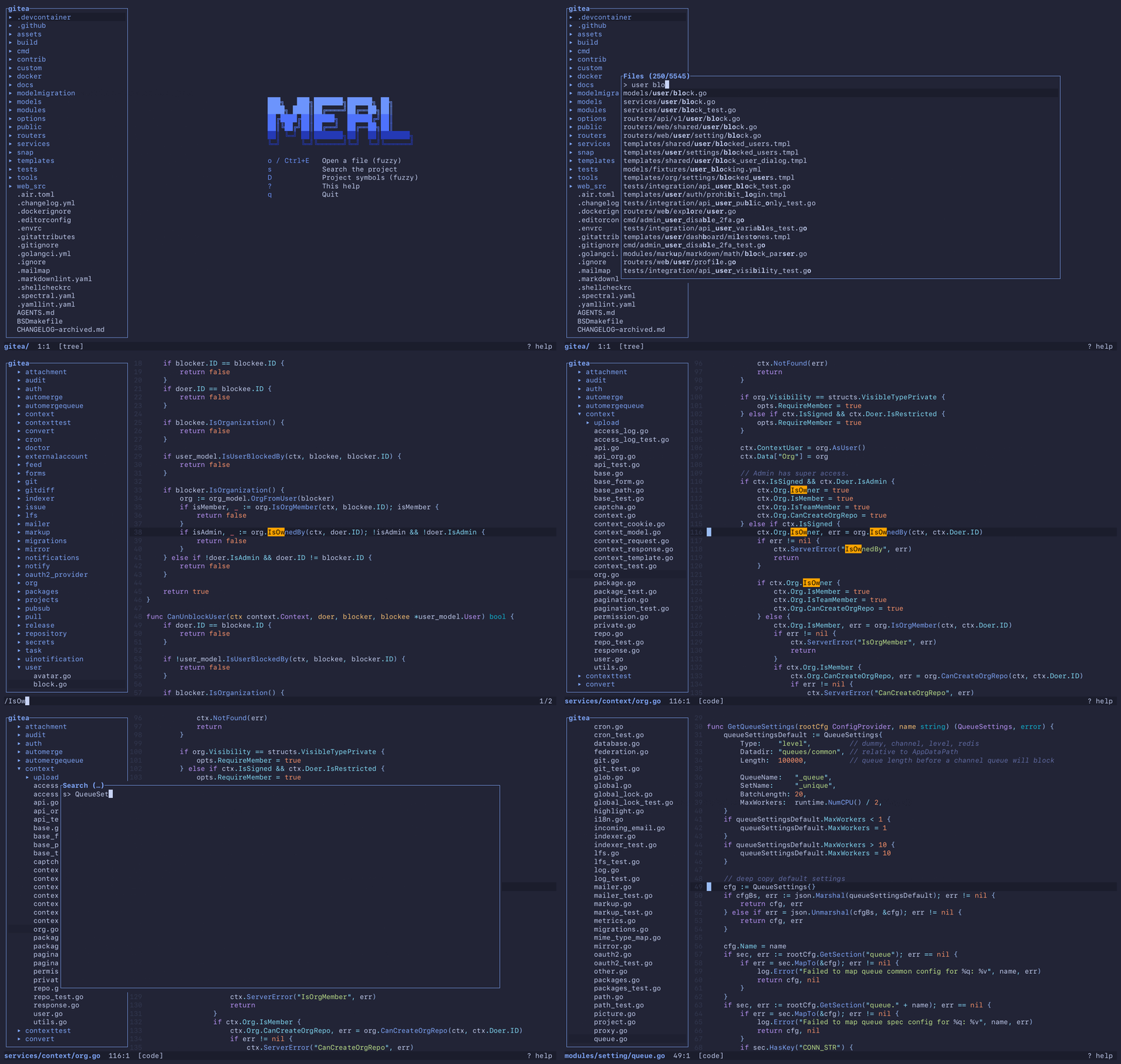
A checkout of gitea, 5,500 files. Nothing was indexed or configured first.
Install
brew install maksim-burtsev/tap/merl
Or take a prebuilt binary for macOS (arm64) or Linux (x86_64, arm64) from the
releases:
curl -fsSL https://github.com/Maksim-Burtsev/merl/releases/latest/download/merl-aarch64-apple-darwin.tar.gz | tar xz
sudo mv merl /usr/local/bin/
Or build it (Rust 1.88 or newer):
cargo install --git https://github.com/Maksim-Burtsev/merl
Then:
merl                 # the current directory
merl FILE:LINE[:COL] # what compilers, linters and grep print, pasted straight in
merl --review        # the branch you are on, as a diff over the real files
merl --tutor         # every key, hands on, in about ten minutes
merl --drill [N]     # N tasks (20) that name what to do, not the key; the keys you skip come most
merl --keys          # how often you press each key and miss it, the unused last
merl --reviews       # your reviews of the last 30 days: their size, their time, the jumps out
The long flags have short forms: -r for --review, -b for --base, -t for --theme,-d for --drill and -k for --keys, so merl -r feature -b origin/dev reviews feature
against origin/dev.
Why
Agents write most of the code now. Your part is to understand it and to review it, and merl does
those two things out of the box, with nothing to configure and nothing to switch off.
Understand the code. Open a file by a few letters of its name, search the project as you
type, go to a definition or list its usages, and come back with[. It follows you into the
standard library and the dependencies.Review a branch.
merl --reviewdraws the branch's diff over the real files, so from any
changed line you can look up what it calls and who else uses it. It stays current while the
agent keeps working, and a file you have walked through gets a tick that stays with the branch
and goes when the file changes. A review, step by step.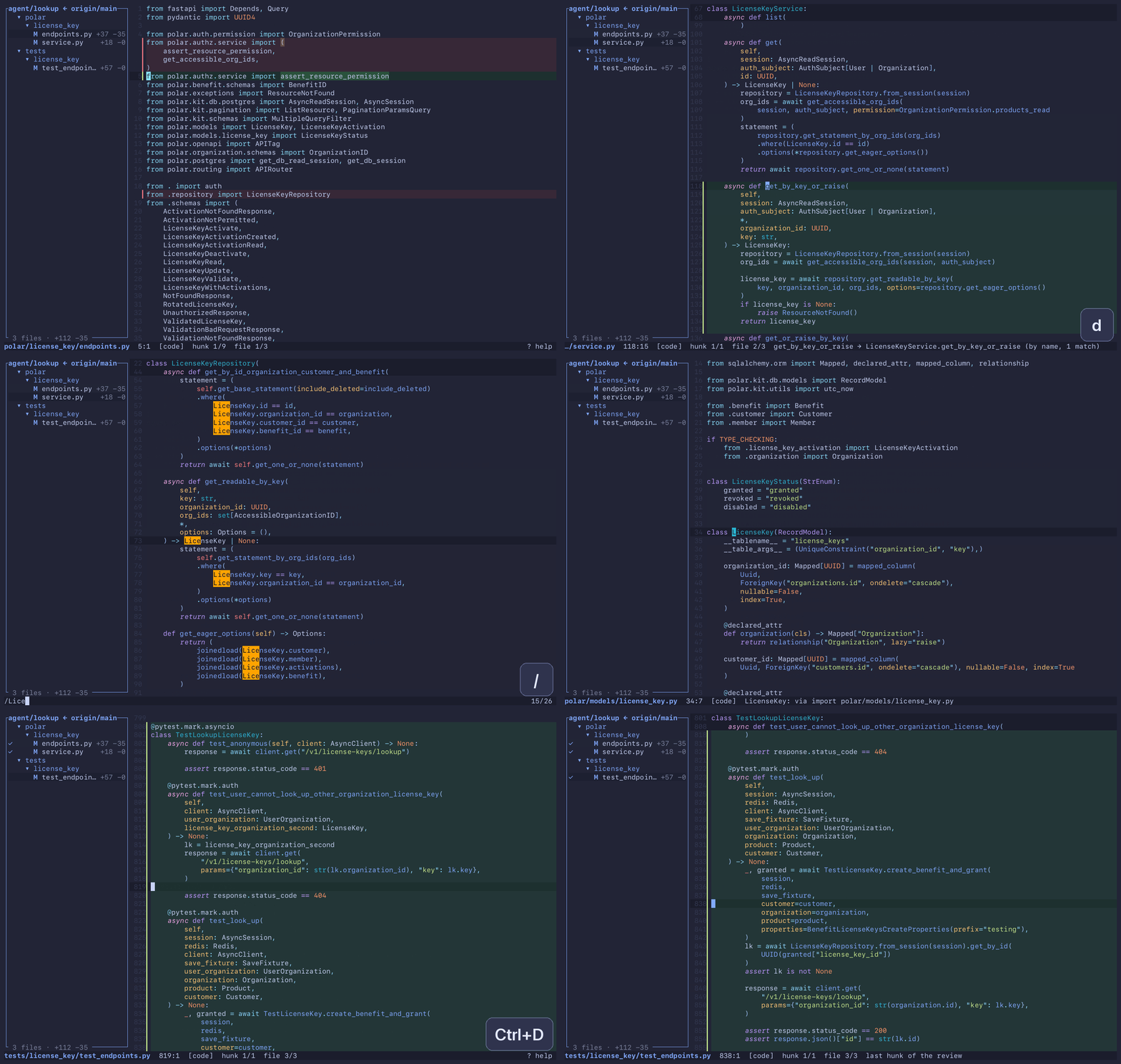
Touch up a line. Enter, type, Esc. It saves itself. Enough for a typo, a constant, or a
secret you would rather not hand to an agent. More on editing.
I spent years switching things off in VS Code to get down to a tree, a highlighted file, go to
definition and search. Vim and Helix want weeks of learning and a config first. merl starts
there. It has no autocomplete, and it took me a while to notice: most of an editor is for typing
code, and I had stopped typing it.
What merl is not
- No plugins.
- No language server and no index. Nothing to install per language, nothing to wait for.
- No splits and no tabs. Your terminal has those.
- No mouse.
- No keymap to write. The keys are below and they stay.
- No autocomplete, no snippets, no refactoring. The agent types.
None of these is on a roadmap. If you live in Vim or Helix and like it there, you do not need
merl.
Keys
The dozen you will use every day. ? inside merl shows the rest.
| Key | Action |
|---|---|
| o / Ctrl+E | Open a file (fuzzy) |
| s | Search the project |
| / / Ctrl+F | Find in the open file |
| d / F12 | Go to definition of the word under the cursor, or its implementations |
| u / Shift+F12 | Usages of the word under the cursor |
| D | Project symbols (fuzzy) |
| [ / ] | Back / forward in the jump history |
| c / C | Review: next / previous hunk, on to the next file |
| Alt+Left / Alt+Right | Move one word |
| Enter | Edit at the cursor (Esc returns to navigation) |
| t | Show or hide the file tree |
| ? | This help |
| q | Quit |
The keys never change, so what you learn stays learned. merl --tutor walks you through them
once. After that merl counts the keys you press in real work, and notes when another key would
have got there in half the presses. merl --keys shows the ones you skip and the ones you miss,
and merl --drill asks for those most: its tasks say what to do and never name the key. The
counts stay on your machine.
Files and jumps
| Key | Action |
|---|---|
| o / Ctrl+E | Open a file (fuzzy) |
| Ctrl+N | New file: type its path, Enter creates and edits it |
| d / F12 | Go to definition of the word under the cursor, or its implementations |
| D | Project symbols (fuzzy) |
| u / Shift+F12 | Usages of the word under the cursor |
| [ / ] | Back / forward in the jump history |
| : / Ctrl+G | Go to line |
Search
| Key | Action |
|---|---|
| / / Ctrl+F | Find in the open file |
| n / N | Next / previous match |
| s | Search the project |
Review
| Key | Action |
|---|---|
| c / C | Review: next / previous hunk, on to the next file |
| m | Review: mark the file as viewed, or take the mark off |
| Fold: Enter | Review: load the diff of a folded generated file |
Editing
| Key | Action |
|---|---|
| Enter | Edit at the cursor (Esc returns to navigation) |
| Ctrl+S | Save now (edits are saved on their own after a pause) |
| Ctrl+R | Reload from disk, dropping unsaved edits |
| Ctrl+Z / Ctrl+Y | Undo / redo |
| Ctrl+C | Copy the selection, or the line, to the clipboard |
| Edit: Ctrl+X | Cut the selection, or the line |
| Edit: Alt+Backspace / Alt+Delete | Delete the word before / after the cursor |
Selection
| Key | Action |
|---|---|
| v | Select the word, then the line, then the paragraph, then the whole file |
| Shift+Up / Shift+Down | Extend the selection by a screen row |
| Shift+Left / Shift+Right | Extend the selection by a char |
| Alt+Shift+Left / Right | Extend the selection by a word |
| Ctrl+Shift+Left / Right | Extend the selection to the start / end of the screen row, then of the line |
Movement
| Key | Action |
|---|---|
| Arrows | Move the cursor; Up / Down go by screen row |
| Alt+Left / Alt+Right | Move one word |
| Home / End | Start / end of the screen row, then of the line |
| Ctrl+Home / Ctrl+End | Start / end of the file |
| { / } | Previous / next paragraph (blank line) |
| Ctrl+D / Ctrl+U | Move half a screen down / up |
| PgUp / PgDn | Move one screen |
Panels
| Key | Action |
|---|---|
| t | Show or hide the file tree |
| Tab | Switch focus between tree and code |
| Tree: Up / Down | Move |
| Tree: Enter | Open the file, or expand the directory |
| Tree: Left / Right | Collapse / expand |
| Picker: Up / Down | Move |
| Picker: PgUp / PgDn | Move one page |
| Picker: Enter | Accept |
| Picker: Esc | Cancel |
| ? | This help |
| Help: Up / Down | Scroll |
General
| Key | Action |
|---|---|
| w | Wrap long lines, or cut them at the edge and scroll sideways |
| p | Show a Markdown file rendered, or its source again |
| f | Fold the function or block at the cursor into its first line, or unfold it |
| T | Pick a theme (live preview) |
| Esc | Close an overlay, leave edit mode, or clear selection and find |
| q | Quit |
Languages
d, u and D work in all of these, with no language server and no index: a project works the
moment you open it. In Python, TypeScript and Go, d also follows the type of the receiver
(self.repo.save), and it always says how it found its target.
| Language | d also reaches |
|---|---|
| Python | the standard library and the .venv |
| TypeScript, JavaScript, Vue, Svelte, Astro | node_modules |
| Go | GOROOT and the modules in go.mod |
| Rust | the sysroot and the crates in Cargo.lock |
| C, C++, Objective-C | the system headers, and from Objective-C the SDK's frameworks and CocoaPods' Pods/ |
| Swift | .build/checkouts |
| PHP | Composer's vendor/ |
| Zig | the standard library |
| Protocol Buffers | the well-known types protoc installs |
| PowerShell | the module directories of PSModulePath |
| Dart | the pub cache and the SDK |
| CMake | CMake's own modules and the packages' config files |
| Elixir, Erlang | Mix's deps/, rebar3's _build, and OTP's sources |
| OCaml | the standard library and the opam switch's libraries |
| Julia | the standard library and the packages of the depot, at the versions Manifest.toml pins |
| Solidity | node_modules, and the files remappings and Foundry's lib/ name |
| Perl | @INC and Carton's local/lib/perl5 |
| Emacs Lisp | the packages package.el installs in elpa/ |
| Scheme, Racket | Racket's collections |
| Common Lisp | Quicklisp's software and local projects |
| Starlark (Bazel, Buck, Tilt) | the target or the file a label names, and the external repositories a Bazel build fetched |
| Java, Kotlin, Scala, Groovy, Ruby, C#, F#, Lua, Nix, Haskell, R, Clojure | |
| GDScript | the script project.godot autoloads under a name, and the file a res:// path names |
| Shell, SQL, Makefile, Terraform, Dockerfile, GraphQL | |
| YAML | the schema a $ref names, in the same file or another |
| JSON | only the schema a $ref names |
| Markdown | the file or the heading a link names, and a file a code span names |
| HTML, CSS, SCSS, Less | the rule a class or an id of HTML, JSX, Vue or Svelte names, the file a path names, a package's stylesheet in node_modules |
What each rule reads and what it refuses to guess: docs/navigation.md.
Themes
T lists the themes and repaints merl in the one under the cursor as it moves. Enter keeps it,
Esc puts the old one back. The default is tokyonight-moon. They were picked to sit in for
hours: no neon, and light themes that look like paper.
docs/themes.md has a screenshot of each and how to add your own.
Config
There is none to write: every setting has a default, and T saves the theme you pick. To change
the rest, edit ~/.config/merl/config.toml.
| Setting | Default | What it does |
|---|---|---|
theme |
"tokyonight-moon" |
The colour theme; T picks it and writes it here |
autosave_delay_ms |
1000 |
How long after the last keystroke an edit is saved |
review_panel_colours |
true |
Review: the file panel dims the counts and adds the branch totals |
review_list_marks |
true |
Review: u and s mark the rows on lines the branch changed |
review_open_files_first |
true |
Review: o lists the review's files first |
For example, to save sooner and keep review's rows unmarked:
autosave_delay_ms = 300
review_list_marks = false
Terminals
Any terminal, and the same keys over SSH and in tmux. Terminals keep Cmd for themselves, so copy
is Ctrl+C and quit is q. Terminal.app is the weak one: no Shift+arrows, no Ctrl+Home, no copy.
In Ghostty, keybind = performable:cmd+c=copy_to_clipboard:mixed makes Cmd+C and Cmd+X work too.
Status
I use merl every working day. 1.0 is next, and what is left for it is in the
milestone. Issues are welcome.
License
MIT. Syntax definitions come from bat via
two-face; the themes keep
their authors' licences.
Reviews (0)
Sign in to leave a review.
Leave a reviewNo results found