ai-testcase-generator-mcp
Health Pass
- License — License: MIT
- Description — Repository has a description
- Active repo — Last push 0 days ago
- Community trust — 15 GitHub stars
Code Warn
- fs module — File system access in package.json
- process.env — Environment variable access in src/index.ts
- network request — Outbound network request in src/services/llmService.ts
Permissions Pass
- Permissions — No dangerous permissions requested
No AI report is available for this listing yet.
An Model Context Protocol(MCP) server that generates comprehensive API test cases (positive, negative, edge cases) from endpoint metadata, powered by AI/LLMs
🤖 AI Testcase Generator MCP
An Model Context Protocol(MCP) server that generates comprehensive API test plans (positive, negative, and boundary/edge cases) directly from endpoint metadata—powered by LLMs.
This is a TypeScript-based Model Context Protocol(MCP) server for QA engineers. It demonstrates core Model Context Protocol concepts by providing:
- AI-powered tool for generating exhaustive test case plans from API endpoints and payloads
- Prompt-driven LLM integration for quality and coverage
- Extensible structure for future automation tooling
✨ Features
- 🔌 MCP-compliant server (
stdiotransport). - 📝 Tool:
generate_tests_excel- Input: endpoint, HTTP method, payload, extra context.
- Input options:
- Direct endpoint details: endpoint, HTTP method, payload
- Use extraContext to provide any additional testing notes or constraints
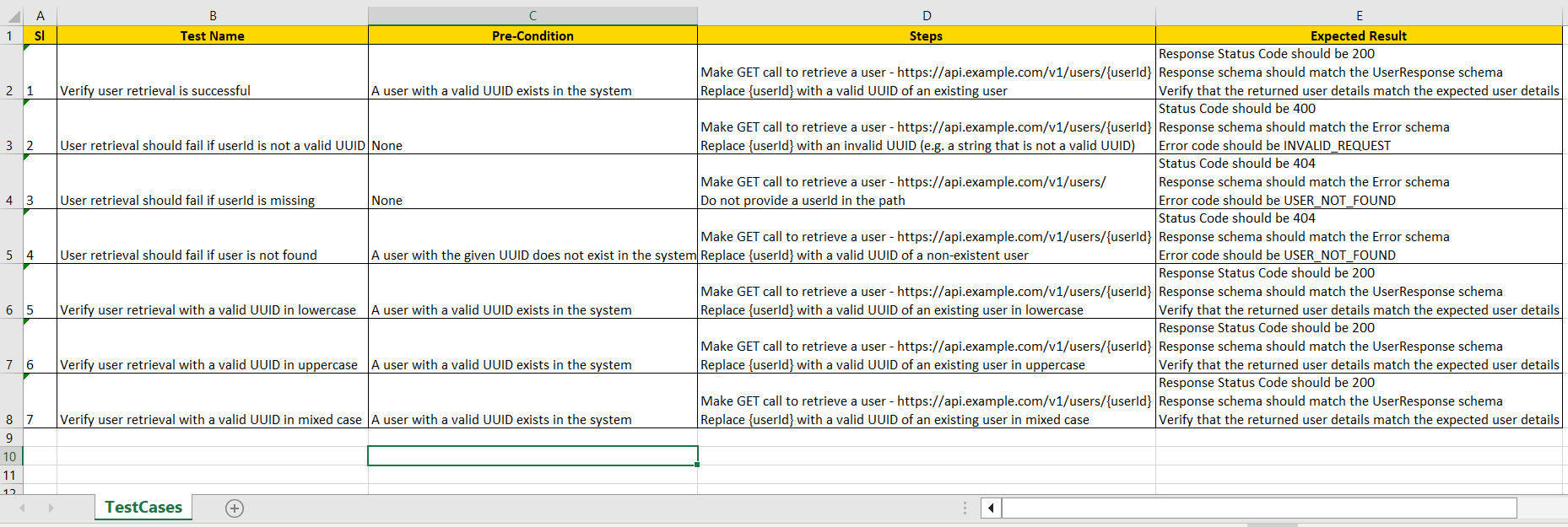
- OutputPut: 📊 Excel test plan with columns: Sl no, Test Name, Pre-Condition, Steps, Expected Result.
- 🧠 Prompt-driven test generation with configurable LLM (Groq, OpenAI, Anthropic).
- 📜 Detailed logging with Winston.
🏗️ Architecture
flowchart TD
    A[Claude / MCP Client] -->|Run Tool| B[MCP Server]
    B -->|Prompt| C[LLM API]
    C -->|Test Cases JSON| B
    B -->|Excel Export| D[(Test Plan .xlsx)]
    B -->|Logs| E[Server Log File]
📂 Project Structure
ai-testcase-designer-mcp/
├── build/                         # Compiled JavaScript output
├── assets/                        # Demo gifs, images, and sample files
│    ├── demo.gif
│    ├── excel_preview.png
│    └── sample_chat_message.txt
├── configs/
│    └── config.json               # Server/tool config
├── src/
│    ├── index.ts                  # Main server entry point (MCP interface & routing)
│    ├── excel.ts                  # Excel file creation & writing logic (modular)
│    ├── logger.ts                 # Winston logger configuration & log writing (modular)
│    └── prompts/
│         └── testcase_prompt.txt  # Prompt template for LLM-based test generation
├── package.json
├── tsconfig.json
├── README.md
└── .gitignore
- src/excel.ts: Handles all Excel (.xlsx) file creation and test plan export (modularized).
- src/logger.ts: Provides modular logging functionality across the MCP server using Winston.
- src/prompts/: Contains prompt templates for LLM-driven test generation.
- assets/: Demo GIFs, Excel sample preview, and chat prompt examples.
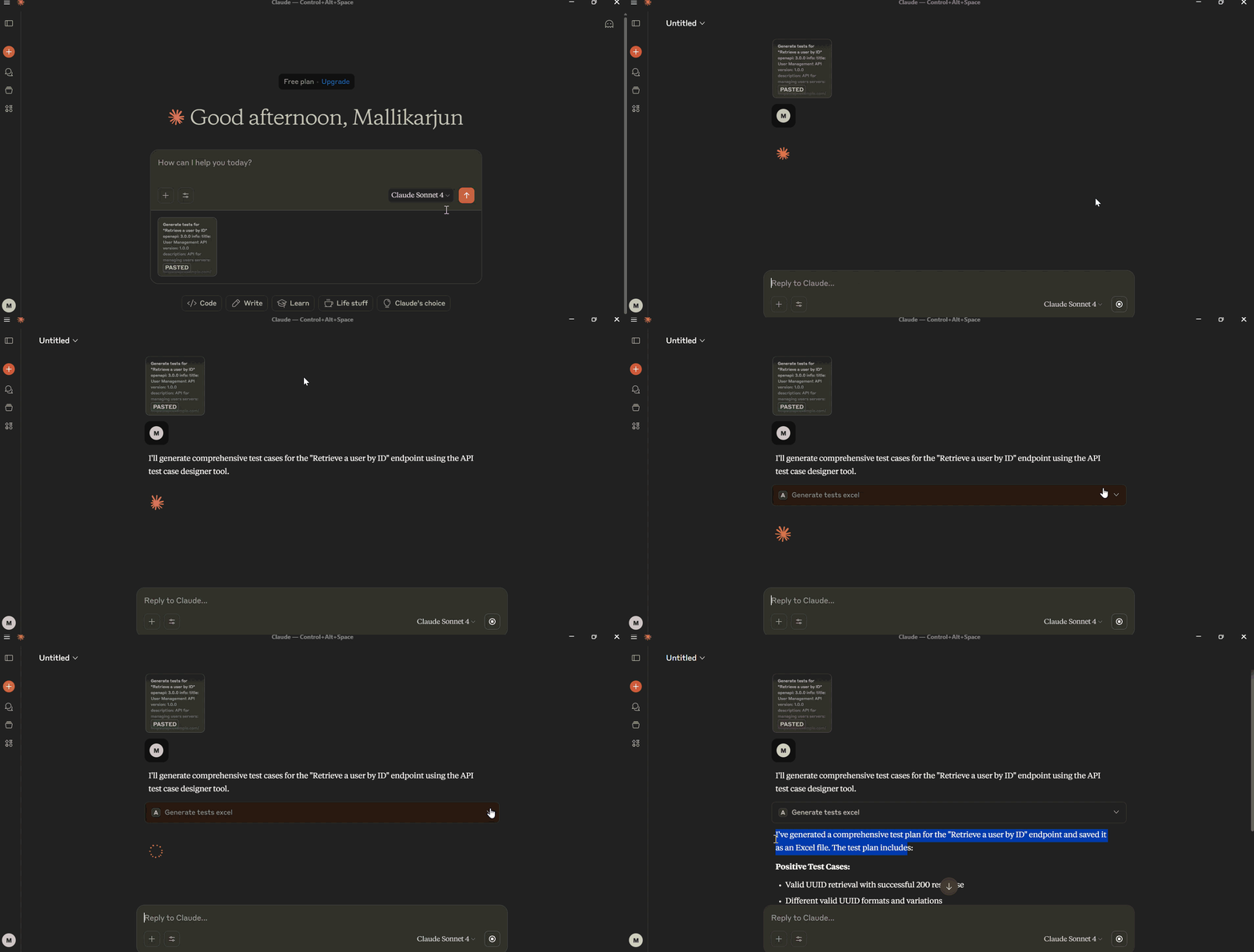
🎥 Demo
Here’s the MCP generating test cases and exporting to Excel:
🔍 Excel Preview
Below is a quick preview of the generated test cases:
Development
Install dependencies:
npm install
Build the server:
npm run build
For development with auto-rebuild:
npm run watch
⚙️ Installation
Follow these steps to set up the AI Testcase Designer MCP server locally:
Clone the repository
git clone https://github.com/yourusername/ai-testcase-designer-mcp.git
cd ai-testcase-designer-mcp
Install dependencies
npm installBuild the server
npm run buildConfigure the server in your MCP client
a. Claude Desktop or any MCP-compatible client
Add the following server configuration:
On MacOS:
~/Library/Application Support/Claude/claude_desktop_config.jsonOn Windows:
%APPDATA%/Claude/claude_desktop_config.json
{
  "mcpServers": {
    "ai-testcase-designer-mcp": {
      "disabled": false,
      "timeout": 60,
      "command": "node",
      "args": [
        "c:/Auto_WS/ai-testcase-designer-mcp/build/index.js"
      ],
      "transportType": "stdio"
    }
  }
}
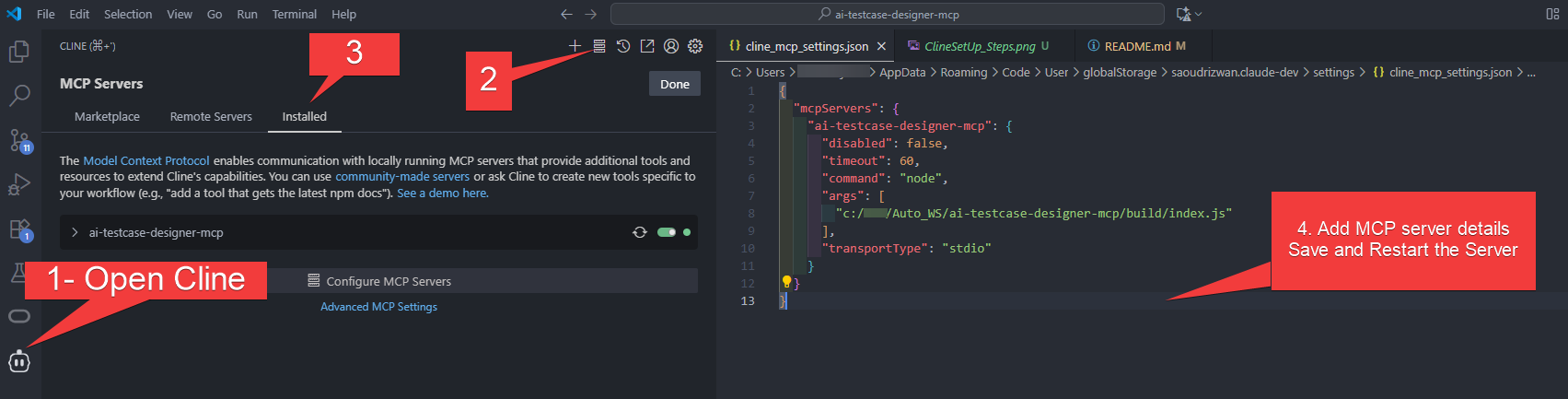
b. Cline (VS Code Extension)
You can also use the AI Testcase Designer MCP server with [Cline](https://cline.bot), the Model Context Protocol VS Code extension.Quick Start:
- Install Cline from the VS Code Marketplace.
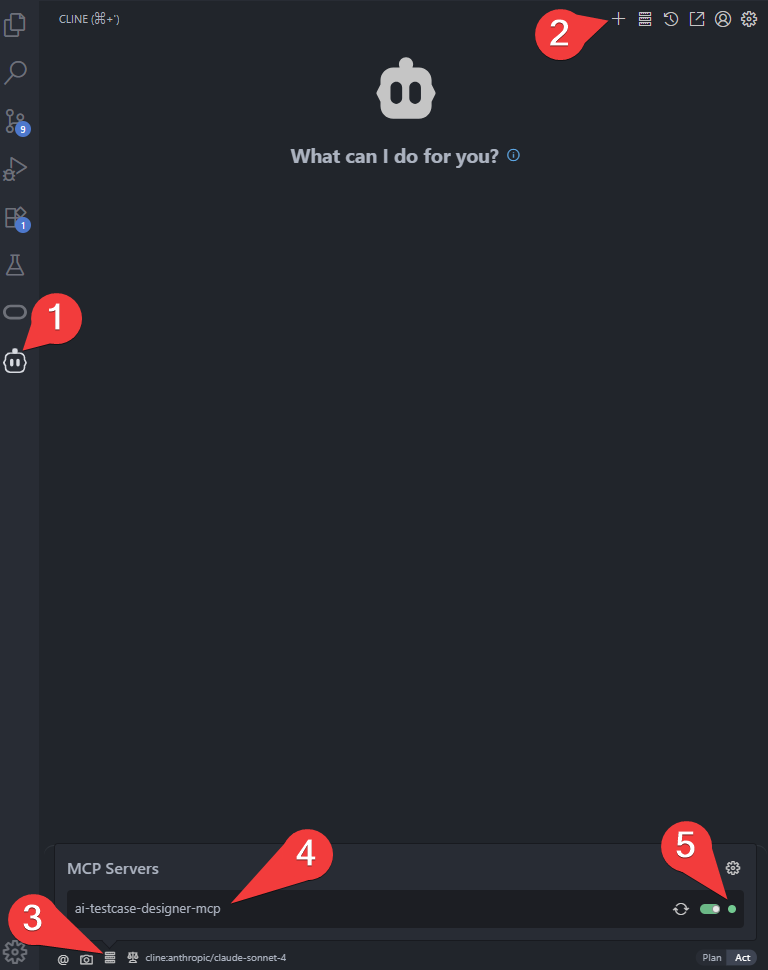
- Open the Cline sidebar (from the VS Code activity bar).
- Go to the "MCP Servers" section and click "Add New MCP Server".
- Fill in the server details:
{ "mcpServers": { "ai-testcase-designer-mcp": { "disabled": false, "timeout": 60, "command": "node", "args": [ "c:/Auto_WS/ai-testcase-designer-mcp/build/index.js" ], "transportType": "stdio" } } } - Test the connection and save.
For a visual step-by-step guide, see below:
For detailed Cline guidance, see the official docs:
cline.bot/getting-started/installing-cline#vs-code-marketplace%3A-step-by-step-setup
🔑 API Key & Work Directory Setup
To use the AI Testcase Designer MCP.
- Get your Groq API key from here for free: https://console.groq.com/keys
- A working directory (WORK_DIR) where generated Excel test plans and server logs will be saved.
Update your config.json file like this:
{
  "MODEL_API_KEY": "gsk_7Ma3Fabcd <your-api-key-here>",
  "WORK_DIR": "C:/Auto_WS/ai-testcase-designer-mcp"
}
How to Use
- 🖥️ Open Claude Desktop (or any MCP-compatible client).
- 📂 Download Sample Chat Message: sample_chat_message.txt and copy its content.
- ✉️ Paste the content into the chat and send the message: the AI will generate detailed test cases in Excel format.
- 💾 Generated Excel files and server logs are saved in your
WORK_DIRfolder.
▶️ Example Request
{
  "name": "generate_tests_excel",
  "arguments": {
    "endpoint": "https://api.example.com/v1/users",
    "method": "POST",
    "payload": {
      "name": "John Doe",
      "email": "[email protected]"
    },
    "extraContext": "Focus on invalid email and empty payload scenarios."
  }
}
📊 Example Excel Output
| Sl no | Test Name | Pre-Condition | Steps | Expected Result |
|---|---|---|---|---|
| 1 | Valid User Create | DB is empty | Send POST with valid payload | User created successfully |
| 2 | Missing Email | DB is empty | Send POST with name only | 400 validation error |
| 3 | Invalid Email | DB is empty | Send POST with invalid email format | 422 error message |
📂 Files Output
Files are written to: ./workdir/generated/
Sample Log Output
2025-09-13T10:22:11 [info]: [Step1] Incoming request: endpoint=/v1/users, method=POST
2025-09-13T10:22:11 [info]: [Step2] Building LLM prompt...
2025-09-13T10:22:13 [info]: [Step5] Converting LLM JSON to Excel rows (15 test cases)
Debugging
Since MCP servers communicate over stdio, debugging can be challenging. We recommend using the [MCP Inspector](https://github.com/modelcontextprotocol/inspector), which is available as a package script:npm run inspector
The Inspector will provide a URL to access debugging tools in your browser.
License
This project is licensed under the MIT License.
See the LICENSE file for details.
Reviews (0)
Sign in to leave a review.
Leave a reviewNo results found