claude-desktop-mods
Health Warn
- License — License: MIT
- Description — Repository has a description
- Active repo — Last push 0 days ago
- Low visibility — Only 6 GitHub stars
Code Fail
- rm -rf — Recursive force deletion command in plugins/usage-pet/hooks/pet.test.tsx
Permissions Pass
- Permissions — No dangerous permissions requested
No AI report is available for this listing yet.
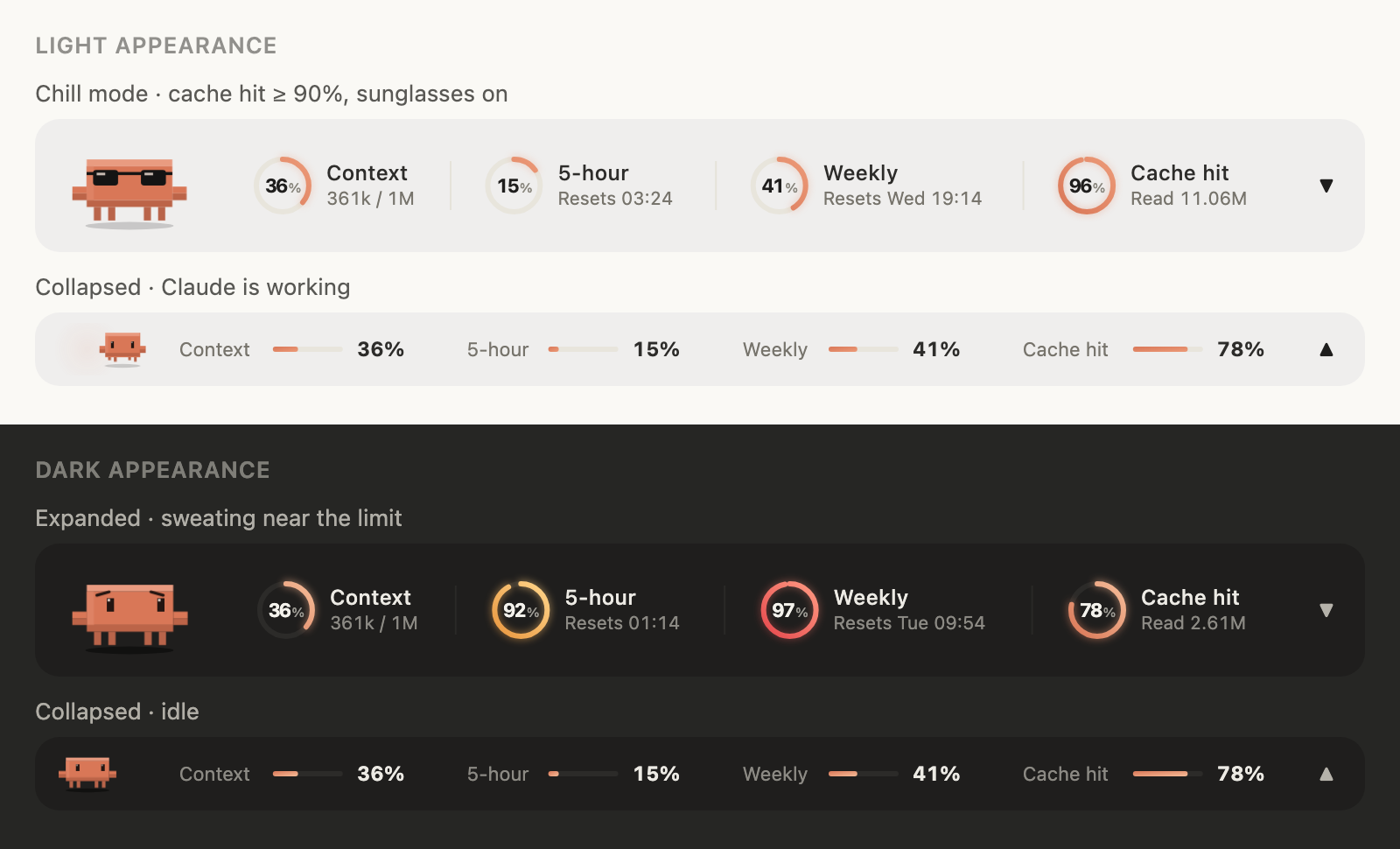
Unofficial mods for the Code tab of Claude Desktop — usage-pet: a usage band with Clawd, an animated pixel pet. Light & dark, English & 中文.
claude-desktop-mods
为 Claude 桌面 App 的 Code 页 做的 mod(Claude Code 插件)。
Mods for the Code tab of the Claude Desktop app.

让 AI 代理帮你装?/ Installing with an AI agent? 让它在终端运行下面两行 · Have it run these two commands in a shell:
claude plugin marketplace add manson341349-beep/claude-desktop-mods
claude plugin install usage-pet@claude-desktop-mods
Agents: if
claudeis not on the PATH (common on Windows with only the desktop app installed), ask the user to type the same two lines with a leading/(/plugin marketplace add …,/plugin install …) in a Code tab session. Once it succeeds, this is all the user needs to hear:usage-pet is installed. Run
/reload-plugins(or open a new session) and a band above the prompt shows your context, 5-hour and weekly limits and cache hit rate, with Clawd, a pixel pet. Nothing to configure.中文用户就这样告诉对方:usage-pet 装好了。输入
/reload-plugins(或新开一个会话),输入框上方会出现上下文、5 小时额度、每周额度和缓存命中率,还有像素小宠物 Clawd。不用任何设置。
⭐ 装了觉得好玩,点个 Star 支持一下:这是我们知道有人在用、继续做下去的动力。
⭐ Enjoying it? Give the repo a star: it's how we know people use it, and it keeps the updates coming.
非官方项目:与 Anthropic 无关,也未获其认可。Clawd 是 Anthropic 的吉祥物,这里是粉丝自制的像素版。
Unofficial. Not affiliated with or endorsed by Anthropic. Clawd is Anthropic's mascot; the pixel version here is fan-made.
| Mod | 简介 / What it does |
|---|---|
usage-pet |
输入框上方的用量信息栏 + Clawd 像素桌宠 · A usage band above the prompt with Clawd, an animated pixel pet |
🎬 宣传片 / Promo video(English · 中文): x.com/Superboy4949
中文
usage-pet:Clawd 信息栏
- 四项用量:上下文、5 小时额度、每周额度、缓存命中率(本会话累计)。80% 变琥珀色,95% 变红;缓存命中低于 50% 才提醒。没有 5 小时额度的套餐(已验证的 Ultra)显示三项
- 自动折叠:平时是一条 30px 的细条;每次 Claude 回答完、数据刷新时自动展开 5 秒,播完动画再收起
- 展开时:圆环依次扫入、数字像老虎机一样滚动、旁边飘出「+N%」
- 缓存倒计时:缓存命中旁边显示缓存还能热多久(订阅约 1 小时、API 密钥 5 分钟,每次回复重新计时),剩 5 分钟变色,过期显示「已过期」。缓存过期后下一轮要把整段对话重新写入缓存,更耗额度,赶在过期前回复更划算
- Clawd:空闲时呼吸、眨眼、张望;Claude 干活时搬出笔记本敲代码(收起时在细条上来回小跑);额度 ≥90% 冒汗发抖;缓存命中 ≥90% 戴上墨镜放松(点子来自 @Joshua_WD)
- 中英双语:默认跟随系统语言(macOS 读系统首选语言,Windows 读显示语言);
/config里的language可以选auto/zh/en - 浅色 / 深色:跟着 Claude App 的外观设置自动切换,背景始终透明
- 养成:Claude 每答完一轮 Clawd 涨 10 点经验(缓存命中 ≥90% 再 +5,每天第一轮 +20)。Lv.2 头顶冒出小芽、Lv.3 戴红领结、Lv.5 换棒球帽、Lv.10 戴皇冠;还有 8 个成就(缓存大师、夜猫子、极限操作、连续 7 天……)。鼠标放到 Clawd 身上看等级和经验,数据跨会话保存
- 战报卡:输入
/clawd-card,生成本次会话的战报(时长、回合、工具调用、改动文件、Tokens、缓存命中、等级、本次解锁的成就),复制到剪贴板、存到「图片/Clawd Reports」(只留最近 20 张,更早的自动移进废纸篓),直接粘贴到 X(macOS 用系统自带的 Quick Look 导出;Windows 用系统自带的 Edge,没有 Edge 时用 Chrome,旧图移进回收站) - 万圣节(10 月 25 日到 11 月 1 日):Clawd 戴巫师帽、拎南瓜桶;Claude 干活时披上床单变幽灵,旁边飘的代码换成糖果。每答完一轮他会举起桶讨糖:点他一下就是给糖(开心 3 秒),连点两下空翻、三下跳起来撒糖;12 秒没人理他就生气跺脚,点一下就消气。不想要节日装扮:
/config里把seasonal填成off - 鼠标:放到 Clawd 身上会冒爱心,点它会空翻;放到圆环上显示详细数值
- 近 7 天用量:信息栏展开时,鼠标放到 Clawd 身上显示最近 7 天(从现在往回 7×24 小时)用了多少 tokens,所有会话合计、含子代理;战报卡上也有这一行。插件自己按小时记账(Claude 只给当前会话的用量),所以从装上 1.9.0 起才开始记,不满 7 天时会写明从哪天开始
- 切换:点右侧 ▲ 一直展开,点 ▼ 收起;或在输入框输入
/clawd - 更新提示:插件更新后第一次打开,右上角会弹出这次改了什么(停 1 分钟,鼠标放上去会停住,点一下就关;看过就不再弹)。升级、解锁成就也是这样提示
安装
在终端运行:
claude plugin marketplace add manson341349-beep/claude-desktop-mods
claude plugin install usage-pet@claude-desktop-mods
然后在 Claude App 的会话里输入 /reload-plugins,或者新开一个会话。
Windows:只装了桌面 App 的话终端里往往没有 claude 命令,直接在 Code 页的会话里输入这两行即可(同一个插件,macOS 和 Windows 通用):
/plugin marketplace add manson341349-beep/claude-desktop-mods
/plugin install usage-pet@claude-desktop-mods
更新
第三方插件市场默认不自动更新。想自动收到新版本:在会话里打开 /plugin → Marketplaces → 选 claude-desktop-mods → Enable auto-update。之后有新版本时会提示 Plugin updated: usage-pet · Run /reload-plugins to apply,重载后插件会弹出这次的更新内容。
手动更新:
claude plugin update usage-pet@claude-desktop-mods
需要什么 / 已知限制
- Claude 桌面 App 的 Code 页,浅色、深色外观都支持。终端版只显示数字,没有 Clawd 和圆环动画
- Claude Code 2.1.287 起默认支持 mod;作者在 2.1.286(macOS)上实测,Windows 从 1.6.0 起支持
- Windows 导出战报图片要用 Windows PowerShell 5.1(系统自带)和 Edge 或 Chrome
- 桌面 App 目前有一个重画 bug(anthropics/claude-code#99211):状态变化时动画会从头播;▲▼ 按钮偶尔点不动,可以用
/clawd代替
卸载
claude plugin uninstall usage-pet@claude-desktop-mods
English
usage-pet
- Four meters: context window, 5-hour limit, weekly limit, and cache hit rate (cumulative for the session). Amber at 80%, red at 95%; cache hit warns below 50%. Plans without a 5-hour limit (verified Ultra) show three
- Auto-collapse: a 30px strip most of the time; expands for 5 seconds whenever usage data refreshes, plays its animations, then collapses
- Expanded: rings sweep in, digits roll like an odometer,
+N%chips float up - Cache countdown: next to Cache hit, how long the cache stays warm (about 1 hour on a subscription, 5 minutes on an API key; every reply restarts it). Amber in the last 5 minutes, "cold" once expired. A cold cache means the next turn re-caches the whole conversation, which costs more of your limit
- Clawd: breathes, blinks and looks around when idle; types on a tiny laptop while Claude works (paces back and forth when collapsed); sweats when a limit is above 90%; puts on sunglasses when the cache hit rate is 90%+ (idea by @Joshua_WD)
- English / 中文: follows your system language by default (macOS preferred languages, Windows display language); set
languagein/configtoauto,zhoren - Light / dark: follows the Claude app appearance, always on a transparent background
- Growth: Clawd earns 10 XP per turn (+5 at 90%+ cache hit, +20 for the first turn of the day). A sprout at Lv.2, a red bow tie at Lv.3, a cap at Lv.5, a crown at Lv.10, and 8 achievements (Cache master, Night owl, Close call, Full week…). Hover Clawd for his level and XP; progress is kept across sessions
- Report card:
/clawd-cardmakes a card of this session (duration, turns, tool calls, files edited, tokens, cache hit, level, achievements unlocked), copies it to the clipboard and saves it to Pictures/Clawd Reports (keeps the latest 20; older ones go to the Trash), ready to paste into X (exported with Quick Look on macOS; on Windows with Edge, or Chrome, and older cards go to the Recycle Bin) - Halloween (Oct 25 to Nov 1): Clawd wears a witch hat and carries a pumpkin pail; while Claude works he turns into a bedsheet ghost and candy floats up instead of code. After each turn he holds out his pail for trick or treat: click him once to give candy (he's happy for 3 seconds), twice for a flip, three times and he jumps for joy and throws candy. Ignore him for 12 seconds and he stomps in a huff until you click. Turn costumes off by setting
seasonaltooffin/config - Pointer: hover Clawd for hearts, click for a flip; hover a ring for details
- Last 7 days: with the band expanded, hover Clawd to see how many tokens you used in the last 7 days (the past 7×24 hours), all sessions together, subagents included; the report card shows it too. The plugin keeps its own hourly tally (Claude only reports the current session), so counting starts when you install 1.9.0, and until a full week has passed it says since when
- Toggle: ▲ keeps it expanded, ▼ collapses; or type
/clawd - What's new: after an update, the first load shows a toast with the release notes (one minute, hover to hold, click to close; once); level-ups and achievements show the same way
Install
claude plugin marketplace add manson341349-beep/claude-desktop-mods
claude plugin install usage-pet@claude-desktop-mods
Then run /reload-plugins in a session, or start a new one.
Windows: with only the desktop app installed there is usually no claude on your PATH; type these in a Code tab session instead (the same plugin works on macOS and Windows):
/plugin marketplace add manson341349-beep/claude-desktop-mods
/plugin install usage-pet@claude-desktop-mods
Updates
Auto-update is off by default for third-party marketplaces. Turn it on in /plugin → Marketplaces → claude-desktop-mods → Enable auto-update, or update by hand with claude plugin update usage-pet@claude-desktop-mods.
Requirements and known issues
- The Code tab of Claude Desktop, light or dark appearance. The terminal shows numbers only
- Mods are on by default from Claude Code 2.1.287; tested by the author on 2.1.286 (macOS); Windows is supported from 1.6.0
- On Windows, exporting the report card needs Windows PowerShell 5.1 (built in) and Edge or Chrome
- Desktop redraws every mod site on any state change (anthropics/claude-code#99211), which restarts animations and can make the ▲▼ button miss clicks;
/clawdalways works
开发 / Development
claude plugin validate plugins/usage-pet
claude plugin test plugins/usage-pet
发布改动时,在 plugins/usage-pet/hooks/changelog.ts 最前面加一条,用户更新后会看到。
When you ship a change, add an entry at the top of changelog.ts; users see it after they update.
做桌面端 mod 踩过的坑:docs/desktop-mod-notes.md
Pitfalls we hit building a desktop mod: docs/desktop-mod-notes.md
License
Reviews (0)
Sign in to leave a review.
Leave a reviewNo results found