joinlet
Health Warn
- License — License: AGPL-3.0
- Description — Repository has a description
- Active repo — Last push 0 days ago
- Low visibility — Only 5 GitHub stars
Code Fail
- exec() — Shell command execution in .arch/evidence.json
Permissions Pass
- Permissions — No dangerous permissions requested
No AI report is available for this listing yet.
Joinlet: open-source architecture workspace, versioned diagrams and context for coding agents.

Joinlet
Architecture that lives with your code.
Design systems visually. Keep diagrams, decisions and coding-agent context in your repository.
Quick start · Features · Coding agents · Self-hosting · Contributing


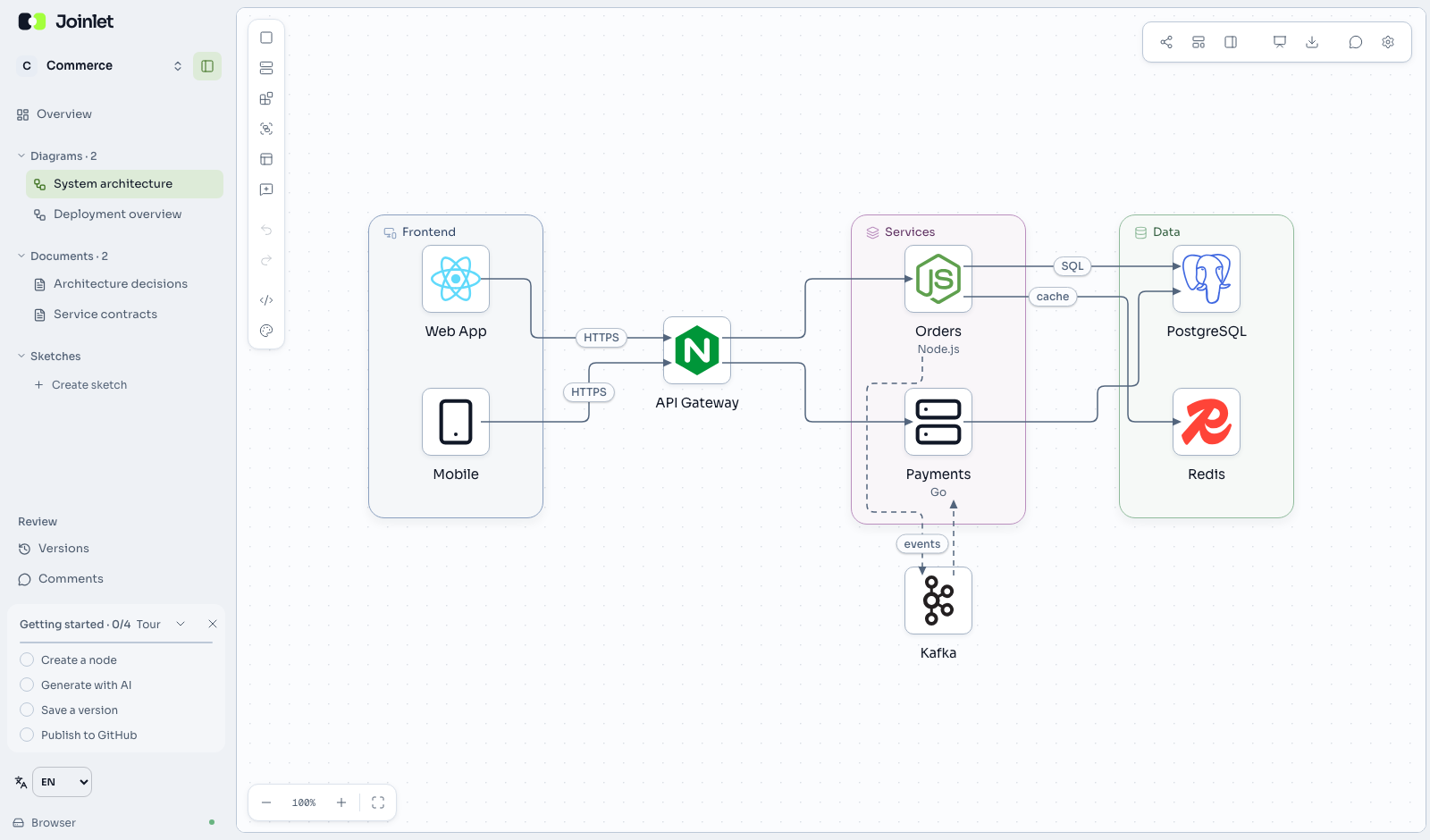
Joinlet is an open-source workspace for software architecture. Draw how your system fits together, write down the decisions behind it, and give your coding agents that same context through MCP and the CLI.
Start in your browser without an account, or save a workspace to a local folder. Repository workspaces live in .arch/ as JSON and Markdown, so architecture changes can be reviewed alongside code in Git.
Features
- Visual system design. Build diagrams with nested groups, cloud and technology icons, architecture perspectives and animated flows. Export to SVG, PNG, Mermaid or PlantUML.
- System simulation. Model traffic, finite queues, caching, retries, circuit breakers and autoscaling on an existing diagram. Run reproducible scenarios in a browser worker or through CLI/MCP, compare saved reports and start from illustrative Playground examples. See the simulation model and reference.
- Diagrams, decisions and sketches together. Keep Markdown documentation and Excalidraw sketches in the same workspace. Use presentation mode to walk others through your design.
- Made for Git. Store diagram structure and layout separately, inspect semantic differences and keep version history. Moving a node does not rewrite its architecture definition.
- Context for coding agents. Read and update architecture through MCP, generate repository context with the CLI, and connect diagrams to source evidence. Synchronize supported source formats such as Terraform, OpenAPI and Kubernetes.
- AI with your own provider. Connect your credentials to discuss the system and generate architecture proposals. Review structured diagram proposals before applying them.
- Team collaboration. Work together with live cursors, comments and invitations with view, comment or edit permissions. Run the collaboration services on your own infrastructure.
Quick start
You'll need Bun 1.4.3 or later and Node.js 22.12 or later.
git clone https://github.com/MarcoPeixot/joinlet.git
cd joinlet
bun install --frozen-lockfile
bun run dev
Open the editor or the English documentation. The development command starts the web app and local API.
The core editor works with browser storage: no account or API key is required. Open a local folder to keep your workspace with a project. AI features and external integrations are optional and use your own credentials.
Joinlet is in beta. Back up important workspaces and review changes before using them in production.
Coding agents
Joinlet exposes architecture to MCP-compatible coding agents. First create or open a folder workspace in the editor, then add this server to your MCP client, replacing both absolute paths:
{
  "mcpServers": {
    "joinlet": {
      "command": "bun",
      "args": [
        "/absolute/path/to/joinlet/apps/mcp/src/main.ts",
        "--dir",
        "/absolute/path/to/your-project"
      ]
    }
  }
}
Agents can inspect diagrams and documents, propose changes, and check source evidence. You can also generate context and verify the workspace directly from the Joinlet checkout:
bun apps/cli/src/main.ts context --dir /absolute/path/to/your-project
bun apps/cli/src/main.ts verify --strict --dir /absolute/path/to/your-project
Generated context includes ARCHITECTURE.md, llms.txt and per-diagram files. Source synchronization covers configured import formats and anchored evidence; it does not verify arbitrary code behavior. Editing a diagram does not automatically rewrite application code.
See the MCP and CLI reference for tool details.
How workspaces are stored
A folder workspace keeps its architecture in readable files:
.arch/
├── strukt.json              # Workspace manifest
├── diagrams/
│   ├── system.strukt.json   # Nodes, connections and groups
│   └── system.layout.json   # Canvas positions and sizes
├── docs/                    # Markdown documents
├── sketches/                # Excalidraw sketches
└── context/                 # Generated context for coding agents
Commit these files alongside your code. Keep generated context up to date through the CLI; review changes to both source and architecture in pull requests.
Self-hosting and Joinlet Cloud
The complete original product is open source: editor, servers, CLI, MCP, VS Code extension and shared packages. Self-host it with your own credentials using the Docker deployment guide. Local use and self-hosting have no commercial workspace, diagram or participant quotas; permissions and technical capacity limits still apply.
Joinlet Cloud is the planned managed service, offering hosting and operation of the same product. Paid subscriptions are not implemented yet. See the open-source and hosting model for the current boundaries and limitations, and the release process for how reviewed changes reach an official installation.
Contributing
Bug reports, documentation improvements and code contributions are welcome. Read the contributing guide to set up development, run checks and prepare a pull request.
- Report a bug or suggest a feature.
- Browse the product architecture.
- Report a security vulnerability privately.
The monorepo contains applications in apps/ and shared libraries in packages/. Existing @strukt/* package names, .strukt.json files and STRUKT_* settings are retained for compatibility.
License
Original Joinlet code is licensed under AGPL-3.0-only. Third-party code and assets retain their own terms; see Third-party notices. The Joinlet name and visual identity are covered by the brand policy. For corresponding source information, see SOURCE.md.
Conectar código e arquitetura
joinlet init --dir /projeto prepara .arch pelo código e documentos; joinlet connect [pasta] abre o editor local sem conta; joinlet watch --dir /projeto acompanha alterações. O painel de repositório oferece pasta nativa, pareamento de computador e seleção GitHub/branch na Cloud autenticada. Sem IA, as importações determinísticas terminam com análise semântica pendente. Diagramas continuam representando arquitetura desejada: implementar suas alterações na aplicação é tarefa do agente.
Veja sincronização, cobertura e conflitos e configuração do worker. bun run build:connector prepara um pacote instalável para a plataforma atual; mantenha binário, elk-worker.js e pasta web juntos. A distribuição não implica ativação da infraestrutura oficial.
Reviews (0)
Sign in to leave a review.
Leave a reviewNo results found