tomacco
Health Pass
- License — License: GPL-2.0
- Description — Repository has a description
- Active repo — Last push 0 days ago
- Community trust — 10 GitHub stars
Code Pass
- Code scan — Scanned 12 files during light audit, no dangerous patterns found
Permissions Pass
- Permissions — No dangerous permissions requested
No AI report is available for this listing yet.
Give your agent a phone. Agentic mobile app development: build, run and test iOS and Android apps from Linux. No Mac needed. Made for Omarchy.
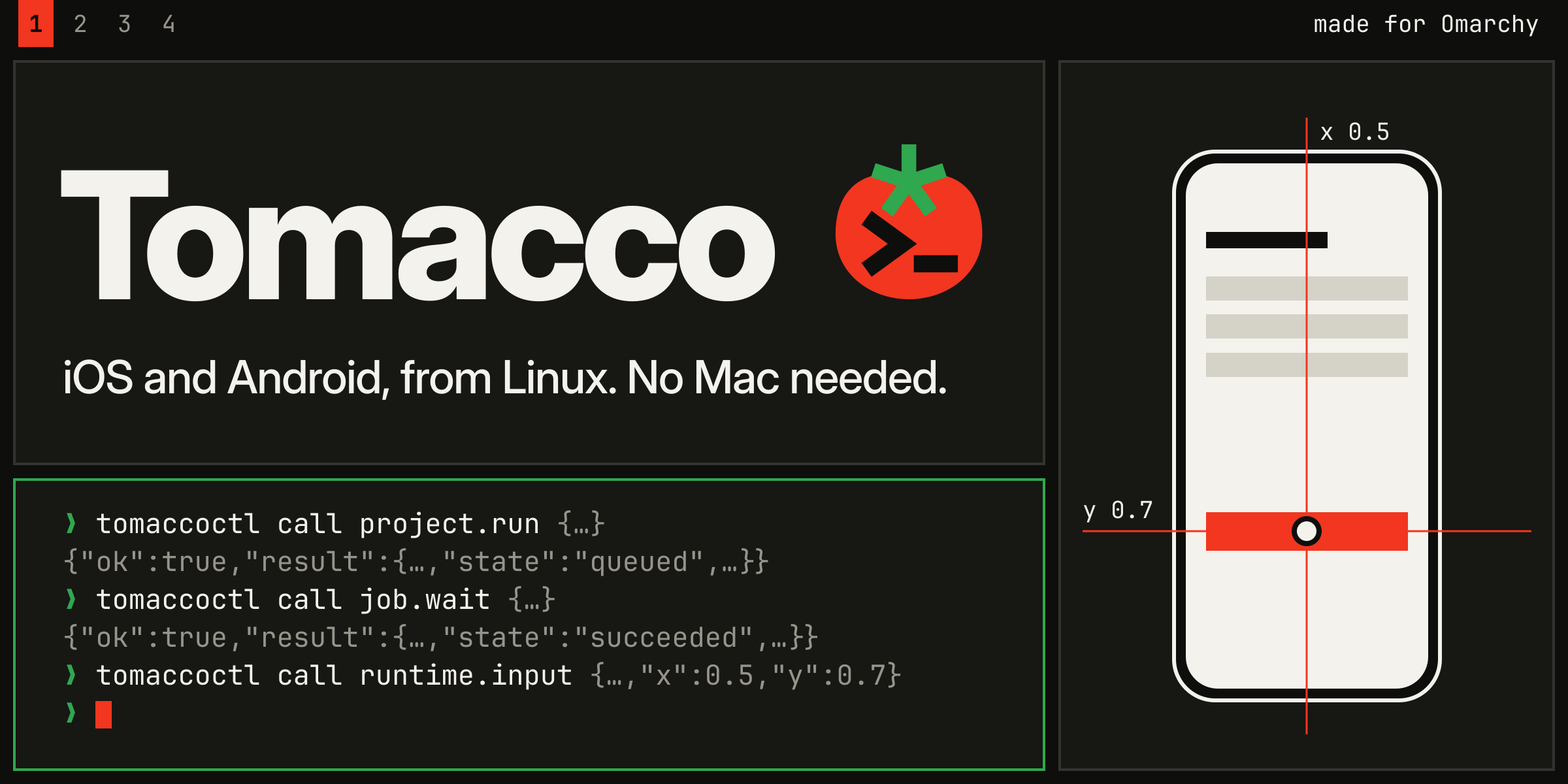
Tomacco: Give your agent a phone.
Build, run and test iOS and Android apps on Linux, with your coding agent or the native desktop.




Quick start · Connect your agent · Virtual iOS · Limits · Documentation · Contributing
Why Tomacco
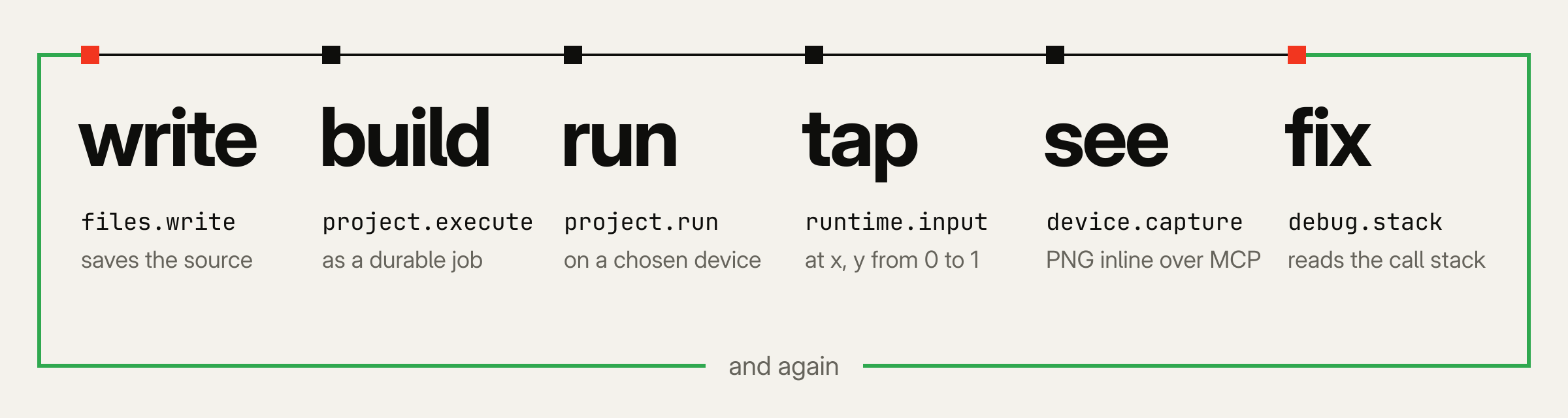
Your coding agent can write an app. Tomacco lets it build that app, run it on a
device, tap through the interface, inspect the result and try again.
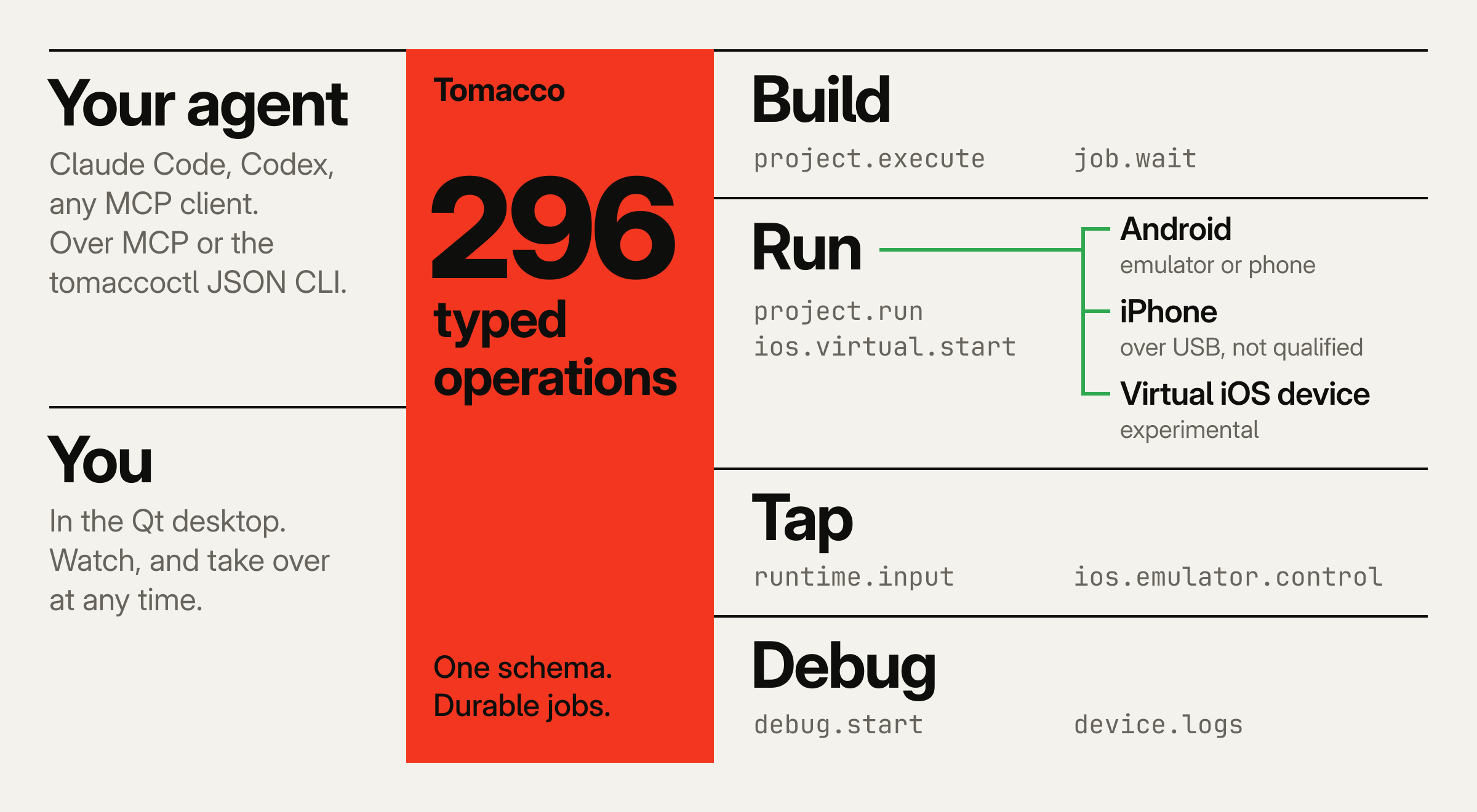
The agent and the native Qt desktop use the same 296 typed operations
through MCP or the tomaccoctl JSON CLI. You can watch the live device, take over
with touch and gestures, and share the same builds, logs and debugging session.
The desktop has 50 complete translation catalogs plus English, covering Omarchy's language
registry. Translation coverage lists the 1,898 marked interface texts and
technical checks; this is not native-speaker review. System follows the language chosen in Omarchy.
Tomacco is made for Omarchy, with panel and window-manager integration. It
also works on other Linux desktops without those integrations. The virtual iOS
device is experimental and needs a separate setup with your own Apple software;
see requirements and limits.
What works today
| Route | What you can do | Start here |
|---|---|---|
| Android | Gradle and Flutter builds, emulator and device control, live view, debugging, UI tests and profiling | Android guide |
| Swift on Android | Build a Swift core with a native Android UI for ARM64 and x86_64 | Swift on Android |
| Virtual iOS device | Boot iOS 27, run your own arm64 apps and interact with live touch; experimental | Setup |
| iPhone over USB | Build with xtool, sign, install and view through WebDriverAgent; physical-device execution not qualified | iPhone guide |
| Mac over SSH | Use Xcode builds, XCTest, the Simulator and App Store validation; not qualified | Mac route |
New in 1.5.0: adaptive phone layouts and scale-aware file choosers, ten coding-agent
adapters, cooperative device reservations and durable action outcomes, compact screen trees,
optional adaptive OCR and a bounded warm OCR engine for persistent MCP sessions. Demo Studio
turns local recordings into perspective device videos, controlled by the desktop or an agent,
with optional original sound. The release notes distinguish local
qualification from pending physical Pixel, iPhone and AirPlay checks.
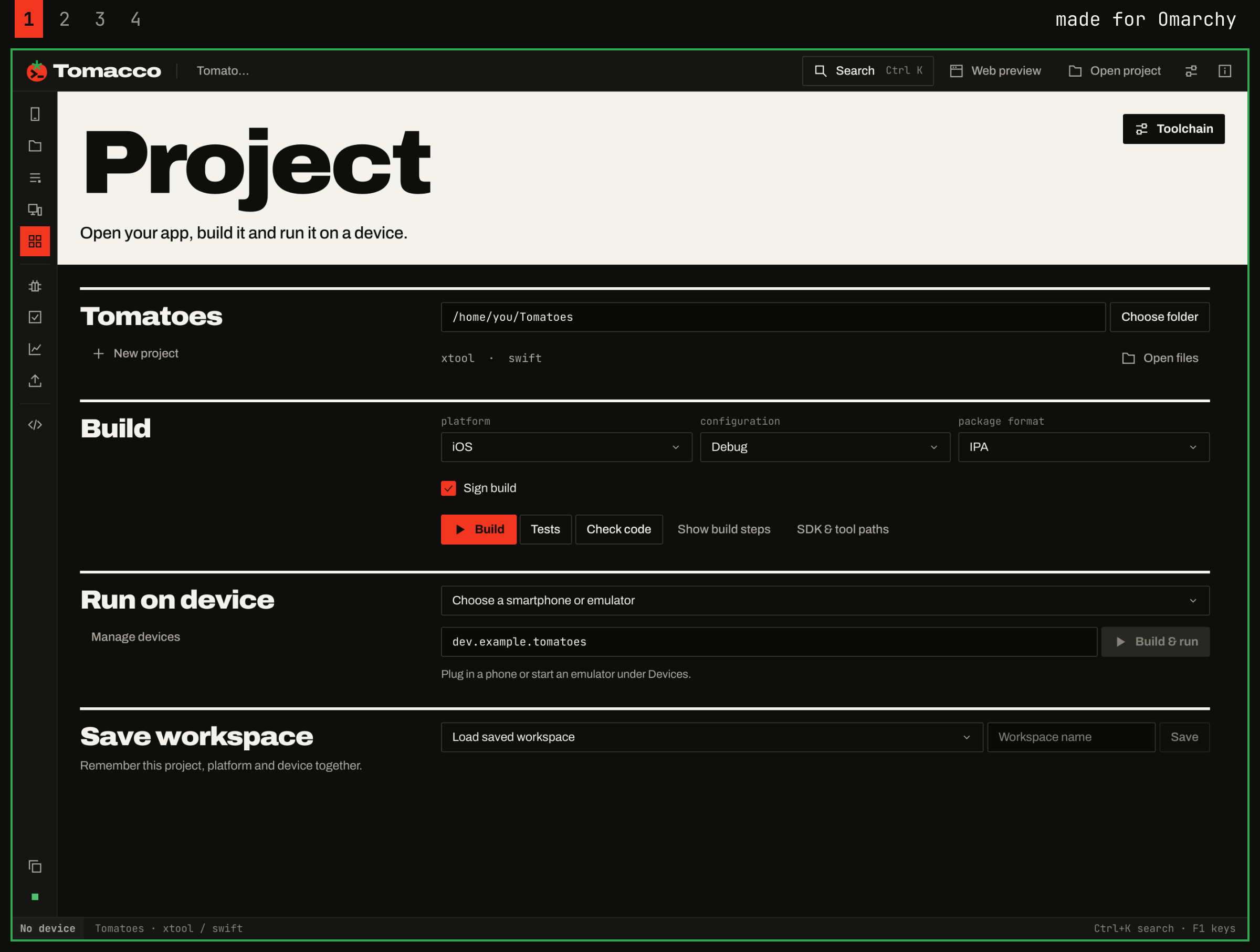
The Project page of the 1.2.1 desktop. A real capture, taken offscreen with no device connected.
Quick start
Let your agent do it. Tell Claude Code, Codex or any coding agent:
Set up Tomacco for me: https://tomacco.dev/agent
Or do it yourself:
curl -fsSL https://tomacco.dev/install.sh | bash
tomaccoctl setup
The first line checks and installs the latest signed release for your user. On Arch and
Omarchy it also offers to install the system packages. The second shows what your computer
can do and offers to install the Android SDK and connect your coding agents.
Arch Linux and Omarchy are the tested platforms. For Debian, Ubuntu and Fedora, a release has a
portable package that bundles Qt and FFmpeg and needs glibc 2.35 or newer; the installer picks it
where the regular package cannot start. On ARM64 (aarch64) Linux it takes the release's aarch64 package; the aarch64 portable
package needs glibc 2.39, such as Ubuntu 24.04 or Debian 13. See which package to use
and ARM64.
To read the script before running it, or to build from source, see
installation options.
Then open a project:
tomacco --project /path/to/app
For a first app, follow Your first Android app: a Compose starter on
the emulator with a screenshot and a UI test.
For a tour of the interface, see the desktop guide. For upgrades,
rollback and uninstall, see installing.
For agents
tomaccoctl setup connects Claude Code, Codex, Gemini CLI, Cursor, VS Code, Zed, OpenCode, Grok CLI, Hermes Agent and omp, asking
first for each; connect a client says which file it changes for each.
The installer also links an agent skill into ~/.claude/skills, ~/.codex/skills
and ~/.agents/skills, so those agents know when to use Tomacco; --no-agent-skill leaves it out.
To connect Claude Code or Codex by hand:
codex mcp add tomacco -- "$(command -v tomaccoctl)" mcp
claude mcp add --transport stdio --scope user tomacco -- "$(command -v tomaccoctl)" mcp
Any stdio MCP client can use the same tools. The server also exposestomacco://catalog and tomacco://jobs. Or use the native tomaccoctl executable
directly: every call returns a JSON result, and schema lists the operations.
tomaccoctl schema
tomaccoctl call device.list '{}'
tomaccoctl call project.inspect '{"path":"/absolute/project"}'
With the Android tools configured and an emulator running, this is the basic
create → build → run sequence. Wait for each job to finish before starting
the next step.
tomaccoctl call project.create '{"path":"/absolute/NewApp","kind":"android","name":"NewApp","organization":"dev.example"}'
tomaccoctl call project.execute '{"path":"/absolute/NewApp","platform":"android","action":"build","format":"apk"}'
tomaccoctl call project.run '{"path":"/absolute/NewApp","platform":"android","device":"emulator-5554"}'
Long operations return a durable job that survives a client disconnect. Keep its
ID and repeat job.wait until its state is succeeded, failed, cancelled ortimed_out. A queued or running job has not finished.
tomaccoctl call job.wait '{"job_id":"JOB_ID","seconds":30}'
The agent guide covers the full workflows, argument validation,
device input, debugging and visual checks. Agent patterns shows how to
plan with capabilities, wait on jobs, act on errors and treat destructive operations, and the
operation reference lists every operation.
In a container
For servers, CI and agents that should not install anything on the host, there is a headless
image: tomaccoctl from the signed release package, a JDK, Gradle and the Android SDK, and in a-emulator variant the Android Emulator with one system image. It has no desktop and no virtual
iPhone. Building it accepts Google's Android SDK license:
docker build --build-arg ACCEPT_ANDROID_SDK_LICENSE=1 -t tomacco-container:1.5.0 packaging/container
claude mcp add --transport stdio --scope user tomacco -- docker run -i --rm -v tomacco-data:/data tomacco-container:1.5.0 mcp
Container image covers the emulator, KVM, USB phones and what was tested.
The virtual iOS device
The experimental runtime boots iOS 27 on an x86_64 Linux PC: SpringBoard,
Settings, Safari and SwiftUI apps built on Linux, with live touch. A patched QEMU
translates the guest's ARM instructions in software; a Rust renderer draws
Apple's paravirtual GPU through Vulkan.
This takes additional setup. It needs your own restore images and a local
Image4 boot manifest, prepared on Linux with the included helper and a public
research template. The IM4M instructions
give the download and command; no Mac or Apple signing request is needed for that step.
It also needs about 100 GiB of disk,
8 GiB of guest RAM and a Vulkan GPU with about 16 GiB of memory. Initial restore
took about half an hour, followed by about nine minutes from a start to an app.
It is not production-ready.
Where do I get the Apple images?
The measured setup uses two exact restore archives:
| Archive | Version and build | Where we found it |
|---|---|---|
iPhone 16 (iPhone17,3) |
iOS 27.0.1 / 24A446 |
The ipsw.me firmware catalog |
PCC virtual device (vphone600ap) |
cloudOS 26.4 beta / 23E5207q |
The cloud264 entry in Lakr233/vphone-cli's firmware catalog |
Both recorded download URLs point to Apple's updates.cdn-apple.com servers.
The separate blacktop/ipsw command-line tool can look up and download firmware.
The image preparation guide
gives the exact catalog revision and file, download commands, manifest checks
and disk-image preparation steps. Newer builds are not substitutes.
Check the applicable Apple terms before downloading or using these images.
Public availability does not establish permission to decrypt, modify, run or
redistribute them. Apple offers its PCC Virtual Research Environment for research
on Apple silicon Macs and excludes commercial use; those terms do not establish
permission for this Linux runtime or general iOS app development. See
sources and licensing limits.
Performance
Measured on one development host: an i9-13900K with a Radeon RX 6000-series GPU.
Every guest processor is emulated, so performance is far below a physical phone.
| Measurement | Result |
|---|---|
| App window after launch | about 6.4 to 7.7 s |
| Touch to visible change | about 0.1 s |
| Home-screen swipe | about 7.5-11 changed frames per second |
| Graphics memory over 36 app launches | at most 1.7 GiB |
Overview and requirements ·
Setup · Usage ·
Troubleshooting
Status and limits
Tomacco 1.5.0 was developed and tested on one workstation: x86_64 Arch Linux with
Omarchy, Qt 6.12 and Rust 1.99. These local and offline checks do not qualify every
distribution or physical device.
The earlier 1.4.1 portable package passed checks in clean Debian 12, Ubuntu 22.04,
Ubuntu 24.04 and Fedora 44 containers; these are historical checks, not qualification of a
newly built 1.5.0 artifact or real desktops on those distributions. The 1.2.1 installer, doctor and an Android starter build ran in clean Debian 12
and 13, Ubuntu 24.04, Fedora 44 and openSUSE Tumbleweed containers. Other machines have not been
qualified; Linux distributions and hardware says what ran where, and what is
known about NixOS, SteamOS and Fedora's atomic desktops.
Physical iPhone execution is not qualified. Build, signing, pairing and runner
paths have contract tests, but execution on a real iPhone has not been verified.
Physical ARM64 Android phones and live Play/App Store submission are also unqualified.
ARM64 Linux is experimental. Earlier builds on an M1 MacBook Air with Arch Linux ARM
passed Rust tests and an offscreen desktop smoke test. Earlier aarch64 portable packages
passed clean Debian 13, Ubuntu 24.04 and Fedora 44 linux/arm64 container checks under
emulation and ran offscreen on that MacBook. Those results do not qualify the new 1.5.0
artifacts or installation on the Pixel running Omarchy Mobile. The aarch64 portable route
needs glibc 2.39, so not Debian 12 or Ubuntu 22.04. The virtual iOS device needs an x86_64 host.
| Virtual iOS area | Current state |
|---|---|
| App deployment | Supports installing an app on the running phone without a reboot (ios.virtual.deploy, about 25 s). SwiftUI apps built with the SDK from your own Xcode download have run; only a few small apps so far. |
| Network | Supports outbound-only NAT networking behind passt, off by default. A guest app saw a working path in a DHCP/DNS test; real traffic through passt remains unproven. |
| Input and storage | Hardware keyboard input and a keychain round-trip have been shown. Persistence is only partly verified. |
| Missing features | Audio, a working debugger, status-bar glyphs and complete graphics support. |
| Widgets | Widget extensions miss chronod's deadline under emulation, so a widget can stay empty. |
| Security | Pointer authentication is bypassed, and other protections are changed. Use your own test apps; keep real accounts and personal data out of the guest. |
The full runtime limits describe what
was tested and what remains open.
Documentation
The documentation index lists every guide. Common starting points:
| I want to… | Guide |
|---|---|
| Install Tomacco and run a first app | Getting started · Your first Android app |
| Connect an agent or automate a workflow | Agents · Agent patterns · Operation reference |
| Run headless in Docker, for agents, servers and CI | Container image |
| Use the workspace and live device view | Desktop |
| Compose and export a device demo from a local recording | Demo Studio |
| Develop for Android or an iPhone | Android · iPhone |
| Set up the experimental iOS runtime | Virtual iOS |
| Contribute to the implementation | Architecture · Building and testing |
| Check licensing, privacy and release status | Legal notes · Privacy · Release notes |
| Get short answers to common questions | FAQ |
Built on the work of others
Tomacco builds on substantial work by the emulator, graphics and mobile-tooling
communities. Thank you to their authors and contributors.
The iOS runtime stands on
jprx/qemu-sptm and jprx/darwin-vm,
yaelliethy/orchard,
steelbrain/reims-vgpu and steelbrain/metal2vulkan,
ChefKissInc/Inferno,
Lakr233/vphone-cli,
linux-apfs/linux-apfs-rw,
rust-vmm/vhost-device
and the register definitions of Asahi Linux's m1n1.
Building for iOS on Linux stands on
xtool,
go-ios,
Appium WebDriverAgent,
cctools-port and apple-libtapi,
ldid and ipsw.
Android's device view uses scrcpy.
Related projects worth knowing.
joshuaswarren/omarchy-apple-dev builds and deploys SwiftUI and Flutter apps from Omarchy to a real iPhone, and pointed us to a toolchain bug of our own.
JonathanInTheClouds/omarchy-ios-kit adds hot reload and VS Code debugging on top of it.
Tomacco ships no code from either. On request, ios.toolkit_install fetches a pinned commit of omarchy-apple-dev into Tomacco's data directory, and Tomacco's operations for Flutter on iOS, Xcode project import, crash reports and App Store builds call its scripts (what ran and what did not). Tomacco uses nothing from omarchy-ios-kit. Thanks to Joshua Warren and, for the Flutter pipeline, dl-alexandre.
Licenses and required notices: THIRD_PARTY_NOTICES.md.
Contributing
See CONTRIBUTING.md for the workflow and
SECURITY.md for private vulnerability reports. Most development
and unit tests need no iOS image.
Support the project
If Tomacco saves you time, you can support development through
GitHub Sponsors.
Legal notice
Tomacco is an independent project. Its documentation describes technical
behavior and source provenance; it does not provide legal clearance or grant
rights to Apple software.
- Apple materials. No Apple firmware, iOS image or Apple binary is part of this repository or its packages. You supply your own images and SDK, and prepare the research boot manifest locally.
- Protection changes. The research runtime changes or bypasses some Apple protections on local copies. The legal notes describe those changes. Keeping copies private or describing a use as research does not by itself establish permission.
- Applicable terms. Review the agreements for your software and the law relevant to your use. This README is not legal advice or a guarantee that a particular use is lawful.
- No warranty. Tomacco is supplied without warranty under the GPL.
Tomacco is not affiliated with, endorsed by or sponsored by Apple, Google or
Samsung, and is independent of Omarchy. Names identify compatible platforms;
see the trademark notice.
Tomacco sends no telemetry; privacy.md explains its network use.
License
Copyright (C) 2026 Marsel Nenaj and Tomacco contributors.
Tomacco's source is licensed under GPL-2.0-or-later; see LICENSE
and COPYRIGHT. Distributed binaries are conveyed under GPL version 3
because of their dependencies. The emulator patches keep their upstream licenses.
- Binaries.
tomaccoctllinks Apache-2.0 crates (prost,sync_wrapper),
and the desktop links Qt 6 (LGPL-3.0) and, on Arch, a GPL-3.0 build of
FFmpeg. The portable package bundles Qt and an LGPL-only FFmpeg build. Distributed binaries are therefore conveyed under GPL version 3, as
the "or later" option allows. Packages install its text asCOPYING.GPL-3.0, and SOURCE.md names the version
and commit they were built from and where the corresponding source is
offered. - Patches. The patch series in
integrations/ios-emulator/keep the
license of the project each one changes.
Every component, with its license and required notices, is listed in
THIRD_PARTY_NOTICES.md. The protocol definitions are
also listed in native/protocol/THIRD_PARTY.md.
Reviews (0)
Sign in to leave a review.
Leave a reviewNo results found