devilop
Health Pass
- License — License: MIT
- Description — Repository has a description
- Active repo — Last push 0 days ago
- Community trust — 39 GitHub stars
Code Warn
- process.env — Environment variable access in deploy/preview-site.mjs
- network request — Outbound network request in examples/agent-update.mjs
- process.env — Environment variable access in examples/block-view-demo/app.mjs
- process.env — Environment variable access in examples/stages-demo/setup.mjs
- network request — Outbound network request in examples/stages-demo/setup.mjs
- process.env — Environment variable access in mcp.mjs
Permissions Pass
- Permissions — No dangerous permissions requested
No AI report is available for this listing yet.
Build products with AI agents. Map the architecture, edit real screens, and send changes to your existing coding chat. Local and open source.
devilop

Build your product with an AI agent: map how it works, build it and test it with users. По-русски
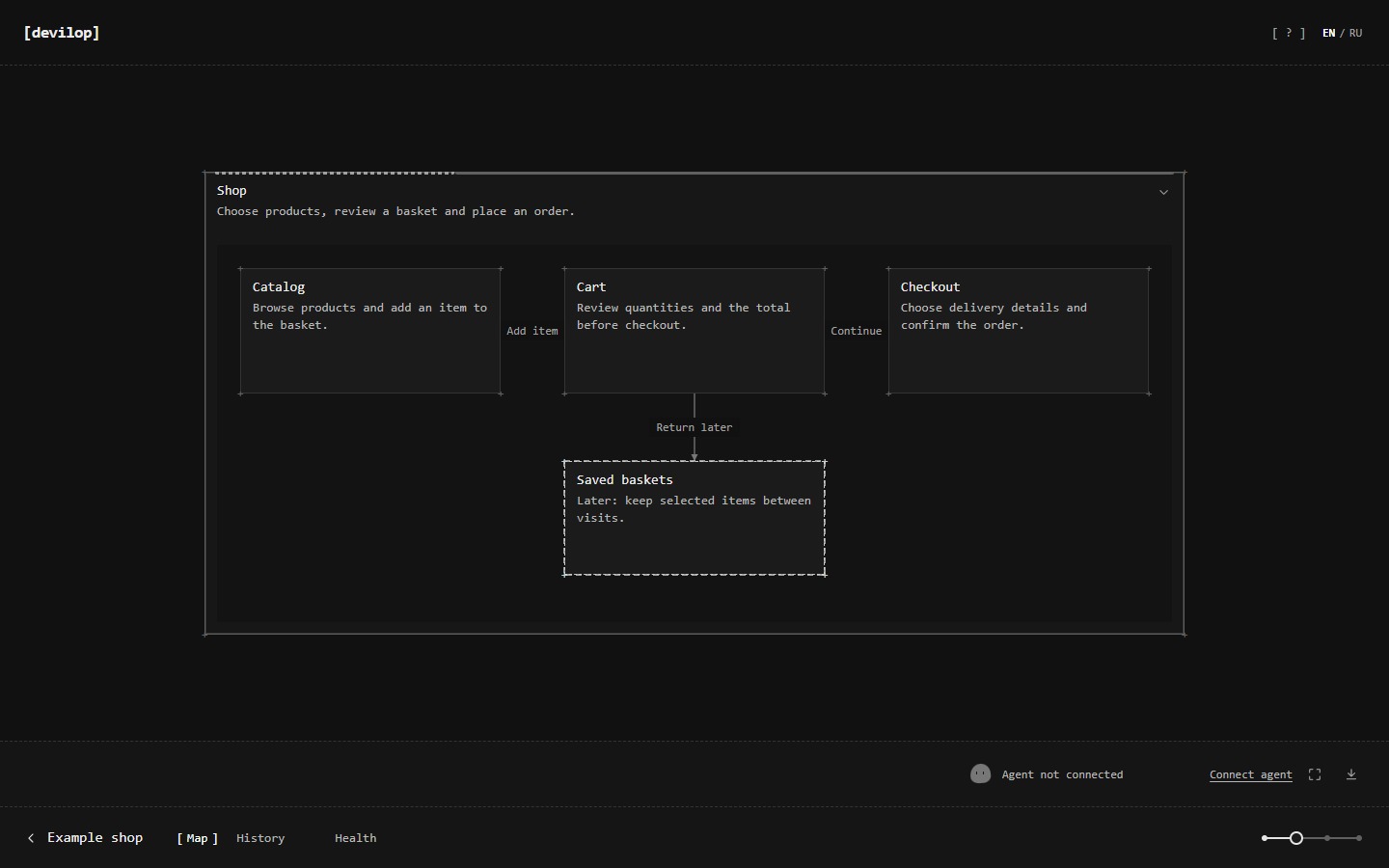
devilop is a local product-development app for hackathon participants, vibe coders, founders and startup makers. Its map is the main workspace: blocks, notes, nested sub-maps and links show the product's structure and user flows. Plan the next outcome with your agent, build it, test it with first users and decide what comes next. The goal is to take your own product toward its first revenue and the point where it needs a team.
Your agent (Codex, Cursor, Gemini, a local model and others) connects your project folder, reads its source and builds the map while you watch. Concept and Mechanics explain the product in plain words. Technical locates the implementation; Code describes each method's detailed behavior in ordinary language.
The agent shows what it is doing and which blocks it is changing. Blocks whose files changed are flagged as possibly outdated, and checks show testing and failure as they happen. "Finish edits" saves your map and interface changes as an immutable package for your connected current chat. You can keep editing while it works. Automatic delivery depends on the client's supported queue, channel or active receive; the interface shows its actual state.
Language. devilop is in English; the interface can also be switched to Russian (EN / RU). The map itself uses whatever language you and your agent write in.
Why
- See how the product works. A level slider switches between four levels: Concept and Mechanics in plain words, Technical for source references and Code for detailed behavior described without code syntax.
- See each user flow. A bound block opens its actual local app page, region and state. Different steps can show different states of the same screen. Edit text, appearance or order there, then hand the drafts to your coding agent.
- Talk about blocks, not files. Select a block and tell your agent "do this here". The agent sees your selection.
- Know what is going on. You can see what the agent is doing now and which blocks it is editing. Outdated descriptions, missing checks, failing tests and leftover
TODOs are flagged too. - Plan on the map. The agent can propose changes as a dashed overlay that you accept or reject. Blocks you add yourself become a plan for the agent. Use a block's Requests field for desired behavior, constraints and examples; Save keeps them in your batch until Finish edits.
- Local and simple. The map runs in one Node.js process, with no runtime dependencies, build step or required cloud account. Its data stays in
.devilop/next to the program. Optional client setup writes project-local configuration; your coding agent makes source changes under its own permissions.
Quick start
You need Node.js 22 or newer.
The website's versioned package includes the runtime and installation instructions.
The existing public GitHub repository may lag behind that package. To work from a source checkout:
git clone https://github.com/mathew5612/mycel.git devilop
cd devilop
node devilop.mjs open
This starts devilop in the background and opens http://127.0.0.1:4317. On Windows you can also double-click devilop.cmd. On macOS you can double-click devilop.command; run chmod +x devilop.command once first.
Then open your agent in your project's folder and give it this line. "Connect project" copies it with instructions
to continue in the same chat and keep setup quiet.
Read the devilop guide and follow it: curl -s http://127.0.0.1:4317/agent
On Windows PowerShell use curl.exe instead of curl. The agent connects the folder and builds the map in this
same chat, using the CLI immediately or existing MCP tools. Setup and browser checks run quietly; the agent returns
the map link without opening windows or navigating your workspace. Optional MCP setup loads tools in future sessions;
you do not need to switch chats to complete onboarding. You keep talking to the agent in its own window: devilop has no chat.
For a source checkout, update with git pull and then node devilop.mjs open. For a downloaded installation,
follow the website guide's verified update procedure and preserve its data folder. If an older devilop is still
running with the same data, open restarts it on the new version. Your maps in .devilop/ are not touched.
Finish edits in your current chat
Ask the agent in the conversation you already use to follow the guide. Codex connects through that chat's native
shell with node <devilop>/devilop.mjs current connect --client codex; Claude and Cursor use devilop_connect on
their current MCP connection. This uses the client's supplied identity and does not create a second agent.
The general CLI also accepts --client claude|cursor, but that alone does not establish Claude's MCP channel or
an idle Cursor listener. Tool access and a successful map build alone do not prove incoming delivery.
| Client | Delivery into that conversation |
|---|---|
| Codex | The native shared queue holds a message for the exact existing thread. Dispatch requires a loaded thread and may take about ten seconds. Queued is not yet received. |
| Claude Code | An opt-in MCP channel sends a notification to the same running CLI session. It requires a compatible version and your explicit channel consent. |
| Cursor | A pending bounded receive call returns the submitted work to the active agent. Once that call ends, it is not listening; external delivery into an idle IDE chat is not confirmed. |
Click the round avatar for the current chat, saved packages, questions and verified results. The status distinguishes
waiting, queued, received and working. Past contact stays in the tooltip; it does not mean the agent is connected.
If a delivery path is unavailable, edits stay saved. With an enabled Codex queue or Claude channel, every newly
sealed package gets its own notice even while older work is waiting or running. Source execution remains ordered,
with one writer: a busy receipt names the earlier package, without cancelling or skipping it. Cursor still requires
an active receive call.
Codex MCP may not inherit the native thread identity. For native queue delivery, the agent uses the current chat's
shell and follows the notice's exact CLI commands consistently. An unrelated MCP connection cannot take over that
assignment. Real Codex delivery into the same chat has been verified in this checkout; source modification and
checked completion through that real client remain unverified. Claude and Cursor native acceptance also remain
unverified. Queue receipts, the controlled demo and isolated tests do not establish a complete real-client workflow.
The agent receives an exact assignment, reports progress and completes it only after actual checks. The broker
keeps credentials private, allows one source writer and clears only matching applied drafts. Your newer edits and
Requests remain intact. Native approvals wait for you; interrupted or uncertain work needs review before retry.
Optional separately managed agent
A separate agent is an optional mode you can explicitly choose; it is not the final onboarding step and does not
connect your current chat. To use that mode, run from the connected project folder and keep the process running:
node <devilop>/devilop.mjs run --client codex --bind
# Cursor with its ACP-capable CLI installed:
node <devilop>/devilop.mjs run --client cursor --bind
The agent client must already be installed and signed in. If it is not on PATH, add--executable <path>. For another ACP client use --client acp --executable <path> --args '["acp"]'.
The runner opens its own native session. It does not inject messages into an unrelated existing IDE chat.
Click the round agent avatar to see the selected session, availability, submitted work, questions and results.
Without --bind, select the registered session there before it can work. To reconnect the same owned session,
use --session <sessionId> from the runner's output after its previous process has stopped. A client must support
resuming that saved session; this cannot take over another live owner. Stop the runner with Ctrl+C.
"Finish edits" saves an immutable package and wakes the selected connected runner; if it is busy, the package waits
for its next turn. You can immediately continue editing. Verified completion updates descriptions and check results
only where they still apply, and removes only unchanged applied draft versions. Your Requests remain verbatim.
Offline packages remain queued; reading a package or ending a model turn is not completion.
Reading through MCP, CLI or HTTP does not mark them complete, and a generic MCP connection alone cannot wake an
idle client. Clients without a supported execution adapter can still read the same packages with batches.
Explicit permission requests wait for your answer in the avatar window. After uncertain partial source changes,
confirm the previous agent has stopped and review the files before retrying; the runner does not repeat them blindly.
For AI agents
If a person asked you to set up devilop for their project:
- Check that Node.js 22+ is available:
node --version. - Unless devilop is already running (
curl -s http://127.0.0.1:4317/api/health), follow the website installation guide and install its verified versioned package outside the project. Start that installation withnode <devilop>/devilop.mjs start. Reuse an existing copy and its data; one devilop serves all projects on the computer. - Fetch the guide (
curl -s http://127.0.0.1:4317/agent, ornode ~/devilop/devilop.mjs guide) and follow it from the project folder. It has the exact commands for this computer. - Tell the person to open http://127.0.0.1:4317 to watch the map.
The ways to connect:
| Agent | How it connects |
|---|---|
| Codex, Claude Code, Cursor | node <devilop>/devilop.mjs setup --agent codex|claude|cursor --install --hooks merges project-local MCP settings and optional hooks. Existing unrelated settings remain. Configuration alone does not enable or verify delivery. |
| Gemini / Antigravity, VS Code, Windsurf, Cline and others | node <devilop>/devilop.mjs setup --agent <name> prints the MCP entry and where it goes |
| Local models (Ollama, LM Studio, llama.cpp, vLLM) | node <devilop>/devilop.mjs chat: a built-in map assistant with read-only access to project files. Current-chat execution, batch mutation and long-wait tools are filtered out. Client configs: setup --agent lmstudio|continue|goose|opencode|jan|openwebui |
| Anything else | The CLI (node <devilop>/devilop.mjs <command> from the project folder), function definitions (devilop tools --format openai|mcp, devilop call <tool> '<json>') or the HTTP API |
These connection methods provide tools, not identical idle delivery in every client. Current-chat delivery uses the
modes above; optional managed delivery uses Codex app-server or an ACP-capable client. The local-model map assistant
reads project files; it does not implement source changes.
Claude Channels are a research preview and require native per-session consent and organization policy permission.
If the existing conversation was started without channel support, the person must close its current owner and
resume that exact conversation interactively withclaude --resume <exact-session-id> --dangerously-load-development-channels server:devilop, reviewing the channel
warning and MCP consent. Setup does not grant that consent or start Claude; do not fork a second conversation to
bypass it. See the client setup reference for identity and
stop-signal limits.
The main commands are below. node devilop.mjs --help lists everything.
node devilop.mjs init              # connect the current folder (same folder, same project and map)
node devilop.mjs current connect --client codex # bind this runtime's current chat, without creating another one
node devilop.mjs current status    # actual delivery and execution state
node devilop.mjs context --brief   # the whole map as Markdown, plus what the person selected and did
node devilop.mjs build map.json    # draw a structure step by step, laid out automatically
node devilop.mjs apply ops.json    # a batch of operations on top of the revision you read
node devilop.mjs wait              # block until the person acts in devilop or someone else edits the map
node devilop.mjs doing 'reading server.mjs' --progress 40
node devilop.mjs mark cart passed  # plan | testing | passed | failed | none
node devilop.mjs check             # run the blocks' test commands and color them live
node devilop.mjs watch             # flag blocks whose files change, whoever changes them
node devilop.mjs health            # failed, outdated, unchecked, planned; TODOs and key-like strings
Using the map
- Create: right-click on empty space for a block or a note, or on a block for a block inside it.
- Link: drag from any edge of a block (or Alt+drag from anywhere on it) and drop anywhere on another block.
- Navigate: double-click a block with a sub-map to dive in, and press Esc to go back up. The slider at the bottom folds the map by level.
- Inspect a user flow: select a block with an app binding. Its view shows the relevant page, region and prepared state, rather than a general browser of the whole app. The agent adds bindings and the small app integration during project analysis or development.
- Edit the interface: switch that view to Edit, choose an element and change its text, supported appearance or order among siblings. The drafts stay on the map until "Finish edits"; the external agent applies them to source and checks the result. Internal processes need no artificial screen. Keep a block planned when its interface has not been built.
- Hand your edits over: "Finish edits" saves one versioned package for the selected agent. Continue editing while it works; open the avatar for results or questions.
- Proposals: the agent's suggestions show up dashed and highlighted, with "Accept" and "Reject".
- History and health: "History" lists the last 200 changes with author and reason. "Health" highlights what needs attention.
Virtual machines
Agents inside a VM (VMware, VirtualBox, Hyper-V, WSL) can use the devilop on your main computer:
- On the main computer: run
node devilop.mjs remote on. - In the VM, the agent runs:
curl -fsS http://<host address>:4317/install.sh | sh. This installs Node.js if needed and a copy of devilop, then asks for access with a 4-digit code. - You: check that the code matches and click "Allow" in devilop. Each machine gets its own key, which you can revoke at any time.
Privacy and security
- devilop listens only on
127.0.0.1. VM access is off untildevilop remote on, and works only on virtual-network addresses with a per-machine key that you approve. - Writes through the API need a token kept in
.devilop/token. - Map storage is local. Connected agents read the project/map and receive submitted work under their own client
permissions and data policies; using a cloud-backed agent is not an offline workflow. devilop chatsends its prompt, map context and requested file/tool results to the model server you configure.
The VM installer downloads Node.js from nodejs.org and checks its SHA-256.- devilop's scans and its built-in local agent skip
.envfiles, keys and certificates. Risk reports show only the file and the line number.
Documentation
- docs/reference.md: the full reference. Covers the interface, every command, the HTTP API and the map format, storage and recovery.
- src/agent-guide.md: the guide agents receive at
/agent. - CONCEPT.md: requirements and design decisions. PROJECT_STATE.md: implementation log.
- AGENTS.md: rules for agents working on devilop itself.
Development
node --test test/*.test.mjs
The UI tests drive headless Chrome; they are skipped when Chrome is not found (set DEVILOP_CHROME to its path). There is no build step. After changing public/, reload the page. After changing the server, run node devilop.mjs stop, then node devilop.mjs open. Tests use temporary folders and free ports and never touch your .devilop/.
This checkout is 0.26.1 and remains at an early stage. Its version does not imply that the public download has been
published. Issues and pull requests are welcome.
License
Reviews (0)
Sign in to leave a review.
Leave a reviewNo results found