openabcode
Health Pass
- License — License: AGPL-3.0
- Description — Repository has a description
- Active repo — Last push 0 days ago
- Community trust — 75 GitHub stars
Code Pass
- Code scan — Scanned 12 files during light audit, no dangerous patterns found
Permissions Pass
- Permissions — No dangerous permissions requested
No AI report is available for this listing yet.
OpenABCode is an LLM-routing coding agent that dynamically routes tasks to the best-suited models


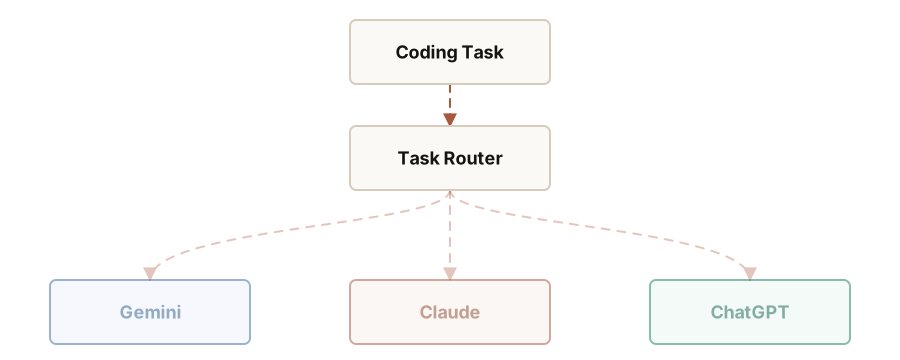
OpenABCode is an LLM-routing coding agent that dynamically routes tasks to the best-suited models:
Google ecosystem-centric tasks are routed to Gemini.
Primary code development is routed to Claude.
Testing and automation scripts are routed to ChatGPT.
To learn more about OpenABCode:
- Visit openabcode.com, the project website
- Read the documentation
Quick Start
Install with the hosted installer:
curl -fsSL https://openabcode.com/install.sh | sh
Or use a package manager:
npm install -g @openabcode/coding-agent --ignore-scripts
bun install -g @openabcode/coding-agent
brew install matrixmapai/tap/openabcode
Then start OpenABCode:
openabcode
Inside the interactive CLI:
/login         Sign in to OpenABCode or another provider
/model         Select fixed models and Route family models
/route-model   Select the model that classifies Route tasks
/route         Turn automatic task routing on or off
When Route is on, the footer shows the configured execution models. Every completed routing decision is also stored in the session JSONL for audit.
Customizing Route Rules
Route rules, heuristic keywords, file extension mappings, project markers, and the default provider can all be customized in ~/.openabcode/agent/settings.json (global) or .openabcode/settings.json (project-level). When a field is set, it fully replaces the corresponding built-in default.
{
  "router": {
    "rules": {
      "openai": "Test and automation — algorithms, code review, testing, data analysis, scripting",
      "google": "Google ecosystem — Android, Flutter, Firebase, Google Cloud, Kotlin",
      "anthropic": "General development — all code writing, editing, debugging, architecture, UI"
    },
    "keywords": {
      "openai": ["algorithm", "unit test", "benchmark", "data analysis", "pipeline"],
      "google": ["android", "flutter", "dart", "firebase", "gcp"],
      "anthropic": ["refactor", "debug", "architecture", "implement", "fix"]
    },
    "fileExtensions": {
      ".kt": "google",
      ".dart": "google",
      ".rs": "anthropic",
      ".ts": "anthropic",
      ".sh": "openai"
    },
    "projectMarkers": {
      "pubspec.yaml": "google",
      "cargo.toml": "anthropic",
      "package.json": "anthropic",
      "main.tf": "openai"
    },
    "defaultProvider": "anthropic"
  }
}
Each field is optional and independent — only configure what you want to override.
Architecture
User prompt
  -> @openabcode/coding-agent  Route configuration and model selection
  -> @openabcode/ai            Classifier and provider API requests
  -> @openabcode/agent-core    Agent loop, state, and tool execution
All Packages
| Package | Description |
|---|---|
| @openabcode/coding-agent | Route-first terminal coding agent CLI |
| @openabcode/tui | Terminal UI renderer behind OpenABCode's interactive editor, model selectors, Route footer, and session views |
| @openabcode/ai | Unified multi-provider LLM API (OpenAI, Anthropic, Google, etc.) |
Permissions & Containerization
OpenABCode does not include a built-in permission system for restricting filesystem, process, network, or credential access. By default, it runs with the permissions of the user and process that launched it.
If you need stronger boundaries, containerize or sandbox OpenABCode. See packages/coding-agent/docs/containerization.md for three patterns:
- Gondolin extension: keep
openabcodeand provider auth on the host while routing built-in tools and!commands into a local Linux micro-VM. - Plain Docker: run the whole
openabcodeprocess in a local container for simple isolation. - OpenShell: run the whole
openabcodeprocess in a policy-controlled sandbox.
Contributing
See CONTRIBUTING.md for contribution guidelines and AGENTS.md for project-specific rules (for both humans and agents).
Development
npm install --ignore-scripts  # Install all dependencies without running lifecycle scripts
npm run build        # Build all packages
npm run check        # Lint, format, and type check
./test.sh            # Run tests (skips LLM-dependent tests without API keys)
./openabcode-test.sh         # Run openabcode from sources (can be run from any directory)
Supply-chain hardening
We treat npm dependency changes as reviewed code changes.
- Direct external dependencies are pinned to exact versions. Internal workspace packages remain version-ranged.
.npmrcsetssave-exact=trueandmin-release-age=2to avoid same-day dependency releases during npm resolution.package-lock.jsonis the dependency ground truth. Pre-commit blocks accidental lockfile commits unlessOPENABCODE_ALLOW_LOCKFILE_CHANGE=1is set.npm run checkverifies pinned direct deps, native TypeScript import compatibility, and the generated coding-agent shrinkwrap.- The published CLI package includes
packages/coding-agent/npm-shrinkwrap.json, generated from the root lockfile, to pin transitive deps for npm users. - Release smoke tests use
npm run release:localto build, pack, and create isolated npm and Bun installs outside the repo before tagging a release. - Local release installs, documented npm installs, and
openabcode update --selfuse--ignore-scriptswhere supported. - CI installs with
npm ci --ignore-scripts, and a scheduled GitHub workflow runsnpm audit --omit=devplusnpm audit signatures --omit=dev. - Shrinkwrap generation has an explicit allowlist for dependency lifecycle scripts; new lifecycle-script deps fail checks until reviewed.
License
AGPL-3.0
Portions derived from Pi remain licensed under the MIT License. See NOTICE for attribution.
Reviews (0)
Sign in to leave a review.
Leave a reviewNo results found