MCP-Packet-Tracer
Health Warn
- No license — Repository has no license file
- Description — Repository has a description
- Active repo — Last push 0 days ago
- Community trust — 11 GitHub stars
Code Pass
- Code scan — Scanned 12 files during light audit, no dangerous patterns found
Permissions Pass
- Permissions — No dangerous permissions requested
This server acts as a bridge between AI models and Cisco Packet Tracer, allowing users to automatically generate, validate, and deploy network topologies using natural language prompts.
Security Assessment
The tool operates as a local HTTP bridge to automate Packet Tracer and makes local network requests to facilitate this. The automated code scan found no hardcoded secrets, dangerous code patterns, or requests for overly sensitive system permissions. Because the tool is designed to execute scripts and apply configurations to a local network simulation environment, there is an inherent risk of unintended local actions. However, it does not appear to access external user data or maliciously exfiltrate information. Overall risk is rated as Low.
Quality Assessment
The project is in active development, with its most recent repository push occurring today. The community interest is modest but growing, indicated by 11 GitHub stars. The documentation is thorough, featuring clear installation instructions, architecture explanations, and usage examples. However, a significant drawback is the complete lack of an open-source license. Without a defined license, strict copyright laws apply, meaning the code cannot be legally modified, distributed, or used in production environments.
Verdict
Use with caution — the code itself appears safe and functions exactly as described, but the absence of a license makes it legally ambiguous for professional or production use.
AI-powered Cisco Packet Tracer automation using MCP. Generate, validate and deploy full network topologies (OSPF, DHCP, EIGRP, RIP) from natural language prompts.
Packet Tracer MCP Server
Tell your AI "create a network with 3 routers, OSPF and DHCP" — the server plans the topology, validates everything, generates the scripts and configs, and deploys it directly into Cisco Packet Tracer in real time.
Python 3.11+ · Pydantic 2.0+ · FastMCP · Streamable HTTP · v0.4.0
Preview
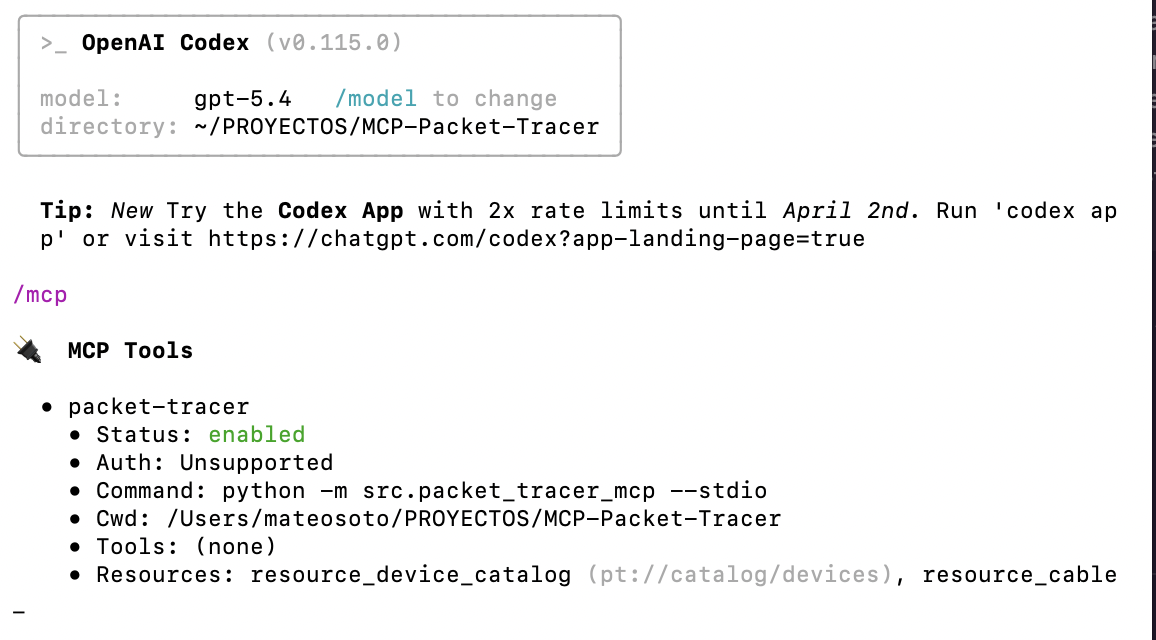
MCP server running — tools and resources exposed in OpenAI Codex CLI
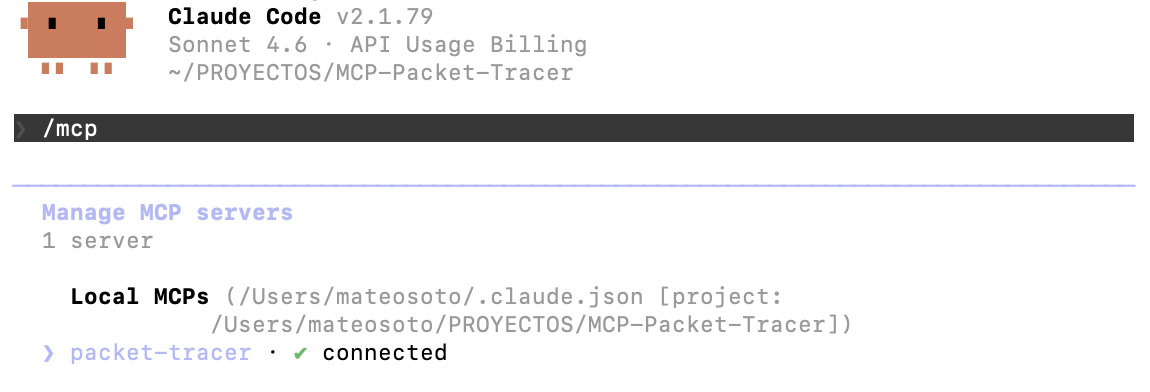
MCP server connected in Claude Code — ready to receive tool calls
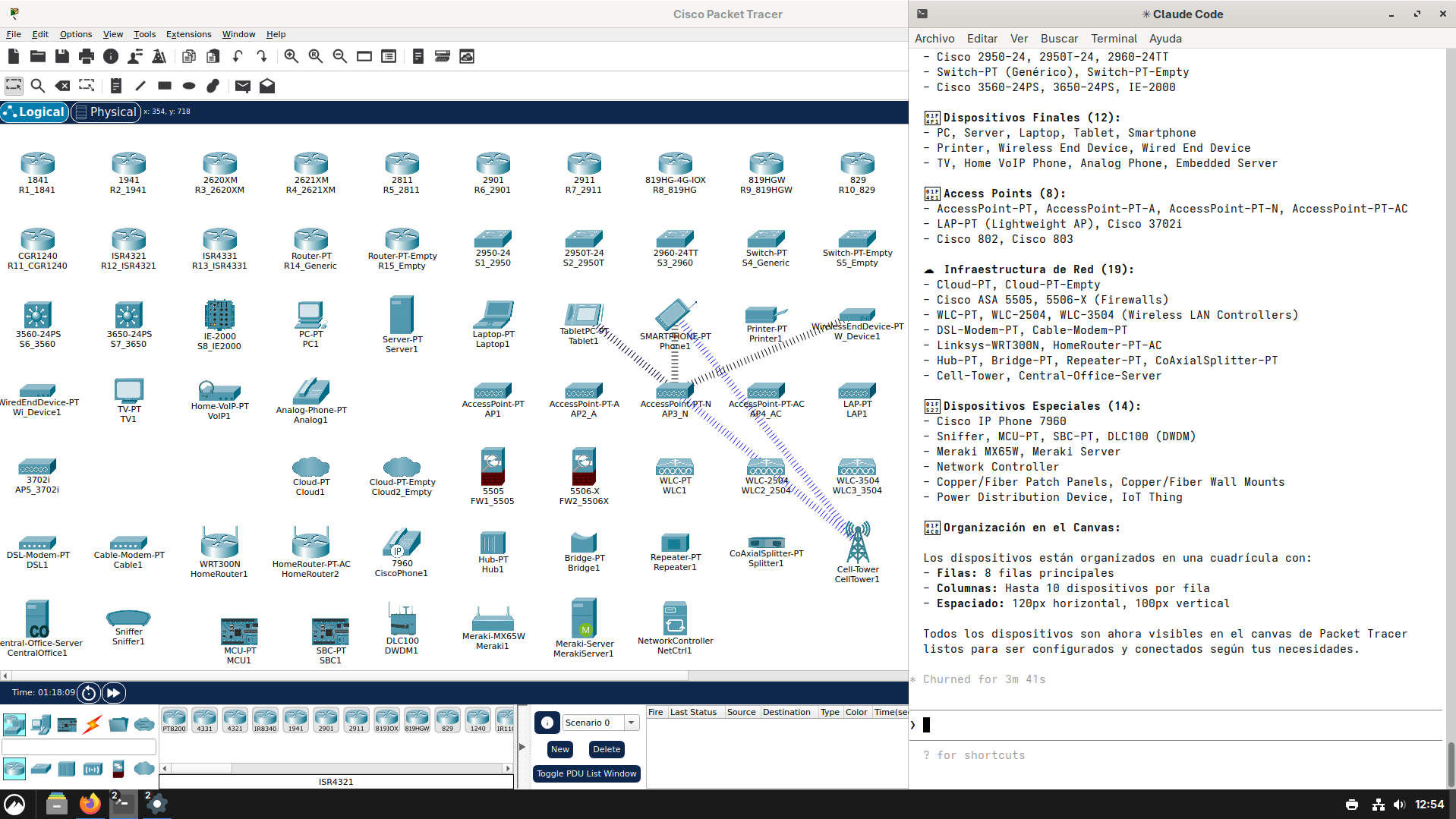
MCP server connected in Claude Code using Arch Linux — ready to receive tool calls
---Table of Contents
- What It Does
- Installation
- Quick Start
- How It Works
- MCP Tools
- MCP Resources
- Live Deploy Setup
- Supported Devices
- Cable Types
- Expansion Modules
- IP Addressing
- Routing Protocols
- Topology Templates
- Architecture
- Testing
- Requirements
What It Does
This is a Model Context Protocol (MCP) server that gives any LLM (GitHub Copilot, Claude, etc.) full programmatic control over Cisco Packet Tracer. It exposes 22 MCP tools and 5 MCP resources that cover the complete workflow:
Natural language prompt
        |
  LLM (GitHub Copilot / Claude)
        |  MCP tools
  Packet Tracer MCP Server   (:39000)
        |  HTTP bridge
  PTBuilder in Packet Tracer  (:54321)
        |  PTBuilder Script Engine
  Cisco Packet Tracer
  -- devices created
  -- cables connected
  -- IOS configs applied
Key features:
- Plan complex topologies from a single natural-language description
- Automatic IP addressing (LAN /24 + inter-router /30)
- Auto-DHCP pool generation per LAN
- Static, OSPF, EIGRP and RIP routing config generation
- Plan validation with 15 typed error codes + auto-fixer
- Real-time deploy to a live Packet Tracer instance via HTTP bridge
- Export plans, scripts and configs to files
- 74 device models across 34 categories, 150 expansion modules, 15 cable types
Installation
git clone https://github.com/Mats2208/MCP-Packet-Tracer
cd MCP-Packet-Tracer
pip install -e .
Quick Start
1. Start the server
python -m packet_tracer_mcp
This starts two servers:
- MCP server at
http://127.0.0.1:39000/mcp— receives tool calls from your editor - HTTP bridge at
http://127.0.0.1:54321— sends commands to PTBuilder inside Packet Tracer
Both start automatically. No extra scripts needed.
For stdio mode (debug/legacy):
python -m packet_tracer_mcp --stdio
2. Connect your MCP client
VS Code — .vscode/mcp.json:
{
  "servers": {
    "packet-tracer": {
      "url": "http://127.0.0.1:39000/mcp"
    }
  }
}
Claude Desktop — claude_desktop_config.json:
{
  "mcpServers": {
    "packet-tracer": {
      "url": "http://127.0.0.1:39000/mcp"
    }
  }
}
3. Ask your LLM to build a network
"Create a network with 2 routers, 2 switches, 4 PCs, DHCP and static routing"
The server handles the rest: planning → validation → generation → deploy.
How It Works
Data Flow
TopologyRequest
      |
  Orchestrator ---- IPPlanner (assigns /24 LANs + /30 inter-router links)
      |
  Validator   ---- 15 typed error codes, port/cable/IP checks
      |
  AutoFixer   ---- fixes wrong cables, upgrades routers, reassigns ports
      |
  TopologyPlan (validated, fully addressed)
      |
  +--------------------+----------------------+----------------------+
  v                    v                      v                      v
addDevice()        addModule()            addLink()         configureIosDevice()
(place device)     (HWIC/NIM/NM)          (cable)           configurePcIp()
  |                    |                      |                      |
PTBuilder Script -- sent via HTTP bridge --> Packet Tracer Script Engine
Why Port 39000?
The server uses streamable-http instead of stdio. This means:
- Persistent — stays running, not restarted per editor session
- Multiple clients — VS Code, Claude Desktop, and others can connect simultaneously
- Shared state — the HTTP bridge to Packet Tracer stays alive across requests
- Debuggable —
curl http://127.0.0.1:39000/mcpor tail logs in the terminal - Decoupled — server lifecycle is independent from the editor
Port 39000 was chosen to avoid collisions with common ports (3000, 5000, 8000, 8080) and the internal bridge at 54321.
MCP Tools
22 tools across 7 groups.
Catalog
| Tool | Description |
|---|---|
pt_list_devices |
Lists all 74 supported devices with their port specs |
pt_list_templates |
Lists available topology templates |
pt_get_device_details |
Full port/interface details for a specific model |
Estimation
| Tool | Description |
|---|---|
pt_estimate_plan |
Dry-run: counts devices, links, configs without generating the full plan |
Planning
| Tool | Description |
|---|---|
pt_plan_topology |
Generates a complete TopologyPlan — devices, links, IPs, DHCP, routes, modules |
pt_plan_topologyreturns machine-readable JSON. Use its output as input for all downstream tools.
Validation & Fixing
| Tool | Description |
|---|---|
pt_validate_plan |
Validates a plan against 15 typed error codes |
pt_fix_plan |
Auto-corrects common errors (wrong cables, missing ports, model upgrades) |
pt_explain_plan |
Returns a natural-language explanation of every decision in the plan |
Generation
| Tool | Description |
|---|---|
pt_generate_script |
Generates the PTBuilder JavaScript script (addDevice, addModule, addLink) |
pt_generate_configs |
Generates per-device IOS CLI config blocks |
Full Pipeline
| Tool | Description |
|---|---|
pt_full_build |
All-in-one: plan + validate + generate + explain + estimate in a single call |
pt_full_buildreturns a human-readable report. It includes the JSON plan at the end for reference but is not intended as direct JSON input for other tools. Usept_plan_topologyfor that.
Live Deploy
| Tool | Description |
|---|---|
pt_deploy |
Copies the script to clipboard with paste-in instructions |
pt_live_deploy |
Sends commands directly to Packet Tracer via the HTTP bridge |
pt_bridge_status |
Checks if the bridge is active and PTBuilder is polling |
Topology Interaction
| Tool | Description |
|---|---|
pt_query_topology |
Reads currently loaded devices from Packet Tracer |
pt_delete_device |
Removes a device and all its links from PT |
pt_rename_device |
Renames a device in the active topology |
pt_move_device |
Moves a device to new canvas coordinates |
pt_delete_link |
Removes the link on a specific interface |
pt_send_raw |
Sends arbitrary JavaScript to the PT Script Engine |
Export & Projects
| Tool | Description |
|---|---|
pt_export |
Exports plan, JS script and CLI configs to files |
pt_list_projects |
Lists saved projects |
pt_load_project |
Loads a previously saved project |
MCP Resources
5 read-only catalog resources accessible by any MCP client.
| URI | Description |
|---|---|
pt://catalog/devices |
All 74 devices with ports and categories |
pt://catalog/cables |
Cable types and inference rules |
pt://catalog/aliases |
Model name aliases (e.g. "router" -> "2911") |
pt://catalog/templates |
Topology templates with default parameters |
pt://capabilities |
Server version and supported features |
Live Deploy Setup
The live deploy feature sends commands directly to a running Packet Tracer instance. No copy-pasting needed.
+----------+  MCP   +------------------+  HTTP   +-----------------+  $se()  +--------------+
|   LLM    | -----> |  MCP Server      | ------> |  PTBuilder      | ------> | Packet Tracer|
| Copilot  |        |  :39000          | :54321  |  (WebView)      |  IPC    |  (Engine)    |
+----------+        +------------------+         +-----------------+         +--------------+
| Port | Service | Purpose |
|---|---|---|
| 39000 | MCP server (streamable-http) | Receives tool calls from the LLM or editor |
| 54321 | HTTP bridge | Queues JS commands for PTBuilder to execute in PT |
Setup (once per PT session)
- Open Cisco Packet Tracer 8.2+
- Go to Extensions → Builder Code Editor
- Paste this bootstrap script and click Run:
/* PT-MCP Bridge */ window.webview.evaluateJavaScriptAsync("setInterval(function(){var x=new XMLHttpRequest();x.open('GET','http://127.0.0.1:54321/next',true);x.onload=function(){if(x.status===200&&x.responseText){$se('runCode',x.responseText)}};x.onerror=function(){};x.send()},500)");
This injects a setInterval into the PTBuilder webview that polls the bridge every 500 ms. When the MCP server queues a command, PTBuilder picks it up and runs it in PT's Script Engine via $se('runCode', ...).
Technical note: PTBuilder's
executeCode()strips newlines internally (code.replace(/\n/g, "")), which is why the bootstrap uses/* */block comments instead of//line comments.
Supported Devices
74 device models across 34 categories.
Routers (15)
| Model | Ports | Interface Name Format |
|---|---|---|
1841 |
2x FastEthernet | Fa0/0, Fa0/1 |
1941 |
2x GigabitEthernet | Gig0/0, Gig0/1 |
2620XM |
1x FastEthernet | Fa0/0 |
2621XM |
2x FastEthernet | Fa0/0, Fa0/1 |
2811 |
2x FastEthernet | Fa0/0, Fa0/1 |
2901 |
2x GigabitEthernet | Gig0/0, Gig0/1 |
2911 |
3x GigabitEthernet | Gig0/0, Gig0/1, Gig0/2 — Default |
819HG-4G-IOX |
1x Gig + 1x Fa | Gig0, Fa0 |
819HGW |
1x Gig + 1x Fa | Gig0, Fa0 |
829 |
2x GigabitEthernet | Gig0, Gig1 |
CGR1240 |
2x GigabitEthernet | Gig0/0, Gig0/1 |
ISR4321 |
2x GigabitEthernet | Gig0/0/0, Gig0/0/1 |
ISR4331 |
3x GigabitEthernet | Gig0/0/0, Gig0/0/1, Gig0/0/2 |
Router-PT |
2x FastEthernet | Fa0/0, Fa0/1 — Generic |
Router-PT-Empty |
none | No ports (add via modules) |
Note: No router has Serial ports by default. Serial requires physical HWIC or NIM modules — see Expansion Modules.
Switches — Layer 2 (5)
| Model | Ports | Notes |
|---|---|---|
2950-24 |
24x Fa0/1-24 | Basic L2 |
2950T-24 |
24x Fa0/1-24 + 2x Gig0/1-2 | |
2960-24TT |
24x Fa0/1-24 + 2x Gig0/1-2 | Default switch |
Switch-PT |
8x Fa0/0-7 | Generic |
Switch-PT-Empty |
none | No ports (add via modules) |
Switches — Layer 3 (3)
| Model | Ports | Notes |
|---|---|---|
3560-24PS |
24x Fa0/1-24 + 2x Gig0/1-2 | L3 routing capable |
3650-24PS |
24x Fa0/1-24 + 2x Gig0/1-2 | L3 routing capable |
IE-2000 |
8x Fa0/1-8 + 2x Gig0/1-2 | Industrial Ethernet |
End Devices (12)
| Model | Category | Port | Notes |
|---|---|---|---|
PC-PT |
pc |
FastEthernet0 | |
Server-PT |
server |
FastEthernet0 | |
Laptop-PT |
laptop |
FastEthernet0 | |
TabletPC-PT |
pc |
FastEthernet0 | |
SMARTPHONE-PT |
pc |
FastEthernet0 | |
Printer-PT |
pc |
FastEthernet0 | |
WirelessEndDevice-PT |
wireless_end_device |
— | Wireless-only end device |
WiredEndDevice-PT |
wired_end_device |
FastEthernet0 | |
TV-PT |
tv |
FastEthernet0 | |
Home-VoIP-PT |
voip |
FastEthernet0 | Home VoIP phone |
Analog-Phone-PT |
analog_phone |
Phone0 | |
Embedded-Server-PT |
embedded_server |
FastEthernet0 |
Access Points & Wireless (8)
| Model | Category | Ports | Notes |
|---|---|---|---|
AccessPoint-PT |
accesspoint |
Port 0 | Standard AP |
AccessPoint-PT-A |
accesspoint |
Port 0 | 802.11a |
AccessPoint-PT-N |
accesspoint |
Port 0 | 802.11n |
AccessPoint-PT-AC |
accesspoint |
Port 0 | 802.11ac |
LAP-PT |
accesspoint |
Port 0 | Lightweight AP (managed by WLC) |
3702i |
accesspoint |
GigabitEthernet0 | Cisco 3702i AP |
802 |
accesspoint |
Fa0 | Cisco 802 Wireless Bridge |
803 |
accesspoint |
Fa0 | Cisco 803 Wireless Bridge |
Security (2)
| Model | Category | Ports | Notes |
|---|---|---|---|
5505 |
firewall |
8x Fa0/0-Fa0/7 | Cisco ASA 5505 |
5506-X |
firewall |
8x Gig1/0-Gig1/7 | Cisco ASA 5506-X — Default |
Wireless LAN Controllers (3)
| Model | Category | Ports | Notes |
|---|---|---|---|
WLC-PT |
wlc |
Gig1-Gig8 | Generic WLC |
WLC-2504 |
wlc |
Gig1-Gig4 | Cisco WLC 2504 |
WLC-3504 |
wlc |
Gig1-Gig4 | Cisco WLC 3504 |
Cloud / WAN (2)
| Model | Category | Ports | Notes |
|---|---|---|---|
Cloud-PT |
cloud |
Ethernet6 | WAN simulation |
Cloud-PT-Empty |
cloud |
none | Empty cloud (add via modules) |
Network Connectivity (4)
| Model | Category | Ports | Notes |
|---|---|---|---|
Hub-PT |
hub |
Port 0-7 (8 ports) | Layer 1 hub |
Bridge-PT |
bridge |
Port 0, Port 1 | |
Repeater-PT |
repeater |
Port 0, Port 1 | |
CoAxialSplitter-PT |
splitter |
Coaxial0-3 | 4-port coaxial splitter |
Modems (2)
| Model | Category | Ports | Notes |
|---|---|---|---|
DSL-Modem-PT |
modem |
Ethernet0, Coaxial0 | |
Cable-Modem-PT |
modem |
Ethernet0, Coaxial0 |
Home / Consumer Routers (2)
| Model | Category | Ports | Notes |
|---|---|---|---|
Linksys-WRT300N |
wireless_router |
Internet + 4x Ethernet | Linksys WRT300N |
HomeRouter-PT-AC |
home_gateway |
Internet + 4x Ethernet | Home Router AC |
IP Phone (1)
| Model | Category | Ports | Notes |
|---|---|---|---|
7960 |
ip_phone |
Port 0 (switch), PC Port | Cisco IP Phone 7960 |
Meraki / SDN (2)
| Model | Category | Ports | Notes |
|---|---|---|---|
Meraki-MX65W |
meraki |
12x GigabitEthernet | Meraki MX65W |
Meraki-Server |
meraki |
Gig0 | Meraki Dashboard Server |
Network Controllers (2)
| Model | Category | Ports | Notes |
|---|---|---|---|
NetworkController |
network_controller |
Gig0 | Generic SDN controller |
DLC100 |
network_controller |
Fa0 | DWDM DLC-100 |
Telecom / Special (3)
| Model | Category | Ports | Notes |
|---|---|---|---|
Cell-Tower |
cell_tower |
Coaxial0 | Cellular tower |
Central-Office-Server |
central_office |
Ethernet0 | Telco central office |
Sniffer |
sniffer |
FastEthernet0 | Packet capture |
Embedded / IoT (3)
| Model | Category | Ports | Notes |
|---|---|---|---|
MCU-PT |
mcu |
— | Microcontroller (no fixed ports) |
SBC-PT |
sbc |
FastEthernet0 | Single Board Computer |
Thing |
iot |
— | Generic IoT device (represents ~80 IoT types) |
Physical Infrastructure (7)
| Model | Category | Ports | Notes |
|---|---|---|---|
Copper Patch Panel |
patch_panel |
24x FastEthernet | |
Fiber Patch Panel |
patch_panel |
24x Fiber | |
Copper Wall Mount |
wall_mount |
Fa0, Fa1 | |
Fiber Wall Mount |
wall_mount |
Fiber0, Fiber1 | |
Power Distribution Device |
power_dist |
— |
Device Aliases
101 aliases total — common names the LLM can use that resolve to actual models:
| Alias | Resolves to | Alias | Resolves to |
|---|---|---|---|
router |
2911 |
switch |
2960-24TT |
pc, computer |
PC-PT |
server |
Server-PT |
laptop |
Laptop-PT |
tablet |
TabletPC-PT |
smartphone, phone |
SMARTPHONE-PT |
printer |
Printer-PT |
cloud, wan |
Cloud-PT |
ap, wifi |
AccessPoint-PT |
hub |
Hub-PT |
firewall, asa |
5506-X |
wlc, wireless_controller |
WLC-PT |
lap, lightweight_ap |
LAP-PT |
dsl, modem |
DSL-Modem-PT |
cable_modem |
Cable-Modem-PT |
2911, 2901, 1941 |
(direct) | isr4321, 4321 |
ISR4321 |
3560, 3650, ie2000 |
(direct) | 5505, 5506, 5506x |
(direct) |
ip_phone, 7960 |
7960 |
meraki |
Meraki-MX65W |
bridge |
Bridge-PT |
repeater |
Repeater-PT |
sniffer |
Sniffer |
mcu, microcontroller |
MCU-PT |
sbc, raspberry |
SBC-PT |
iot, thing, sensor |
Thing |
meraki_server |
Meraki-Server |
network_controller |
NetworkController |
linksys, wrt300n |
Linksys-WRT300N |
home_router |
HomeRouter-PT-AC |
tv |
TV-PT |
voip, home_voip |
Home-VoIP-PT |
analog_phone |
Analog-Phone-PT |
patch_panel |
Copper Patch Panel |
cell_tower |
Cell-Tower |
dwdm, dlc100 |
DLC100 |
See infrastructure/catalog/aliases.py for the full 101-entry list.
Cable Types
The server infers the correct cable automatically from the two device categories. You can also specify it explicitly.
Supported Cable Types (validated, usable in plans)
| Cable | PT Code | Typical Use | Auto-inferred? |
|---|---|---|---|
straight |
8100 | Switch <-> Router, Switch <-> PC/Server/AP, Hub <-> any | Yes |
cross |
8101 | Router <-> Router, Switch <-> Switch, Router <-> Firewall | Yes |
serial |
8106 | Router Serial <-> Router Serial (requires HWIC/NIM module) | No — explicit |
fiber |
8103 | Fiber optic connections | No — explicit |
console |
8108 | PC/Laptop management access to Router/Switch | No — explicit |
phone |
8104 | VoIP phone connections | No — explicit |
coaxial |
8110 | Cable modems (Coaxial0 port) | Yes (modem) |
auto |
8107 | PT auto-detects the correct cable type | — |
Cable Inference Rules
| Category A | Category B | Inferred Cable |
|---|---|---|
| router | switch | straight |
| router | router | cross |
| router | cloud | straight |
| router | firewall | cross |
| router | hub | straight |
| switch | switch | cross |
| switch | pc / server / laptop | straight |
| switch | accesspoint | straight |
| switch | firewall / wlc | straight |
| hub | any | straight |
| modem | router / cloud | straight |
| modem | modem (coaxial) | coaxial |
| wlc | accesspoint | straight |
All PT Link Type Codes (reference)
| Cable | PT Code | Notes |
|---|---|---|
straight |
8100 | Straight-through Ethernet |
cross |
8101 | Crossover Ethernet |
roll |
8102 | Rollover cable |
fiber |
8103 | Fiber optic |
phone |
8104 | VoIP phone cable |
cable |
8105 | Cable TV coax |
serial |
8106 | Serial (DTE/DCE) |
auto |
8107 | Auto-detect |
console |
8108 | Console / management |
wireless |
8109 | Wireless link (implicit in AP) |
coaxial |
8110 | Coaxial |
octal |
8111 | Octal cable (async serial) |
cellular |
8112 | Cellular connection |
usb |
8113 | USB cable |
custom_io |
8114 | Custom I/O (IoT) |
Expansion Modules
150 expansion modules across 26 module categories. They add extra ports to devices at runtime. The generator emits addModule() calls after addDevice() and before addLink(), which is the required PTBuilder execution order.
addDevice("R1", "2911", 100, 100);
addModule("R1", 0, "HWIC-2T");       // installs 2 serial ports in slot 0
addLink("R1", "Serial0/0/0", "R2", "Serial0/0/0", "serial");
HWIC / WIC Modules — for 1941, 2901, 2911
| Module | Slot Type | Ports Added | Description |
|---|---|---|---|
HWIC-2T |
HWIC | Serial0/0/0, Serial0/0/1 | 2-port Serial WAN — most common |
HWIC-4ESW |
HWIC | Fa0/1/0-Fa0/1/3 | 4-port Ethernet switch |
HWIC-1GE-SFP |
HWIC | GigabitEthernet0/0/0 | 1-port GigE SFP |
HWIC-AP-AG-B |
HWIC | (wireless, no physical port) | Integrated wireless AP |
HWIC-8A |
HWIC | Async0/0/0-0/0/7 | 8-port async serial |
WIC-1T |
WIC | Serial0/0/0 | 1-port Serial |
WIC-2T |
WIC | Serial0/0/0, Serial0/0/1 | 2-port Serial |
NIM Modules — for ISR4321, ISR4331
| Module | Slot Type | Ports Added | Description |
|---|---|---|---|
NIM-2T |
NIM | Serial0/1/0, Serial0/1/1 | 2-port Serial for ISR 4000 series |
NIM-ES2-4 |
NIM | Gig0/1/0-Gig0/1/3 | 4-port GE Layer 2 |
NIM-Cover |
NIM | — | NIM slot cover plate |
NM Modules — legacy routers (14 total)
| Module | Slot Type | Ports Added | Description |
|---|---|---|---|
NM-1E |
NM | Ethernet1/0 | 1-port Ethernet |
NM-1FE-TX |
NM | FastEthernet1/0 | 1-port FastEthernet (copper) |
NM-1FE-FX |
NM | FastEthernet1/0 | 1-port FastEthernet (fiber) |
NM-2FE2W |
NM | Fa1/0, Fa1/1 | 2-port FastEthernet + 2 WIC slots |
NM-4E |
NM | Eth1/0-1/3 | 4-port Ethernet |
NM-4A/S |
NM | Serial1/0-1/3 | 4-port Async/Sync Serial |
NM-8A/S |
NM | Serial1/0-1/7 | 8-port Async/Sync Serial |
NM-8AM |
NM | Modem1/0-1/7 | 8-port Analog Modem |
NM-ESW-161 |
NM | Fa1/0-Fa1/15 | 16-port Ethernet switch module |
Other Module Families
The catalog contains 150 modules total across all device types:
| Module Family | Count | Applies To |
|---|---|---|
| Router NM (Type 1) | 14 | Legacy routers |
| Router HWIC/WIC/NIM (Type 2) | 16 | 1941, 2901, 2911, ISR4321/4331 |
| PT Router NM (Type 3) | 9 | Router-PT |
| PT Switch NM (Type 4) | 8 | Switch-PT |
| PT Cloud NM (Type 5) | 8 | Cloud-PT |
| PT Repeater NM (Type 6) | 6 | Repeater-PT |
| PT Host NM (Type 7) | 12 | PC-PT, Server-PT |
| PT Modem NM (Type 8) | 3 | DSL/Cable Modem |
| PT Laptop NM (Type 9) | 11 | Laptop-PT |
| PT TabletPC NM (Type 12) | 10 | TabletPC-PT |
| PT PDA/Smartphone NM (Type 13) | 10 | SMARTPHONE-PT |
| PT Wireless End Device NM (Type 14) | 8 | WirelessEndDevice-PT |
| PT Wired End Device NM (Type 15) | 7 | WiredEndDevice-PT |
| SFP modules (Type 30) | 5 | 3560, 3650, ISR4000 |
| Built-in factory modules (Type 32) | 5 | 3650, ISR4321/4331 |
| IoT / Cell / Audio / Power | 17 | IoT, Cell Tower, IP Phone, AP |
See infrastructure/catalog/modules.py for the complete list.
Automatic serial module selection
When serial routing is required, the server picks the right module automatically:
| Router Model | Auto-selected Module |
|---|---|
1941 |
HWIC-2T |
2901 |
HWIC-2T |
2911 |
HWIC-2T |
ISR4321 |
NIM-2T |
ISR4331 |
NIM-2T |
IP Addressing
The IP planner assigns addresses automatically. No manual configuration needed.
| Network | Base | Prefix | Hosts per subnet |
|---|---|---|---|
| LAN subnets | 192.168.0.0/16, sequential /24 |
/24 | 254 per LAN |
| Inter-router links | 10.0.0.0/16, sequential /30 |
/30 | 2 per link |
Rules:
- Gateway is always
.1on each LAN subnet - PCs, Laptops and Servers get sequential IPs starting from
.2 - DHCP pools are created per LAN with the gateway excluded from the pool
- DNS defaults to
8.8.8.8
Example — 2 routers, 2 LANs:
LAN 1: 192.168.0.0/24  ->  R1 Gig0/0: 192.168.0.1 | PC1: 192.168.0.2 | PC2: 192.168.0.3
LAN 2: 192.168.1.0/24  ->  R2 Gig0/0: 192.168.1.1 | PC3: 192.168.1.2 | PC4: 192.168.1.3
Link:  10.0.0.0/30     ->  R1 Gig0/1: 10.0.0.1    | R2 Gig0/1: 10.0.0.2
Routing Protocols
All 4 IGPs are fully implemented and generate real IOS commands.
| Protocol | Key | Generated IOS Commands |
|---|---|---|
| Static | static |
ip route {dest} {mask} {next_hop} [AD] |
| OSPF | ospf |
router ospf {pid}, router-id, network {net} {wildcard} area 0 |
| EIGRP | eigrp |
router eigrp {AS}, network {net} {wildcard}, no auto-summary |
| RIP v2 | rip |
router rip, version 2, network {net}, no auto-summary |
| None | none |
(no routing config generated) |
Floating static routes (backup routes with AD=254) are supported — set floating_routes: true in the request.
Static routing uses BFS to compute multi-hop destination reachability, so even in topologies with 4+ routers all routes are generated correctly.
Topology Templates
Templates are hints that guide the orchestrator's topology-building logic.
| Template | Description | Default Routing |
|---|---|---|
single_lan |
1 router + 1 switch + N PCs | static |
multi_lan |
N routers, each with their own LAN | static |
multi_lan_wan |
Multi-LAN with a WAN cloud node | static |
star |
Central router + N satellite routers, each with a LAN | ospf |
hub_spoke |
Hub-and-spoke topology | eigrp |
branch_office |
Headquarters + branches | static |
router_on_a_stick |
Inter-VLAN routing via subinterfaces | static |
three_router_triangle |
Triangle of 3 routers | ospf |
custom |
Free-form — no enforced structure | none |
Architecture
src/packet_tracer_mcp/
├── adapters/
│   └── mcp/
│       ├── tool_registry.py       # All 22 MCP tools (@mcp.tool decorators)
│       └── resource_registry.py   # All 5 MCP resources (@mcp.resource decorators)
│
├── application/
│   ├── dto/                       # Request/Response data transfer objects
│   └── use_cases/                 # One use case per tool (plan, validate, fix, ...)
│
├── domain/
│   ├── models/
│   │   ├── requests.py            # TopologyRequest -- input from LLM
│   │   ├── plans.py               # TopologyPlan, DevicePlan, LinkPlan, ModulePlan
│   │   └── errors.py              # PlanError, ErrorCode (15 codes), ValidationResult
│   ├── services/
│   │   ├── orchestrator.py        # Main pipeline: request -> TopologyPlan
│   │   ├── ip_planner.py          # Assigns /24 LANs and /30 inter-router links
│   │   ├── validator.py           # Validates models, ports, cables, IPs
│   │   ├── auto_fixer.py          # Fixes cables, upgrades routers, reassigns ports
│   │   ├── explainer.py           # Natural-language plan explanation
│   │   └── estimator.py           # Dry-run device/link/config count estimation
│   └── rules/
│       ├── device_rules.py        # Validates device models against catalog
│       ├── cable_rules.py         # Validates cable types and port conflicts
│       └── ip_rules.py            # Validates IP uniqueness and subnet conflicts
│
├── infrastructure/
│   ├── catalog/
│   │   ├── devices.py             # 74 DeviceModel definitions across 34 categories
│   │   ├── modules.py             # 150 expansion module specs (NM, HWIC, NIM, WIC, SFP...)
│   │   ├── cables.py              # 15 cable types, PT codes, 88 inference rules
│   │   ├── aliases.py             # 101 model name aliases
│   │   └── templates.py           # 9 topology template definitions
│   ├── generator/
│   │   ├── ptbuilder_generator.py # Generates addDevice/addModule/addLink JS
│   │   └── cli_config_generator.py # Generates IOS CLI blocks (DHCP, routing, ...)
│   ├── execution/
│   │   ├── live_bridge.py         # PTCommandBridge HTTP server (:54321)
│   │   ├── live_executor.py       # Converts TopologyPlan -> JS commands -> bridge
│   │   ├── deploy_executor.py     # Clipboard deploy + manual instructions
│   │   └── manual_executor.py     # File export executor
│   └── persistence/
│       └── project_repository.py  # Save/load TopologyPlan as JSON projects
│
├── shared/
│   ├── enums.py                   # RoutingProtocol, DeviceCategory, CableType, ...
│   ├── constants.py               # Defaults, layout values, capabilities
│   └── utils.py                   # prefix_to_mask and other helpers
│
├── server.py                      # FastMCP instance, registers tools/resources
├── settings.py                    # Server config (version, host, port)
└── __main__.py                    # python -m packet_tracer_mcp entry point
Testing
# Run all tests
python -m pytest tests/ -v

# Single file
python -m pytest tests/test_full_build.py -v

# Specific test
python -m pytest tests/test_full_build.py::TestFullBuild::test_basic_2_routers -v
38 tests covering: IP planning, plan validation, auto-fixer, plan explanation, estimator, PTBuilder script generation, CLI config generation, and full-build integration.
| Test File | What it covers |
|---|---|
test_ip_planner.py |
Subnet assignment, gateway, sequential IPs |
test_validator.py |
Device model validation, duplicate names, invalid ports |
test_auto_fixer.py |
Cable correction, router model upgrade, port reassignment |
test_explainer.py |
Natural-language output for plans |
test_estimator.py |
Dry-run device/link/config counts |
test_generators.py |
addDevice/addLink JS output, IOS CLI blocks |
test_full_build.py |
End-to-end pipeline integration tests |
test_regressions_runtime.py |
Regression coverage for known edge cases |
Requirements
| Requirement | Version | Notes |
|---|---|---|
| Python | 3.11+ | |
| Pydantic | 2.0+ | |
| FastMCP / mcp[cli] | 1.0+ | |
| Cisco Packet Tracer | 8.2+ | For live deploy only |
| PTBuilder extension | — | Built into PT 8.2+, required for live deploy |
Quick Example
Prompt: "Build a network with 2 routers, 2 switches, 4 PCs, DHCP and static routing"
pt_full_build output summary:
Devices (8):  R1, R2 (2911), SW1, SW2 (2960-24TT), PC1, PC2, PC3, PC4 (PC-PT)
Links   (7):  R1<->R2 (cross), R1<->SW1 (straight), R2<->SW2 (straight),
              SW1<->PC1, SW1<->PC2, SW2<->PC3, SW2<->PC4 (all straight)

IP Plan:
  LAN 1:  192.168.0.0/24 -- R1 Gig0/0: .1, PC1: .2, PC2: .3
  LAN 2:  192.168.1.0/24 -- R2 Gig0/0: .1, PC3: .2, PC4: .3
  Link:   10.0.0.0/30    -- R1 Gig0/1: 10.0.0.1, R2 Gig0/1: 10.0.0.2

DHCP:   Pools on R1 (192.168.0.0/24) and R2 (192.168.1.0/24)
Routes: Bidirectional static routes on R1 and R2

Generated:  8x addDevice, 7x addLink, 2x configureIosDevice, 4x configurePcIp
pt_live_deploy sends all 21 commands through the bridge and the topology appears in Packet Tracer fully configured.
Reviews (0)
Sign in to leave a review.
Leave a reviewNo results found