dino
Health Warn
- License — License: MIT
- Description — Repository has a description
- Active repo — Last push 0 days ago
- Low visibility — Only 5 GitHub stars
Code Fail
- rm -rf — Recursive force deletion command in app/build.sh
Permissions Pass
- Permissions — No dangerous permissions requested
No AI report is available for this listing yet.
Every agent, one terminal: a native Mac terminal on Ghostty's core for Claude Code, Codex and more
dino
Every agent, one terminal.


Install · Features · Agents · Build · Architecture · Contributing
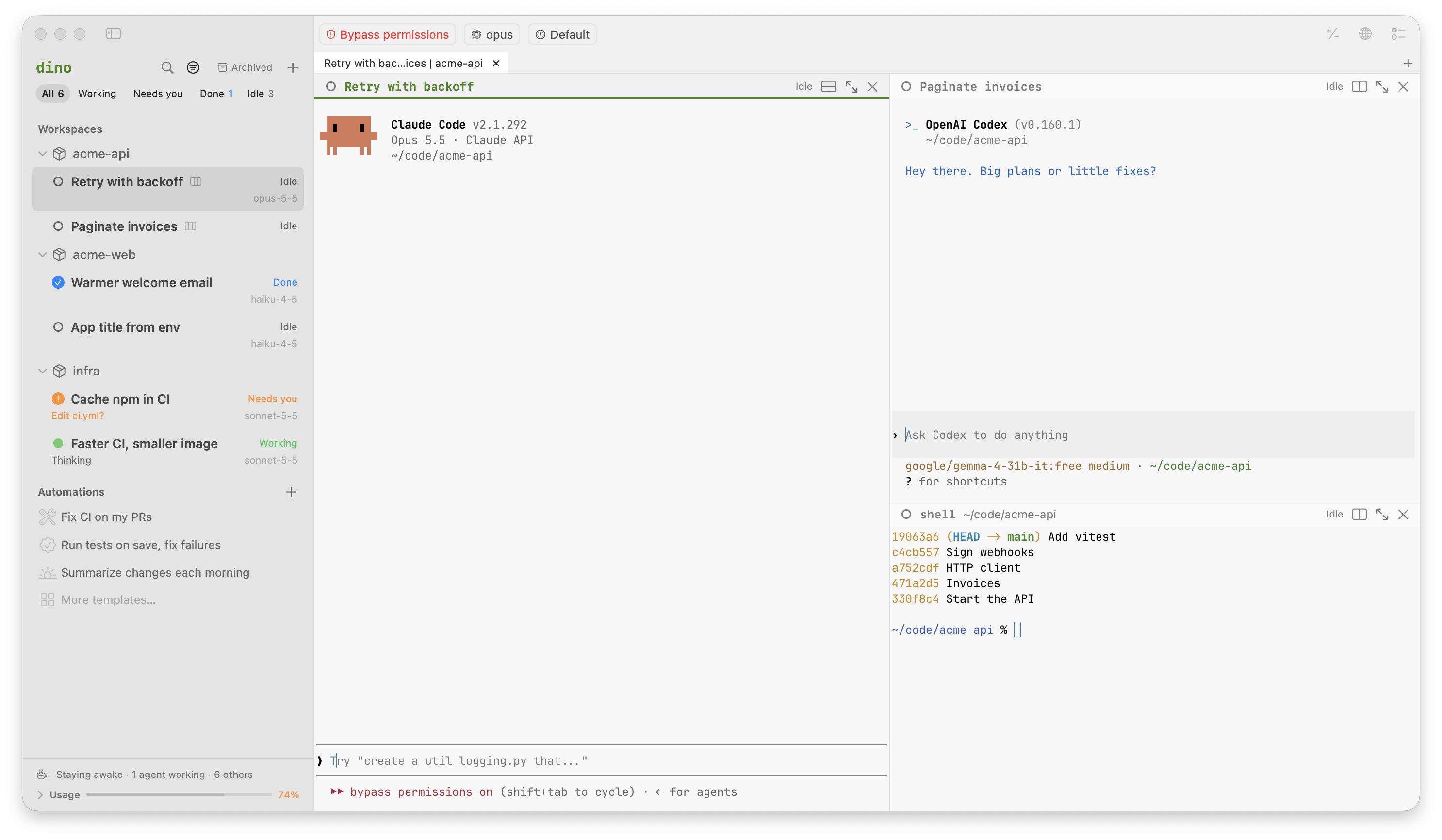
dino is a native Mac terminal on Ghostty's core. It finds Claude Code, Codex and the rest wherever
they run on your Mac, keeps them going after you quit, and tells you when one needs you. Close the
sidebar and it's a plain terminal. Free and open source, no account.
Install
macOS 14 or later, on Apple silicon.
brew install meetdino/tap/dino
Or download Dino.dmg.
Both include the dino command. For just the command line:
curl -fsSL https://meetdino.com/install.sh | sh
dino updates itself.
Features
- Finds the agents you already have. Agents running in iTerm2, Terminal, Ghostty or tmux show
up in the sidebar with what they're doing. Continue in dino brings one over, conversation
included. One you type in a dino shell (claude,codex) is a dino session from the start. - Agents outlive the window. A background daemon,
dinod, owns every session. Quit the app,
or restart dinod, and they're still there;dino lslists them from any terminal. - Knows which one needs you. Working, needs you, done or idle, from each agent's own signals,
with a notification and a Dock badge when one is waiting on you. - A real terminal. Tabs, splits, your Ghostty config, themes and keybinds. Your own tmux runs
untouched, and Show my agents in tmux puts dino's agents in a tmux session as windows. - An AI line in your shell. ⌘I turns plain English into a command you can check
before it runs. ⌘⏎ hands a bigger request to an agent in a split. - A browser for every session. When an agent starts a dev server, dino offers its page in a
preview beside the terminal, which keeps its page as you switch sessions. - From diff to merged. A session per git worktree. Comment on lines of its diff and send them
to the agent, then open the pull request with auto-fix (failed checks go back to the agent with
their logs) and auto-merge. - Any agent, any model. Use each agent's own login, or run it through dino's local proxy on
OpenRouter, your ChatGPT plan, a coding plan's key, or a model on your Mac with Ollama, LM
Studio, llama.cpp or vLLM. Every session shows its model, tokens and context. - Keeps going at a limit. When a subscription or plan runs out, the next call goes on to the
routes you list for that agent (another plan, OpenRouter, a model on your Mac) until the limit
resets, and the session says so. - Automations. Start or continue an agent on a schedule, when a PR opens or merges, CI fails or
someone writes @dino, when files change, or after another run. Start from a ready one (fix CI on
my PRs, review new PRs, run tests on save) and adjust it. Each run keeps its summary, its diff
and its PR. - Usage across every agent. Tokens, models, streaks, speed per provider and what each session
costs your Mac, from dino's proxy and each agent's own records. - Shows when an agent uses your Mac. When an agent drives your apps or your browser through
computer use, its session says so, with a Stop button. - Nothing leaves your Mac except each agent's traffic to the provider it talks to. Signing in
is optional, only to sync settings between Macs, and API keys never sync.
Supported agents
dino finds, starts, resumes and tracks the status of
Claude Code,
Codex,
GitHub Copilot CLI,
Cursor Agent,
Amp,
OpenCode,
Kimi Code,
Qwen Code,
Pi,
Hermes Agent and
CodeWhale, and your shells.
It also starts Crush and Aider,
without status. Settings shows which agents are installed, and installs or signs in to the rest
with each agent's own commands.
Using the command line
dino                      # the app; in a dino terminal or piped, the sessions
dino .                    # a shell in this folder, shown in the app
dino . claude             # Claude Code in this folder
dino ls                   # every session
dino attach <id>          # a session in this terminal
dino found                # agents running elsewhere on this Mac
dino stats                # usage across every agent: tokens, models, streaks
dino automations          # what dino does by itself, and how each run went
dino --help               # the rest
Settings live in ~/.config/dino/settings.toml, which dinod reads and writes. The app's
Settings window edits the same file.
Shell integration inside tmux
dino's shells tell it their prompts, exit codes and folder, as Ghostty's do, without changing your
startup files. A tmux you start in dino runs as in any terminal: its panes load only your own
startup files, as in Ghostty, and dino still follows the active pane's folder and window name and
its bells. For zsh in tmux panes to tell dino their exit codes and pass on notifications too, add
this line to your .zshrc (it also turns on tmux's allow-passthrough for those panes):
[[ -n $TMUX ]] && source "${DINO_HOME:-$HOME/.config/dino}/shell-integration/zsh/dino-tmux.zsh" 2>/dev/null
Building from source
You need the Xcode Command Line Tools (xcode-select --install) and Rust
(rustup, 1.85 or later). No Apple developer account or signing keys.
git clone https://github.com/meetdino/dino.git
cd dino
cargo build --release      # the dino command and dinod: target/release/dino
./app/build.sh --install   # Dino.app with both inside: ~/Applications/Dino.app
open ~/Applications/Dino.app
That's the dino to use every day: it runs dinod from the dino inside it, as a release does, and
moves dinod over to a new build once nothing is working. Run ./app/build.sh --install again after
pulling (while dino runs, the new build waits beside it), then choose Restart to Update in dino. dino →
Install Command Line Tool links ~/.local/bin/dino to the dino inside it. Builds are signed
with your Developer ID if the keychain has one (macOS then keeps dino's permissions from one build
to the next), ad hoc otherwise.
./app/build.sh alone makes app/build/Dino.app, "dino dev": a build to try things in, with its
own settings and permissions, that runs the dino on your PATH.
To try a build without touching the dino you use every day, give it its own home, and it runs its
own dinod there:
DINO_HOME=/tmp/dino-dev ./target/release/dino new shell
How it's built
dinod(Rust) owns sessions, the local proxy, settings and sign-in. Everything else is a client
of it over a Unix socket.- The app (Swift, SwiftUI) draws terminals with libghostty.
dino(Rust) is the command line, anddinoditself.cloud/is the optional account server (Rust, Postgres) for sign-in and settings sync. You can
host your own: see cloud/README.md.
ARCHITECTURE.md has the whole picture: the crates, how they may depend on each
other, and the contracts other projects build on.
Contributing
Issues and pull requests are welcome. CONTRIBUTING.md covers setup, testing
without disturbing your own dino, the performance budget, and signing off your commits (DCO).
Everyone taking part follows the Code of Conduct. Please report security
issues privately, as SECURITY.md describes.
License
MIT, see LICENSE. Third-party code dino includes, and its licenses, are listed in
THIRD_PARTY_NOTICES.md, and the account server's in
cloud/THIRD_PARTY_NOTICES.md.
Reviews (0)
Sign in to leave a review.
Leave a reviewNo results found