Autofish
Health Pass
- License — License: Apache-2.0
- Description — Repository has a description
- Active repo — Last push 0 days ago
- Community trust — 112 GitHub stars
Code Fail
- rm -rf — Recursive force deletion command in .github/workflows/cli-release.yml
- spawnSync — Synchronous process spawning in cli/npm/meta/bin/af.js
- process.env — Environment variable access in cli/npm/meta/scripts/postinstall.mjs
Permissions Pass
- Permissions — No dangerous permissions requested
This tool is an AI agent infrastructure that provides a stable, observable execution layer for automating and controlling Android devices. It consists of an on-device Android application and a Rust-based CLI that communicates with it over a local network or USB connection.
Security Assessment
Overall risk: Medium. The tool inherently requires broad access to your Android device, relying on Accessibility Services and Shizuku to execute screen interactions, tap/swipe actions, and UI tree inspections. It makes network requests to facilitate communication between your host machine and the Android device. The automated scan flagged a synchronous process spawning call in the JavaScript wrapper (`af.js`) and a recursive force deletion command (`rm -rf`) inside a GitHub Actions release workflow. While the deletion is likely just standard build cleanup and no dangerous permissions or hardcoded secrets were found, the npm wrapper and shell spawning mechanisms warrant a quick manual code review before deployment.
Quality Assessment
Overall quality is strong. The project is actively maintained, with repository updates pushed as recently as today. It is properly licensed under the permissive Apache-2.0, meaning it is safe for most open-source and commercial use. Having 51 GitHub stars indicates a growing community interest and a baseline level of public trust, though it is still a relatively young tool.
Verdict
Use with caution — the project is well-structured and actively maintained, but developers should review the CLI wrapper code before integrating it into sensitive environments.
An AI Agent tool to automate Android devices reliably
Autofish
English | 中文
Android control infrastructure for agents and multi-agent systems.
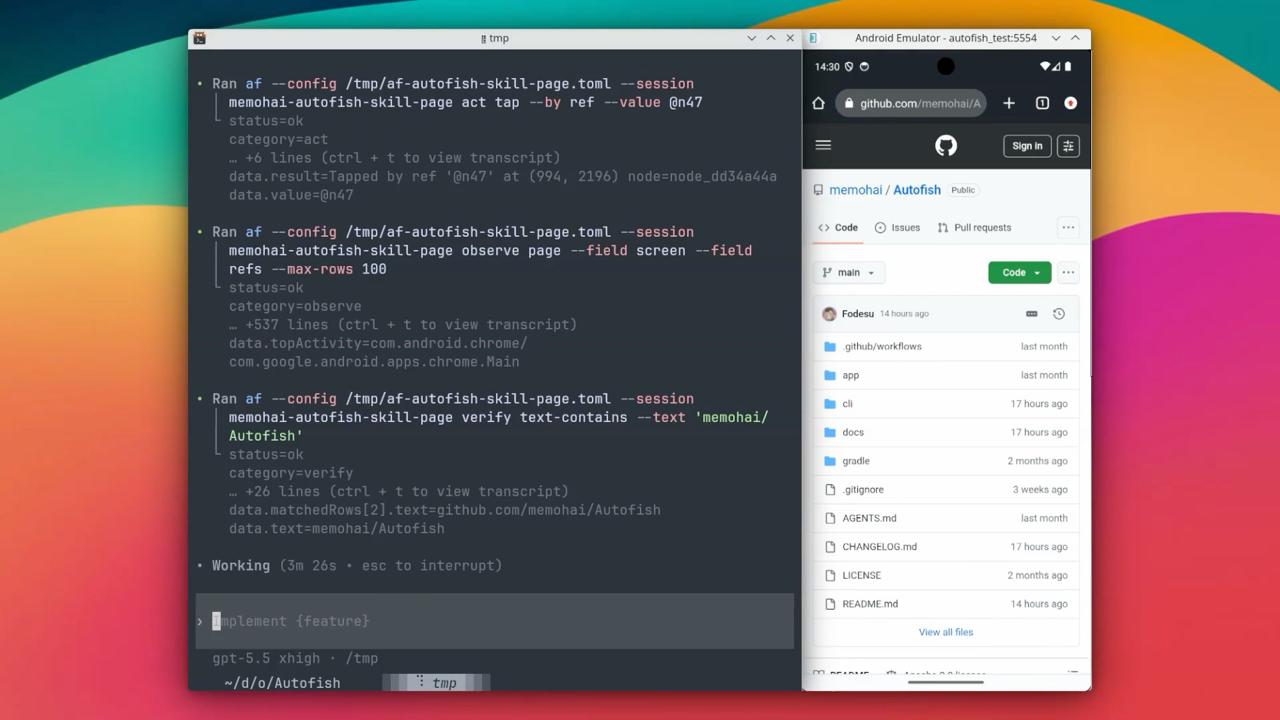
Autofish gives any agent a stable, explicit, and observable Android execution layer: inspect the screen, act through stable refs instead of brittle coordinates, verify outcomes after every step, and recover with local execution memory.
human → agent → autofish → Android device
         ↑                       |
         └── observe / verify ───┘
How It Works
Autofish has two components:
Android Service — A foreground service running on the device, exposing an HTTP API. It handles screenshots, UI tree inspection, tap/swipe/text input execution, and on-screen overlay annotations.
CLI (af) — A Rust binary that talks to the service over HTTP. It provides the command interface, manages local tool memory (SQLite), and handles artifact storage. Distributed via npm (@memohjs/af).
Install and Connect
Install Autofish from npm:
npm i -g @memohjs/af
Install the matching official Autofish Android app through the CLI:
af app install --device <ADB_SERIAL>
Then open Autofish on the Android device:
- Enable the Autofish accessibility service.
- Enable Shizuku support when available.
- Turn on Service from the Autofish home page.
- Copy the
af configcommands or rawIP/PORT/TOKENfrom the home page connection card.
If adb is not available, install the latest APK manually from GitHub Releases.
Shizuku setup:
- Install Shizuku from RikkaApps/Shizuku GitHub Releases.
- Follow the official Shizuku setup guide.
- Rooted devices can start Shizuku directly in the Shizuku app.
- Android 11+ devices can use wireless debugging from the Shizuku app without a computer.
- USB ADB users can connect the device to a computer and run the start command shown by the Shizuku app.
- Shizuku usually needs to be started again after device reboot.
Notes:
- Service must be turned on before
af health,observe,act, orverifycan reach the device. - If Shizuku is not running, Autofish can still use the accessibility fallback when Accessibility Service is enabled.
Configure the CLI with the commands copied from the Android app home page, or set the values manually:
af config set remote.url "http://<IP>:<PORT>"
af config set remote.token "<TOKEN>"
af config set memory.db "$HOME/.config/af/af.db"
af config set output.default "text"
af config set artifacts.dir "$HOME/.config/af/artifacts"
For USB, af connect usb reads the App's non-sensitive connection hint, creates adb forwarding, and verifies /health without requiring a token:
af connect usb --device <ADB_SERIAL>
af connect usb writes remote.url and connection.* USB metadata. It does not write remote.token; keep the token copied from the app for observe, act, verify, and recover.
Check the service before giving control to an agent:
af health
af observe page --field screen --field refs --max-rows 80
Configure the Autofish Skill
The canonical skill file is:
cli/skills/autofish-control/SKILL.md
Install it globally for Codex:
mkdir -p "$HOME/.agents/skills/autofish-control"
cp cli/skills/autofish-control/SKILL.md "$HOME/.agents/skills/autofish-control/SKILL.md"
Install it globally for Claude Code:
mkdir -p "$HOME/.claude/skills/autofish-control"
cp cli/skills/autofish-control/SKILL.md "$HOME/.claude/skills/autofish-control/SKILL.md"
Use Autofish
Autofish is most reliable when every action is based on a fresh observation and followed by verification.
1. Create a session
Use one stable session name per task so memory and event logs stay coherent:
SESSION="settings-wifi"
2. Observe the current page
af --session "$SESSION" observe page --field screen --field refs --max-rows 80
Use the returned refs for interaction. A ref such as @n3 points to a clickable UI node from the latest observation.
3. Run exactly one action
Prefer ref-based taps:
af --session "$SESSION" act tap --by ref --value @n3
Other useful actions include:
af --session "$SESSION" act launch --package com.android.settings
af --session "$SESSION" act text --text "hello"
af --session "$SESSION" act back
af --session "$SESSION" act home
af --session "$SESSION" act swipe --from 500,1600 --to 500,600 --duration 400
4. Observe again and verify
af --session "$SESSION" observe page --field screen --field refs --max-rows 80
af --session "$SESSION" verify text-contains --text "Wi-Fi"
When verifying app navigation, top-activity is often a better check:
af --session "$SESSION" verify top-activity --expected "Settings" --mode contains
5. Save useful knowledge
For non-trivial navigation or recovery, save what worked:
af --session "$SESSION" memory save --app com.android.settings --topic "nav/home-to-wifi" \
  --content "Tap @n3 (Wi-Fi) from the main Settings page, then verify text contains Wi-Fi."
Before repeating a similar task, query memory:
af --session "$SESSION" memory context
af memory search --app com.android.settings
af memory experience --app com.android.settings
6. Recover from uncertain state
If the UI changed unexpectedly, do not continue with stale refs. Re-observe, inspect recent failures, then use one recovery step:
af --session "$SESSION" observe page --field screen --field refs --max-rows 120
af memory log --for-session "$SESSION" --status failed --limit 5
af --session "$SESSION" recover back --times 1
af --session "$SESSION" observe page --field screen --field refs --max-rows 80
The same loop works for humans and agents: observe, take one action, observe again, verify, then continue.
Tool Memory
The CLI maintains a local SQLite database that tracks:
- Events — Every
act,verify, andrecoverwith page fingerprint, status, failure cause, and duration. - Transitions — Automatically closed act → verify pairs with success/failure counters.
- Recovery strategies — Which recovery steps worked for which failure causes.
- Agent notes — Append-only knowledge your agent writes and queries.
Why Autofish
Multi-agent orchestration is a rapidly evolving discipline. How agents coordinate, plan, retry, and delegate will converge on best practices and dedicated platforms — much like microservice orchestration converged on Kubernetes. Device control is a different concern and should not be entangled with it.
When planning and execution are fused, the agent loses authority over what actually happens, failures get absorbed instead of surfaced, and adopting a better orchestration strategy means rewriting the entire stack.
Autofish keeps the boundary clean: device control is infrastructure, not application logic. Your agent — or whatever orchestration layer emerges — keeps full authority over planning and decision-making. Autofish provides deterministic device operations, explicit failure signals, and a queryable execution record. When the orchestration story matures, Autofish stays the same.
Design Principles
| Principle | What it means in practice |
|---|---|
| Single responsibility | Android observation and control. No planning, no LLM calls, no workflow engine. |
| Agent-first interface | The CLI and service API are shaped for machine consumption: structured output, deterministic exit codes, composable commands. |
| Deterministic surface | Commands do exactly what they say. No implicit retries, no "smart" heuristics behind the scenes. |
| Closed-loop discipline | Every action must be preceded by observation and followed by verification. The system enforces this through its memory model. |
| Graceful degradation | Multiple execution paths coexist. When preferred capabilities are unavailable, fallback paths keep the system operational. |
| Observable execution | Every action, state transition, and recovery is recorded with structured context — queryable by the agent mid-run. |
Contributing
Contributions are welcome. If you want to improve Autofish, please start with an issue
Documentation
- Quickstart — From zero to first command
- CLI Reference — All commands, flags, and output formats
- Architecture — Service internals, refs design, API contracts
- CLI Memory — Data model, recording rules, observation cache
- Changelog — Release history and breaking changes
Build from Source
Requirements: JDK 21, Android SDK API 36, Rust toolchain, just.
just build
just install
Reviews (0)
Sign in to leave a review.
Leave a reviewNo results found