code_mate
Health Warn
- License — License: MIT
- Description — Repository has a description
- Active repo — Last push 0 days ago
- Low visibility — Only 5 GitHub stars
Code Fail
- new Function() — Dynamic code execution via Function constructor in pcrs/ui/alpine.min.js
Permissions Pass
- Permissions — No dangerous permissions requested
No AI report is available for this listing yet.
USB desk display for real-time Claude Code usage - ESP32-S3 + Rust host
CodeMate
English | 简体中文



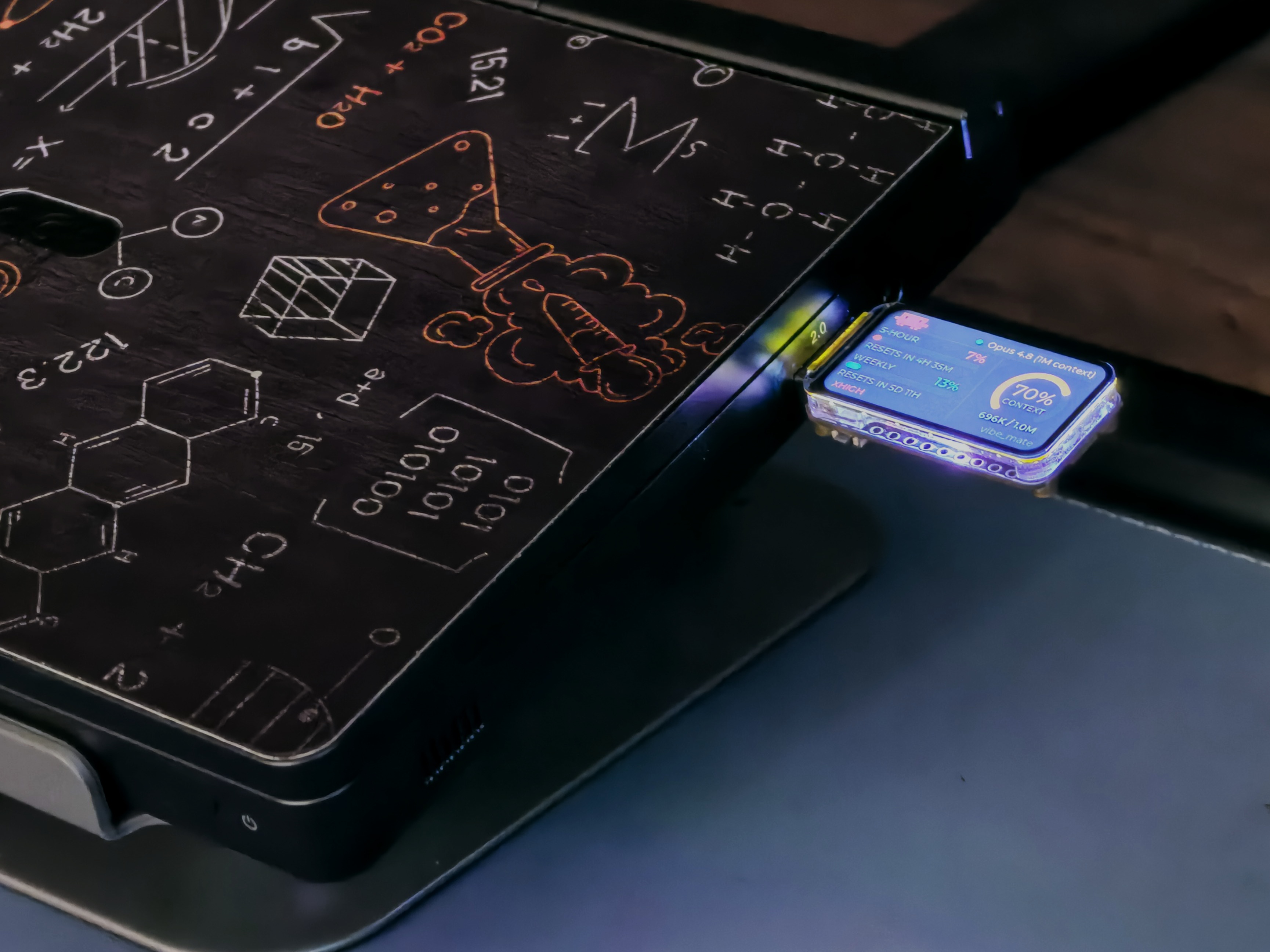
A USB desk display for Claude Code, Codex CLI and Kimi Code — an ESP32-S3 board with a
1.47" screen that shows your real-time usage, context window and work status, fed by
a tiny tray-resident Windows host over USB serial.
Features
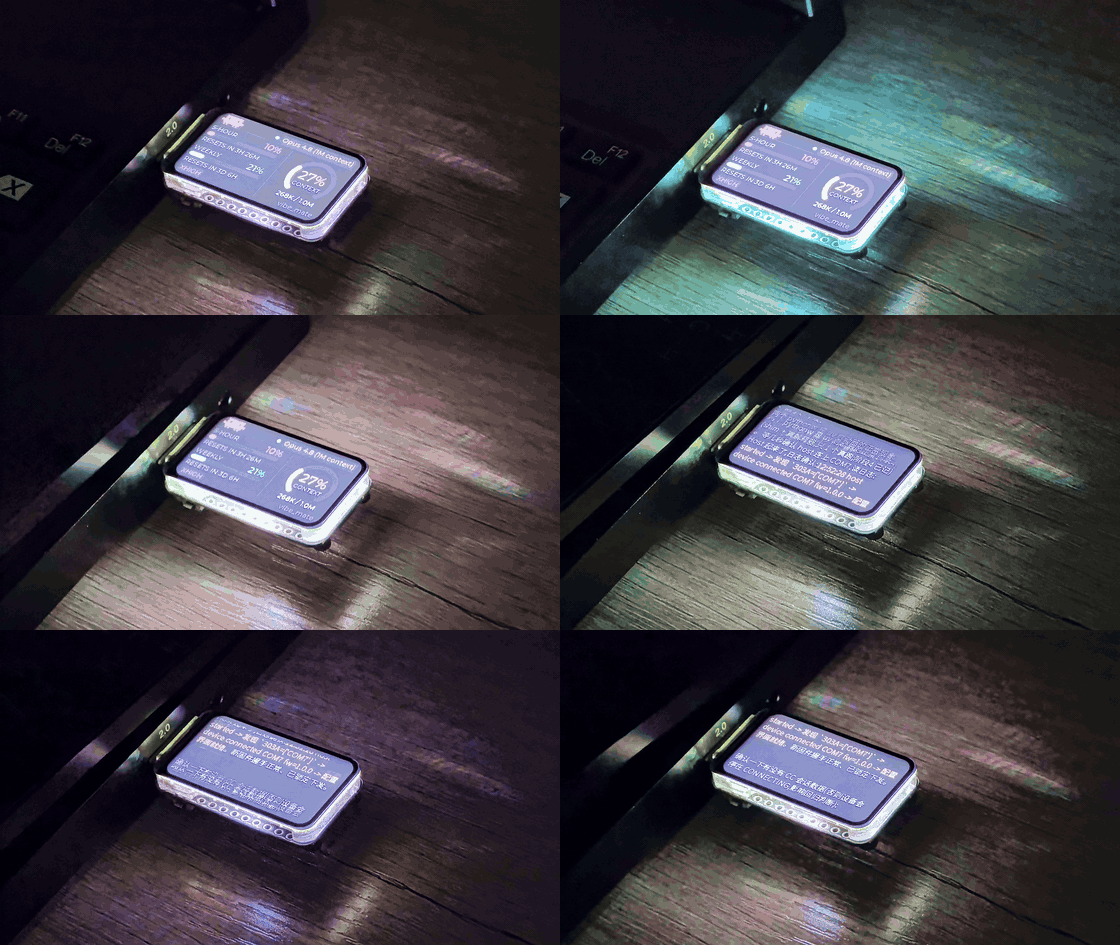
- Official usage percentages — the 5-hour and weekly rate-limit windows and the
context-window gauge come from Claude Code's own statusline feed, so they match/usageexactly. Everything is read locally; nothing extra talks to the network. - Work-status LED — the onboard RGB LED breathes in random colors while the
agent is generating, sits calm blue when idle. - Multi-session — every open Claude Code / Codex terminal is tracked; short-press
BOOT on the device (or use auto-follow mode) to cycle between sessions. - Codex CLI support — Codex sessions appear in the same cycle with their own
accent theme and rate-limit windows. - Kimi Code support — Kimi sessions join the same cycle (pixel K logo, indigo
theme); the 5-hour and weekly quota come from the same/usagesAPI thatkimi /usagereads. - Terminal screen — close the laptop lid and the device switches to a scrolling
view of the assistant's latest reply (CJK-capable font). - System monitor screen — CPU / RAM / VRAM / disk activity / public IP, shown
whenever no coding-agent session is available (or on demand via BOOT). - Single ~1 MB exe — the host is one Rust binary: tray icon, config window,
hooks and serial host included. No runtime dependencies beyond WebView2. - USB-disk self-install — the device itself can boot as a read-only USB drive
carryingCodeMate.exe; run it from the drive and it installs itself.
Hardware
One board, no soldering: Waveshare ESP32-S3-LCD-1.47
(ESP32-S3R8, 16 MB flash / 8 MB PSRAM, ST7789 172×320 IPS, native USB CDC).
Board wiki ·
pinout & firmware details
Designed to plug into a right-side USB-A port: connector on the left, landscape
screen facing you.
How it works
┌─ PC — tray-resident host (CodeMate.exe) ────────────────────────────────┐
│                                                                         │
│  Claude Code ── statusline + activity hooks ──►  per-session snapshots  │
│  Codex CLI  ─── session hooks ────────────────►  (~/.claude/code_mate/) │
│                                                        │                │
│  system metrics (CPU/RAM/VRAM/disk/public IP) ─────────┤                │
│                                                        ▼                │
│                     newline-delimited JSON over USB CDC serial          │
└────────────────────────────────┬────────────────────────────────────────┘
                                 ▼
                    ESP32-S3 1.47" display + RGB LED
                 dashboard / terminal / system screens
The hooks are subcommands of the same exe (--statusline, --activity,--codex-activity, --kimi-activity): Claude Code invokes them after every reply, they atomically
write per-session snapshot files, and the host merges, selects and streams frames to
the device. Full frame reference: docs/protocol.md.
Requirements
- Windows (the host uses Win32 APIs; firmware is platform-neutral).
- Claude Code — a recent version, signed in with a Pro / Max subscription
(API/Console accounts have no 5-hour/weekly windows, sorate_limitsnever
appears). - WebView2 Runtime for the config window (preinstalled on Windows 11; without it
the app degrades gracefully to tray + background host). - Building from source: Rust (MSVC toolchain) for the host, PlatformIO for
the firmware (installs project-locally, see firmware/README.md). - Optional: Codex CLI if you want Codex sessions on the display.
- Optional: Kimi Code if you want Kimi sessions and quota on the display.
Quick start
From a release
Download
CodeMate-firmware-<version>.binandCodeMate.exefrom
Releases.Flash the firmware (device in download mode: hold BOOT, tap RST, release BOOT):
esptool --chip esp32s3 --baud 921600 write_flash 0x0 CodeMate-firmware-<version>.binPress RST afterwards. (
pip install esptoolif you don't have it.)Run
CodeMate.exe→ a tray dot appears (cyan = device connected, gray = not).In the config window click Install / Repair hooks (or run
CodeMate.exe --install). Send one message in Claude Code and the display comes
alive.
From source
# Firmware (see firmware/README.md for the one-time toolchain setup)
.\.venv\Scripts\pio run -d firmware -t upload

# Host
cd pcrs
cargo build --release        # → target\release\CodeMate.exe
Usage
- Tray: double-click the exe → tray icon (cyan ring = device connected). Left
click opens the config window: connection status, live sessions, session
switching mode (auto-follow / manual), hook install status, autostart toggle,
language (EN/中文), temperature unit, system-screen toggle. - Hooks:
--installmerges the statusline + activity hooks into~/.claude/settings.json(your existing hooks are preserved; a backup is
written) and registers Codex hooks in Codex'shooks.json. Codex additionally
requires trusting the hook once in its/hooksmenu.--uninstallremoves only
CodeMate's entries. - On the device:
- Short-press BOOT — next session (
session 1 → … → system → back). - Long-press BOOT (~0.7 s) — mode-select menu (release firmware): Normal or
U-Disk mode. - Close the lid (with "lid close does nothing" power setting) — switches to
the terminal screen; open to return.
- Short-press BOOT — next session (
- LED legend: slow blue pulse = waiting for host · solid blue = connected, idle
· random-color breathing = agent working · flicker = disk activity (system
screen) · white sweep = screen change · magenta = U-disk mode. - U-disk self-install: on a fresh PC, long-press BOOT → U-Disk → a read-only
drive appears withCodeMate.exeon it. Run it: it copies itself to%LOCALAPPDATA%\code_mate, installs the hooks and autostart. Reset the device to
return to normal mode.
CLI reference
| Command | Purpose |
|---|---|
CodeMate.exe |
Tray + config window + host (default) |
--install / --uninstall / --status |
Register / remove / inspect the Claude Code + Codex + Kimi hooks |
--statusline / --activity / --codex-activity / --kimi-activity |
Hook entry points (invoked by the agents, not by hand) |
--autostart-enable / --autostart-disable / --autostart-status |
Start-with-Windows shortcut |
--selftest |
Run the host for ~12 s, print connection status |
--sysmon |
Print CPU/RAM/VRAM/disk samples (system-monitor smoke test) |
--dump-frame / --dump-sys / --dump-ip / --frames |
Debug: print a dashboard/system data frame, IP info, or text frames from stdin |
FAQ
- The percentages never appear — you need a Pro/Max login and at least one
Claude Code response after installing the hooks; statusline data only flows while
Claude Code is used. - Config window doesn't open — WebView2 Runtime missing; the tray + device keep
working. Install Microsoft's Evergreen Bootstrapper to get the window back. cargo buildhangs downloading crates — some networks stall on crates.io
HTTP/2 multiplexing; this repo shipspcrs/.cargo/config.tomlwhich disables it
already. If it still stalls, retry — downloads resume.- Antivirus flags the exe — it is an unsigned single-file binary; build from
source or add an exclusion. Code-signing is the long-term fix. - Firmware/flashing issues — see firmware/README.md
troubleshooting table.
Repository layout
code_mate/
├── firmware/          # ESP32-S3 firmware (PlatformIO + Arduino + TFT_eSPI + LVGL v9.5)
│   ├── src/           #   protocol, layouts (dashboard/terminal/system/loading), LED, USB-disk
│   └── data/          #   (git-ignored) contents of the device's USB drive
├── pcrs/              # Windows host (Rust): hooks + serial host + tray + config window
│   ├── src/
│   └── ui/            #   config window (HTML/CSS/JS + inlined Alpine.js, offline)
└── docs/              # protocol & extension guide, media
Want to add a screen or a new data source? Start at
docs/protocol.md.
License
MIT © 2026 mengxiyou. Bundled third-party components are listed in
THIRD_PARTY_NOTICES.md.
Acknowledgements
- Waveshare ESP32-S3-LCD-1.47 — the hardware
- LVGL & TFT_eSPI — device UI stack
- Alpine.js — config window interactivity
- Source Han Sans — CJK glyphs on the terminal screen
- ccusage,
cc-usage-monitor,
claude-code-statusline — prior art on reading Claude Code usage
Reviews (0)
Sign in to leave a review.
Leave a reviewNo results found