CCUsageX
Health Warn
- License — License: MIT
- Description — Repository has a description
- Active repo — Last push 0 days ago
- Low visibility — Only 6 GitHub stars
Code Fail
- new Function() — Dynamic code execution via Function constructor in docs/demo/api.js
- exec() — Shell command execution in docs/demo/api.js
- network request — Outbound network request in docs/demo/api.js
- exec() — Shell command execution in docs/demo/charts.js
- network request — Outbound network request in docs/demo/limits.js
- network request — Outbound network request in docs/demo/plan.js
- exec() — Shell command execution in docs/demo/widget.js
- network request — Outbound network request in docs/demo/widget.js
Permissions Pass
- Permissions — No dangerous permissions requested
No AI report is available for this listing yet.
Local, zero-dependency dashboard for Claude Code usage: every prompt, token, cache hit and API-equivalent dollar, from Claude Code's own logs. Live demo inside.
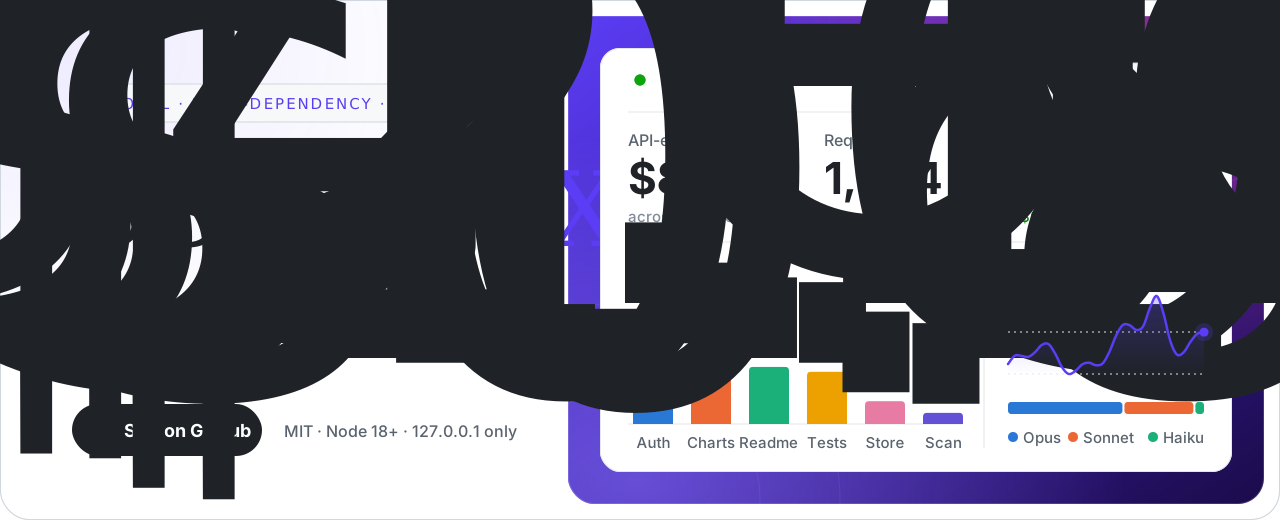
CCUsageX — Claude Code usage dashboard
See every prompt, token and dollar of your Claude Code usage.
A local, zero-dependency web dashboard that reads Claude Code's own logs and shows requests, models, tokens,
cache hits, response times, tools, sessions and the API-equivalent cost of each prompt you type.






Live demo ·
Website ·
Quick start ·
How it works ·
FAQ ·
Several accounts? CCSwitcherX ·
Docs
What is CCUsageX?
CCUsageX is a free, open-source dashboard for Claude Code usage that runs
entirely on your computer. It reads the transcript files Claude Code already writes to ~/.claude/projects, works out
exactly which API requests each of your prompts triggered (including subagents), and shows the tokens, cache savings,
response time and API-equivalent cost of every one, in a fast web UI at http://127.0.0.1:3020.
Nothing is uploaded anywhere, and it needs nothing but Node.js 18+.

Features
 |
 |
 |
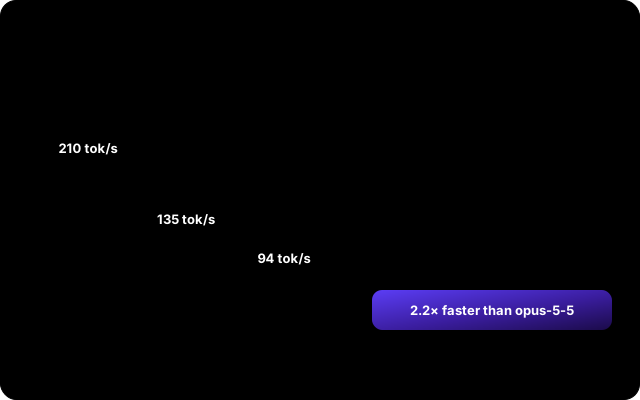 |
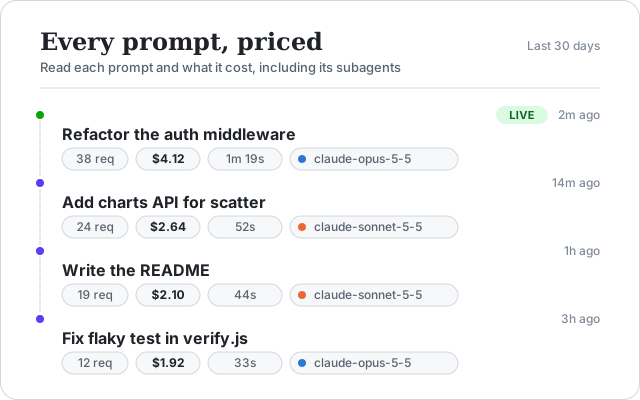
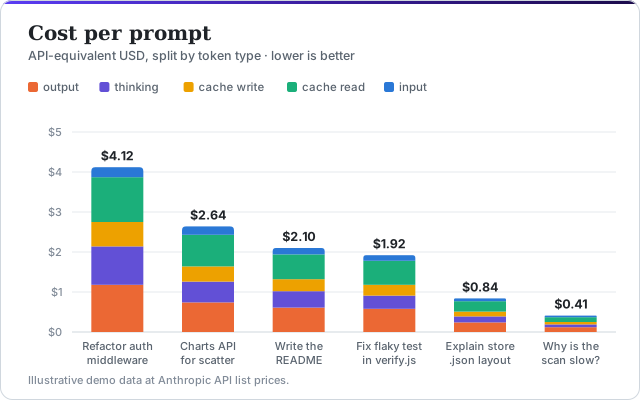
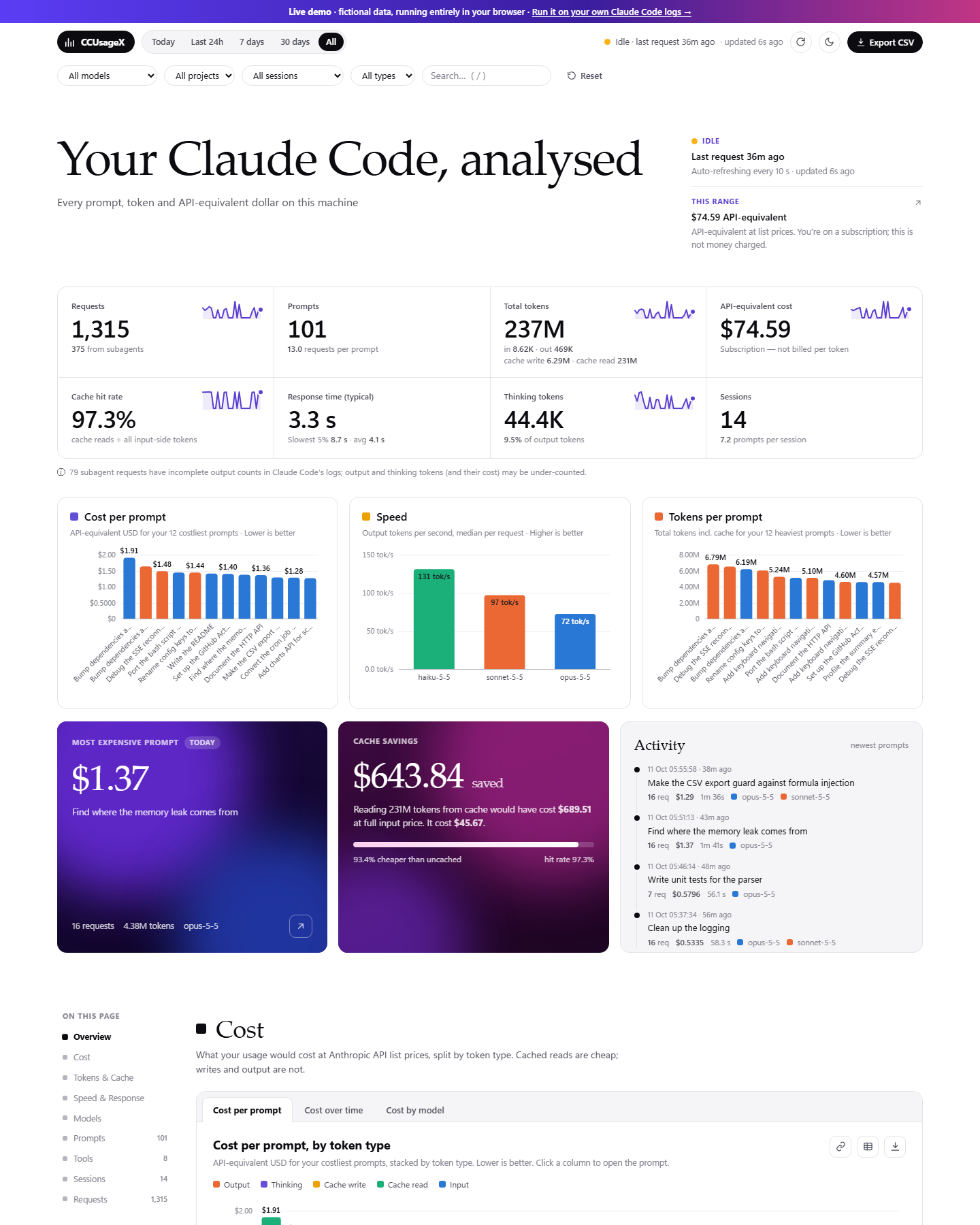
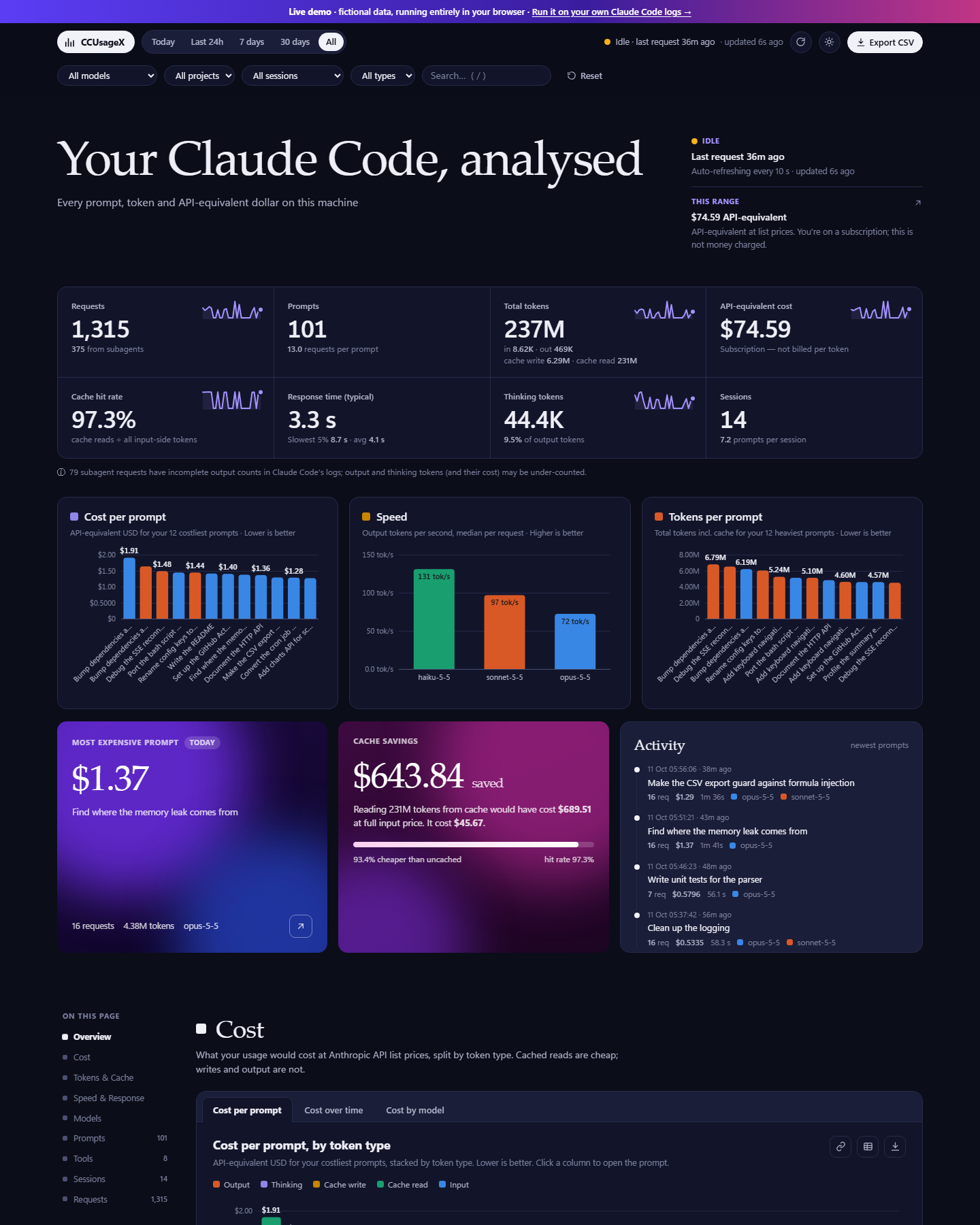
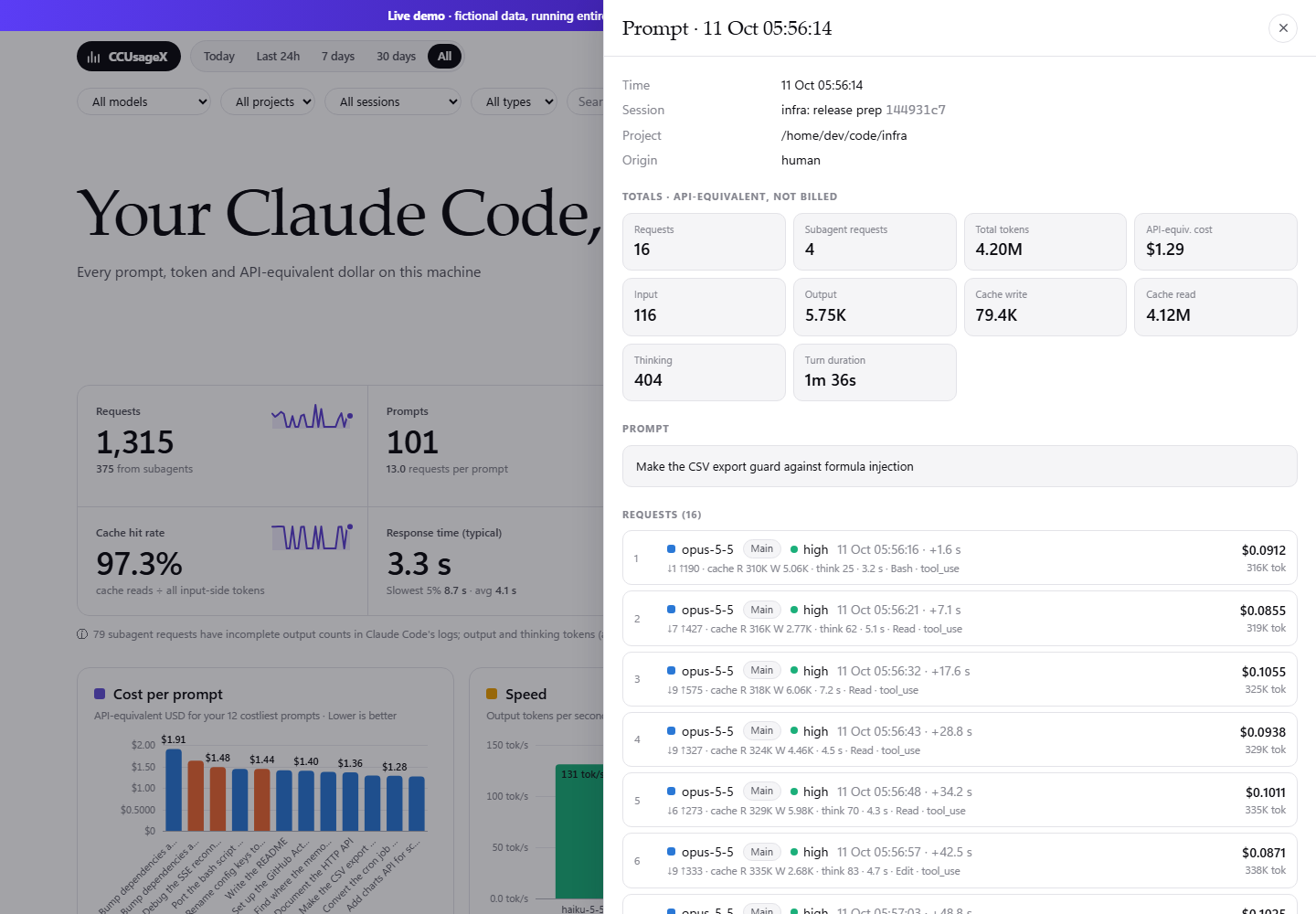
- Every prompt, priced. Click any prompt to read it in full and see each API request it caused, including
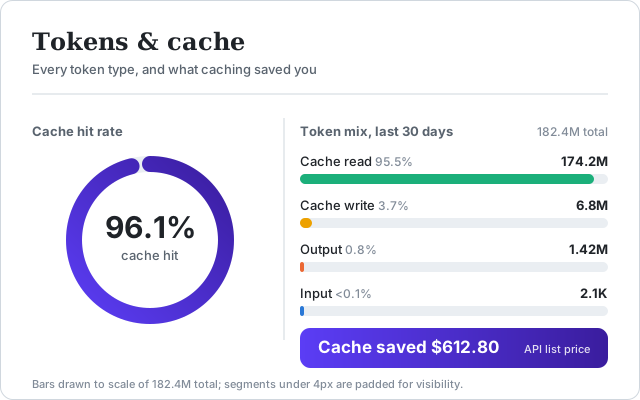
subagents, with tokens and cost per request. - Real token accounting. Input, output, cache write (5-minute and 1-hour), cache read and thinking tokens,
deduplicated exactly the way Claude Code writes them (one line per content block, one request each). - API-equivalent cost. Priced at Anthropic list prices from an editable
config.json, including the
cache-write multipliers, Haiku long-context tier and fast mode. Useful on a Pro/Max subscription to see what your
usage is worth. - Cache savings. Cache hit rate and the dollars caching saved you.
- Plan usage limits. Your 5-hour session and 7-day weekly limits on Pro and Max, with reset times, a pace
projection and a small history, plus per-model weekly limits when Claude Code reports them. Read from Claude Code's own/usagereport and refreshed automatically; see Plan usage limits. - Desktop widget. A small always-visible Claude Pulse widget (Rainmeter on Windows, or any browser) with your limits,
a live "right now" coach, today by hour and measured heavy hours; see Desktop widget. - Models, effort, speed. Output tokens per second, response time (typical and slowest 5%), effort levels and
Claude Code versions. - Tools, sessions, projects. Which tools ran how often, per-session and per-project breakdowns.
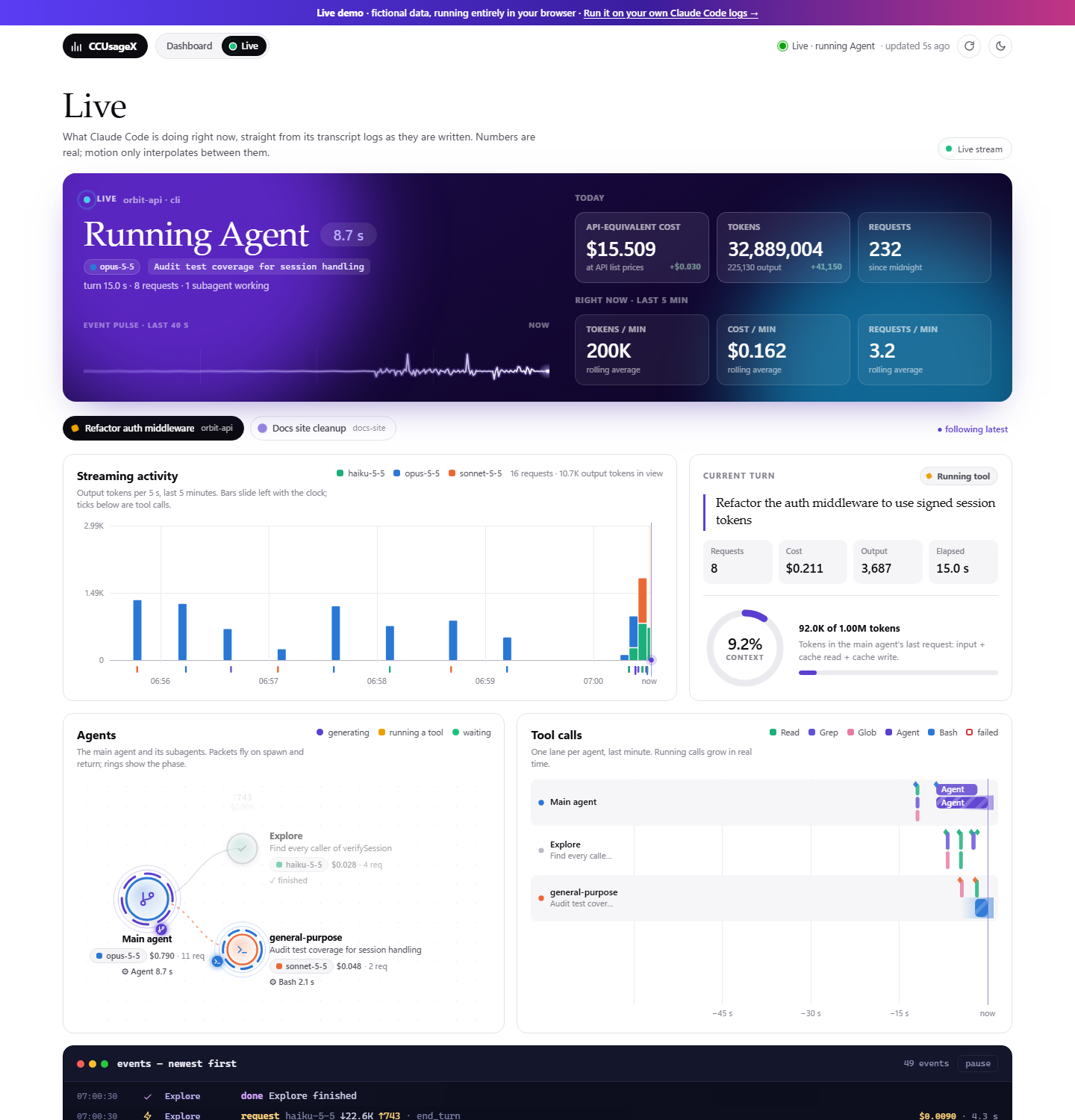
- Live view, in real time. A mission-control tab that streams what Claude Code is doing as it happens:
current status with a ticking timer, the main agent and its subagents, tool calls as live swimlanes, a
scrolling activity chart, context-window gauge, rolling cost and token counters, and an event feed.
Events reach the browser a few milliseconds after Claude Code writes them (file watcher + Server-Sent Events). - Keeps your history. Claude Code deletes old transcripts after 30 days by default; CCUsageX keeps its own copy.
- Filters and export. Time range, model, project, session, main vs subagent, full-text search, CSV export.
- Honest numbers. Independently verified against a separate re-implementation and against ccusage token counts;
known gaps in Claude Code's logs are labelled in the UI (details).
Quick start
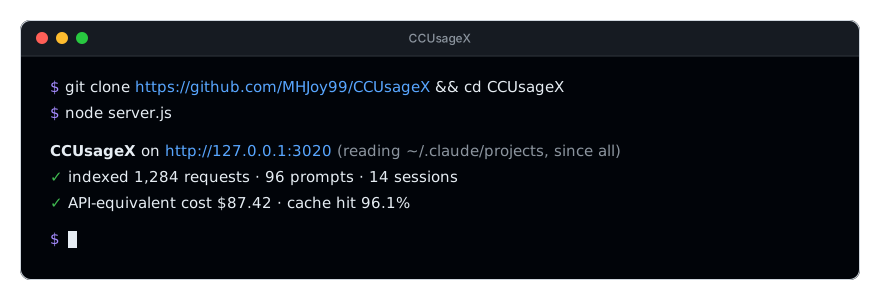
You need Node.js 18 or newer. No npm install step: there are no dependencies.
git clone https://github.com/MHJoy99/CCUsageX.git
cd CCUsageX
node server.js
Open http://127.0.0.1:3020. Or run it straight from GitHub without cloning:
npx github:MHJoy99/CCUsageX
Want to look around first? Try the live demo (fictional data), or run
the demo locally with npm run demo.
Windows: open it like a desktop app
Double-click Open-CCUsageX.cmd. It starts the server hidden and opens the dashboard in Google Chrome (Edge app window if Chrome is missing).Close-CCUsageX.cmd stops the server. For a Start Menu entry and more, seeCCUsageX.ps1 (-Action start|stop|status|restart).
macOS / Linux
node server.js, then open http://127.0.0.1:3020. To keep it running in the background, use your usual tool
(launchd, systemd --user, pm2, tmux).
Plan usage limits

CCUsageX shows how much of your Claude subscription limit you have used: the 5-hour session window and the
7-day weekly window, with when each one resets, plus the per-model weekly limits (for example one for a single
model) when Claude Code reports them. The numbers refresh automatically from Claude Code's documented /usage report,
every 2 minutes while you look at the dashboard (every 15 minutes otherwise). This works the same in the terminal and in
the VS Code panel. It uses no model tokens and writes no transcript: CCUsageX runs the local commandclaude -p with the single prompt /usage (the Agent SDK documents usage_report.rate_limits for it). It takes about
3 seconds and costs nothing. The refresh button on the card runs it on demand.
The probe finds claude on your PATH, or the binary bundled with the VS Code, Cursor or Windsurf extension. SetCCU_CLAUDE_BIN to point at a specific binary, or CCU_LIMITS_PROBE=0 to turn the probe off.
The status line is now optional. It gives instant updates in terminal claude sessions (on every reply), and
CCUsageX uses whichever source changed most recently. Set it up from the repository folder:
npm run statusline:install        # or: node scripts/install-statusline.js --install
node scripts/install-statusline.js --status
npm run statusline:uninstall      # restores the status line you had before
The installer edits only the statusLine entry of your Claude Code settings.json (~/.claude/settings.json, or$CLAUDE_CONFIG_DIR/settings.json):
- It copies the file to
settings.json.bak-<YYYYMMDD-HHMMSS>first, and leaves every other setting as it was. - If you already have a status line, it keeps running. CCUsageX runs it and shows its output, and saves your previous
setting underccusagexPreviousStatusLine, so--uninstallputs it back exactly. - An invalid
settings.jsonstops the installer before anything is written. --dry-runshows the change without writing, and--config-dir <dir>picks another Claude Code folder.
Things to know:
- Pro and Max only. Claude Code reports these limits for claude.ai subscriptions. With an API key, a third-party
provider, or a login without profile access, the report has no limits and the card says so. - The status line is optional. In our tests only terminal
claudesessions ran it, and the VS Code panel did not;
the/usageprobe does not depend on it. - Local data only. Snapshots are written to
~/.ccusagex/limits/(or$CCU_DATA_DIR/limits/). CCUsageX makes no
network request itself; it only runs the localclaudecommand above and never reads your credentials.
Details, including the data fields and the burn-rate projection, are in
docs/ARCHITECTURE.md.
Desktop widget (Windows, Rainmeter)
Claude Pulse is a small desktop widget that keeps your limits in sight while you work. It shows:
- by default, three cards for one or many accounts: today's budget (the dollars of work your accounts can take
today so no weekly allowance goes unused, with rollover), run dry (when you hit a limit if you keep going, at
this, your usual and a heavy pace, and when it comes back) and burn order (which account first, and what each
loses at its reset), - behind their own switches in settings: a live coach line, an account picker with a Switch button, a waste alert
before a reset, the next 10 days, prompts left by model and effort, today by workspace, a forecast report card,
a use-it-or-lose-it list, and all the cards below: - a peak clock with your heavy hours (measured from your own history) and the informational US busy hours,
- today by hour under the clock (today's dollars per hour over your usual day),
- the 5-hour and weekly rings with reset times and where each lands by its reset, and per-model weekly limits,
- a live right now coach: your last hour's $/h and whether that pace fits the rest of today ("Keep this pace till
2:10 PM", "Ease off by …"), what still fits today, and which account the switcher moves to next, - a settings gear, a compact mode, and a clear offline state when CCUsageX is not running,
- the plan value: what your plan gives in API-equivalent dollars (measured, never typed in) against what you spent
today and yesterday, and, with several saved accounts, each account's weekly % and the work left across all of them, - a plain will it last? answer for all accounts together ("safe up to $X/day"), and effort/model tips from your own logs,
- insights: the next 7 days of work left at your usual and heavy pace, and the last 14 days of spend, prompts,
cache, tokens, models and helpers.
Install it on Windows with Rainmeter (CCUsageX must be running):
powershell -ExecutionPolicy Bypass -File scripts\install-widget.ps1
The installer runs in Windows PowerShell 5.1 (built into Windows) and in PowerShell 7.
Remove it with scripts\install-widget.ps1 -Uninstall (add -RemovePlugin to delete the plugin too). Add-StartWithWindows to launch Rainmeter at logon, or -WhatIf to preview. The installer needs no admin rights and
never installs Rainmeter itself.
Any OS, no Rainmeter: open http://127.0.0.1:3020/widget.html in a browser; it is the same widget.
Privacy. Local only. The widget talks to 127.0.0.1 and nothing else. The only network access is the one-time
download of the WebView2 plugin from its official GitHub release, checked
against a pinned SHA256.
An honest note on the two bands. Anthropic said on 2026-03-26 that 5-hour limits drain faster on weekdays 5-11am
Pacific (Business Insider),
then removed that reduction for Pro and Max on 2026-05-06.
So the US band is informational and labelled that way. The heavy-hours band is measured from your own
history (limit percentage used per dollar of work, by hour of day) and needs at least 3 days of data. Details,
configuration and troubleshooting: docs/WIDGET.md.
Several Claude accounts? Use CCSwitcherX
CCSwitcherX is the sister project: switch Claude Code between your own
accounts in one click (Windows window, VS Code status bar and CLI, encrypted saved logins). Free and MIT, like
CCUsageX. The two work as one:
| CCUsageX + Claude Pulse | CCSwitcherX | |
|---|---|---|
| Plan | Today's $ budget across all accounts, the burn order, when each one runs dry | Reads that plan (~/.ccusagex/burn-plan.json) |
| Limits | Weekly %, 5-hour windows, $ per 1% for each account | Live checks of each account, its own stop line |
| Action | Switch button per account in the widget | Does the switch, moves on by itself when one is full |
| Waste | Warns before a reset would leave work unused | Burns the account that resets first |
Install CCSwitcherX and CCUsageX finds it on its own (~/.claude-accounts); nothing to set up.
Without it, CCUsageX still tracks the account you are signed in to.
Screenshots
How it works
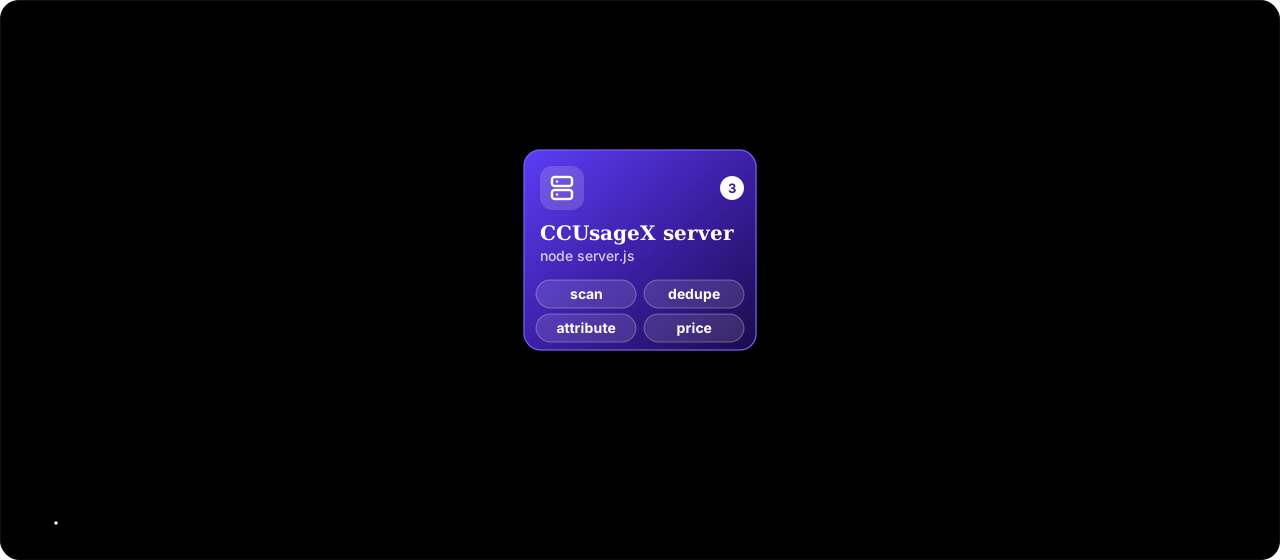
- Claude Code (CLI or IDE extension) writes every conversation to
~/.claude/projects/**/*.jsonl. - CCUsageX reads those files read-only, incrementally, every few seconds.
- Each API response is counted once (by message id + request id) and attributed to the human prompt that caused it.
Subagent work rolls up to the parent prompt. - Requests are priced with
config.jsonand kept in~/.ccusagex/store.json. - A small built-in HTTP server serves the dashboard and a JSON API on
127.0.0.1only.
Full details, including the record format, dedupe rules and the HTTP API, are in
docs/ARCHITECTURE.md.
How it compares
| CCUsageX | ccusage | Claude-Code-Usage-Monitor | Sniffly | |
|---|---|---|---|---|
| Interface | Local web dashboard | CLI tables / JSON | Live terminal UI | Local web dashboard |
| Cost per prompt, with the prompt text | ✅ | — | — | Partial |
| Subagent requests attributed to the parent prompt | ✅ | — | — | — |
| Cache hit rate and cache savings | ✅ | Tokens only | — | — |
| Response time and output speed by model | ✅ | — | Burn rate | — |
| Keeps history after Claude Code's 30-day cleanup | ✅ | — | — | — |
| Other coding agents (Codex, OpenCode, …) | — | ✅ | — | — |
| Live plan-limit / quota tracking | ✅ | Partial | ✅ | — |
| Dependencies | None | npm package | Python package | Python package |
These tools work well together. ccusage is excellent for quick terminal reports across many agents, and the
Usage Monitor is great for watching plan limits live.
Configuration
Everything is in config.json:
| Key | Default | Meaning |
|---|---|---|
startDate |
"all" |
Only count usage on/after this local date ("YYYY-MM-DD"), or "all" |
port |
3020 |
Dashboard port (bound to 127.0.0.1) |
scanIntervalSeconds |
5 |
How often transcripts are re-scanned |
pricing.models |
Anthropic list prices | USD per million tokens: input, output, cacheRead, optional fastMultiplier, longContext |
Environment variables: PORT, CLAUDE_CONFIG_DIR (where Claude Code keeps its data, default ~/.claude),CCU_DATA_DIR (where CCUsageX keeps its store, default ~/.ccusagex), CCU_START_DATE.
Privacy
- Runs only on your machine and listens on
127.0.0.1only (requests with a foreignHostheader are rejected). - Makes no outbound network requests of its own, has no telemetry and no dependencies.
- Reads
~/.clauderead-only. Its own copy, which includes your prompt text, is stored in~/.ccusagex/.
Delete that folder to remove it. - Plan limits come from running Claude Code's own
/usagecommand locally (no model call, no tokens, no network request
from CCUsageX). Snapshots go under~/.ccusagex/limits/. The optional status line edits only thestatusLineentry in
Claude Code'ssettings.json, after making a backup.
FAQ
How do I see my Claude Code token usage?
Run node server.js in this repo and open http://127.0.0.1:3020. CCUsageX reads Claude Code's logs and shows tokens
per prompt, request, model, session and day.
How much does my Claude Code usage cost?
CCUsageX prices every request at Anthropic's API list prices ("API-equivalent cost"). If you're on a Pro or Max
subscription, that's the value of your usage, not money you were charged.
Where does Claude Code store its logs?
In ~/.claude/projects/<project>/<session>.jsonl (on Windows, %USERPROFILE%\.claude\projects). Subagent
transcripts sit in a subagents folder next to the session file.
Does CCUsageX send my data anywhere?
No. It has no network code beyond its own local server, which only listens on 127.0.0.1.
Why do some subagent requests show very few output tokens?
For many subagent requests Claude Code only writes the usage from the start of the stream, so output and thinking
tokens are a lower bound. CCUsageX flags these requests and labels the affected totals instead of guessing.
How is it different from ccusage?
ccusage is a CLI that reports usage across many coding agents. CCUsageX is a web dashboard focused on Claude Code that
goes per prompt: prompt text, subagent attribution, cache savings, response times and persistent history.
More answers in docs/FAQ.md.
Development
npm test          # 38 unit tests on synthetic transcripts (node:test, no deps)
npm run verify    # independent re-count of your real logs vs. the running dashboard
npm run demo      # dashboard on generated demo data
See CONTRIBUTING.md. Bugs and ideas are welcome in
issues.
License
MIT © MHJoy99. CCUsageX is an independent project and is not affiliated with or endorsed by Anthropic.
"Claude" and "Claude Code" are trademarks of Anthropic.
Reviews (0)
Sign in to leave a review.
Leave a reviewNo results found