agent-walker
Health Pass
- License — License: Apache-2.0
- Description — Repository has a description
- Active repo — Last push 0 days ago
- Community trust — 25 GitHub stars
Code Pass
- Code scan — Scanned 12 files during light audit, no dangerous patterns found
Permissions Pass
- Permissions — No dangerous permissions requested
No AI report is available for this listing yet.
Local AI coding-agent usage dashboard — tokens, cost, projects, autonomy.
agent-walker



日本語: README.ja.md
Can you see where your AI agents have walked?
A local terminal dashboard built from the logs your AI coding agents already
write to your machine — tokens, API-equivalent cost, projects, tools, and
autonomy, a month of runs in one screen. Put in the work and you'll earn a
codename.
Only the one watching can deter it.

Why
Subscription AI tools don't show you what you actually use. agent-walker
reads the session logs on your disk and answers, in one screen:
- How much would this cost on the API? — cache-aware cost windows
(today / 7d / 30d / period), so you know if the subscription pays for itself - Where do the tokens go? — per-repository breakdown across agents
- When and with which model? — GitHub-style activity grass, stacked
per-model daily bars, hour-of-day profile in your local timezone - Can it run unattended? — turn-duration histogram weighted toward the
20-minute-plus autonomy range - Which skills earn their tokens? — per-skill 30-day breakdown on the
Claude tab, when your Claude Code version attributes messages to skills - How hard did you push the plan? — daily peak of the 5h-window
utilization over the last month on the Codex tab: history, not a live meter - How do you let it think? — how often extended thinking actually fired
(Claude) and the reasoning-effort mix (Claude and Codex)
Privacy
- Your logs never leave your machine — agent-walker does not phone home
with usage or error data. - The only always-on outbound traffic is a
GETof public model-pricing
metadata from LiteLLM's pricing database
(MIT-licensed) when the dashboard loads or reloads a report. It carries no
log content and no usage data, but it does let GitHub's CDN see your IP,
the same as anygit pull. Block it with a firewall rule or run offline if
that matters to you. - Cursor is the one exception. It's auto-detected when you're signed into
Cursor locally, and reading its usage reaches the network: agent-walker uses
your local Cursor session token to query Cursor's own usage dashboard (Cursor
keeps no usage on disk). That sends your session cookie to Cursor to read your
own usage. It's skipped (no request) whenever there's nothing to read — Cursor
not installed, or signed out — so nothing is sent unless you're signed in. See
docs/cursor.md. - Release binaries carry GitHub Artifact Attestations:
gh attestation verify agent-walker-aarch64-apple-darwin.tar.xz -R miiiiiiich/agent-walker
Use
No install — npx / bunx fetch the prebuilt binary for your platform
(macOS Apple Silicon, Linux arm64/x64 GNU, Windows x64) and run it:
npx agent-walker
# or
bunx agent-walker
| Key | Action |
|---|---|
← → / h l / Tab |
switch provider (only those with data; most-used first; Total last) |
↑ ↓ / j k / PgUp PgDn |
scroll |
1–9 |
jump to tab |
r |
reload |
s |
share your stats card (copy image / save to your OS Downloads folder) |
q / Esc / Ctrl-C |
quit |
Flags:
| Flag | What it does |
|---|---|
--days <N> |
Analysis window for the graphs (default 30; the codename's throughput level is always taken from the last 30 days, so the rank doesn't drift with --days) |
--share <path> |
Render the stats card to a PNG, print its caption, and exit |
--no-cache |
Rescan every log file, ignoring the parse cache |
--no-cursor |
Disable the Cursor collector — the only one that sends a credential off the machine (your Cursor session cookie, to cursor.com) — so it makes no network request |
--claude-dir / --codex-dir / --agy-dir / --opencode-dir / --copilot-dir / --grok-dir |
Point at non-standard log locations (also honors CLAUDE_CONFIG_DIR, CODEX_HOME, OPENCODE_HOME, COPILOT_HOME, and GROK_HOME when set) |
--cursor-state-db |
Point at a non-standard Cursor state.vscdb (or set CURSOR_TOKEN to supply the session token directly) |
--completions <shell> |
Print shell completions (e.g. --completions zsh) and exit |
Share your codename
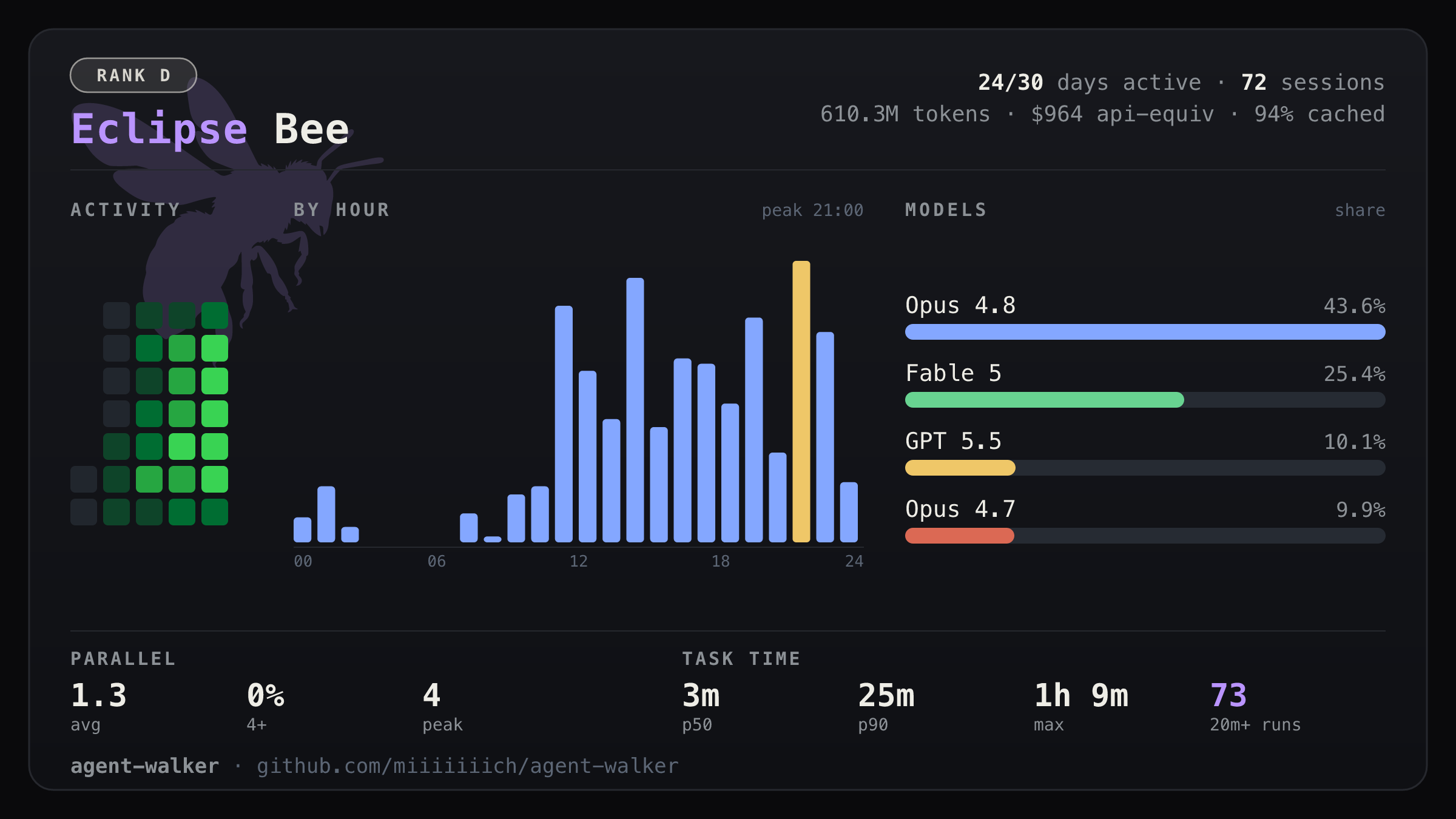
Press s in the dashboard (or run agent-walker --share card.png) to render a
shareable stats card. Instead of leading with a raw token count, the card reads
how you work: a GitHub-style activity grid, your hour-of-day rhythm, and a
per-model split, with parallelism and task-time as plain numbers.
Your usage also earns a codename — one ladder you climb as you go: letter
ranks from E up to SS, each split into a few steps, and every step is an
animal — 24 in all, Ant to Lion. Exactly where the lines sit is left as a
puzzle, and repository names never appear on the card — just glance before
you post.
Works with your agents
Every agent is auto-detected — install nothing, configure nothing, just run it.
| Agent | Tokens & cost | Models | Projects | Tools | Activity |
|---|---|---|---|---|---|
| Claude Code | ✅ | ✅ | ✅ | ✅ | ✅ |
| Codex CLI | ✅ | ✅ | ✅ | ✅ | ✅ |
| OpenCode | ✅ | ✅ | ✅ | ✅ | ✅ |
| Grok Build | ✅ | ✅ | ✅ | ✅ | ✅ |
| GitHub Copilot CLI | ✅ | ✅ | ✅ | ✅ | ✅ |
| Cursor | ✅ | ✅ | — | — | ✅ |
| Antigravity | ✅ | ✅ | ✅ | ✅ | ✅ |
Local-only, except Cursor — it keeps no usage on disk, so it's read from
Cursor's own dashboard over the network (only when you're signed in; see
Privacy). The per-agent pages explain exactly what's read, how
tokens/cache/cost are counted, and the caveats.
Everything is parsed in parallel and cached per file
(~/.cache/agent-walker/), so warm starts skip the bulk of the work and only
reparse log files whose (mtime, size) changed. Log lines are treated as
untrusted input — malformed records are counted and skipped, never evaluated.
Keep more than 30 days of history
Claude Code deletes transcripts after 30 days by default, so on first
use the dashboard will only show the last month no matter how long the
window is. To keep a year of history, add this to ~/.claude/settings.json:
{ "cleanupPeriodDays": 365 }
Cleanup runs on session start, so anything older than 30 days that was
already deleted is gone — set this early. Codex CLI keeps its sessions
indefinitely; no setting needed.
Notes & limitations
- Cost figures are API-equivalent estimates (what the same usage would
cost on metered pricing), not your actual bill. Rates come from LiteLLM
with cache reads/writes priced separately; the pricing-fetch date shows up
in the COST panel when pricing loads and the terminal has room for it. - Token totals are cache-inclusive (input + output + cache writes + cache
reads). Claude Code re-sends the full context every turn, so for heavy
users the bulk of the total tends to be cache reads — real but cheaply
billed context re-reads, not new work. See docs/claude.md. - Antigravity tokens are read from an undocumented protobuf (its
per-conversation SQLite), decoded by tag number and checked per row for mutual
consistency of the output fields (#3 == #9 + #10), which catches a re-meaning
of those output tags; the residual gap is noted in docs/agy.md.
They count toward the totals. Cost is estimated from its Gemini model's display
name via the same LiteLLM table as every other agent. - These numbers won't match each agent's own in-app usage display: those use
different time windows and count cache reads differently. See the per-agent
pages above. - Antigravity log timestamps carry no timezone and are assumed to be local.
- Windows binaries are published from 0.3 onward; the dashboard runs in
Windows Terminal / PowerShell and reads logs from%USERPROFILE%. WSL
installs work too — paths just stay in their Linux form.
Acknowledgements
ccusage pioneered local usage tracking
for AI coding agents and first identified and solved problems that
agent-walker also addresses. See THIRD_PARTY_NOTICES.
License
MIT or Apache-2.0, at your option.
Reviews (0)
Sign in to leave a review.
Leave a reviewNo results found