overture
Health Warn
- License — License: MIT
- Description — Repository has a description
- Active repo — Last push 0 days ago
- Low visibility — Only 5 GitHub stars
Code Fail
- network request — Outbound network request in plugin/kit/agent.py
- rm -rf — Recursive force deletion command in plugin/kit/deploy/install.sh
Permissions Pass
- Permissions — No dangerous permissions requested
No AI report is available for this listing yet.
Answer your AI agents' questions from a web page behind Cloudflare Access: lock answers as rulings, render Mermaid visuals inline, star what matters, settle stale rulings, review your dashboard and PRs, and run roar/refine/drill panels. A Claude Code / Desktop plugin plus a small self-hosted server; runs no git and no project code.

Your AI coding agents ask. You answer from one web page.
Overture keeps the answers and warns you when the code changes under them.




What is it?
When you run AI coding agents (for example several Claude Code sessions),
they keep needing decisions from you. Which database should we use? How
many retries? Which region? Today each agent stops and waits in its own
terminal. Your answer then disappears when the session ends.
Overture gathers all those questions into one inbox you open in a
browser, on your laptop or your phone.
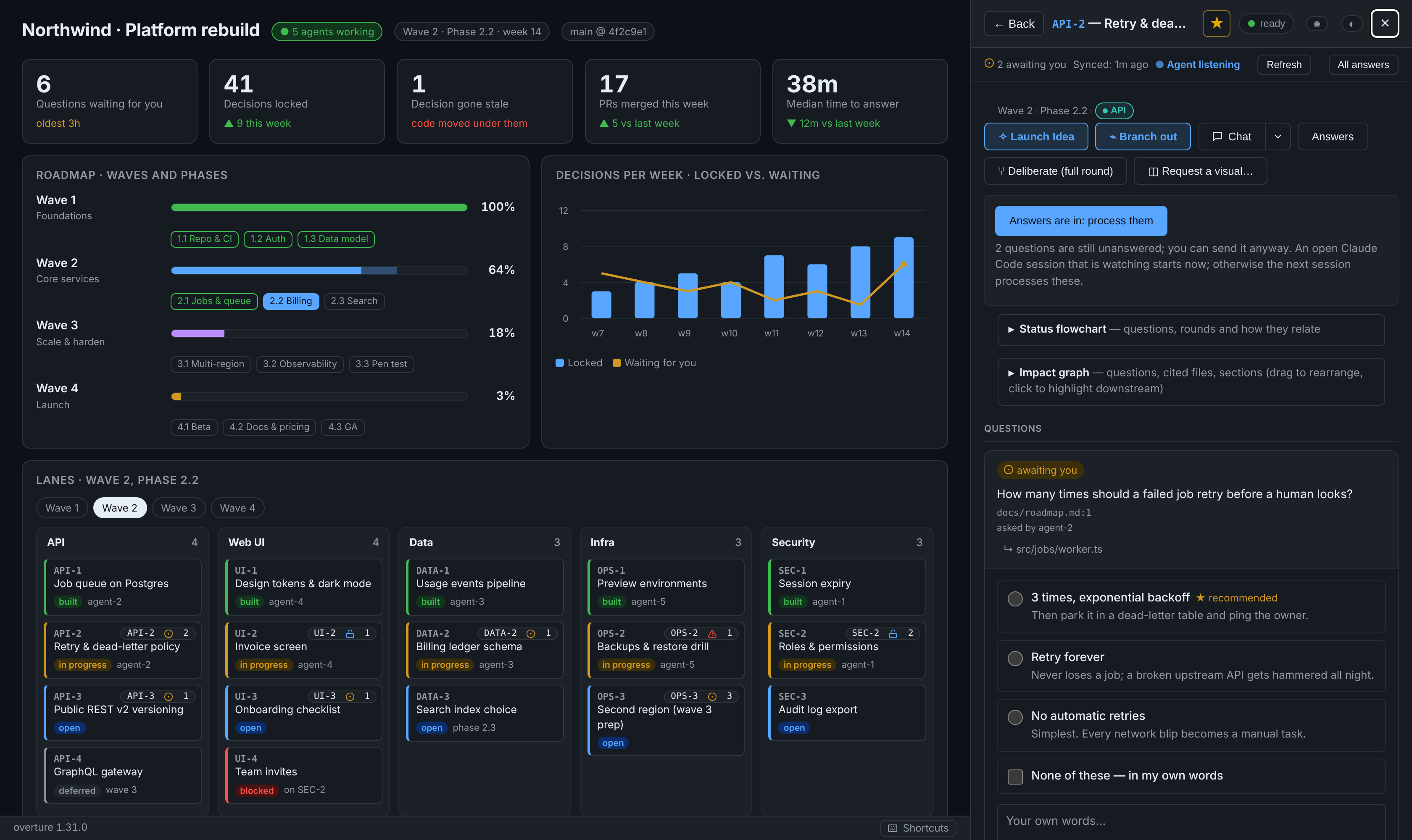
- An agent asks. It lists the options, marks the one it recommends (★),
and shows the code that matters. - You answer. Tap an option, or answer a whole batch from the keyboard.
Lock it when you're sure. - Every agent remembers it. Locked answers are saved into your project's
own git history. If the code they relied on later changes, the answer is
flagged stale, so you are never relying on a decision whose code has
since changed.
Most capabilities in What you can do come with a screenshot
or short animation.
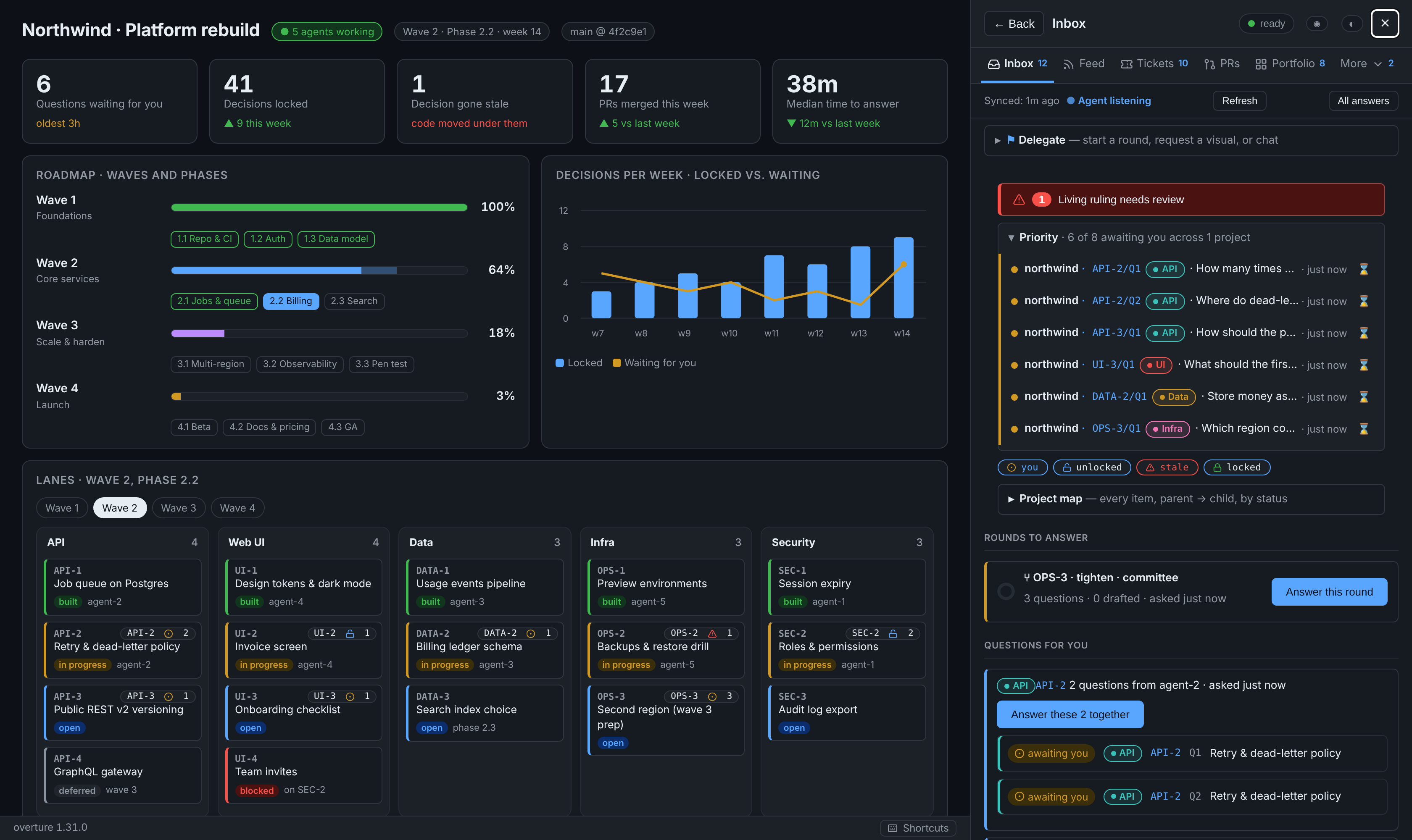
It docks beside any page you already have. The screenshots show it next to a
project dashboard: waves, phases and lanes, with a live count of open
questions on each card. It runs on your own machine behind your own login,
and nothing goes to a third-party service.
Who is it for?
- Solo developers running several AI agents who are tired of
babysitting terminals. - Tech leads who want a written record of why the code is the way it
is. - Anyone juggling several projects. One page shows what is waiting for you
across all of them.
Try it
You need Claude Code and a Cloudflare account. The free tier is enough; it
provides the login page that protects your inbox.
/plugin marketplace add MikeHeid/overture
/plugin install overture@overture
/overture:console-onboard
The last command walks you through the rest, in your project. The full
details are under Install.
Already running Overture for another project? Join this one to the same
server instead of starting a second one: docs/JOIN.md.
Words you'll see
| Word | Plain meaning |
|---|---|
| Question | Something an agent needs you to decide, with options and a recommended pick (★). |
| Lock | "I'm sure." A locked answer becomes a lasting rule that every agent follows. |
| Ruling | A locked answer. |
| Stale | The code a ruling relied on has changed. Take another look. |
| Steward | The one agent session that collects your answers and writes them into the project. |
| Round | A batch of related questions you answer in one go. |
| Seats | Optional advisor agents (security, UX, devil's advocate) that weigh in before you decide. They never decide for you. |
Where it's going
| Stage | What it means for you | Status |
|---|---|---|
| Wave 1: one person, many agents | Inbox, rulings, stale warnings, multi-project view, automation | ✅ Shipped (v0.7 → v1.31) |
| Wave 2: faster setup, stronger rules | Install in under 10 minutes without Cloudflare; a broken ruling can block a bad merge | 🟡 ~15% |
| Wave 3: teams | Several people with roles; every decision records who made it | 🟠 ~10% |
| Wave 4: an open standard | Other agent tools (not just Claude) can ask and read rulings | ⚪ ~5% |
The detailed roadmap, with five development lanes, progress estimates and the
reasoning behind them, is in docs/STRATEGY.md. That
document also covers what makes Overture hard to copy and why it could change
how teams build with AI.
This README describes the kit as it is today. CHANGELOG.md
says what each release added. Everything below is the full reference.
Install
Two routes. Both end at /overture:console-onboard.
A. Straight from this repository (no download)
In Claude Desktop's Code tab or in claude:
/plugin marketplace add MikeHeid/overture
/plugin install overture@overture
Then, in your project:
/overture:console-onboard
Updates land with:
/plugin marketplace update overture
/plugin update overture@overture
B. From a release zip
Get overture-<version>.zip from
Releases. Unzip it
somewhere it can stay (it makes a overture/ folder). Then:
/plugin marketplace add ~/overture
/plugin install overture@overture-local
/overture:console-onboard
Updates: delete ~/overture/, unzip the new release zip in its place,
then:
/plugin marketplace update overture-local
/plugin update overture@overture-local
A one-liner for scripts, including other Claude sessions:
rm -rf ~/overture && \
  gh release download --repo MikeHeid/overture --pattern 'overture-*.zip' \
    --dir /tmp --clobber && \
  unzip -q /tmp/overture-*.zip -d ~ && rm /tmp/overture-*.zip
Then run the two /plugin commands above and restart the session.
Upgrade the agent server on each onboarded project
Updating the plugin only refreshes the files on disk; the running Python
server does not pick them up until it restarts. For every project that was
onboarded, run the installer with --start to copy the fresh kit to~/.local/share/overture/kit/ and restart the systemd user units:
bash ~/overture/plugins/overture/kit/deploy/install.sh \
  --project <path to project> --start
(When using route A, the path is the plugin cache instead; the install
script's path is printed by onboard.py show on the project.)
After the restart, verify from the project's machine:
curl -s http://127.0.0.1:$(grep ^CONSOLE_PORT .overture/console.env | cut -d= -f2)/health
# → {"ok": true, "version": "<the version you just installed>", ...}
The first Claude session in each project after the upgrade prints a short
banner naming the new version and the commands most useful at that moment
(items-push, items-watch, scaffold-dashboard, sync-dashboard,page-snapshot, prs-push, inbox).
| Guide | For |
|---|---|
| docs/USER-GUIDE.md | Start here: what the console is, the pinned install, your day and the agents' day, and tips for spending fewer tokens. |
| INSTALL.md | Installing the plugin and onboarding a project. |
| docs/JOIN.md | Joining another project to the main Overture server (one server, many projects). |
| docs/MIGRATION.md | Upgrading. Covers moving a vendored kit onto one pinned install, and the one-off steps each release needs. |
| docs/CLOUDFLARE.md | The Access application, the tunnel and DNS. |
| docs/ADAPTER.md | Connecting the console to your project's work items and decision log. |
| docs/DEPLOY.md | Installing, upgrading and rolling back the systemd services. |
| docs/RUNBOOK.md | Symptoms, checks and fixes, starting with the loopback /health check. |
Name the session, bootstrap the dashboard
Set the agent id for a Claude session — type this in Claude Code:
/overture:as my-agent-name
The name is recorded against this session in STATE/sessions.jsonl. Everyagent.py call the session makes signs with it, questions and messages are
attributed to it, and the SessionStart banner knows which session is which.OVERTURE_AGENT=my-agent-name in the shell env is a machine-wide fallback;/overture:as wins for that session.
Bootstrap the dashboard — in a terminal on the project's machine:
# Writes docs/console/page.html with Header / Items / Rollout / Engine / Spec
# sections and injects a matching board() into .overture/adapter.py.
agent.py --state <STATE> scaffold-dashboard --project .

# Insert a <details data-ck-item="X"> stub for every item not yet on the
# page, nested under its parent. Idempotent; hand-edits inside each node
# survive re-syncs.
agent.py --state <STATE> items-push --adapter .overture/adapter.py \
  --sync-dashboard docs/console/page.html

# Commit, snapshot, press "Use this page" in the console.
git add -A && git commit -m "dashboard: scaffold + sync"
agent.py --state <STATE> page-snapshot --path docs/console/page.html

# Keep the live values fresh:
agent.py --state <STATE> items-watch --adapter .overture/adapter.py
Make it more beautiful. The console inherits CSS custom properties from the
host page's :root. Define any of these to re-skin the whole kit (an unlayered
host :root beats the kit's @layer console-fallbacks):
:root {
  --c-bg: #...;  --c-surface: #...;  --c-surface-alt: #...;
  --c-fg: #...;  --c-fg-muted: #...;
  --c-border: #...;  --c-border-light: #...;
  --c-accent: #...;  --c-accent-fg: #...;
  --c-open: #...;    --c-open-bg: #...;
  --c-claimed: #...; --c-claimed-bg: #...;
  --c-built: #...;   --c-built-bg: #...;
  --c-blocked: #...; --c-blocked-bg: #...;
  --c-deferred: #...; --c-deferred-bg: #...;
  --radius-sm: 6px;  --radius-md: 10px;
}
@media (prefers-color-scheme: dark) { :root:not([data-theme="light"]) { ... } }
The 0.9.11 fallback palette is Primer-aligned (#0969da accent on light,#58a6ff on dark) and ships color-scheme so native scrollbars match. Then:
- Add deep links from the item view to your dashboard by setting
sectionsin.overture.json:{"sections": {"AB-2": ["#features/rollout", "#features/timeline"]}}.
The item view renders chips linking to each anchor. - Add in-place state badges by marking any
<section data-ck-item="X">
on the dashboard. The console injects anX 2 1 3 4badge, each count
behind its state's icon (awaiting you, unlocked, stale, locked),
in-place, updated on every live wake; clicking it opens the panel on X.
Hooks the plugin ships (doorbell + command guards)
The plugin runs three hooks in every Claude session on your machine. All three
act only in projects that agent.py register has entered in your user-level
registry (~/.config/overture/projects.json); in any other project they
print nothing and exit 0.
| Hook event | File | What it does |
|---|---|---|
SessionStart (startup/resume/clear/compact/fork) |
plugin/hooks/session_start.py |
Reads the doorbell for this project's console and prints what the owner sent while no session was watching: questions, process requests, chat replies, scan requests, visual requests, each with its seq and the command to handle it. On first run after an install or an upgrade, prints a banner naming the running kit version and the commands most useful at that moment. |
UserPromptSubmit |
plugin/hooks/name_session.py |
Picks up /overture:as NAME and records the mapping session_id → agent name in STATE/sessions.jsonl (atomic rewrite). The next agent.py call reads the name from this file. |
PreToolUse (matcher: AskUserQuestion) |
plugin/hooks/ask_guard.py |
On a non-steward session in a project that names a steward, refuses AskUserQuestion so the question goes to the owner through the console instead of a transient prompt. |
All three are stdlib-only, read-only outside their known files, and never run
anything from the repository. See the module docstrings for the trust model.
What you can do
Answer, lock, and ask for a round
Answer and lock. Each question shows its options, the ★ and whose
recommendation it is, and evidence rows. The evidence shows the cited lines
as they are now, and says whether they changed since the question was asked.
Your own words on an answer travel with it. Locking turns an answer into a
ruling. A round's questions open as one form: ←/→ to move, 1–9 to pick, then
Lock all & process.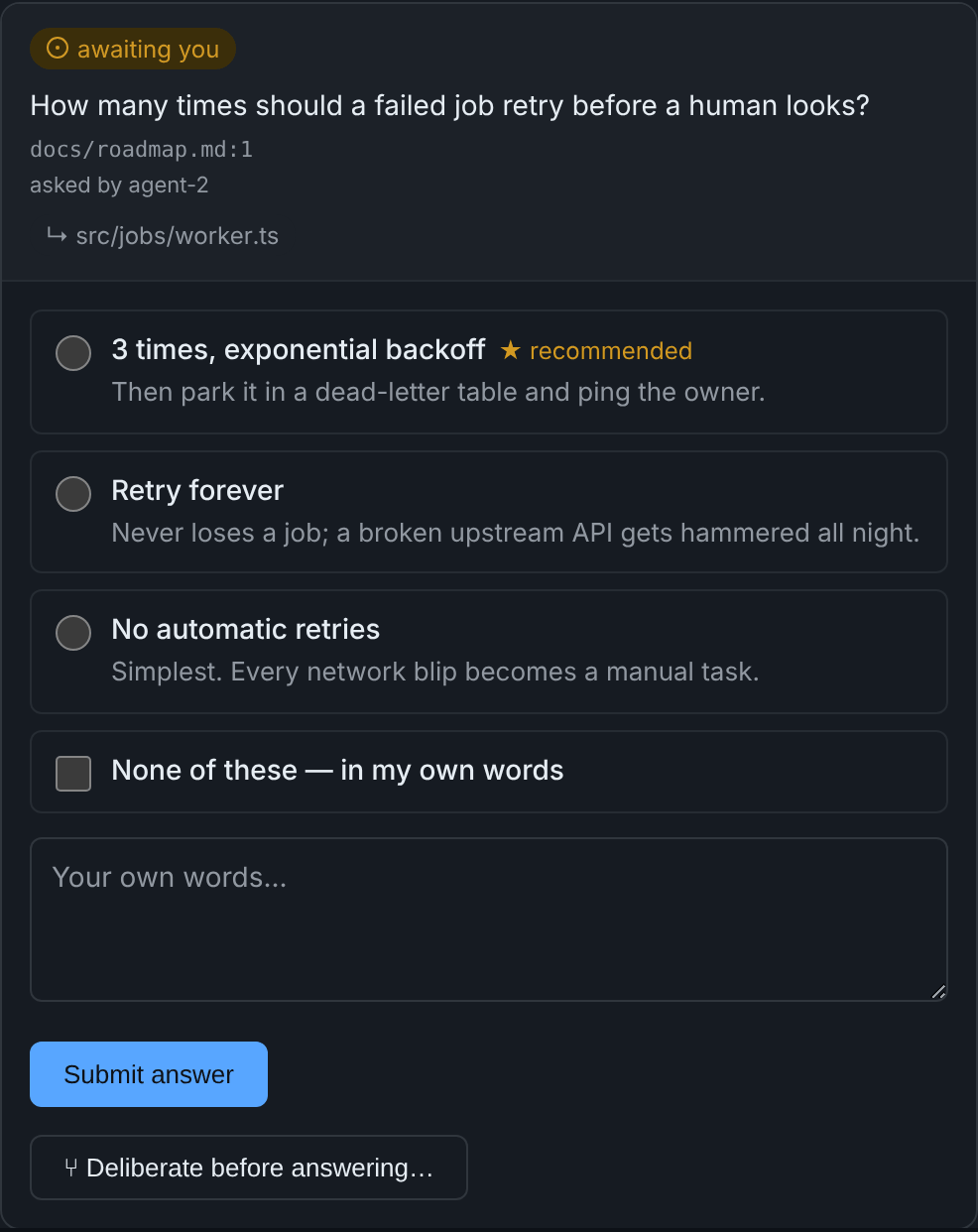
Lock with one tap. Lock this answer sends the lock immediately
(0.9.12). If the server refuses it (e.g. a condition is no longer true),
the question card shows the reason and the Lock button comes back.Lock several at once. When an item has more than one answered, unlocked
question, Lock all N answers… shows every answer it is about to lock,
then locks them in order and stops at the first refusal, naming it.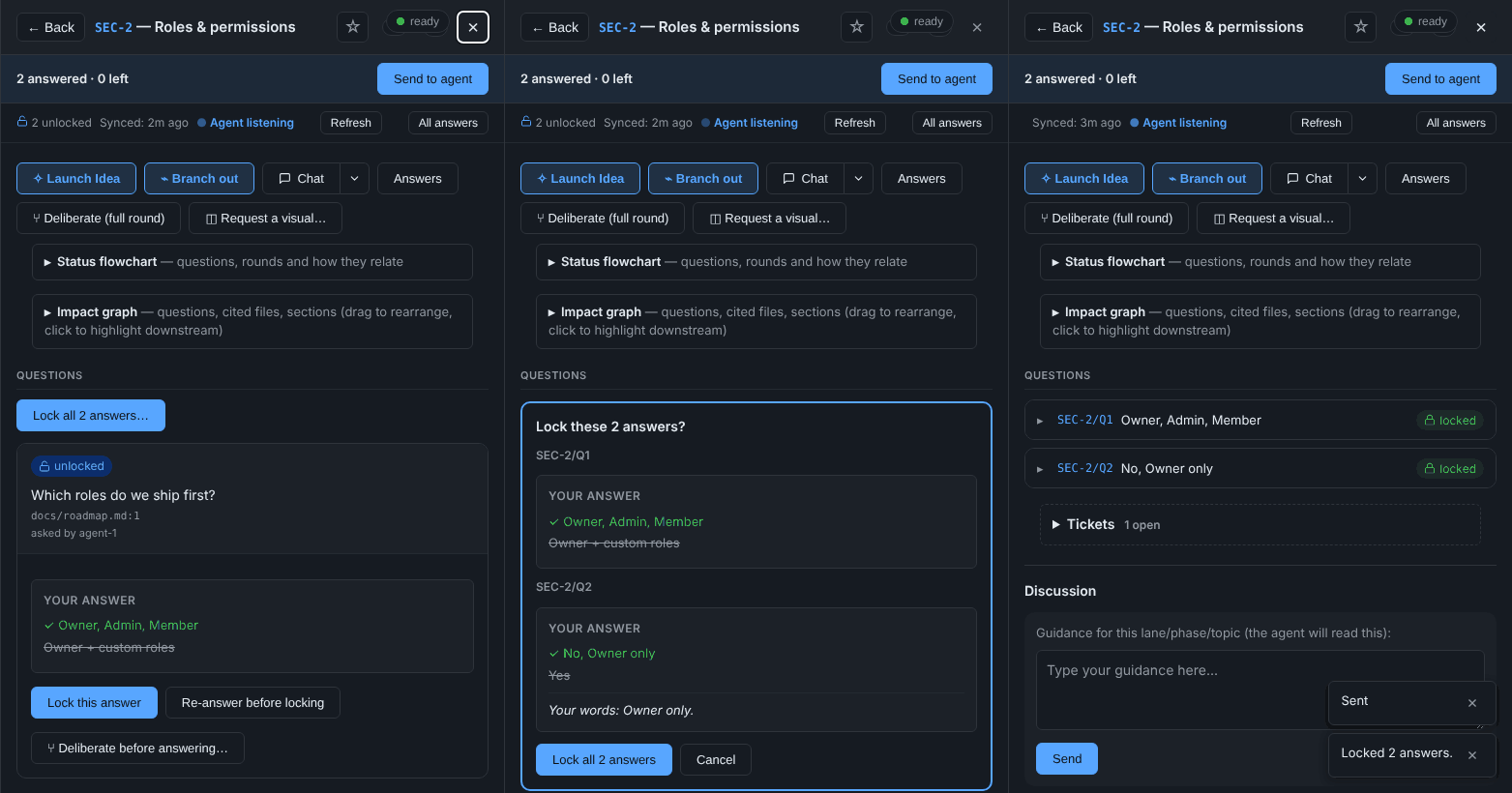
A round moves on by itself. Pick a single-choice option and, after a
moment, the form moves to the next question still without a pick, and says
so. It stays put for multiple choice, for a question you are writing words
on, and for ↑/↓ through the options. It never moves onto the Lock page.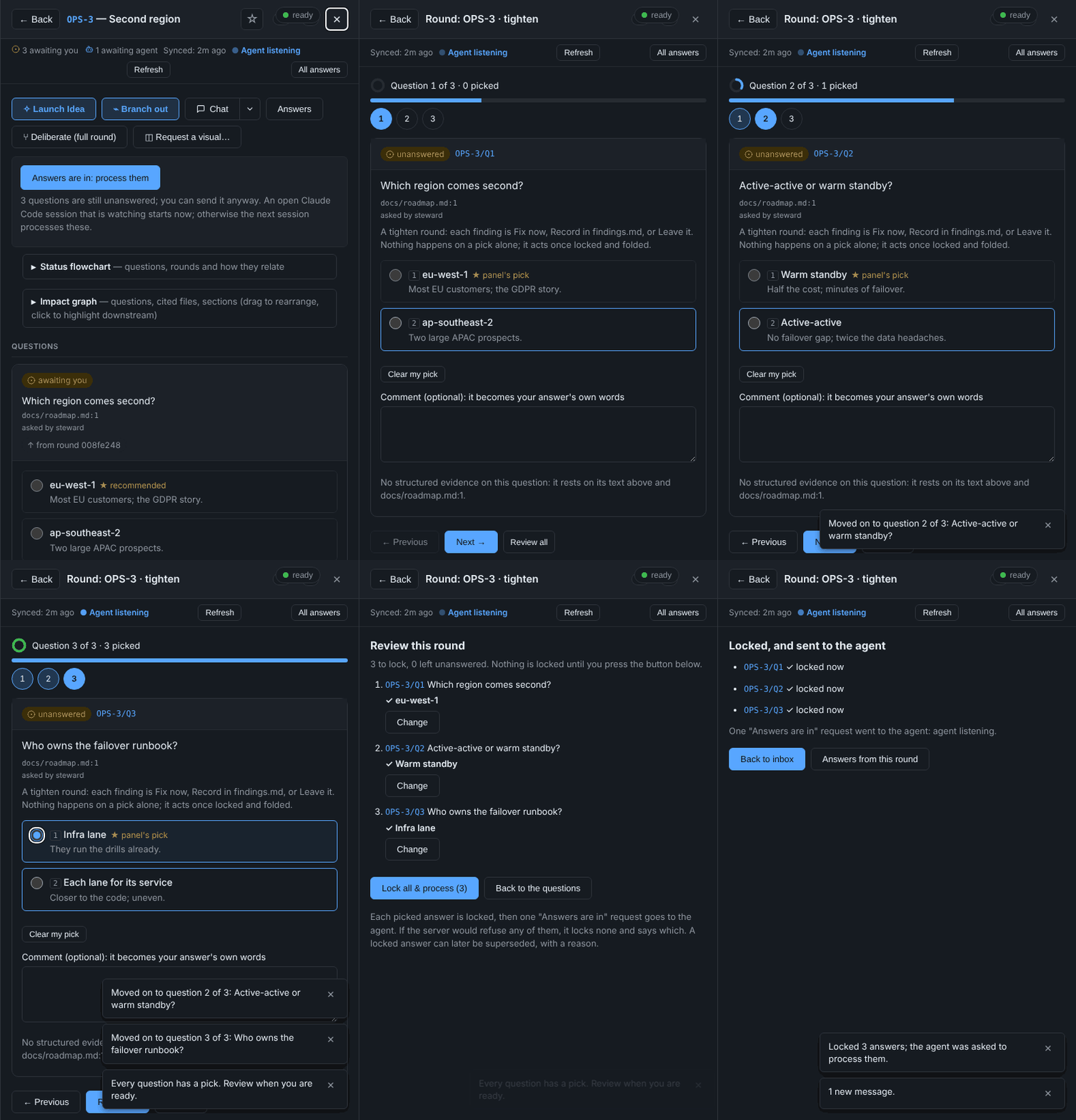
Answer these together. Loose questions on one item, asked by one named
agent session within five minutes of each other, are grouped in the inbox
and open as one form. Unnamed sessions are never grouped, because nothing
shows they are one agent's.Send to agent. Once you have answered something, a bar under the panel
header shows "N answered · M left" and sends the agent the same "process
them" signal as before. It goes once sent and comes back with the next
answer.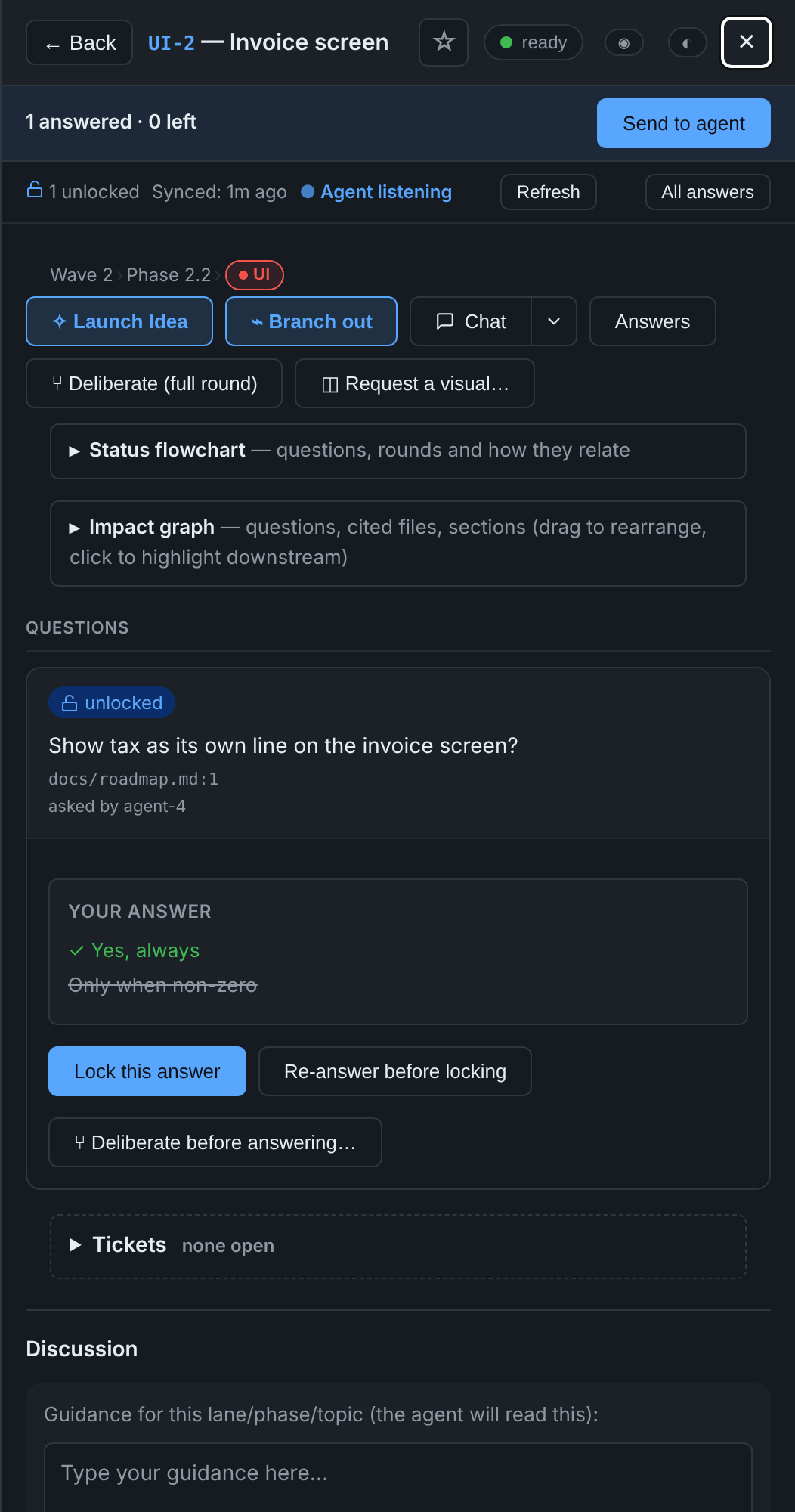
Locked questions roll up to one line (question, pick, state). Click or
press Enter to open one. Open and stale questions stay whole. The slides and
fades run only when your system does not ask for reduced motion.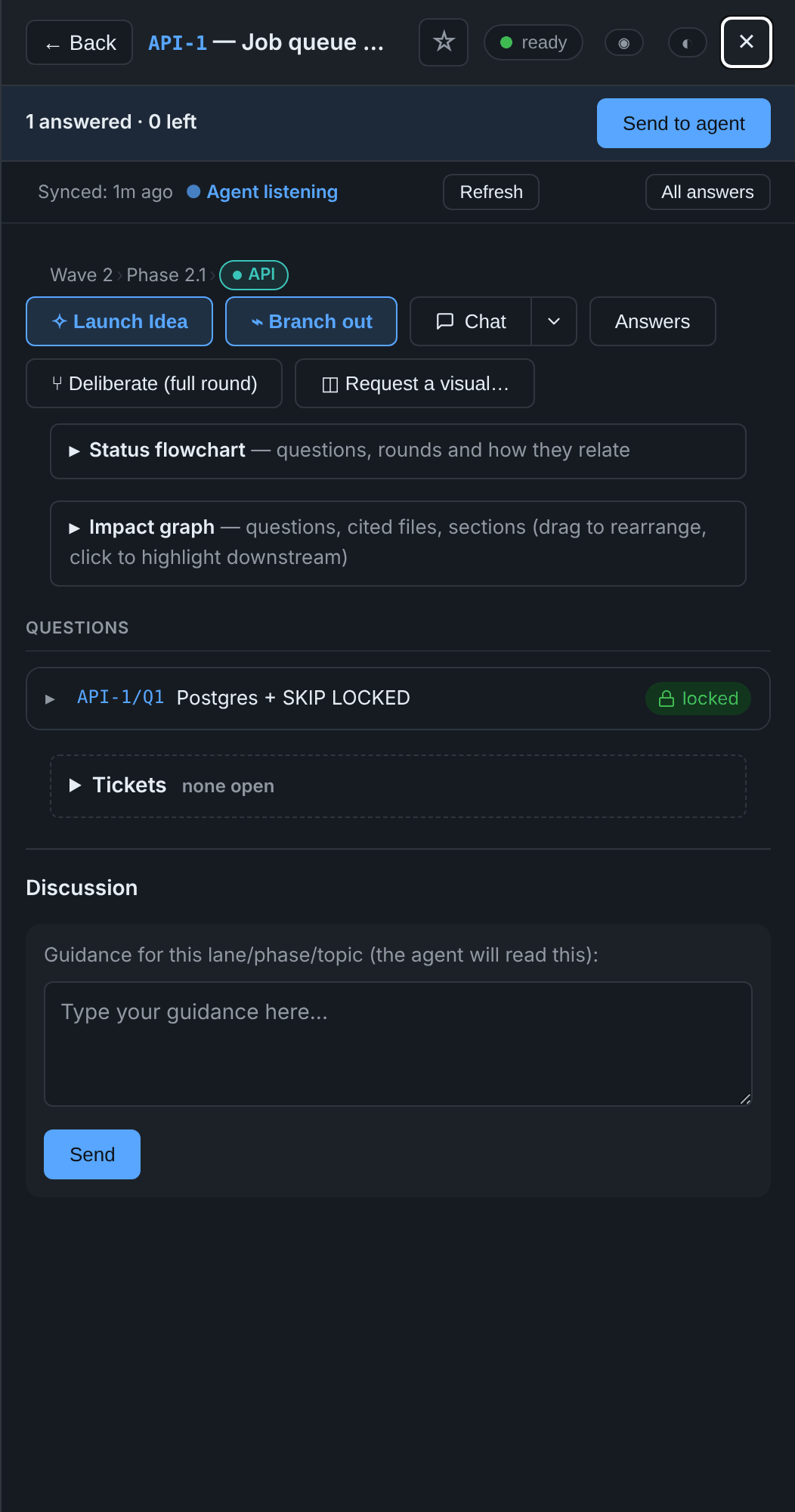
Deliberate before answering. On an open question, pick one to three
seats (DevOps, UX, adversarial, security, architect, analyst, or one you
name). They reply with a ★ and their reasons, and never answer or lock for
you. The cost is shown first, at about 100k tokens a seat.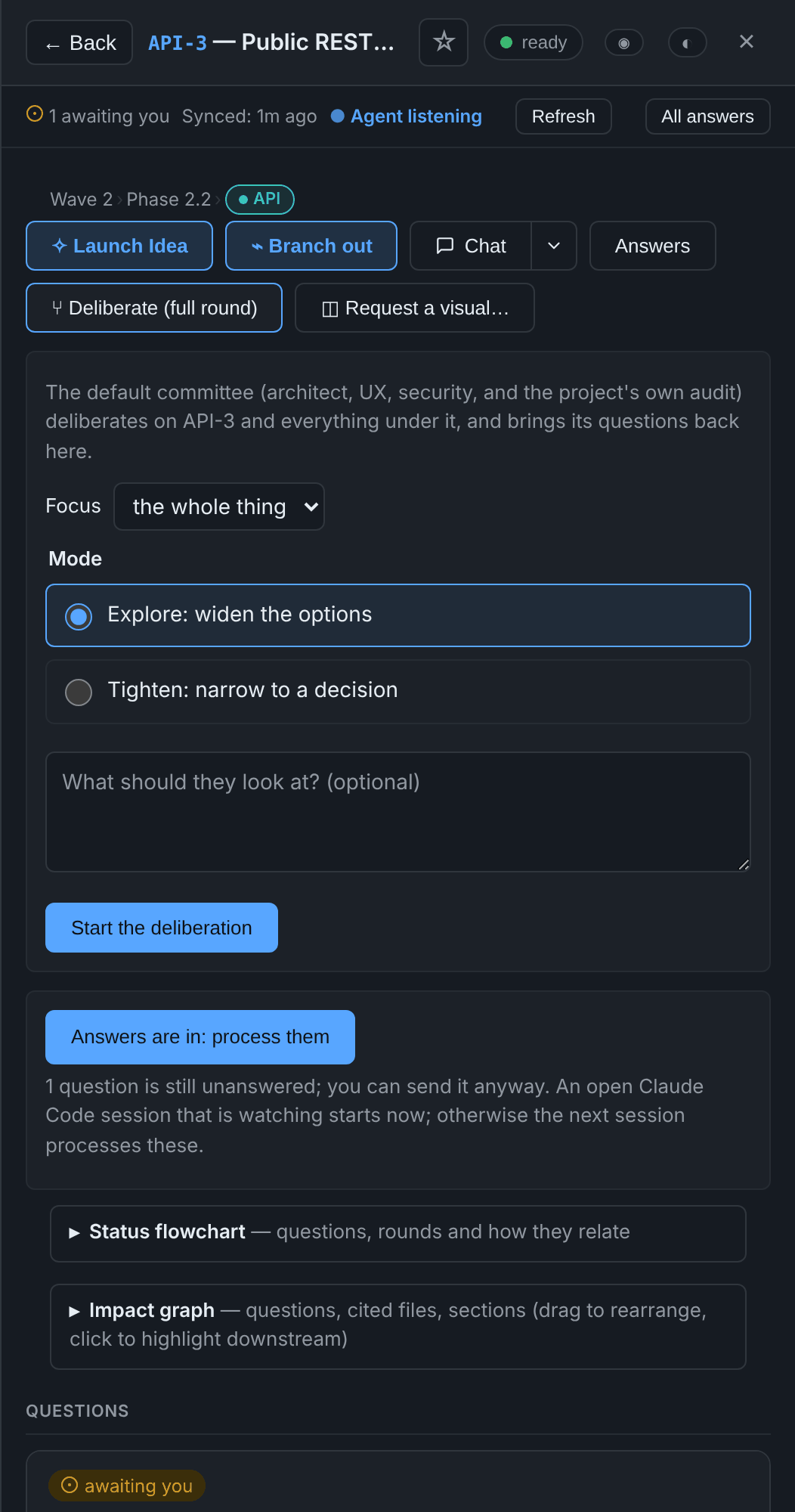
Next step ▾ beside every locked answer:
- Follow up: chosen seats look at that answer again.
- Roar: a three-round panel, at most once per lock.
- Refine or Drill: runs the skill your project names, by default
the plugin's ownoverture:refineandoverture:drill.
Each step comes back as questions for you to lock. Nothing is written into
the project before you lock.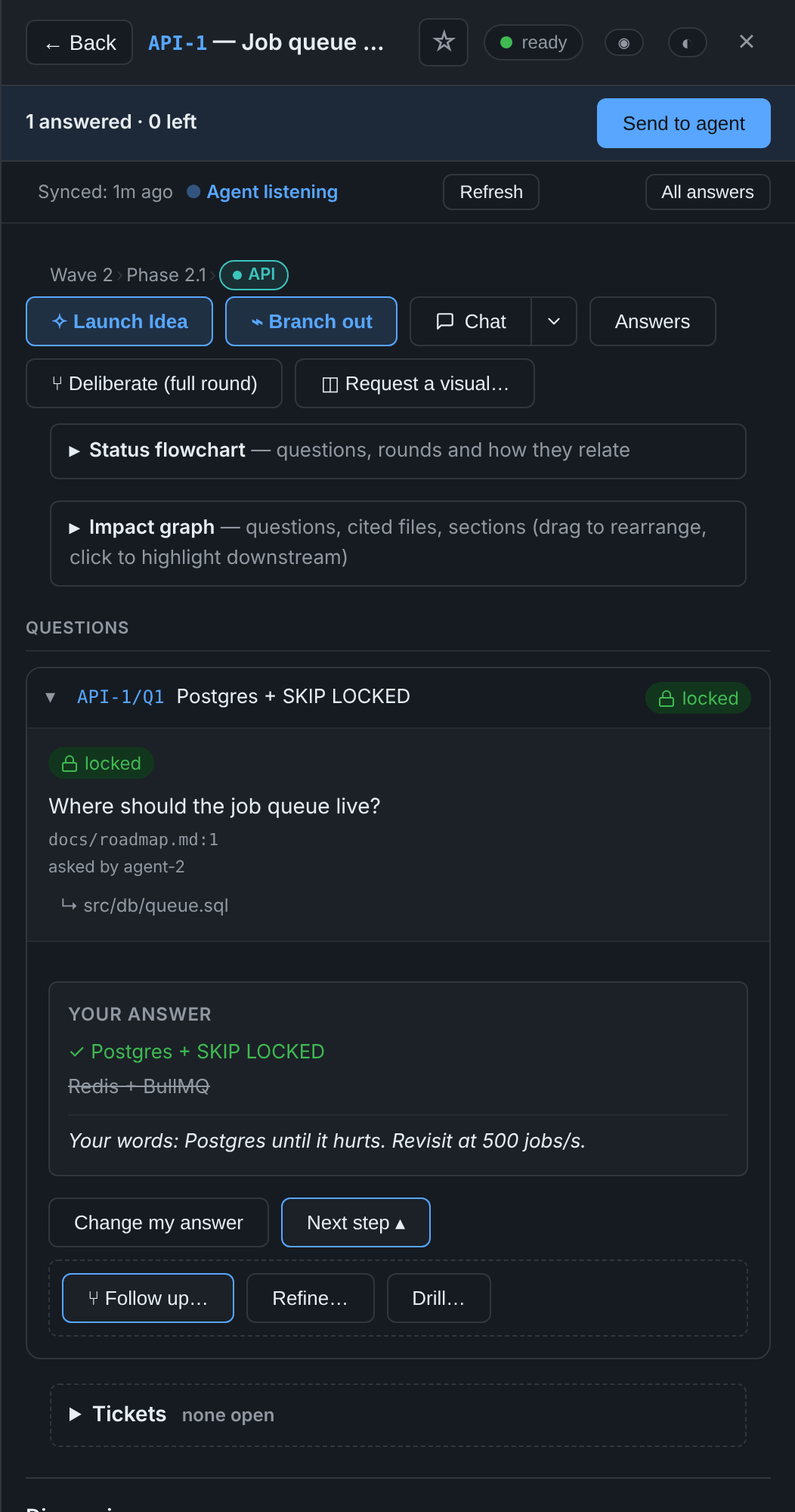
Status flowchart on every item. Each item view carries a collapsible
Status flowchart that the server builds from your questions and rounds:
the item at the left, open/stale/locked questions coloured, rounds as their
own shape, dotted edges where a newer question supersedes an older one or
a round follows up on an earlier one. It is lazy (nothing loads until you
expand it) and renders inside the same sandboxed Mermaid frame as a
requested visual. Click a node to jump straight to that question's card
(or open an item if it is an item node).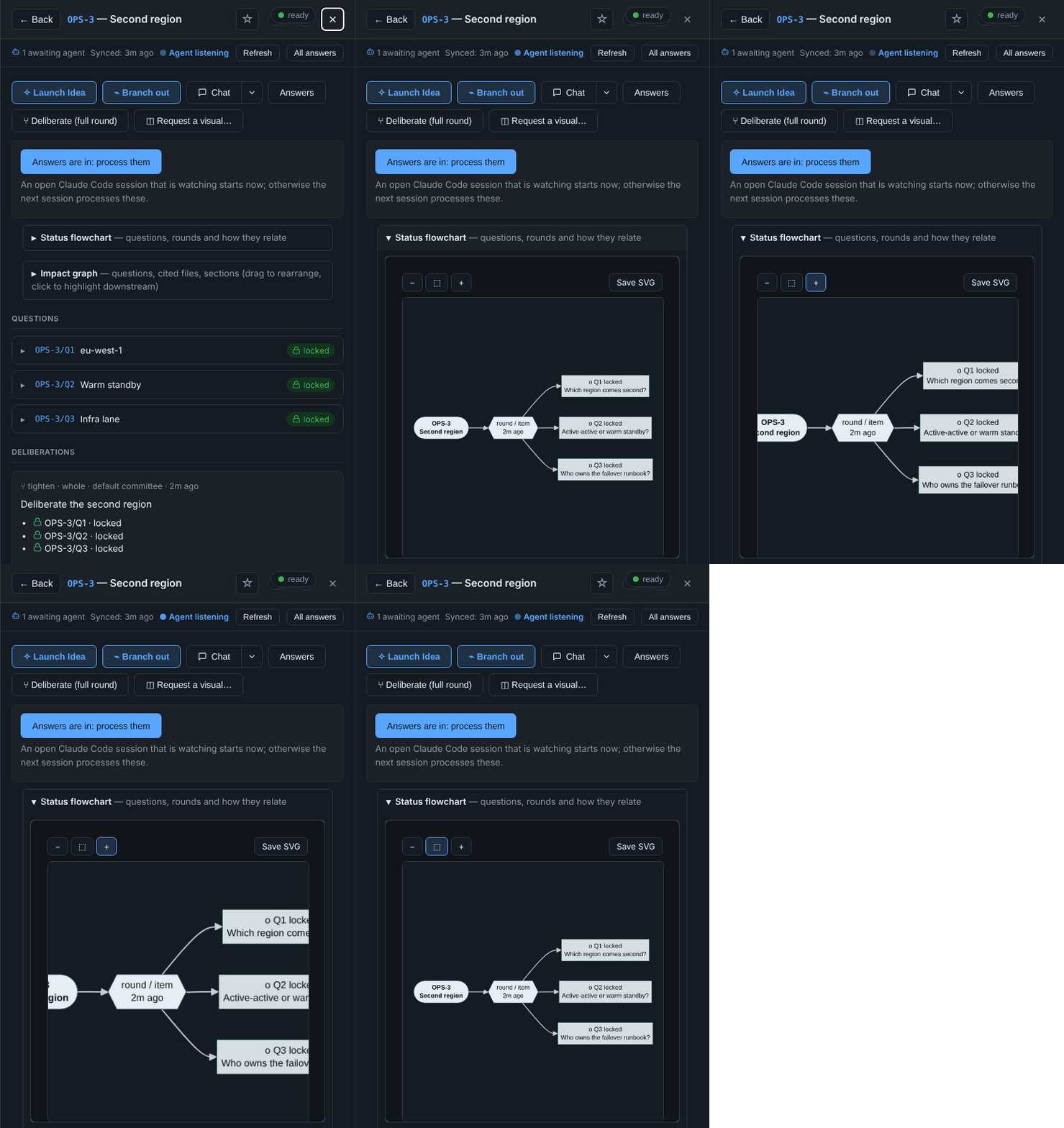
Project map at the top of the Inbox: a tree of every item, parent to
child, drawn left to right.- Each node is coloured by its own questions' roll-up (open > stale >
answered-but-unlocked > locked), with a short tally. - Items are grouped in one box per lane, its border in the lane's
colour. - Click an item to open it.
- A chip row narrows the map to one state; ancestors stay drawn muted, so
the tree is still a tree. - It loads lazily, like the per-item chart.
- Each node is coloured by its own questions' roll-up (open > stale >
Lane colours. A lane is the
lane-…part of an item's section, for
examplewave-2/phase-2.2/lane-api. An item without one inherits its
parent's.- Where it shows: a chip coloured by the lane, on inbox and Priority
rows (with a matching left edge) and as a "Wave 2 › Phase 2.2 › API"
trail at the top of the item. - Colours are automatic. They are drawn from 8 colours that read at
3:1 or better in light and dark, and two lanes share one only past 8. - To pin a colour or a label, add it to
.overture.json:"lanes": {"lane-api": {"color": "blue", "label": "API"}}. Only
palette names are accepted: blue, teal, green, amber, orange, red,
purple or pink."ux": truemarks a lane's items as UX components for
the console-ux skill. - On your dashboard, each item's
<details>and eachdata-ck-item
block getsdata-ck-laneanddata-ck-lane-color, and console.css
publishes--ck-lane-<colour>, so your page can colour its own lane
blocks to match.
- Where it shows: a chip coloured by the lane, on inbox and Priority
Save SVG on every chart and Mermaid visual. The rendered SVG is sent
back to the parent and downloaded as a plain file; nothing goes back to
the server.Request a visual on an item. The agent answers with a Mermaid diagram
(rendered right there inside a sandboxed frame — the vendored lib runs in an
opaque origin and cannot touch the console's cookies, storage or network;
View source still shows the raw.mmd), or with an HTML mock shown the
same way, scripts off entirely.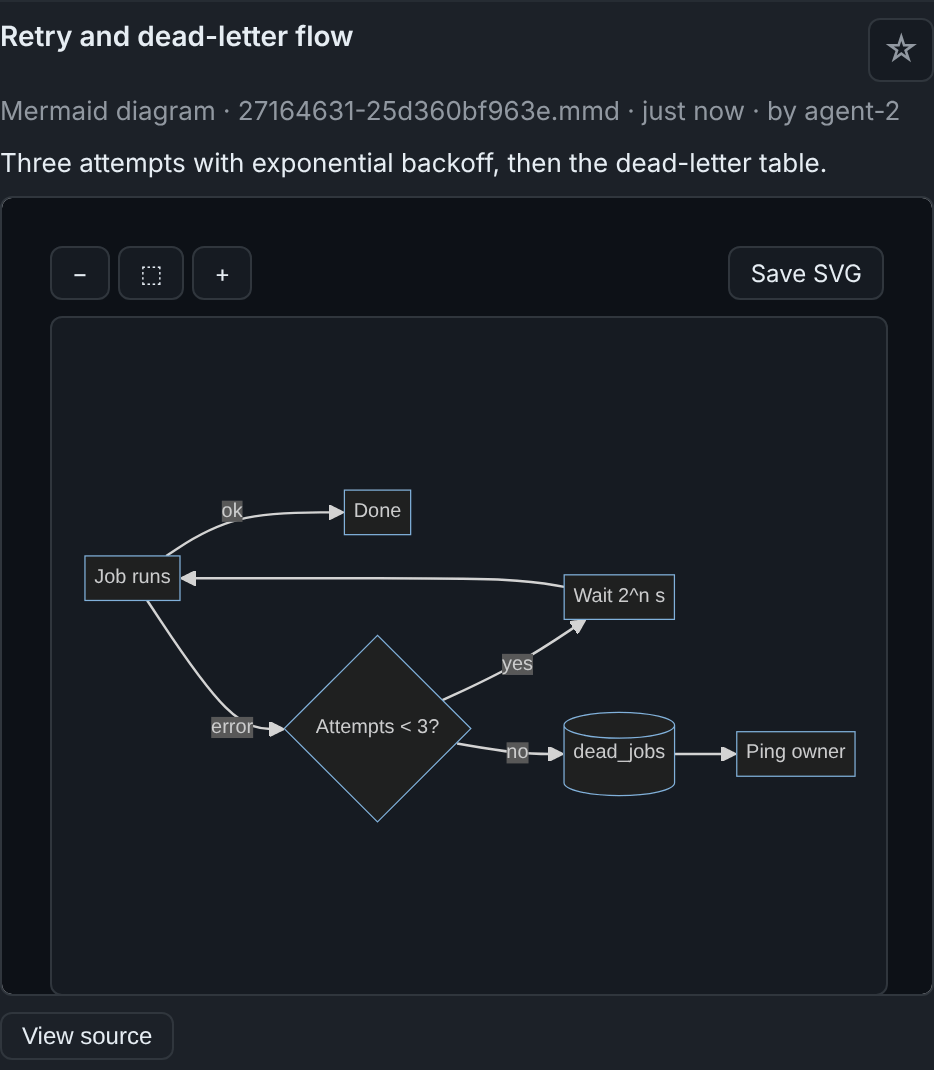
A short chime when a visual arrives, the drawn item surfaces at the top
of the Inbox under New visuals, and the Feed row says "Visual drawn".
The badge on the inbox button and the Feed tab counts it too, until you look.Star what matters. Tap ☆ on a visual or an item (the item view's title
bar, the Inbox row, the New visuals row). The Favorite tab lists them,
grouped by item, newest first. Only the owner can star.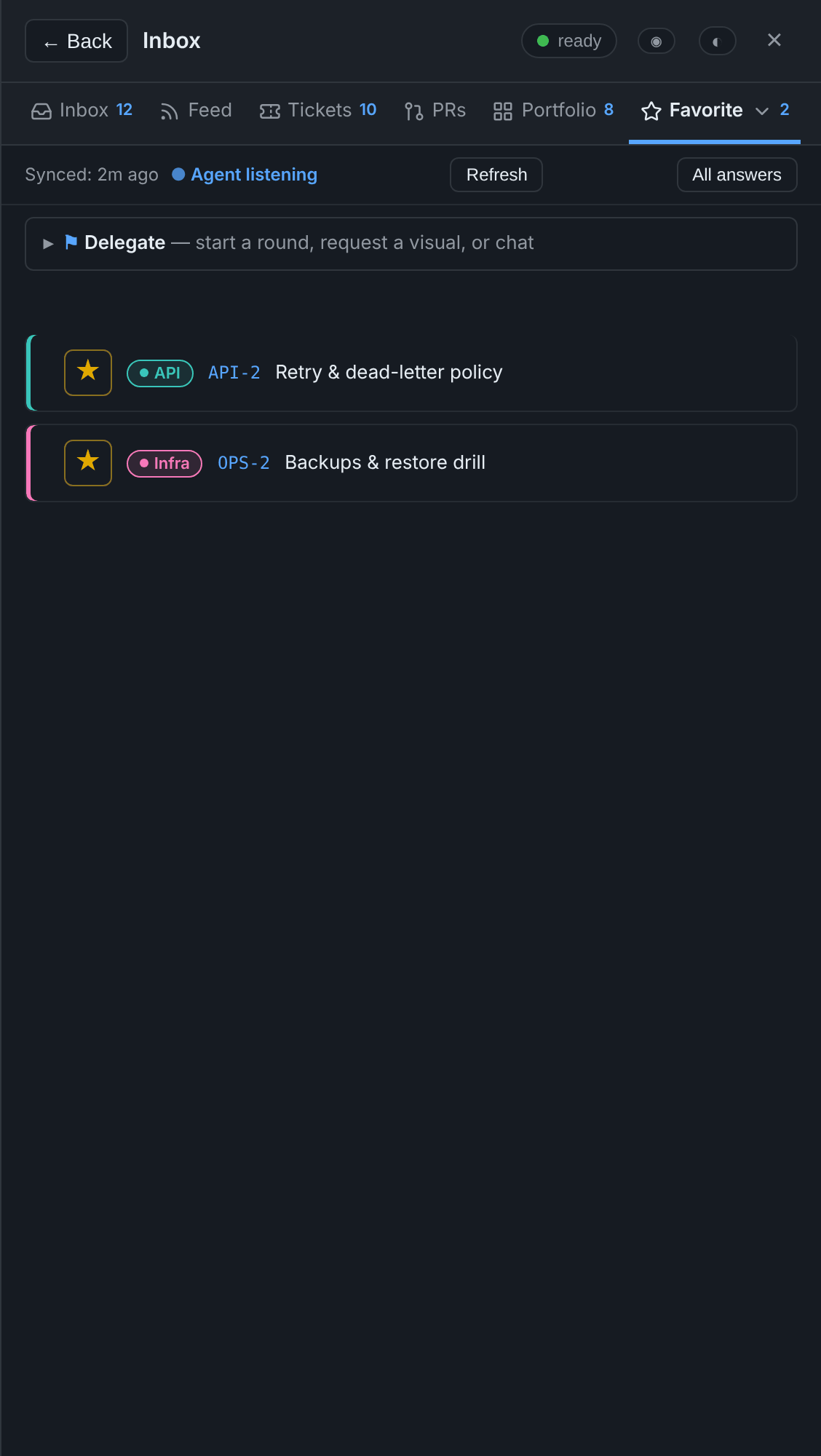
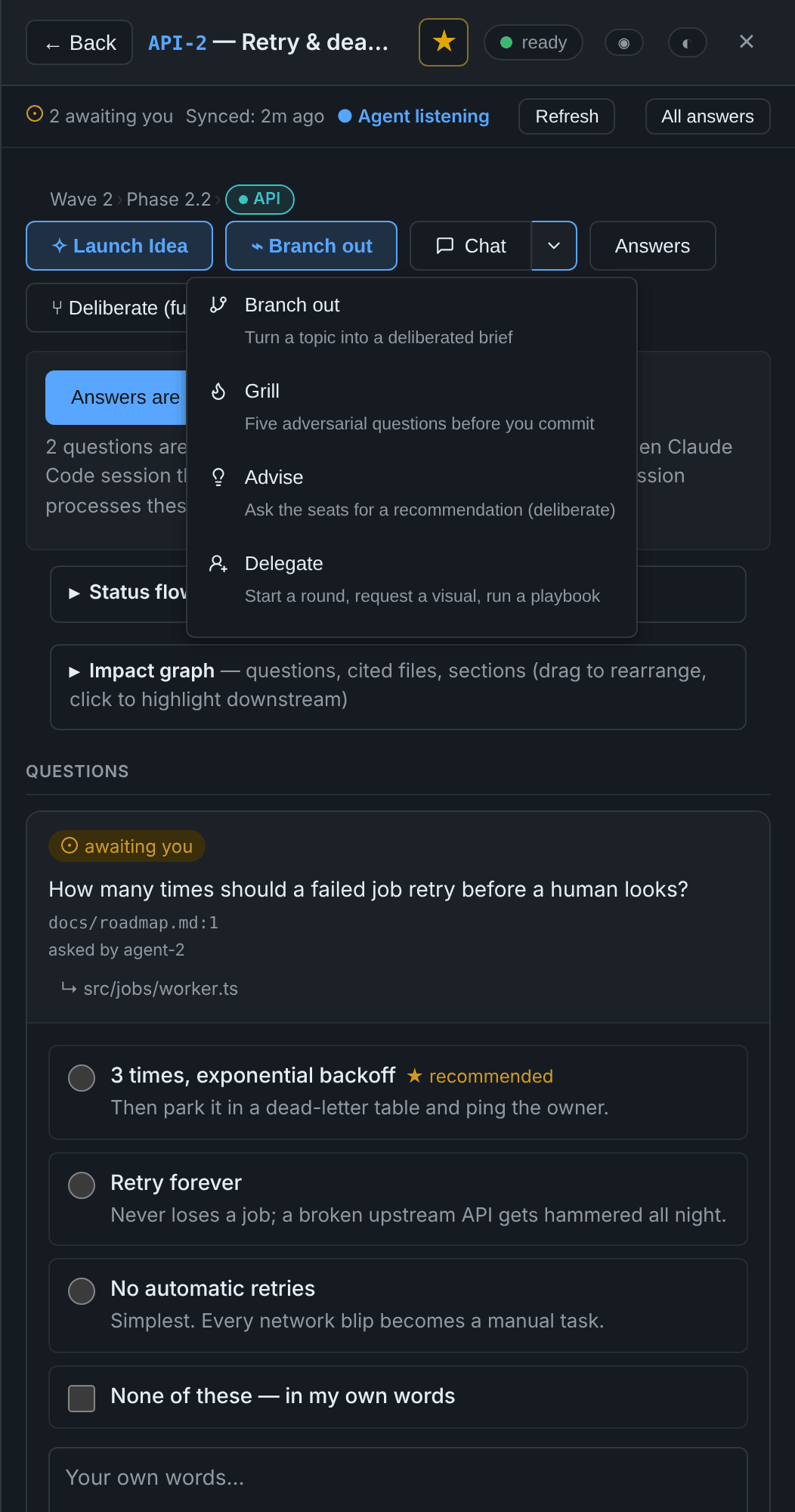
Chat, for a message not tied to a question. It wakes the watching
session. On an item, 💬 Chat ▾ jumps to that item's discussion. Its
menu offers Branch out, Grill, Advise (deliberate) and
Delegate, each already scoped to the item.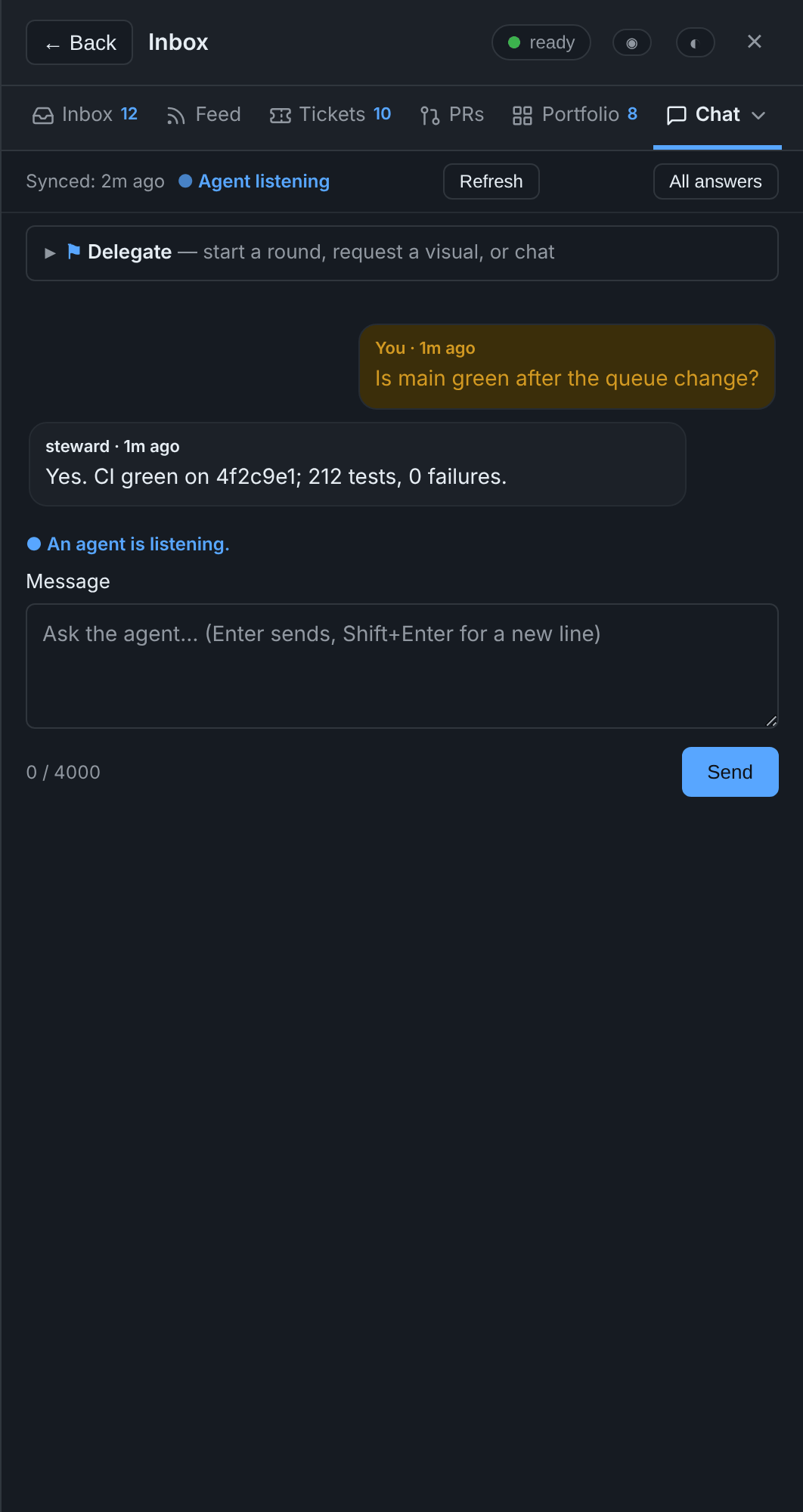
Keep rulings honest as the code moves
A question says what must stay true for its answer to stand (valid_if):
cited text (an excerpt), a whole file (file_sha256), or an item's status.
When that stops holding, the answer reads stale and What changed? says
which check failed, with a diff of the cited text against the file as it is now.
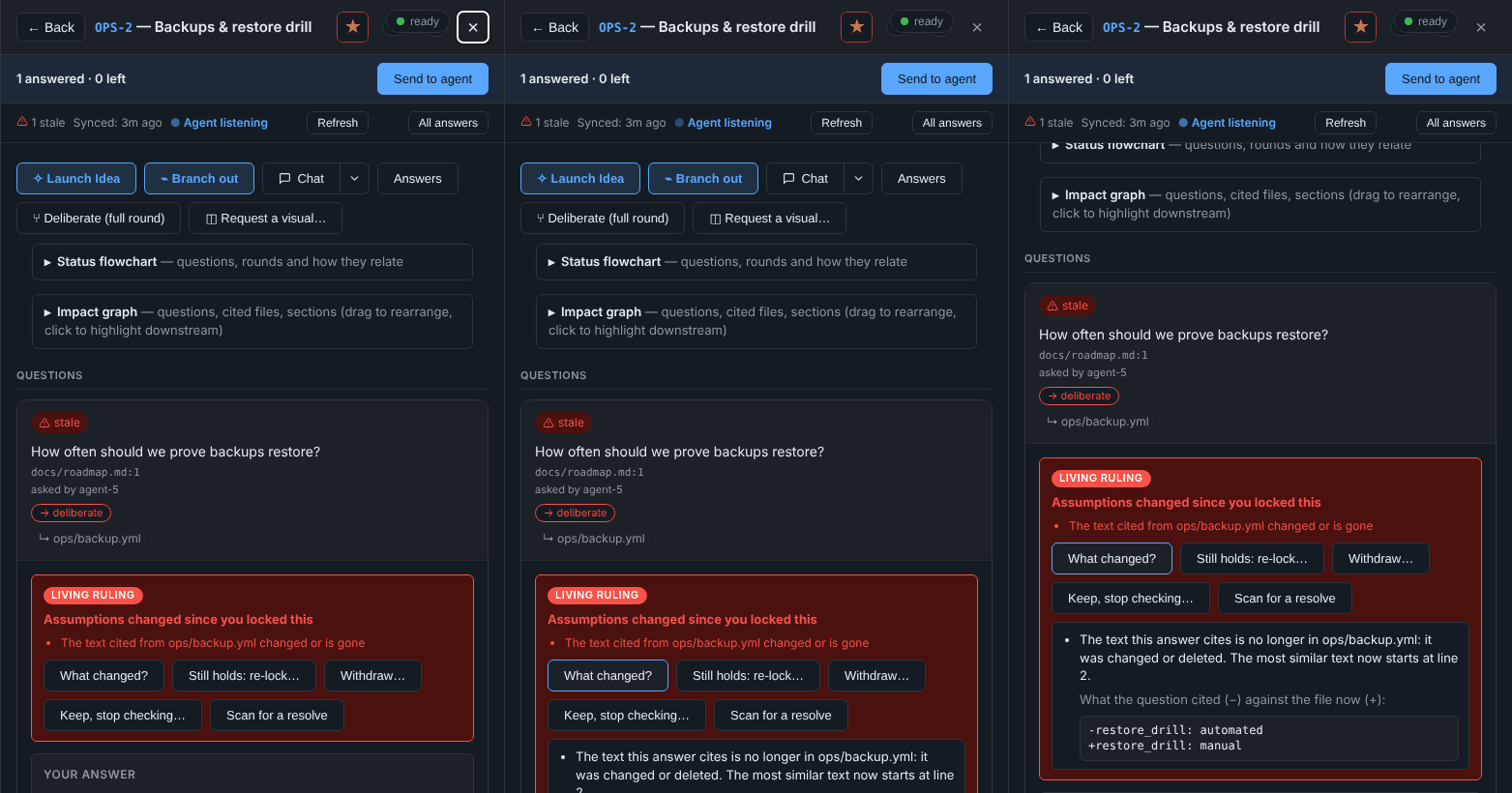
- Still holds: re-lock… keeps your answer and re-checks it against the
files as they are now. agent.py reanchor(the steward runs it,--dry-runfirst) turns a
stale whole-file hash into an excerpt only with evidence: the question names
a line range in that file, the steward's pushed history holds the version
it was locked against, and those lines are still in the file exactly once.
Anything else stays stale, with the reason listed.- Withdraw…: the ruling no longer applies, and you give a reason.
- Keep, stop checking…: the ruling stands, but is no longer checked
against the files. - Confirm a proposed anchor. The steward proposes new lines for the
ruling to rest on, the server reads them itself, and nothing changes until
you press Confirm. - Replace. A new question is linked to the stale one. The old ruling
stands until you lock the new answer.
Only the owner can do any of these, and only on a stale answer. Nothing is
deleted: each act is recorded in a file beside the store, and the fold records the
outcome in your project. New questions are refused a whole-file hash where an
excerpt fits, which is what made most rulings go stale.
See what agents changed, as screenshots
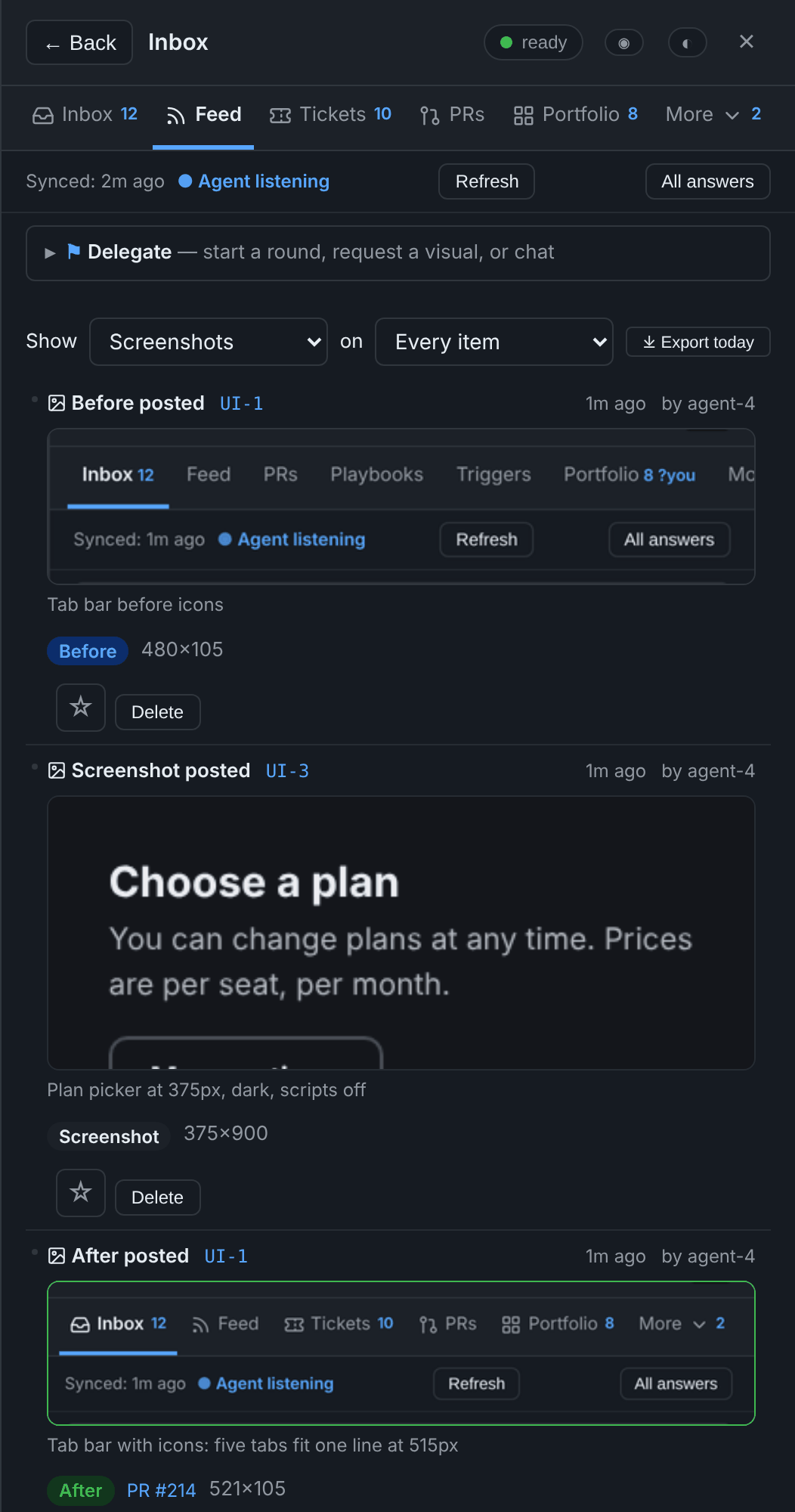
When an agent changes something you can see, it posts a before and an
after screenshot on the item:
agent.py asset UI-1 --file after.png --caption "Tabs with icons" --kind after --pr 214
They show up in the Feed, where a before and after appear side by side
and the Screenshots filter shows only them, and in a Screenshots fold
on the item. Click one to open a full-size viewer, and step through the
others with ◂ ▸ or the arrow keys.
- Formats: PNG, JPEG, WebP or GIF. The format is decided from the
file's own bytes, never its name, and SVG is refused because it can carry
script. - Size limits: 2 MiB for a still image, 8 MiB for a GIF, and 8000 px on
a side. - Storage: files are kept in the server's state directory, never in your
project. - When space runs short (100 per item, 3000 or 300 MiB per project), the oldest
screenshots that aren't starred or linked to a PR are removed. The Feed
says so. - Your controls: star a screenshot to keep it, or delete it (press
twice). - Reduced motion: with reduced motion turned on, a GIF waits for you to
press play.
Track work as tickets
Tickets are small units of work that belong to an item: a task, a bug,
a research question, or a grilling note. You create them on an
item's panel. Launch Idea and Branch Out create them for you.
- Blocking. A ticket can be blocked by other tickets. Circular blocking
is refused by name. When a blocker closes, everything it blocked
unblocks. - The Tickets tab (
g k) is a board across every item, with Open,
Blocked and Closed columns and a filter by kind. Each card names its
item, opens it with a click, and says what blocks it by title. - What blocks what draws the chains as a diagram, grouped by item. It
is there for the whole project on the Tickets tab, and for one item on
that item's panel.
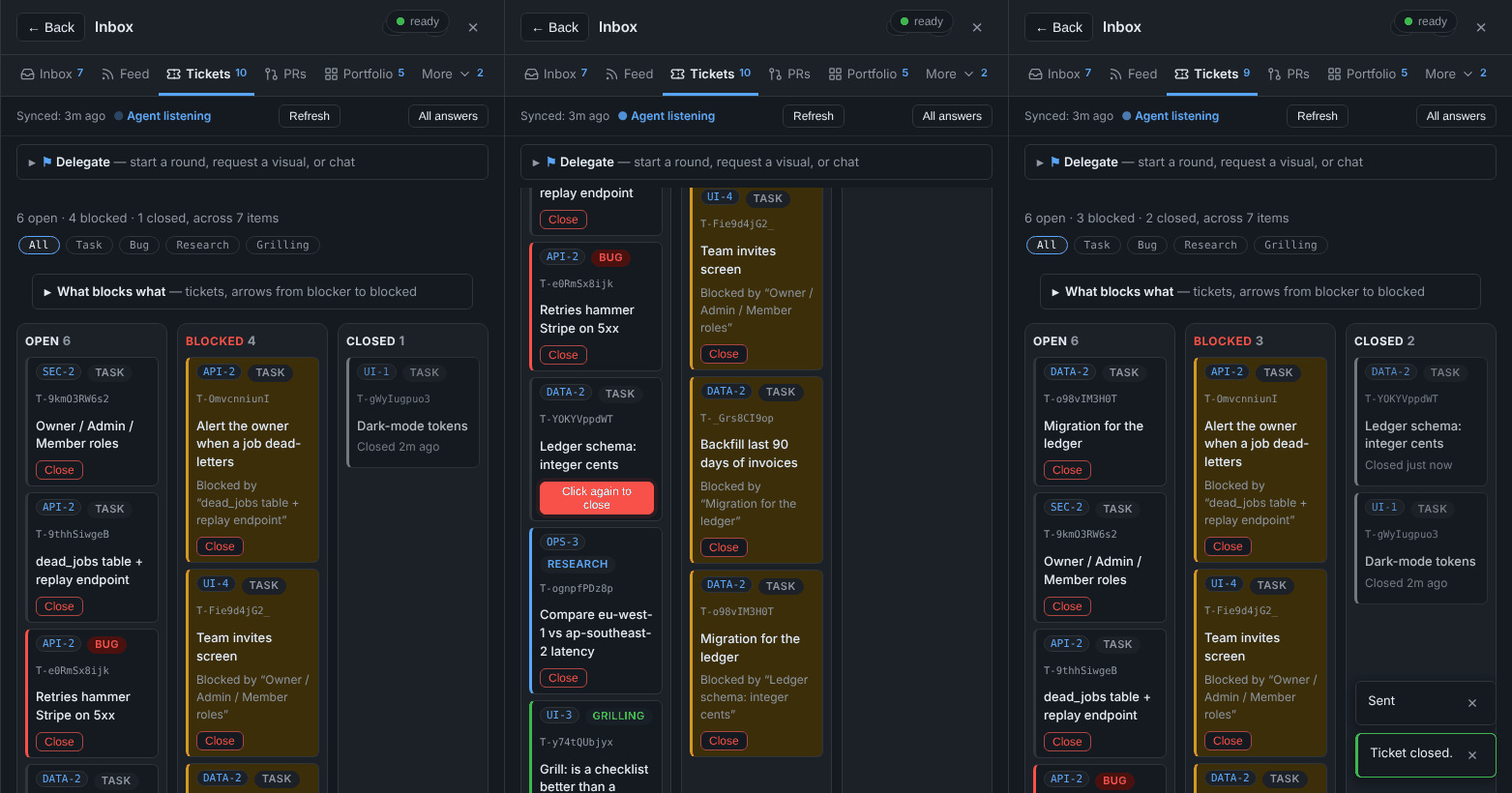
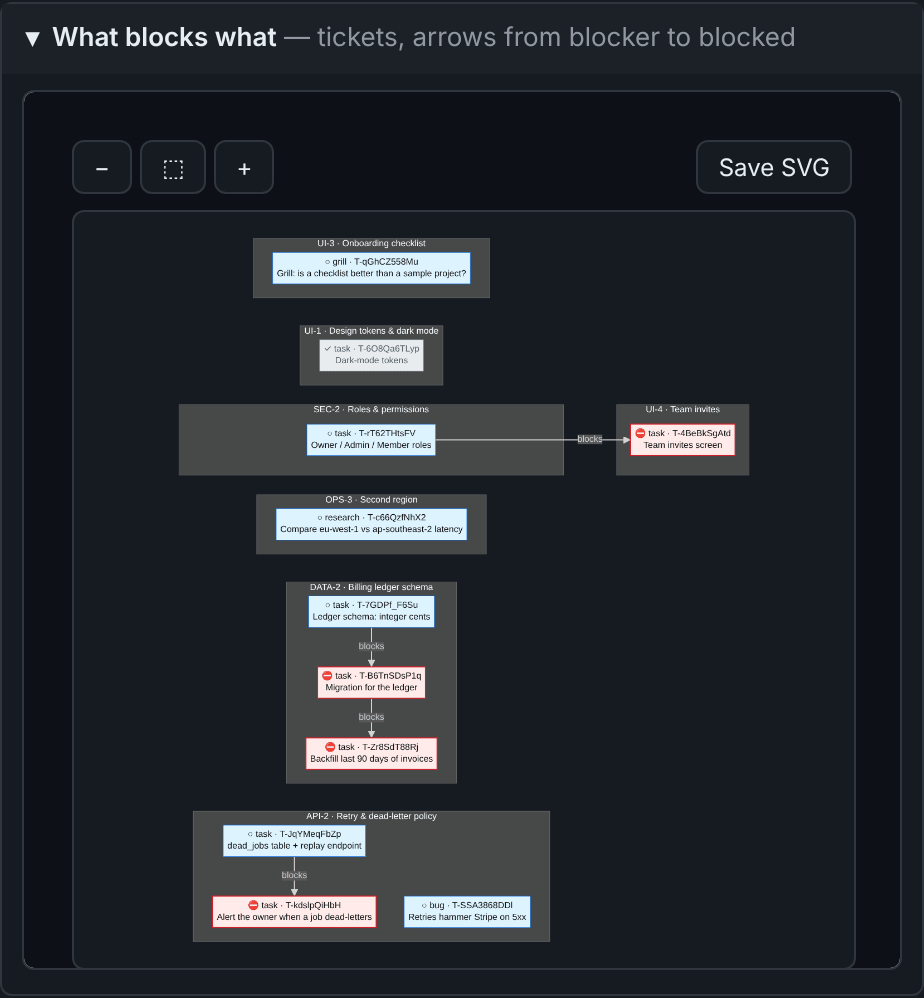
Only you create and close tickets. Agents cannot write them yet; that
waits on the capability gate.
Your dashboard, published by you
The console can sit inside your project's own dashboard page. An agent
stages a page from a merged commit (agent.py page-snapshot). The console
then shows it as a proposal, with its ref, commit, size and a sandboxed
preview. It is served only after you press Use this page. No agent can
publish, and the "reviewed" label is shown as the agent's claim, because the
server cannot check it.
See what's happening
The page updates itself, with no reload. A box you're typing in is never
redrawn under you.The Inbox shows what waits for you, with an unread count. The Feed
shows every question, answer, lock and reply, newest first.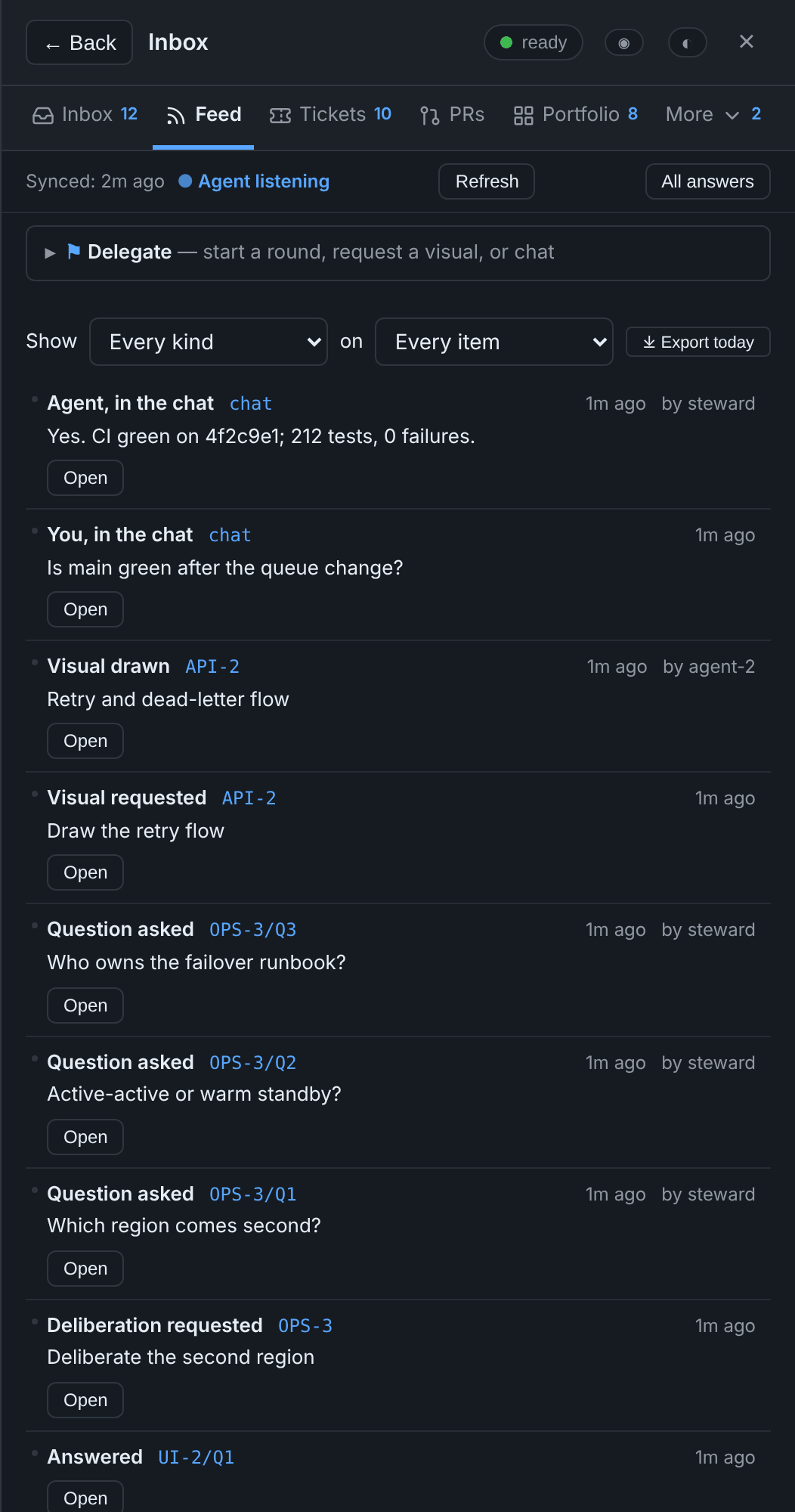
The status bar says whether an agent session is listening right now.
Optionally, a footer shows your Claude usage for the 5-hour and 7-day
windows.Several agents, one console. Sessions can be named (
/overture:as agent-6). One of them, the steward, named in your own registry, is the
only one that processes your requests and folds your answers. The others
post their questions to your inbox instead of asking you directly.The PRs tab shows each pull request as its own card. The left edge
shows its state: blue open, amber checks running, red checks failing,
gray draft, purple merged. It lists the project's open pull requests, then those
merged or closed in the last 30 days (--dayschanges it), with checks, draft and merged
badges, a link to each on GitHub, and an Open button for any item or
question a title or branch names. The steward pushes the list
(agent.py prs-push), and the tab says when it last did.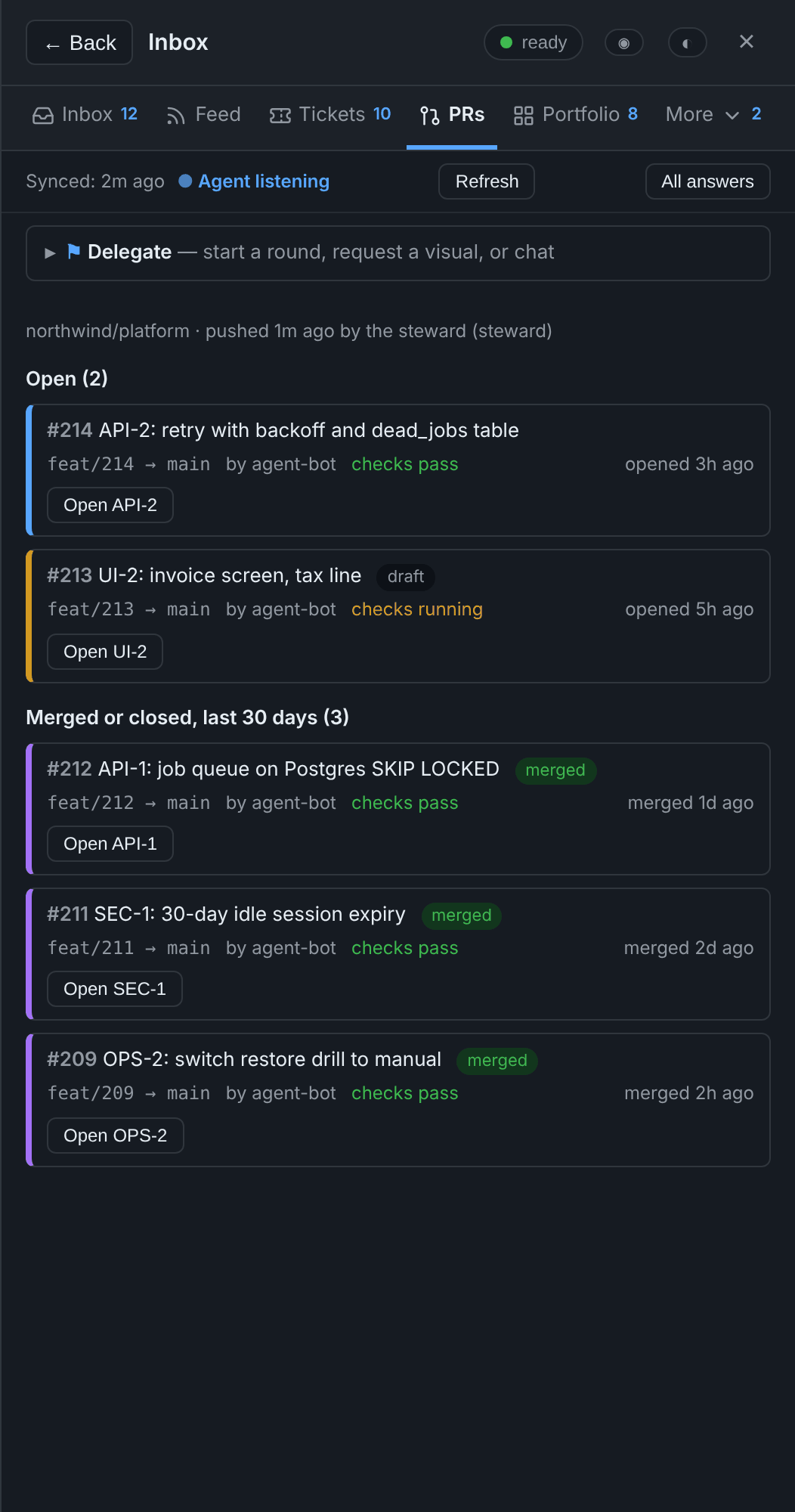
The Favorite tab lists everything you starred, grouped by item.
Cross-project priority ribbon. The Inbox opens with up to six of the
oldest awaiting questions across every console (self + each portfolio
peer), each with a traffic-light dot (yellow < 1h, orange < 24h,
red > 24h). Click a row to jump — local items open their panel; peer
rows open the peer in a new tab.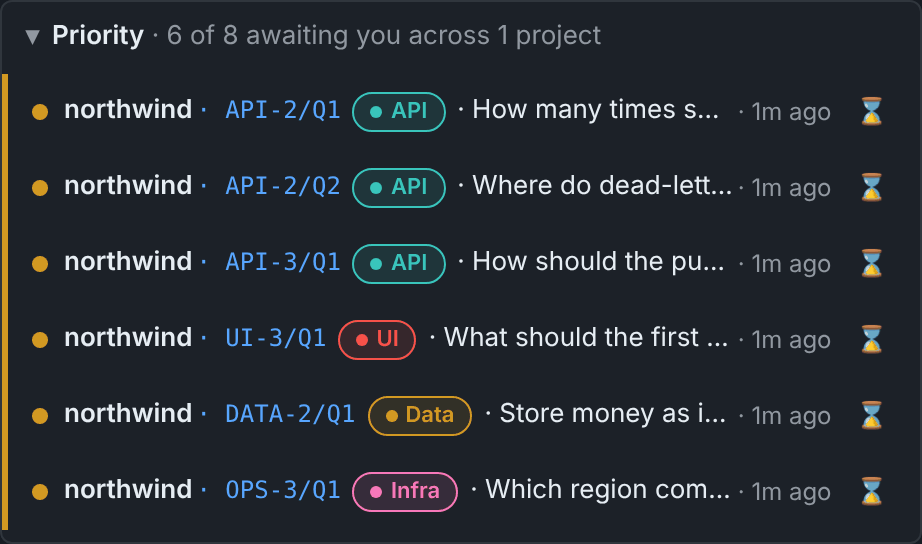
Command palette. Press Ctrl+K / Cmd+K on any page to open a
search box over items, questions, playbooks, peers, tabs and actions.
Type a few characters, press Enter: jumps to an item, runs a playbook,
opens a peer in a new tab, or hops a tab.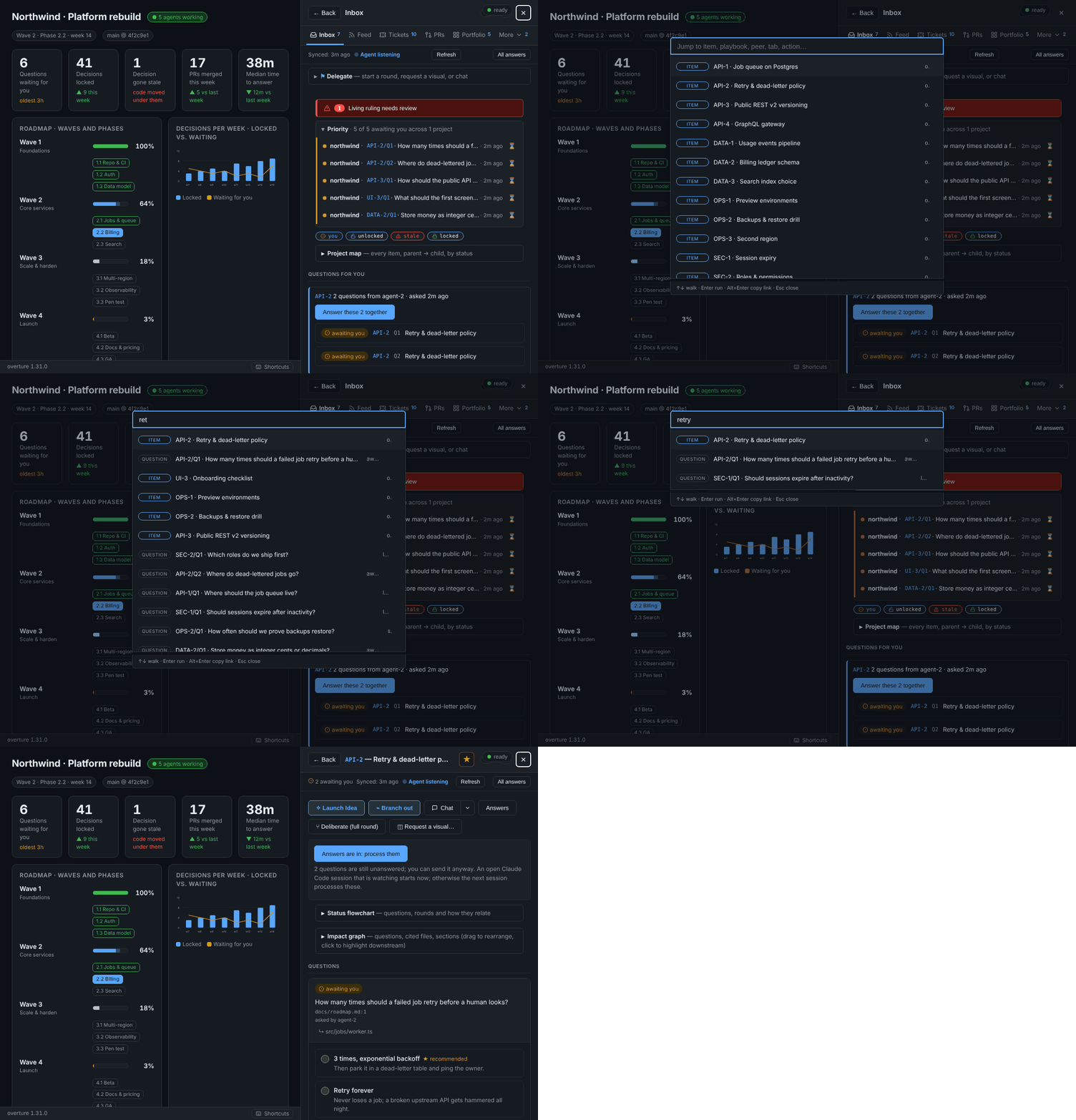
Keyboard shortcuts. Press
?, or the ⌨ Shortcuts button in the
footer, for the full list.g i / f / k / p / s / o / chop to the Inbox / Feed / Tickets / PRs /
Favorite / Portfolio / Chat tab,g bcloses the panel,.focuses the
Delegate bar,j / kwalk the rows, Enter / Space opens the focused
row. Shortcuts never fire in a text input.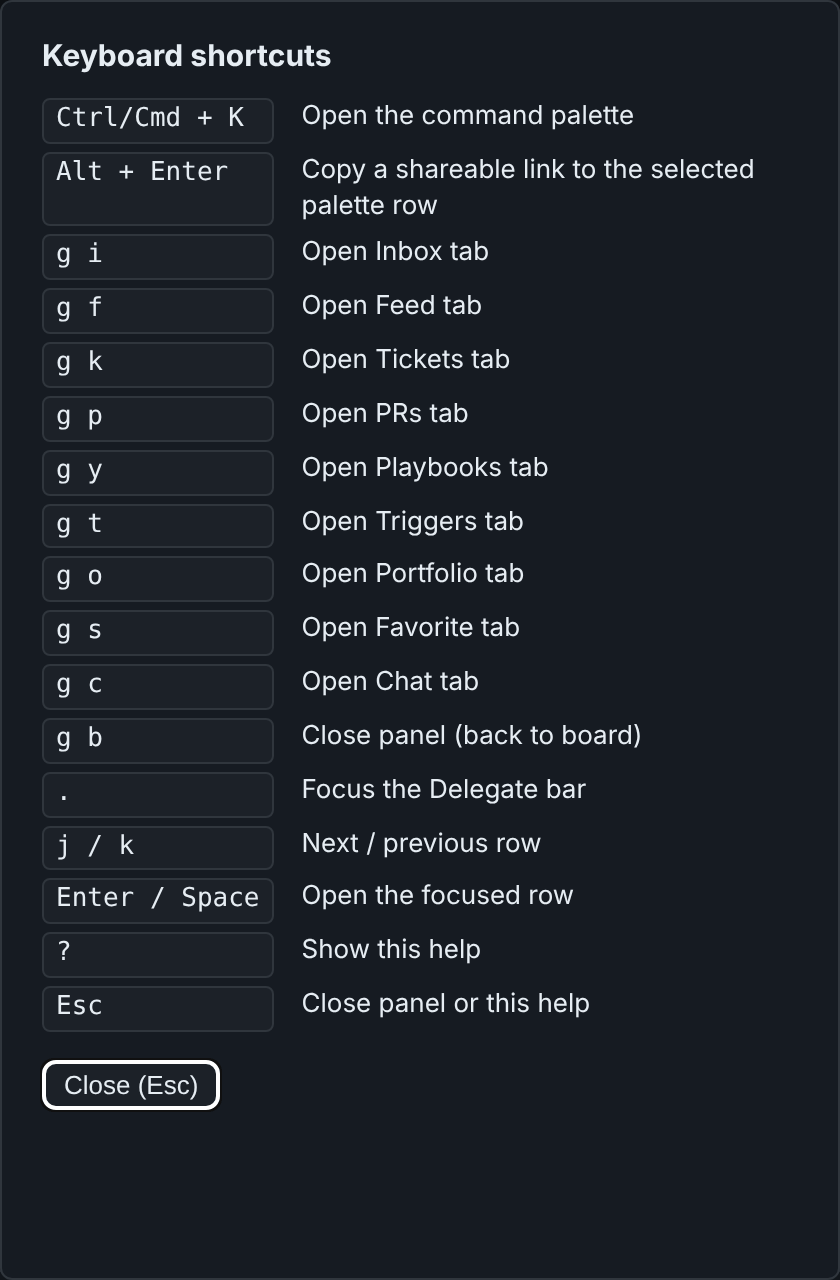
The Portfolio tab lists every other console you have configured, with
its state tallies (2 you,1 unlocked,1 stale,9 locked, each with its
state icon), last-activity and a click
that opens it in a new tab. A bell button opts in to desktop
notifications so a sibling's new?youor!stalereaches you even
when the tab is in the background; a Snooze button sets a 1-hour DND
lid. Peers are declared in.overture/portfolio.json; the Cloudflare
Access service-token secrets live inSTATE/portfolio-secrets/<peer>.json
(agent.py portfolio-tokenprints the layout). The home server does the
cross-origin calls, so the browser never sees a peer's secret.A Back control sits at the top of every item view, so discuss from
the dashboard always has a one-tap way home.Direction stays visible. Each item in the Inbox carries a collapsible
"N answered on this item" under its open questions, showing the last few
locked rulings on it. Items whose questions are all locked within the last
day stay on the list under Recently answered, so you can see what was
asked and what you answered without leaving the Inbox.
How it fits together
 browser ──Access login──▶ Cloudflare ──tunnel──▶ 127.0.0.1:PORT  server.py
                                                     │ checks the Access JWT (team keys + AUD)
                                                     ▼
                                              state dir: store + doorbell
                                                     ▲
 Claude session ── SessionStart hook reads the doorbell (registered projects only)
                └─ skills: console-process / console-fork / console-fold / console-ask / console-visual / console-ux ── agent.py
server.pyserves the console, inside your published dashboard page if
you have one. Every request without a valid Access token is refused, loopback
included. It runs no project code and no git. Your work items arrive byagent.py items-push, git history byagent.py history-push, pull
requests byagent.py prs-push(ghruns in the steward, never in the
server), and the page byagent.py page-snapshot. The steward runs all
four in its own process,
and each sends data the server checks against a closed schema.agent.pyis the agent's side. Its commands:Purpose Commands Reading inbox,todo,view,answers(capped at 64 KiB, with a narrower command named when a read is too big),healthAsking and answering ask,reply,working,synced,watchDeliberation fork-context,transcript,visual,visual-export,next-step,costsStale answers check,reanchor,propose-anchorPushing data items-push,history-push,prs-push,page-snapshotOwner only register,steward,server add,server token rotate--as NAMEnames the session.fold.pywrites locked answers, and what became of them, into your
project through its adapter, in the steward's process.plugin/holds the Claude Code plugin: the hook, the skills, and the
committee agents. Its skills includeroar,refine,drillanddeliberate, which a console round uses and which also run on their own
(/overture:roarand so on).onboard.pyanddeploy/onboard a project and install the
services.
What a project token protects
One console server can host several projects. Each project's agents reach it
with that project's own token. The token is kept in~/.config/overture/tokens/NAME (mode 0600, outside every repository);server.json holds only its hash. agent.py picks the project from the
directory it runs in. agent.py server token rotate NAME (which you run)
refuses the old token from the next request.
- What it stops: cross-talk and mistakes. A wrong
--state, a skill bug,
or an agent carrying another project's habits cannot read or write another
project's console through the kit. - What it does not stop: an agent running as the same OS user that sets
out to cross over. It can readtokens/and the state directories directly.
Real isolation needs a sandbox or a separate user. - An old per-project server is a way around it. While one still listens on
STATE/agent.sock, that socket answers without a token. Stop it before
relying on the token.
Windows + WSL2 (optional)
The server, the tunnel and the systemd units are POSIX; a convenient layout
on a Windows host is to run them in WSL2 while a Claude Code session lives on
either side. A few traps worth knowing:
- CRLF.
git config core.autocrlf=trueon Windows gives every file in
the plugin cache CRLF endings.install.shthen fails at once
(set: pipefail: invalid option name), and systemd unit files with a\r
silently misbehave. Install the kit from a copy stripped of CR (sed -i 's/\r$//'on each*.sh,*.in,*.py,*.js,*.css,*.html) or
clone withcore.autocrlf=false. - Default branch.
page-snapshot --from-ref origin/mainis the default
and fails on a repository whose default is anything else. Pass--from-ref HEAD --unreviewedwhile bootstrapping, or point--from-ref
at your actual branch. - Page path.
onboard.pydefaults the page to.overture/page.html,
whichpage-snapshotrefuses (leading dot). Move the page underdocs/console/page.htmlor similar. - Items. The server never runs your adapter. After onboarding, run
agent.py --state STATE items-push --adapter PATHonce (and whenever the
item list changes); until thenaskon any item butPROJECTis refused. - Reaching the server from Windows. The agent socket lives in WSL and
Windows cannot open a WSL2 Unix socket. Options: run the agent-side session
inside WSL (wsl -e bashwrapper), or use the one-server HTTP door with a
project token on loopback. - Linger. Systemd user units stop when WSL shuts down. Run
loginctl enable-linger $USERin WSL; a Windows process that keeps WSL
alive still helps when nothing else holds it.
Trust
- The plugin's hook runs in every project you open, but acts only in projects
listed in~/.config/overture/projects.json, which onlyagent.py registerandagent.py stewardwrite. A cloned repository's.overture.jsonis never trusted by itself, and cannot name a steward. - Anything an agent can write — the adapter,
.git/config, the dashboard file
in the working tree — is never run or read by the server. - The kit never opens
~/.cloudflared/cert.pemor a tunnel credentials file.
It checks that the file exists, and nothing more. - Nothing onboarding writes is a secret. The AUD tag and team domain are what
tokens are checked against; no token can be made from them.
Development
python3 -m venv .venv && .venv/bin/pip install -r requirements.txt
.venv/bin/python test_kit.py && .venv/bin/python test_server.py && .venv/bin/python test_onboard.py
.venv/bin/python test_build.py
OVERTURE_BROWSER=1 .venv/bin/python test_browser.py   # needs playwright + browsers
Three test_kit.py compatibility tests start older released kits, so they
need the v0.8.7 and v0.8.8 tags; in a shallow or tag-less clone rungit fetch --tags first, or they fail and name the missing tag.
test_server.py's syscall tests need strace, and FAIL when it is missing,
so they cannot quietly not run. On a machine without it, setOVERTURE_NO_STRACE=1 to skip them, and each is then reported, by name, as
not run.
To refresh the README screenshots after a UI change (needs Playwright and
Chromium), run:
python3 docs/demo/screenshots.py
The script starts the real console server in-process, with a throwaway key
standing in for Cloudflare Access. It publishes docs/demo/showcase.html, an
example dashboard with waves, phases and lanes, as the project page. It seeds
questions, rulings, a stale ruling, a round, a visual, chat and PRs through the
same doors agents and the owner use. Then it captures every capability in this
README: stills in docs/screenshots/feature-*.png, hero shots in dark and
light, and short GIFs (anim-*.gif) of the interactive ones.
To build the release zip:
python3 build_zip.py --deny-file ~/my-deployment-values.txt
It runs claude plugin validate --strict on the result. The deny file lists
strings from your own deployment (hostnames, AUD tags, team domain, home
path), and the build refuses if any of them appears in the zip.
License
MIT. See LICENSE. The bundled Lucide icons are ISC-licensed
(plugin/kit/overture/vendor/LUCIDE-LICENSE.txt).
Reviews (0)
Sign in to leave a review.
Leave a reviewNo results found