keel-v2
Health Warn
- License — License: MIT
- Description — Repository has a description
- Active repo — Last push 0 days ago
- Low visibility — Only 5 GitHub stars
Code Pass
- Code scan — Scanned 12 files during light audit, no dangerous patterns found
Permissions Pass
- Permissions — No dangerous permissions requested
No AI report is available for this listing yet.
keel's test-first flow as a LangGraph graph with LangChain agents, a dashboard, MCP tools, budgets and Claude/Codex/Copilot logins — in one Docker image
keel v2
AI agents write tested code for your project. You approve the important steps.
Everything runs in one Docker container.
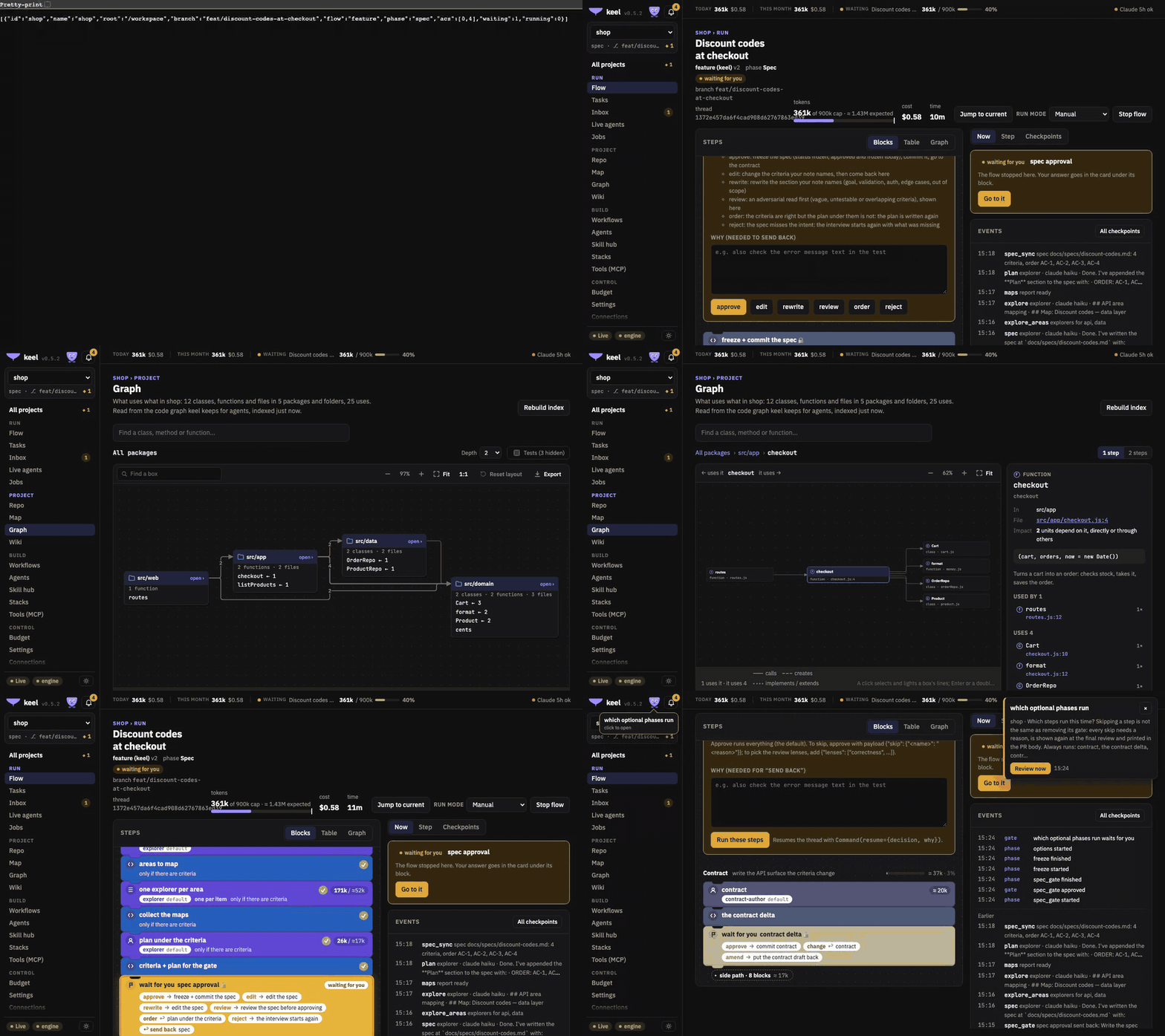
Recorded from a real keel v2 run (Claude Haiku on a small shop project), not drawn.
Start
You need Docker.
1. Install keel (once)
curl -fsSL https://raw.githubusercontent.com/MiladNalbandi/keel-v2/main/install.sh | bash
2. Start it for your project (a git folder). Your browser opens http://localhost:8080.
keel2 start ~/path/to/your/project
3. Log in: Connections › Set up login, then pick Claude, Codex or GitHub Copilot.
4. Start work: Flow › Start a flow. Write what you want. Approve when keel asks you (◆).
How it works
 you: "show each player's rank"
         │
         ▼
  1. spec     an agent writes what to build              ◆ you approve
  2. test     an agent writes a test that fails
  3. code     an agent writes code until the test passes ◆ you approve
  4. review   agents check the whole change              ◆ you approve
         │
         ▼
 done: tested commits on a new branch. keel never pushes.
What you see
| Page | What it shows |
|---|---|
| Flow | the running flow, step by step; several flows side by side (a tab each), each on its own branch; the history of every flow |
| Inbox | everything that waits for you |
| Tasks | your tasks or Jira tickets; Start runs a flow for one |
| Code · Map · Graph | the code, the database diagram, and what uses what |
| KeelBot (in Code, ⌘I) | ask about the code; which workflow fits a piece of work (and start it); ask about a running flow; write a workflow of your own; fix things while a flow waits at a gate, or try an idea on its own branch |
| Workflows | the workflows as blocks, in folders, with how often each ran |
| Tools › Plugins | Database (KeelBot queries, an IntelliJ-style database tool in Code, data checks in workflows), Git (push and pull requests in Code, each branch as a tab with its changes and Switch, git steps in workflows) and CI/CD (watch the pipelines, see why one failed, fix it with a flow), also for Claude Code through keel2 mcp |
| Quality | how well each flow works with each model, run on small test projects; a drop shows in red |
| Budget | tokens and cost (a small bar shows it on top of every page) |
Flows
| Flow | Use it to |
|---|---|
| feature | build something new |
| change | make a small change |
| fix | fix a bug (first a test that shows it) |
| diagnose | find a bug you cannot repeat yet |
| review | review your branch (it changes nothing) |
| lint | fix formatting and lint problems |
| cover | add tests for the changed lines |
| ship | final checks and the pull request text |
| hunt | look for bugs |
| init | set up a project for keel |
Commands
| Command | What it does |
|---|---|
keel2 start [folder] |
start keel |
keel2 stop |
stop keel |
keel2 add <folder> [<folder> …] |
add more projects (each a git repo, or a folder of repos) |
keel2 folders |
which project folders keel has |
keel2 status |
is keel running? |
keel2 update |
get the newest version |
keel2 doctor |
find problems and say how to fix them |
keel2 help |
all commands |
Something wrong? Run keel2 doctor. It tells you what to do.
More
- Guide: run modes, Tasks and Jira, logins, where keel keeps its files (keel v1 layouts), Docker mode,
MCP (read, write and admin levels), native mode without Docker (keel2 start --native), and how to build keel yourself - How the parts talk
License
MIT, see LICENSE.
Reviews (0)
Sign in to leave a review.
Leave a reviewNo results found