cc-pretty-statusline
Health Warn
- License — License: MIT
- Description — Repository has a description
- Active repo — Last push 0 days ago
- Low visibility — Only 5 GitHub stars
Code Fail
- child_process — Shell command execution capability in bin/install.js
- execSync — Synchronous shell command execution in bin/install.js
- fs.rmSync — Destructive file system operation in bin/install.js
- os.homedir — User home directory access in bin/install.js
- process.env — Environment variable access in bin/install.js
- fs module — File system access in bin/install.js
Permissions Pass
- Permissions — No dangerous permissions requested
This is an opinionated, theme-aware status line for the Claude Code CLI. It displays context, git branch, session duration, and usage costs directly in the terminal prompt.
Security Assessment
Overall risk: Medium. The tool uses a Node.js installer (`bin/install.js`) that executes synchronous shell commands (`execSync`), accesses the user's home directory (`os.homedir`), and performs destructive file system operations (`fs.rmSync`) to set up or uninstall the statusline script. It also accesses environment variables, likely to read the `CLAUDE_CONFIG_DIR` path. While the code handles sensitive file paths and executes system commands, this behavior is strictly confined to the local installation and uninstallation process of the script. No dangerous permissions, hardcoded secrets, or external network requests were detected.
Quality Assessment
The project is fresh, with its most recent push occurring today. It uses the highly permissive MIT license and includes a well-documented README with clear installation and uninstallation instructions. However, it currently has very low visibility in the open-source community with only 5 GitHub stars, indicating limited peer review and community trust.
Verdict
Use with caution — the code itself is safe for local use, but the low community adoption means it has undergone minimal public scrutiny.
A good-looking Claude Code statusline
cc-pretty-statusline
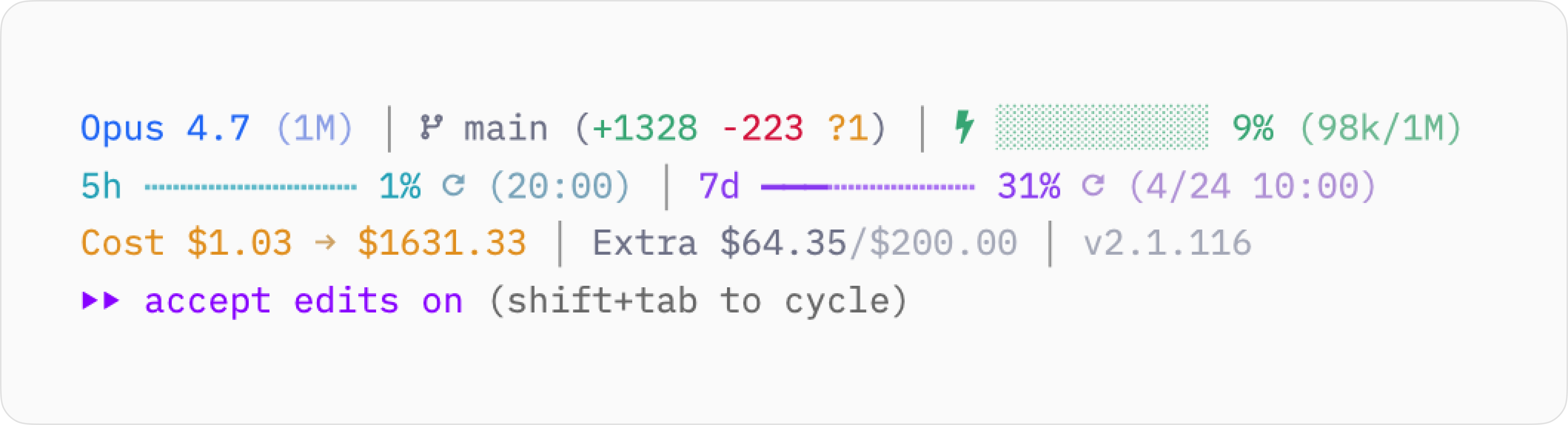
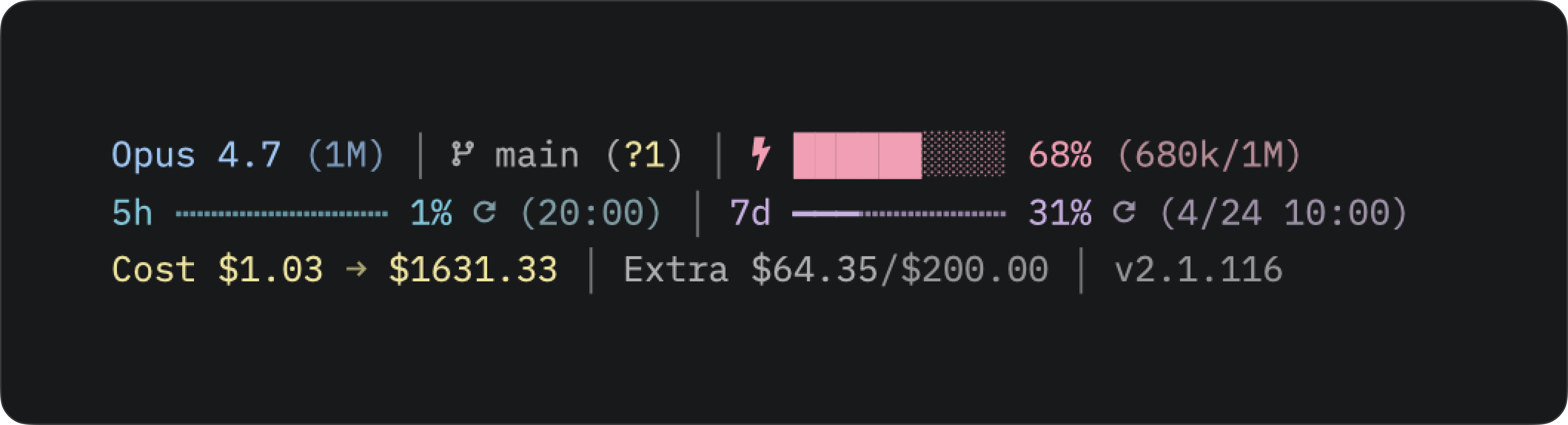
An opinionated, theme-aware status line for Claude Code CLI.
Automatic light/dark detection, session cost tracking, usage bars, and
honest respect for CLAUDE_CONFIG_DIR so multi-account setups don't
cross-contaminate.
Features
- Adaptive light/dark palette that follows macOS system appearance, or
pin it at install time with--theme light|dark. - Model, context bar, branch + diff, session duration, 5h/7d rate
limits, today / total cost, Extra usage, Claude Code version. - Multi-account safe — scoped by
CLAUDE_CONFIG_DIR.
Fonts
Needs a Nerd Font (or Nerd Font fallback) — otherwise icons render as□. Recommended: Lilex or
JetBrains Mono Nerd Font from
nerd-fonts.
Install
Requires jq, curl, and git on $PATH. Optional:ccusage (npm i -g ccusage)
for the cost / usage line — without it that line is hidden.
npx cc-pretty-statusline
Or clone and run:
git clone https://github.com/minoism/cc-pretty-statusline
cd cc-pretty-statusline
node bin/install.js
The installer prompts for a palette — pick auto to follow your
terminal's theme, or pin light / dark. For non-interactive installs,
pass the mode directly:
npx cc-pretty-statusline --theme auto    # detect per render
npx cc-pretty-statusline --theme light   # pin light
npx cc-pretty-statusline --theme dark    # pin dark
auto writes a plain bash "~/.claude/statusline.sh" entry; pinned
modes prepend CLAUDE_STATUSLINE_THEME=<mode> to the command. Re-run
the installer any time to change the choice.
It copies statusline.sh into your CLAUDE_CONFIG_DIR (default~/.claude) and writes the statusLine entry into yoursettings.json. Existing files are backed up to statusline.sh.bak.
Restart Claude Code to see the new status line.
Uninstall
node bin/install.js --uninstall
Restores the previous statusline if a backup exists; otherwise removes
the file and the settings.json entry.
Multiple accounts
The installer honors CLAUDE_CONFIG_DIR, so each Claude Code profile
gets its own copy of statusline.sh and its own settings.json entry.
Export the variable and run the installer once per profile:
CLAUDE_CONFIG_DIR=/path/to/other-profile npx cc-pretty-statusline --theme auto
Cache files and keychain lookups in statusline.sh are already scoped
per CLAUDE_CONFIG_DIR, so profiles stay isolated at runtime too.
Terminals that don't follow macOS appearance
Auto mode reads macOS system appearance, so any terminal that follows
the system (Zed's theme.mode: "system", Terminal.app default, iTerm's
auto-switch, etc.) just works. For terminals locked to a fixed theme
(iTerm with a pinned profile, WezTerm, Alacritty, Zed with a hard-codedtheme.mode), two escape hatches:
Bind a theme-toggle. Run this alongside your terminal's own
light/dark toggle:
~/.claude/statusline.sh --set-theme light # or dark, or auto to re-detect
Pre-launch probe. Add this to your shell rc to capture the
terminal's real background before Claude starts:
eval "$(~/.claude/statusline.sh --probe-bg)"
Only captures the initial state — for mid-session toggles use--set-theme.
Credits
Forked and substantially rewritten from
kamranahmedse/claude-statusline.
Shared with the LINUXDO community.
License
MIT — see LICENSE.
Reviews (0)
Sign in to leave a review.
Leave a reviewNo results found