codex-chatgpt-web
Health Pass
- License — License: MIT
- Description — Repository has a description
- Active repo — Last push 0 days ago
- Community trust — 16 GitHub stars
Code Fail
- spawnSync — Synchronous process spawning in scripts/build-runtime-bundle.ts
- rm -rf — Recursive force deletion command in scripts/install.sh
- spawnSync — Synchronous process spawning in scripts/smoke-codex-catalog.ts
- process.env — Environment variable access in scripts/smoke-codex-catalog.ts
- spawnSync — Synchronous process spawning in scripts/smoke-release.ts
- process.env — Environment variable access in scripts/smoke-release.ts
- network request — Outbound network request in scripts/smoke-release.ts
- Hardcoded secret — Potential hardcoded credential in scripts/smoke-release.ts
Permissions Pass
- Permissions — No dangerous permissions requested
No AI report is available for this listing yet.
Use ChatGPT Pro as a native model in the Codex app — with context, compaction, streaming, images, and optional MCP tools.
ChatGPT Web for Codex
Use ChatGPT Web (including Pro) as native Codex models.
Change the model tier, save your workflow.





Pick ChatGPT Web — Instant, Medium, High, Extra High, or Pro in Codex's native
model picker. The bridge sends the complete Codex task context to a fresh ChatGPT Temporary Chat,
attaches images, and streams visible reasoning, tool activity, and Markdown back into the same
Codex task.
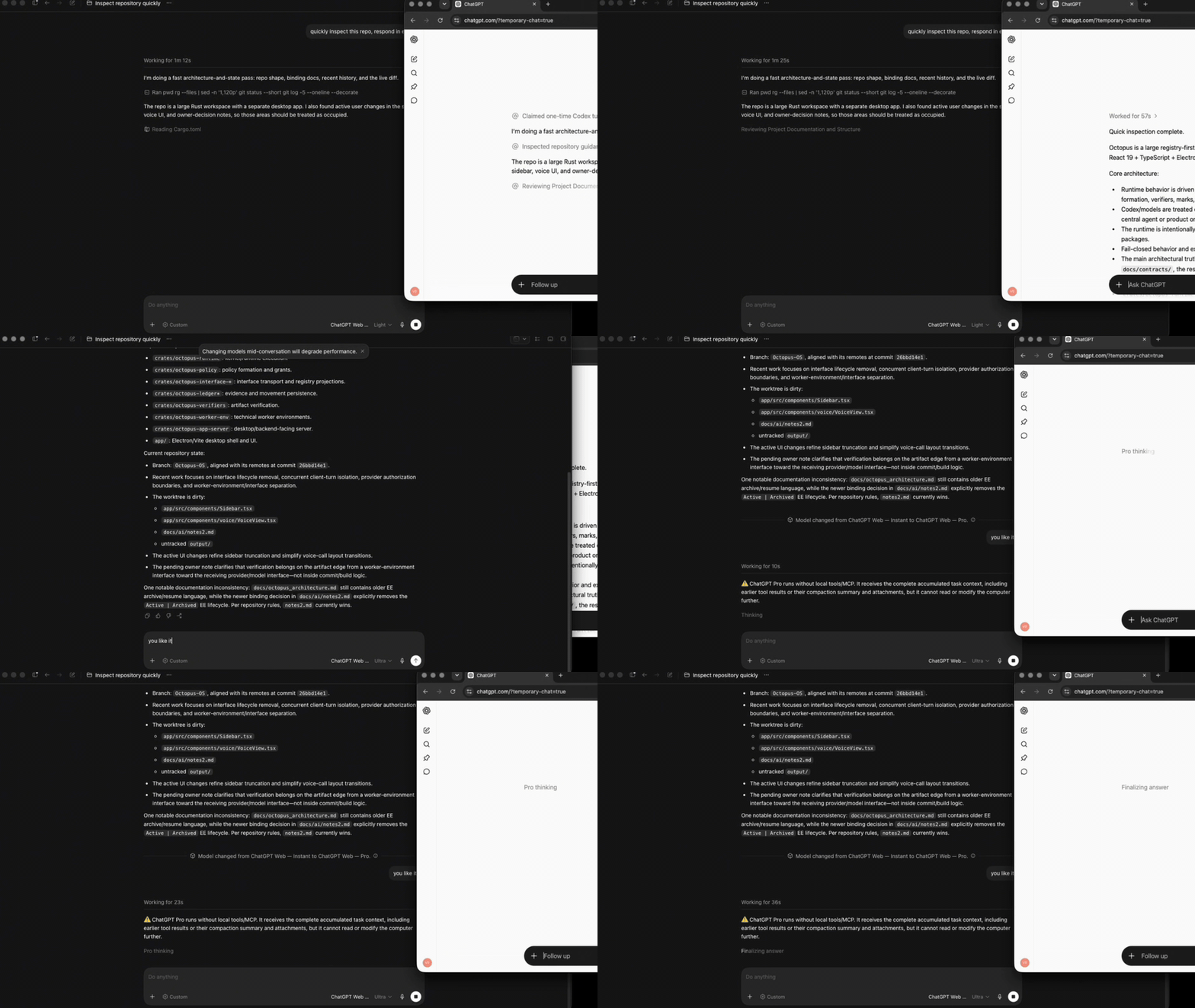
Codex task ──Responses + SSE──▶ codex-chatgpt-web ──controlled Chrome──▶ ChatGPT
     ▲                                │                                      │
     └──────── native UI, context, images, tracing, and tool lifecycle ──────┘
Highlights
- Native Codex harness. This is the same model-picker, task history, context lifecycle,
approvals, sandbox, streaming, tracing, and tool UI you already use in Codex—not a second chat
client. Like OpenCodex, it changes the model backend while preserving the native workflow. - Local-first task sessions. Codex remains the source of truth for task history on your
computer. Every browser turn starts in a fresh ChatGPT Temporary Chat and receives the complete
accumulated Codex context, so browser chats are not reused across tasks or added to normal
ChatGPT history. - The full Codex harness over MCP. In full mode, Instant through Extra High can use the active
Codex task's filesystem, shell, images, approvals, and configured tools/apps through MCP. Calls
and real results stay inside the same browser response—nothing is simulated as text. - Pro stays useful. Pro is the one exception: ChatGPT's current Pro mode does not expose the
custom MCP connector this bridge needs. Its native capabilities, including web search and
research, remain available. Gather local workspace context with Instant through Extra High,
switch to Pro, and Pro receives the complete accumulated Codex task for deeper analysis. - Fail-closed and manually tested. Model selection, long inline context, images, streaming,
visible trace, compaction, native tool rounds, cancellation, and Pro were exercised end-to-end on
macOS. UI drift and missing capabilities produce explicit errors rather than silent fallbacks.
Temporary Chat is a ChatGPT privacy mode, not anonymity or local-only inference: prompts are still
processed by OpenAI and are subject to the account's settings and OpenAI's
Temporary Chat policy. This project
is unofficial; users remain responsible for complying with applicable OpenAI terms and workspace
policies.
Quick start
Browser-only mode needs macOS, Google Chrome, and a ChatGPT account. It does not need an API key,
tunnel, system Node/Bun installation, OpenCodex, or a Playwright browser download.
curl -fsSL https://github.com/miuuyy/codex-chatgpt-web/releases/latest/download/install.sh \
  | sh -s -- --browser-only --acknowledge-unofficial
Sign in through the one Chrome window opened by setup, restart Codex once, and select a
ChatGPT Web — … model. Pro appears only when it is available on the authenticated account.
Normal use starts automatically after macOS login and does not require another terminal command.
Modes
| Mode | Models | Local Codex tools | Extra setup |
|---|---|---|---|
| Browser-only | Instant through Pro | No; Codex shows a warning | None |
| Full harness | Instant through Pro | Instant–Extra High: yes; Pro: read-only | OpenAI tunnel + ChatGPT connector |
Every picker entry has one fixed ChatGPT mode. Codex still displays its built-in Effort and Speed
rows, but changing them cannot silently change the selected browser model. Pro receives the full
context already collected by Codex, but ChatGPT Pro cannot initiate local MCP/tool calls.
The proxy keeps Codex's built-in openai provider and live model catalog. It forwards the official
catalog unchanged and appends only its ChatGPT Web entries, so native models, task history,
approvals, sandboxing, and tool results remain owned by Codex.
Full harness
Full mode connects ChatGPT's tool calls back to the current Codex task through the official
OpenAI tunnel-client. The tunnel is outbound: it does
not expose a public IP, open an inbound port, or require router forwarding.
Create a tunnel in Platform tunnel settings.
Create a runtime key with Tunnels Read + Use in Platform API key settings.
Install and import the key:
curl -fsSL https://github.com/miuuyy/codex-chatgpt-web/releases/latest/download/install.sh | sh
~/.local/bin/codex-chatgpt-web tunnel key-import
Run setup with your tunnel id:
~/.local/bin/codex-chatgpt-web setup --full \
  --tunnel-id tunnel_0123456789abcdef0123456789abcdef \
  --acknowledge-unofficial
While
doctorreports ready, attach that tunnel to a ChatGPT connector namedCodex Native
in ChatGPT connector settings, scan its tools, set
the intended action permissions, and restart Codex once.
Write/modify actions require a ChatGPT workspace and admin policy that permit them. OpenAI
currently documents those actions for Business and Enterprise/Edu workspaces; personal Pro is
limited to read/fetch MCP permissions. See
developer mode and MCP apps.
Unexpected approval prompts fail closed unless --auto-approve-tool-calls is explicitly enabled;
that option clicks Allow once, never a permanent grant.
Operations
codex-chatgpt-web doctor
codex-chatgpt-web service status
codex-chatgpt-web tunnel status        # full mode
codex-chatgpt-web browser check
codex-chatgpt-web login                # refresh an expired ChatGPT session
codex-chatgpt-web uninstall --yes
Setup stores private state under ~/.codex-chatgpt-web, installs versioned launchd services, and
journals the previous Codex route so uninstall can restore it. It refuses to replace a different
route unless --replace-codex-route is explicit, and refuses to stop or update while a task is
still active.
If you stop a Codex task between native tool rounds, no Responses request remains on which Codex
can signal cancellation. Abort the retained browser turn without stopping the daemon, then retry
the update:
codex-chatgpt-web service cancel-turns
Limitations and security
- This is unofficial browser automation, not an OpenAI API. ChatGPT UI changes can break selectors;
drift fails explicitly instead of silently switching model or transport. - Browser state is a sensitive login artifact. Never share or commit
~/.codex-chatgpt-web/browser. - The Responses listener is loopback-only, but another process running as the same local user can
reach it. Use a trusted single-user workstation. - Browser turns are serialized to protect one profile and prevent transcript reuse across tasks.
- Managed background installation currently supports macOS only.
- Codex Desktop hardcodes Pro's wire effort as Ultra and always shows a Standard speed row.
Those controls do not alter the fixed ChatGPT Web model. Renaming them would require patching the
signed Codex app. - macOS may report that Bun was prevented from modifying apps when Playwright launches installed
Chrome. The bridge does not modify Chrome; leaving that App Management permission denied is
expected.
Read the complete architecture and
security model before enabling full mode. Report vulnerabilities through
SECURITY.md.
Development
bun install --frozen-lockfile
bun run verify
verify runs dependency auditing, strict TypeScript checks, harness/MCP/config tests, a
relocatable runtime smoke test, and a real headless launch of system Chrome.
Credits and disclaimer
Portions of the Responses translation, Codex catalog integration, and browser harness were adapted
from OpenCodex under the MIT license. See
third-party notices.
This project is experimental, independent software. It is not affiliated with or endorsed by
OpenAI, and it must not be used to evade usage limits or access controls. Review OpenAI's current
Terms of Use and
Services Agreement before public distribution.
Reviews (0)
Sign in to leave a review.
Leave a reviewNo results found