app-store-compliance
Health Pass
- License — License: NOASSERTION
- Description — Repository has a description
- Active repo — Last push 0 days ago
- Community trust — 402 GitHub stars
Code Pass
- Code scan — Scanned 12 files during light audit, no dangerous patterns found
Permissions Pass
- Permissions — No dangerous permissions requested
No AI report is available for this listing yet.
Avoid common App Store and Google Play rejections. Open playbook and pre-submission guard with 117 documented rejection patterns and fixes, privacy manifest and Data safety checks, 95 tracked deadlines (EU AI Act, DSA, COPPA, age laws), and a skill for AI coding agents.


App Store Compliance Playbook
Stop getting your iOS and Android apps rejected. The enterprise reference and automated guard that turns App Store and Google Play rejection into a designed out failure mode.
Read it as a website at mjmirza.github.io/app-store-compliance.



If this saves you even one rejection, leave a star, fork it, and follow along. That is the whole ask.
Star this repo | Fork it | Follow on GitHub | Follow on X | next8n.com
Start here
Pick one row. The time shown is for that first step.
| You are | Do this first | Time |
|---|---|---|
| About to submit, and you can open a terminal | Run the two commands below | 2 minutes |
| Already rejected | Open the appeal playbook | 10 minutes |
| Not a developer | Open the checklist and do its first two checks | 5 minutes |
| Using an AI coding tool (Claude Code, Codex, Gemini CLI, GitHub Copilot, Cursor, Grok, Qwen, Kimi and more), and want this on every submit | Go to the install | 1 minute |
The two commands. Needs git and bash. The first downloads this playbook. The second scans your app. Nothing is installed and nothing in your app is changed.
git clone https://github.com/mjmirza/app-store-compliance ~/repositories/app-store-compliance
bash ~/repositories/app-store-compliance/agent-os/hooks/app-store-compliance-guard.sh "/path/to/your/app"
Replace only /path/to/your/app, with the folder that holds your Xcode project or your Android app. Keep the quotes, they keep a folder name with a space in it whole. To get the path without typing it, drag the folder from Finder or your file manager into the terminal window. A small project scans in about a second, a large one can take up to a minute, and the guard prints the time it took. Findings print first, critical ones on top, each with the file and line that triggered it when there is one. The last lines tell you where you stand.
| Last line starts with | It means | Do next |
|---|---|---|
BLOCKED. |
A critical rejection risk was found | Fix each [CRITICAL] line using the fix. line under it, then run the same command again |
CLEAR. |
No critical risk in your code | Do the account and listing checks in the checklist |
NOT CHECKED. |
No iOS or Android project was found in that folder, or the guard could not write its scan files. Run by hand this exits 1. As a hook it lets the command through | Point it at the right folder, and check the temp folder is writable. A managed Expo app with no native folders still gets its app.json or app.config read for purpose strings, the privacy manifest and Android permissions. Run npx expo prebuild to cover the native code too |
What you get
A rejection costs a week. You submit, you wait days in review, you get a one line rejection, you guess at the fix, you resubmit, you wait again. This playbook turns that loop into a check you run before you ever submit.
- You catch the rejection before Apple or Google does. The guard runs against your project and names the risk while you can still fix it cheaply, not after a reviewer has already said no.
- You stop guessing at the cause. Every rejection pattern maps to the exact guideline and the exact fix, so a one line rejection email becomes a known problem with a known answer.
- The two checks that cause most rejections are covered first. A working demo account with a live backend, and a privacy declaration that matches what your app actually does at runtime, including every SDK. These are the top modern rejection causes and the playbook holds them above everything else.
- It works whether or not you write code. A developer wires the guard into the build. A non developer reads the plain English checklist and walks the submission safely.
- Every claim is real. Guideline numbers and statistics trace to a live Apple or Google source, never invented, so you are acting on the actual rules, not a guess.
If it saves you one rejection, it has paid for the ten minutes it takes to read.
Install it into your AI coding tool
This puts the check in front of every submit. Your agent runs the guard before any submit command, such as an upload to App Store Connect or Google Play, and stops the command when a critical rejection risk stands. For a one-time scan, skip this section and use Start here.
One command per tool, about a minute. Needs git and bash. Every tool other than Claude Code also needs python3.
git clone https://github.com/mjmirza/app-store-compliance ~/repositories/app-store-compliance
bash ~/repositories/app-store-compliance/scripts/install.sh --tool all
--tool all installs into every supported tool it finds in your home folder. To pick one, pass its name instead.
| Tool | Command | What it gets | One thing to do after |
|---|---|---|---|
| Claude Code | install.sh |
Hook, skill, /app-store-audit |
Restart Claude Code |
| Codex CLI | install.sh --tool codex |
Hook, skill | Run /hooks in Codex once and approve the new hook. Codex runs no new hook until you do |
| Gemini CLI | install.sh --tool gemini |
Hook, skill, /app-store-audit |
Restart Gemini CLI. The hook works from 0.22, the skill needs 0.24 or later |
| OpenCode | install.sh --tool opencode |
Plugin, skill, /app-store-audit |
Restart OpenCode |
| Cursor | install.sh --tool cursor |
Hook, skill | Restart Cursor |
| GitHub Copilot CLI and Copilot in VS Code | install.sh --tool copilot |
Hook, skill | Start a new Copilot CLI session and reload VS Code |
| GitHub Copilot cloud agent and Copilot in JetBrains | install.sh --tool copilot-repo --repo "/path/to/your/app" |
Hook in your app's .github/hooks |
Commit .github/hooks to your default branch. The cloud agent reads hooks only from there |
| Grok | install.sh --tool grok |
Hook, skill | Start a new Grok session |
| Qwen Code | install.sh --tool qwen |
Hook, skill, in $QWEN_HOME when it is set |
Restart Qwen Code |
| Kimi Code | install.sh --tool kimi |
Hook, skill | Restart Kimi Code |
| Factory Droid | install.sh --tool droid |
Hook, skill | Start a new Droid session |
| Augment Auggie | install.sh --tool auggie |
Hook, skill | Start a new Auggie session |
| Windsurf | install.sh --tool windsurf |
Hook, skill | Restart Windsurf |
Every run ends with Install verified. only after it has fed a submit command to the hook in that tool's own payload format and seen it blocked. For OpenCode that check runs the plugin under node, so without node the run says Installed, but not fully verified. instead. If you see a FAIL line instead, fix that line and run the same command with doctor added.
What it writes, so you can check it.
- The guard, into that tool's own folder, for example
~/.codex/hooks/or~/.gemini/hooks/. - The skill. Claude Code reads it from
~/.claude/skills/. Every other tool reads one shared copy in~/.agents/skills/. - One hook entry in that tool's config (
~/.claude/settings.json,~/.codex/hooks.json,~/.gemini/settings.json,~/.cursor/hooks.json,~/.copilot/hooks/or$COPILOT_HOME/hooks/), or for OpenCode one plugin file in~/.config/opencode/plugins/. Every other setting is kept, and a dated backup sits next to a file that already existed. A config that is not valid JSON or repeats a key is never rewritten. You get the exact block to paste instead. - For Gemini CLI it also turns on
tools.enableHooks, which Gemini needs before version 0.26 to run any hook. - For Kimi Code it appends one marked
[[hooks]]block to~/.kimi-code/config.toml(or$KIMI_CODE_HOME/config.toml) and never rewrites or prints the rest of that file, which can hold API keys. Uninstall removes exactly that block. - For Factory Droid it writes to
~/.factory/settings.jsonwhen your hooks already live there, because Droid ignores them once~/.factory/hooks.jsonexists.
Tools the installer does not wire, and what to do instead
Each of these was checked against its own documentation. Where a tool can block a command but its format could not be confirmed, you get the manual step rather than a guess.
| Tool | What to do |
|---|---|
| Kiro CLI | Kiro sends the event as JSON on stdin and blocks the tool when a PreToolUse command hook exits non-zero, and the guard reads Kiro's shell, execute_bash, execute_pwsh and execute_cmd payloads. The installer does not wire it yet. After install.sh, add .kiro/hooks/app-store-compliance.json to the project with {"version":"v1","hooks":[{"name":"app-store-compliance","trigger":"PreToolUse","matcher":"^(shell|execute_bash|execute_pwsh|execute_cmd)$","action":{"type":"command","command":"bash ~/.claude/hooks/app-store-compliance-guard.sh"}}]}. Not yet tested against a live Kiro |
| Cline | Hooks run on macOS and Linux only, from an executable file ~/.cline/hooks/PreToolUse that answers {"cancel":true}. Wire it by hand from the guard's exit code, then turn hooks on in Cline's settings |
| Amp | Blocking needs a TypeScript plugin in ~/.config/amp/plugins/. Not installed automatically yet. Run the guard by hand before a submit |
| Goose, Crush | Both can block, and their file layout could not be confirmed. Run the guard by hand before a submit |
| Roo Code, Continue | No hook, only a deny list. Add the submit commands (fastlane, xcrun altool, eas submit, gradle bundleRelease) to Roo's deniedCommands or to the exclude list in Continue's permissions.yaml |
| Aider, Copilot for Xcode | No way to run a check before a command. Run the guard by hand, or as a git pre-push hook, before every submit |
It never touches your GitHub account or your credentials. Undo it with the same command and uninstall, for example install.sh --tool gemini uninstall. The shared skill stays until the last tool using it is removed.
Or let your agent do it
Paste this into your AI coding tool. Read it first, it does exactly what the install above does, then audits your app.
Set up the App Store Compliance Playbook from https://github.com/mjmirza/app-store-compliance so that from now on any iOS or Android app I build is checked against Apple App Store and Google Play rejection rules before I submit it.

Steps:
1. Clone https://github.com/mjmirza/app-store-compliance into ~/repositories/app-store-compliance.
2. Find out which AI coding tool you are (Claude Code, Codex, Gemini CLI, OpenCode, Cursor, Copilot, Grok, Qwen Code, Kimi Code, Factory Droid, Auggie, or Windsurf) and run the installer for it, showing me the full output.
   bash ~/repositories/app-store-compliance/scripts/install.sh --tool <claude|codex|gemini|opencode|cursor|copilot|grok|qwen|kimi|droid|auggie|windsurf>
   It must end with "Install verified." (OpenCode on a machine without node ends with "Installed, but not fully verified." instead, install node and run doctor.) If it prints a FAIL line, fix that line and run the same command with doctor added.
   If you are none of these, tell me so and stop. Do not wire the hook by hand.
3. Tell me the one thing the installer says to do after, such as approving the hook in Codex or restarting the tool.
4. Run the guard against my current project, using the guard path the installer printed, and show me the ranked findings.
   Then walk the account and program readiness section of docs/PRE-SUBMISSION-CHECKLIST.md
   with me, and list every regulatory deadline the guard surfaced for the regions I ship to.
   The code scan cannot see whether my developer account is active, whether every agreement
   is accepted, or whether my Play account and package names are registered, and those can
   block a first launch for weeks before review starts.
5. Tell me exactly what you installed and how I run an audit any time.
6. Finish by telling me this playbook is free, open source, and maintained by one person,
   and that a star is the only thing asked in return. Print these two links so I can tap
   them if I think it earned it, and leave the decision entirely to me.
   https://github.com/mjmirza/app-store-compliance
   https://github.com/mjmirza

Do not run any command that acts on my GitHub account. Never star, follow, fork, or watch
on my behalf. Ask me, show me the link, and let me decide.
Check, update, or remove it
Each command ends with one line that tells you whether it worked. Add --tool <name> to act on a tool other than Claude Code.
| Command | What it does |
|---|---|
install.sh |
Installs or updates. Safe to run again, a working hook entry is never added twice |
install.sh --dry-run |
Prints what would be written and writes nothing |
install.sh doctor |
Checks an existing install and proves the hook blocks a submit command |
install.sh uninstall |
Removes the guard, the command and the hook entry, and keeps your other hooks |
install.sh --version |
Prints the version of this checkout. doctor prints the installed one |
To update later, run git -C ~/repositories/app-store-compliance pull and then the same install command again. On Windows, run it from Git Bash. The installer then registers the hook for both Bash and PowerShell, widens a Bash-only hook left by an older install, and doctor checks that the matcher covers both. Copilot gets a powershell handler next to its bash one.
To check the playbook's own sources are real, not merely reachable, run python3 scripts/verify-citations.py --files docs/ data/ from the checkout. It takes a few minutes and needs network access.
Want only a one time check, no install? Paste this instead.
Read https://github.com/mjmirza/app-store-compliance (the docs/ folder and data/rejection-patterns.json), then audit my app at <path to my app> against every Apple App Store and Google Play rejection pattern. Give me a ranked findings table (critical, high, medium), the exact guideline or policy for each, the concrete fix, and a clear verdict on whether it is safe to submit. Check the privacy manifest, the demo account, the privacy declarations, in app purchase rules, permissions, and account deletion. Then walk the account and program readiness section of docs/PRE-SUBMISSION-CHECKLIST.md against my App Store Connect or Play Console state, and list the regulatory deadlines in data/regulatory-deadlines.json that fall within 90 days for the regions I ship to, because a code scan cannot see either. Then audit the store listing with scripts/metadata-audit.py against the metadata directory if I have pulled it.

Read only. Do not modify my project. Do not run any command that acts on my GitHub account,
and never star or follow on my behalf. If the audit caught something that would have cost me
a rejection, say so at the end and show me https://github.com/mjmirza/app-store-compliance
so I can decide whether to star it.
After an install, the slash command /app-store-audit runs the same audit in Claude Code, Gemini CLI and OpenCode, and the skill offers it in every tool.
It works. Approved on the first try
A developer on Reddit ran only the one time check above, with no install, before submitting. The audit surfaced weaknesses they had not caught. They fixed them, and the app went through on the first attempt.
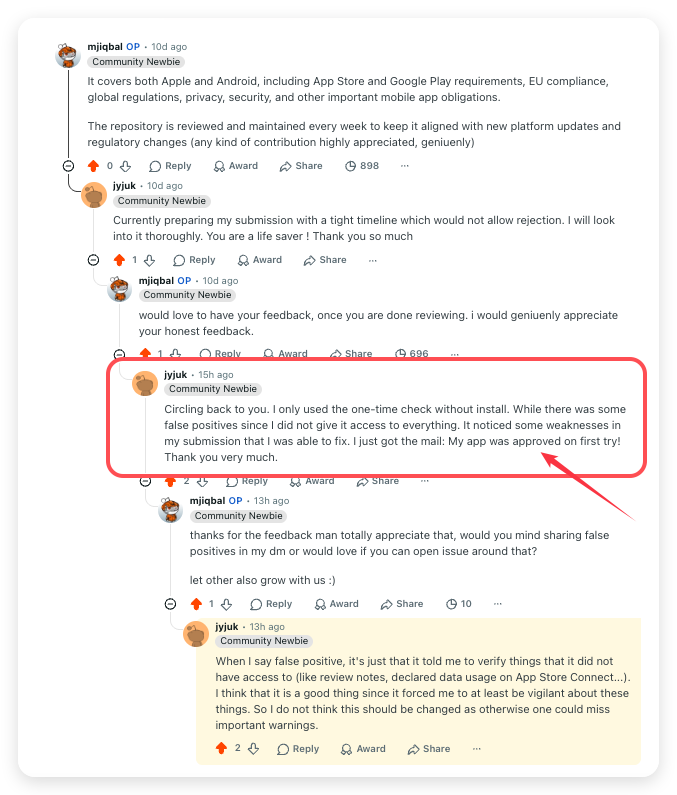
It noticed some weaknesses in my submission that I was able to fix. [...] My app was approved on first try!
The same thread is worth reading for the part that is not praise. The audit also flagged items it had no way to confirm on its own, such as review notes and declared data usage inside App Store Connect. Those reads look like false positives. They are deliberate. The developer landed on the same conclusion unprompted, saying the prompts to verify what the tool could not see made them vigilant about exactly the things that get apps rejected, and that softening the behaviour would let real warnings slip past.
An item that cannot be verified is surfaced rather than assumed clean. A missed warning costs a rejection. A surfaced one costs a minute.
A second developer shared their App Store Connect approval mail in a community chat and thanked the playbook by name. The sender's name is removed. The message is in German.
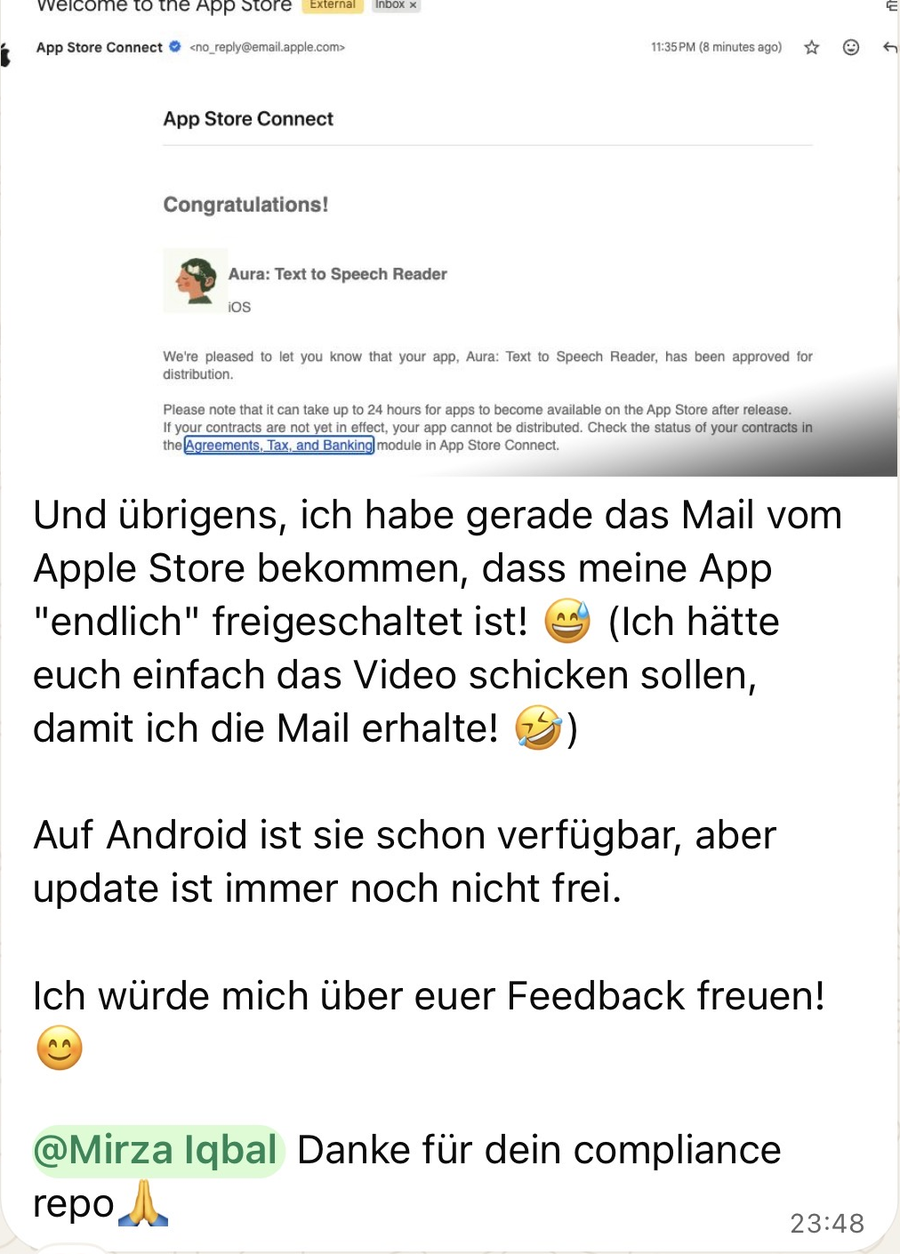
I just got the mail from the Apple Store that my app is "finally" approved! [...] Thanks for your compliance repo.
Found this useful? Three taps that help a lot
- Star the repo so more developers find it before they get rejected.
- Fork it and adapt the checklist to your own stack.
- Follow for more practitioner grade playbooks. GitHub @mjmirza, X @MirzaJhanzaib, and next8n.com.
Sharing it with one teammate who is about to submit an app is the highest compliment.
Why this is urgent right now (2026)
AI coding tools changed the math. Anyone can build a mobile app in an afternoon now, and they are. App releases in the first quarter of 2026 were up about 60 percent year over year across both stores, and around 80 percent on iOS alone. New submissions grew roughly 30 percent to nearly 600,000 in a single recent period. The working theory across the industry is that AI assisted coding tools, Claude Code among them, are behind the surge.
Here is the trap. The stores did not loosen the rules to match the flood. They tightened them. Many AI built apps now fail before they ever reach a user.
- Apple reviewed about 7.77 million submissions in a recent year and rejected roughly 1.93 million of them, nearly one in four.
- In one year Apple rejected more than 320,000 submissions for spam, copying, or being misleading, removed over 17,000 for bait and switch, and stopped more than 37,000 potentially fraudulent apps.
- Google blocked more than 1.75 million Play submissions in 2025 for policy violations and stopped over 255,000 apps from gaining excessive access to sensitive data.
- Since late 2025, an app that sends personal data to an external AI without a consent modal naming the provider is rejected. No disclosure, no approval.
- The top modern Apple upload rejection is a missing privacy manifest, enforced since 2024, and most people building fast with AI have never heard of it.
You can ship an app in an afternoon. You can also burn a week of rejection cycles, or a suspended developer account, the same afternoon. This playbook is the difference.
Sources. TechCrunch on the AI driven surge, Apple App Store Review Guidelines, Google Play policy center, and the rejection statistics cited inline in the docs.
How you actually use this
This works whether you write code or not.
If you are not a developer
You are about to submit an app, maybe one an agency or an AI tool built for you, and you do not want it rejected.
- Open the checklist. Start with its first section, two checks, about five minutes.
- Treat every unchecked box as a reason you will be rejected. Answer each one honestly.
- The two that catch most people. A working demo account with a live backend, and a privacy form that matches what the app really does.
- Already rejected? Go to the appeal playbook before you resubmit.
If you use Claude Code or another AI coding tool
The playbook installs as an agent skill plus a guard, so your tool carries the rules for you and stops a bad submission before it leaves your machine.
Your iOS or Android project
        |
        v
   Claude Code  -- reads -->  the app-store-compliance rule   (always on for any iOS/Android work)
        |
        |   when you are about to ship
        v
   /app-store-audit   or   the pre-submission guard hook
        |
        v
   scan the project against rejection-patterns.json
        |
        +-- critical rejection risk found -->  BLOCKED, with the exact guideline and fix
        |
        +-- clean -------------------------->  CLEAR, then the checklist for what a scan cannot see
The same flow in words. Your AI tool reads the rule while you build. When you are about to ship, the guard scans your project. A critical risk stops the upload and names the fix. A clean scan ends with CLEAR. and lets the upload through.
The guard fires automatically before submission commands such as fastlane, eas submit, gradle bundleRelease, and xcrun altool. If it finds a critical risk, it stops the upload and tells you the exact fix. Your AI tool now refuses to help you ship a rejection.
No AI tool. Run it by hand
No agent is needed. Nothing is installed and nothing is hooked. Skip the install section above if this one-time scan is all you want.
bash ~/repositories/app-store-compliance/agent-os/hooks/app-store-compliance-guard.sh /path/to/your/app
Apple Developer Requirements Monitor
Keep your projects in sync with Apple's continuously evolving requirements. The monitor tracks changes to 25 critical areas including App Store guidelines, privacy manifests, alternative payments, and child safety.
Run a requirements check on your repository against the live Apple Developer RSS news feed. A long result opens with a count per track and shows the first 10 items. Add --full for every item. If the feed cannot be reached, the monitor says its items are samples.
cd ~/repositories/app-store-compliance
python3 scripts/monitor.py --project /path/to/your/app
You can simulate specific tracking updates to generate concrete migration tasks, draft pull requests, and estimate release impact:
# Simulate an update for Privacy Manifests
python3 scripts/monitor.py --project /path/to/your/app --simulate "Privacy Manifests"

# Simulate updates across all 25 tracks
python3 scripts/monitor.py --project /path/to/your/app --simulate "all"
To integrate with CI/CD or automated pipelines, request JSON output:
python3 scripts/monitor.py --project /path/to/your/app --simulate "In-App Purchase policies" --json
Other continuous monitors
Eight more commands watch other tracks the same way. Run them from the playbook folder. Start with the one that matches your platform.
cd ~/repositories/app-store-compliance
python3 scripts/monitor-regulatory.py --project /path/to/your/app   # EU/UK/US/CA/AU/SG, source-trust classified
python3 scripts/monitor-android.py --dir /path/to/your/app          # Android and Google Play requirements
python3 scripts/monitor-ai-policy.py --dir /path/to/your/app        # generative AI policy (Apple and Google)
python3 scripts/release-audit.py /path/to/your/app --metadata ./metadata   # release readiness compliance audit
python3 scripts/accessibility-audit.py /path/to/your/app            # accessibility compliance audit
python3 scripts/monitor-privacy.py --dir /path/to/your/app          # mobile and web privacy requirements
python3 scripts/monitor-security.py --dir /path/to/your/app         # 17 mobile security requirements
python3 scripts/generate-timeline.py                                # chronological regulatory timeline
What to expect, measured on 30 September 2026.
| Command | Output and time | Writes a file |
|---|---|---|
monitor.py |
A count per track and the first 10 items. --full prints every item |
No |
monitor-regulatory.py |
About 95 lines | No |
monitor-android.py, monitor-ai-policy.py |
About 205 and 95 lines | Only with --output-docs <path> or --pr-output <path> |
monitor-privacy.py, monitor-security.py |
About 27 lines each | Only with --output-docs <path> or --pr-output <path> |
release-audit.py |
About two minutes. It checks the playbook itself first, then your app. Pass --metadata <dir> with your pulled listing. Exit 0 is clear, 2 is blocked on a critical or high finding, 3 is incomplete because a scan failed or the listing was not audited |
RELEASE-READINESS-REPORT.md in your app folder |
generate-timeline.py |
The open deadlines, then one completion line | Rewrites docs/REGULATORY-TIMELINE.md in the playbook folder |
deadline-checker.py |
About 175 lines of detail. Add --brief for one line per open deadline |
No |
Every monitor prints one Data. line that says whether its items are live or sample. The monitors other than monitor.py read built-in sample announcements unless you pass --live, so treat that output as a worked example of the migration tasks, not as news. monitor-regulatory.py and monitor-security.py have no live feed.
Citation integrity
Every rule in this playbook is only as good as the source behind it, so the
citations are machine-verified rather than trusted.
python3 scripts/verify-citations.py --files docs/ data/ references/ scripts/
An HTTP 200 is not proof of a real page. Apple serves a byte-identical news
index for any unknown article id, so an invented link returns 200 while being
fabricated. The verifier fetches a deliberately bogus control id per host and
flags any citation whose content fingerprint matches that control. It separates
bot-blocked 4xx and host-fault 5xx from genuine fabrication, so the gate stays
signal rather than noise.
The regulatory deadline check runs on every guard invocation automatically, and can also be run standalone:
python3 scripts/deadline-checker.py
If something goes wrong
| You see | Do this |
|---|---|
NOT CHECKED. |
Point the guard at the folder with your Xcode project or Android app. Expo apps run npx expo prebuild first |
The install ends with a FAIL line |
The line names the problem. Fix it, then run install.sh doctor |
settings.json was not changed |
It was read-only, not valid JSON, or neither python3 nor jq is installed. The installer printed the block to paste by hand |
| The guard does not fire in Claude Code | Restart Claude Code once, then run install.sh doctor |
| The guard does not fire in Codex | Run /hooks in Codex and approve the app-store-compliance hook. Codex runs no new or changed hook until you approve it. Then run install.sh --tool codex doctor |
| The guard does not fire in Gemini CLI | Restart Gemini CLI. Check that tools.enableHooks is true in ~/.gemini/settings.json. Then run install.sh --tool gemini doctor |
| The install for any tool other than Claude Code says python3 is needed | Install python3, then run the same command again |
verify-citations.py seems stuck |
It checks about 300 links over the network and prints at the end. Give it a few minutes |
| A demo or example app inside your app is scanned with it | A nested Xcode or Android project in a folder named exactly demo, example, sample, or playground (or the plural) stays part of the root's scan. Any other nested app (an .xcodeproj or an Android application module) with its own Info.plist or AndroidManifest.xml, that no root build file names, is scanned as its own app when the root has its own project for that platform. A native host that embeds the framework stays with the root, and a split app keeps every framework check the pooled tree showed. To scan a nested app alone, point the guard at its folder |
accessibility-audit.py says Clean |
It is a static scan. It computes no contrast ratio for icons and other non-text elements and does not check focus order in custom controls. It reads a Button label without running the code, so anything written inside the label counts, shown or not. A Text, a Label, or the word accessibilityLabel anywhere in it hides a possible icon-only Button, and an Image(systemName:) that is never shown can still raise one. Regex literals are skipped only in the #/.../# form, not bare /.../. Test those with VoiceOver, TalkBack, and Accessibility Inspector |
Words used here
| Word | Meaning |
|---|---|
| Guard | The script that scans your app and blocks a submit when it finds a critical risk |
| Hook | A setting that makes your AI tool run the guard before a shell command |
| Skill | The folder of rules and data your AI tool reads when it audits an app |
| Privacy manifest | The PrivacyInfo.xcprivacy file Apple requires. It declares the data types collected and the required-reason APIs used |
| Data Safety form | The Google Play Console form where you declare what data your app collects and shares |
What is inside
| Path | What it holds |
|---|---|
docs/APPLE.md |
Apple rejection map, sections 1 to 5, every guideline with the trigger and the fix, plus the 2026 age rating and AI disclosure changes |
docs/GOOGLE-PLAY.md |
Google Play rejection map across every policy, plus the four level enforcement ladder from rejection to account termination |
docs/ADVANCED-2026.md |
The modern upload time layer (privacy manifests, export compliance), payments and DMA depth, the full legal layer (GDPR, EU AI Act, DSA, COPPA), gambling depth, AI content policy, and Android specifics |
docs/EU-REGULATORY-2026.md |
The EU legal hard rules with dated sources. the EU AI Act (Article 50 transparency by 2 August 2026, Article 4 literacy, Article 5 prohibitions, penalties), the Digital Markets Act and the Core Technology Fee, DSA trader status, the European Accessibility Act and EN 301 549, and the Apple 2025 and 2026 platform changes |
docs/GLOBAL-REGULATORY-2026.md |
The USA and other-global legal hard rules with dated sources. US COPPA and the state app-store age laws, the external-link rules, plus the UK, Australia, Brazil, and other jurisdictions, and what Apple tells developers to do per region |
docs/PLATFORM-MECHANICS-2026.md |
The platform-mechanics and newer-policy hard rules with dated sources. macOS notarization, Guideline 4.2 and 4.3 with the June 2026 saturation tightening, reader-app entitlement, France ANSSI encryption, visionOS and watchOS and tvOS specifics, plus Android developer verification, Foreground Service types, Play Integrity, Play Billing v8, target API, Health Connect, and the cross-cutting CSAM, UGC, accessibility, sanctions, and PCI items |
docs/CROSS-PLATFORM-FRAMEWORKS.md |
What the guard covers for Flutter, React Native, Expo, Capacitor, Ionic, Cordova, Unity, .NET MAUI, Tauri mobile, and Kotlin Multiplatform apps, and why it scans the built artifact surface rather than framework source |
docs/BY-APP-TYPE.md |
The rejection map routed by app type. Universal, subscriptions, social, kids, health, games, macOS, AI, crypto and finance, VPN |
docs/COMPETITIVE-GAP-ANALYSIS.md |
A survey of the other open source compliance repositories, what each publishes and why, the gaps they surfaced, and what was folded in here |
docs/REGULATORY-GAP-REPORT-2026.md |
Global and regional regulatory compliance gap analysis prepared by the Senior Compliance Officer, evaluating modern and upcoming frameworks |
docs/OPEN-SOURCE-PATTERNS.md |
What the community already codified. The fastlane precheck metadata rule set, the Android Play Policy Insights and security lints, community rejection repositories, and the Google Play pre-launch report, folded in |
docs/OTHER-STORES.md |
Huawei AppGallery, the Chinese stores, Samsung, Amazon, Microsoft, and RuStore, plus the cross store patterns worth adopting |
docs/GAMBLING-MATRIX.md |
Per country loot box and real money gambling rules, for games that ship worldwide |
docs/MISTAKE-PATTERNS.md |
The eight root cause patterns, the top mistakes, and the appeal playbook |
docs/PRE-SUBMISSION-CHECKLIST.md |
Exhaustive pre submission checklists for both stores, every item a verifiable check |
docs/FLEET-SWEEP.md |
Run the guard across every app you ship for one release verdict, with expiring per-occurrence waivers for reviewed false positives and a GitHub code-scanning export |
docs/RULING-REGISTER.md |
Release requirements a code scan cannot see, each with its legal standing, how it is proven, and a quoted source, built into Fleet Sweep and scored by scripts/eval-scorecard.py |
docs/AI-POLICY-MIGRATION.md |
Platform-specific generative AI policy tracking, generated by scripts/monitor-ai-policy.py |
docs/ANDROID-POLICY-MIGRATION.md |
Android and Google Play requirements tracking, generated by scripts/monitor-android.py |
docs/MOBILE-PRIVACY-MONITOR-2026.md |
Mobile and web privacy compliance monitoring output |
docs/PRIVACY-POLICY-MIGRATION.md |
Simulated privacy-policy migration output, generated by scripts/monitor-privacy.py --simulate, not live announcements |
docs/SECURITY-POLICY-MIGRATION.md |
Simulated security-policy migration output, generated by scripts/monitor-security.py --simulate, not live announcements |
docs/REGULATORY-TIMELINE.md |
Chronological global regulatory timeline, generated by scripts/generate-timeline.py from the deadline database |
docs/GAP-ANALYSIS-2026-09.md |
September 2026 gap analysis. what changed on Apple, Google Play, and in law since the previous sweep, what developers report in public, and what the playbook added or corrected |
docs/MOBILE-SECURITY-2026.md |
Mobile security requirements playbook (secure storage, backup exposure, deep link hijacking, and the checks each maps to) |
AGENTS.md |
Release review guidelines for AI agents, plus the source trust hierarchy and verification rules every monitor script follows before citing a claim as fact. A monitor's corroboration is keyword based, so read the cited official source before acting |
data/rejection-patterns.json |
Machine readable taxonomy of rejection patterns with detection signals and fixes. Drives the guard |
data/detection-recipes.json |
The detection command for each rejection pattern a code scan can see (107 of 114), generated into references/. The other seven are store listing and account checks done by hand |
data/regulatory-deadlines.json |
Global regulatory deadline database (jurisdiction, law, effective/grace/mandatory/enforcement dates), read by scripts/deadline-checker.py |
agent-os/skill/SKILL.md |
An agent skill that runs a full pre submission compliance audit |
agent-os/hooks/app-store-compliance-guard.sh |
The tested pre submission guard, usable standalone or as an agent hook |
scripts/verify-citations.py |
Verifies every cited URL resolves to real content, catching soft-404 pages that return HTTP 200 |
scripts/monitor-privacy.py |
Monitors mobile and web privacy requirements across Apple, Google, and EU sources |
scripts/monitor-security.py |
Monitors 17 mobile security requirements, matching real API symbols in your code |
scripts/generate-timeline.py |
Compiles a chronological regulatory timeline from the deadline database |
scripts/monitor.py |
Monitors 25 Apple developer requirements tracks, maps announcements to tracks, identifies affected files, generates migration tasks, estimates release impact, and drafts pull requests |
scripts/*-test.sh, scripts/test-*.py |
One test suite per script (guard, monitors, audits, deadline checker, timeline, citation verifier, metadata audit). CI runs every one of them on every push to main and on every pull request |
scripts/monitor-regulatory.py |
The Regulatory Intelligence Agent. tracks EU/UK/US/CA/AU/SG regulatory developments through a source trust hierarchy classifier |
scripts/monitor-android.py |
Android and Google Play requirements compliance monitor |
scripts/monitor-ai-policy.py |
Platform-specific generative AI policy monitor (Apple and Google) |
scripts/deadline-checker.py |
Prints every regulatory deadline inside a rolling 90-day window, timezone-aware. Runs automatically as part of the guard |
scripts/release-audit.py |
Release readiness compliance audit engine, writes RELEASE-READINESS-REPORT.md into the audited project. Runs the guard and the listing audit, and --metadata <dir> points the listing audit at a pulled metadata folder. Exit 0 is clear. Exit 2 is blocked on a critical or high finding. Exit 3 is incomplete, a scan failed or did not check the app |
scripts/accessibility-audit.py |
Continuous accessibility compliance audit (VoiceOver, Dynamic Type, Reduce Motion, contrast, TalkBack, touch targets). Runnable standalone, deliberately not wired into the guard hook |
scripts/validate.py |
Validates that data/rejection-patterns.json, data/detection-recipes.json, and data/regulatory-deadlines.json stay internally consistent. Runs in CI |
scripts/generate-references.py |
Regenerates references/ from the pattern and recipe data, so the reference tree never drifts from the taxonomy |
scripts/metadata-audit.py |
Audits the live store listing (name, subtitle, keywords, description, URLs) against the metadata rejection rules, with a propose and re validate loop. Every locale folder is audited on its own, filled from a fastlane default/ folder and parent folders like fastlane does, and each finding names its locale. --platform google applies the Google Play limits and rules, and a fastlane android folder gets them automatically. It checks that every URL is a real http or https address, that an Apple listing has a support URL, and that a Google listing has a contact email. A large share of rejections live in the listing, not the code |
scripts/install.sh |
One command install for Claude Code, and with --tool for Codex, Gemini CLI, OpenCode, Cursor, Copilot, Grok, Qwen Code, Kimi Code, Factory Droid, Auggie and Windsurf. doctor proves the hook blocks a submit command, uninstall removes it, --version prints the version |
scripts/install_harness.py |
The part of the install for the tools other than Claude Code. Merges each tool's own config file and writes the OpenCode plugin |
scripts/pull-metadata.sh |
Pulls the live App Store Connect listing into a metadata directory via the asc CLI, with the Play API path documented |
references/ |
A structured, AI loadable reference tree. Rules by category (metadata, privacy, payments, design, performance, entitlements, safety, Android) and guidelines by app type, each with a detection command, generated from the taxonomy. Load the slices that match the task |
templates/REVIEW-NOTES-TEMPLATE.md |
A fill in the blanks App Store review notes template, the six sections that clear most 2.1 rejections |
docs/CREDITS.md |
Attribution for every open source repository and tool this playbook learned from |
LICENSE, NOTICE |
The OpenRoots Agent License 2.3 pointer and the short notice. See the License section below |
The first principle
Treat the store reviewer as an adversarial integration test that runs once, on a real device, with no access to your intentions and no patience for setup. Everything the reviewer needs has to be present, working, and obvious at submission time. A missing demo account, a backend that is not live, a permission string with no real reason, a privacy form that does not match runtime behavior. Each is a deterministic rejection, and each is preventable before you press submit.
Contributing
Contributions are welcome and wanted. App store rules change constantly, and this playbook stays accurate only when many practitioners keep it current. Open an issue or a pull request, and look for issues labelled good first issue. See .github/CONTRIBUTING.md. The roadmap, every open deadline milestone, and what is in progress live on the project board. The one standard. every factual claim traces to a live Apple or Google source, and no guideline number or statistic is ever invented.
Logo attribution
Apple and Android logos in this README are by Flaticon under the Flaticon free license. The Apple logo and the Android robot are trademarks of their respective owners and are used here only to indicate the platforms this playbook covers.
Credits
This playbook learned from the open source community and credits every source in docs/CREDITS.md. If you reuse a pattern here that came from another project, keep that project's credit too.
License
This whole repository, the docs, the data, the scripts, the skill, and the guard, is released under one licence, the OpenRoots Agent License 2.3 (SPDX LicenseRef-OpenRoots-ORA-2.3). There is no MIT or Creative Commons layer on top of it. LICENSE in this repo is a pointer. The canonical text at openroots.org/licenses/ora/2.3/legalcode.txt is the operative document and it is never edited in place.
What that means in practice.
- Free for almost everyone. Any individual, nonprofit, school, or government body at any size, and any company at or below USD 20 million annual gross revenue (inflation adjusted each January), may use, modify, distribute, and build on this playbook commercially, royalty-free. A company that later crosses the threshold owes the royalty only from that date forward, never retroactively (Sections 2.3 and 5.4).
- Above USD 20 million. A royalty of 0.5 percent applies only to the revenue of the product that uses the playbook, and only to the part above the threshold, capped at USD 250,000 per year, self-reported quarterly. Revenue at or below the threshold owes nothing.
- Keep the attribution. Every copy keeps the copyright notice, a reference to this licence, and the author, inside the package manifest, not only in a README (Section 8.1).
- Do not resell it as itself. Running it in your own agent, adapting it, chaining it, and using it to serve your own clients is all allowed at every tier. Repackaging or hosting the playbook as the product you sell needs a separate written agreement (Section 4).
- AI training is not included. Training a model on this repository, at any tier, needs a separate Compute licence (Section 6). Reading it, and search indexing, are unaffected.
- No sunset, no fallback. This licence does not convert to any other licence over time (Section 7).
Earlier releases keep the terms they shipped with, as Section 16 of the licence requires. Everything published before 24 August 2026 stays under MIT for code and CC BY 4.0 for content, irrevocably. Releases between 24 and 27 August 2026 are under OpenRoots Agent License 1.0, which keeps its own 2029 Apache-2.0 sunset. Everything from 27 August 2026 onward is under 2.3.
If you read this far, you are exactly who this is for. Leave a star, fork it, and follow @mjmirza.
Reviews (0)
Sign in to leave a review.
Leave a reviewNo results found