ai-cli-mcp
Health Warn
- License — License: MIT
- Description — Repository has a description
- Active repo — Last push 0 days ago
- Low visibility — Only 5 GitHub stars
Code Warn
- process.env — Environment variable access in .github/workflows/watch-session-prs.yml
- process.env — Environment variable access in src/__tests__/cli-bin-smoke.test.ts
Permissions Pass
- Permissions — No dangerous permissions requested
This MCP server acts as an orchestrator, allowing an MCP client (like Cursor) to run and manage multiple third-party AI CLI tools (Claude, Codex, Gemini, Forge) as background processes for parallel task execution.
Security Assessment
Overall Risk: High. The core function of this tool is to execute shell commands and spawn background processes. Furthermore, it explicitly advertises bypassing native safety mechanisms, such as using `--dangerously-skip-permissions` for Claude and `--full-auto` for Codex. This allows the AI agents to run arbitrary commands and modify files without standard human approval gates. The audit found no hardcoded secrets. Environment variable access is limited to expected areas (a GitHub workflow and a test file). Because this tool is explicitly designed to strip away the safety guardrails of other AI tools, it grants the driving AI client highly privileged access to your system.
Quality Assessment
The codebase is licensed under the permissive MIT standard and appears to be actively maintained, with recent repository updates. However, community visibility and trust are currently very low, as indicated by minimal GitHub stars. This means the project has undergone little external scrutiny from the wider developer community.
Verdict
Use with caution. Only use this tool in isolated development environments (like Docker containers or VMs) where you fully trust the controlling AI, as bypassing AI safety permissions inherently grants it unchecked system access.
MCP server to run Claude, Codex, and Gemini CLI agents in the background from any MCP client.
AI CLI MCP Server


📦 Package Migration Notice: This package was formerly
@mkxultra/claude-code-mcpand has been renamed toai-cli-mcpto reflect its expanded support for multiple AI CLI tools.
An MCP (Model Context Protocol) server that allows running AI CLI tools (Claude, Codex, Gemini, and Forge) in background processes with automatic permission handling.
Did you notice that Cursor sometimes struggles with complex, multi-step edits or operations? This server, with its powerful unified run tool, enables multiple AI agents to handle your coding tasks more effectively.
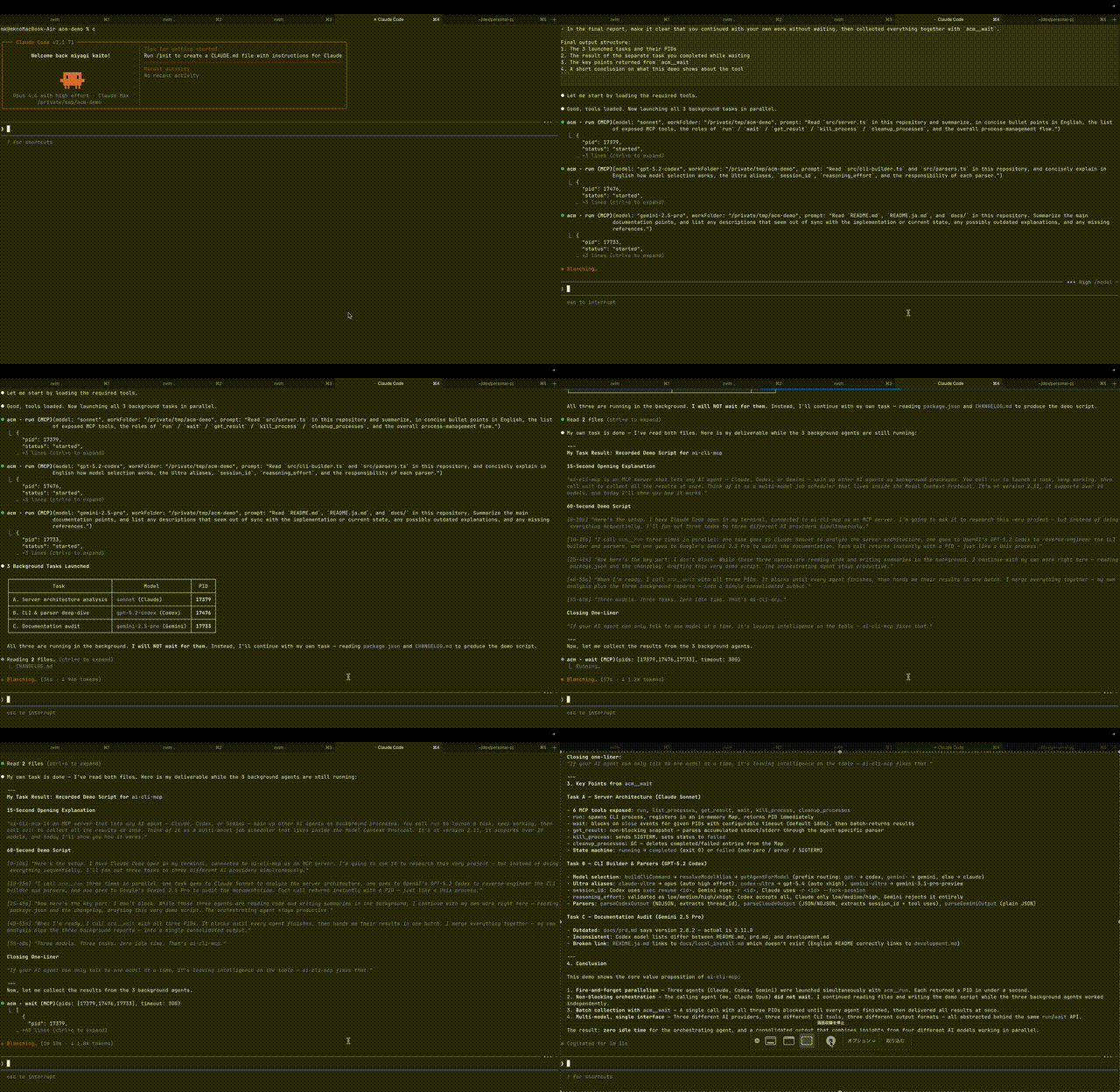
Demo
Overview
This MCP server provides tools that can be used by LLMs to interact with AI CLI tools. When integrated with MCP clients, it allows LLMs to:
- Run Claude CLI with all permissions bypassed (using
--dangerously-skip-permissions) - Execute Codex CLI with automatic approval mode (using
--full-auto) - Execute Gemini CLI with automatic approval mode (using
-y) - Execute Forge CLI in non-interactive mode (using
forge -C <workFolder> -p <prompt>) - Support multiple AI models: Claude (sonnet, sonnet[1m], opus, opusplan, haiku), Codex (gpt-5.4, gpt-5.3-codex, gpt-5.2-codex, gpt-5.1-codex-mini, gpt-5.1-codex-max, gpt-5.2, gpt-5.1, gpt-5.1-codex, gpt-5-codex, gpt-5-codex-mini, gpt-5), Gemini (gemini-2.5-pro, gemini-2.5-flash, gemini-3.1-pro-preview, gemini-3-pro-preview, gemini-3-flash-preview), and Forge (
forge) - Manage background processes with PID tracking
- Parse and return structured outputs from both tools
Usage Example (Advanced Parallel Processing)
You can instruct your main agent to run multiple tasks in parallel like this:
Launch agents for the following 3 tasks using acm mcp run:
- Refactor
src/backendcode usingsonnet- Create unit tests for
src/frontendusinggpt-5.2-codex- Update docs in
docs/usinggemini-2.5-proWhile they run, please update the TODO list. Once done, use the
waittool to wait for all completions and report the results together.
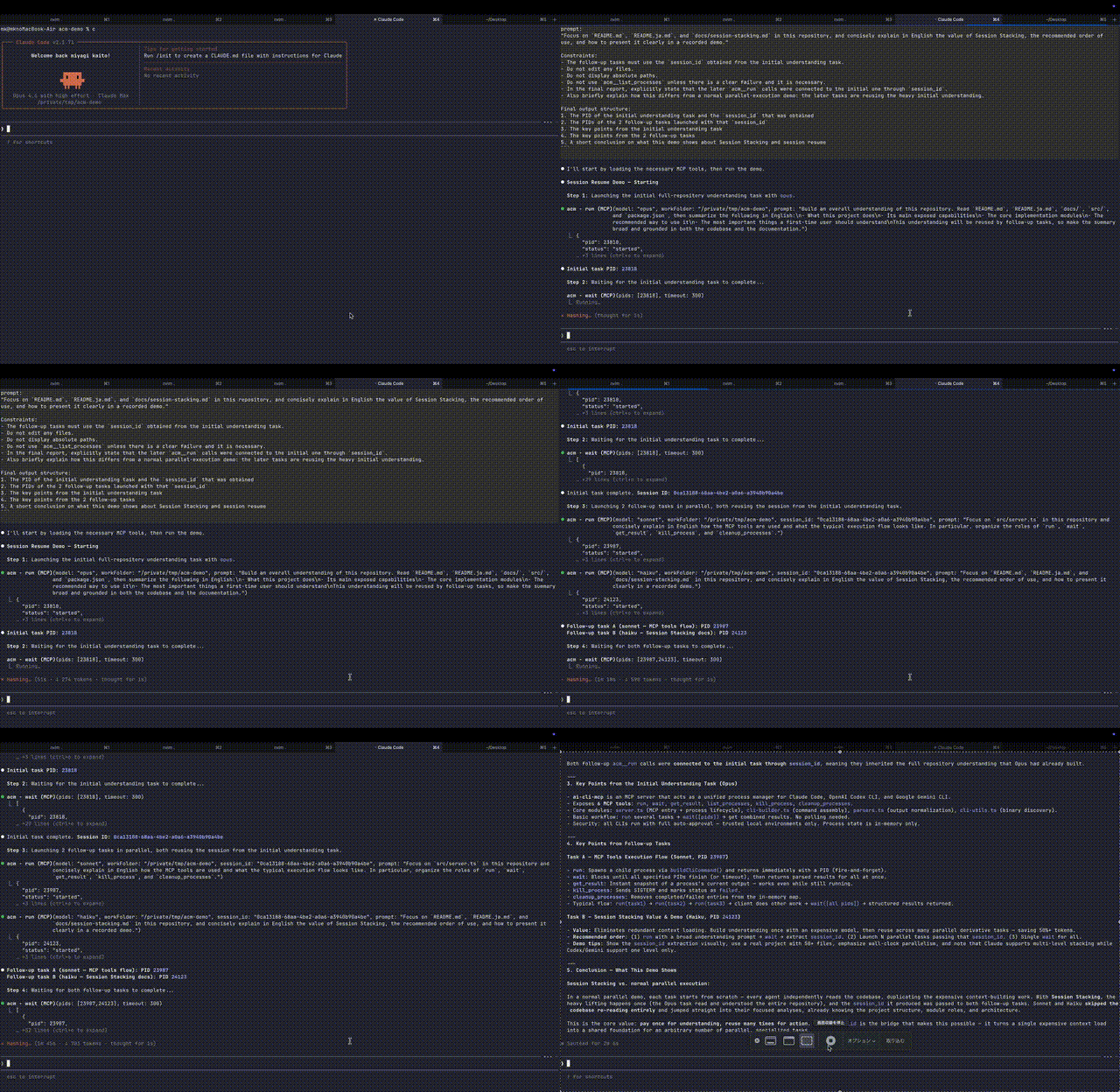
Usage Example (Context Caching & Sharing)
You can reuse heavy context (like large codebases) using session IDs to save costs while running multiple tasks.
- First, use
acm mcp runwithopusto read all files insrc/and understand the project structure.- Use the
waittool to wait for completion and retrieve thesession_idfrom the result.- Using that
session_id, run the following two tasks in parallel withacm mcp run:
- Create refactoring proposals for
src/utilsusingsonnet- Add architecture documentation to
README.mdusinggpt-5.2-codex- Finally,
waitagain to combine both results.
Benefits
- True Async Multitasking: Agent execution happens in the background, returning control immediately. The calling AI can proceed with the next task or invoke another agent without waiting for completion.
- CLI in CLI (Agent in Agent): Directly invoke powerful CLI tools like Claude Code or Codex from any MCP-supported IDE or CLI. This enables broader, more complex system operations and automation beyond host environment limitations.
- Freedom from Model/Provider Constraints: Freely select and combine the "strongest" or "most cost-effective" models from Claude, Codex (GPT), Gemini, and Forge without being tied to a specific ecosystem.
Prerequisites
The only prerequisite is that the AI CLI tools you want to use are locally installed and correctly configured.
- Claude Code:
claude doctorpasses, and execution with--dangerously-skip-permissionsis approved (you must run it manually once to login and accept terms). - Codex CLI (Optional): Installed and initial setup (login etc.) completed.
- Gemini CLI (Optional): Installed and initial setup (login etc.) completed.
- Forge CLI (Optional): Installed and initial setup completed.
Installation & Usage
There are now two primary ways to use this package:
ai-cli-mcp: MCP server entrypointai-cli: human-facing CLI for background AI runs
MCP usage with npx
The recommended way to use the MCP server is via npx.
Using npx in your MCP configuration:
    "ai-cli-mcp": {
      "command": "npx",
      "args": [
        "-y",
        "ai-cli-mcp@latest"
      ]
    },
Using Claude CLI mcp add command:
claude mcp add ai-cli '{"name":"ai-cli","command":"npx","args":["-y","ai-cli-mcp@latest"]}'
Human CLI usage with global install
If you want to use the production CLI directly from your shell, install the package globally:
npm install -g ai-cli-mcp
This exposes both commands:
ai-cliai-cli-mcp
Examples:
ai-cli doctor
ai-cli models
ai-cli run --cwd "$PWD" --model sonnet --prompt "summarize this repository"
ai-cli ps
ai-cli result 12345
ai-cli wait 12345 --timeout 300
ai-cli kill 12345
ai-cli cleanup
ai-cli-mcp
Human CLI usage with npx
Because the published package name is still ai-cli-mcp, the shortest npx form for the CLI is:
npx -y --package ai-cli-mcp@latest ai-cli run --cwd "$PWD" --model sonnet --prompt "hello"
Important First-Time Setup
For Claude CLI:
Before the MCP server can use Claude, you must first run the Claude CLI manually once with the --dangerously-skip-permissions flag, login and accept the terms.
npm install -g @anthropic-ai/claude-code
claude --dangerously-skip-permissions
Follow the prompts to accept. Once this is done, the MCP server will be able to use the flag non-interactively.
For Codex CLI:
For Codex, ensure you're logged in and have accepted any necessary terms:
codex login
For Gemini CLI:
For Gemini, ensure you're logged in and have configured your credentials:
gemini auth login
macOS might ask for folder permissions the first time any of these tools run. If the first run fails, subsequent runs should work.
CLI Commands
ai-cli currently supports:
runpsresultwaitkillcleanupdoctormodelsmcp
Example flow:
ai-cli doctor
ai-cli models
ai-cli run --cwd "$PWD" --model codex-ultra --prompt "fix failing tests"
ai-cli ps
ai-cli wait 12345
ai-cli result 12345
ai-cli cleanup
run accepts --cwd as the primary working-directory flag and also accepts the older aliases --workFolder / --work-folder for compatibility.
doctor checks only binary existence and path resolution. It does not verify login state or terms acceptance.
CLI State Storage
Background CLI runs are stored under:
~/.local/state/ai-cli/cwds/<normalized-cwd>/<pid>/
Each PID directory contains:
meta.jsonstdout.logstderr.log
Use ai-cli cleanup to remove completed and failed runs. Running processes are preserved.
Known Limitation
Detached ai-cli runs do not currently persist natural process exit codes. As a result, the CLI can report process output and running/completed state, but it does not yet guarantee exitCode for naturally finished background runs.
Connecting to Your MCP Client
After setting up the server, add the configuration to your MCP client's settings file (e.g., mcp.json for Cursor, mcp_config.json for Windsurf).
If the file doesn't exist, create it and add the ai-cli-mcp configuration.
Tools Provided
This server exposes the following tools:
run
Executes a prompt using Claude CLI, Codex CLI, Gemini CLI, or Forge CLI. The appropriate CLI is automatically selected based on the model name.
Arguments:
prompt(string, optional): The prompt to send to the AI agent. Eitherpromptorprompt_fileis required.prompt_file(string, optional): Path to a file containing the prompt. Eitherpromptorprompt_fileis required. Can be absolute path or relative toworkFolder.workFolder(string, required): The working directory for the CLI execution. Must be an absolute path.
Models:- Ultra Aliases:
claude-ultra(defaults to high effort),codex-ultra(defaults to xhigh reasoning),gemini-ultra - Claude:
sonnet,sonnet[1m],opus,opusplan,haiku - Codex:
gpt-5.4,gpt-5.3-codex,gpt-5.2-codex,gpt-5.1-codex-mini,gpt-5.1-codex-max,gpt-5.2,gpt-5.1,gpt-5 - Gemini:
gemini-2.5-pro,gemini-2.5-flash,gemini-3.1-pro-preview,gemini-3-pro-preview,gemini-3-flash-preview - Forge:
forge reasoning_effort(string, optional): Reasoning control for Claude and Codex. Claude uses--effort(allowed: "low", "medium", "high"). Codex usesmodel_reasoning_effort(allowed: "low", "medium", "high", "xhigh"). Forge does not supportreasoning_effort.session_id(string, optional): Optional session ID to resume a previous session. Supported for: haiku, sonnet, opus, gemini-2.5-pro, gemini-2.5-flash, gemini-3.1-pro-preview, gemini-3-pro-preview, gemini-3-flash-preview, forge.
wait
Waits for multiple AI agent processes to complete and returns their combined results. Blocks until all specified PIDs finish or a timeout occurs.
Arguments:
pids(array of numbers, required): List of process IDs to wait for (returned by theruntool).timeout(number, optional): Maximum wait time in seconds. Defaults to 180 (3 minutes).
list_processes
Lists all running and completed AI agent processes with their status, PID, and basic info.
get_result
Gets the current output and status of an AI agent process by PID.
Arguments:
pid(number, required): The process ID returned by theruntool.
kill_process
Terminates a running AI agent process by PID.
Arguments:
pid(number, required): The process ID to terminate.
Troubleshooting
- "Command not found" (claude-code-mcp): If installed globally, ensure the npm global bin directory is in your system's PATH. If using
npx, ensurenpxitself is working. - "Command not found" (
ai-cli): If installed globally, ensure your npm global bin directory is inPATH. If usingnpx, usenpx -y --package ai-cli-mcp@latest ai-cli .... - "Command not found" (claude or ~/.claude/local/claude): Ensure the Claude CLI is installed correctly. Run
claude/doctoror check its documentation. - Permissions Issues: Make sure you've run the "Important First-Time Setup" step.
- JSON Errors from Server: If
MCP_CLAUDE_DEBUGistrue, error messages or logs might interfere with MCP's JSON parsing. Set tofalsefor normal operation. - ESM/Import Errors: Ensure you are using Node.js v20 or later.
Contributing
For development setup, testing, and contribution guidelines, see the Development Guide.
Advanced Configuration (Optional)
Normally not required, but useful for customizing CLI paths or debugging.
CLAUDE_CLI_NAME: Override the Claude CLI binary name or provide an absolute path (default:claude)CODEX_CLI_NAME: Override the Codex CLI binary name or provide an absolute path (default:codex)GEMINI_CLI_NAME: Override the Gemini CLI binary name or provide an absolute path (default:gemini)FORGE_CLI_NAME: Override the Forge CLI binary name or provide an absolute path (default:forge)MCP_CLAUDE_DEBUG: Enable debug logging (set totruefor verbose output)
CLI Name Specification:
- Command name only:
CLAUDE_CLI_NAME=claude-custom - Absolute path:
CLAUDE_CLI_NAME=/path/to/custom/claude
Relative paths are not supported.
Example with custom CLI binaries:
    "ai-cli-mcp": {
      "command": "npx",
      "args": [
        "-y",
        "ai-cli-mcp@latest"
      ],
      "env": {
        "CLAUDE_CLI_NAME": "claude-custom",
        "CODEX_CLI_NAME": "codex-custom"
      }
    },
License
MIT
Reviews (0)
Sign in to leave a review.
Leave a reviewNo results found