mdma
Health Warn
- License — License: MIT
- Description — Repository has a description
- Active repo — Last push 0 days ago
- Low visibility — Only 8 GitHub stars
Code Pass
- Code scan — Scanned 12 files during light audit, no dangerous patterns found
Permissions Pass
- Permissions — No dangerous permissions requested
This tool extends standard Markdown by adding interactive components like forms, approval gates, tables, and webhooks. It is designed to render structured, actionable responses generated by AI models directly within an application's user interface.
Security Assessment
The automated code scan found no dangerous patterns across its files, and it does not request any dangerous system permissions. By design, it does not execute shell commands or contain hardcoded secrets. However, because it explicitly handles interactive forms capable of capturing sensitive data and triggers remote webhooks, developers must ensure their implementation properly secures the frontend and backend endpoints processing this information. Overall risk is rated as Low.
Quality Assessment
The project is licensed under the permissive MIT license and was updated very recently (as of today). However, it currently has extremely low community visibility with only 8 GitHub stars. Because of this, it should be considered an early-stage or niche tool, meaning it may lack extensive peer review or rapid community-driven support if you encounter edge cases.
Verdict
Safe to use, though keep in mind it is a young project with minimal community adoption.
Interactive documents from Markdown. Extends MD with forms, approvals, webhooks, and more — built for next gen apps
MDMA
Markdown Document with Mounted Applications
Interactive documents from Markdown. Built for next gen-apps
Why MDMA?
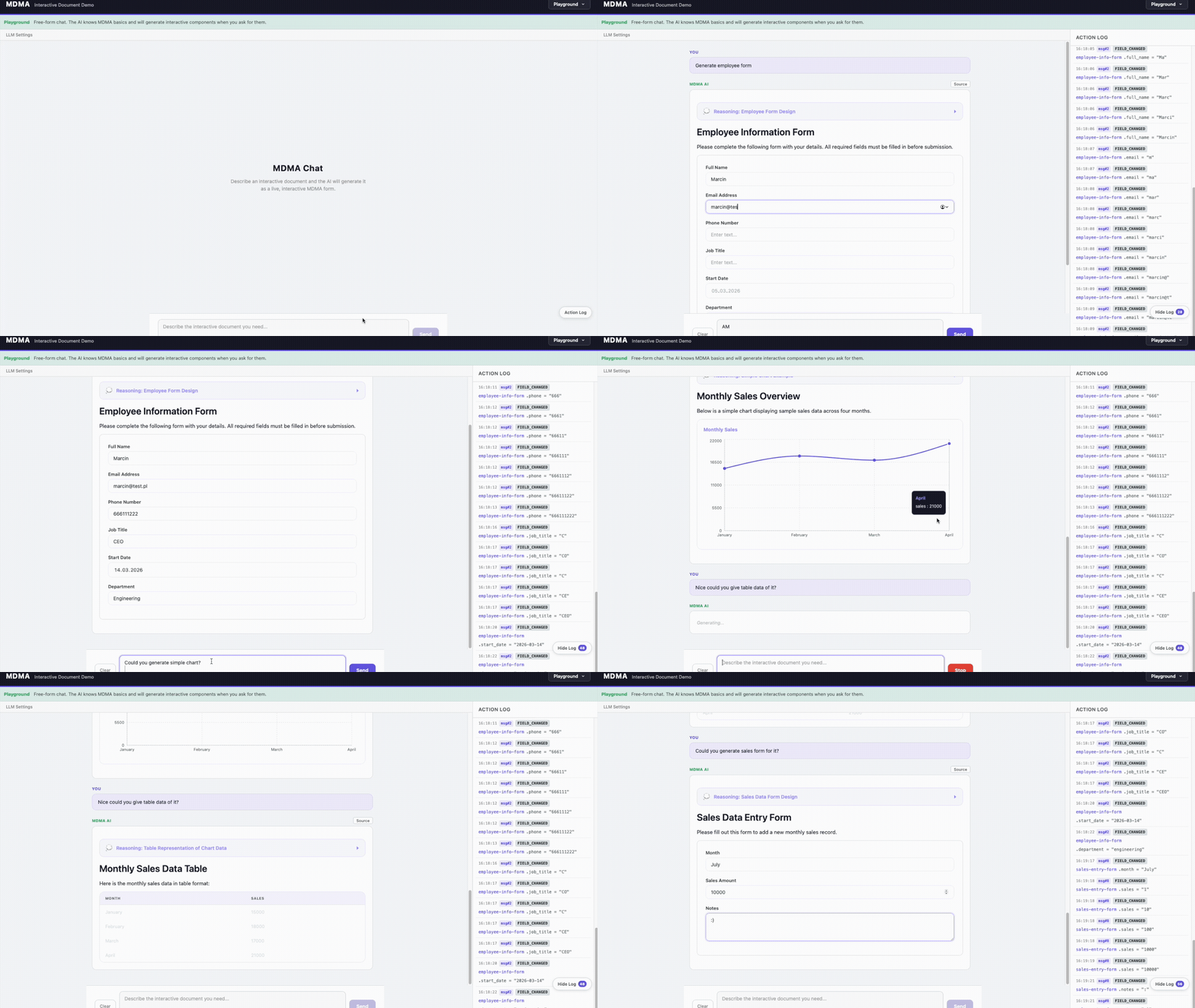
AI conversations today are plain text — the user reads a response and manually acts on it. MDMA changes that. When an LLM knows the MDMA spec, it can respond with interactive components (forms, tables, approval gates) instead of just text. The conversation becomes actionable: the user fills out a form, approves a step, or reviews structured data — all inline, with a predictable schema that your app already knows how to render and process.
No custom UI per use case. No parsing free-form text. The AI generates structured, validated components and your frontend renders them instantly.
What is MDMA?
MDMA extends Markdown with interactive components defined in fenced mdma code blocks. A regular Markdown file becomes an interactive application:
# Patient Intake

```mdma
type: form
id: intake-form
fields:
  - name: patient-name
    type: text
    label: "Full Name"
    required: true
    sensitive: true
  - name: email
    type: email
    label: "Email"
    required: true
    sensitive: true
  - name: reason
    type: textarea
    label: "Reason for Visit"
    required: true
```

```mdma
type: button
id: submit-btn
text: "Submit Intake Form"
variant: primary
onAction: submit
```
Components
9 built-in component types, all rendered out of the box by @mobile-reality/mdma-renderer-react:
| Component | Type key | Description |
|---|---|---|
| Form | form |
Multi-field forms with text, email, number, select, textarea, checkbox, and datetime fields. Supports validation, required fields, default values, and sensitive (PII) flags. |
| Button | button |
Action buttons with primary, secondary, and danger variants. |
| Tasklist | tasklist |
Interactive checkbox task items with labels. |
| Table | table |
Data tables with typed columns and row data. |
| Chart | chart |
Table fallback by default — renders chart data as a simple HTML table to avoid forcing a charting dependency (~400KB). Override with your own renderer (e.g. recharts) via customizations.components.chart (see Custom Chart Renderer below). |
| Callout | callout |
Alert banners with info, warning, error, and success variants. Supports optional title and dismiss button. |
| Approval Gate | approval-gate |
Approve/deny workflow gates with pending, approved, and denied states. |
| Webhook | webhook |
Webhook triggers with idle, executing, success, and error status indicators. |
| Thinking | thinking |
Collapsible thinking/reasoning blocks that show the AI's chain of thought. |
Additionally, standard Markdown content (headings, paragraphs, lists, code blocks, images, links, tables, etc.) is rendered inline between components.
Custom Chart Renderer
The built-in chart renderer intentionally renders data as a plain table so the library stays lightweight. To get actual charts, register a custom renderer:
import { MdmaDocument } from '@mobile-reality/mdma-renderer-react';
import { MyRechartsRenderer } from './MyRechartsRenderer';

function App({ ast, store }) {
  return (
    <MdmaDocument
      ast={ast}
      store={store}
      customizations={{
        components: {
          chart: MyRechartsRenderer,
        },
      }}
    />
  );
}
This pattern works for overriding any built-in component — pass a custom React component under customizations.components.<type>.
Installation
# Core — parse and run MDMA documents
npm install @mobile-reality/mdma-parser @mobile-reality/mdma-runtime

# React rendering
npm install @mobile-reality/mdma-renderer-react

# AI authoring — system prompts for LLM-based generation
npm install @mobile-reality/mdma-prompt-pack

# Validation — static analysis for MDMA documents
npm install @mobile-reality/mdma-validator

# CLI — interactive prompt builder + document validation
npx @mobile-reality/mdma-cli
All packages are published under the @mobile-reality npm org.
Usage
import { unified } from 'unified';
import remarkParse from 'remark-parse';
import { remarkMdma } from '@mobile-reality/mdma-parser';
import { createDocumentStore } from '@mobile-reality/mdma-runtime';
import type { MdmaRoot } from '@mobile-reality/mdma-spec';

// 1. Parse markdown into AST
const processor = unified().use(remarkParse).use(remarkMdma);
const tree = processor.parse(markdown);
const ast = (await processor.run(tree)) as MdmaRoot;

// 2. Create a reactive document store
const store = createDocumentStore(ast, {
  documentId: 'my-doc',
  sessionId: crypto.randomUUID(),
});

// 3. Subscribe to state changes
store.subscribe((state) => {
  console.log('Bindings:', state.bindings);
});

// 4. Dispatch user actions
store.dispatch({
  type: 'FIELD_CHANGED',
  componentId: 'intake-form',
  field: 'patient-name',
  value: 'Jane Doe',
});
In a Chat
import { buildSystemPrompt } from '@mobile-reality/mdma-prompt-pack';

// Custom prompt prescribes exactly what the LLM should generate
const systemPrompt = buildSystemPrompt({
  customPrompt: `You are a bug tracking assistant. When a user reports a bug,
always generate a single form component matching this exact structure:

\`\`\`mdma
type: form
id: bug-report
fields:
  - name: title
    type: text
    label: "Bug Title"
    required: true
  - name: severity
    type: select
    label: "Severity"
    options:
      - { label: Critical, value: critical }
      - { label: High, value: high }
      - { label: Medium, value: medium }
      - { label: Low, value: low }
  - name: steps
    type: textarea
    label: "Steps to Reproduce"
    required: true
  - name: expected
    type: textarea
    label: "Expected Behavior"
  - name: actual
    type: textarea
    label: "Actual Behavior"
\`\`\``,
});

// Send to any OpenAI-compatible API
const response = await fetch('https://api.openai.com/v1/chat/completions', {
  method: 'POST',
  headers: { Authorization: `Bearer ${apiKey}` },
  body: JSON.stringify({
    model: 'gpt-4o',
    messages: [
      { role: 'system', content: systemPrompt },
      { role: 'user', content: 'The login page crashes after entering my password.' },
    ],
  }),
});

// The LLM responds with regular markdown containing ```mdma blocks
// Parse it into an AST + store as shown above
React
import { MdmaDocument } from '@mobile-reality/mdma-renderer-react';
import '@mobile-reality/mdma-renderer-react/styles.css'; // default styles

function App({ ast, store }) {
  return <MdmaDocument ast={ast} store={store} />;
}
Note: The
styles.cssimport provides default styling for all MDMA components (forms, tables, callouts, animations, etc.). It's optional — you can write your own styles targeting the.mdma-*CSS classes instead.
Packages
| Package | Description |
|---|---|
@mobile-reality/mdma-spec |
The foundation of the MDMA ecosystem — Zod schemas, TypeScript types, and AST definitions for all 9 component types. Every other package depends on spec for validation and type safety. |
@mobile-reality/mdma-parser |
A remark plugin that transforms standard Markdown into an MDMA-extended AST. Extracts mdma code blocks, validates YAML against component schemas, and builds a binding dependency graph. |
@mobile-reality/mdma-runtime |
Headless state management engine for MDMA documents — like a mini state specialized for interactive documents. Manages reactive bindings, dispatches actions, enforces environment policies, and writes every event to a tamper-evident audit log with automatic PII redaction. |
@mobile-reality/mdma-attachables-core |
Handlers for 7 of the 9 component types — the ones that manage state (form, button, tasklist, table, callout, approval-gate, webhook). Chart and thinking are display-only and rendered directly without state handlers. |
@mobile-reality/mdma-renderer-react |
React rendering layer with components for all 9 MDMA types and hooks for state access. Provides MdmaDocument for full-document rendering and useComponentState/useBinding for fine-grained reactivity. |
@mobile-reality/mdma-prompt-pack |
System prompts that teach LLMs how to author valid MDMA documents. Exports buildSystemPrompt() to combine the full spec reference with optional custom instructions for domain-specific generation. |
@mobile-reality/mdma-validator |
Static analysis engine with 10 lint rules covering YAML correctness, schema conformance, ID uniqueness, binding resolution, and PII sensitivity. Powers programmatic validation in CI pipelines and custom tooling. |
@mobile-reality/mdma-cli |
Interactive CLI tool for creating custom MDMA prompts. Opens a local web app where you visually select components, configure fields, set domain rules and trigger conditions, then an LLM generates a tailored customPrompt for use with buildSystemPrompt(). Also includes a validate command for static document analysis. |
@mobile-reality/mdma-mcp |
MCP (Model Context Protocol) server that exposes MDMA spec, prompts, and tooling to AI assistants. Tools: get-spec, get-prompt, build-system-prompt, validate-prompt, list-packages. Works with Claude Desktop, VS Code, Cursor, and any MCP-compatible client. |
@mobile-reality/mdma-evals |
LLM evaluation suite built on promptfoo with 4 test suites: base generation quality (25 tests), custom prompt compliance (10 tests), multi-turn conversation handling (11 conversations, 25 turns), and prompt builder verification (25 tests). Validates that AI-generated MDMA documents are structurally correct and semantically appropriate. |
Architecture
@mobile-reality/mdma-spec                  Format specification + Zod schemas
  ├── @mobile-reality/mdma-parser          Markdown → MDMA AST (remark plugin)
  ├── @mobile-reality/mdma-prompt-pack     AI authoring prompts
  ├── @mobile-reality/mdma-validator       Document validation
  └── @mobile-reality/mdma-runtime         State / events / policy engine
        └── @mobile-reality/mdma-attachables-core   Component handlers
              └── @mobile-reality/mdma-renderer-react   React components
@mobile-reality/mdma-cli                   CLI prompt builder + validation
@mobile-reality/mdma-mcp                   MCP server for AI assistants
@mobile-reality/mdma-evals                 LLM evaluation suite (promptfoo)
Getting Started
pnpm install
pnpm build
pnpm test
CLI
Interactive prompt builder for creating custom MDMA prompts.
# Run the prompt builder — opens a web app in your browser
npx @mobile-reality/mdma-cli

# Validate MDMA documents
npx @mobile-reality/mdma-cli validate "docs/**/*.md"
npx @mobile-reality/mdma-cli validate "docs/**/*.md" --fix  # auto-fix issues
npx @mobile-reality/mdma-cli validate "docs/**/*.md" --json # JSON output
The prompt builder walks you through:
- Pick components — select from the 9 MDMA types (form, table, approval-gate, etc.)
- Configure — define fields, options, roles, sensitive flags, and business rules
- Set triggers — specify when the AI should generate MDMA components (keywords, contextual conditions)
- Generate — an LLM creates a tailored
customPromptbased on your configuration - Export — copy the result and use it in your app:
import { buildSystemPrompt } from '@mobile-reality/mdma-prompt-pack';

const systemPrompt = buildSystemPrompt({
  customPrompt: '<paste generated prompt here>',
});
MCP Server
MCP (Model Context Protocol) server that lets AI assistants understand and work with MDMA.
Setup
Add to your AI tool config (Claude Desktop, VS Code, Cursor, etc.):
{
  "mcpServers": {
    "mdma": {
      "command": "npx",
      "args": ["@mobile-reality/mdma-mcp"]
    }
  }
}
Tools
| Tool | Description |
|---|---|
get-spec |
Returns the full MDMA specification: component types, JSON schemas, binding syntax, and authoring rules |
get-prompt |
Returns a named prompt (mdma-author, mdma-reviewer, or mdma-fixer) |
build-system-prompt |
Generates a custom MDMA prompt from structured input (domain, components, fields, steps, business rules) |
validate-prompt |
Validates a custom prompt against MDMA conventions — returns warnings, suggestions, and constraint reference |
list-packages |
Returns all MDMA packages with purpose, install command, and usage example |
list-docs |
Returns the catalog of MDMA documentation files (path, title, description) available for fetching from the public GitHub repo |
get-doc |
Fetches the latest version of an MDMA documentation file from raw.githubusercontent.com/MobileReality/mdma. Supports optional ref (branch/tag/SHA, defaults to main) |
Example: Building a prompt with structured input
An AI agent calls build-system-prompt with:
{
  "domain": "HR onboarding",
  "components": ["form", "approval-gate", "webhook"],
  "fields": [
    { "name": "email", "type": "email", "sensitive": true, "required": true },
    { "name": "department", "type": "select", "options": ["Engineering", "Marketing"] }
  ],
  "steps": [
    { "label": "Registration", "description": "Employee fills in personal details" },
    { "label": "Approval", "description": "Manager reviews and approves" }
  ],
  "businessRules": "All PII fields must be marked sensitive."
}
The tool returns a structured custom prompt ready to use with buildSystemPrompt({ customPrompt }).
Testing locally
npx @modelcontextprotocol/inspector node packages/mcp/dist/bin/mdma-mcp.js
MCP vs No-MCP: Agent Implementation Comparison
We tested building the same MDMA chat app with two AI agents — one with the MCP server enabled, one without. Here's what happened:
| Aspect | With MCP | Without MCP |
|---|---|---|
| Package discovery | Agent called list-packages — got all 9 packages with install commands and usage in one step |
Agent had to read README, explore repo, and piece together which packages exist |
| Spec knowledge | Agent called get-spec — received all 9 component types with JSON schemas, binding syntax, and authoring rules |
Agent had to read source files across multiple packages to understand component types |
| Prompt setup | Agent called get-prompt("mdma-author") — got the exact system prompt ready to use |
Agent had to find mdma-prompt-pack, understand buildSystemPrompt(), and figure out how to use it |
| Time to working app | Agent knew the right packages, APIs, and patterns from the start — fewer wrong turns | Agent spent significant time exploring, reading docs, and backtracking on wrong approaches |
| Code quality | Focused implementation — agent used exactly the right APIs because MCP told it what exists | More verbose — agent implemented some things manually that packages already provided |
Key takeaway: The MCP server eliminated the discovery phase entirely. Instead of the agent reading source code to understand MDMA, it called 3 tools (list-packages → get-spec → get-prompt) and had complete, structured knowledge of the ecosystem within seconds.
Skills
Agent-authoring guidance packaged as a portable Agent Skill (compatible with Claude Code, the Agent SDK, and any harness that consumes SKILL.md).
| Skill | Path | Purpose |
|---|---|---|
mdma-integration |
skills/mdma-integration/SKILL.md | Teaches agents how to integrate MDMA into an application — package selection, parse → store → render wiring, LLM streaming (with the updateAst reparse pattern), custom components, prompt authoring & maintenance, CI validation, and MCP exposure. |
The skill is intentionally portable: every code sample is inline and every reference uses @mobile-reality/mdma-* package names, so it works when dropped into a project that only installs the published packages. Drop the folder into .claude/skills/ (Claude Code), your Agent SDK skills directory, or any compatible location.
Paired with the MCP server, an agent gets both how to think about the integration (skill) and live access to spec, prompts, and docs (MCP tools) — the skill tells it to call buildSystemPrompt / validate / updateAst, and the MCP tools give it the actual spec and docs to do so correctly.
Evals
LLM evaluation suite using promptfoo to verify MDMA generation quality.
# Run base eval suite (25 tests)
pnpm eval

# Run custom system prompt tests (10 tests)
pnpm eval:custom

# Run multi-turn conversation tests (25 turns across 11 conversations)
pnpm eval:conversation

# Run prompt builder tests (25 tests)
pnpm eval:prompt-builder

# Run all eval suites
pnpm eval:all

# View results in browser
pnpm eval:view
Key Features
- Deterministic parsing — Markdown + YAML, no runtime JS in documents
- PII protection — Automatic detection + redaction (hash, mask, omit)
- Audit trail — Append-only event log with tamper-evident hash chaining
- Policy engine — Allow/deny rules per action and environment
- AI authoring — System prompts for AI-assisted document creation
Initial Roadmap
v0.2 — Developer Experience
- More examples (14 real-world use cases)
- CLI tool for prompt creation (MDMA flows)
- Improved validator
- Added MCP
- Added Skills for Agentic usage
- Improved error messages in parser
- File upload field type for forms
v0.3 — AI & Generation
- Multi-model eval coverage (Claude, GPT-4o, Gemini, Llama)
- Prompt tuning toolkit — test and compare custom prompts
- Agent-friendly SDK — let AI agents fill forms and trigger actions programmatically
- Webhook execution engine (real HTTP calls in production environments)
v1.0 — Production Ready
- Stable API with semantic versioning guarantees
- E2E test suite for full document workflows
- Performance benchmarks and optimization
- Migration guides between versions
- Blueprints promoted from experimental to stable
Future
- Collaborative editing (multiplayer document state)
- Custom component marketplace
- Audit trail dashboard UI
- HIPAA / SOC 2 compliance documentation
Tech Stack
TypeScript monorepo — pnpm workspaces, Turborepo, Zod, React, Vitest, remark
Built by Mobile Reality
MDMA is built and maintained by Mobile Reality — an AI automation agency specializing in AI agent development, custom software, and enterprise automation. We use MDMA in production across fintech and proptech projects.
Read more:
- LLM Interface: The Missing Layer Between Your AI Model and Your Users
- Structured LLM Output Without JSON Schemas
- Generative UI: How AI Creates Dynamic User Interfaces
License
MIT
Made with ❤️ by Mobile Reality
Reviews (0)
Sign in to leave a review.
Leave a reviewNo results found