swarm-orchestrator
Health Pass
- License — License: ISC
- Description — Repository has a description
- Active repo — Last push 0 days ago
- Community trust — 70 GitHub stars
Code Warn
- process.env — Environment variable access in .github/plugin/hooks/hooks.json
- fs module — File system access in .github/plugin/hooks/hooks.json
- process.env — Environment variable access in .github/plugin/hooks/post-tool-use.json
- fs module — File system access in .github/plugin/hooks/post-tool-use.json
- process.env — Environment variable access in .github/plugin/hooks/pre-tool-use.json
- network request — Outbound network request in config/default-agents.yaml
Permissions Pass
- Permissions — No dangerous permissions requested
This tool acts as a verification and governance layer for AI coding agents (like Copilot, Claude Code, and Codex). Instead of generating code autonomously, it orchestrates external AI agents across isolated git branches and uses evidence-based quality gates—such as build checks, tests, and git diffs—to ensure code safety before merging.
Security Assessment
The tool accesses the file system and reads environment variables via hook configurations, which is expected behavior since it needs to manage git branches and authenticate with external AI APIs (via `ANTHROPIC_API_KEY` or `OPENAI_API_KEY`). It also makes outbound network requests, primarily defined in its default agent configurations, to communicate with these third-party AI services. No hardcoded secrets were detected, and it does not request inherently dangerous OS permissions. Because it orchestrates external AI tools that can write and modify code, it inherently executes shell commands.
Overall Risk Rating: Medium. The tool itself is designed around safety and verification, but the underlying architecture requires handing over local file system access and code execution to third-party AI models.
Quality Assessment
The project is actively maintained (last updated today) and has gained solid early traction with 70 GitHub stars. It is covered by a CI pipeline and boasts an impressive 1,159 passing tests, indicating a high standard of engineering rigor. It uses the permissive ISC license, making it safe for commercial and open-source use.
Verdict
Use with caution — the orchestrator is well-engineered and secure, but you must trust the external AI providers and CLI tools it connects to, as they will actively execute and write code on your machine.
Verification and governance layer for AI coding agents. Parallel orchestration with evidence-based quality gates for Copilot, Claude Code, and Codex.

Swarm Orchestrator
Verification and governance layer for AI coding agents. Parallel execution with evidence-based quality gates, not autonomous code generation.
This is not an autonomous system builder. It orchestrates external AI agents (Copilot, Claude Code, Codex) across isolated branches, verifies every step with outcome-based checks (git diff, build, test), and only merges work that proves itself. The value is trust in the output, not speed of generation.





Quick Start · What Is This · Quality Benchmarks · Usage · GitHub Action · Recipes · Architecture · Contributing
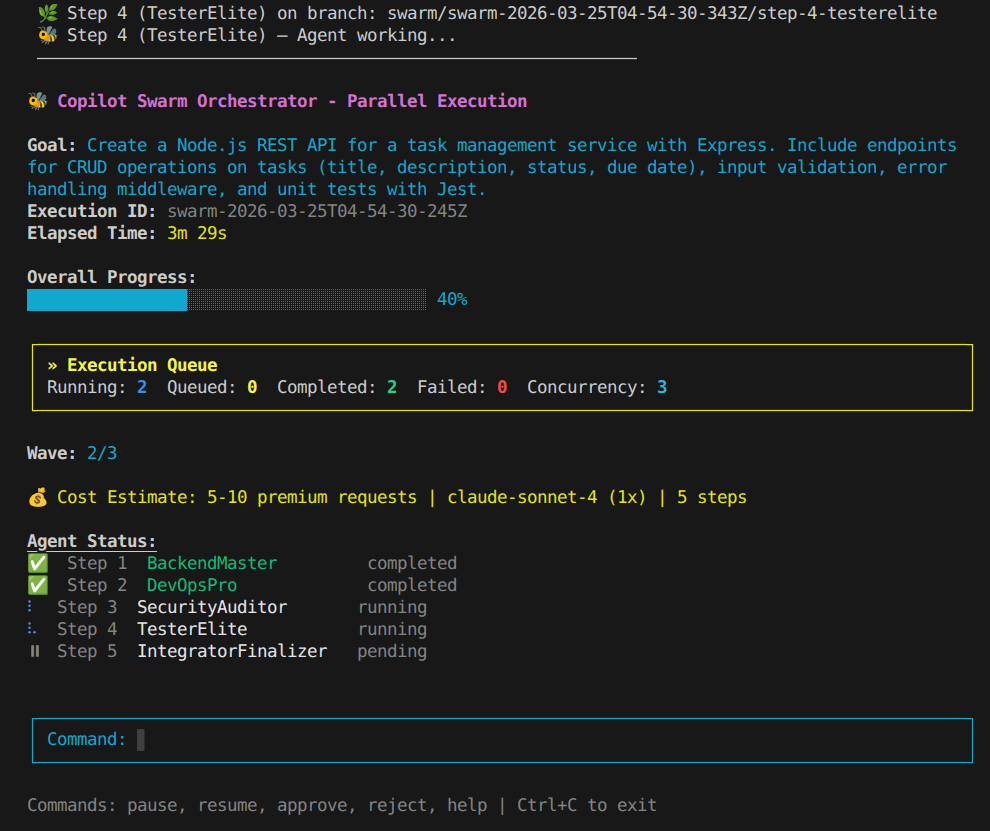
Quick Start
# Install globally
npm install -g swarm-orchestrator
# Or clone and build from source
git clone https://github.com/moonrunnerkc/swarm-orchestrator.git
cd swarm-orchestrator
npm install && npm run build && npm link
# Run against your project with any supported agent
swarm bootstrap ./your-repo "Add JWT auth and role-based access control"

# Use Claude Code instead of Copilot
swarm bootstrap ./your-repo "Add JWT auth" --tool claude-code

# Use Codex
swarm bootstrap ./your-repo "Add JWT auth" --tool codex
See it work before pointing it at your code:
swarm demo demo-fast # two parallel agents, ~1 min
Requires Node.js 20+, Git, and at least one supported agent CLI installed.
| Agent | Install | Auth |
|---|---|---|
| GitHub Copilot CLI | npm install -g @github/copilot |
Launch copilot and run /login (requires Node.js 22+) |
| Claude Code | npm install -g @anthropic-ai/claude-code |
ANTHROPIC_API_KEY |
| Codex | npm install -g @openai/codex |
OPENAI_API_KEY |
What Is This
AI coding agents generate code fast, but without verification, you're merging untested assumptions into your codebase. This orchestrator provides the evidence layer: it runs agents in parallel, checks whether the generated code actually works, and blocks anything that can't prove itself.
What it does: You define a goal. The orchestrator builds a dependency graph, launches steps as dependencies resolve, and manages the full lifecycle: branch creation, agent execution, outcome verification, failure repair, and merge. Every agent runs on its own isolated git branch. Every step is verified by what actually happened: did files change, does the build pass, do tests pass. Steps that can't prove their work don't merge.
What it does not do: This tool does not generate code. It delegates code generation to external agent CLIs (Copilot, Claude Code, Codex) and focuses entirely on orchestration, verification, and quality governance. It is not a replacement for autonomous coding tools; it is a trust layer that wraps them.
Works with Copilot CLI, Claude Code, Codex, or any CLI agent via the adapter interface. Select your tool with --tool globally or per-step in your plan. The orchestrator doesn't care which agent writes the code; it cares whether the code works.
Verification is outcome-based. The engine runs git diff against the branch baseline, executes the project's build and test commands in the worktree, and checks for expected output files. Transcript analysis (parsing what the agent claimed) runs as a supplementary signal, not the primary gate. When a step fails, the RepairAgent receives structured failure context (which checks failed and why, ordered by actionability) instead of blindly retrying the same prompt.
Also available as a GitHub Action for CI/CD integration and with built-in recipes for common tasks.
Quality Benchmarks
The orchestrator's prompt injection and quality gates front-load requirements that developers normally discover through iterative reprompting. The same goal run through the orchestrator produces output that would take 17-25 follow-up prompts to reach with a standalone agent.
The following comparison used the same goal run through Claude Code unassisted and through the orchestrator. Both outputs were evaluated by an independent reviewer against identical criteria.
Goal: "Create a simple browser-based tic-tac-toe game with HTML, CSS, and vanilla JavaScript. Include a 3x3 grid, alternating X and O turns, win detection, and a reset button."
Results: Orchestrator vs Claude Code (unassisted)
| Category | Claude Code | Orchestrator |
|---|---|---|
| Architecture | A (factory pattern, logic/DOM separation) | A+ (pure ES module + DOM controller, new-array-per-move state) |
| Tests | A- (11 tests, custom harness, storage mock required) | A+ (19 tests, zero dependencies, edge case + error coverage) |
| Accessibility | F (no ARIA, no focus management, no keyboard support) | A+ (skip link, aria-live, positional labels, focus-visible) |
| Responsive design | F (fixed 100px cells, no handling) | A (clamp on all sizes, dvh, edge padding) |
| CSS architecture | C (hardcoded colors, no variables, no media queries) | A+ (20+ custom properties, dark mode, reduced-motion) |
| HTML semantics | C+ (buttons, no landmarks, no meta tags) | A+ (meta description, dual theme-color, SVG favicon, landmarks) |
| Project scaffolding | F (no package.json, no README) | A (zero-dep test runner, structured README) |
| Audio feedback | None | A (Web Audio API, lazy init, per-event frequencies) |
What the orchestrator included that Claude Code did not
17 specific quality attributes were present in orchestrator output and absent from Claude Code output: skip link, aria-live region, positional aria-labels (row/column), focus-visible styles, responsive clamp sizing, CSS custom properties (50+ variable references), prefers-reduced-motion media query, prefers-color-scheme dark mode with full variable overrides, <meta name="description">, dual <meta name="theme-color"> (light and dark), inline SVG favicon, pure logic module separation, copy-on-move game state, audio feedback via Web Audio, separate DOM controller, zero-dependency Node test runner, and structured README with file table.
Each attribute requires at least one follow-up prompt to add when using a standalone agent. Several (full dark mode variable overrides, responsive clamp system, module extraction) require 2-3 rounds. Conservative total: 17-25 prompts eliminated per project.
Note: These results are from a representative run. The underlying agent is non-deterministic, so exact grades and counts may vary between runs. The quality attributes are enforced by prompt injection and gate verification, so they are reliably present, but the specific implementation details (e.g., test count, number of CSS variables) can differ.
How it works
The orchestrator injects quality requirements into every agent prompt before execution begins: accessibility standards (ARIA labels, keyboard navigation, focus-visible, skip links), CSS requirements (custom properties, reduced-motion, color-scheme), HTML metadata (description, theme-color, viewport), and code structure rules (pure logic separation, DOM controller pattern, semantic HTML). Quality gates then verify the output and reject work that doesn't meet the bar, triggering targeted repair with specific failure context.
Standalone agents optimize for "correct and working." The orchestrator adds "accessible, responsive, themed, and structured" before the agent writes a single line. The quality bar comes from the system, not from the user's prompt.
Note: This benchmark covers frontend web projects using Claude Code as the baseline. Copilot CLI and Codex comparisons are in progress and will be added here. Backend, API, and CLI project benchmarks are planned.
Usage
Commands
| Command | Description |
|---|---|
swarm bootstrap ./repo "goal" |
Analyze repo and generate a plan |
swarm run --goal "goal" |
Generate plan and execute in one step |
swarm swarm plan.json |
Execute a plan with parallel agents |
swarm quick "task" |
Single-agent quick task |
swarm use <recipe> |
Run a built-in recipe against current project |
swarm recipes |
List available recipes |
swarm recipe-info <n> |
Show recipe details and parameters |
swarm gates [path] |
Run quality gates on a project |
Key Flags
| Flag | Effect |
|---|---|
--tool <n> |
Agent to use: copilot (default), claude-code, codex |
--governance |
Enable Critic review wave with scoring and auto-pause |
--lean |
Enable Delta Context Engine (KB-backed prompt references) |
--cost-estimate-only |
Print cost estimate and exit without running |
--max-premium-requests <n> |
Abort if estimated premium requests exceed budget |
--wrap-fleet |
Use Copilot CLI's native /fleet for parallel subagent dispatch |
--strict-isolation |
Restrict cross-step context to verified entries only |
--pm |
Enable PM Agent plan review before execution |
--param key=value |
Set recipe parameters (with use command) |
--pr auto|review|none |
PR behavior after execution |
Examples
# Full-featured run with Claude Code
swarm swarm plan.json --tool claude-code --governance --lean

# Recipe: add tests with vitest targeting 90% coverage
swarm use add-tests --tool codex --param framework=vitest --param coverage-target=90

# Preview cost before committing
swarm swarm plan.json --cost-estimate-only

# Per-step agent selection in plan.json
# { "steps": [
#   { "id": 1, "task": "...", "agentName": "BackendMaster", "cliAgent": "claude-code" },
#   { "id": 2, "task": "...", "agentName": "TesterElite", "cliAgent": "codex" }
# ]}
GitHub Action
Run the orchestrator in CI without installing anything. Outcome-based verification provides the trust layer for unattended execution.
Security note: Always pass credentials via the
env:block, never viawith:inputs. GitHub Actions may expose input values in workflow logs. Always set minimalpermissions:to limitGITHUB_TOKENscope. See SECURITY.md for full credential handling guidance.
name: AI Swarm - Add Tests
on:
  workflow_dispatch:
    inputs:
      goal:
        description: 'What should the swarm do?'
        default: 'Add comprehensive unit tests for all untested modules'

permissions:
  contents: write
  pull-requests: write

jobs:
  swarm:
    runs-on: ubuntu-latest
    steps:
      - uses: actions/checkout@v4
      - uses: moonrunnerkc/swarm-orchestrator@main
        id: swarm
        with:
          goal: ${{ github.event.inputs.goal }}
          tool: claude-code
          pr: review
        env:
          ANTHROPIC_API_KEY: ${{ secrets.ANTHROPIC_API_KEY }}
          # Add other adapter keys as needed:
          # OPENAI_API_KEY: ${{ secrets.OPENAI_API_KEY }}
      - name: Check Results
        if: always()
        run: echo "${{ steps.swarm.outputs.result }}"
| Input | Default | Description |
|---|---|---|
goal |
(required) | What the swarm should accomplish |
tool |
copilot |
Agent CLI: copilot, claude-code, codex |
recipe |
Run a built-in recipe instead of a goal | |
plan |
Path to a pre-built plan JSON | |
pr |
review |
PR behavior: auto, review (draft), none |
max-retries |
3 |
Max retry attempts per step |
model |
Model to pass to the agent CLI |
The Action outputs result (JSON with per-step verification status), plan-path, and pr-url. Session artifacts are automatically redacted for known secret values (API keys, tokens) at the end of every run. The agent CLI must be available in the runner; the Action does not install it. See docs/github-action.md for setup instructions.
Recipes
Reusable, parameterized plans for common tasks. Recipes modify existing projects (unlike templates, which create new ones).
swarm recipes                           # list all
swarm recipe-info add-tests             # show details
swarm use add-tests                     # run with defaults
swarm use add-auth --param strategy=session --tool claude-code
| Recipe | Steps | Description | Key Parameters |
|---|---|---|---|
add-tests |
3 | Add unit tests for untested modules | framework (jest/vitest/mocha), coverage-target |
add-auth |
4 | Add authentication | strategy (jwt/session) |
add-ci |
3 | Add GitHub Actions CI pipeline | |
migrate-to-ts |
4 | Migrate JavaScript to TypeScript | strict (true/false) |
add-api-docs |
3 | Generate OpenAPI spec and docs | format (openapi/markdown) |
security-audit |
3 | Run security audit and fix findings | |
refactor-modularize |
4 | Break monolithic code into modules |
Create custom recipes by adding JSON files to templates/recipes/. See docs/recipes.md for the schema and examples.
Architecture
Goal ──> Plan ──> Waves ──> Branches ──> Agents ──> Verify ──> Repair? ──> Merge
Plan generation. A goal becomes numbered steps with declared dependencies, each assigned to a specialized agent. Plans can be generated from a goal, loaded from a template, run from a recipe, or bootstrapped from repo analysis.
Greedy scheduling. Steps launch the moment their dependencies are satisfied. Adaptive concurrency adjusts based on success rates.
Branch isolation. Each step runs on its own git worktree and branch. With
--strict-isolation, cross-step context is restricted to verified entries only.Agent execution. The orchestrator spawns the selected agent CLI (
--tool) as a subprocess, injecting the prompt plus dependency context. Transcripts are captured for supplementary analysis.Outcome verification. The engine checks what actually happened: git diff against the recorded base SHA, build execution, test execution, and expected file existence. Transcript parsing runs as a secondary signal. Steps must prove their work with outcomes, not claims.
Failure repair. Failed steps are classified (build failure, test failure, missing files, no changes) and retried up to three times. Each retry receives structured failure context: which checks failed, the relevant build/test output, and what to fix. The RepairAgent uses outcome-based root causes, not guesswork.
Merge. Verified branches merge to main. Quality gates check the result for scaffold leftovers, duplicate blocks, hardcoded config, README accuracy, test isolation, runtime correctness, accessibility, and test coverage.
| Check | Type | Required | What It Verifies |
|---|---|---|---|
| Git diff | git_diff |
Yes | Agent produced file changes vs base SHA |
| File existence | file_existence |
If specified | Expected output files exist in worktree |
| Build execution | build_exec |
If script exists | npm run build (or detected equivalent) passes |
| Test execution | test_exec |
If script exists | npm test (or detected equivalent) passes |
| Transcript evidence | transcript |
No | Agent claimed completion (supplementary) |
When outcome checks are present, transcript-based checks are demoted to non-required. A step passes when all required checks pass.
Key modules| Module | Responsibility |
|---|---|
swarm-orchestrator.ts |
Greedy scheduler, dependency resolution, merge delegation, cost tracking |
worktree-manager.ts |
Git worktree lifecycle: creation, removal, branch operations |
branch-merger.ts |
Branch merge strategies: rebase-and-merge, conflict resolution, wave merges |
verifier-engine.ts |
Outcome-based verification (git diff, build, test, file existence) + transcript analysis |
session-executor.ts |
Agent adapter integration, AgentResult-to-SessionResult mapping |
adapters/ |
Pluggable agent adapters (copilot, claude-code, codex) |
recipe-loader.ts |
Recipe loading, parameterization, listing |
repair-agent.ts |
Failure classification, targeted retry with outcome context |
plan-generator.ts |
Plan creation, dependency validation, recipe-to-plan conversion |
cost-estimator.ts |
Pre-execution cost prediction with model multipliers |
knowledge-base.ts |
Cross-run pattern storage, recipe run tracking, cost history |
runs/<execution-id>/
  session-state.json          # full execution state (resumable)
  metrics.json                # timing, commit count, verification stats
  cost-attribution.json       # per-step estimated vs actual premium requests
  steps/
    step-N/share.md           # raw agent transcript
  verification/
    step-N-verification.md    # outcome-based pass/fail report
Demos
Six built-in scenarios for verifying your setup or seeing the pipeline end-to-end.
Cost note: Demos run real agent sessions against real APIs. Each step consumes at least one premium request (or API call for Claude Code / Codex). Larger demos with expensive models can use significant budget. For example,
saas-mvpwitho3(20x multiplier) could consume 160+ premium requests. Use--cost-estimate-onlyto preview costs before committing.
swarm demo list
swarm demo-fast          # ~1 min, two parallel agents
swarm demo <n>        # any scenario

# Preview cost before running
swarm demo api-server --cost-estimate-only
| Scenario | Agents | What Gets Built | Time | Est. Requests (1x model) |
|---|---|---|---|---|
demo-fast |
2 | Two independent utility modules | ~1 min | 2 |
dashboard-showcase |
4 | React + Chart.js dashboard, Express API | ~8 min | 4-5 |
todo-app |
4 | React todo with Express backend | ~15 min | 4-5 |
api-server |
6 | REST API with JWT, PostgreSQL, Docker | ~25 min | 6-8 |
full-stack-app |
7 | Full-stack with auth, E2E tests, CI/CD | ~30 min | 7-10 |
saas-mvp |
8 | SaaS MVP with Stripe, analytics, security | ~40 min | 8-12 |
Contributing
npm install && npm run build && npm test
Before submitting a PR: run npm test, run swarm gates ., and keep commits descriptive. TypeScript strict mode, ES2020 target.
License
Built by Bradley R. Kinnard.
Reviews (0)
Sign in to leave a review.
Leave a reviewNo results found