motionmind-video
Health Warn
- License — License: MIT
- Description — Repository has a description
- Active repo — Last push 0 days ago
- Low visibility — Only 5 GitHub stars
Code Pass
- Code scan — Scanned 12 files during light audit, no dangerous patterns found
Permissions Pass
- Permissions — No dangerous permissions requested
No AI report is available for this listing yet.
Make videos with your AI coding agent and HyperFrames, and keep every render as a tracked, comparable version.

MotionMind
Make videos with your AI coding agent. MotionMind tracks, measures and shows every version.
Promos, reels, product demos and tutorials built as HyperFrames projects by the agent you already use, with a local
studio that works like MLflow for renders.






30-second walkthrough · MP4 with sound (0.8 MB) · made with MotionMind itself
What you get · Quick start · Workflow · Example prompts · Studio · Install · FAQ
Why
AI agents can already write a motion graphic. What goes wrong is everything around it: the agent skips straight to
code, every "small change" overwrites the version the client approved, nobody knows which render was the good one,
the audio is at a random level, and the next chat starts from zero.
MotionMind gives the agent a production process and gives you a record of it:
- a bundled agent skill that makes the agent work like a studio — concepts first, storyboard second, build, review,
render, with you approving each gate; - a CLI that turns every render into a frozen, measured version (video, contact sheet, source snapshot, loudness,
parameters, checksum); - a local Studio where you watch, compare side by side, edit in HyperFrames Studio without code, and promote a
version to production.
What you get
| Part | What it does | |
|---|---|---|
| 🧠 | motionmind skill |
Four-gate workflow, HyperFrames rules, motion and sound guidance, QA checklist, screen-demo kit. Works with any agent that reads SKILL.md. |
| ⌨️ | motionmind CLI |
setup, init, render, log, promote, track, compare, music, sfx, doctor. The agent calls it; you can too. |
| 🖥️ | Studio (motionmind ui) |
Dashboard at 127.0.0.1:4310: every version with player, 4:5 safe-area overlay, contact sheet, LUFS and QA status, parameters, stages, compare, docs. |
| 🎵 | Music bed | motionmind music: deterministic, sample-free 120 BPM beds with sections (tense, calm, groove, lift, outro), bells and ducking. |
| 🔊 | Starter SFX | 22 CC0 sounds (clicks, pops, chimes, whooshes, risers, impacts) built in; plug in your own library any time. |
| 📡 | Tracking | Already working in HyperFrames Studio or another editor? motionmind track logs every render or export as a version. |
What you can make
| Output | Typical length | |
|---|---|---|
| 🎬 Promos & reels | launches, app promos, campaign spots, 9:16 social | 6–30 s |
| 🖥️ Product demos | real product screenshots with a moving camera, cursor and highlights | 20–60 s |
| 🧭 Tutorials & explainers | chaptered walkthroughs, step-by-step how-tos, 16:9 or 9:16 | 30–90 s |
| 🔤 Kinetic typography | statements, announcements, hooks | 5–20 s |
| 📺 Bumpers & end cards | logo moments, CTAs, idents | 3–10 s |
Every version is a HyperFrames project (HTML + GSAP) rendered to MP4, so it can be reopened, edited visually in
HyperFrames Studio, and re-rendered identically later.
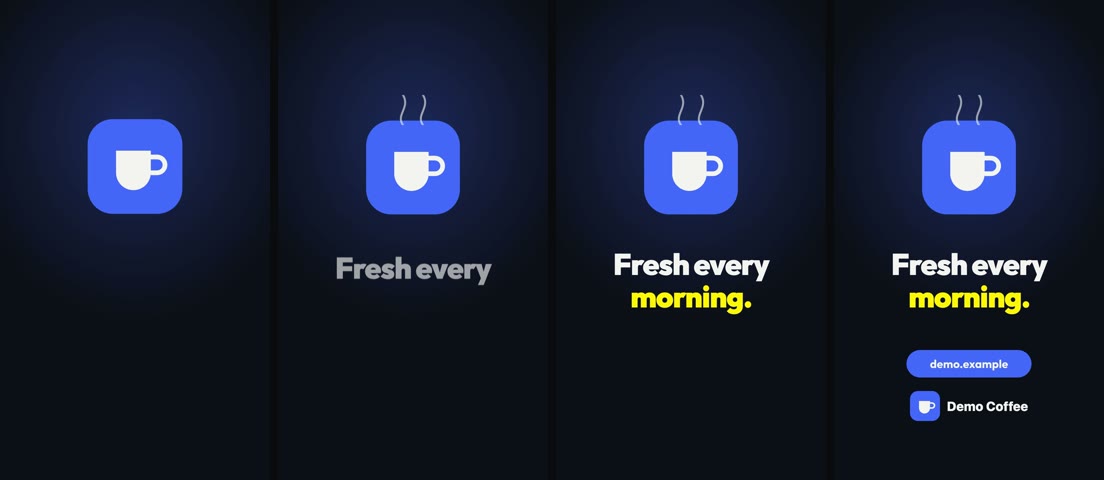 A 6-second 9:16 demo for the fictional Demo Coffee brand that ships in
shared/brands/demo/:
built with motionmind init, music from motionmind music, three sounds from the starter pack,
rendered at −13.7 LUFS.
Quick start
Requirements: macOS, Linux or Windows; Node.js 22+; ffmpeg/ffprobe on PATH; and an AI coding agent CLI.
HyperFrames and its headless Chrome are fetched on first use (Linux ARM64 needs a system Chromium, see
Requirements).
npm i -g motionmind
motionmind setup my-studio        # workspace + motionmind skill + official HyperFrames skills
cd my-studio
motionmind doctor                 # Node, ffmpeg, Chrome, HyperFrames, skill, agent CLI
motionmind ui                     # Studio at http://127.0.0.1:4310 — keep it running
In a second terminal, in the same folder:
$ claude            # or codex, gemini, opencode …
> Use the motionmind skill. I want a 15-second 9:16 promo for my coffee shop "Kopi Senja",
  message "great coffee, friendly prices", CTA kopisenja.id, music + SFX, no voice-over.
Expect a few rounds of conversation, not a one-shot: the agent stops at each gate and waits for you.
Workflow
flowchart LR
  A[Brief<br>goal, audience,<br>format, CTA] --> B[3 concepts<br>plan/concepts.md]
  B --> G1{Gate 1<br>you pick}
  G1 --> C[Storyboard + style<br>per second, TASTE.md]
  C --> G2{Gate 2<br>you approve}
  G2 --> D[Build<br>motionmind init<br>scenes, check, snapshot]
  D --> E[Draft render<br>logged as staging]
  E --> G3{Gate 3<br>you review in Studio<br>or HyperFrames Studio}
  G3 -->|notes| D
  G3 --> F[Render + QA<br>−14 LUFS, safe area,<br>determinism]
  F --> G4{Gate 4<br>you promote}
  G4 --> H[production]
- Brief the agent. Product, audience, format and length, audio (music only, voice-over coming, temporary TTS),
CTA, what must be on screen. Put the logo, fonts and product screenshots inshared/brands/<brand>/. - Pick a concept. Two or three genuinely different stories in words, written to
plan/concepts.md. - Approve the storyboard. A per-second table, and the style locked in
TASTE.md(palette with roles, type,
easing, music) so later versions look and move the same. - Let it build.
motionmind initcreates the version folder; the agent writes one scene per file, runs
HyperFramescheckandsnapshotafter every change, and looks at the frames. - Review. Watch the draft in the Studio, or press Edit in HyperFrames to change text, timing or audio without
code. While you edit, the version is locked for the agent. - Promote. After QA (−14 LUFS ±0.5, true peak ≤ −1 dBFS, 9:16 safe area, CTA held), you move it to production;
the previous production version of the same aspect ratio is archived, never deleted. The loudness rules are
enforced: a version that misses them is refused for production unless you override it (--force, or the checkbox
in the Studio), and the override is written toLOG.md.
Tip: a new message or audience is a new campaign; a new hook, style, music or ratio for the same message is a
new version (v2-…) in the same campaign. Rendered versions are never overwritten.
Example prompts
Use the motionmind skill. A 30-second 9:16 promo for our note-taking app. Logo and screenshots are in shared/brands/notely/.
Use the motionmind skill. A 45-second 16:9 product tour of our HR dashboard from the captures in shared/brands/acme/captures/,
camera following the clicks, music + SFX.
Use the motionmind skill. Kinetic typography for our festival: "City of Sound, 3 nights, 48 stages". Loud, 9:16, 12 seconds.
Continue acme/launch-15s: make v2 with a new hook that starts from the problem; keep the style from TASTE.md.
Revise acme/launch-15s v2: the CTA is too small and the second scene is rushed. Render again when fixed.
Getting better results
- Give real brand material: logo files, fonts, palette, product screenshots at 2× resolution.
- Say the format, the length and the one thing the viewer must remember. Short text wins.
- References are for rhythm and technique, never for copying layouts, colours or assets.
- Start a new chat per new video; resume an old one by naming its campaign — the agent reads
TASTE.md,PROGRESS.mdandLOG.mdfirst.
The Studio
motionmind ui serves a local dashboard over the workspace (it only binds to 127.0.0.1).
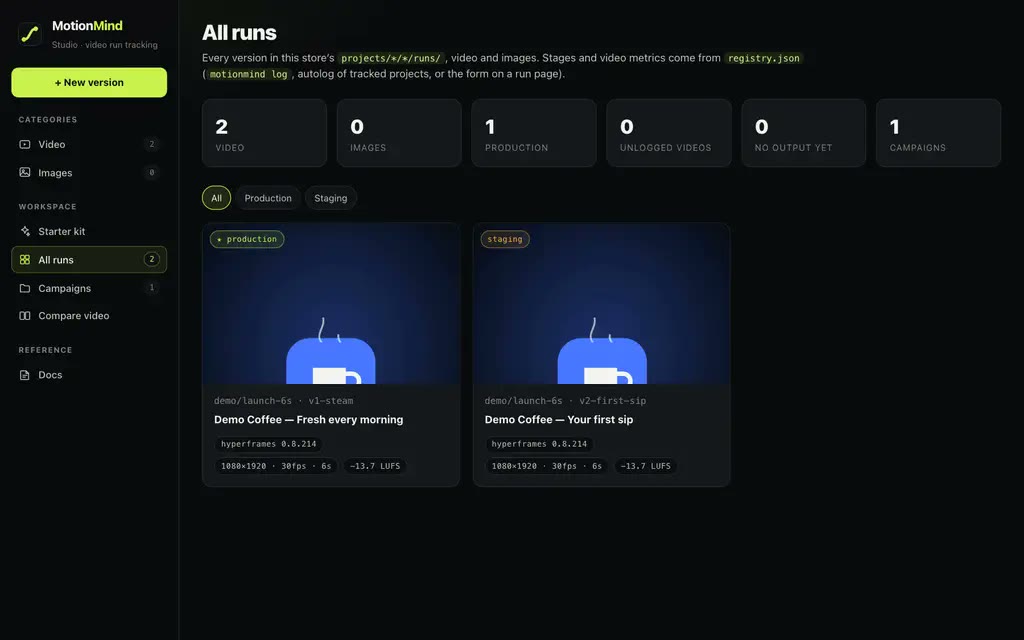 All runs Every version with stage, resolution, loudness and engine, filtered by campaign or stage. |
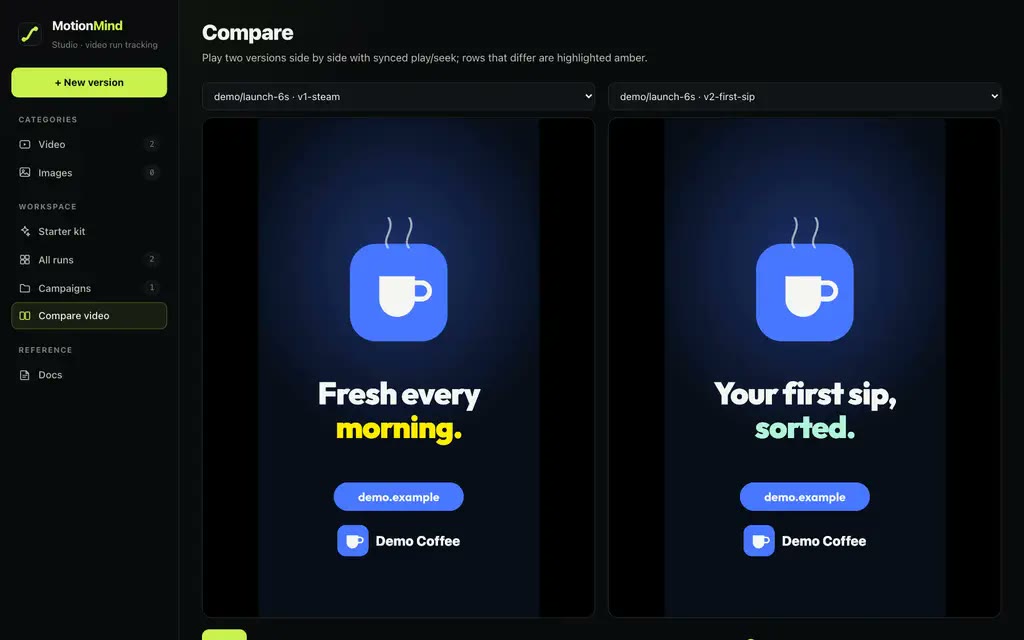 Compare Two versions played in sync, with a table of what changed: parameters, loudness, size. |
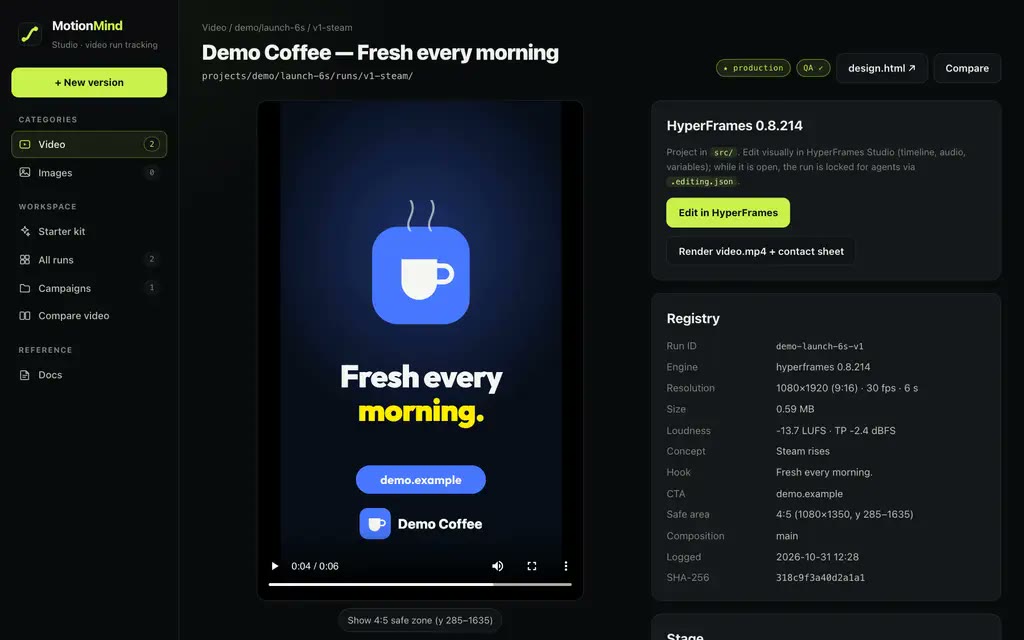 Run page Player with 4:5 safe-area overlay, contact sheet, breakdown, parameters, stage, Edit in HyperFrames, Render. |
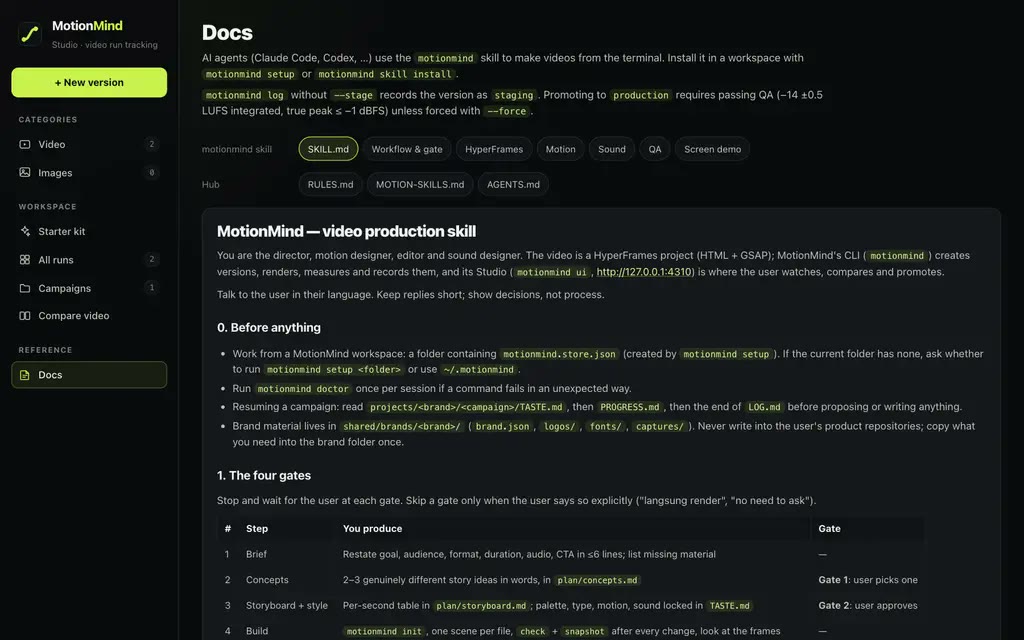 Docs The skill and its references, readable by you exactly as the agent reads them. Plus a Starter kit that turns a brief into a prompt. |
MotionMind, the MLflow way
| MLflow | MotionMind |
|---|---|
tracking store (mlruns/) |
workspace with motionmind.store.json (or ~/.motionmind, or $MOTIONMIND_STORE) |
| experiment | campaign <brand>/<campaign> |
| run · params · metrics · artifacts | version v<N>-<slug> · composition, variables, CLI version · LUFS, true peak, duration, render time · video.mp4, contact sheet, src/ snapshot |
mlflow.autolog() |
motionmind track + motionmind ui / watch: every render in a tracked project is logged |
mlflow.log_* |
motionmind log <video> --param k=v --metric k=n |
| model registry stages | staging (default) → production → archived, one production version per aspect ratio; production requires passing QA |
mlflow ui |
motionmind ui |
Already working in HyperFrames Studio or another editor?
Let MotionMind just keep the record — every render or export becomes a version:
motionmind track ~/Movies/HyperFrames/my-video --campaign acme/launch-15s   # HyperFrames: watches renders/
motionmind track ~/Exports/premiere --campaign acme/launch-15s-cut          # any editor: watches new .mp4 files
motionmind log ./final.mp4 --campaign acme/launch-15s --param hook="Stock running low?"
motionmind compare acme-launch-15s-v1 acme-launch-15s-v2
motionmind promote acme-launch-15s-v2 --stage production
Install
npm (recommended)
npm i -g motionmind        # or run any command with npx motionmind …
motionmind setup my-studio
setup creates the workspace (motionmind.store.json, projects/, shared/brands/, AGENTS.md, CLAUDE.md),
copies the skill to .agents/skills/motionmind with a link at .claude/skills/motionmind, and runsnpx hyperframes skills to install the official HyperFrames skills into your agents' global skill folders (in your
home directory; skip with --no-hyperframes-skill). Update the motionmind skill later with motionmind skill install
(add --global to install it into ~/.agents and ~/.claude instead).
The package carries the Studio's Next.js + React runtime (about 330 MB installed, most of it Next.js and its native
compiler), so the first install takes a few minutes on a slow connection.
From source
git clone https://github.com/Motion-Minds/motionmind-video.git && cd motionmind-video/studio
npm install && npm run build && npm link     # provides the motionmind command
The skill only
The skill is a plain Agent Skills folder: studio/skills/motionmind/ (SKILL.md, references/, assets/). It still
needs the motionmind CLI on PATH for its commands.
| Agent | Where it goes |
|---|---|
| Claude Code | .claude/skills/motionmind in the project, or ~/.claude/skills/motionmind |
| Codex CLI · OpenCode · omp | .agents/skills/motionmind or ~/.agents/skills/motionmind, or reference it from AGENTS.md |
| Gemini CLI · Cursor · others | copy into the project and reference SKILL.md from GEMINI.md, .cursor/rules, or the system prompt |
Install one copy per scope.
motionmind skill installrefuses to overwrite a folder it did not create unless
you pass--force.
Requirements
| To… | You need |
|---|---|
| Run the CLI and Studio | Node.js 22+ |
| Render, measure loudness, make contact sheets | ffmpeg + ffprobe on PATH |
| Render HyperFrames | nothing extra on macOS, Windows and desktop Linux x64 — npx fetches the pinned HyperFrames CLI and its headless Chrome. Minimal Linux (servers, Docker) also needs Chrome's system libraries; HyperFrames prints the exact apt-get install line, and Docker needs --shm-size=1g. Linux ARM64 has no headless Chrome build: install Chromium (apt install chromium) and export HYPERFRAMES_BROWSER_PATH=$(command -v chromium). |
| Make videos with an agent | an agent CLI that reads skills: Claude Code, Codex, Gemini CLI, OpenCode, … |
| Your own sound library | optional — a folder with one sub-folder per category, MOTIONMIND_SFX=<folder> |
| Nicer Studio fonts | optional — Satoshi and Geist files in shared/ui-fonts/ (system fonts otherwise) |
motionmind doctor checks all of this and says what is missing.
Commands
| Command | What it does |
|---|---|
motionmind setup [dir] · doctor · skill install [--global] |
create a workspace, check prerequisites, install/update the skill |
motionmind ui [--port] [--no-watch] |
Studio + autolog for tracked projects |
motionmind init b/c v1-slug --engine hyperframes [--resolution portrait|landscape|square] |
new version folder with a pinned HyperFrames project and brand assets |
motionmind import <dir> b/c v1-slug |
copy an existing HyperFrames project into a new version |
motionmind edit b/c [version] [--stop] |
open HyperFrames Studio on a version (or the tracked project); locks it for agents |
motionmind render b/c [version] |
render with the pinned CLI, make the contact sheet, measure, update the record |
motionmind log <video> --campaign b/c [--param k=v] [--metric k=n] [--stage staging|production|archived] [--force] |
record any video as a version; stage defaults to staging |
motionmind track <dir> --campaign b/c [--backfill] · untrack · tracked · watch [--once] |
autolog renders of a project you edit elsewhere |
motionmind promote <run_id> --stage production|staging|archived [--force] [--campaign b/c] · list · compare <a> <b> [--campaign b/c] |
registry operations; production requires passing QA |
motionmind music --out x.wav --duration 15 --sections "0:tense,2:groove,5:outro" |
deterministic music bed; section numbers are bars (0-based), not seconds |
motionmind sfx list [--query] · sfx scan |
SFX catalogue (built-in CC0 pack, or your library) |
How the skill keeps quality up
- Gates before code — concepts, then storyboard and style; nothing is built before you choose.
- One version, one folder — new direction means
v<N+1>; approved renders are frozen with their source, assets
and pinned CLI, so they re-render identically. - Look at the output — HyperFrames
checkandsnapshotafter every change; the agent opens the frames and the
contact sheet before saying "done". - Style memory — palette with colour roles, type, easing and music live in
TASTE.md; feedback becomes rules there. - Determinism — no randomness or clocks in scenes; the same render twice gives identical frames.
- Sound that's measured — −14 LUFS ±0.5 integrated, true peak ≤ −1 dBFS, read from the rendered file every time.
logandrenderwarn when a video misses it, and promotion to production is refused (override:--force, which
is written toLOG.md). Silent videos pass. - Phone-safe layout — 9:16 text and CTA inside y 285–1635, body text ≥ 28 px, CTA held still at the end.
- Edit lock — while you edit in HyperFrames Studio, the agent does not touch the project; afterwards it reads
your changes first. - Rights — only assets the user owns or can license; every sound and download has its source recorded.
Full detail: studio/skills/motionmind/SKILL.md and references/ (workflow, HyperFrames, motion, sound, QA, screen demo).
Repository layout
studio/                          the npm package "motionmind"
  skills/motionmind/             the agent skill: SKILL.md, references/, assets/screen-kit.js
  core/                          store, runs, HyperFrames adapter, media, music, SFX, setup
  cli/                           the motionmind command
  app/ components/ lib/          the Studio (Next.js)
  sfx/                           CC0 starter sound pack + catalog.json
  starter-kits/ templates/       prompt kits and campaign templates
  public/brand/                  MotionMind logo
shared/brands/demo/              example brand kit (palette, colour roles, logo)
shared/brands/motionmind/        MotionMind brand kit
AGENTS.md                        instructions for agents working in this repo / store
scripts/                         export_oss.py, brand-capture notes
docs/gallery/                    README images
FAQ
Does MotionMind generate the video by itself?No. Your AI agent writes the video, following the motionmind skill; MotionMind provides the process, the commands,
the record and the Studio. That is also why it works with whichever agent and model you prefer.
Yes, an H.264 video.mp4 per version, next to its contact sheet and the HyperFrames source that produced it.
Yes. Press Edit in HyperFrames on a version (or run motionmind edit) to open HyperFrames Studio: timeline, text
variables, audio clips. Then render again from the Studio.
Yes: macOS, Windows and Linux (x64 and ARM64). On Linux ARM64 there is no headless Chrome build, so install Chromium
and set HYPERFRAMES_BROWSER_PATH; minimal Linux images also need Chrome's system libraries (HyperFrames prints theapt-get line). In PowerShell, quote comma lists: --sections "0:tense,2:groove". motionmind doctor checks the
rest.
Yes. motionmind track <folder> --campaign <brand>/<campaign> records every new render or export; motionmind log
records a single file.
The built-in pack is CC0 (Kenney's Interface Sounds plus sounds synthesised for MotionMind) and the music bed is
generated from code. Sounds you add are yours to license; motionmind sfx list --unlicensed shows what has no
licence recorded.
The Studio binds to 127.0.0.1 and reads local files. HyperFrames is run with telemetry off. Your agent talks to its
own model provider as usual.
Yes. Skills in ~/.agents/skills/ or .agents/skills/ (Remotion, the official HyperFrames skills, your own brand skills)
sit next to motionmind; the agent picks whichever fits the request.
Contributing
Issues and pull requests are welcome. Behaviour lives in studio/core/ (the CLI and Studio share it); a rule for the
agent goes in studio/skills/motionmind/, with the failure it prevents. Run npm run typecheck, npm test andnpm run build in studio/ (tests use Node's built-in runner; Node 22.18 or newer), and bump version instudio/package.json.
License
MIT © 2026 Vinzzztty. The MotionMind name and logo identify the project and are not covered by the MIT
licence. Third-party tools and the starter sounds keep their own licences — see NOTICE.md.
Reviews (0)
Sign in to leave a review.
Leave a reviewNo results found