explain-for-dumb
Health Warn
- License — License: MIT
- Description — Repository has a description
- Active repo — Last push 0 days ago
- Low visibility — Only 5 GitHub stars
Code Warn
- Code scan incomplete — No supported source files were scanned during light audit
Permissions Pass
- Permissions — No dangerous permissions requested
No AI report is available for this listing yet.
Claude Code skill that explains code changes in plain human language — no scary jargon. Two modes: a 'for dummies' story or a per-file walkthrough.
explain-for-dumb
A Claude Code skill that explains code changes in plain human language — no scary jargon.
You come back to your branch after an AI agent (or a colleague, or past-you at 2am) has been busy, and the diff looks like hieroglyphs. This skill reads the actual changes, understands them, and tells you what happened like you're a smart but tired human being.
What it does
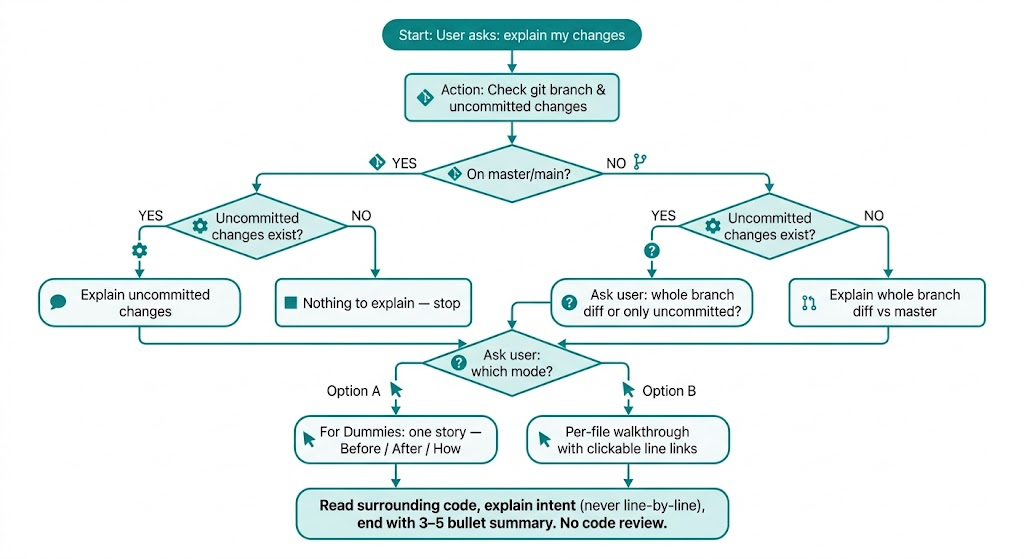
- Figures out what to explain: the whole branch diff vs
master, or just your uncommitted changes (it asks when both exist). - Asks how you want it explained:
- For dummies — one coherent story: how things worked before, what works now, and how it was done, in everyday analogies with almost no code.
- Per-file walkthrough — file by file: what each file is responsible for, what changed and why, every new function in human words, with clickable links pointing at the exact changed lines.
- Actually reads the surrounding code, not just the diff — so explanations are true, not guessed.
- Answers in whatever language you're speaking in the session.
- Ends with a short 3–5 bullet summary.
- Never turns into a code review — no "risks", no "things to watch out for". It explains, it doesn't judge.
How it decides what to do
Install
For humans
The easiest way — via the skills.sh CLI:
npx skills add MotleyWildside/explain-for-dumb
Or manually. Personal install — available in all your projects:
mkdir -p ~/.claude/skills/explain-for-dumb
curl -o ~/.claude/skills/explain-for-dumb/SKILL.md \
  https://raw.githubusercontent.com/MotleyWildside/explain-for-dumb/main/SKILL.md
Per-project install — checked into the repo, so the whole team gets it:
mkdir -p .claude/skills/explain-for-dumb
curl -o .claude/skills/explain-for-dumb/SKILL.md \
  https://raw.githubusercontent.com/MotleyWildside/explain-for-dumb/main/SKILL.md
Restart Claude Code (or start a new session) and the skill is picked up automatically.
For agents
If you are an AI agent reading this: install the skill yourself by fetchinghttps://raw.githubusercontent.com/MotleyWildside/explain-for-dumb/main/SKILL.md
and writing it to ~/.claude/skills/explain-for-dumb/SKILL.md (user-wide) or.claude/skills/explain-for-dumb/SKILL.md (project-wide).
If you are a human who'd rather delegate: paste this into your Claude Code session:
Install the skill from https://github.com/MotleyWildside/explain-for-dumb
into ~/.claude/skills/explain-for-dumb/SKILL.md
Usage
In a Claude Code session, just say any of:
/explain-for-dumb- "explain my changes"
- "what did the agent do?"
- "walk me through the diff"
Claude will detect the scope (branch vs uncommitted), ask which mode you want, and explain.
Examples
"For dummies" mode
You: "what did the agent do?"
Before: the app asked the server for the user list every time you opened the page, even if you opened it five times in a row — like calling the pizza place to re-read the menu on every visit.
After: the list is fetched once and remembered for five minutes. The page opens instantly on repeat visits.
How it was done: a small "memory box" (a cache) was added between the page and the server. Before calling the server, the page now checks the box first. If the menu is already there and less than five minutes old — use it; otherwise call the server and put the fresh copy in the box.
Summary:
- Added caching for the user list (5-minute lifetime)
- Page no longer hits the server on every open
- One new file with the cache logic, two files updated to use it
Per-file walkthrough mode
You: "walk me through the diff"
useUsers.ts:12-38 — this file is responsible for fetching the user list for the page.
New functiongetCachedUsers— it exists to answer "do we already have a fresh copy?" before bothering the server. "Fresh" means younger than 5 minutes (theTTLconstant — time-to-live, i.e. how long a saved copy is trusted).UsersPage.tsx:47 — the page itself. One-line change: it now calls
getCachedUsersinstead offetchUsers, so it goes through the memory box first.
It knows when there's nothing to say
You: "explain my changes" (on a clean master)
You're on
masterand the working tree is clean — there's nothing to explain. Nothing was invented to look busy. 🙂
It works in your language
The skill always answers in the language you're speaking in the session. Ask in Spanish — get the story in Spanish:
Antes: la aplicación pedía la lista de usuarios al servidor cada vez que abrías la página...
License
MIT — see LICENSE.
Reviews (0)
Sign in to leave a review.
Leave a reviewNo results found