moskills
Health Pass
- License — License: MIT
- Description — Repository has a description
- Active repo — Last push 0 days ago
- Community trust — 11 GitHub stars
Code Fail
- spawnSync — Synchronous process spawning in bin/moskills.cjs
- process.env — Environment variable access in bin/moskills.cjs
- fs module — File system access in bin/moskills.cjs
- process.env — Environment variable access in docs/diagrams/scenes/moskills-flow.mjs
Permissions Pass
- Permissions — No dangerous permissions requested
No AI report is available for this listing yet.
Rules, skills and hooks that make an AI coding agent agree on the work, prove each step, and stop before it says done.
moskills



Rules, skills and hooks that make an AI coding agent agree on the work, prove each step, and stop before it says "done".
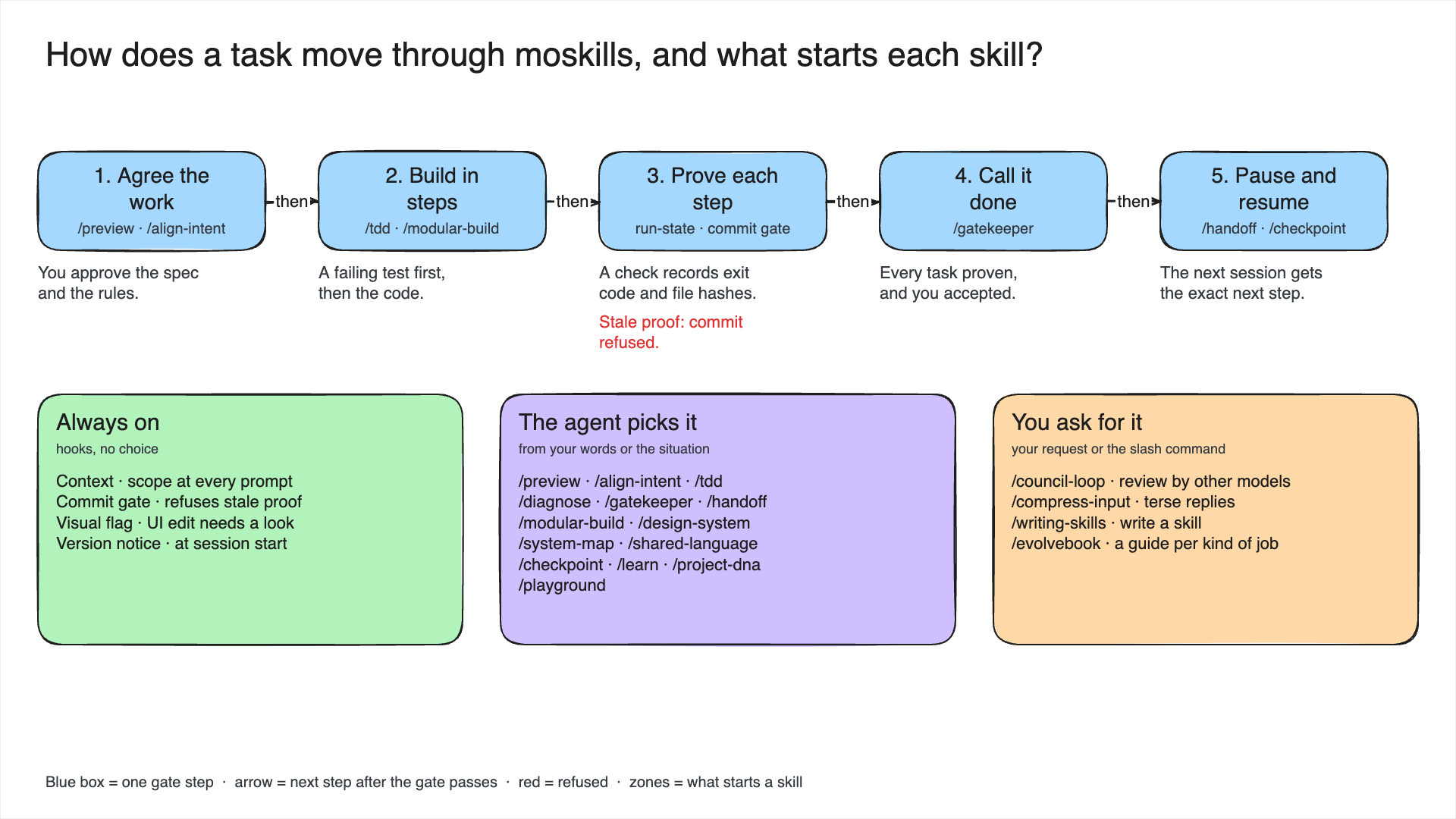
- You ask in plain words. The agent picks the skill.
- Each step has a gate: a check, a screenshot or your approval.
- A changed file makes the proof stale, and moskills refuses the commit.
It works in Claude Code as a plugin, and in Codex, Antigravity and other agents through the CLI.
Install
Claude Code, inside Claude Code:
/plugin marketplace add Mouad1/moskills
/plugin install moskills@moskills
/moskills-init
Other agents, in a terminal:
npm install -g moskills
cd your-project && moskills init --agents
Run init once per project. Then ask the agent: "Build this feature" or "Fix this bug". Updates, uninstall and the file list are in the install guide.
What starts each skill
| Starts | Skill | What it does |
|---|---|---|
| Always on (hooks) | Context | Puts the scope and the next step into every prompt and after compaction. |
| Always on (hooks) | Commit gate | Refuses git commit when a proof is missing, failed or stale. |
| Always on (hooks) | Version notice | Says at session start when a newer moskills exists. |
| Always on (hooks) | Visual flag | Marks a task after a UI edit. A screenshot or your look is then required. |
| Agent picks it | /preview |
Turns a vague idea into a spec and a one-page PRD that you approve. |
| Agent picks it | /align-intent |
Fixes the goal, scope, success criteria and rule IDs before code. |
| Agent picks it | /tdd |
Writes a failing test, then the code, and records the proof. |
| Agent picks it | /diagnose |
Reproduces a bug and finds the root cause before any fix. |
| Agent picks it | /gatekeeper |
Answers "is it done?" with the checks: Finished or Still not done. |
| Agent picks it | /handoff |
Saves the exact next step so the next session can continue. |
| Agent picks it | /checkpoint |
Records progress, evidence and blockers after a milestone. |
| Agent picks it | /modular-build |
Builds an app one module at a time. You accept each module. |
| Agent picks it | /design-system |
Keeps one design.md with the colours, type and spacing of the UI. |
| Agent picks it | /playground |
Makes one HTML page with sliders when you must change a value to see a result. |
| Agent picks it | /system-map |
Maps modules and dependencies before a change to unfamiliar code. |
| Agent picks it | /shared-language |
Keeps one term per concept in a glossary that the lint checks. |
| Agent picks it | /learn |
Turns a correction into a rule in tasks/lessons.md. |
| Agent picks it | /project-dna |
Records a decision and a replay prompt to build the same thing again. |
| You ask | /council-loop |
Asks reviewers from other model providers and loops until they agree. |
| You ask | /compress-input |
Makes the agent reply in fewer words. |
| You ask | /writing-skills |
Writes or changes a skill, with trigger tests and evals. |
| You ask | /evolvebook |
Keeps one guide per kind of job that improves on each run. |
"Agent picks it" means the agent starts the skill from your words or from the situation. A slash command starts any skill directly. The trigger evals test each "Agent picks it" skill on a direct request and an indirect request.
Note on /council-loop: how the agent reaches the other providers depends on the host. Some hosts have a delegate tool for other models, and other hosts use each provider's CLI. The report says how many providers took part.
Scenario 1: a new project without a UI
flowchart LR
  A[Idea] -->|/preview| B[Spec you approve]
  B -->|/align-intent| C[Scope and rules]
  C -->|/tdd| D[Code with proof]
  D -->|/gatekeeper| E[Done]
  E -->|/handoff| F[Next session]
| You say | What starts | What happens |
|---|---|---|
| "I want a CLI that renames photos by date." | /preview |
The agent asks one question at a time and writes a spec. You approve it. |
| "Pin down what done means for the first version." | /align-intent |
The agent writes the goal, the non-goals and the rules with their checks. |
| "Build it." | /tdd |
Each task starts with a failing test. The check result is recorded. |
| (You edit a file after the test ran.) | Commit gate | The proof is stale. The commit is refused until the test runs again. |
| "The build broke." | /diagnose |
The agent finds the root cause before it changes code. |
| "Is it done?" | /gatekeeper |
The agent runs the checks and reports Finished or Still not done. |
| "Save where we are, I must stop." | /handoff |
The next session starts at the exact next step. |
Scenario 2: a project with a UI
flowchart LR
  A[App idea] -->|/modular-build| B[Module list]
  B -->|/design-system| C[design.md]
  C -->|/tdd| D[One module built]
  D -->|visual flag| E[Screenshot or your look]
  E -->|/gatekeeper| F[Module accepted]
  F -->|next module| D
| You say | What starts | What happens |
|---|---|---|
| "Build a booking app: auth, calendar, payments." | /modular-build |
The agent splits the app into modules. You accept the order. |
| "Pick the colours and spacing for the app." | /design-system |
The agent writes one design.md. The UI code uses only those values. |
| "Build the calendar module." | /tdd |
Tests first, then the code, with recorded proof. |
| (The agent edits a UI file.) | Visual flag | The task needs a screenshot or your look before it is done. |
| "I can't picture how the price changes with the duration." | /playground |
The agent makes one HTML page with sliders for the price inputs. |
| "Is the calendar module done?" | /gatekeeper |
Every check and the visual check must pass. Then you accept the module. |
| "No, we always use pnpm here." | /learn |
The agent records the rule in tasks/lessons.md. |
What init adds to your project
- Rules in
.claude/standard/, imported byCLAUDE.md.moskills syncupgrades them. - Skills and commands in
.claude/skills/and.claude/commands/. - Your files, created once and never overwritten:
docs/prd.md,docs/rules.md,.claude/STATE.mdandtasks/. - Guards: a Git pre-commit hook and the Claude Code hooks above.
moskills doctor reports drift. moskills status prints the goal, the finished work, the blockers and the next step.
More docs
- Quick start, command reference, install guide
- Architecture, diagrams, STE80 writing rules
- Trigger evals, changelog, roadmap
Do not push directly to the default branch. Push a branch and open a pull request. Run npm test before you do.
Built by Mouad Belghiti.
Reviews (0)
Sign in to leave a review.
Leave a reviewNo results found