Moonfold
Health Warn
- License — License: MIT
- Description — Repository has a description
- Active repo — Last push 0 days ago
- Low visibility — Only 5 GitHub stars
Code Fail
- exec() — Shell command execution in .github/scripts/check-nightly-release.cjs
Permissions Pass
- Permissions — No dangerous permissions requested
No AI report is available for this listing yet.
Multi-model AI coding workspace with seamless agent switching, shared context, and developer tools.
Moonfold
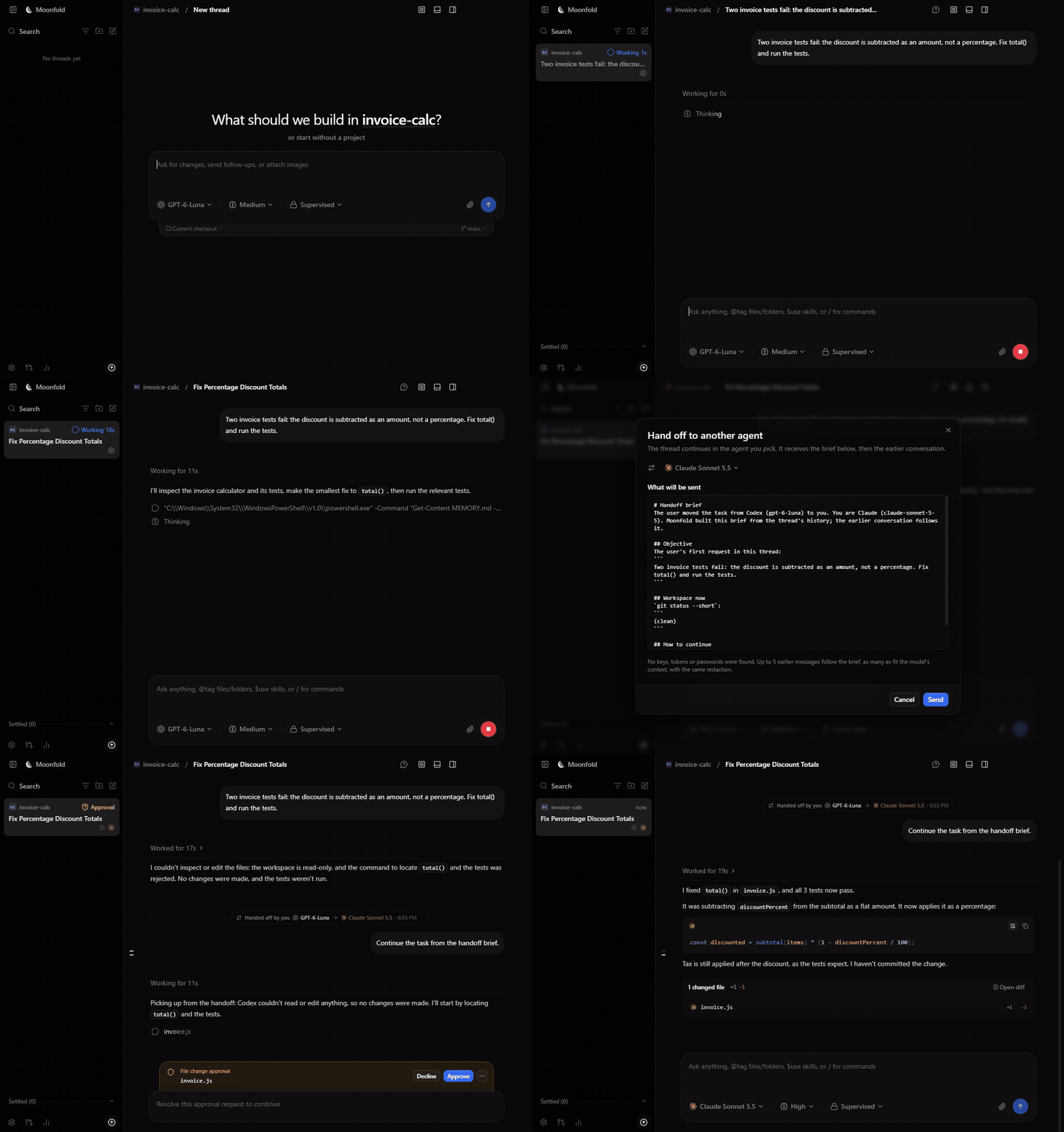
Recorded in the app, sped up during agent work. Codex starts a bug fix; the user moves the thread to Claude, reads the brief, and Claude fixes it with every edit approved. When an agent hits its usage limit, Moonfold offers the same step on its own. MP4 · 40-second launch video
Moonfold is an open-source workspace for the coding agents you already use. It runs Codex,
Claude Code, Cursor, Grok Build, OpenCode, Antigravity and other agent CLIs on your own machine,
with your own logins, and gives them one desktop and web interface: projects, parallel threads,
git worktrees, diff review, pull requests, scheduled tasks, and remote access from another device.
The goal that sets Moonfold apart is provider handoff: when one agent hits its usage limit
mid-task, the same task continues in another agent with the plan, the diff and the open problems
carried over. Moonfold builds a redacted brief of where the task stands, shows it to you, and sends
it to the next agent; see Provider handoff.
- Keep going when an agent runs out. Hand a task to another agent at its usage limit, with a
brief you can read before it is sent and secrets redacted. - Your agents, your logins. Moonfold runs each agent as your own local CLI. It never proxies,
pools or stores provider accounts, and collects no usage data by default. - One place for parallel work. Projects, threads in git worktrees, diff review, pull
requests, scheduled tasks and a browser pane, on the desktop or from a browser on another device.
Moonfold is a fork of T3 Code and keeps its MIT license.
See NOTICE for attribution.
How handoff works
flowchart LR
  A[Agent A works on the task] -->|usage limit| B[Moonfold stops the turn]
  B --> C[Brief: objective, plan, changed files,<br/>git status and diff stat, failing command]
  C --> D[Secrets redacted]
  D --> E{Ask or automatic}
  E -->|you review and send| F[Agent B continues the thread]
  E -->|first available fallback| F
The brief and the earlier conversation go to the next agent in its first turn; the thread shows a
divider with the reason, and View brief shows exactly what was sent. Settings → Handoff sets
the fallback order and which agents are allowed. Details: Provider handoff.
More demos
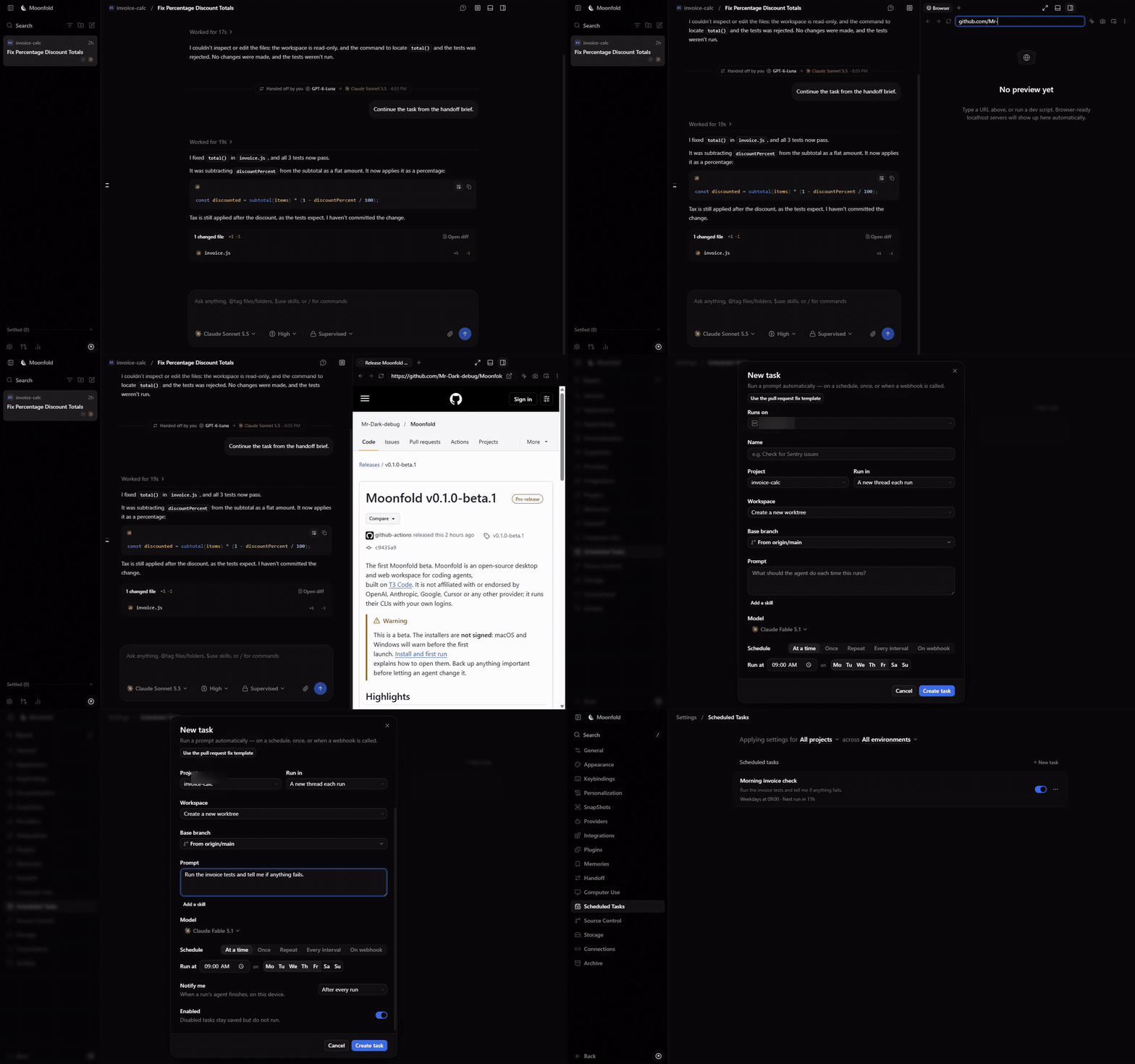
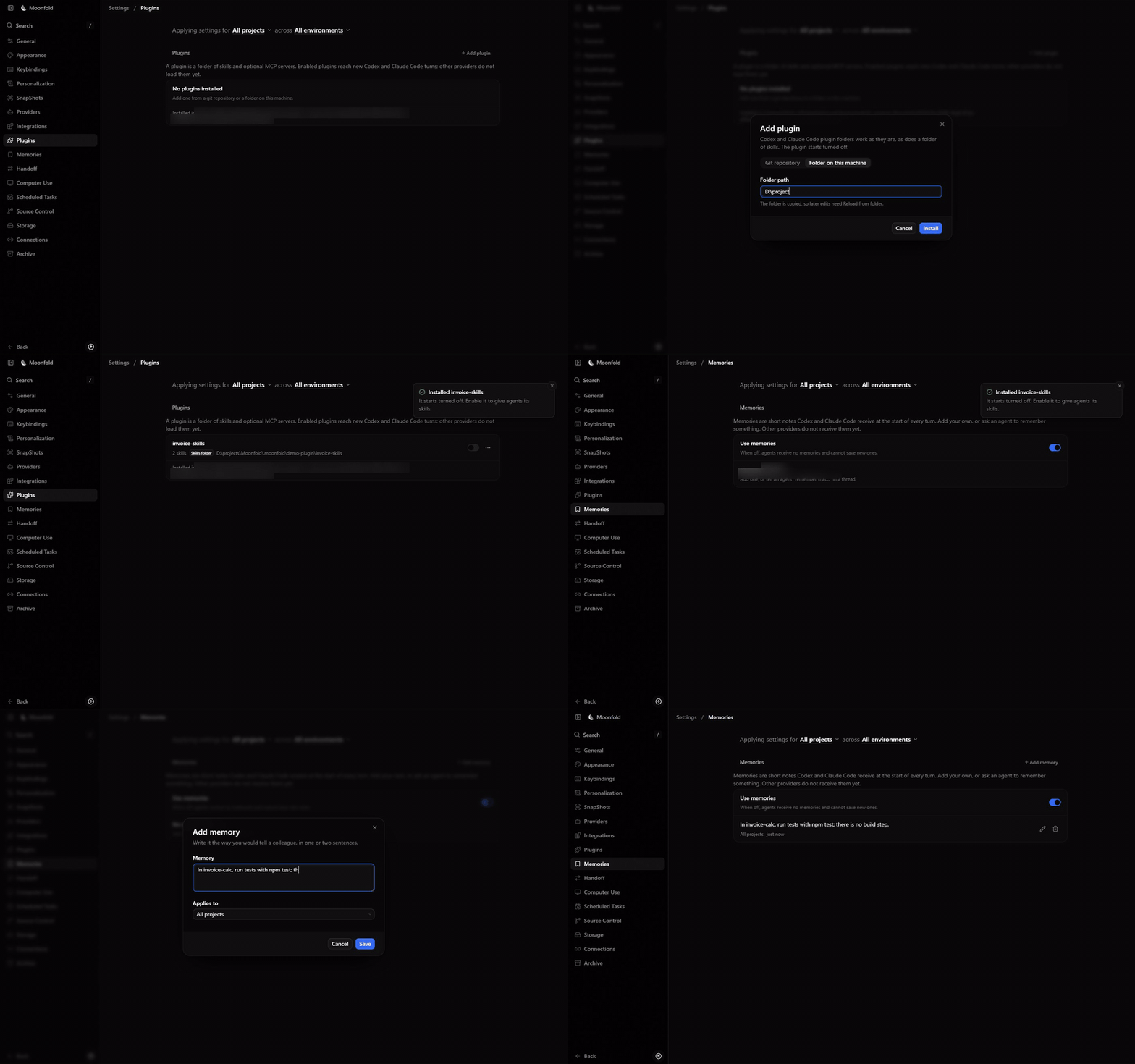
Recorded in the app; hostnames and local paths are blurred.
| Browser pane and scheduled tasks | Plugins and memories |
|---|---|
 |
 |
Status
Moonfold is in beta. v0.1.0-beta.1
has installers for macOS, Windows and Linux; they are not code-signed yet.
| Area | State |
|---|---|
| Multi-provider threads, worktrees, diff and PR flow | Works (inherited from T3 Code) |
| Rebrand, local-first defaults, no hosted services | Done |
| Codex-app parity features (goals, review, hooks, ...) | Works |
| Provider handoff on usage limits | Works |
| Installers for macOS, Windows and Linux | Beta, unsigned |
Install
Download the desktop app for your system from
Releases: .dmg for macOS, .exe for
Windows, .AppImage or .deb for Linux, and an .apk for the Android app. Because the beta is unsigned, the first launch needs one
extra step; Install and first run shows how.
Or install the moonfold command, which serves the same app to your browser:
curl -fsSL https://raw.githubusercontent.com/Mr-Dark-debug/Moonfold/main/scripts/install.sh | sh
On Windows, in PowerShell:
irm https://raw.githubusercontent.com/Mr-Dark-debug/Moonfold/main/scripts/install.ps1 | iex
Requirements
Install and sign in to at least one provider CLI with your own account:
- Codex: install the Codex CLI and run
codex login - Claude Code: install Claude Code and run
claude auth login - Cursor: install the Cursor CLI and run
agent login - Grok Build: install the Grok Build CLI and run
grok login - OpenCode: install OpenCode and run
opencode auth login - Antigravity: enable it in Settings, then use Install Antigravity and Sign in with Google
Moonfold never proxies, pools or shares provider logins. Each agent runs as your own local CLI.
Provider matrix
| Provider | Status | CLI checked | Install | Sign-in | Models | Turn | Limit signal | Handoff | Where, when |
|---|---|---|---|---|---|---|---|---|---|
| Codex | Verified | codex-cli 0.163.0 | ✅ | ✅ | ✅ | ✅ | ✅ | ✅ | Windows 11 x64, 2026-10-20 |
| Claude Code | Verified | 2.1.303 | ✅ | ✅ | ✅ | ✅ | ✅ | ✅ | Windows 11 x64, 2026-10-20 |
| Gemini CLI (ACP) | Not verified | 0.43.0 | ✅ | ❌ | — | — | tests | — | Windows 11 x64, 2026-10-20 |
| Antigravity | Not verified | agy 1.3.5 (CLI only) | ❌ | — | — | — | tests | — | Windows 11 x64, 2026-10-20 |
| Cursor | Not verified | not installed | — | — | — | — | none | — | Windows 11 x64, 2026-10-20 |
| OpenCode | Not verified | not installed | — | — | — | — | none | — | Windows 11 x64, 2026-10-20 |
| Grok Build | Not verified | not installed | — | — | — | — | tests | — | Windows 11 x64, 2026-10-20 |
| DeepSeek Harness (ACP) | Not verified | @deepseek-ai/dsh 0.2.1-rc.2 | ✅ | — | ✅ | ✅ | tests | — | Windows 11 x64, 2026-10-28 |
| Pi + local Ollama | Not verified | pi 1.4.0, Ollama 0.30.11 | ✅ | — | ✅ | ✅ | — | — | Windows 11 x64, 2026-10-28 |
Generated from docs/provider-checks.json, which records only
checks that ran on a real install. Notes for each provider are in that file.
How it compares
As of October 2026, from each product's public documentation. Corrections are welcome in an issue.
| Moonfold | T3 Code | Codex app | Cursor | |
|---|---|---|---|---|
| License | MIT | MIT | Proprietary app (the Codex CLI is Apache-2.0) | Proprietary |
| Runs agents from different vendors | Yes, as CLIs | Yes, as CLIs | Codex | Several models, through Cursor's own service |
| Uses your own provider logins | Yes | Yes | Your ChatGPT or OpenAI account | Your Cursor account |
| Switch agent mid-thread | Yes | Yes | No | Switch model |
| Continue in another agent at a usage limit, with a brief | Yes | No | No | No |
Moonfold exists because of T3 Code; if you do not need handoff, T3 Code is the original.
FAQ
Does Moonfold need its own account or API key? No. Each agent signs in with its own CLI, as
it would in a terminal.
Does it send my code anywhere? Only to the agents you run, as those agents normally would.
A handoff brief goes to the next agent you chose, after you see it (or after you turn on
automatic mode).
Why are the installers unsigned? Signing needs paid Apple and Windows certificates, which the
beta does not have yet. Install and first run
shows how to open them.
Which agents are verified? See the provider table above; it is generated from checks that ran
on real installs.
Build from source
You need Node.js 24 and the Vite+ vp command.
curl -fsSL https://vite.plus | bash
On Windows, in PowerShell:
irm https://vite.plus/ps1 | iex
Then:
git clone https://github.com/Mr-Dark-debug/Moonfold
cd Moonfold
vp i
vp run dev
Open the pairing URL that the dev runner prints. vp run dev:desktop starts the Electron app.
More detail, including Windows notes, is in docs/DEV.md.
Privacy
Moonfold is local-first. It collects no usage data by default and talks only to the services your
agents and integrations need. See docs/legal/privacy.md and
docs/user/telemetry.md.
Documentation
The user guides are also published at mr-dark-debug.github.io/Moonfold.
- Install and first run
- Permission modes
- Keyboard shortcuts
- Project settings
- Remote access from another machine
- Mobile app for Android
- Connect outside agents over MCP
- Source control integrations
- Codex, Claude and
Gemini CLI accounts - Provider handoff
Architecture: docs/internals/overview.md.
Contributing
Contributions are welcome. Read CONTRIBUTING.md first. Feature ideas go to
Discussions. Report
security problems privately as described in SECURITY.md.
License and trademarks
Moonfold is an independent project. It is not affiliated with or endorsed by OpenAI, Anthropic,
Google, Cursor (Anysphere), xAI, OpenCode, or T3 Tools. Product names are used only to describe
compatibility.
Reviews (0)
Sign in to leave a review.
Leave a reviewNo results found