claude-terminal
Health Pass
- License — License: MIT
- Description — Repository has a description
- Active repo — Last push 0 days ago
- Community trust — 12 GitHub stars
Code Fail
- fs.rmSync — Destructive file system operation in forge.config.ts
- child_process — Shell command execution capability in src/hooks/on-notification.js
- child_process — Shell command execution capability in src/hooks/on-prompt-submit.js
- process.env — Environment variable access in src/hooks/on-prompt-submit.js
- fs module — File system access in src/hooks/on-prompt-submit.js
- child_process — Shell command execution capability in src/hooks/on-session-end.js
- child_process — Shell command execution capability in src/hooks/on-session-start.js
- child_process — Shell command execution capability in src/hooks/on-stop.js
Permissions Pass
- Permissions — No dangerous permissions requested
This tool is a tabbed terminal manager built with Electron that lets you run multiple Claude Code sessions side-by-side. It includes features like git worktree integration, session persistence, and auto-naming.
Security Assessment
Overall risk: Medium. The application has extensive shell command execution capabilities spread across multiple hook files (on-notification, on-prompt-submit, on-session-end, on-session-start, on-stop). It also accesses environment variables and the file system, including a destructive file removal operation (`fs.rmSync`) in its build configuration. While these features are expected for a terminal manager that orchestrates CLI tools and git operations, the sheer number of execution points increases the attack surface. No hardcoded secrets were detected, and it does not request dangerous elevated permissions.
Quality Assessment
The project is active, with its last push happening today. It uses the permissive MIT license and has a clear description. However, community trust is currently very low, with only 12 GitHub stars. Being a relatively new and untested tool, it lacks the widespread community validation typically needed for enterprise trust.
Verdict
Use with caution — the tool functions as expected for a terminal orchestrator, but its elevated system access and low community adoption mean you should review its hook scripts before relying on it in sensitive development environments.
Tabbed terminal manager for Claude Code sessions — run multiple AI coding agents side-by-side with worktree integration, session persistence, and auto-naming. Built with Electron for Windows.
ClaudeTerminal



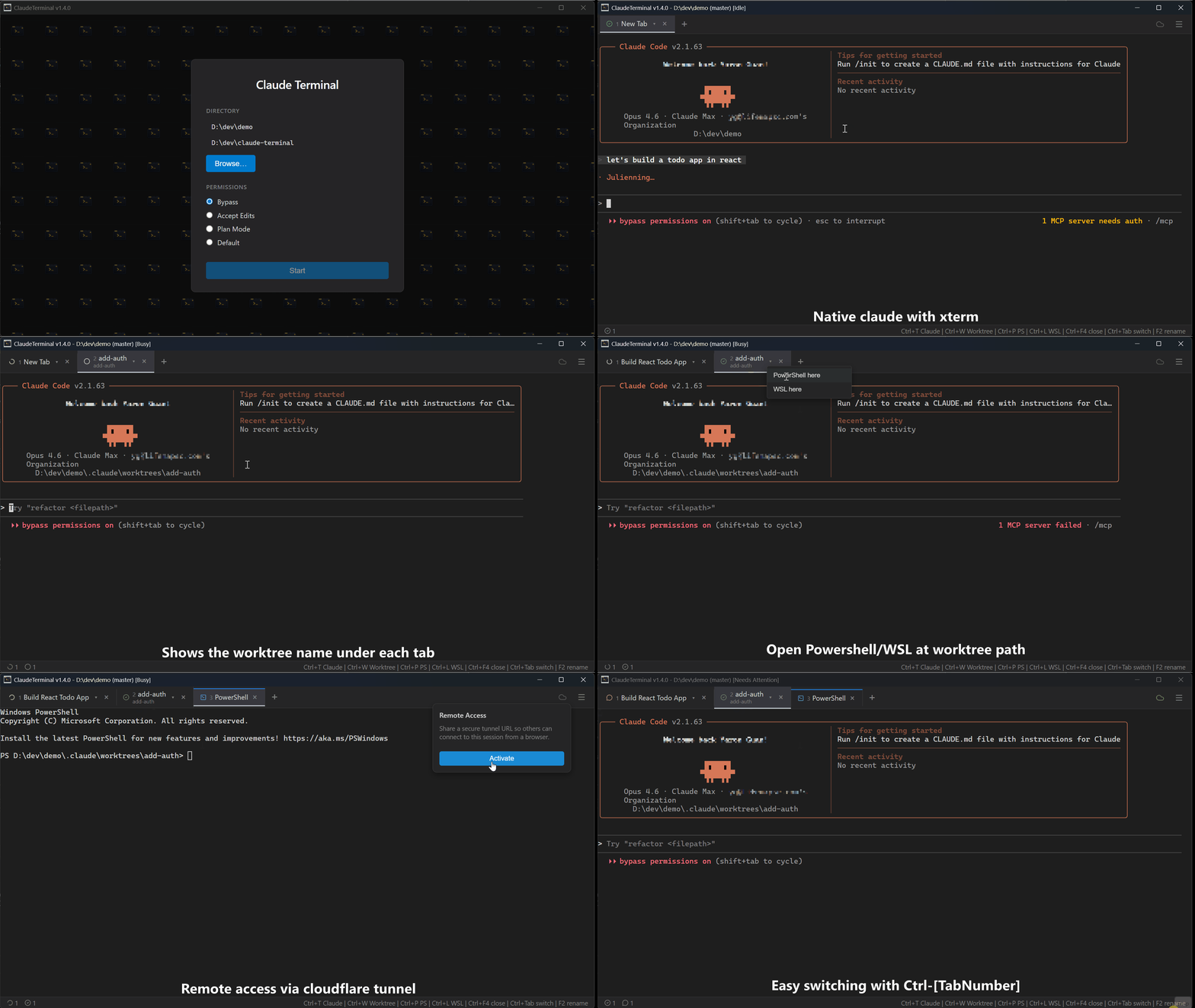
A tabbed terminal manager for running multiple Claude Code sessions side by side — with multi-project workspaces, session persistence, git worktree integration, and auto-naming.
Think Windows Terminal, but purpose-built for Claude Code.
Why ClaudeTerminal?
If you use Claude Code, you've probably found yourself juggling multiple terminal windows — one for your main task, one for a bug fix on a worktree, a shell tab for git operations. ClaudeTerminal puts all of that in one window with:
- Visual status at a glance — see which sessions are working, idle, or need input without switching tabs
- Multi-project workspaces — run sessions across multiple repositories in one window, each with its own color tint
- Session persistence — close the app, reopen it, pick up where you left off
- One-click worktrees —
Ctrl+Wcreates a git worktree and scopes a new Claude session to it - No context pollution — each tab is isolated, with auto-generated descriptive names
- Desktop notifications — get notified when a background session finishes or needs attention
Download
Grab the latest release for your platform:
| Platform | Format |
|---|---|
| Windows | .exe installer |
| macOS | .zip |
| Linux | .deb, .rpm |
Prerequisites: Claude Code CLI must be installed and authenticated.
Windows is the primary platform. macOS and Linux builds are provided but less tested.
Features
Tabbed Claude Code Sessions
- Claude tabs — open multiple Claude Code sessions, each in its own terminal
- Shell tabs — open plain PowerShell or WSL terminals alongside Claude sessions, with distinct icons per shell type
- Auto-naming — uses Claude Haiku to analyze your first prompt and automatically generate descriptive tab names (e.g. "Auth Bug Fix" instead of "Tab 3")
Session Persistence
- Tabs, names, and working directories are saved automatically on every state change
- Full session restoration on app restart — every Claude session resumes exactly where you left off
Git Worktree Integration
- Built-in worktree manager
- Open new Claude sessions scoped to a specific worktree with
Ctrl+W - Branches from the current directory's git branch, not just main
Multi-Project Workspaces
- Open sessions across multiple repositories in a single window with
Ctrl+N - Each project gets a distinct color tint on the window border so you always know which project is active
- Project sidebar — shows all open projects with tab status counts; appears automatically when you have more than one project
- Project switcher —
Ctrl+Popens a quick-switch overlay with keyboard navigation - Arrow key navigation —
Ctrl+↑/↓cycles between projects;Ctrl+←/→cycles tabs within the active project - Each project's tabs, worktrees, hooks, and git state are fully isolated from each other
Repository Hooks
- Configure shell commands that run automatically on lifecycle events like
worktree:created,tab:created,session:started, and more - Managed via a built-in UI dialog — no config files to edit manually
- Per-repository config stored in
.claude-terminal/hooks.json
Example: Auto-install dependencies when a new worktree is created:
{
  "hooks": [
    {
      "id": "install-deps",
      "name": "Install dependencies",
      "event": "worktree:created",
      "commands": [
        { "path": ".", "command": "pnpm i" }
      ],
      "enabled": true
    }
  ]
}

Status & Notifications
- Per-tab status icons — animated icons show whether each session is working, idle, or needs input
- Window title — displays aggregate status (Idle/Working) so you can see it in your taskbar
- Status bar — session status summary and keyboard shortcut hints
- Desktop notifications — native OS notifications when Claude sessions complete tasks, encounter errors, or need your attention. Clicking a notification focuses the relevant tab.
Remote Access
- Access your ClaudeTerminal sessions from any device via a Cloudflare tunnel
- One-click activation generates a short access code and QR code
- Read-only web client — view terminal output from your phone or another machine
- Auto-reconnect on connection drops
Keyboard Shortcuts
Tabs
| Shortcut | Action |
|---|---|
Ctrl+T |
New Claude tab |
Ctrl+W |
New worktree tab |
Ctrl+Shift+P |
New PowerShell tab |
Ctrl+Shift+L |
New WSL tab |
Ctrl+Tab / Ctrl+→ |
Next tab |
Ctrl+Shift+Tab / Ctrl+← |
Previous tab |
Ctrl+1–Ctrl+9 |
Jump to tab by number |
Ctrl+F4 |
Close tab |
F2 |
Rename tab |
Projects
| Shortcut | Action |
|---|---|
Ctrl+N |
Add project to workspace |
Ctrl+P |
Open project switcher |
Ctrl+↑ |
Previous project |
Ctrl+↓ |
Next project |
Build from Source
# Prerequisites: Node.js, pnpm
pnpm install
pnpm start        # Development
pnpm run make     # Build installer
Acknowledgements
Some features were inspired by Maestro, a multi-agent orchestration tool for Claude Code.
License
Reviews (0)
Sign in to leave a review.
Leave a reviewNo results found