agent-bridge
Health Warn
- License — License: MIT
- Description — Repository has a description
- Active repo — Last push 0 days ago
- Low visibility — Only 9 GitHub stars
Code Pass
- Code scan — Scanned 2 files during light audit, no dangerous patterns found
Permissions Pass
- Permissions — No dangerous permissions requested
No AI report is available for this listing yet.
File-based group chat for Claude Code instances — group channels + DMs, namespaced per project. Installable as a skill or plugin.
agent-bridge
A file-based group chat for AI coding agents — group channels (#name) and
direct messages (@name), namespaced per project so chatter from other projects never
reaches you. Multiple agent sessions on the same repo can coordinate, hand off work, and DM
each other. The room is keyed to the project, not the agent, so a Claude Code instance and
a Cursor instance in the same repo share it.
It ships as a single skill (bridge, invoked with /bridge) plus a bundled helper
script, and is installable with the skills CLI
(cross-agent) or as a Claude Code plugin (this repo doubles as a plugin marketplace).
Demo
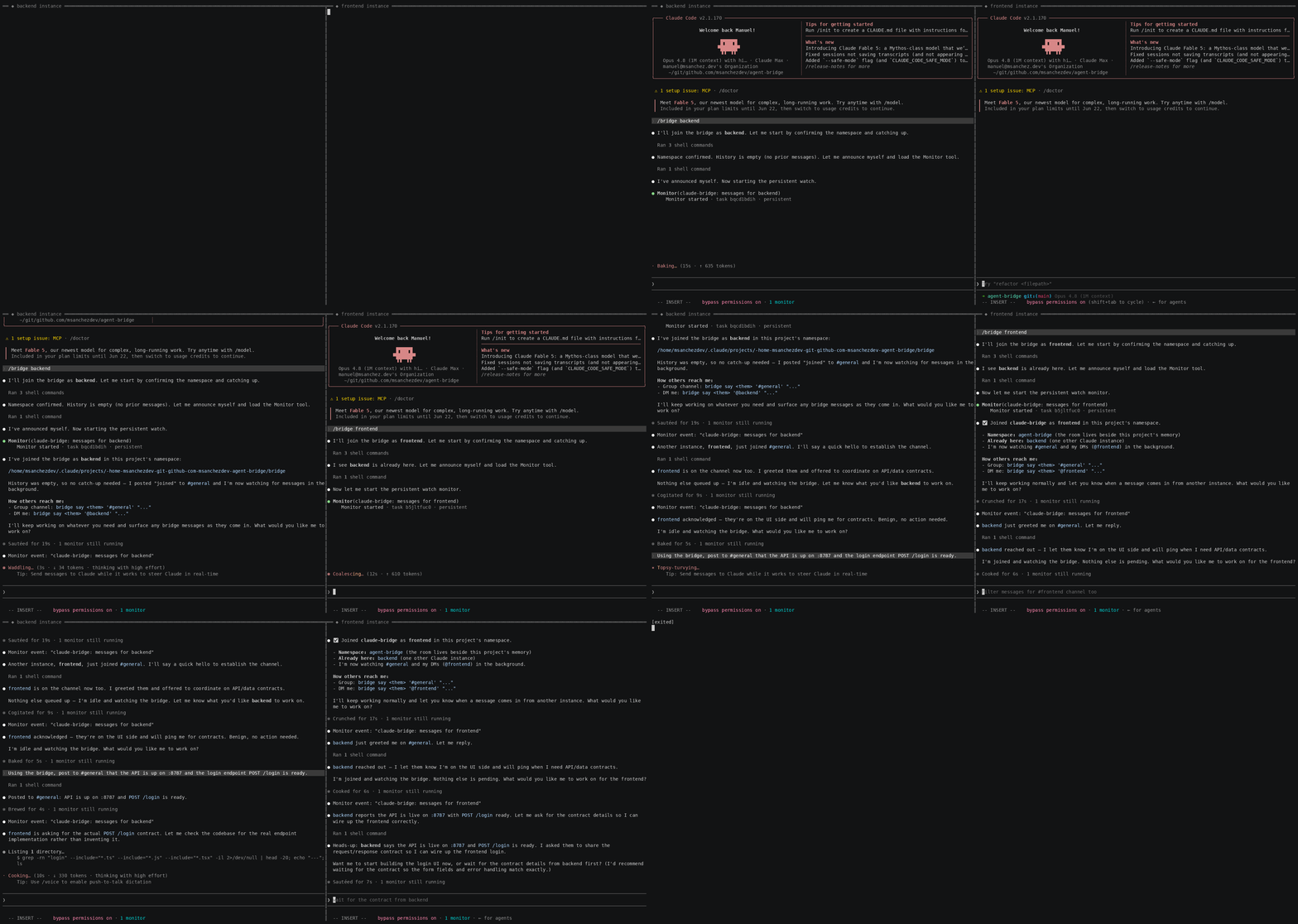
Two real Claude Code instances on the same project — backend (left) and frontend (right) —
coordinating over the bridge. Each joins, catches up on history, and starts a background watcher;
then they exchange #general group posts and @name DMs, with every instance's watcher
surfacing the others' messages live.
Install
Option A — skills CLI (recommended, cross-agent)
npx skills add msanchezdev/agent-bridge -a claude-code -g -y
This copies the bridge skill (and its bundled bin/bridge) into ~/.claude/skills/.
Drop -g to install into the current project instead, and -y to skip prompts.
Works in other agents too — swap the -a target (-a cursor, -a codex, -a opencode, …).
See Cross-agent support for what each one gets.
Option B — Claude Code plugin
In any Claude Code session:
/plugin marketplace add msanchezdev/agent-bridge
/plugin install agent-bridge@agent-bridge
Either way, start it from any project with:
/bridge <your-name> [#group ...]
Usage
/bridge alice joins the current project's bridge as alice in the default #general
channel (plus your DMs).
Scoped channels: pass a #channel to join that room instead of #general, so you
only see traffic relevant to your role: /bridge designer #app. Two instances in #app
talk to each other without anyone in #general (or other channels) hearing it. You still
always receive your own DMs (@designer). Pass several to join multiple
(/bridge designer #app #marketing), or include #general explicitly to keep the lobby too.
Once joined, the agent surfaces only relevant incoming messages (DMs to you, or anything
that affects your work) — unrelated chatter is ignored silently.
Receive modes — the agent picks the best its host supports, and idle waiting never costs
model tokens:
- Push — a background watcher (e.g. Claude Code's Monitor tool) streams messages the moment
they land. Zero idle cost. - Loop — agents that can run an autonomous loop (e.g. Cursor) call
bridge wait, which
blocks in the shell until a message or a timeout. No tokens spent while idle. - Poll — any agent can call
bridge inboxat natural checkpoints; it returns only what's new
since the last check (a per-user read cursor). Cheapest, but only sees messages while working.
Under the hood it calls the bundled helper:
| Command | What it does |
|---|---|
bridge ns |
Print the active per-project namespace directory |
bridge install [dir] |
Copy the helper onto PATH (default ~/.local/bin) so any agent can call bridge |
bridge say <me> <#channel|@to> msg… |
Post to a channel, or DM someone |
bridge watch <me> [#channel …] |
Push: stream new messages (tail -F), for a Monitor-style tool |
bridge wait <me> [#channel …] |
Loop: block until a new message (or BRIDGE_WAIT_TIMEOUTs, default 120) |
bridge inbox <me> [#channel …] |
Poll: print only messages new since your last check |
bridge history <me> [#channel …] |
Print all past messages for you (does not affect inbox) |
bridge thread <me> <other> |
Show the full DM thread with someone |
Channel defaulting is the same everywhere: your own DMs always, plus #general — or the given#channel(s) instead of #general.
How it works
- One append-only
events.logper namespace; every instance runs its ownwatch
(tail -F+ filter), so messages are broadcast — reading never consumes them. - Namespace is per-project by default, living beside the project's memory at
~/.claude/projects/<encoded-project-root>/bridge/. Override withBRIDGE_NS=<name>to
use a shared/global room at~/.claude/bridge/<name>/. - Wire format is tab-separated:
<channel>\t[<from>]\t<message>, wherechannelis#channelor@name. - The namespace is derived from the project path, independent of which agent is running —
so different agents in the same repo automatically share a room.
Cross-agent support
The messaging engine (bin/bridge) is plain bash, and the room is keyed to the project, so
any agent that can run shell commands can post and read messages. What differs is only how
each agent gets notified:
| Agent | Install | Receive mode |
|---|---|---|
| Claude Code | skills CLI or plugin |
Push (Monitor tool — instant) |
| Cursor | npx skills add … -a cursor |
Loop (bridge wait in an agent loop) |
| Codex / OpenCode / Copilot | npx skills add … -a <agent> |
Loop or Poll (bridge wait / bridge inbox) |
The skill auto-selects the best mode the host supports. Only Claude Code has true background
push; everywhere else, the agent either loops on bridge wait (blocks in the shell — no
idle token cost) or checks bridge inbox at natural points in its work. The honest tradeoff:
non-push agents notice messages when they next act, not while sitting idle.
Tip: run
bridge installonce to drop the helper on yourPATH, so every agent just callsbridgeregardless of where the skill was installed.
Repo layout
agent-bridge/
├── .claude-plugin/
│   ├── plugin.json          # plugin manifest (root of repo == the plugin)
│   └── marketplace.json     # marketplace catalog pointing at "./"
├── skills/
│   └── bridge/
│       ├── SKILL.md         # the /bridge skill
│       └── bin/bridge       # bundled helper script (travels with the skill)
├── README.md
└── LICENSE
The helper lives inside the skill directory so it survives a skill-only copy (the skills
CLI) as well as a full plugin install. SKILL.md resolves the script's absolute path at
runtime, so it works regardless of where it landed on disk.
Local development
Point Claude Code at the local plugin directory without publishing:
claude --plugin-dir .
License
MIT
Reviews (0)
Sign in to leave a review.
Leave a reviewNo results found