Adeorq-releases
Health Warn
- License — License: NOASSERTION
- Description — Repository has a description
- Active repo — Last push 0 days ago
- Low visibility — Only 6 GitHub stars
Code Pass
- Code scan — Scanned 12 files during light audit, no dangerous patterns found
Permissions Pass
- Permissions — No dangerous permissions requested
No AI report is available for this listing yet.
Adeorq: nueve agentes trabajando, una sola pantalla. Panel de escritorio para Windows que corre agentes de IA en terminales reales. Codigo a la vista, licencia propietaria.

Adeorq
Nine agents working. One screen.
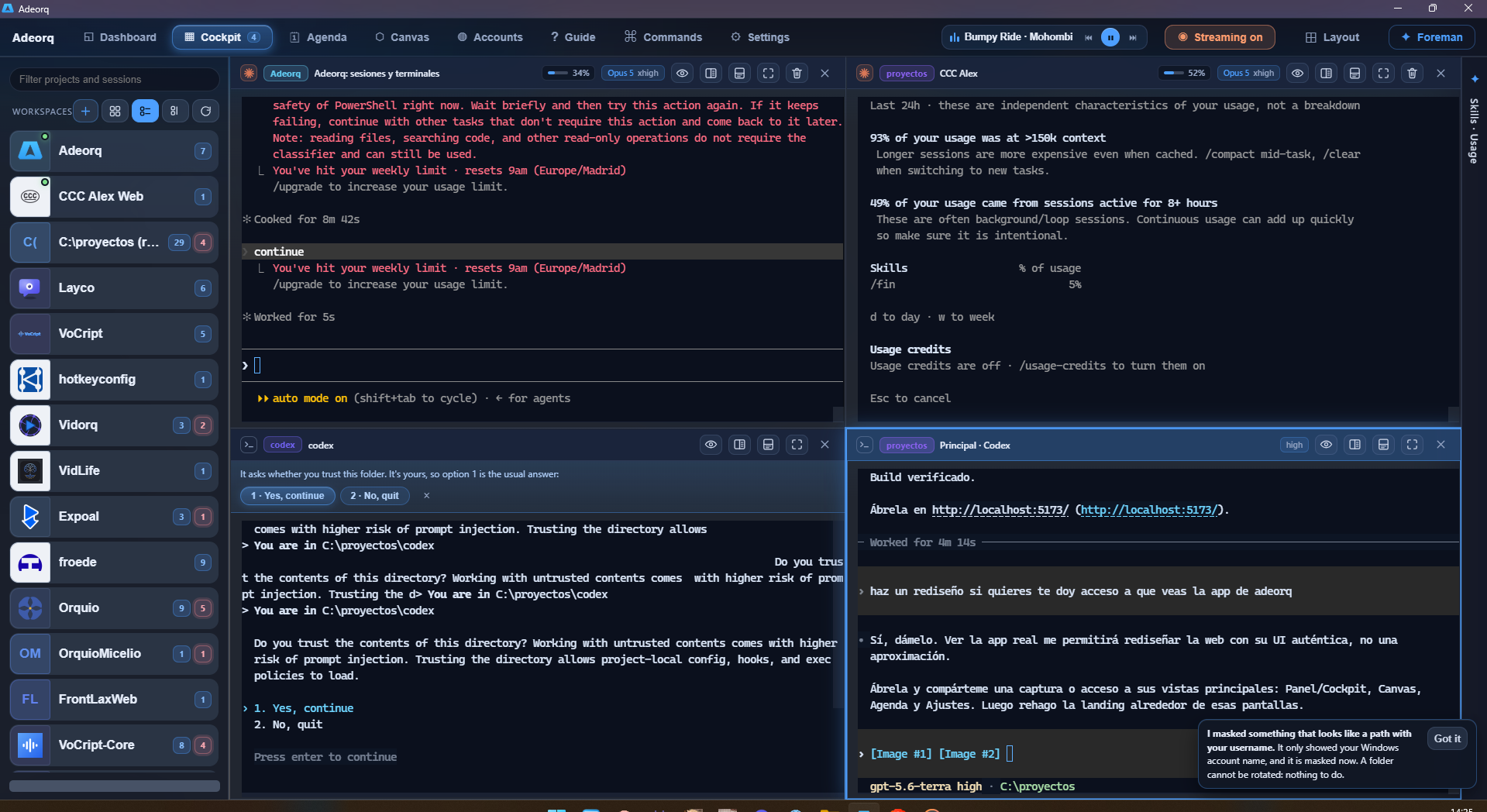
A Windows desktop panel that opens your projects in real terminals — the same ConPTY the
system uses, not a chat box imitating one — shows your Claude Code sessions with their actual
state, and lets you run several agents at once without losing track of any of them.


Free · no account · no API keys · updates itself
All releases ·
Website ·
Guide ·
Español

It runs on YOUR account
Adeorq neither sells nor bundles access to any model. It uses the subscriptions you already
pay for and the CLIs you already have installed: Claude Code, Codex, Gemini CLI,
Antigravity, Copilot, Qwen, Crush, opencode, Amp, Cursor, pi and Kiro. If you have more than
one account, each terminal can be born on a different one.
That is the whole reason it exists: new model features land on the command line before they
land in desktop apps. Adeorq builds the experience on top of those programs instead of
replacing them, so the day something new ships, you have it.
What is inside
| The Cockpit | A grid of real terminals. Split them, move them, set them aside without closing them, and find them where you left them next time. |
| Your sessions | Reads ~/.claude with no API at all: title, real state (asking you / finished / halfway), how long ago, and which ones are still alive. One click resumes any of them inside the panel. |
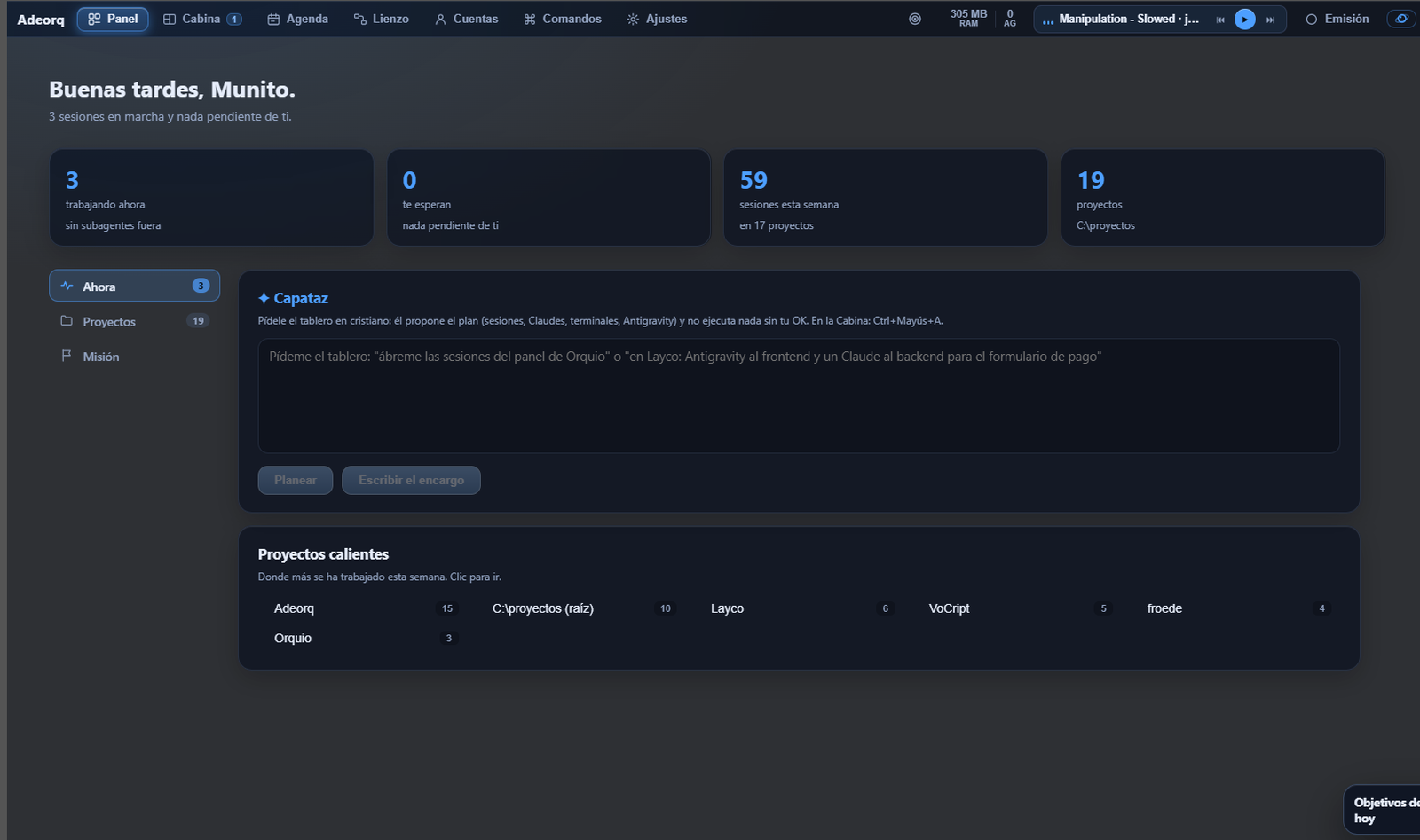
| The Foreman | Tell it what you want out loud and it proposes a board. Nothing runs without your OK, and the plan goes through a deterministic gate before you even see it. |
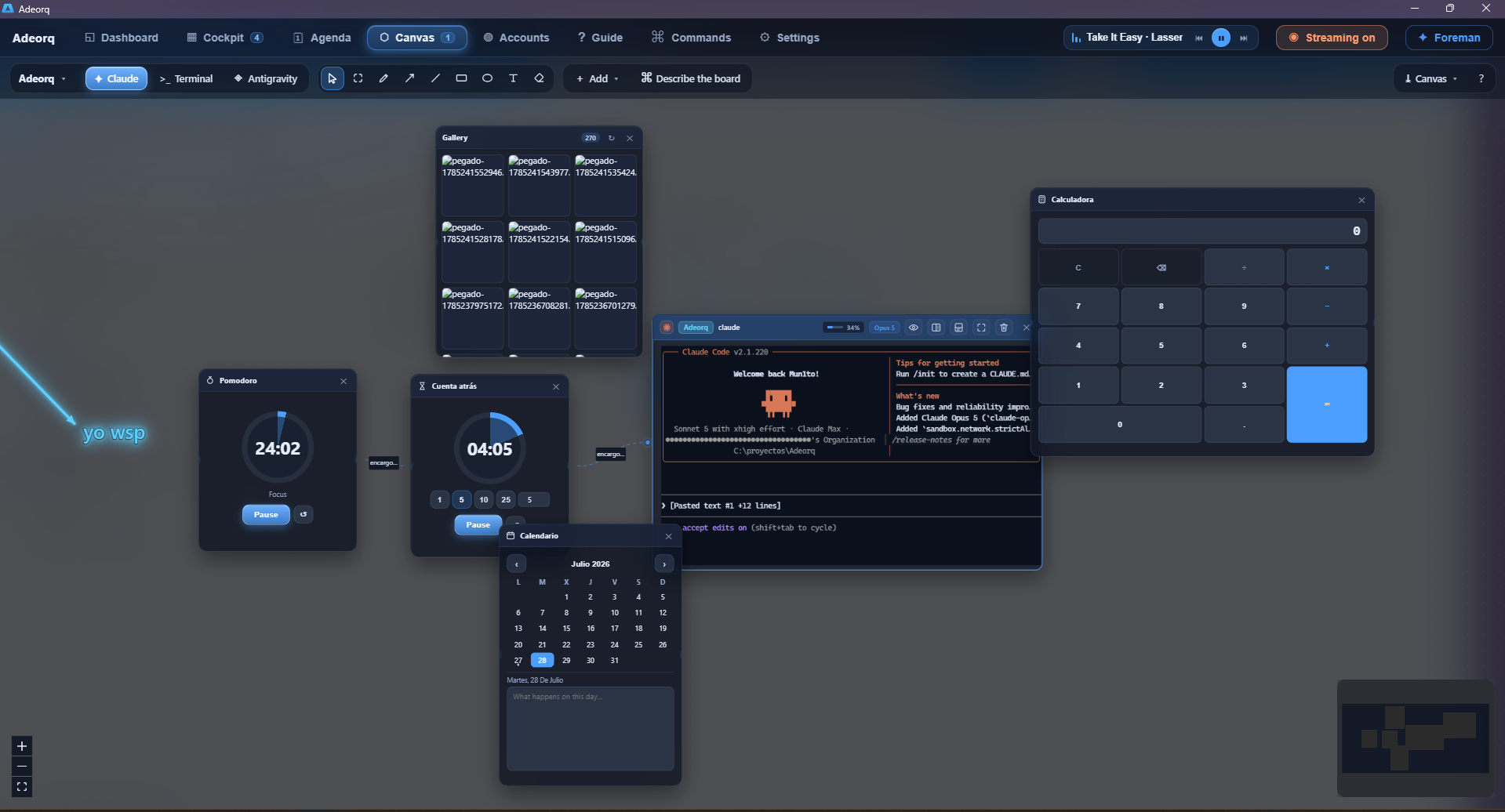
| The Canvas | An infinite board with the terminals living inside it, plus notes, images, a kanban, and arrows that hand one agent's output to the next. |
| The web pane | Your localhost right beside the agent building it: a small browser with tabs, back and forward, and one click to swap in YOUR real browser, extensions and all. |
| Activity | What is going on behind the focused terminal: which skills and MCP servers it is using, every tool call, and each request to the model with its tokens. |
| Shadow Mode | Each agent in its own git worktree. You read the diff and decide whether it lands or gets thrown away. |
| The Agenda | What is coming at you, your goals for the day, and the ideas your agents leave behind along the way. |
| Memory | Your Obsidian vault inside the panel, searchable by what the notes say, with a map of what links to what. |
Windows will warn you when you install it
That is expected. The installer is not code-signed — an Authenticode certificate costs
several hundred euros a year — so SmartScreen shows "Windows protected your PC" the first
time.
To carry on: More info → Run anyway.
Always download it from
this repository's releases page
and nowhere else. And once installed, updates are signed: Adeorq verifies each one's
cryptographic signature before applying it, so that warning only ever appears once.
On Linux
Download
Adeorq-x86_64.AppImage,
make it executable and run it. There is nothing to install:
chmod +x Adeorq-x86_64.AppImage
./Adeorq-x86_64.AppImage
The releases page also carries a.deb for Debian and Ubuntu (sudo apt install ./Adeorq_*.deb).
Three things work differently, and it is better to know them upfront:
- Secrets. On Windows they go to the Credential Manager, which encrypts them with your
login. Linux has no such vault, so they go to a600file under~/.local/share/adeorq/secretos: that protects them from other users of the machine, not
from another program of yours. - The music controls (what is playing, next, volume) are Windows-only: the system itself
publishes that, and the Linux equivalent is MPRIS, which is not in yet. - The window is translucent, so it needs a compositing desktop. Any modern GNOME or KDE
has one; without a compositor the glass will look opaque.
It is built on Ubuntu 22.04, so it needs glibc 2.35 or newer (Ubuntu 22.04+, Debian 12+,
Fedora 36+, Arch).
Building it yourself
pnpm install
pnpm tauri dev      # development window
pnpm tauri build    # installer
You need Rust. On Windows, also the Visual Studio build tools; on Linux,
Tauri 2's own:
sudo apt install build-essential pkg-config libssl-dev \
  libgtk-3-dev libwebkit2gtk-4.1-dev libayatana-appindicator3-dev librsvg2-dev patchelf
Don't trust it, check it
Open source only helps if somebody actually reads the code, and almost nobody does. So
instead of asking you to trust this project, here is the prompt to check it: point your own
AI agent at this repository and get a security report, in your language, in a few minutes,
even if you do not know how to program.
Open AI-AUDIT.md and paste it into Claude Code, Codex, Cursor, Copilot or
whatever you use. It is the same prompt in every public repository here, so you can compare.
ES: No hace falta que te fíes. Abre AI-AUDIT.md, pega ese texto en tu IA
y te dirá en tu idioma qué hace este programa de verdad: qué envía por internet, qué toca
en tu ordenador y qué ejecuta al instalarse.
Licence
The source is visible. That does not make it free software.
You may install and use Adeorq freely, for yourself or for your company, and you may read,
study and compile this code. What you may not do is redistribute it, resell it or publish
derived versions. It is all spelled out in LICENSE (in Spanish, in plain
language).
Third-party components keep their own licences, with every copyright notice collected inTHIRD-PARTY-NOTICES.md.
Built on
Adeorq would not exist without these. All permissively licensed, all credited one by one with
their copyright in THIRD-PARTY-NOTICES.md.
| Tauri | The window and the bridge to Rust. A 5 MB binary instead of 150. |
| xterm.js | The terminal emulator, with its WebGL renderer. |
| portable-pty (WezTerm) | Real ConPTY, from Rust. |
| React + Vite | The interface. |
| React Flow | The infinite canvas. |
| Ollama · whisper.cpp | What runs on your own machine: summaries and dictation, without leaving the house. |
Notices
Not affiliated with Anthropic, OpenAI, Google or Microsoft. Their names and logos are
trademarks of their respective owners and appear here only to identify which tool you are
working with.
Something wrong? Open an issue.
Reviews (0)
Sign in to leave a review.
Leave a reviewNo results found