muniment
Health Pass
- License — License: NOASSERTION
- Description — Repository has a description
- Active repo — Last push 0 days ago
- Community trust — 12 GitHub stars
Code Fail
- rm -rf — Recursive force deletion command in .factory/factory.yaml
- process.env — Environment variable access in .forgejo/workflows/ci.yml
- rm -rf — Recursive force deletion command in .forgejo/workflows/release.yml
- process.env — Environment variable access in .forgejo/workflows/secret-scan.yml
Permissions Pass
- Permissions — No dangerous permissions requested
No AI report is available for this listing yet.
Your models, working together: a free desktop app for your models, tools, and files. Read-only mirror.

Your models. Working together.
A free desktop app for your models, tools, and files. No Muniment account required.
Website · Docs · Get the app · Getting started
Free desktop · Source under FSL.
Features
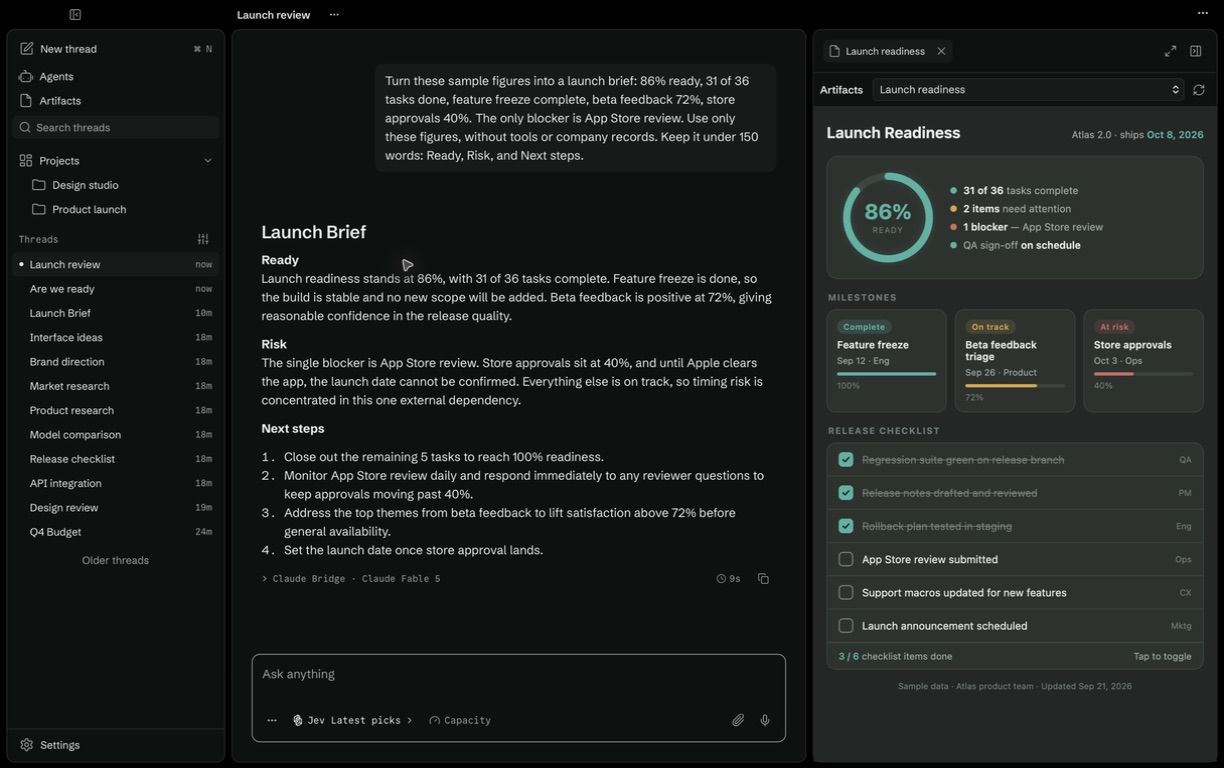
- Your models, together. Connect provider accounts, API keys, or local models. Choose a model or let Jev route each request. Usage shows what each subscription window has left.
- One workspace. Keep projects, threads, files, a terminal, and a browser together.
- Tools that fit your work. Add MCP servers, skills, and plugins. Pick extra ones for a single turn.
- Permission modes. Each thread and agent runs in one of six modes, from Ask before changes to Bypass permissions. An approval is Allow once or Deny.
- Agents and artifacts. Create agents that run on a schedule, a webhook, or a tool check, and interactive outputs beside the conversation.
- Your machines. Pair other desktops, servers, and containers, and run a thread or an agent on any of them.
- Memory and voice. Keep context across threads, see where each memory came from, and dictate on-device with live words.
Start
Download Muniment for your platform:
See the install guide for platform requirements
and all downloads for alternate installers.
Open the app, connect a provider, and start a thread.
Follow the getting started guide for your first project.
AppImage sandbox setup
Ubuntu 24.04 restricts unprivileged user namespaces. The AppImage needs a host sandbox helper on these systems, even without the DEB.
The AppImage includes a setup script and the Chromium sandbox helper.
- Download the AppImage from the official release.
- In an empty directory, extract its sandbox setup.
chmod +x /path/to/muniment.AppImage
/path/to/muniment.AppImage --appimage-extract usr/lib/muniment/cef/chrome-sandbox
/path/to/muniment.AppImage --appimage-extract setup-sandbox.sh
- Install the helper with administrator access.
sudo /bin/sh squashfs-root/setup-sandbox.sh
- Remove the extracted files.
rm -r squashfs-root
- Run the original AppImage as your normal user.
The setup requires a setuid-enabled executable filesystem at /usr/lib/muniment/cef.
It keeps Chromium's sandbox enabled and leaves the host's user namespace policy unchanged.
Run setup for each AppImage update. Matching helpers need no changes.
If setup reports a different helper, keep the DEB helper when the DEB is installed.
For an AppImage-only installation, close Muniment and remove /usr/lib/muniment/cef/chrome-sandbox with sudo rm before setup.
To uninstall an AppImage-only installation, remove that helper and the AppImage.
Homebrew
The official Homebrew cask is not available yet. Use the macOS download above.
Once Homebrew accepts the cask, install with:
brew install --cask muniment
Repository layout
core/is the shared Rust core: runtime, model router, pins, protocols and the
headless servers. core/README.md describes its crates.src-tauri/is the desktop's Rust workspace. It builds the core crates by path.src/is the desktop UI.scripts/andtest/hold the desktop's tooling and tests.
Core holds the logic that every host shares. The desktop is the UI layer on top of it.
Releases
GitHub Releases on munimentai/muniment host every download. One vX.Y.Z tag
releases the desktop app, the CLI, the server and the runtime image together.core/Cargo.toml names the version, and scripts/version.py keeps the desktop
copies in step. The CI workflows in .forgejo/workflows/ build and publish them.
Only a maintainer dispatch of main runs a release job. Each job checks this in its first step and fails before any credential is read.
- Set the version with
python3 scripts/version.py set X.Y.Zand land it onmain.core/scripts/release.pyprints the next version. - Dispatch
nightly.ymlonmain. It signs the three platform builds, uploads them to thenightlypre-release, and runs the installed checks. - Dispatch
subscriptions.ymlon GitHub with the nightly source SHA. Its native runners are on GitHub. - Dispatch
release.ymlonmainwith the source SHA, the version, anddry_runset. The dry run runs every check and creates nothing. - Dispatch
release.ymlagain withoutdry_run. It creates the version tag in the source repository, and the mirror carries it to GitHub.
The job then publishes the verified nightly bytes,latest.json, andSHA256SUMSas the stable release.
Later jobs add the pins and the signed server archives, signSHA256SUMSover every file, and push the runtime image.
The GH_RELEASE_TOKEN secret holds a fine-grained GitHub token with Contents write on munimentai/muniment.
Every GitHub Releases call uses it. The CI job token reaches only the source repository.
Issues and license
Report a bug or request a feature by email to [email protected].
Outside code contributions are not accepted. See CONTRIBUTING.md
and SECURITY.md for issue and private vulnerability reports.
Muniment uses FSL-1.1-ALv2, a Fair Source license.
Each version converts to Apache 2.0 after two years.
Third-party components retain their own licenses.
npm run check:agent-dependencies checks Claude Code, Pi, and extension pins against current releases and Pi peer ranges.
Updates require the focused regression tests and the native CI and installed nightly checks.npm run test:agent-runtime checks extension loading, selected models, streamed completion, and cache usage against a local fixture.
Set PI_TEST_BINARY to the verified Pi executable and PI_TEST_PACKAGES to an isolated frozen install of core/pins/packages.bun.lock.
Reviews (0)
Sign in to leave a review.
Leave a reviewNo results found