claude-code-starter-kit
Health Warn
- License — License: MIT
- Description — Repository has a description
- Active repo — Last push 0 days ago
- Low visibility — Only 6 GitHub stars
Code Fail
- rm -rf — Recursive force deletion command in .claude/hooks/block-dangerous.sh
Permissions Pass
- Permissions — No dangerous permissions requested
No AI report is available for this listing yet.
Discipline + security starter kit that keeps Claude Code (or any LLM agent) on course across sessions: repo-based memory that survives compaction, enforced hooks & permissions, and a phased workflow — consistent, traceable, safe. Clone it or install as a plugin.
Keel — Claude Code Starter Kit
Like a ship's keel keeps a vessel on course, Keel keeps Claude Code (or any LLM) on course:
a discipline + security starter kit that makes your project consistent, traceable, and safe —
no drift across sessions, from the very first one.
Requires: Claude Code. The .claude/ layer (permissions, hooks,
skills) is Claude-Code-native; the docs and discipline (rules.md, ADRs, HANDOVER.md, security guide)
are tool-agnostic and useful with any agent.
Quick start
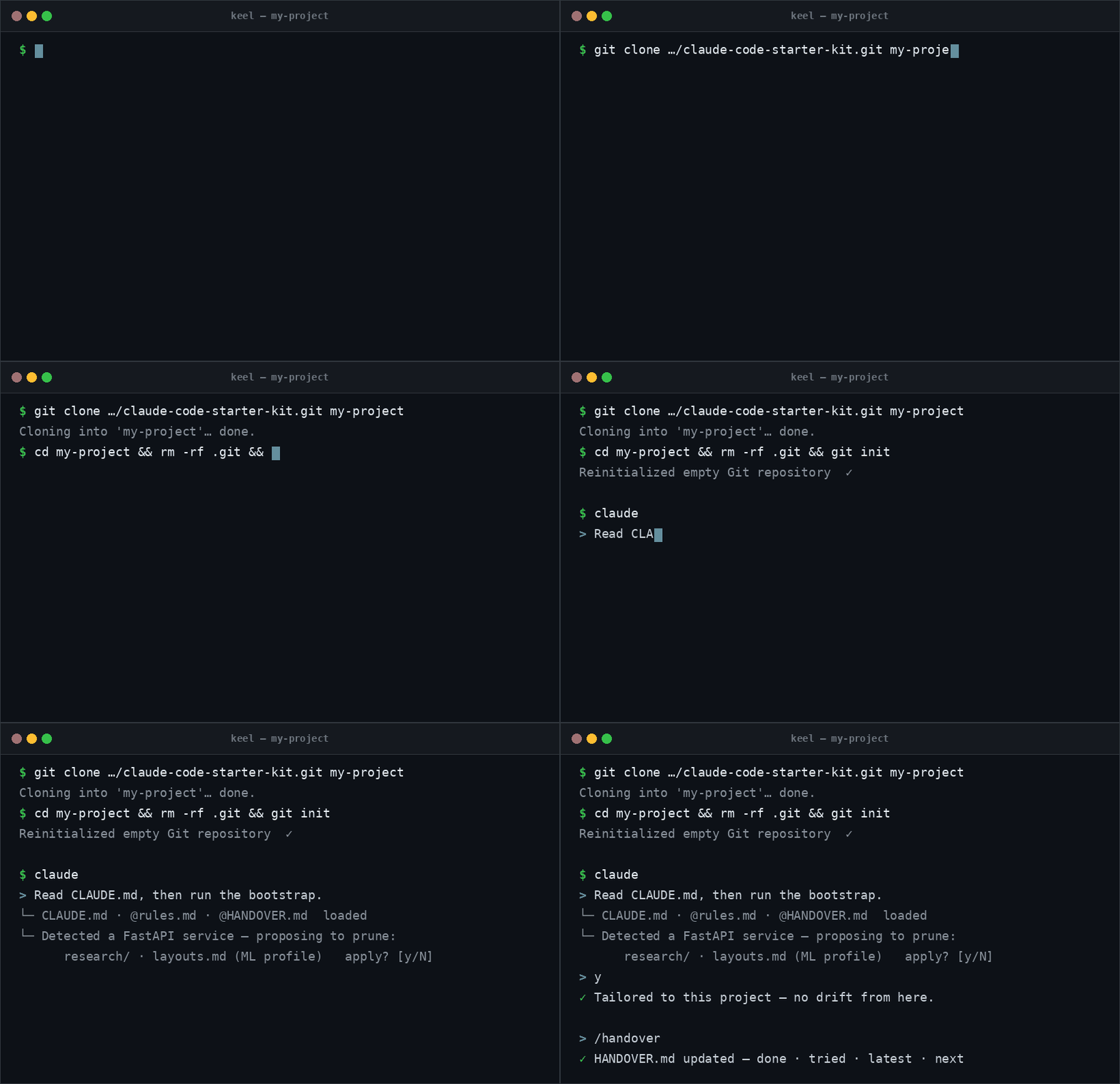
# 1) clone Keel as your new project, then start your own git history
git clone https://github.com/muratsilahtaroglu/claude-code-starter-kit.git my-project
cd my-project && rm -rf .git && git init
# 2) in Claude Code, let it tailor the template to THIS project before coding:
#    "Read CLAUDE.md, then run the bootstrap: prune what this project doesn't need and plan."
Shell commands in this README are for macOS/Linux — on Windows use Git Bash (Claude Code uses it
there anyway); the PowerShell equivalent of rm -rf .git is Remove-Item -Recurse -Force .git.
Not every project needs the whole template — the bootstrap prunes it to fit (with your approval).
See How to use below. Already have a project? Don't rm -rf .git — see
Adopting into an existing project.
Or install just the tooling as a plugin
This repo is also its own Claude Code plugin marketplace — install the enforcement layer without cloning:
/plugin marketplace add muratsilahtaroglu/claude-code-starter-kit
/plugin install keel@keel
That gives you the skills (each keel--prefixed, so under the plugin namespace: /keel:keel-handover ·/keel:keel-distill · /keel:keel-phase-review · /keel:keel-research · /keel:keel-adopt ·/keel:keel-update · /keel:keel-audit · /keel:keel-plan · /keel:keel-compact ·/keel:keel-stats · /keel:keel-pilot), the researcher +verifier + auditor subagents, and the
memory/safety hooks — across every repo. A clone is a snapshot; the plugin is a subscription:
when the template improves, one /plugin marketplace update keel brings the new tooling to all your
projects at once — no re-cloning. It does not install the discipline docs (rules.md,HANDOVER/LESSONS/TASKS, docs/) or the .claude/settings.json permissions (plugins can't seed repo
files or permission rules). The clone above is the full kit; the plugin is the tooling half for teams
that already have the docs or want the skills everywhere.
Team auto-install (plugin-only projects): commit these two keys to the project's.claude/settings.json and everyone who opens the repo gets the keel tooling registered and enabled
automatically — no per-person /plugin marketplace add + /plugin install:
{
  "extraKnownMarketplaces": {
    "keel": { "source": { "source": "github", "repo": "muratsilahtaroglu/claude-code-starter-kit" } }
  },
  "enabledPlugins": { "keel@keel": true }
}
Don't add this to a full clone of the kit — the clone already registers the same hooks via.claude/settings.json, and plugin + settings registration together fire each hook twice (the
dual-registration note in docs/steering.md).
Updating a cloned kit works the same reviewed way: run /keel-update in the project — it fetches the
latest template, skips what your bootstrap pruned, and shows the rest as diffs: kit tooling in one
reviewed batch, likely-tailored files (rules.md, config, workflows) hunk-by-hunk. Only hunks you
approve are applied; your project memory (HANDOVER/LESSONS/TASKS), your code, and the project-owned
docs (CLAUDE.md, architecture, ADRs) are never touched.
Purpose: When starting a new project (you or your teammates), give Claude Code this folder as a
template. The generic "working discipline" files inside help set up the project from day one as
professional, traceable, and secure. No file contains a project name or project-specific detail —
fill in the placeholders.
What Keel fixes (problem → mechanism)
The whole kit in one picture — left, what goes wrong in long AI-assisted projects; right, the concrete
mechanism that closes it:
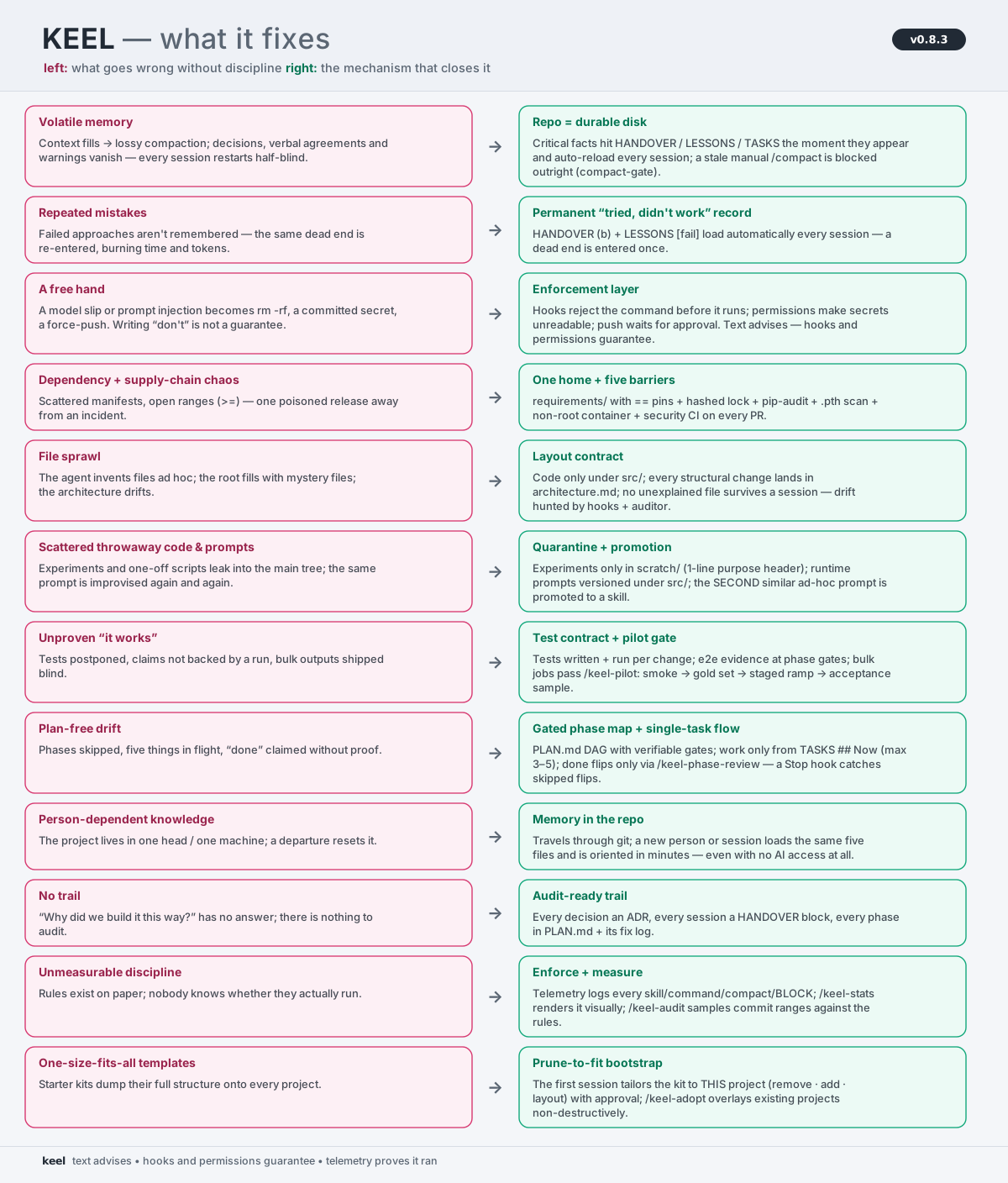
Generated from docs/assets/gen_architecture_svg.py (the FIXES list) — same data-driven pipeline as the structure maps.
| Without Keel | With Keel — the mechanism |
|---|---|
| Volatile memory. The context window fills and the conversation is compacted into a lossy summary — decisions, verbal agreements and warnings vanish; every session restarts half-blind. | Repo = durable disk. Critical facts hit HANDOVER / LESSONS / TASKS the moment they appear and auto-reload every session; a stale manual /compact is blocked outright (compact-gate). |
| Repeated mistakes. Failed approaches aren't remembered — the same dead end is re-entered, burning time and tokens. | Permanent "tried, didn't work" record. HANDOVER (b) + LESSONS [fail] load automatically every session — a dead end is entered once. |
A free hand. A model slip or prompt injection becomes rm -rf, a committed secret, a force-push. Writing "don't" is not a guarantee. |
Enforcement layer. Hooks reject the command before it runs, permissions make secrets unreadable, push waits for approval. Text advises; hooks and permissions guarantee. |
Dependency chaos + supply-chain risk. Scattered manifests, open ranges (>=) — one poisoned release away from an incident. |
One home + five barriers. Everything in requirements/ (base/dev); == pins + hashed lock + pip-audit + .pth scan + non-root container + security CI on every PR. |
| File sprawl. The agent invents files ad hoc; the root fills with mystery files; the architecture drifts. | Layout contract. Code only under src/; every structural change lands in docs/architecture.md; no unexplained file survives a session — drift is hunted by hooks + the auditor. |
| Scattered throwaway code & prompts. Experiments and one-off scripts leak into the main tree; the same prompt is improvised again and again. | Quarantine + promotion. Experiments live only in scratch/ (1-line purpose header); runtime prompts are versioned files under src/; the SECOND similar ad-hoc prompt is promoted to a skill. |
| Unproven "it works". Tests postponed, claims not backed by a run, bulk outputs shipped blind. | Layered test contract + pilot gate. Tests written + run per change; e2e evidence at phase gates; bulk jobs pass /keel-pilot (smoke → gold set → staged ramp → acceptance sample). |
| Plan-free drift. Phases skipped, five things in flight, "done" claimed without proof. | Gated phase map + single-task flow. PLAN.md DAG with verifiable gates; work only from TASKS ## Now (max 3–5); done flips only via /keel-phase-review — a Stop hook catches skipped flips. |
| Person-dependent knowledge. The project lives in one head / one machine; a departure resets it. | Memory in the repo. It travels through git; a new person or session loads the same five files and is oriented in minutes — even with no AI access at all (see the human-handover section). |
| No trail. "Why did we build it this way?" has no answer; there is nothing to audit. | Audit-ready trail. Every decision an ADR, every session a HANDOVER block, every phase in PLAN.md + its fix log. |
| Unmeasurable discipline. Rules exist on paper; nobody knows whether they actually run. | Enforce + measure. Telemetry logs every skill/command/compact/BLOCK; /keel-stats renders it visually; /keel-audit samples commit ranges against the rules. |
| One-size-fits-all templates. Starter kits dump their full structure onto every project. | Prune-to-fit bootstrap. The first session tailors the kit to THIS project (remove · add · layout) with approval; /keel-adopt overlays existing projects non-destructively. |
When (not) to use Keel
Honest scoping: solo developer, one machine, a weekend project? Claude Code's built-in auto-memory +
compaction will mostly carry you — Keel's discipline would be overhead. Keel pays off when any of these
is true:
- a team — project memory must live in the repo and travel through git (built-in auto-memory is
machine-local and never shared); - open source / CI — enforced permissions + hooks, supply-chain checks, PR discipline;
- a months-long project with tens of compactions — block-rotated memory, an always-loaded lessons
database, a cross-session task board.
And even then, you don't take all of it: the bootstrap prunes whatever this project doesn't need.
The loop (why it doesn't drift)
flowchart LR
    New([new project]) --> Boot["🧭 bootstrap<br/>prune to fit · your approval"]
    Boot --> Phase["⚙️ phase<br/>build + test · no skipping"]
    Phase --> Docs["📝 update docs<br/>+ HANDOVER.md"]
    Docs --> Commit["✅ commit + push<br/>your approval"]
    Commit --> Phase
    Docs -. session ends .-> Mem[("🧠 HANDOVER.md<br/>durable memory")]
    Mem -. next session reads .-> Phase
The context window is volatile RAM; the repo is durable disk. Every phase writes what it did intoHANDOVER.md + the docs, so the next session (even after 10+ compactions) picks up without drift.
The memory model (three always-loaded, size-capped files + a zero-cost archive):
| File | What | Anti-bloat rule |
|---|---|---|
HANDOVER.md |
last 5 session blocks (done · tried-failed · latest · next) | on overflow /keel-distill rotates the oldest block |
LESSONS.md |
critical knowledge written the moment it appears (rules, must-run tests, gotchas, failures) — with your approval | ~100-line cap; dedup/merge; SUPERSEDED, never silently deleted |
TASKS.md |
cross-session task board (Now (max 3–5) · Next · Discovered), each item with a verifiable done-when: |
~100-line cap; delete on done — git is the archive |
docs/handover-archive.md |
raw rotated blocks, verbatim | never @-imported → zero context cost, grep on demand |
PLAN.md |
strategic phase map: status table + colored Mermaid DAG (renders live on GitHub/VSCode — watch nodes turn red→yellow→green) + post-completion fix log | not @-imported; statuses flip at rituals — a Stop hook nudges the moment a wip phase's tasks are all done but its status wasn't flipped (+ table↔diagram↔TASKS drift check) |
No vector DB, no external memory service — grep-able markdown beats embeddings at this scale
(Claude Code itself ships with agentic search and no index). /keel-distill is the consolidation ritual:
rotate, dedup, promote 3×-applied lessons into rules/skills, lint for contradictions.
Surviving compaction (the pincer)
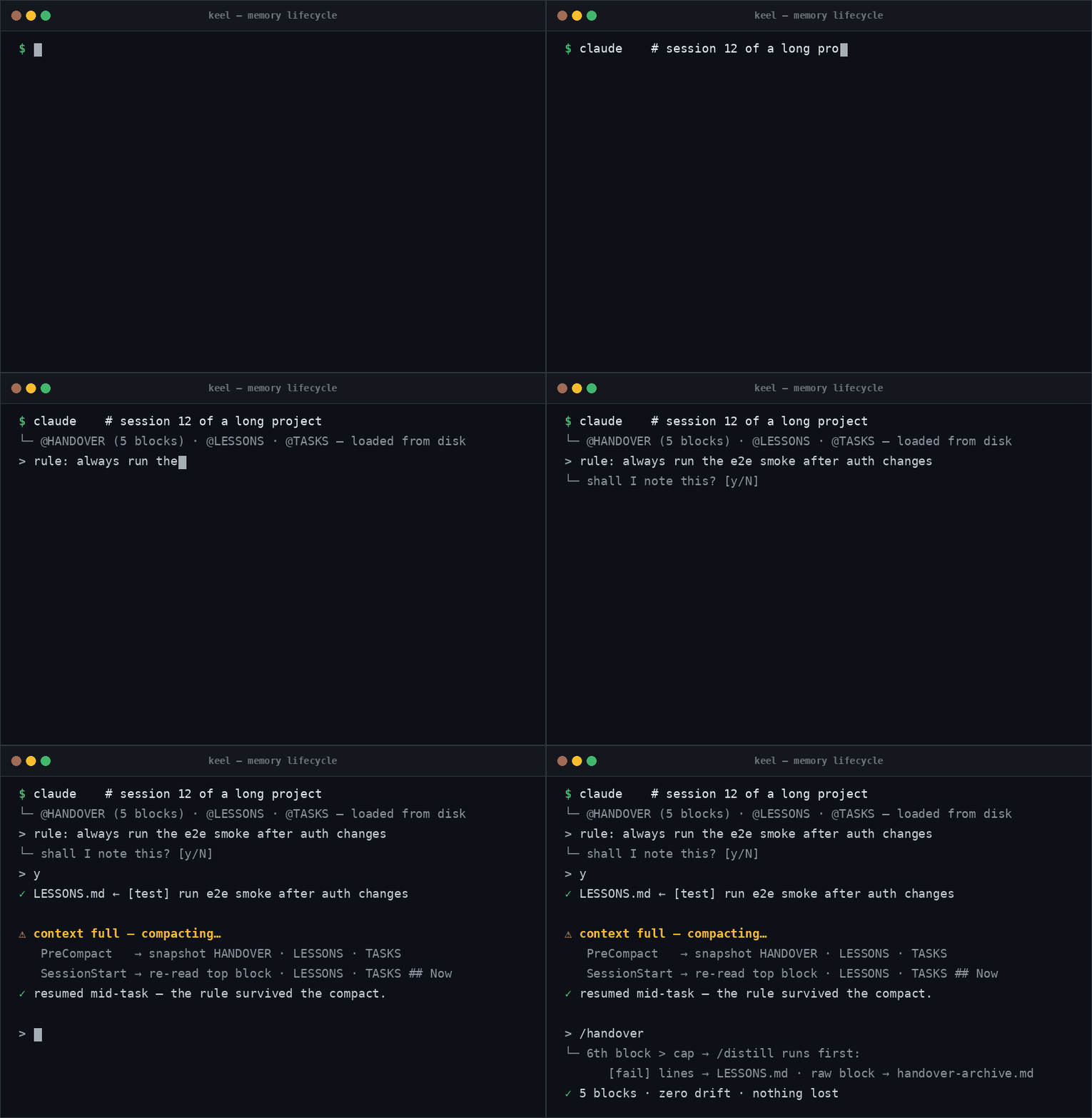
When the context window fills up, Claude Code compacts: the conversation is squeezed into a lossy
summary. Anything said only in conversation can vanish — but the @-imported files are re-injected
from disk after every compaction. Keel exploits that with a two-sided pincer around the compact:
- Before —
PreCompacthooks:pre-compact-snapshotsnapshotsHANDOVER/LESSONS/TASKSto.claude/snapshots/and warns if the handover looks stale (its stdout cannot inject
instructions — that's SessionStart's job);compact-gategoes further and blocks a manual/compactoutright (exit 2) while the disk is stale — tree changed butHANDOVER.md
untouched — pointing at/keel-compact. Auto-compact is never blocked (a blocked auto-compact
could wedge a full session); on older CLIs the block degrades to a loud warning. Bypasses:/compact keel-forceortouch .claude/compact-force. - After —
SessionStarthook (its output is injected into context): tells Claude to re-read the
top HANDOVER block,LESSONS.md, andTASKS.md ## Now, and warns when a memory file needs/keel-distill. - Standing directive in
CLAUDE.md: what every compaction summary must preserve (modified files,
open tasks, test commands, unwritten agreements → write them toLESSONS.mdfirst). - One command before a manual compact —
/keel-compact: the pincer restores only what is on
disk, so a forgotten/keel-handoverstill loses the conversation-only state./keel-compactruns
the whole ritual (/keel-handover→/keel-distillwhen due → PLAN flips), verifies freshness,
then hands off to the built-in/compact. The individual skills stay invokable as always.
Compaction becomes a curation step, not an information-loss event.
No AI? The repo still tells you what to do (human handover)
Everything above is plain, capped markdown written for humans too — if Claude Code access ends
mid-project (billing, outage, a teammate without a seat), the project continues from the repo alone.
Read in this order:
HANDOVER.md(top block) — where the last session stopped: (a) done, (b) tried-and-FAILED
(don't retry these), (c) latest changes, (d) next steps in priority order.TASKS.md ## Now— today's 3–5 work items, each with a verifiabledone-when:.PLAN.md— the phase map: what isdone/wip/todo, each phase's gate, the current focus.LESSONS.md— the traps and must-run tests ([gotcha]/[test]/[fail]) accumulated so far.docs/architecture.md— what every module/file does;docs/adr/— why it was decided that way.CLAUDE.md+Makefile— build/test/run commands; thengit logfor fine-grained history.
Freshness is enforced, not hoped for: the handover ritual runs at every session end (a Stop hook
reminds you; a stale manual /compact is blocked outright), staleness warnings fire at session start,
and the caps keep every file short enough to actually read. Worst case you lose the tail of one
interrupted session — and the hot-path rule (critical facts go to LESSONS.md the moment they appear)
shrinks even that.
Two layers: guidance + enforcement
Rules alone can be ignored; Keel also wires the discipline into Claude Code's native, deterministic layer.
| Layer | Where | Enforced? |
|---|---|---|
| Guidance | rules.md, ADRs, HANDOVER.md |
advisory — the working discipline |
| Always in context | CLAUDE.md @-imports rules.md + HANDOVER.md + LESSONS.md + TASKS.md |
auto-loaded every session, re-injected after compaction |
| Permissions | .claude/settings.json |
denies reading .env/secrets · asks before git push |
| Hooks | .claude/hooks/ |
blocks rm -rf · force-push · staging .env · pipe-to-shell |
| Compaction safety | SessionStart + PreCompact hooks | snapshot memory files before compact · re-ground ("re-read HANDOVER/LESSONS/TASKS") + cap warnings after |
How to use
- Copy the contents of this folder into the root of the new project.
- Bootstrap tailoring (rules.md §0.0): have the AI first understand the project, then propose
(a) which template parts are unnecessary for this project and should be removed (with reasons), and
(b) which layout profile fromdocs/layouts.md(ML, service/API, CLI, ...) to instantiate.
Nothing is removed or added without user approval. Not every project needs the whole template. - Fill in the
<...>placeholders inCLAUDE.md,.env.example, anddocs/architecture.md. - Choose and add a
LICENSEbefore the first push (a folder with no license is "all rights reserved"). - Tell Claude Code: "First read CLAUDE.md, then plan." (CLAUDE.md
@-importsrules.md+HANDOVER.md+LESSONS.md+TASKS.md.) - Follow the discipline in
rules.mdand proceed in phases; update docs +HANDOVER.mdat the end of
each phase, then commit + push with approval.
Adopting into an existing project (brownfield)
Keel isn't only for new projects — you can bring an already-in-progress project under its discipline.
The kit is overlaid, never dumped on top: non-destructive is the hard rule (rules.md §0, Mode B).
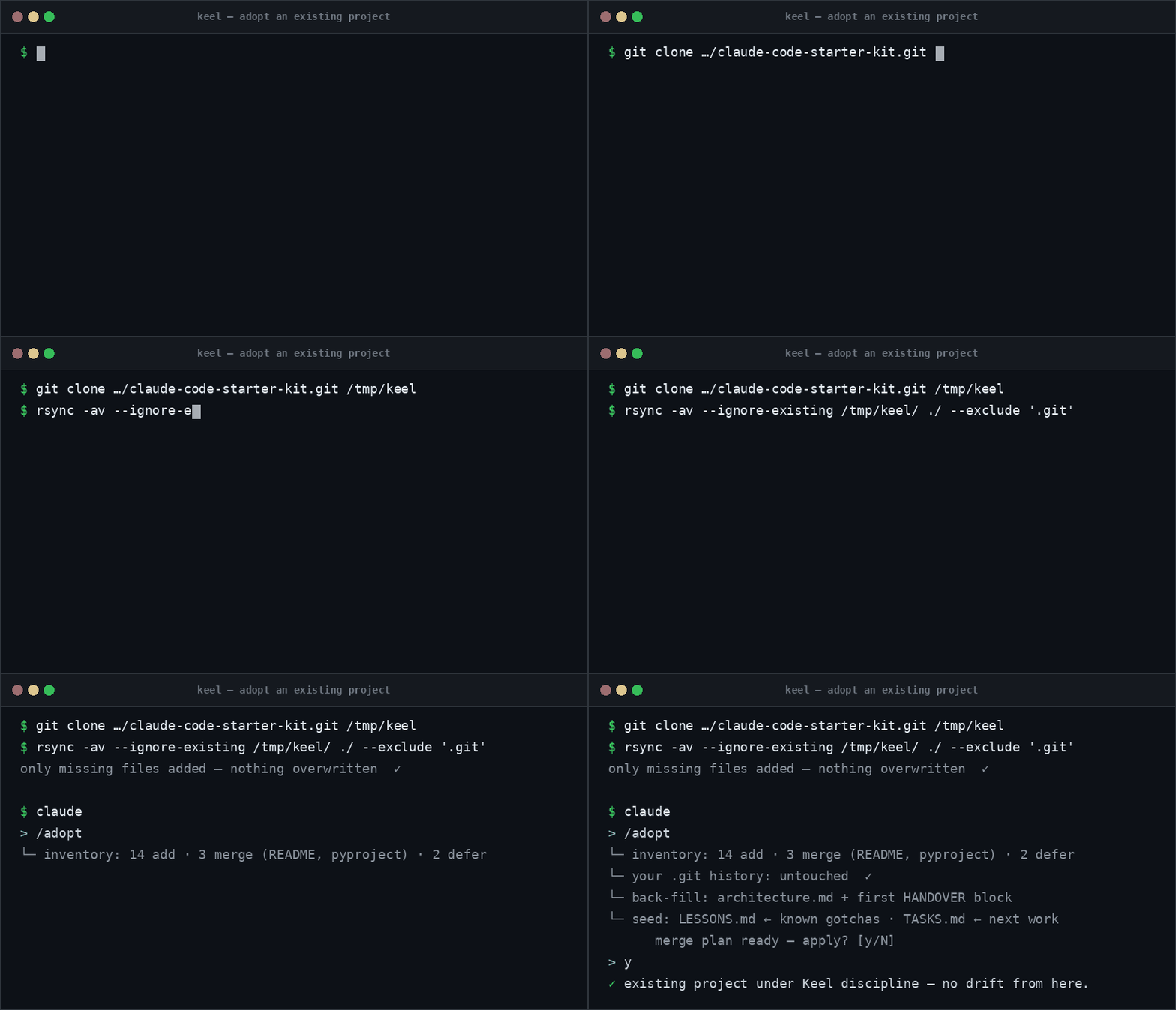
# clone the kit somewhere ELSE — never touch your project's .git
git clone https://github.com/muratsilahtaroglu/claude-code-starter-kit.git /tmp/keel
# add ONLY the files you don't already have (existing files are kept, never overwritten):
rsync -av --ignore-existing /tmp/keel/ /path/to/your-project/ --exclude '.git'
Windows has no rsync (not even in Git Bash) — run the built-in robocopy from cmd/PowerShell
instead, cloning to a Windows path first (in Git Bash /tmp is NOT C:\tmp; /XC /XN /XO skip
everything already in the target, like --ignore-existing):
git clone https://github.com/muratsilahtaroglu/claude-code-starter-kit.git C:\tmp\keel
robocopy C:\tmp\keel C:\path\to\your-project /E /XC /XN /XO /XD .git
Then, in Claude Code, run /keel-adopt (or: "Adopt Keel into THIS project — don't overwrite my files, add
only what's missing, back-fill docs/architecture.md + HANDOVER.md from the current code, merge conflicts
by showing me a diff first, and propose the plan before changing anything."). /keel-adopt inventories every
path as add · merge · defer, reverse-engineers the docs from your real code, seeds the memory layer
(first HANDOVER.md block = what exists today; LESSONS.md = known gotchas; TASKS.md ## Now = the actual
next work), and migrates security (rules.md §7) gradually — without breaking a working build.
Where your code lives (discipline vs. code)
Keel's files sit at the root because that's where the tooling requires them (Claude Code reads the
root CLAUDE.md; .gitignore / pyproject.toml must be at root). They don't mix into your code — they
sit beside it, exactly like package.json or .eslintrc in any project. Your actual application code
lives in a separate source tree the bootstrap creates from a docs/layouts.md profile:
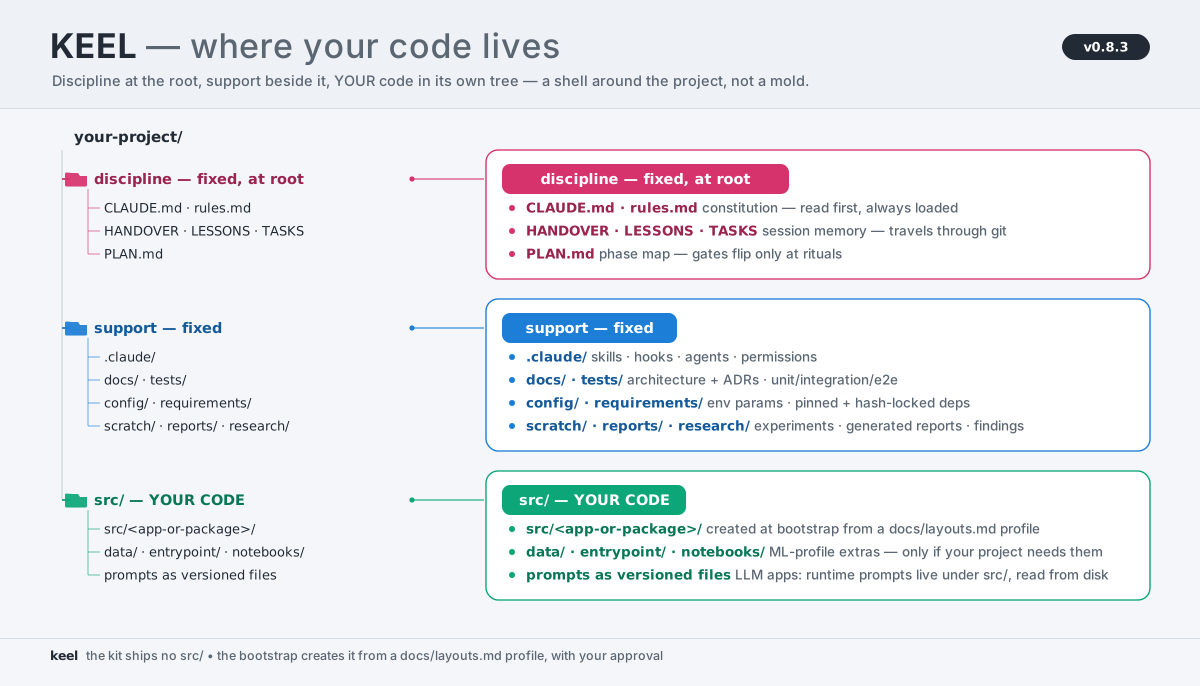
The kit ships no src/ — it is NOT part of the shipped tree below; the bootstrap proposes the right
layout for your project type (service / CLI / ML / mix) and you approve it, then all application code
goes under src/ and nothing loose lands at the root (rules.md §3.10). LLM-app runtime prompts (if any)
are versioned files under src/, read from disk. New project: the shell comes first, you add code
inside src/. Existing project: your code already exists and the shell wraps around it via /keel-adopt —
nothing in your src/ moves. Keel is a shell that wraps your project, not a skeleton you pour code into.
Contents (all generic / project-agnostic)
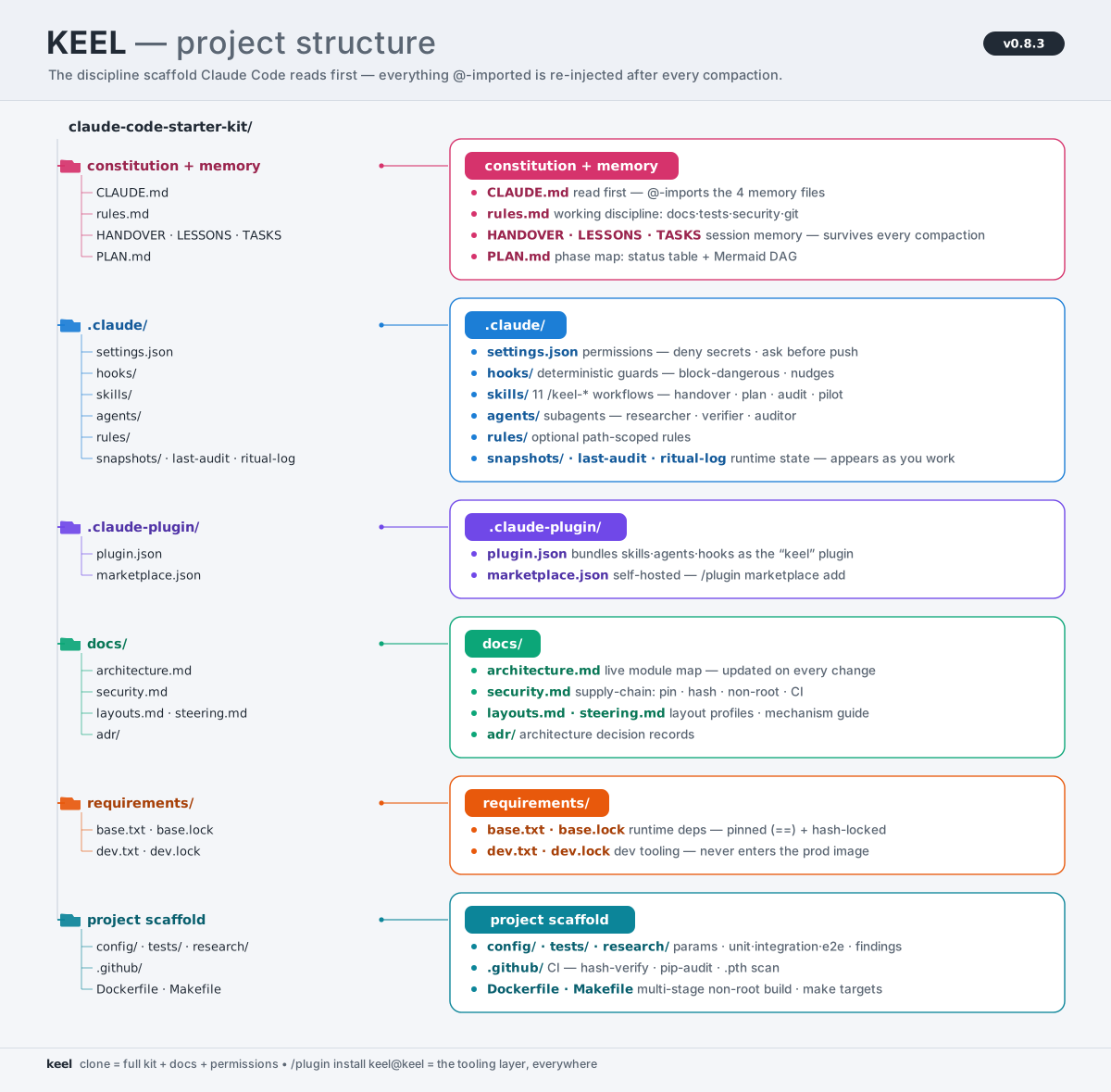
Diagram generated from docs/assets/gen_architecture_svg.py — edit the group list and re-run to regenerate. Every item's one-line role lives in the per-folder READMEs and docs/architecture.md.
Reviews (0)
Sign in to leave a review.
Leave a reviewNo results found