oauth2-authorization-server
mcp
Fail
Health Warn
- No license — Repository has no license file
- Description — Repository has a description
- Active repo — Last push 0 days ago
- Low visibility — Only 6 GitHub stars
Code Fail
- Hardcoded secret — Potential hardcoded credential in docker-compose.yml
Permissions Pass
- Permissions — No dangerous permissions requested
Purpose
This project is a full-stack OAuth2 Authorization Server built with Java 25 and Spring Boot 4. It is designed to handle user authentication and authorization, integrating with MariaDB, Redis, and monitoring tools via Docker.
Security Assessment
Risk: High. The tool inherently manages highly sensitive data, specifically processing user login credentials and OAuth2 authorization tokens. While it does not broadly execute arbitrary shell commands, it operates via Docker containers. The automated scanner flagged a critical failure for hardcoded secrets in the `docker-compose.yml` file. The README confirms this, exposing default usernames, passwords, database credentials, and API keys. Although these are likely meant for a local development sandbox, embedding and exposing credentials in this manner is a serious security risk. Additionally, the environment variables required for OpenAI, DeepSeek, and Anthropic API keys imply the application makes external network requests to third-party AI services.
Quality Assessment
The project appears to be in active development, with its last push occurring today. It demonstrates strong software engineering practices by utilizing modern frameworks, Testcontainers for integration testing, and JUnit 5. However, the repository lacks a designated license file, meaning users technically have no legal permission to modify or distribute the code. Furthermore, with only 6 stars, the project has extremely low community visibility and adoption, suggesting it is a personal or early-stage endeavor rather than a battle-tested solution.
Verdict
Use with caution; the severe handling of hardcoded credentials and missing license make it suitable only for strictly isolated local testing or educational purposes, not for production environments.
This project is a full-stack OAuth2 Authorization Server built with Java 25 and Spring Boot 4. It is designed to handle user authentication and authorization, integrating with MariaDB, Redis, and monitoring tools via Docker.
Security Assessment
Risk: High. The tool inherently manages highly sensitive data, specifically processing user login credentials and OAuth2 authorization tokens. While it does not broadly execute arbitrary shell commands, it operates via Docker containers. The automated scanner flagged a critical failure for hardcoded secrets in the `docker-compose.yml` file. The README confirms this, exposing default usernames, passwords, database credentials, and API keys. Although these are likely meant for a local development sandbox, embedding and exposing credentials in this manner is a serious security risk. Additionally, the environment variables required for OpenAI, DeepSeek, and Anthropic API keys imply the application makes external network requests to third-party AI services.
Quality Assessment
The project appears to be in active development, with its last push occurring today. It demonstrates strong software engineering practices by utilizing modern frameworks, Testcontainers for integration testing, and JUnit 5. However, the repository lacks a designated license file, meaning users technically have no legal permission to modify or distribute the code. Furthermore, with only 6 stars, the project has extremely low community visibility and adoption, suggesting it is a personal or early-stage endeavor rather than a battle-tested solution.
Verdict
Use with caution; the severe handling of hardcoded credentials and missing license make it suitable only for strictly isolated local testing or educational purposes, not for production environments.
OAuth2 Authorization Server with MariaDB, Docker OpenTelemetry LGTM, and Redis Integrations with Spring Boot 4, Java 25 and Docker. Integration Tests with Testcontainers and unit Tests with Junit 5, and Mockito
README.md
OAuth2 Authorization Server with Spring Boot 4 and Java 25
Prerequisites
- Java 25 should be installed -->
export JAVA_HOME=$(/usr/libexec/java_home -v 25) - Maven should be installed
- Docker should be installed
- Postman can be installed
How to Run and Test
Run the following commands to set environment variables for AI model API keys
  export OPENAI_API_KEY=your_api_key_here
  export DEEPSEEK_API_KEY=your_api_key_here
  export ANTHROPIC_API_KEY=your_api_key_here      # Optional
  export GOOGLE_GENAI_API_KEY=your_api_key_here   # Optional
  cd oauth2-authorization-server

  # Run tests on the host (requires Docker for Testcontainers)
  mvn clean verify

  # Build and start the application together with all infrastructure services
  docker compose --profile start_application up -d --build

  # Start only infrastructure services (Redis, MariaDB, LDAP, Ollama, etc.)
  docker compose up -d

  # For local development without Docker (requires infrastructure services running via docker compose up -d)
  ./mvnw spring-boot:run   # or: mvn spring-boot:run
Import the followings to test in Postman
Swagger: http://localhost:9000/swagger-ui/index.html
- Click
Authorizeand enter the following credentials client_id:clientclient_secret:secret- Use one of the following default values to log in http://localhost:9000/login
- username:
Developerpassword:password - username:
Adminpassword:password - username:
Userpassword:password
- username:
- Click
Actuator: http://localhost:9000/actuator/
Database credentials
url:jdbc:mariadb://localhost:3306/oauth2_authorization_serverusername:mb_testpassword:test
Redis
host:localhostport:6379
Redis Insight: http://localhost:5540/
- Click
Add Redis database Connection URL-->redis://[email protected]:6379- Click
Add Database 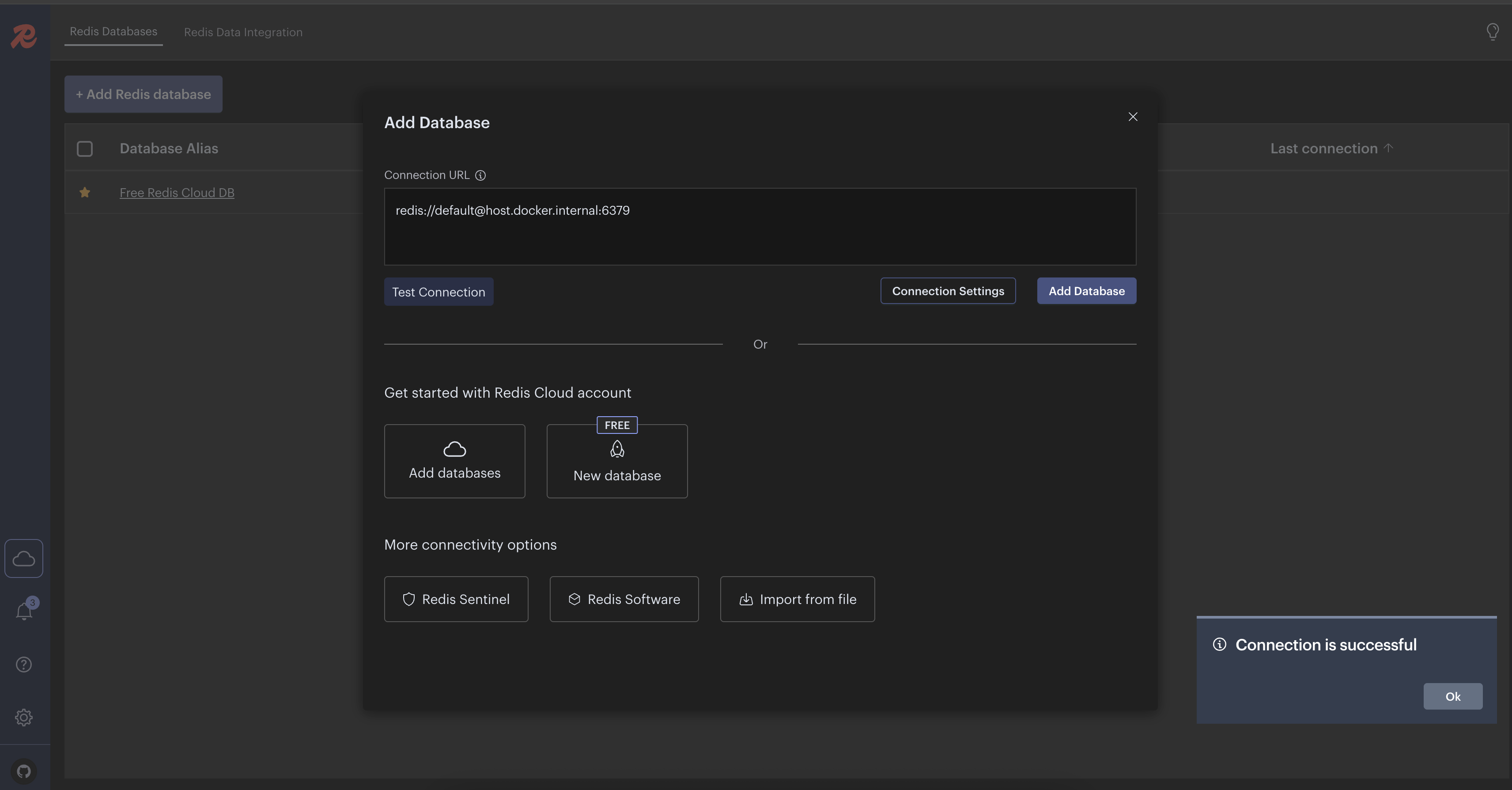
- Click
Ollama
- http://localhost:3000/ sign up for an account for local environment
- Search for
mxbai-embed-largeand download it if it does not exist - Search for
mistraland download it if it does not exist - Search for
deepseek-r1:7band download it if it does not exist
Grafana UI
- http://localhost:3001/
- username:
admin - password:
admin
Debugging Spring Boot Tests in IntelliJ IDEA
- Run one of the below commands in the terminal
mvn test -Dmaven.surefire.debug- If port 5005 is already in use, you can specify a custom port
mvn test -Dmaven.surefire.debug="-Xdebug -Xrunjdwp:transport=dt_socket,server=y,suspend=y,address=8000"
- Open IntelliJ IDEA
- Go to
Run > Attach to Process(or use shortcut)- Windows/Linux:
Ctrl + Alt + 5 - Mac:
Cmd + Alt + 5
- Windows/Linux:
- Select the Java process running your tests
- The test will pause until you connect your debugger. Once connected, you can use breakpoints and step through your
code.
How to Run and Test with CDC(Class Data Sharing)
- Java 25+ should be installed
- Run
./mvnw clean installor./mvnw clean install -Paotor./mvnw -Paot packagecommand to build the application
with AOT - Run
docker-compose up -dcommand to run necessary services - Run
docker build -t oauth2-authorization-server -f DockerfileForAOTCache .command to build the image - Run
docker run -d --restart=always -p 9000:9000 oauth2-authorization-server:latestcommand to run the image
How to Run and Test Native Image with GraalVM
- Java 25 GraalVM edition should be installed
- Run
docker-compose up -dcommand to run necessary services - Run
./mvnw -Pnative native:compileor./mvnw -Pnative native:compile -DskipTestscommand to build the native image - Run
./target/oauth2-authorization-servercommand to run the native image - Install Grype (OPTIONAL)
- Run
native-image-inspect ./target/oauth2-authorization-server-0.0.1 | grype -vcommand to scan vulnerabilities
- Run
- Run
native-image-inspect ./target/oauth2-authorization-server-0.0.1 >output.jsoncommand and openoutput.jsonor
visit http://localhost:9000/actuator/sbom/native-image to inspect all libraries, methods etc. used in the native image - Run
open ./target/oauth2-authorization-server-build-report.htmlto see build report - Use Swagger UI to test the application
Spring Boot with CRaC(Coordinated Restore at Checkpoint) by Creating Ready to Restore Container Image.
- Warning: for real projects make sure to not leak sensitive data in CRaC files since they contain a snapshot of the
memory of the running JVM instance. - Checkpoint
- Run
on demand checkpoint/restore of a running application
with:./docs/scripts/checkpoint.sh - Run
an automatic checkpoint/restore at startup
with:./docs/scripts/checkpointOnRefresh.sh
- Run
- Restore
- Restore the application with:
./docs/scripts/restore.sh
- Restore the application with:
- Use Swagger UI to test the application
How to Run and Test AI Models Locally with Docker Desktop Model Runner
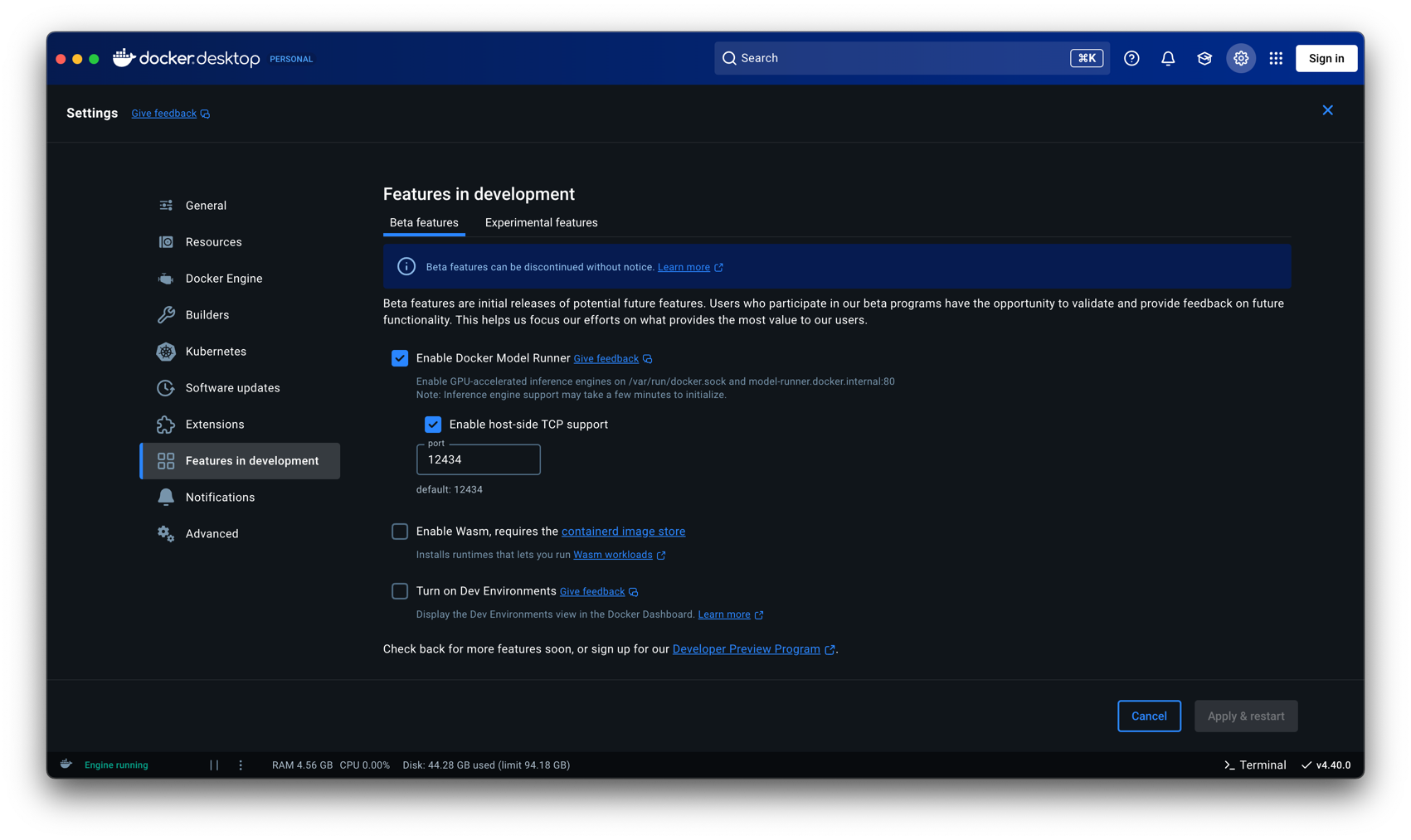
- Requires: Docker Desktop 4.40 and later
- Run
docker-compose up -dcommand to run necessary services - Run
docker model pull ai/gemma3:4B-Q4_K_Mcommand to pull the model- Run
docker model run ai/gemma3:4B-Q4_K_Mcommand to run the model to test it from the command line (OPTIONAL)
- Run
Docker Desktop-->Settings-->Features in development-->Beta features-->Enable Docker Model Runner-->Enable host-side TCP support-->Apply & Restart- Run
mvn testormvn clean installormvn clean packageor./mvnw clean installcommand to run all the tests - Run
mvn spring-boot:runcommand to run the application - Use Swagger UI to test the application
References
- Spring Boot 3 Tutorial Security OAuth2 Spring Authorization Server Save login data to a database
- Spring Boot LDAP Authentication from scratch with Spring Security and LDAP Server
- BCryptPasswordEncoderTests
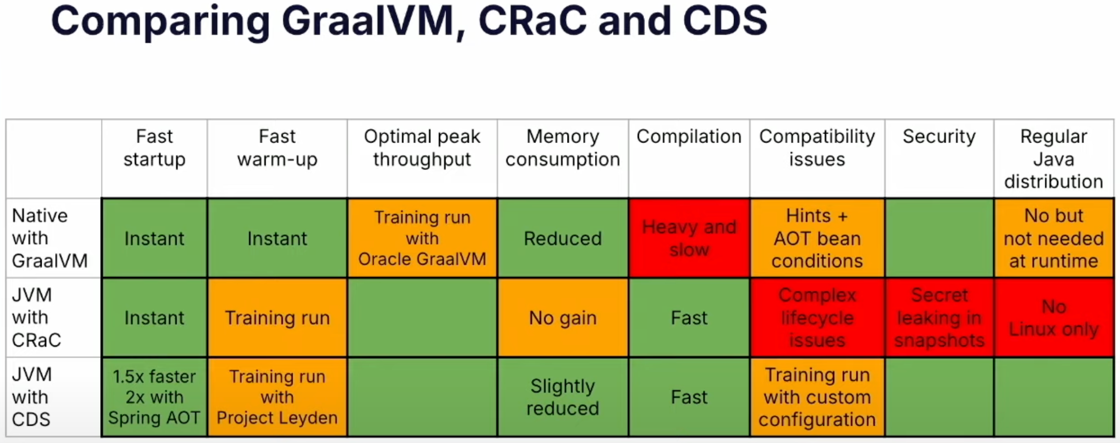
- Efficient Containers with Spring Boot 3, Java 21 and CDS (SpringOne 2024)
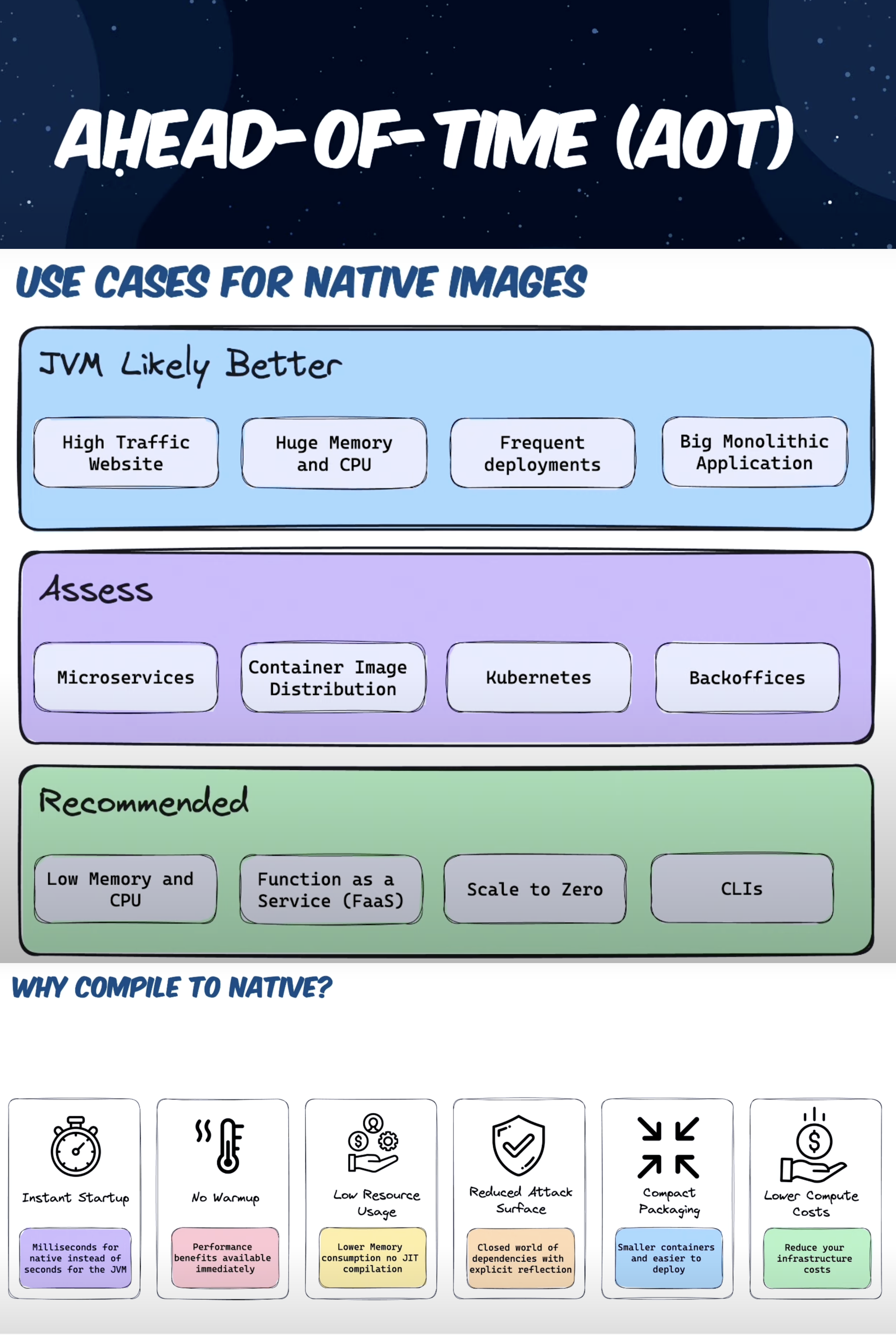
- Getting started with Spring Boot AOT + GraalVM Native Images
- Welcome, GraalVM for JDK 24!🚀
- A vulnerability scanner for container images and filesystems Grype
- Introduction to Project CRaC: Enhancing Runtime Efficiency in Java & Spring Development
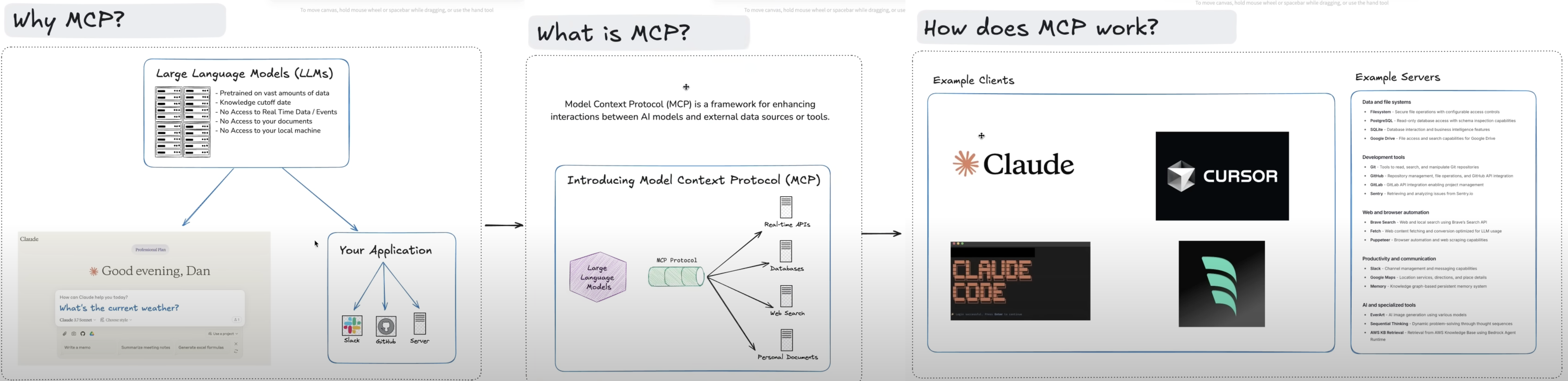
- Model Context Protocol (MCP)
- Ollama Installation with Docker Compose
- A Guide to Spring AI Advisors
- Testing LLM Responses Using Spring AI Evaluators
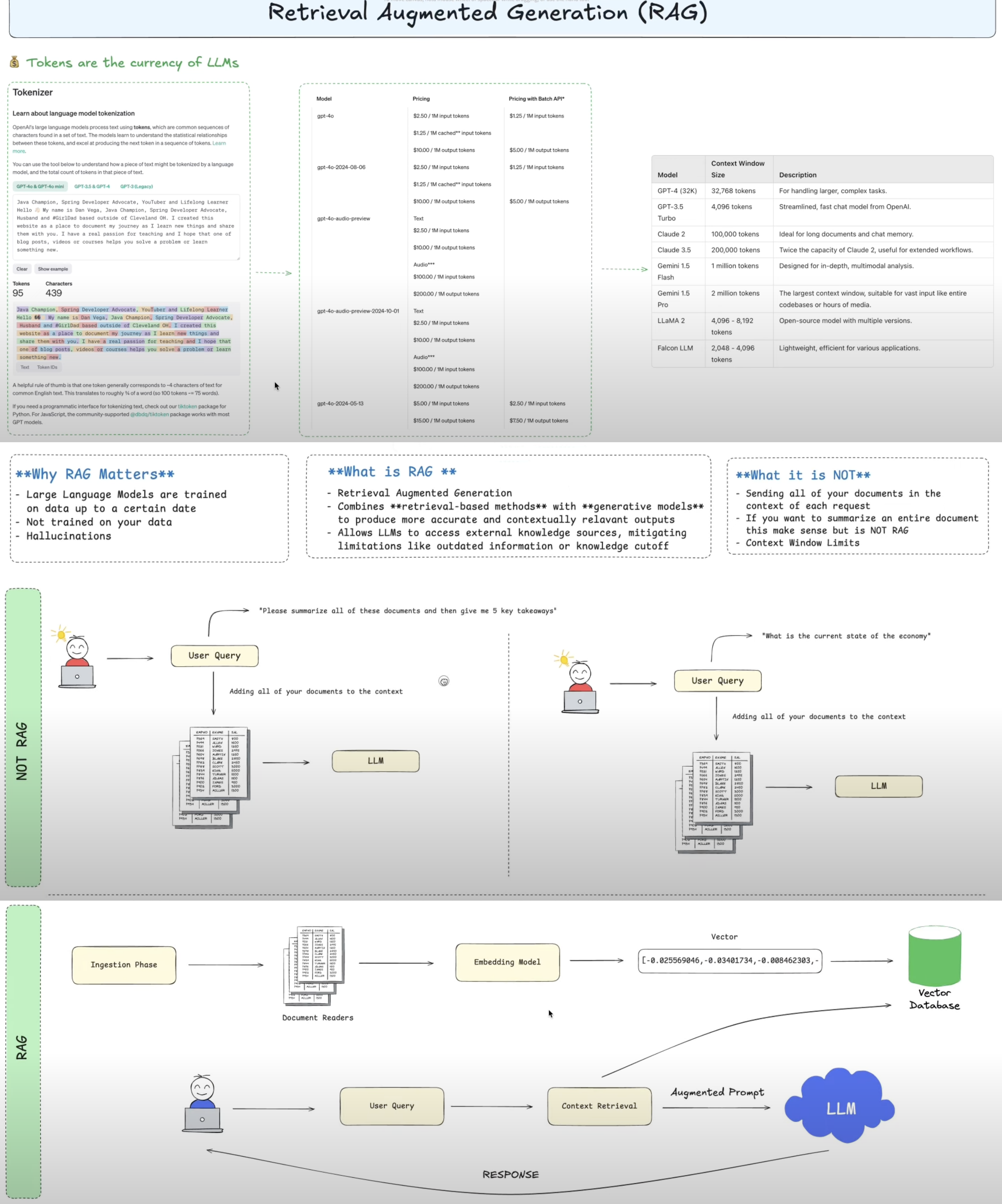
- Vector Databases
- Java + RAG: Create an AI-Powered Financial Advisor using Spring AI 💡
- Run AI Models Locally: Zero API Keys, Zero Fees with Docker Desktop Model Runner
- Spring AI 2.0 M1 with Spring Boot 4 Integration
- A Step-by-Step Guide for Installing and Using AppMap for Java
Reviews (0)
Sign in to leave a review.
Leave a reviewNo results found