muster-code
Health Warn
- License — License: MIT
- Description — Repository has a description
- Active repo — Last push 0 days ago
- Low visibility — Only 5 GitHub stars
Code Warn
- process.env — Environment variable access in .github/workflows/agent-app-ci.yml
- process.env — Environment variable access in .github/workflows/agent-app-cross-platform.yml
- fs module — File system access in .github/workflows/agent-app-cross-platform.yml
- process.env — Environment variable access in .github/workflows/agent-app-release.yml
Permissions Pass
- Permissions — No dangerous permissions requested
No AI report is available for this listing yet.
Muster Agent — the AI coding agent desktop app that remembers. Claude Code, Codex, OpenCode and local models in one window, with long-term memory, sandboxes and live diffs. macOS · Windows · Linux.
Muster Agent
The open-source AI Development Environment (ADE) that remembers.
A desktop app for macOS, Windows and Linux where coding agents work in your folders, with long-term
memory, sandboxes, and the agents, routers and models you already use, all in one window.
Works with Codex, Claude Code, Cursor, Gemini CLI, OpenCode and Grok, any OpenAI-compatible router
(OmniRoute, OpenRouter, LiteLLM) and local models (Ollama, LM Studio). Paperclip tasks run locally with
automatic hand-back.
Made in India 🇮🇳 · themuster.dev
https://github.com/user-attachments/assets/9602a60c-2faf-4138-92a1-7d850d0b44ab




⬇ Download Muster Agent
macOS (Apple silicon and Intel) .dmg · Windows 10/11 installer -win-x64-setup.exe · Linux .AppImage / .deb
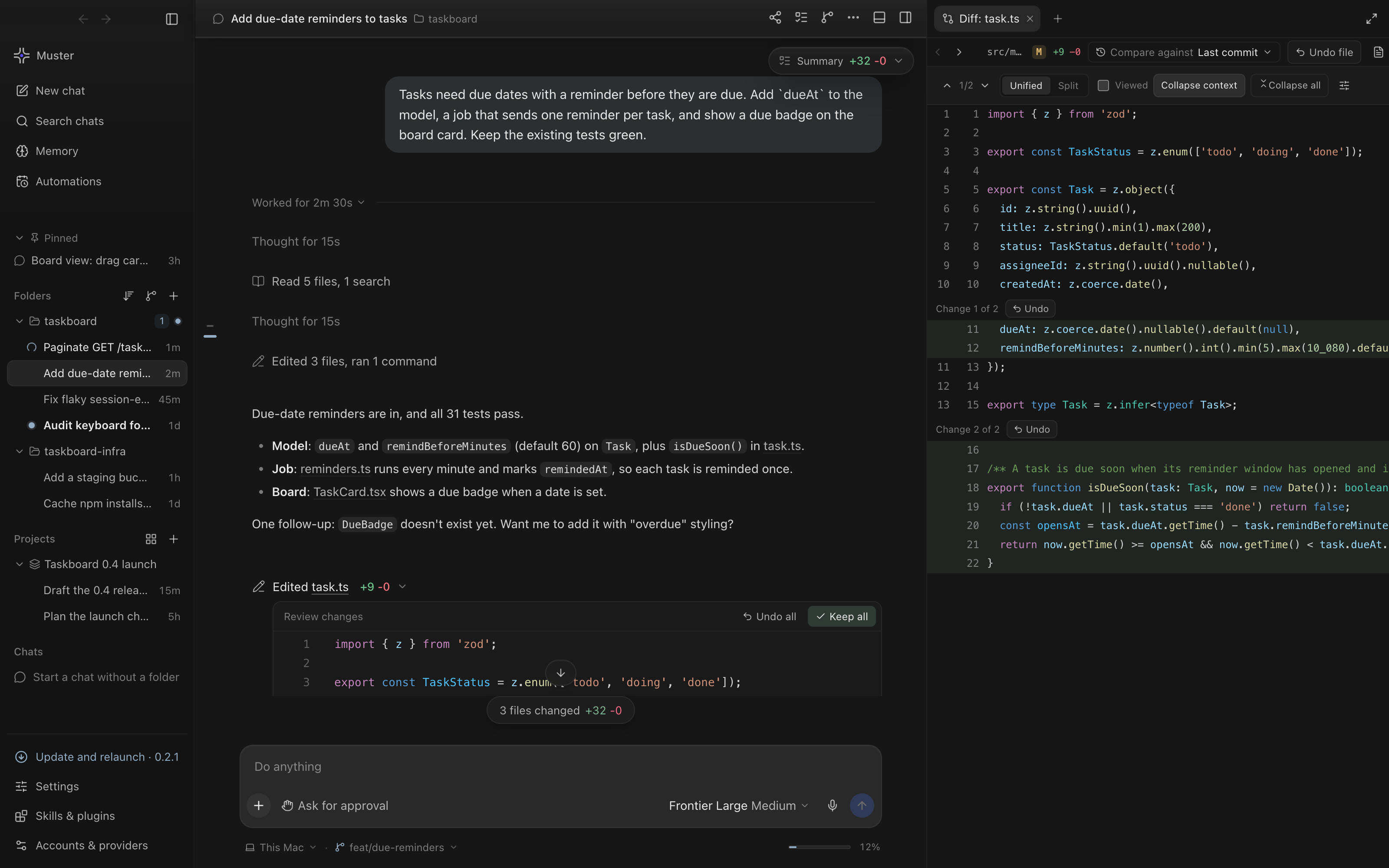
A chat on the left and the live diff of the agent's edit on the right. Undo any change before you keep it.
Why Muster Agent
Most agent apps start every chat from zero, run commands straight on your machine, and lock you
into one vendor's models. Muster Agent is an agentic development client (ADC) built the other way
around:
- It remembers. Long-term memory, backed by the Hindsight memory engine, carries what the agent
learned about you and each project into the next chat. You can see what will be recalled before
you send. - It keeps agents contained. Each chat or folder can get its own Docker-backed computer with no
network by default, capped memory, CPU and process counts, and only the grants you give it. - It uses the providers you already have. On first launch it finds your existing sign-ins,
gateways, API keys and local model servers. You don't sign in again. - It stays light. Long chats, terminals and diffs are virtualized and kept in bounded buffers,
so memory use stays bounded as a session grows. - It is a real workbench. Live diffs with Keep/Undo, a terminal, a browser, git history and
parallel chats sit next to the conversation, so you rarely have to switch windows.
Tour
What each part of the app looks like, and what to look for. The screenshots use a made-up project,
taskboard, a small TypeScript API and web board.
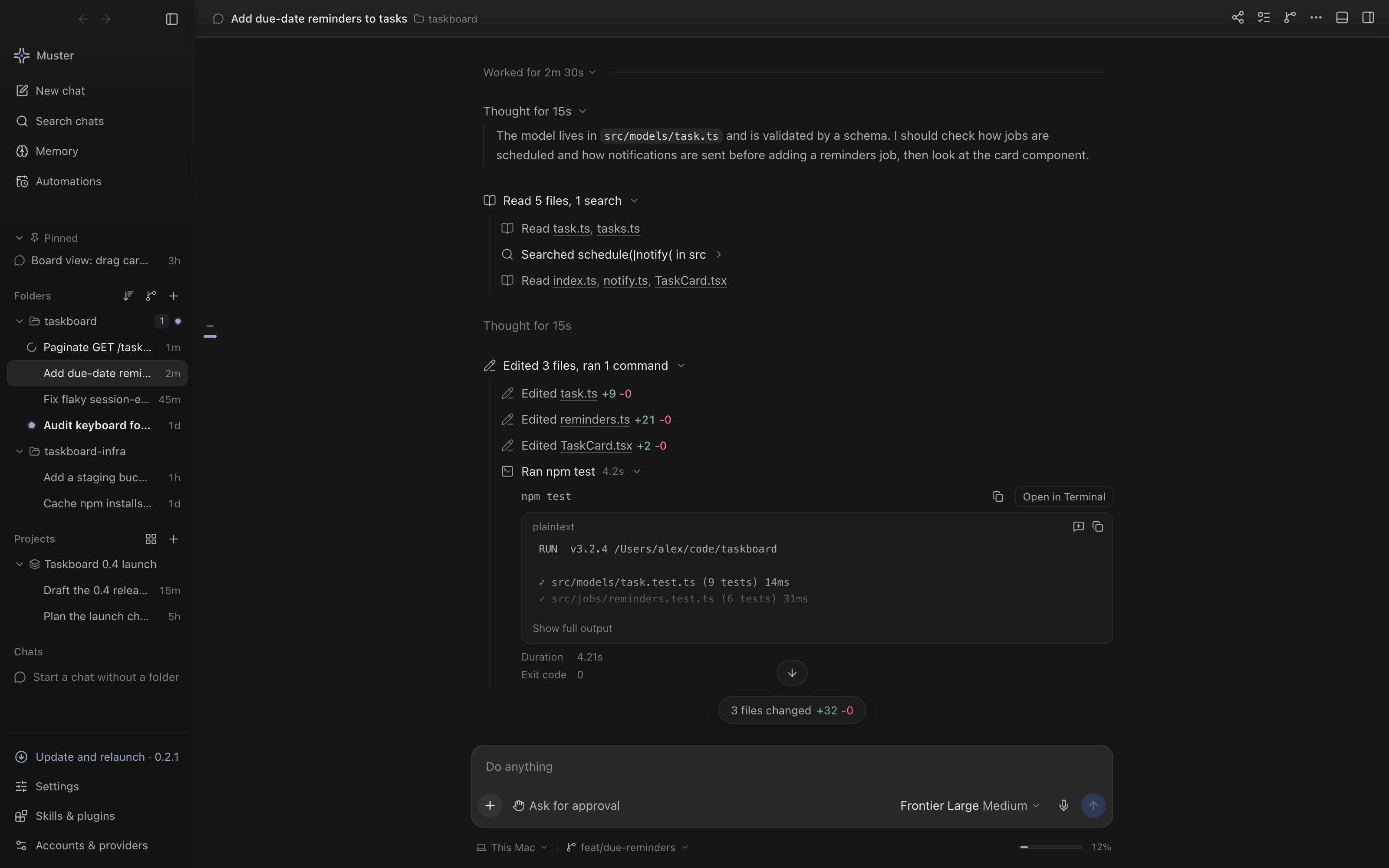 One turn, opened up. The agent's reasoning, the files it read and searched, each edit with its +/- counts, and the test run with its output and exit code. |
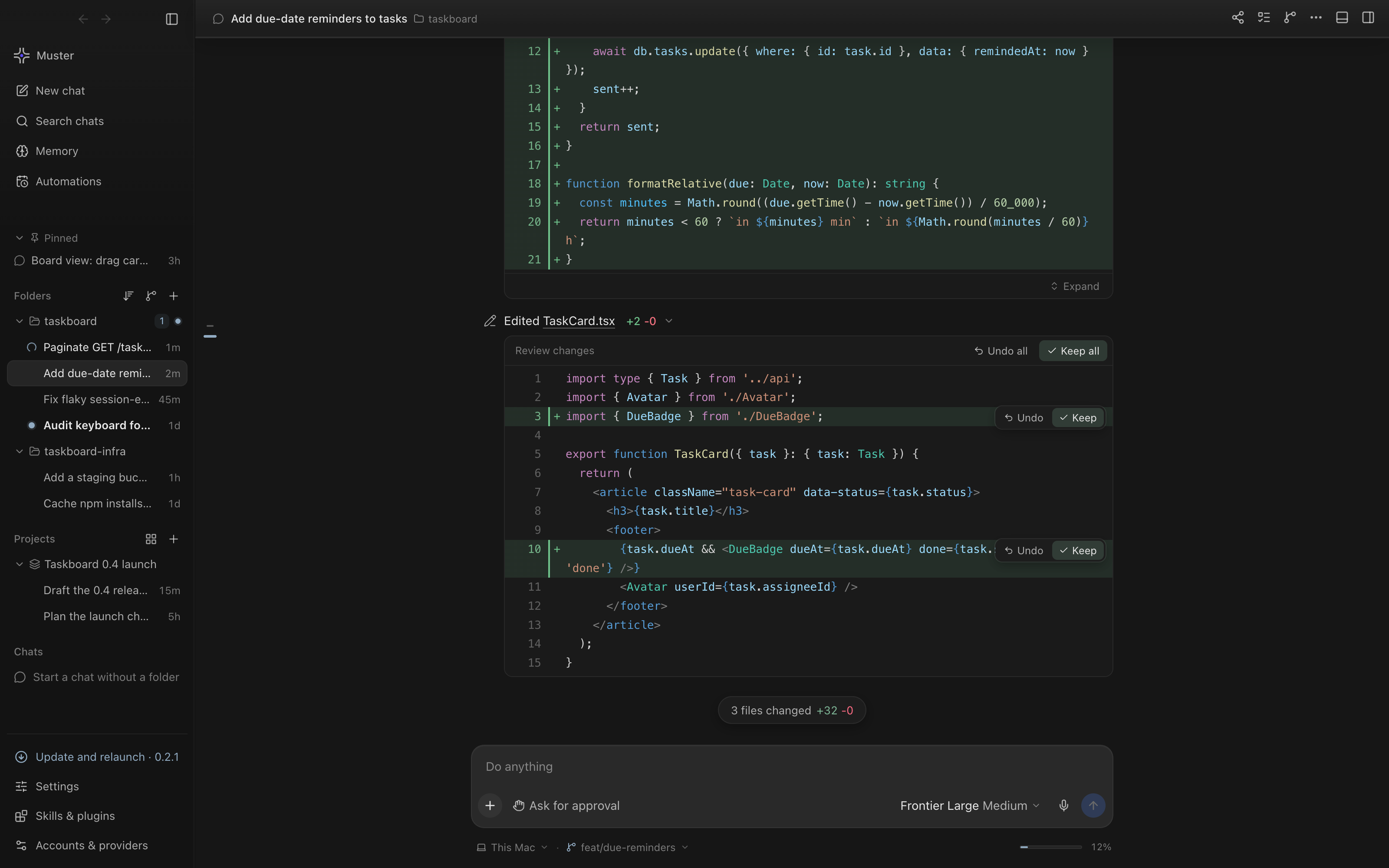 Inline diffs in the chat. Each edited file shows as a diff in the conversation. Keep or Undo one change, or the whole file. |
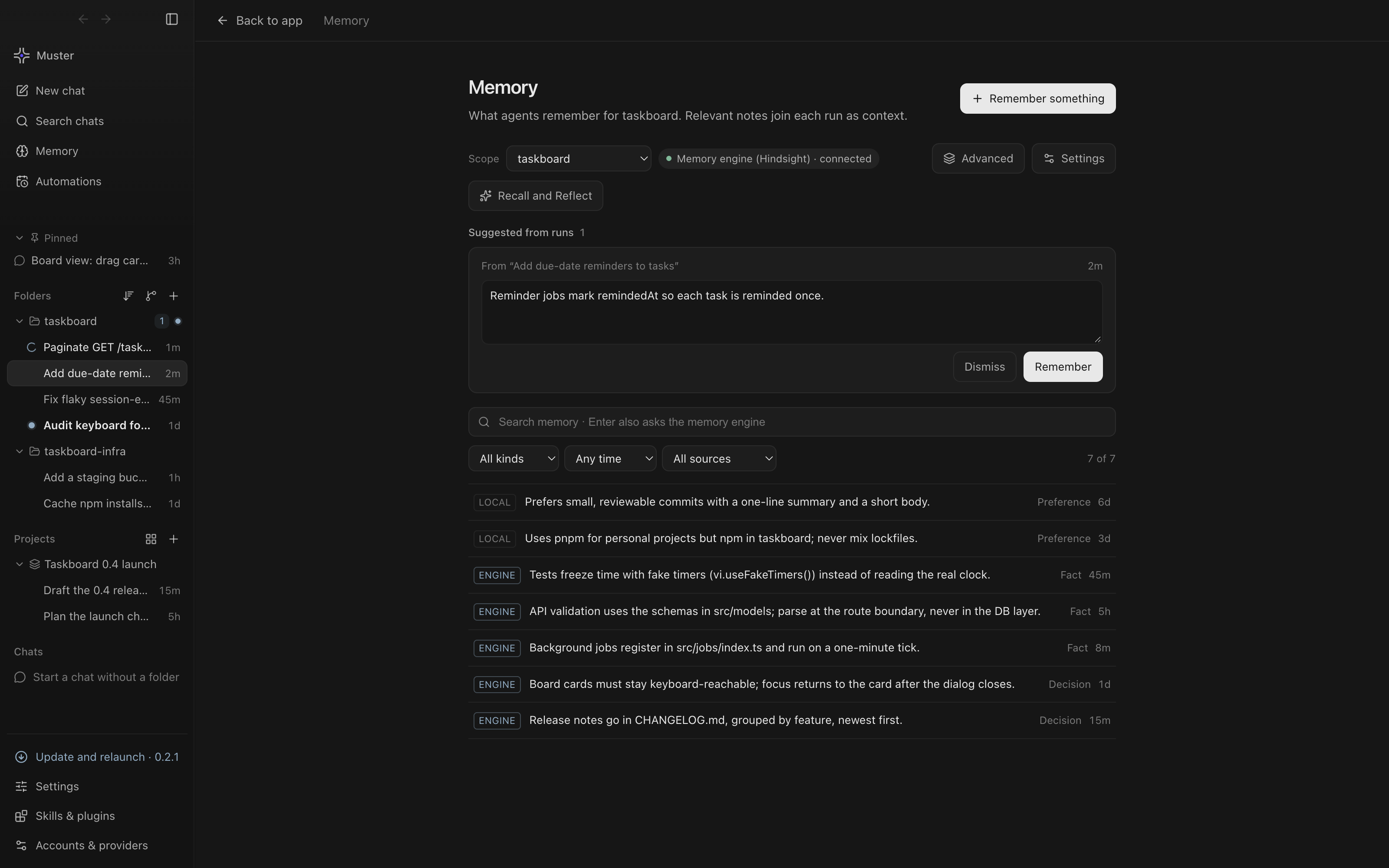 Memory. Personal and folder notes with where they came from, a note suggested by the last run to keep or dismiss, and search. |
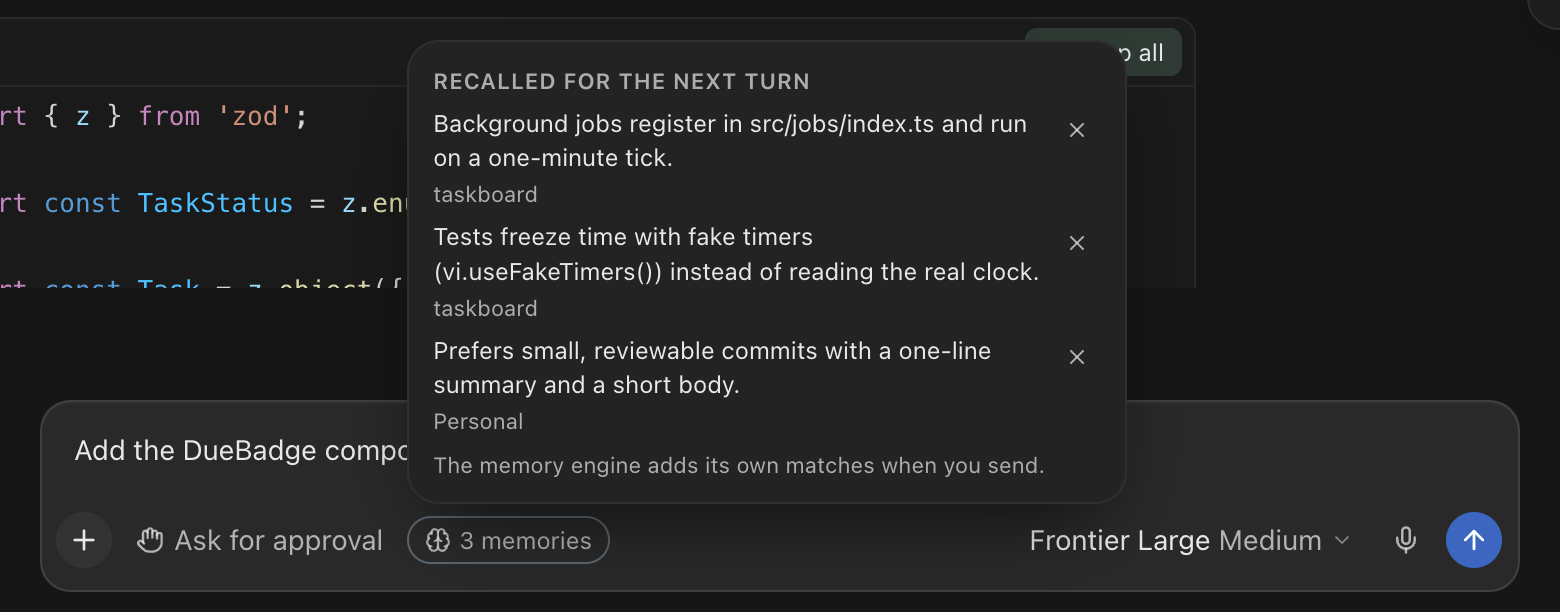 Recall preview. Before you send, the composer lists the notes the next turn will recall for this draft; remove any you don’t want in this chat. |
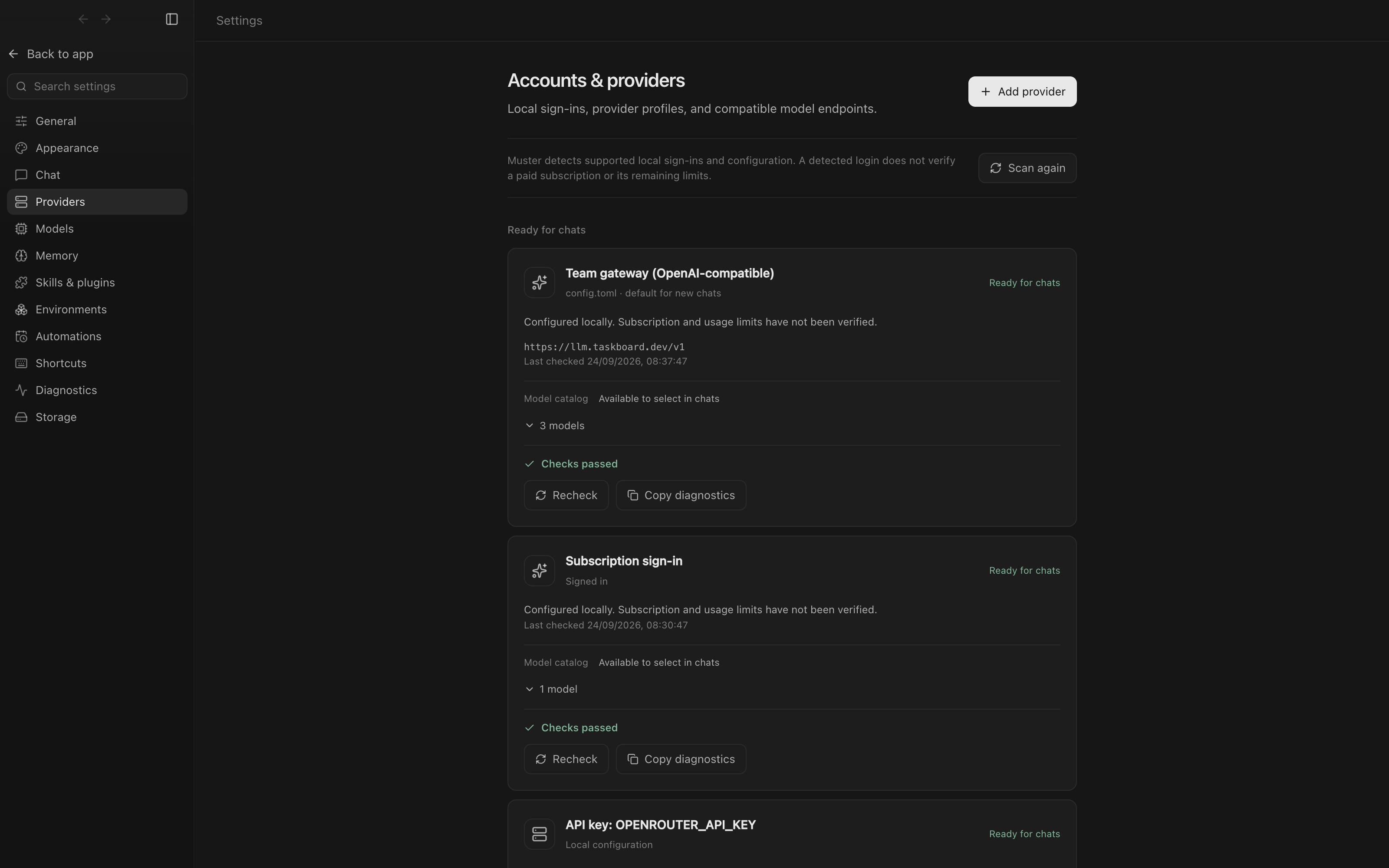 Accounts and providers. Found on first launch and ready for chats, each with its endpoint, model catalog and a health check. |
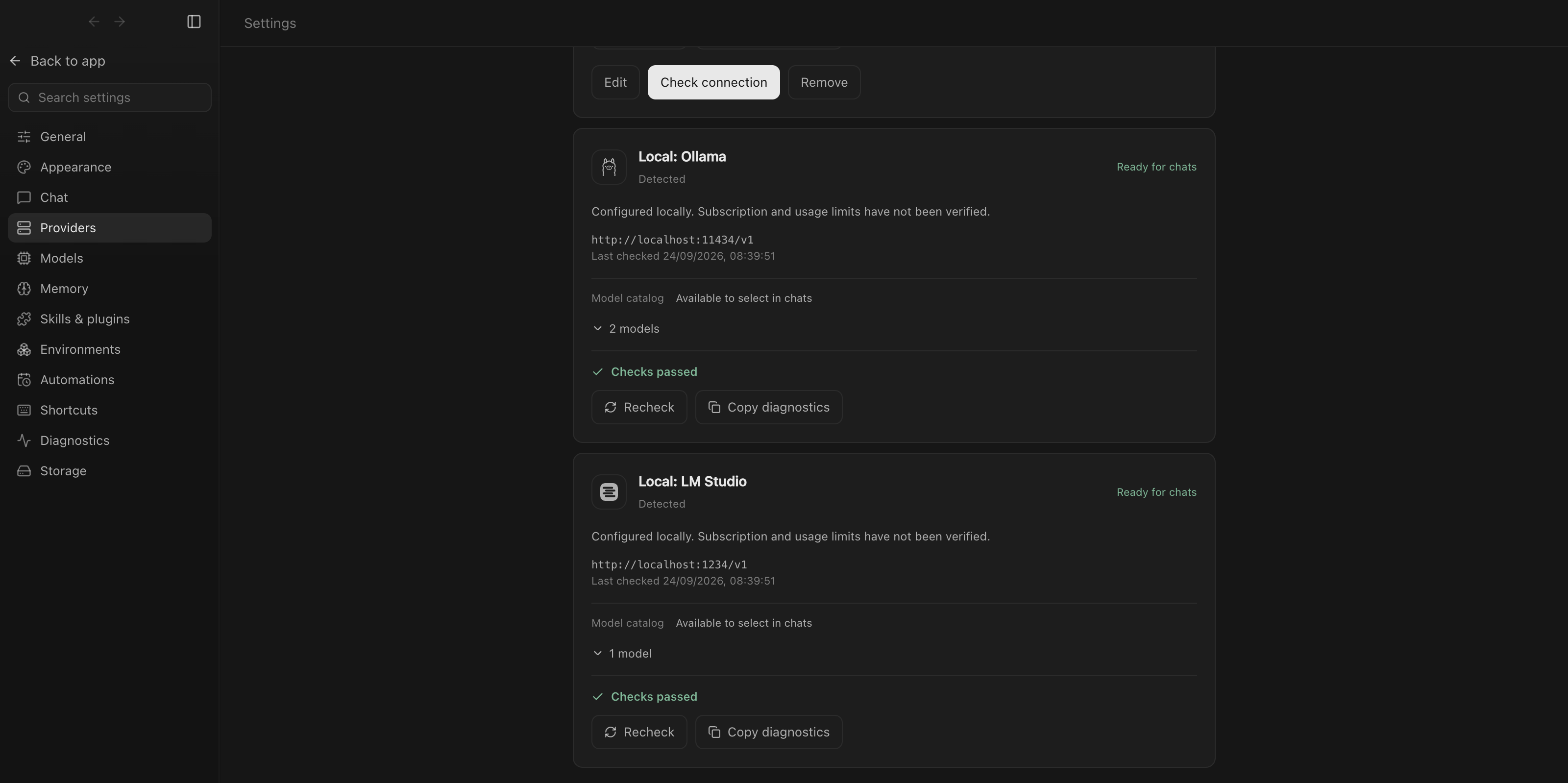 Local model servers. Ollama and LM Studio on this Mac, next to API keys from your environment. |
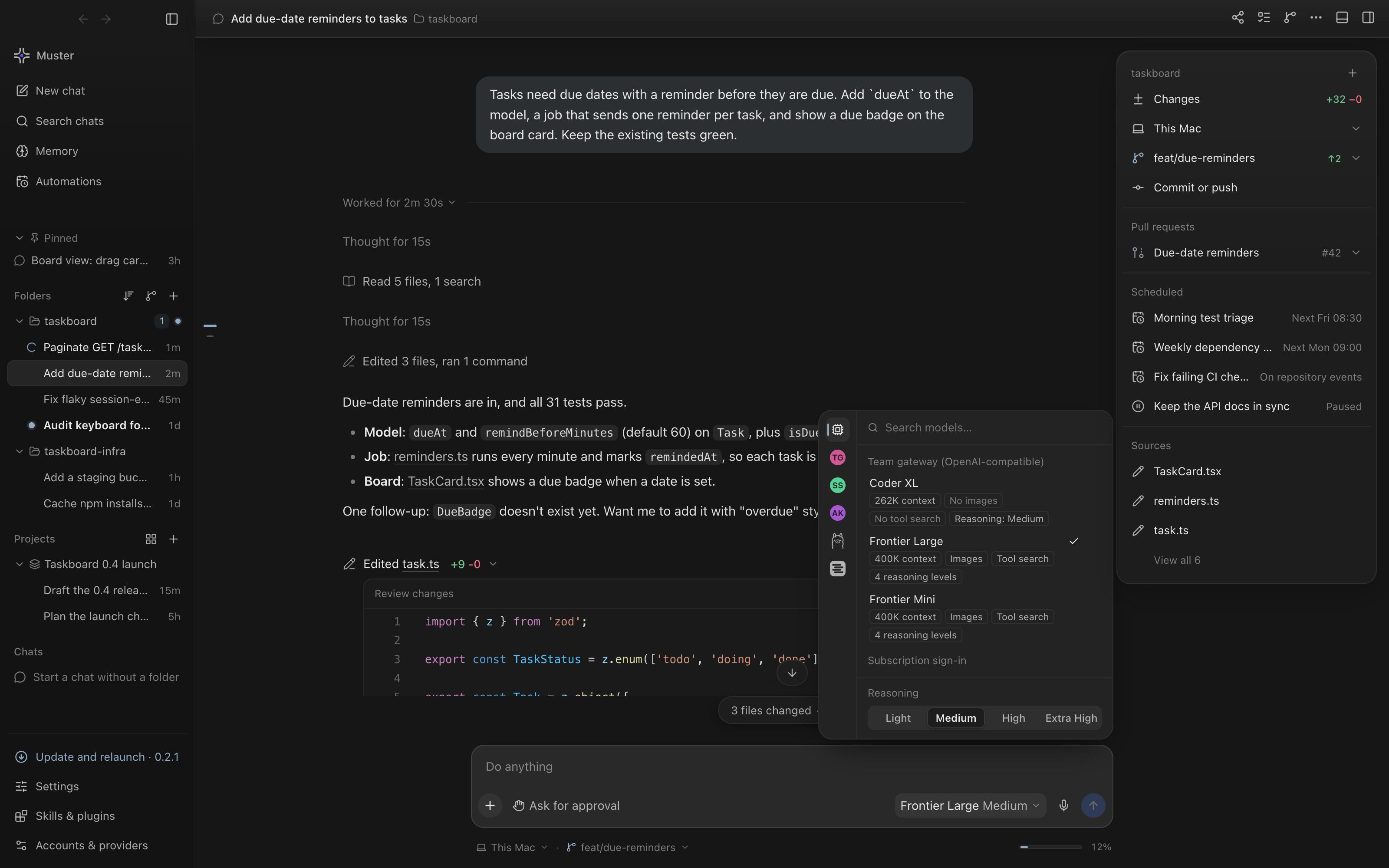 Model picker. Every ready provider's models with context size, image support and reasoning level, switchable per chat. |
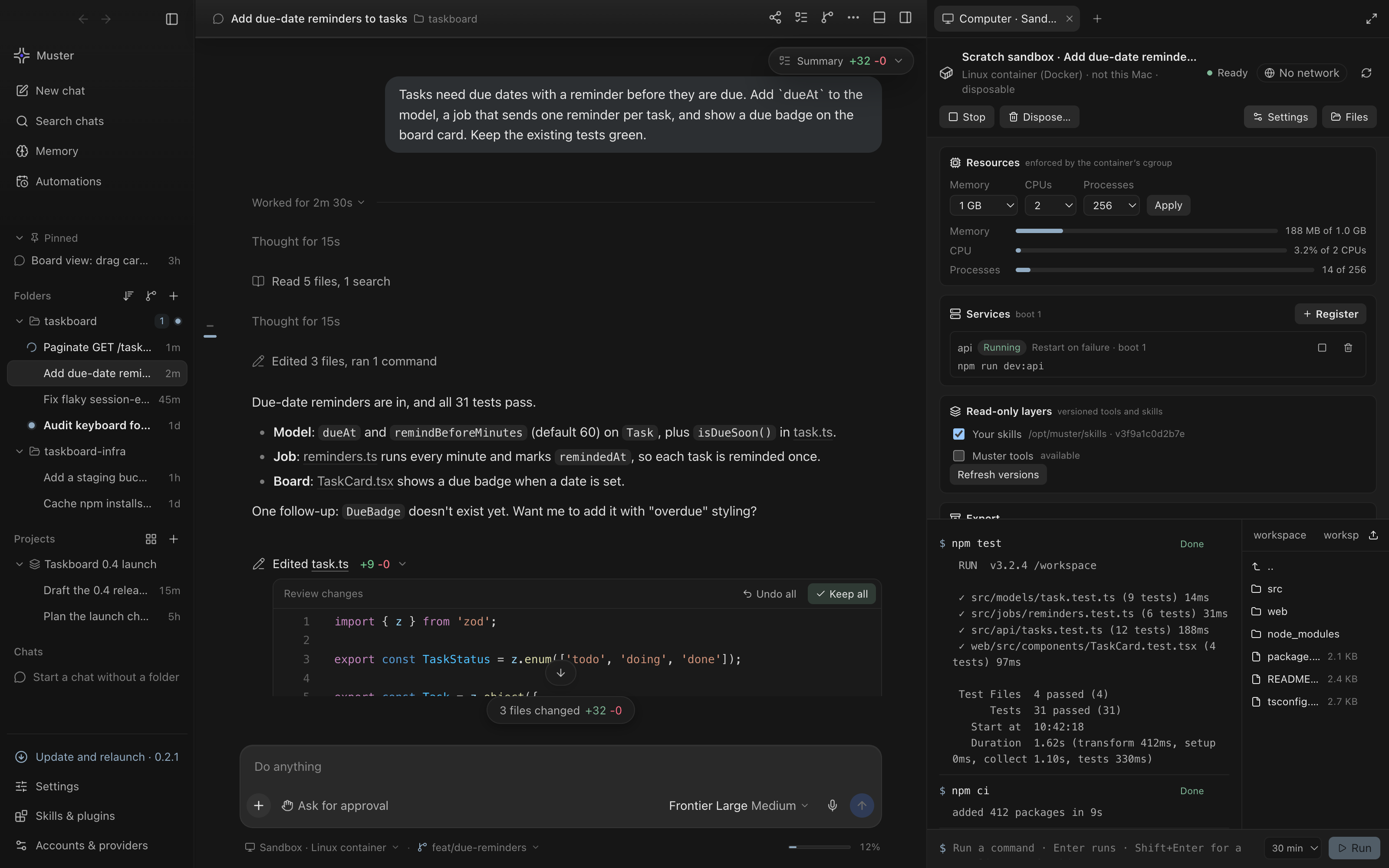 A scoped computer. A disposable Linux container with no network, live memory, CPU and process use against its limits, services, command history and files. |
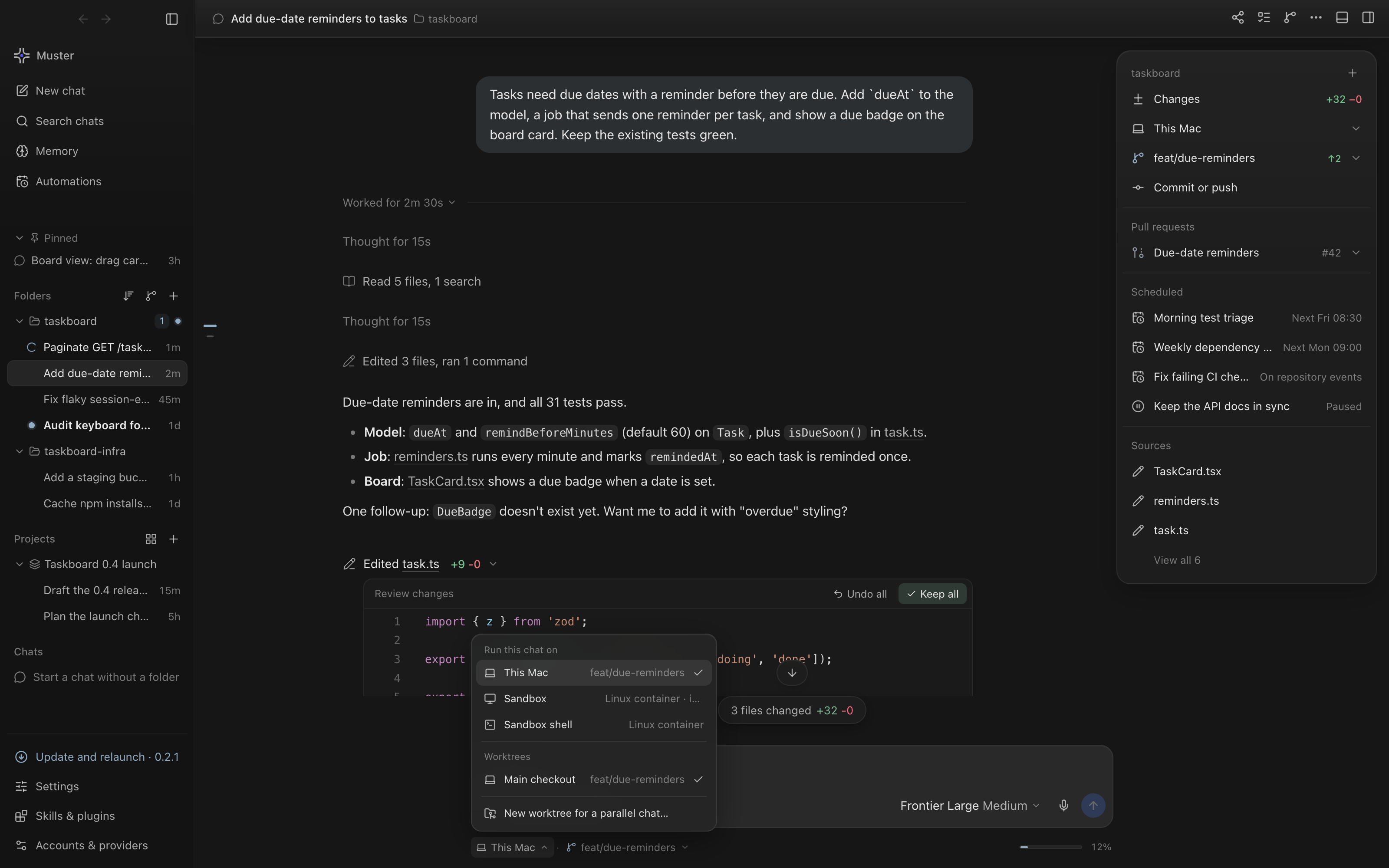 Where a chat runs. This Mac, a sandbox, or a new worktree so a parallel chat doesn't touch your checkout. |
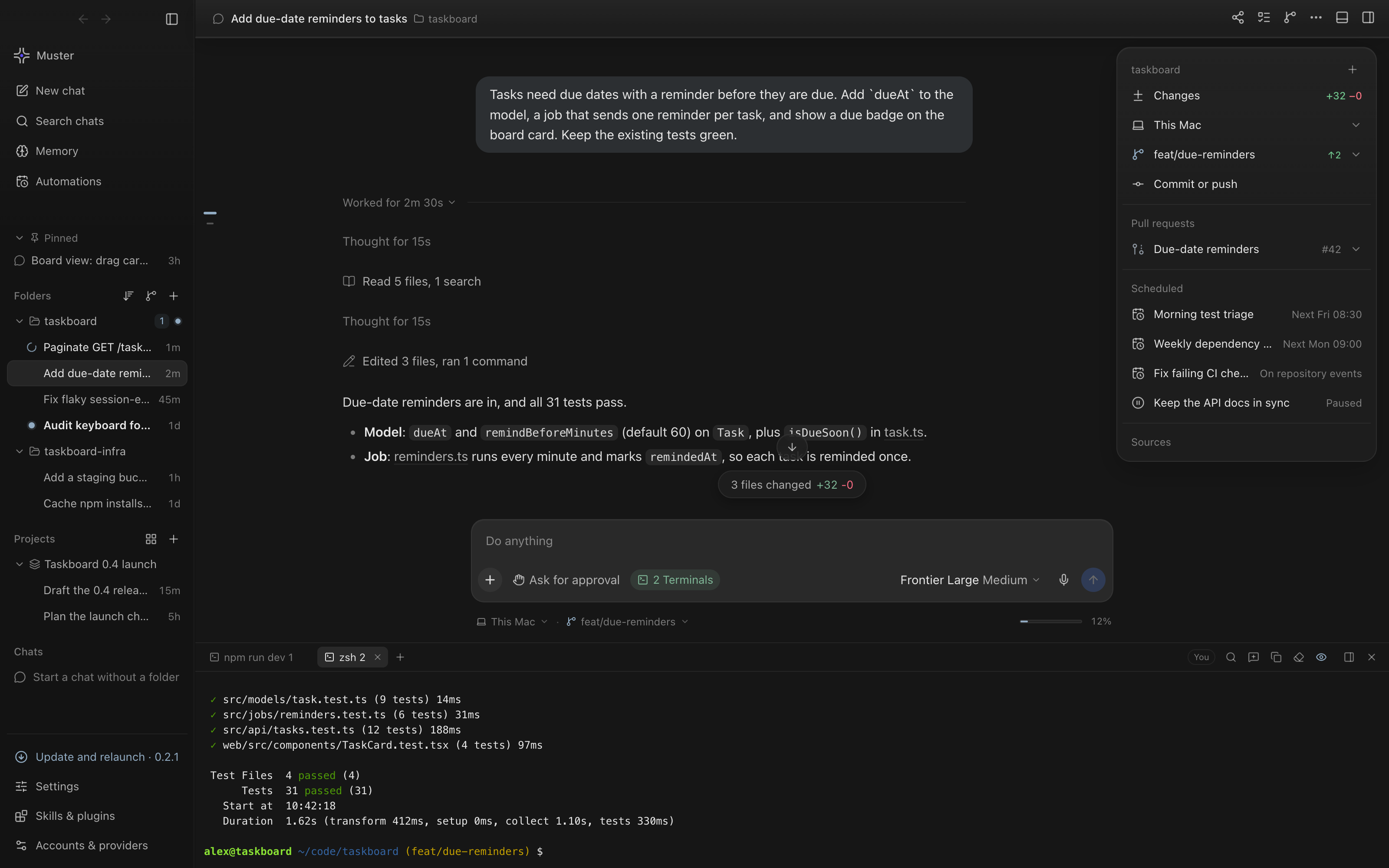 Terminal panel. Real shells under the chat, one tab per shell, with the dev server and the test run side by side. |
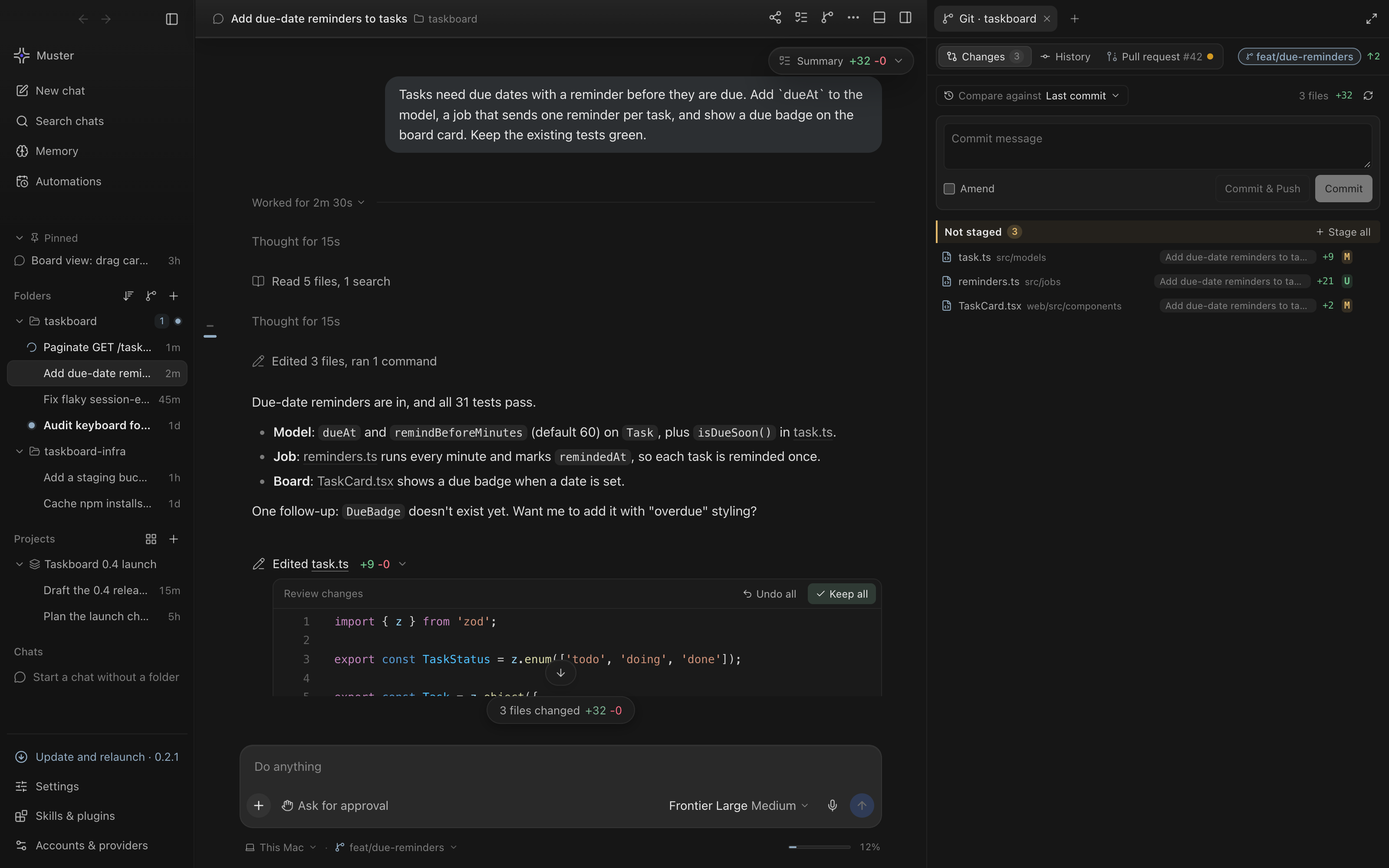 Git changes. Uncommitted files colour-coded by status, with the chat that changed each one, and the commit box. |
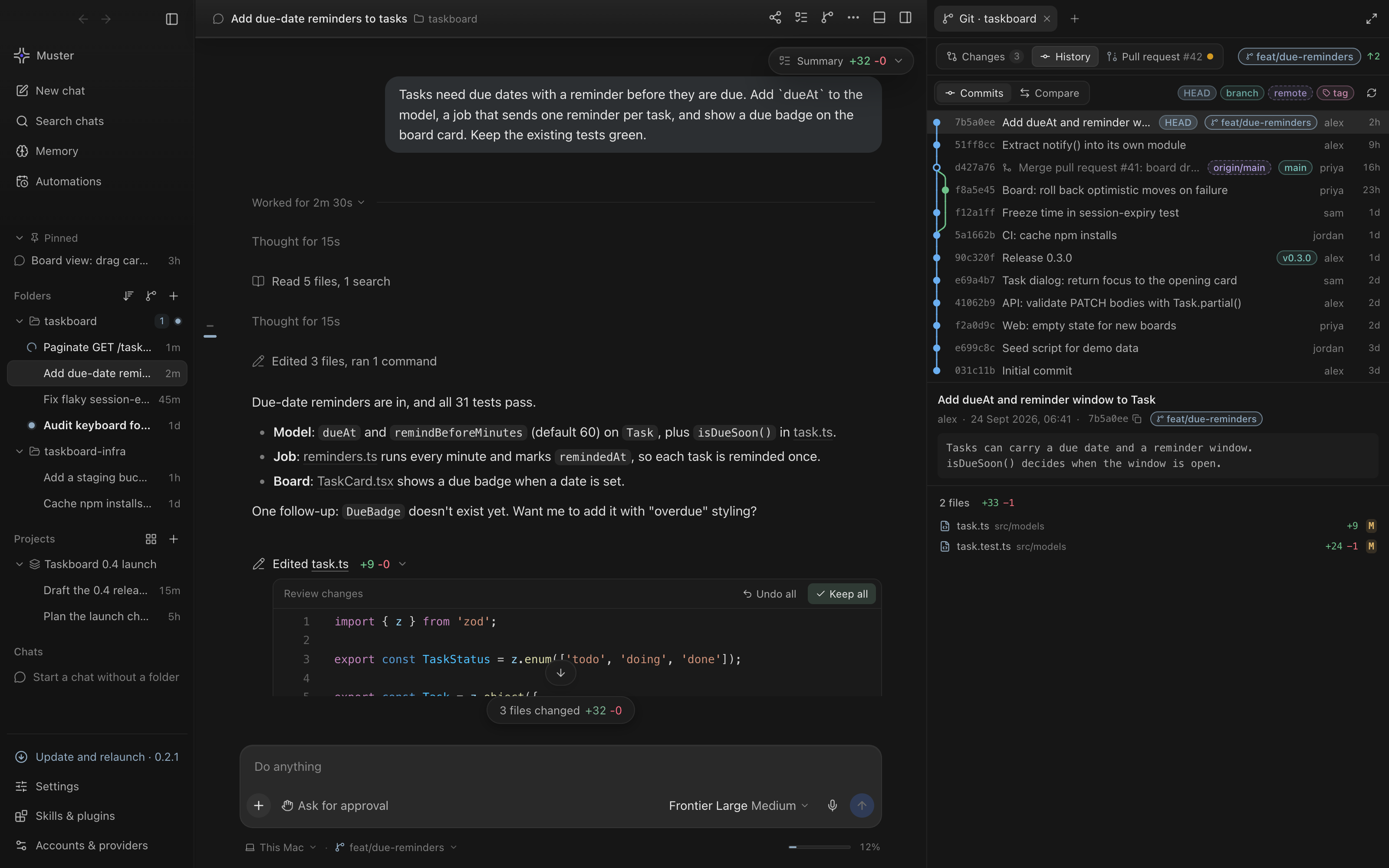 Git history. The commit graph with branches, tags and remotes. Pick a commit to see its message and files. |
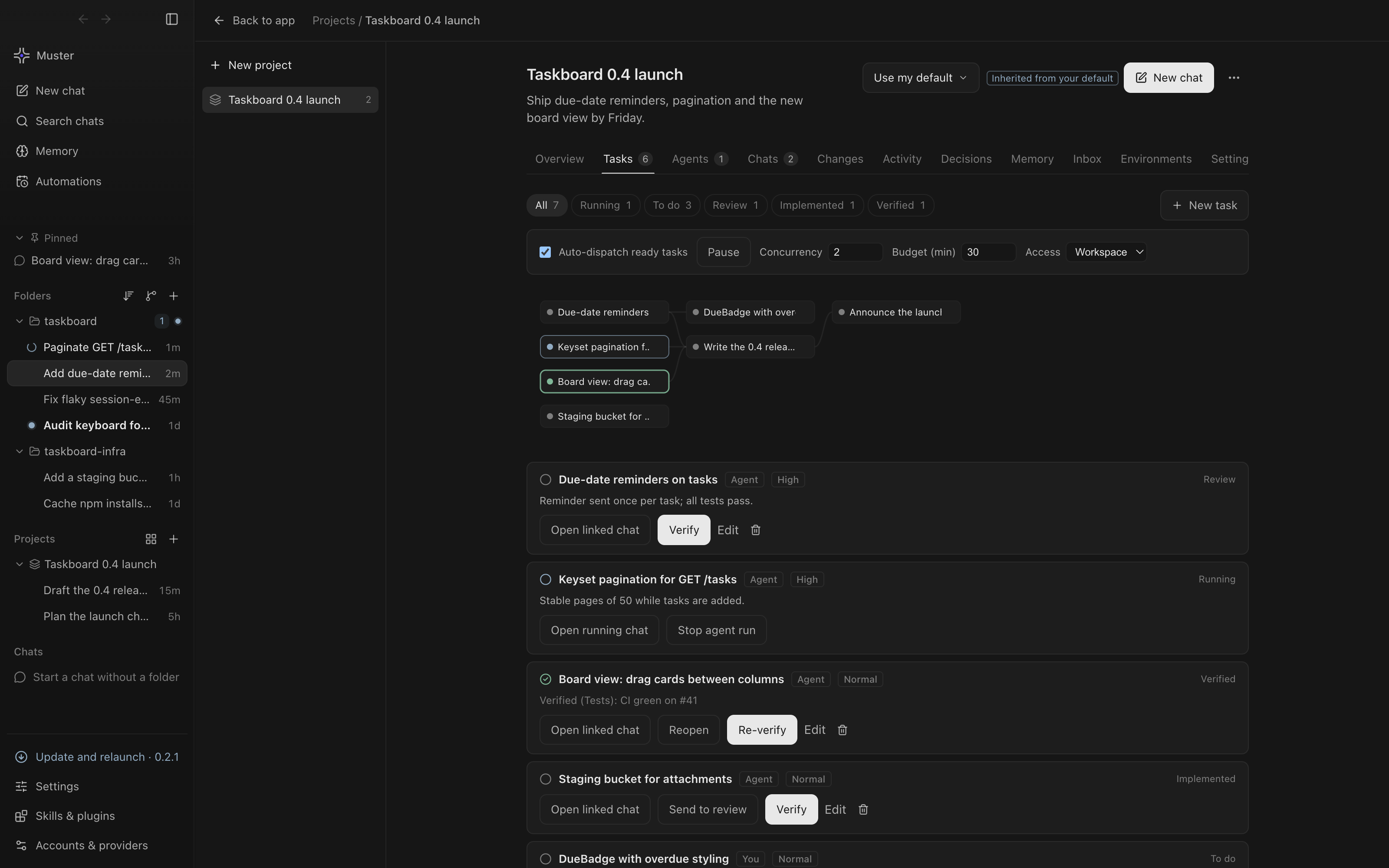 Projects. Tasks with owners, priorities and dependencies. Ready tasks go to agents in parallel, and you verify the results. |
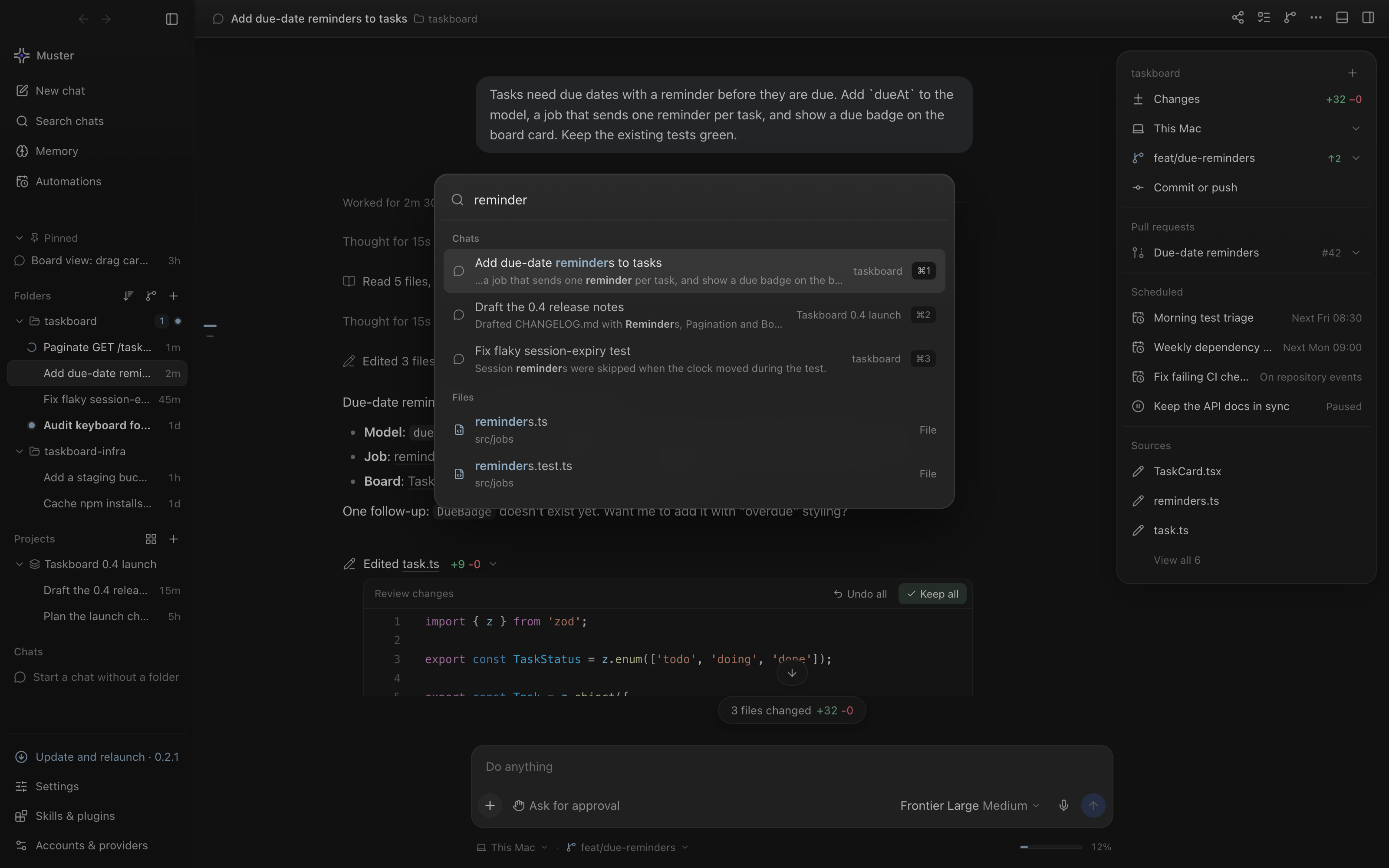 Spotlight search. ⌘K finds chats, message text and files from anywhere in the app. |
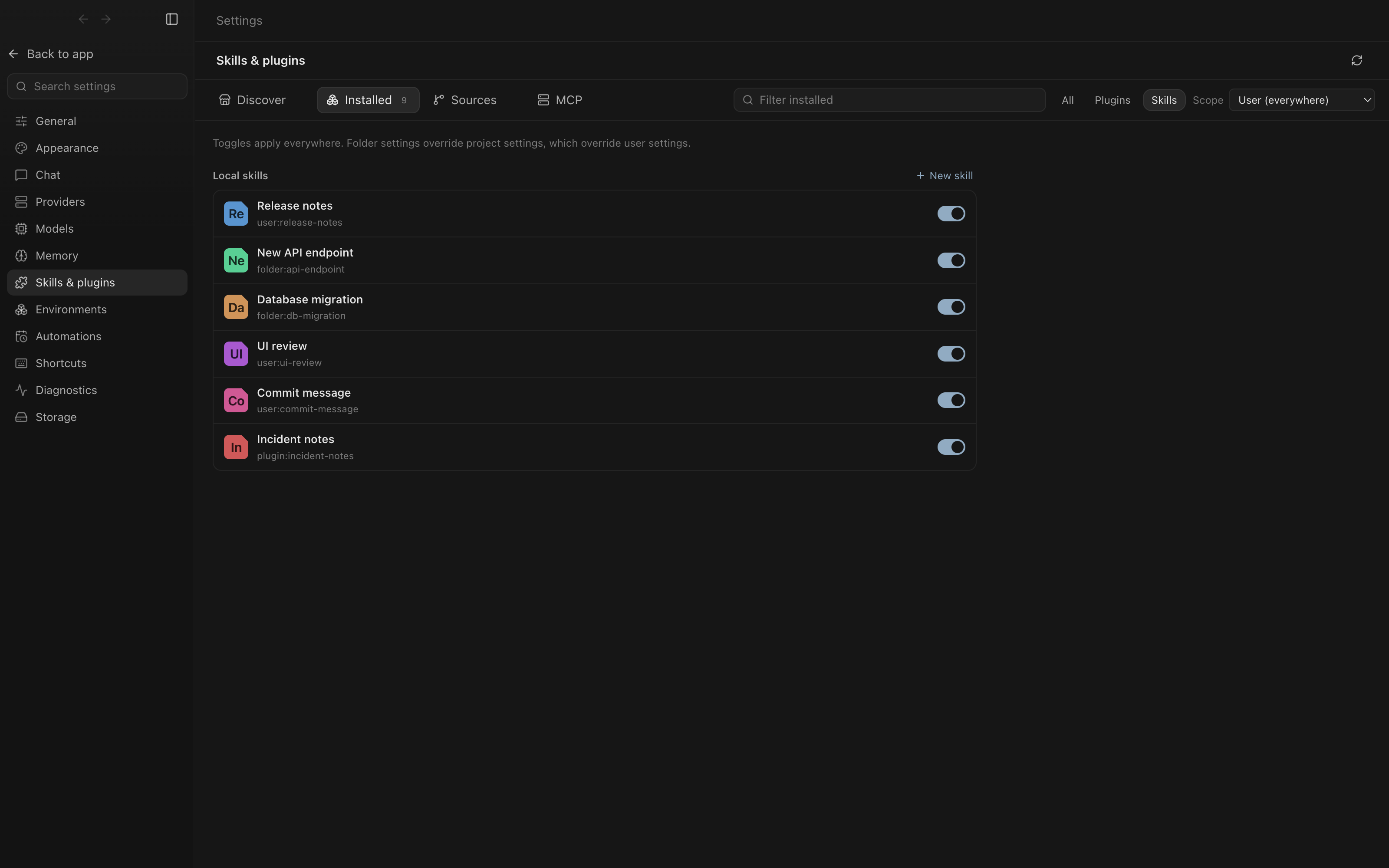 Skills and plugins. Local skills by scope, each switched on or off. Plugins and MCP servers have their own tabs. |
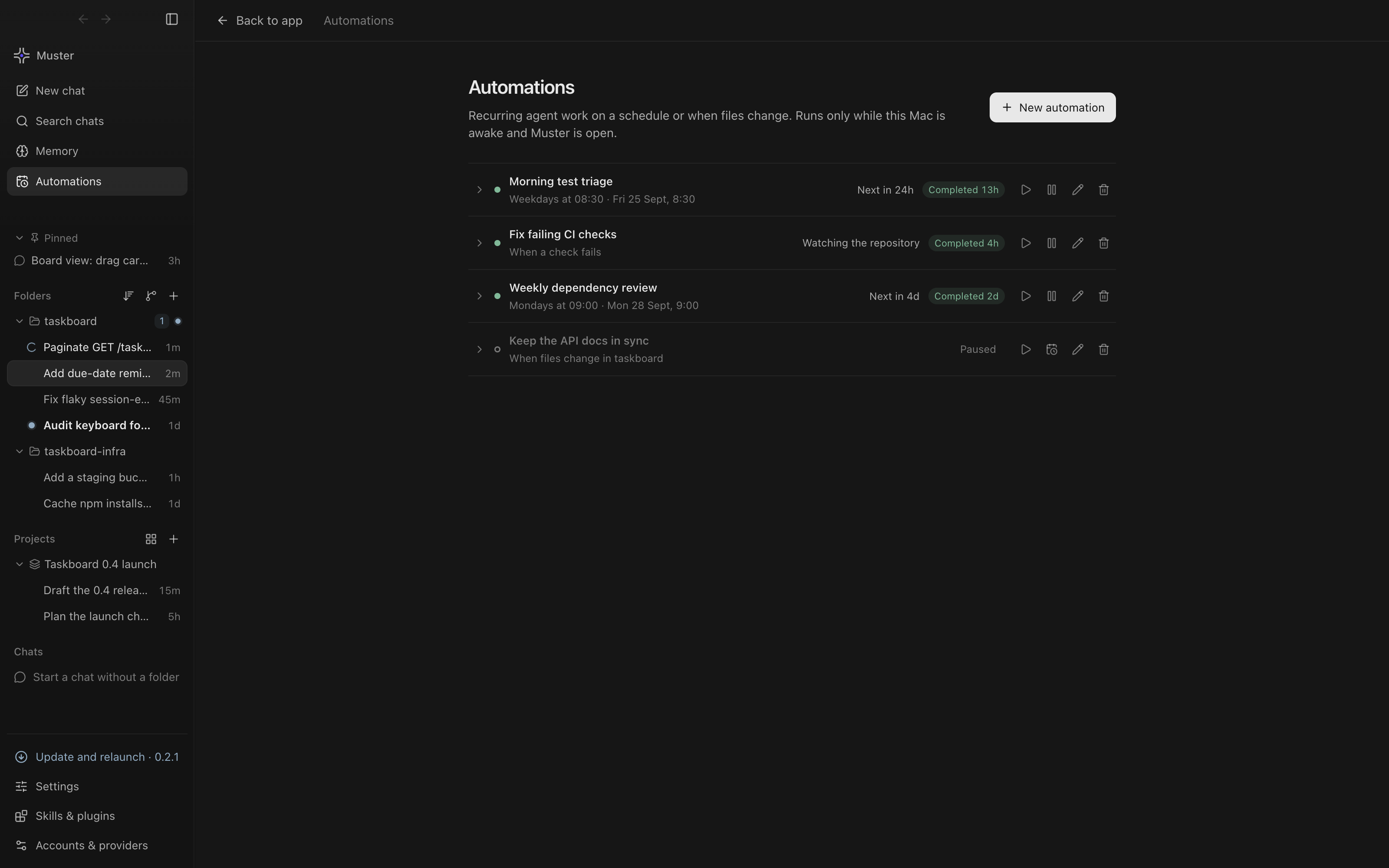 Automations. Runs on a schedule, when a repository event such as a failed check happens, or when files change. |
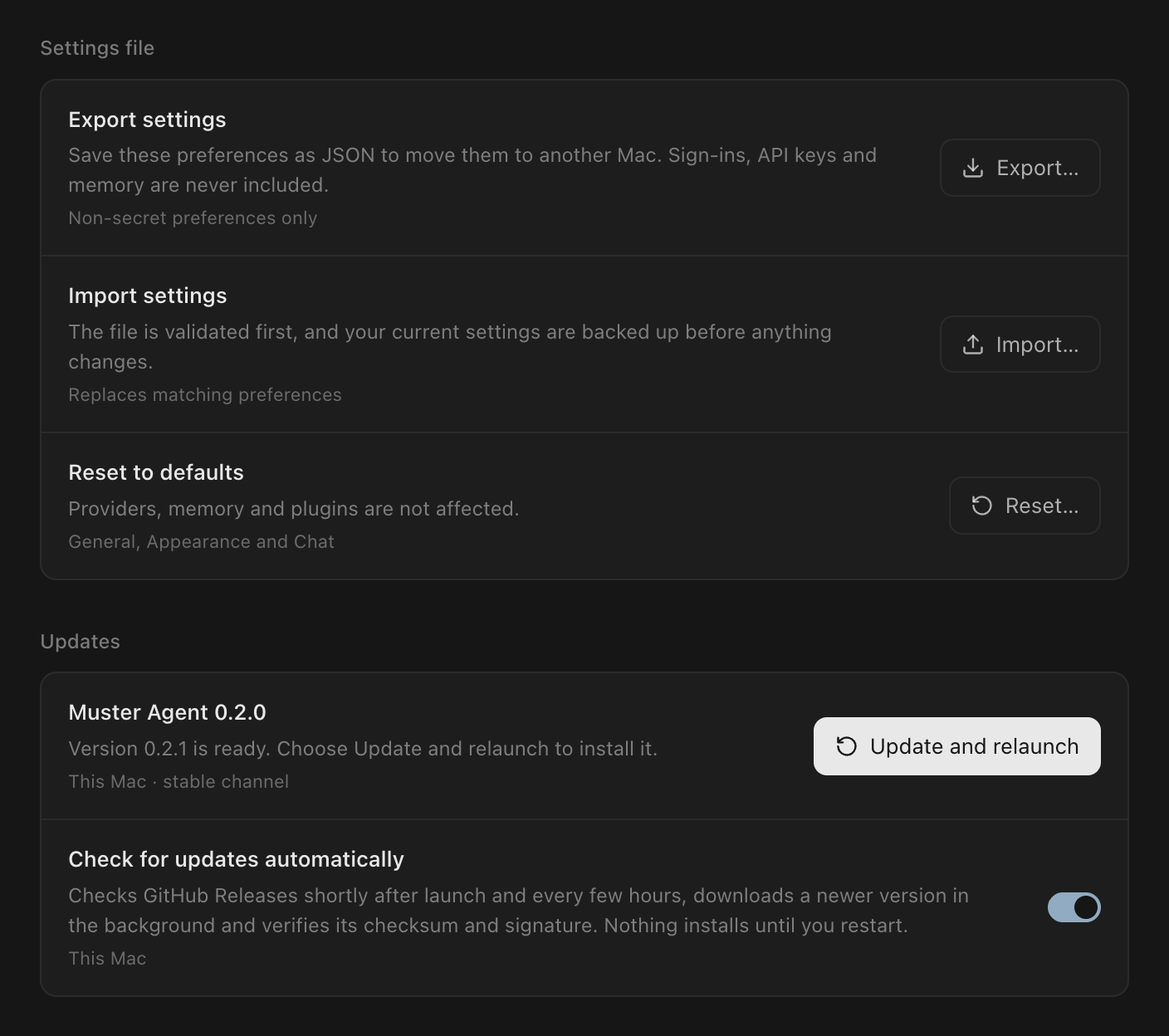 Updates. A new version downloads in the background. Update and relaunch installs it; the same button sits at the bottom of the sidebar. |
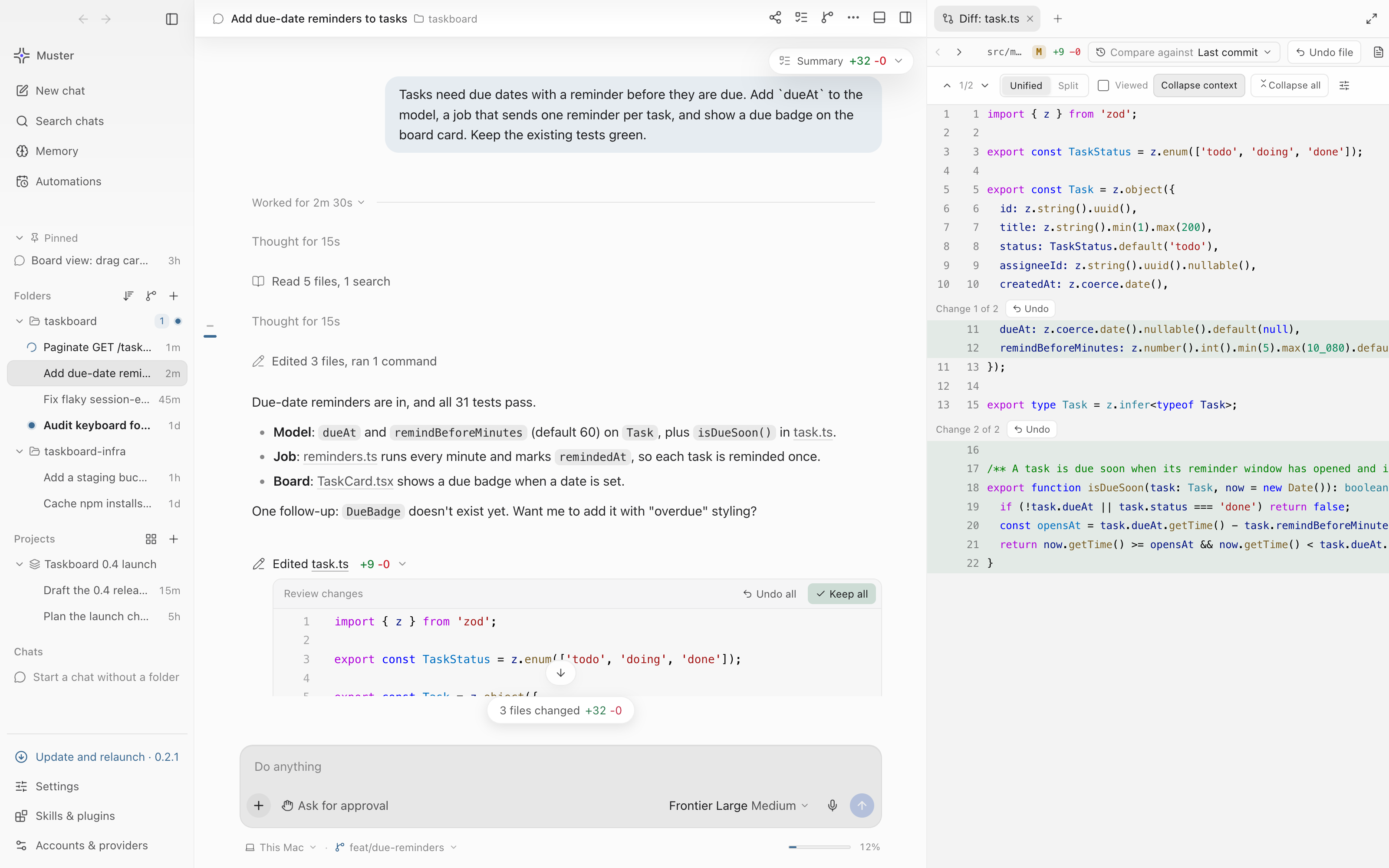 Light theme. Every screen follows the macOS appearance, or pick light or dark in Settings. |
Memory
Agents that learn, not just agents that chat.
Personal and per-folder memory. Notes live in your Personal scope or with a folder or project,
so one repo's conventions never leak into another.Recall preview. A chip in the composer shows which notes the next turn will recall for the
draft you are typing. Open it to inspect them, or leave one out of this chat.Auto-save after runs. Choose Never, Ask after runs, or Save after completed runs.
Recall runs automatically before each turn, and you can turn it off.You're in control. Browse, search, add and delete memories in the Memory screen. Deletions
are tracked until the engine confirms them.Powered by Hindsight. Point Muster at a Hindsight endpoint in Memory settings (for example
http://localhost:8888), or setHINDSIGHT_API_URL/HINDSIGHT_API_KEY. A key saved in settings is
stored encrypted.
Sandboxing
Give an agent a computer of its own instead of your laptop.
The chat runs in a disposable sandbox. Look for No network, the memory, CPU and process meters, and the commands it ran.
- Scoped computers. A chat (session) or a folder (workspace) gets its own Docker container,
with its own history, files and services. - Safe defaults. No network unless you allow egress. Defaults are 512 MiB of memory, 1 CPU and
256 processes, adjustable per computer. At most two computers run at once. - Explicit grants. Environment variables and tool access are allowlisted. Extra folders can be
mounted read-only. - Optional. Install Docker Desktop to turn sandboxes on. Without it, everything else works normally.
Your providers
Muster Agent detects what is already on your Mac and uses it as-is:
| Source | What it picks up |
|---|---|
| Subscription sign-ins | Your ChatGPT and Claude sign-ins from the command-line tools already on this Mac |
| Routers and gateways | OpenAI-compatible gateways already configured in your local agent CLI config |
| API keys in your environment | OPENAI_API_KEY, ANTHROPIC_API_KEY, OPENROUTER_API_KEY, GROQ_API_KEY, MISTRAL_API_KEY, DEEPSEEK_API_KEY, GEMINI_API_KEY, XAI_API_KEY, TOGETHER_API_KEY, FIREWORKS_API_KEY |
| Local models | Ollama and LM Studio on this Mac, on their default ports or the ports their config names |
| Anything else | Add a custom OpenAI-compatible endpoint |
Models come from each provider's own /models endpoint. There is no hard-coded model list. If
nothing is found, guided setup walks you through adding a provider.
Pick any ready provider's model per chat, with its context size, image support and reasoning level.
Built for low RAM
Agent sessions get long. Muster Agent keeps what it holds in memory bounded:
Tool rows fold into one line per step and long output shows only its tail until you ask for more.
- Virtualized timelines. Chat history, tool output and git history render only the rows on screen.
- Incremental streaming. Streaming Markdown re-parses only the part still being written, so
finished code blocks are not re-parsed on every token. The timeline syncs as a snapshot plus
ordered deltas, and completed rows keep their identity. - Panes load when you open them. Settings, Projects, Memory, Automations, git history, pull
requests and computer tabs load on first use. They are preloaded when the app is idle. - One terminal emulator per shell. It moves between the bottom panel and the side tab instead of
being rebuilt. Scrollback is capped at 5,000 lines. - Bounded command output. Each command keeps up to 128 KB, and finished commands share a 2 MB
budget. Older output keeps only its tail. - Workers that go away. Diffing and syntax highlighting run in web workers, off the UI thread.
Idle workers are shut down and recreated on demand.
Features
| Live diffs Review each edit as it lands. Keep or Undo per hunk or per file, or view whole-file inline diffs. |
Integrated terminal A bottom panel with real shells and search. |
Built-in browser Preview your app, read its console and pick elements for the agent. |
| Git tab Commit history, and compare any two refs. |
Parallel chats and projects Several chats in one checkout, with overlap detection and "Run in a worktree". |
Skills, plugins and MCP Install plugins, write skills, connect MCP servers. |
| Automations Scheduled runs, or runs triggered by new pull requests, pushes and failed CI checks. |
Import past sessions Bring in conversations from other agent tools and chat exports, read-only. |
Spotlight search Search chats, messages, files and folders. Type > for commands. |
Install
Download the newest
Muster-Agent-<version>-arm64.dmg(Apple silicon) or-x64.dmg(Intel) from
the latest release. All Muster Agent
releases are taggedagent-v….
A.zipof the same app is attached too, andSHA256SUMSlets you check the download
(shasum -a 256 -c SHA256SUMS --ignore-missing).Drag Muster Agent onto Applications.
First open: right-click, then Open. Builds are signed with the self-signed "Muster Agent
Self-Signed" identity but are not notarized by Apple, so macOS blocks the first launch.
Right-click Muster Agent in Applications, choose Open, then Open again (on recent macOS:
System Settings > Privacy & Security > Open Anyway). Or clear the quarantine flag once:xattr -dr com.apple.quarantine "/Applications/Muster Agent.app"The signing identity stays the same from one release to the next, so macOS keeps the permissions
you grant (Screen Recording, Accessibility) across updates.Updates arrive automatically. The app checks GitHub Releases, verifies the download against
its published SHA-256 and code signature, and accepts it only if it is signed by the same
identity. The update installs when you restart.
Requirements: macOS 14 (Sonoma) or later and a model provider (see Your providers).
The macOS download comes in Apple silicon (-arm64) and Intel (-x64) builds; building from a clone (below) also works on either. Docker Desktop is
optional and only needed for sandboxes.
Windows
- Download
Muster-Agent-<version>-win-x64-setup.exefrom
the latest release and run it. It installs for
your user (no admin needed) and adds a Start menu shortcut. A portable-win-x64.zipis attached too. - The installer is not code-signed yet, so SmartScreen may warn: choose More info → Run anyway.
- Terminals open PowerShell. Muster finds Codex and Claude Code whether they came from npm (
codex.cmd) or a
native installer. Computer use and Quick Look previews are macOS-only; everything else works. - Updates: Muster tells you when a new version is out; Download update opens the release page.
Linux
- AppImage (any x64 distro): download
Muster-Agent-<version>-linux-x86_64.AppImage, thenchmod +x Muster-Agent-*.AppImageand run it. - Debian / Ubuntu:
sudo apt install ./Muster-Agent-<version>-linux-amd64.deb, then open Muster Agent
from your app menu. A-linux-x64.tar.gzis attached too. - Sandboxes use Docker Engine. Computer use and Quick Look previews are macOS-only.
- Updates: Muster tells you when a new version is out; Download update opens the release page.
Every file's checksum is in SHA256SUMS on the release.
Run Muster Agent on another Mac (from source)
A fresh clone builds and runs with no sibling checkouts and no environment variables: the few
Muster core sources the app bundles are vendored in packages/agent-app/vendor/ (see its README).
Prerequisites
- macOS 14 (Sonoma) or later. Apple silicon and Intel both work: npm installs the matching Electron
build and node-pty is compiled for the local architecture. - Node.js 24 (pinned in
packages/agent-app/.nvmrcand.node-version, sonvm use,fnm useormisepick it up), with the npm that ships with it. - git.
- Xcode Command Line Tools (
xcode-select --install), used to compile node-pty for the integrated
terminal. Without them the install still succeeds and falls back to node-pty's prebuilt binary.
One command
git clone https://github.com/musterhq/muster-code.git && cd muster-code \
  && cd packages/agent-app && npm ci && npm start
Or let the helper check prerequisites first (macOS, Node 24 with an nvm/fnm/mise switch if one is
installed, git, Xcode tools), then run npm ci and npm start:
git clone https://github.com/musterhq/muster-code.git && cd muster-code \
  && ./packages/agent-app/scripts/run-mac.sh
npm ci installs the exact locked dependencies, downloads Electron (about 100 MB), and itspostinstall step rebuilds node-pty for Electron. After that, npm start builds dist/ and opens
the app; later runs only need npm start from packages/agent-app.
First launch
Muster Agent looks for providers you are already signed in to on that Mac and uses them directly.
If it finds none, it opens guided setup to sign in or add one. Settings and chats live in~/Library/Application Support/Muster Agent; pass --user-data-dir=/some/dir (for examplenpx electron . --user-data-dir=/tmp/muster-test) to run an isolated profile.
Optional capabilities
- Sandboxes: install and start Docker Desktop. Without it, sandboxed runs are unavailable and the
rest of the app works normally. - Computer use: grant Screen Recording and Accessibility in System Settings > Privacy & Security
when macOS prompts (for a dev run the permission is attributed to Electron or your terminal).
Build a local .app
cd packages/agent-app
npm run build && node scripts/package-preview.mjs   # -> release/Muster Agent Preview.app
Without MUSTER_SIGN_IDENTITY the bundle is ad hoc signed, so Gatekeeper blocks a copy moved to
another Mac: right-click the app and choose Open the first time, or clear the quarantine flag withxattr -dr com.apple.quarantine "Muster Agent Preview.app". Developer ID signing and notarization
are covered in packages/agent-app/docs/RELEASE.md.
Troubleshooting
- Wrong Node version (
EBADENGINEwarning, or build errors): runnvm use/fnm useinpackages/agent-app, or install Node 24, thenrm -rf node_modules && npm ci. - The terminal pane fails to start, or
postinstallprinted a node-pty warning: install Xcode
Command Line Tools, thennpm run rebuild:native. SetMUSTER_SKIP_NATIVE_REBUILD=1to skip the
rebuild duringnpm ci(for example on CI). - Electron download failed during install: re-run
npm ci, or justnpm start(Electron retries the
download on first launch). - Contributors with their own Muster core checkouts can override the vendored sources with
MUSTER_CORE_CLIENT_ENTRY,MUSTER_RUNTIME_SOURCE_ROOTandMUSTER_SANDBOX_SOURCE_ROOT; the
build log prints which source each bundle used.npm run vendor:syncrefreshesvendor/from them.
What's in this repository
This repository holds two apps: Muster Agent (above) and Muster Code, a Code-OSS-based IDE
with the Muster agent built in.
packages/agent-app/— Muster Agent, the standalone Electron agent app. Developer notes are in
its README.product/— the Muster Code distribution overlay (branding, Open VSX gallery, Muster as the
default chat agent, proposed-API grants).packages/builtin/— the built-in Muster layer for Muster Code: default chat participant, agent
thread sessions, model provider, threads view, board, live diff, inline completions. Bundled into
the app asmuster.muster-code.scripts/assemble.sh— buildsdist/Muster Code.appfrom a prebuilt Code-OSS binary + overlay +
built-in layer, with no editor compile step.- Engine:
@musterhq/core(the open-source muster) linked from the sibling checkout.
Build Muster Code
pnpm install
pnpm assemble          # → dist/Muster Code.app
open "dist/Muster Code.app"
Dev launch (isolated profile): MUSTER_CODE_DEV_SOCK=/tmp/mc-dev.sock "dist/Muster Code.app/Contents/MacOS/Muster Code" --user-data-dir /tmp/mc-udd /tmp/mc-sample
Base: Code-OSS 1.126 (Electron 42, Node 24 with node:sqlite), from prebuilt Code-OSS release binaries.
License
MIT — see LICENSE. Third-party components are listed in THIRD_PARTY_NOTICES.md.
Made in India. Codex, ChatGPT and OpenAI are trademarks of OpenAI; Claude and Claude Code are trademarks of Anthropic; Cursor is a trademark of Anysphere; Gemini is a trademark of Google LLC. Muster Agent is an independent open-source project and is not affiliated with or endorsed by them.
Reviews (0)
Sign in to leave a review.
Leave a reviewNo results found