DroidAgent
Health Warn
- License — License: MIT
- Description — Repository has a description
- Active repo — Last push 0 days ago
- Low visibility — Only 5 GitHub stars
Code Pass
- Code scan — Scanned 1 files during light audit, no dangerous patterns found
Permissions Pass
- Permissions — No dangerous permissions requested
No AI report is available for this listing yet.
DroidAgent是一个运行在Android上的开源AI Agent。使用Kotlin与Jetpack Compose原生实现,可以在手机上管理工作区、读写文件、执行Shell、抓取网页、调用MCP工具和启动子代理
DroidAgent
简体中文 | English



DroidAgent is an open-source AI agent that runs natively on Android. It is built with Kotlin and Jetpack Compose, and can manage workspaces, read and write files, run shell commands, fetch web pages, call MCP tools, and spawn subagents from a phone.
Project motto: no extra features — just the purest Android AI agent.
- Author: muzhou07
- Repository: muzhou07/DroidAgent
- Package:
com.muzhou.droidagent - Version:
1.2.0 - Requirements: Android 8.0 (API 26) and above
- License: MIT
UI and interaction are inspired by DeepSeek's chat-demo; the agent layering follows deepseek-harness. Both are MIT licensed. The protocol is compatible with OpenAI Chat Completions, so DeepSeek, OpenAI, Ollama, LM Studio, vLLM, and OneAPI all work.
Screenshots
| New chat | Conversation and usage |
|---|---|
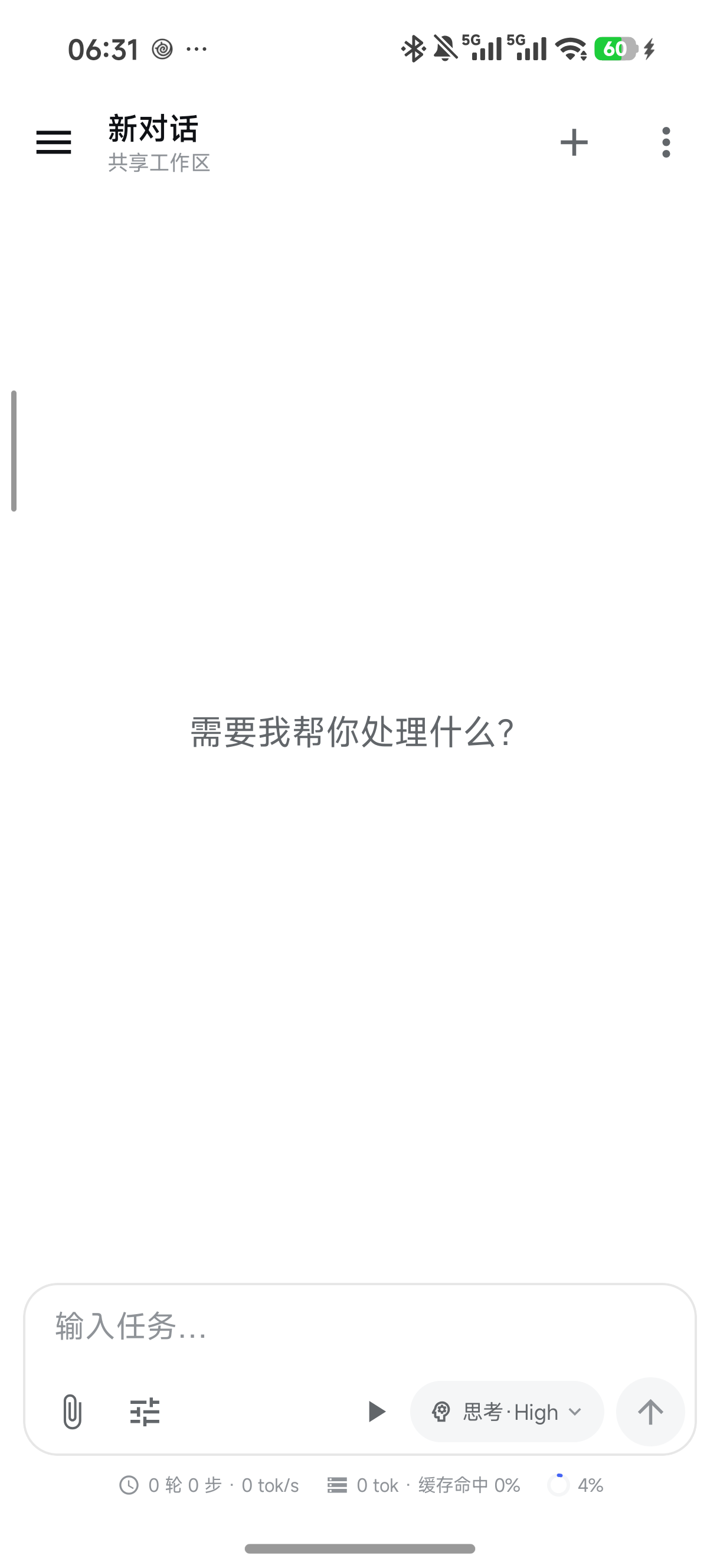 |
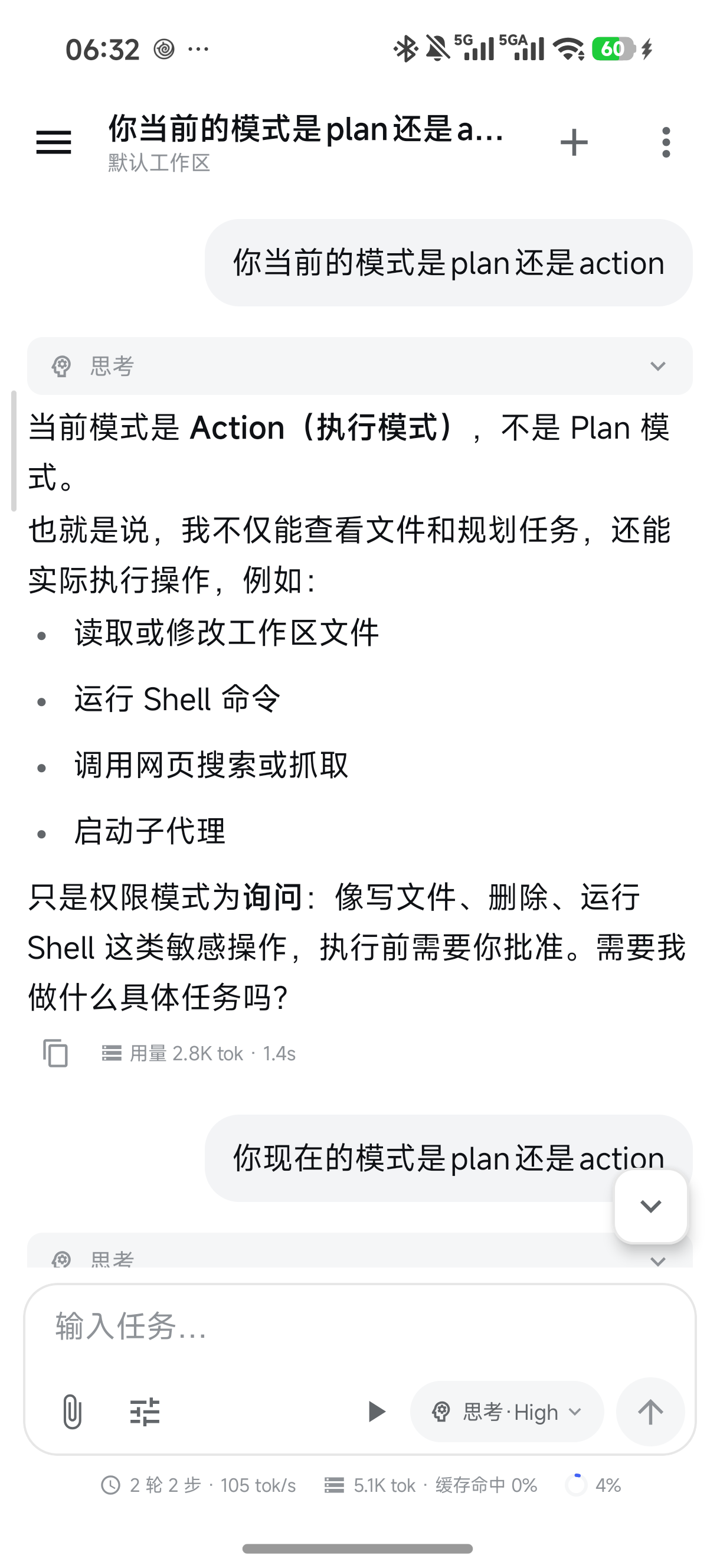 |
| Sessions and workspaces | Settings |
|---|---|
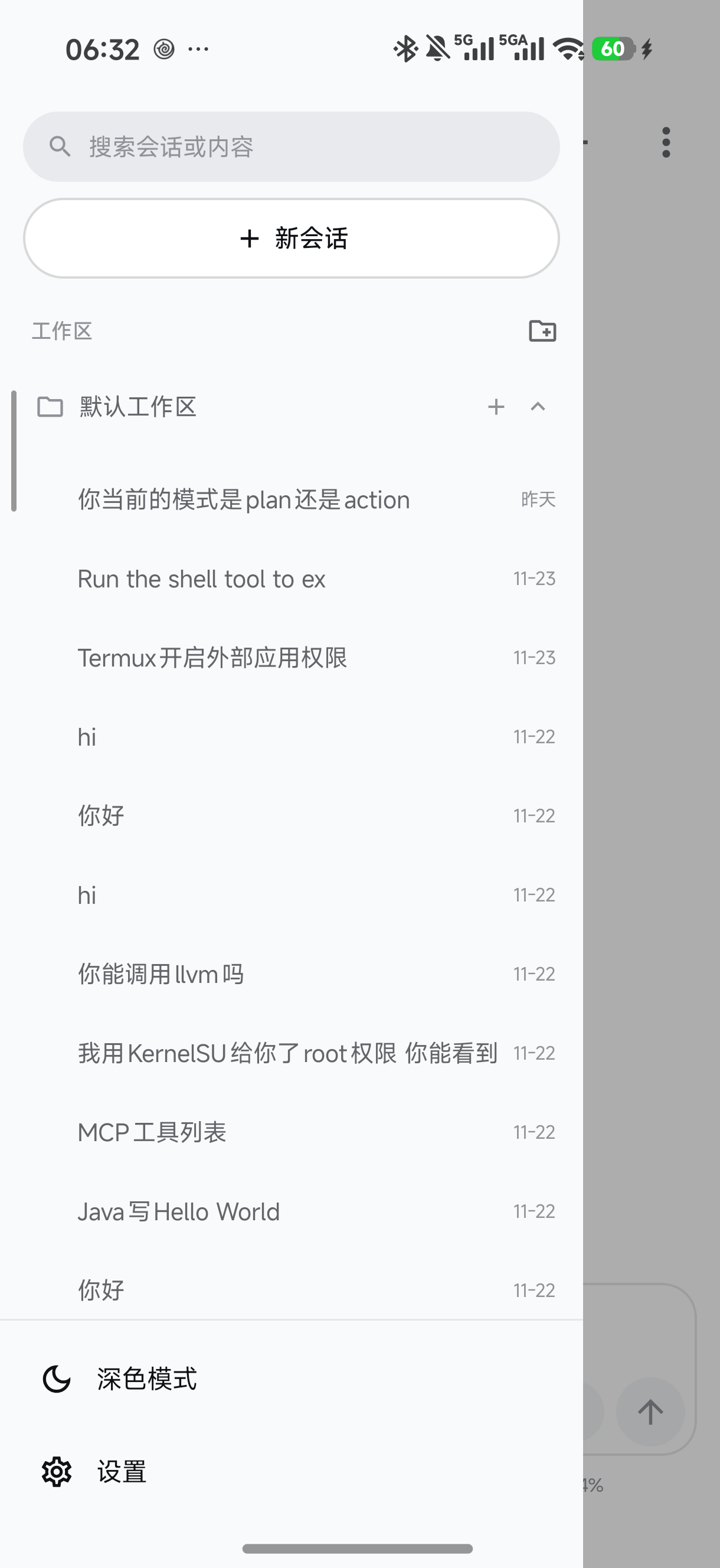 |
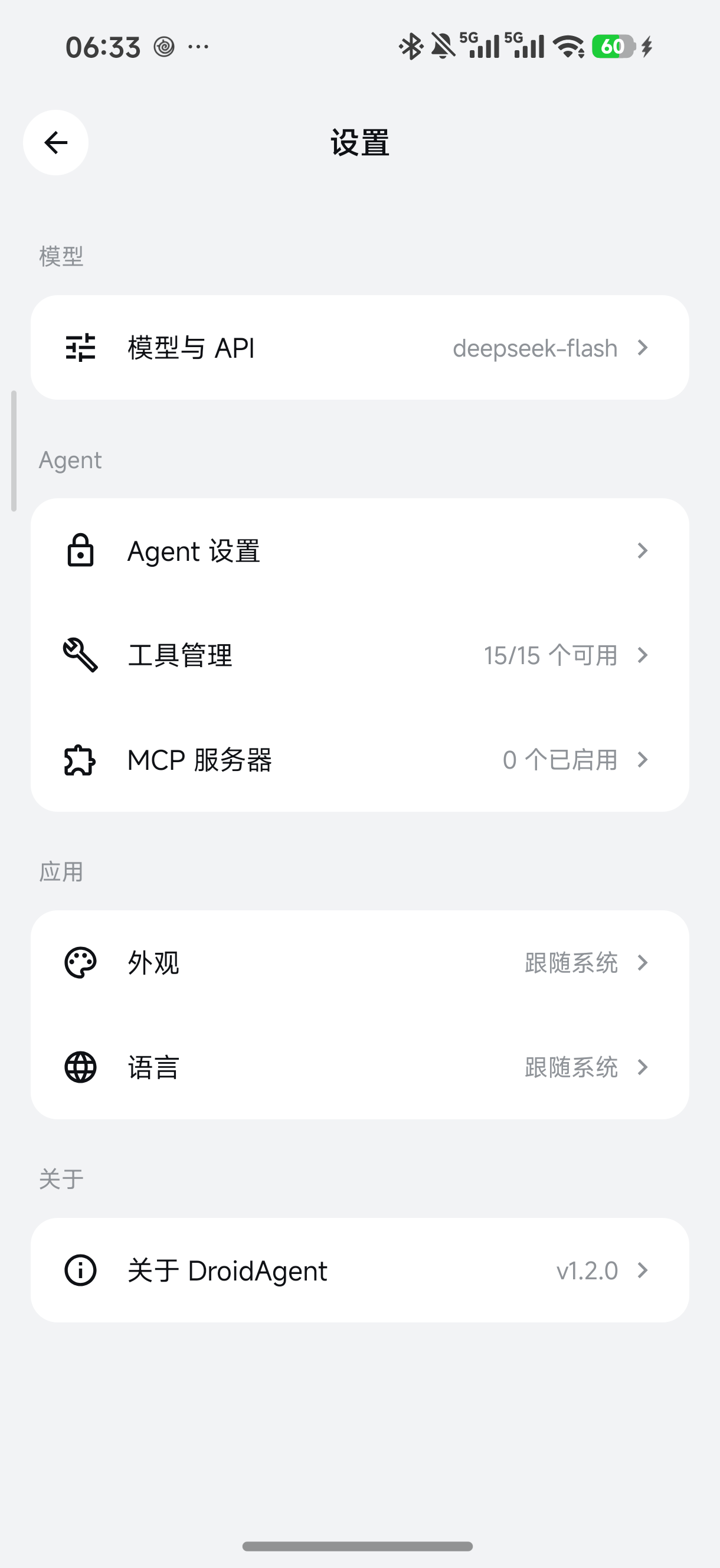 |
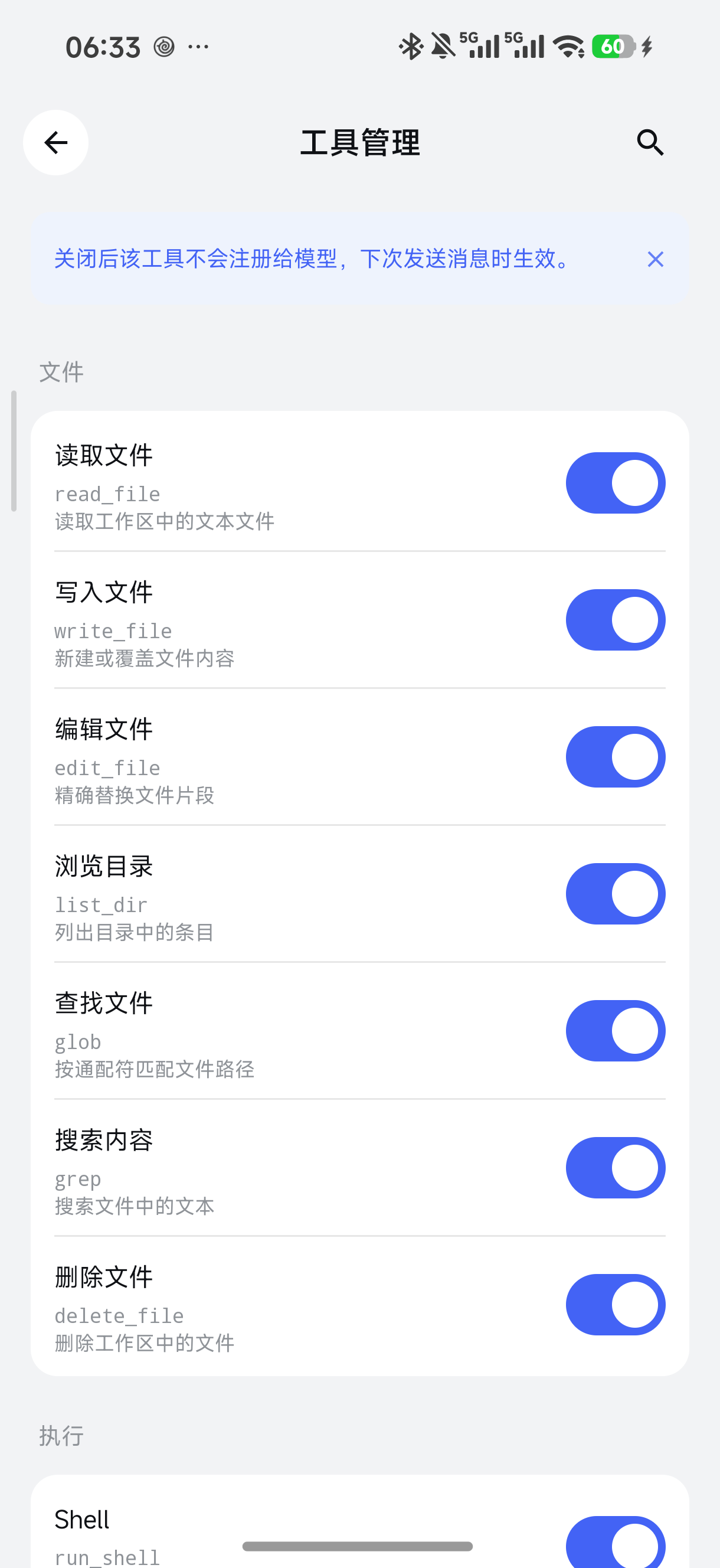
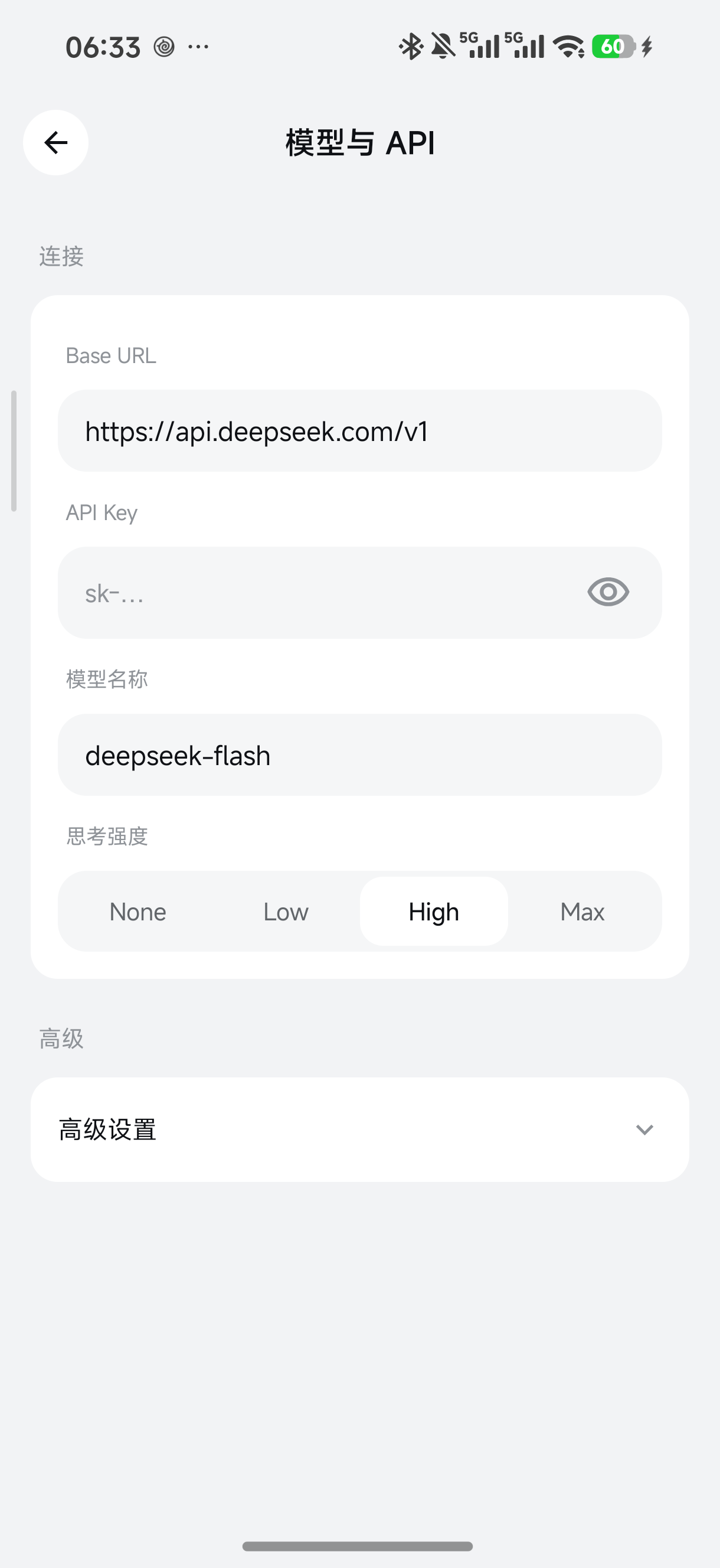
| Tool management | Model and API |
|---|---|
 |
 |
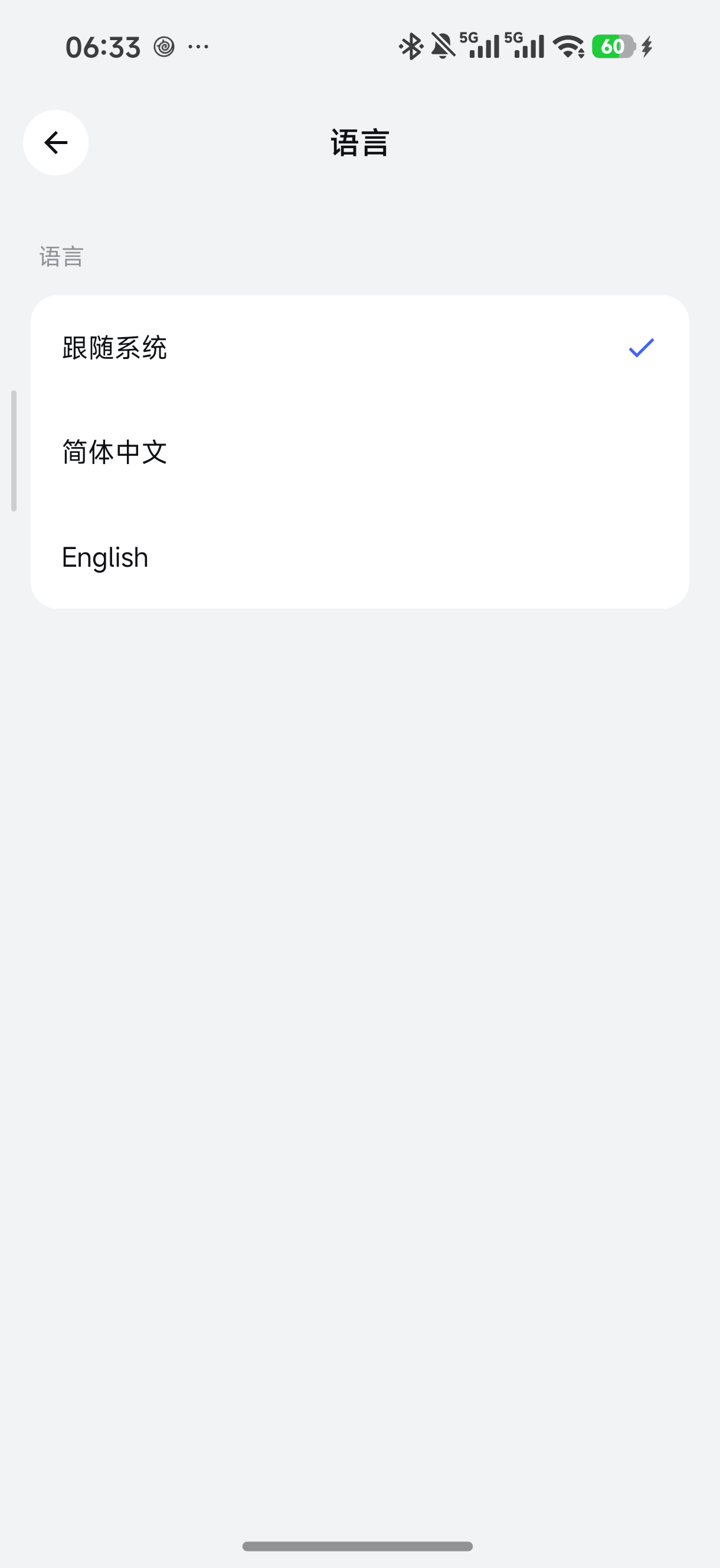
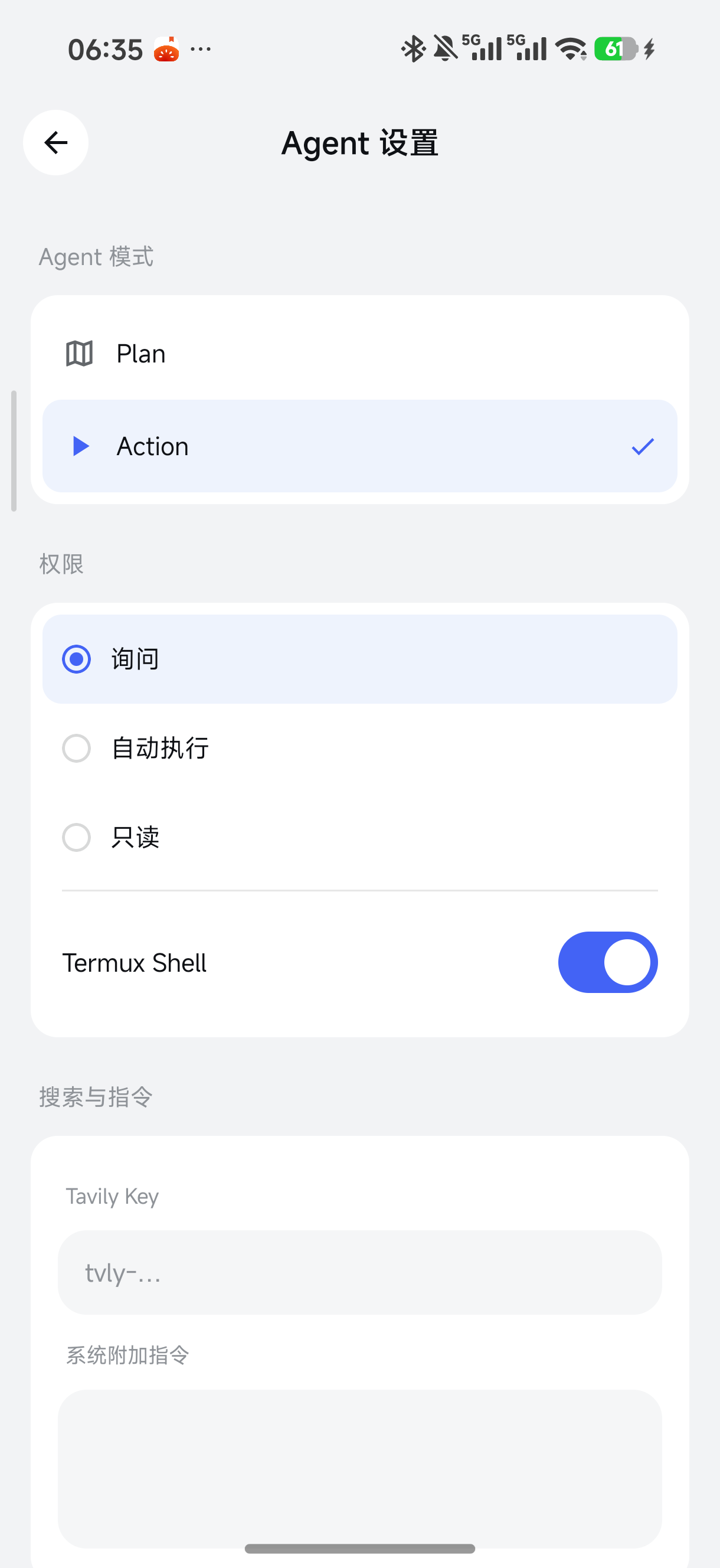
| Language | Agent settings |
|---|---|
 |
 |
Screenshots taken on a Xiaomi 17 Pro (HyperOS 4 / Android 17, 1220×2656).
Features
Chat and models
- Multiple sessions: create, switch, rename, delete.
- Cold start opens a new chat and reuses the last workspace; the session title is generated by the model after the first message.
- The drawer groups sessions by workspace; search matches both titles and message content.
- Streaming OpenAI Chat Completions with
reasoning_contentsupport. - Multi-round tool calling with streamed argument accumulation.
- Regenerate, stop, and copy answers.
- Reasoning effort None / Low / High / Max (default High), switchable in settings and the composer, sent as
reasoning_effort. - Plan / Action modes: Plan only analyzes, reads, searches, and plans — write and shell tools are not registered at runtime; Action runs the full task. The switch sits left of the reasoning control and also in Settings → Agent settings.
- Reasoning output collapses automatically; only the current turn stays expanded.
- Failed requests appear as a red message inside the session and are persisted; errors are never sent back to the model.
- Requests time out after 12 minutes of inactivity so long tasks cannot hang forever.
- Per-turn token usage and latency; the composer footer shows rounds, steps, tok/s, cache hit, and context usage.
- Attachments support images (data URL) and text/code files.
- Web search prefers Tavily, falling back to Bing / DuckDuckGo; fetching retries, follows redirects, detects encoding, and extracts the main content.
- Markdown rendering with headings, lists, quotes, tables, links, inline code, and syntax highlighting.
- Context is summarized automatically near the window limit, keeping recent messages.
- Long sessions use SQLite WAL, transactional writes, and background row building; cold start does not scan every session.
- A "scroll to bottom" button appears while reading history.
- Dark, light, and follow-system themes; settings save instantly.
- UI language: follow system / Simplified Chinese / English, switched in Settings → App → Language and applied immediately.
- Immersive system bars: content extends behind the status and navigation bars; lists and fixed bottom bars avoid the safe area, for both gesture and three-button navigation.
- Tool management has search over display name, callable name, and description; MCP tools show the server and the original tool name.
- The About page checks the latest GitHub release and shows an update sheet when one is available.
Agent tools
| Tool | Capability | Approval |
|---|---|---|
read_file |
Read text with line numbers, supports offset/limit | No |
write_file |
Create or overwrite a file | Yes |
edit_file |
Exact string replacement | Yes |
list_dir |
List a directory | No |
glob |
Find files by glob pattern | No |
grep |
Regex search file contents | No |
delete_file |
Delete a file or directory | Yes |
run_shell |
Run shell commands, background jobs supported | Yes |
job_list |
List background jobs of this session | No |
job_output |
Read incremental output of a background job | No |
job_kill |
Terminate a background job | Yes |
web_search |
DuckDuckGo / Tavily search | No |
web_fetch |
Fetch a page and extract the main content | No |
todo_write |
Update the task list | No |
task |
Start a subagent | No (approvals still apply inside) |
mcp_<tool> |
Tools provided by MCP servers | Yes by default, except readOnlyHint |
Settings → Agent → Tool management toggles each built-in tool and every tool from connected MCP servers. Each row shows the display name and the model-facing call name; disabled tools are not registered for the next message.
Workspaces
- App-private workspace: no extra permissions.
- Shared storage workspace:
/storage/emulated/0/DroidAgent/, reachable from both the built-in shell and Termux; requires all-files access. - SAF workspace: granted through the system directory picker; file tools work, shell depends on whether the path maps to a local one.
- A session is bound to its workspace at creation and cannot be changed afterwards.
- Create and delete workspaces, and start sessions inside a specific workspace.
- Built-in file manager, text editor, and terminal.
Shell and Termux
- The built-in shell uses
/system/bin/shwith toybox, running in the workspace root. - Termux runs bash through
com.termux.RUN_COMMANDand is meant for shared-storage workspaces. Requirements:- Install Termux and grant DroidAgent the
RUN_COMMANDpermission; - Enable
allow-external-apps=truein~/.termux/termux.propertiesand restart Termux; - Run
termux-setup-storageinside Termux.
- Install Termux and grant DroidAgent the
- Shell results include output, exit code, duration, and timeout state; timeouts kill the whole process tree.
run_shellacceptsrun_in_background=true, returns a job ID immediately, and is managed withjob_output,job_list, andjob_kill.
MCP
- Streamable HTTP (MCP 2025-03-26):
initialize,tools/list(paginated),tools/call. - Uses
Mcp-Session-IdandMCP-Protocol-Version, and understands JSON and SSE responses. - Servers can be enabled/disabled, configured with request headers, and inspected for connection state.
- Call names depend only on the tool's own name:
mcp_<tool>, ASCII only; duplicate names get a numeric suffix, independent of the server's configured name.
Permissions and security
- Three permission modes:
- Ask: writes, deletes, shell, and MCP mutating tools are approved one by one; "always allow in this session" is available.
- Auto: everything runs automatically — higher risk.
- Read-only: write and command tools are rejected at runtime; the model cannot force them.
- The approval sheet shows the command, arguments, and diff.
- API keys, Tavily keys, custom headers, and MCP headers are encrypted with Android Keystore (AES/GCM); failures never fall back to plaintext.
web_fetchaccepts any http(s) URL, including localhost, intranet, and reserved addresses.- Base URLs may be HTTP or HTTPS.
- Cloud backup and device migration are disabled.
Subagents
- The
tasktool starts a subagent with its own context, useful for code exploration and batch analysis. - Two levels of nesting; workspaces, MCP, and approval policy are shared while conversation history stays separate.
Architecture
app/                     Android UI and app layer
  ui/chat                Chat, composer, approval sheet, tool cards
  ui/markdown            Markdown rendering and syntax highlighting
  ui/settings            Settings home and sub-pages
  ui/files, ui/terminal  File manager, editor, terminal
  ui/drawer              Session tree in the drawer
  ui/workspace           Workspace picker and creation
  data                   Settings, crypto, SQLite session store, AgentRunner

agent/                   Android library, reusable on its own
  llm                    OpenAI-compatible client (SSE, tool calls, reasoning)
  agent                  Agent loop, prompts, context compaction, token estimation
  tool                   Tool interface and built-in tools
  workspace              VFS abstraction: local file system / SAF
  shell                  Built-in shell / Termux
  mcp                    Streamable HTTP client and manager
  web                    Search and page fetching
Agent loop:
- Build the system prompt: workspace, permissions, task list,
AGENTS.mdproject rules, MCP state. - Stream the model, accumulating text, reasoning, and tool-call arguments.
- Finish when there are no tool calls; otherwise approve and execute them one by one.
- Write tool results back to history, persist them, and continue.
- Summarize and keep recent messages as the context window fills.
Build
Requirements
- JDK 17
- Android SDK: Platform 35, Build Tools 36+
- Gradle 8.9 or the bundled wrapper
- Android Studio Ladybug or newer (optional)
Command line
# local.properties
sdk.dir=/path/to/android-sdk

./gradlew :app:assembleDebug
# APK: app/build/outputs/apk/debug/app-debug.apk
Release builds:
./gradlew :app:assembleRelease
# Signed: app/build/outputs/apk/release/app-release.apk
# Without signing config: app-release-unsigned.apk
Signing reads keystore.properties in the repository root:
storeFile=release.jks
storePassword=******
keyAlias=droidagent
keyPassword=******
release.jks and keystore.properties are git-ignored. Without them the build falls back to an unsigned APK, which keeps CI working. Back up the key and password — losing them means no upgrade path for installed users.
WSL example:
wsl -e bash -lc 'export JAVA_HOME=/path/to/jdk17; \
  cd /path/to/DroidAgent && \
  gradle :app:assembleDebug'
Tests
./gradlew :agent:testDebugUnitTest :app:testDebugUnitTest
Current coverage:
- Markdown parsing (headings, lists, tables, unclosed code fences)
- Streamed tool-call argument accumulation
- Glob matching and path traversal protection
- OpenAI message serialization (assistant
content: null, tool calls) - Multimodal message parsing
- System prompt and token estimation
web_fetchrejecting non-HTTP/HTTPS schemes
Usage
- Open the app and go to Settings → Model and API; fill in the base URL, API key, and model.
- DeepSeek:
https://api.deepseek.com/v1+deepseek-flash - OpenAI:
https://api.openai.com/v1+gpt-4o - Ollama:
http://<lan-ip>:11434/v1+ model name
- DeepSeek:
- Pick a permission mode; "Ask" is recommended for first use.
- Manage workspaces in the drawer; tap
+on a workspace row to start a session there. - Describe the task in the composer; the agent calls tools and asks for approval as needed.
- Use the folder icon for files and the terminal icon for commands.
MCP example
Add a server in Settings → MCP servers:
- Name:
filesystem - URL:
https://your-mcp-server.example.com/mcp - Headers: e.g.
Authorization: Bearer xxx
It connects on save, and tools appear as mcp_<tool> (for example mcp_filesystem_read_file).
Known limitations
- The bundled shell is toybox;
git,node,python, and friends may be missing — use Termux for those. - SAF workspaces only get a shell when the path maps to a local one and all-files access is granted; file tools are unaffected.
- Image attachments require a vision-capable model.
- Model endpoints may be HTTP or HTTPS; over public HTTP the API key travels in plaintext.
web_fetchcan reach local and intranet services, so prompt injection could trick the agent into reading workspace data and sending it out.- Links in chat can trigger arbitrary URI schemes; check the source before tapping.
- Long background jobs are subject to Android battery policies; keeping the app in the foreground is recommended.
- Termux needs
allow-external-apps=true, shared-storage access, and theRUN_COMMANDpermission; otherwise the built-in shell is used.
Verification
- End-to-end tested on an Android 15 emulator (1080×1920): chat, tool calls, approvals, file writes, shell, MCP, subagents, attachments, web fetching.
- File operations and shell work in local, shared-storage, and SAF workspaces.
- Cold start reuses the last workspace; Termux returns exit code 0 for
echo OKin a shared workspace. - Background jobs with
run_in_backgroundandjob_output(wait=true)behave correctly. - Unit tests pass,
lintDebugreports 0 errors,assembleDebugand signedassembleReleasesucceed.
Development and contributing
- AGENTS.md: development guide, code structure, constraints, release process.
- SECURITY.md: security policy, vulnerability reporting, known risks.
- docs/RELEASE_NOTES_v1.2.0.md: v1.2.0 release notes.
- THIRD_PARTY_NOTICES.md: third-party licenses.
Upstream and credits
- deepseek-ai/chat-demo (MIT): UI and interaction reference.
- deepseek-ai/deepseek-harness (MIT): agent layering, tool calling, MCP, and workspace design reference.
- compose-miuix-ui/miuix (Apache-2.0): menu, input, and slider styling reference.
- OkHttp (Apache-2.0), kotlinx.serialization (Apache-2.0), Jsoup (MIT), AndroidX / Jetpack Compose (Apache-2.0).
DroidAgent is an independent implementation and is not affiliated with DeepSeek.
Author
muzhou07
- GitHub: https://github.com/muzhou07
- Project: https://github.com/muzhou07/DroidAgent
License
MIT © 2026 muzhou07
Reviews (0)
Sign in to leave a review.
Leave a reviewNo results found