claude-bulkhead
Health Pass
- License — License: MIT
- Description — Repository has a description
- Active repo — Last push 0 days ago
- Community trust — 16 GitHub stars
Code Fail
- rm -rf — Recursive force deletion command in docs/demo.sh
- child_process — Shell command execution capability in scripts/bench-hooks.js
- spawnSync — Synchronous process spawning in scripts/bench-hooks.js
- rm -rf — Recursive force deletion command in scripts/bench-hooks.js
- fs.rmSync — Destructive file system operation in scripts/bench-hooks.js
- process.env — Environment variable access in scripts/bench-hooks.js
- fs module — File system access in scripts/bench-hooks.js
Permissions Pass
- Permissions — No dangerous permissions requested
No AI report is available for this listing yet.
Keeps parallel Claude Code sessions from killing each other's servers, fighting over ports, freezing the machine, or switching a branch under each other.
claude-bulkhead
Hooks that stop parallel Claude Code sessions on one machine from killing each other's servers or running it out of RAM.
7 guards, 9 commands, a status line, 5 slash commands, 1 skill, zero dependencies




What is it | Why | Features | Install | Quick start | Remote | How it works | Guards | FAQ
Release notes: CHANGELOG.md.
What is it?
Claude Code hooks are small programs that Claude Code runs at fixed points, for example before every shell command, and that can stop the command and tell Claude why.
bulkhead is a set of these hooks for one situation: several Claude Code sessions, and their subagents, working on the same computer at the same time. Each session acts as if it had the machine to itself. bulkhead checks each shell command against what the other sessions are doing: which processes and ports belong to which session, how much RAM is left, and which git tree each session works in. When a command would hurt another session, it is blocked, and Claude gets a message with the safer command to run instead.
You need it if you run two or more Claude Code sessions at once, often one per git worktree, or your sessions and subagents start dev servers, builds and test runs.
You probably do not need it if you run one session at a time and do not let it start servers or builds. Most of what bulkhead does is about sessions getting in each other's way.
| Without bulkhead | With bulkhead |
|---|---|
An agent restarts its dev server with pkill node, and every other worktree's server dies with it. |
kill-guard blocks the command and tells the agent how to find and stop its own PID. |
Two worktrees run npm run dev. The second moves to 3001, but its agent keeps testing localhost:3000 and sees the other branch. |
port-guard blocks the second start and names a free port. bulkhead port prints one on demand. |
Three sessions start next build, npm test and Playwright in the same minute, and the machine freezes. |
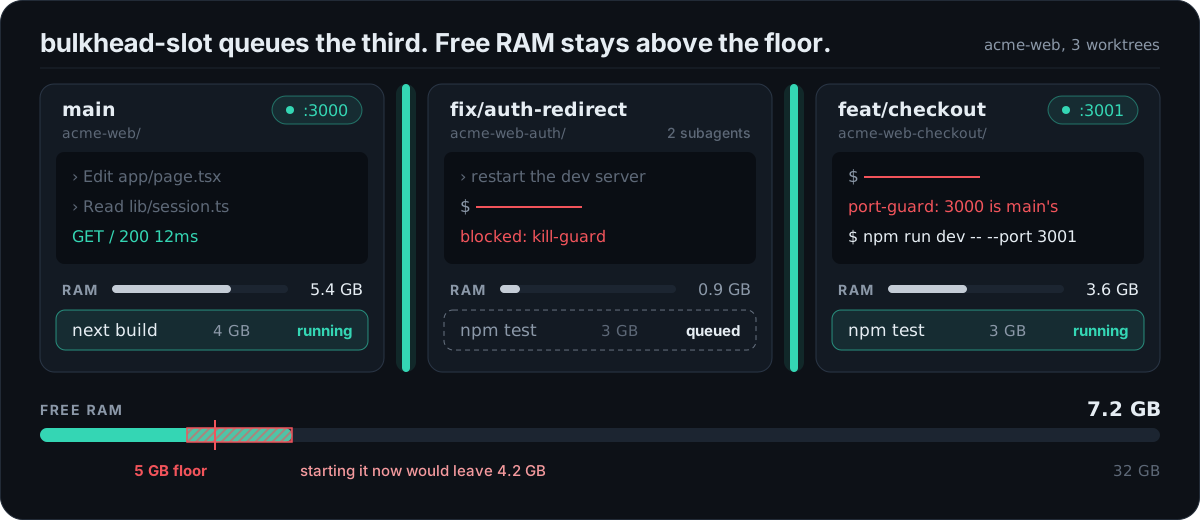
memory-guard blocks heavy commands when RAM is low. Through bulkhead-slot, the third job waits in a queue until there is room. |
| A session checks out another branch in a tree that a second session is editing. | checkout-guard blocks it and suggests git worktree add. |
| A session exits, and its dev servers, test workers and watchers keep running and holding RAM and ports. | orphan-reaper stops them within seconds of the session exiting. |
| A subagent polls in the foreground for ten minutes. The session cannot answer you, and the prompt cache expires. | wait-guard blocks the loop and asks for run_in_background: true. |
Why this exists
A common way to speed up work with Claude Code is to run several sessions on one repository, each in its own git worktree, each with its own subagents. git keeps the branches apart. The machine does not: every session shares the same ports, the same process table and the same RAM. That is where they collide.
- Two worktrees of the same app both run
npm run dev. The second one fails on port 3000, or quietly moves to 3001 while its agent keeps testinglocalhost:3000and sees the other branch. - An agent restarts its own server with
pkill nodeortaskkill /IM node.exeand takes down the dev servers and test runs of every other worktree, and sometimes its own session. - Three sessions start
npm test,next buildand a Playwright run in the same minute, and the machine stops responding. - A session ends and the dev servers it started keep running.
The Claude Code tracker has many reports of exactly this:
- #13941: asked to restart a dev server, Claude ran
taskkill //IM node.exeorpkill nodeand killed its own session. - #34754:
taskkill //F //IM python.exekilled two long-running simulations, after the user had marked their PIDs as off limits. - #43225: asked to restart one bot, Claude force-killed every Python process on the machine, about 20 services.
- #53229: told to stop only unused dev servers, an agent also killed a gateway and a Postgres process it had not identified.
- #15487: 24 subagent processes saturated a 4 GB VPS until it had to be rebooted; a commenter froze a 24 GB Mac the same way.
- #11502 and #25180: processes started by agents outlive them, 60 Node processes in one report and 550 pytest workers in the other.
claude-bulkhead is a set of small hooks that block or clean up each of these. Each one can be turned off on its own. The name is from the bulkhead pattern: one compartment taking on water should not sink the ship.
What it does
| kill-guard Blocks pkill node, taskkill /IM, Stop-Process -Name and other kills by program name. Kills by PID pass. |
port-guard Blocks starting a dev server on a port another session already serves, and killing that session's server by port. |
| memory-guard and bulkhead-slot Blocks heavy commands when RAM is low, and queues heavy jobs against one RAM budget shared by every session. |
checkout-guard Blocks git checkout, stash, reset --hard and similar when another live session works in the same tree. |
| wait-guard Blocks foreground sleep loops longer than 3 minutes, which make the next request rewrite the whole prompt cache. |
orphan-reaper When a session exits, stops the dev servers, test workers, watchers and headless browsers it left running. |
| basics Blocks rm -rf at a root or home, force-pushes to main, and resets that would lose uncommitted work. |
bulkhead status, top, log, doctorShows every session, its RAM, its ports, queued jobs, and what the guards have blocked. |
Status line3 sessions 2 heavy 9.1 GB free in the Claude Code status line, in under 100 ms. |
Config and slash commands Per-machine and per-project config with allow lists, plus /bulkhead:status, /bulkhead:log, /bulkhead:doctor and /bulkhead:reap. |
Optional: bulkhead remote runs a test suite, a build or a browser run on another machine over SSH, when this one has no RAM to spare.
Demo
Recorded with docs/demo.sh. The two sessions are stand-in processes named claude; everything printed comes from the hook scripts and bulkhead status.
Install
/plugin marketplace add Myeongseok-Kang/claude-bulkhead
/plugin install bulkhead@bulkhead
Node 18 or later must be on PATH. The native Claude Code installer does not install Node, so check with node --version first. Without Node every hook fails to start: nothing is blocked, and Claude Code shows a hook error notice for each hook on every tool call. There are no other dependencies.
Quick start
- Install the plugin as above and start a new Claude Code session.
- Check the setup. Inside Claude Code run
/bulkhead:doctor, or runbulkhead doctorin the Bash tool. Every line should sayOK. AWARNorFAILline names the guard and the reason. - Open a terminal next to your sessions and run
bulkhead topto watch sessions, RAM, ports and heavy jobs live. Pressqto quit.
After that there is nothing to do. The guards run on every Bash and PowerShell call. To see what they stopped, run bulkhead log or /bulkhead:log; bulkhead log --summary counts blocks per guard on your machine. To change a threshold or allow a command, see docs/configuration.md. All commands are listed in docs/commands.md.
Run heavy jobs on another machine (optional)
When several sessions run test suites and builds at once, one machine runs out of RAM: memory-guard blocks the commands, or bulkhead-slot makes them queue. If you have a second machine that is mostly idle, bulkhead remote runs the heavy command there instead.
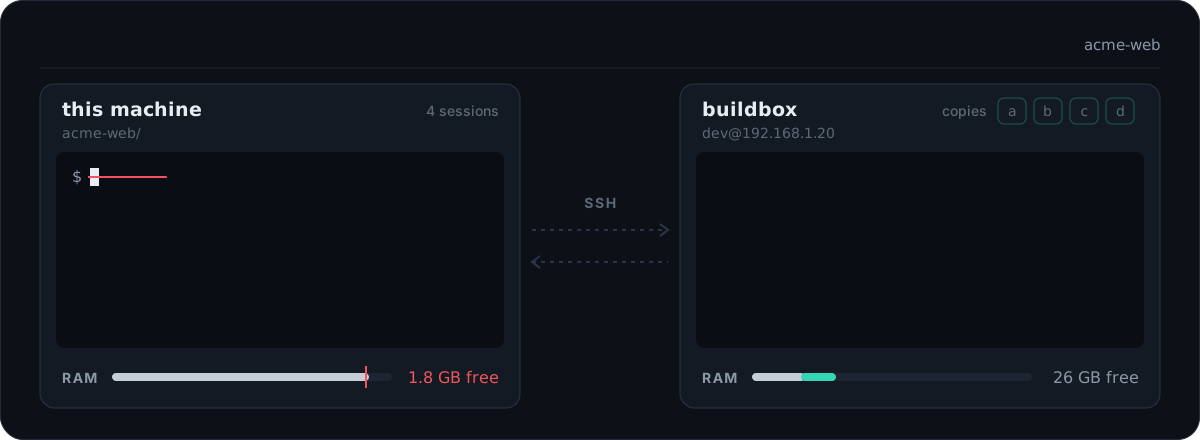
bulkhead remote add buildbox [email protected] --ssh-option=IdentityFile=~/.ssh/buildbox
bulkhead remote run -- npm test
[bulkhead remote] buildbox: 3f2a1c9 already there, 3 changed files (24 KB), 1 deleted
[bulkhead remote] buildbox  copy a  /home/dev/bulkhead-remote/acme-web-3f9a1c  port 7172
...test output...
[bulkhead remote] exit 0 after 1m 12s (copy a)
- What is sent. The current commit as a git bundle (only the commits the remote does not have yet) and your uncommitted changes, deletions included. Ignored files stay here unless you name them with
--files. Nothing outside the repository is sent. - Where it runs. In one of up to 8 copies of the repository on the remote, so parallel runs do not share a working tree.
node_modulesis kept between runs. Each run gets its own port in$BULKHEAD_PORT. - Room. Locks on the remote hold a copy and a job slot, and
--gb=Nwaits until N GB is free there. When there is no room within--waitminutes, it exits 3. - Cleanup. When the command ends, or the SSH connection drops (Ctrl-C, a tool timeout), everything it started on the remote is stopped, including a server left on its port.
- The remote needs only an SSH server,
bash,gitandtar. Linux, macOS and Windows with Git for Windows all work.
bulkhead remote fetch PATH brings files back from the copy the last run used, and bulkhead remote status shows each remote's free RAM and running jobs. In Claude Code, /bulkhead:remote <command> runs a command there in the background. Setup, options and exit codes: docs/remote.md.
How it works
flowchart LR
  CC["Claude Code session"] -->|"PreToolUse: Bash, PowerShell"| G["kill-guard, wait-guard, memory-guard,<br>port-guard, checkout-guard, basics"]
  CC -->|"SessionEnd, SessionStart"| R["orphan-reaper (background)"]
  G -->|"read"| P["process table, listening ports,<br>~/.claude/sessions"]
  G <-->|"read, append"| S[("state dir ~/.claude/bulkhead<br>slots, guards.log, events.jsonl")]
  B["bulkhead-slot"] <--> S
  G -->|"exit 2 + message: blocked"| CC
  G -->|"exit 0: allowed"| CC
  G -.->|"any error: exit 0"| CC
Each guard is a separate Node script with no dependencies. Claude Code pipes the tool call to it as JSON. The guard reads the command text, and only when the command matches does it look further: at the process table, the listening ports, the session files Claude Code keeps in ~/.claude/sessions, free RAM, or git status. A block is exit code 2 with a message that tells Claude what to do instead. Any error inside a guard lets the call through, so a broken guard never stops your work.
Every session on the machine shares one state directory. bulkhead-slot keeps its RAM reservations there, and every block is recorded there. More detail, including the state directory layout and how sessions are found on each OS, is in docs/architecture.md.
Guards
Each guard has a page with the exact commands it blocks, what passes, the message Claude sees, and its limits. The short version:
kill-guard: kills by program nameBlocks taskkill /IM, taskkill /FI without a PID, Stop-Process -Name, Get-Process node | Stop-Process, pkill, killall, kill $(pgrep node), wmic ... delete and similar when they target a program other sessions share, such as node, python, java, chrome, git or vite. Kills by PID and by project path pass. Kills by port pass too, unless another session owns the port; port-guard checks those. Claude is told how to find its own PIDs.
Turn off: BULKHEAD_DISABLE=kill-guard. Details: docs/guards/kill-guard.md.
Blocks starting a dev server (npm run dev, next dev, vite, uvicorn, rails s and more) on a port that another Claude session's process tree is listening on, and suggests a free port. It also blocks kill-by-port commands such as npx kill-port 3000, fuser -k 3000/tcp and lsof -ti :3000 | xargs kill when another session owns that port.
Turn off: BULKHEAD_DISABLE=port-guard. Details: docs/guards/port-guard.md.
memory-guard blocks heavy commands (test runners, next build, tsc, Gradle, the Android emulator, Playwright, cargo test, docker build and similar) when free RAM is under 3 GB, or under 15% of RAM on machines with less than 20 GB. bulkhead-slot run --gb=4 -- <command> waits until the shared RAM budget has room, runs the command, and frees the slot when it exits.
Turn off: BULKHEAD_DISABLE=memory-guard. Details: docs/guards/memory-guard.md.
Blocks git checkout <branch>, switch, stash, reset --hard, clean -f, rebase, merge, restore . and a dirty pull when another live session works in the same tree, and suggests git worktree add.
Turn off: BULKHEAD_DISABLE=checkout-guard. Details: docs/guards/checkout-guard.md.
Blocks a foreground command whose sleeps can add up to more than 180 seconds. The prompt cache expires after about five minutes without a request, so a subagent polling in the foreground rewrites the whole context every time it wakes. Claude is told to run the loop with run_in_background: true. Sleeps in a background job (sleep 600 &) pass. With the default 120 second tool timeout a wait cannot pass the default limit, so it blocks only when the call raises the timeout.
Turn off: BULKHEAD_DISABLE=wait-guard, or raise the limit with BULKHEAD_WAIT_MAX_SEC. Details: docs/guards/wait-guard.md.
When a session exits, a hidden background waiter stops what it started from its tool shells and left running: dev servers and anything else listening on a port, test runners and their workers (Vitest, Jest, Playwright, pytest and xdist, cargo test, go test and more), watchers such as tsc --watch and nodemon, builds such as next build, and headless browsers. A pass at session start catches what a crash left behind. Editors, terminals, shared daemons such as Gradle or adb, and anything you started yourself are never touched. bulkhead reap --dry-run shows what it would stop and why. Windows, Linux and macOS (macOS tested with fixtures).
Turn off: BULKHEAD_DISABLE=orphan-reaper. Details: docs/guards/orphan-reaper.md.
rm-root (rm -rf at a root, home or above the repository), force-push-main (git push --force to main or master; --force-with-lease passes) and discard-changes (git reset --hard or git clean -fd that would lose uncommitted work).
Turn off: BULKHEAD_DISABLE=basics, or one rule by name. Details: docs/guards/basics.md.
How bulkhead relates to other hook packs
General safety packs protect a session from dangerous commands. For example, claude-forge includes hooks that filter leaked secrets from output, block piped remote scripts and stop destructive SQL, and dcg and cc-safety-net cover destructive shell and git commands broadly. They are worth using.
bulkhead covers a different problem: sessions on one machine getting in each other's way through process ownership, ports, shared RAM and a shared git tree. Only its three basics rules overlap with those packs, and you can turn them off with BULKHEAD_DISABLE=basics if another pack already covers them. bulkhead runs alongside other hooks: Claude Code runs every hook that matches a tool call, and the call is stopped if any of them blocks it.
Configuration
The defaults need no setup. To change them, use a config file: ~/.claude/bulkhead/config.json for the machine, and <repo>/.claude/bulkhead.json for one project (found by walking up to the folder with .git). Project settings win over the global file. For example, a project that runs ffmpeg on purpose and has a slow integration suite:
{
  "killGuard": { "allowNames": ["ffmpeg"] },
  "waitGuard": { "limitSeconds": 300 },
  "portGuard": { "ignorePorts": [9229] },
  "basics": { "protectedBranches": ["main", "release"] }
}
Every guard can be turned off with "<guard>": { "enabled": false }. bulkhead config prints every setting, its value and where it came from. A broken file is ignored, the guards keep their defaults, and the session shows one notice at startup. All keys are in docs/configuration.md, and config.example.json sets each of them.
Environment variables still work and win over both files. The simplest place for them is the env block of ~/.claude/settings.json.
| Variable | Default | Same as |
|---|---|---|
BULKHEAD_DISABLE |
empty | Comma-separated guards to turn off: kill-guard, wait-guard, memory-guard, port-guard, checkout-guard, orphan-reaper, basics, or all. The basics rules can also be turned off one at a time: rm-root, force-push-main, discard-changes. A name here is off whatever the files say |
BULKHEAD_WAIT_MAX_SEC |
180 | waitGuard.limitSeconds |
BULKHEAD_MIN_FREE_GB |
3, or 15% of RAM if less | memory.minFreeGb |
BULKHEAD_SLOT_FLOOR_GB |
5, or 25% of RAM if less | memory.slotFloorGb |
BULKHEAD_MAX_COMMIT_PCT |
75 | memory.maxCommitPct (Windows only) |
BULKHEAD_NO_LOG |
empty | log.enabled: false when set to 1 |
BULKHEAD_STATE_DIR |
~/.claude/bulkhead |
Where slots, the event log, guards.log and the global config file live |
BULKHEAD_SSH |
ssh on PATH |
The ssh client bulkhead remote runs |
See what is running
bulkhead is on the Bash tool's PATH next to bulkhead-slot. Inside Claude Code, /bulkhead:status, /bulkhead:log [24h|7d], /bulkhead:doctor and /bulkhead:reap run the matching command and summarize it. To run it in your own terminal, call it by path, for example node ~/.claude/plugins/cache/bulkhead/bulkhead/0.1.1/bin/bulkhead top (the cache path depends on your install; /plugin shows it). Every command that prints a table takes --json. The full reference is docs/commands.md.
bulkhead status
Every Claude Code session on the machine, the memory its process tree uses, what it has listening on a port, the jobs held in bulkhead-slot and the ones waiting, and free RAM:
$ bulkhead status
SESSION  STARTED       RSS     PROJECT
18672    Oct 12 17:49  1.4 GB  ~/src/acme-web
  :3000  node.exe  pid 24632
21888    Oct 12 17:52  353 MB  ~/src/acme-web-auth
26448    03:43         625 MB  ~/src/acme-web-checkout
  :3001  node.exe  pid 31020

SLOT    GB  PID    AGE    COMMAND
slot-1  4   30112  6 min  npx playwright test

WAITING  GB  PID    FOR    COMMAND
#1       3   30200  2 min  npm run build

9.9 GB free of 31.8 GB, commit 68%
bulkhead slot ... is the same as bulkhead-slot ....
bulkhead top
The same view, live and full screen. It refreshes every 2 seconds on Linux and macOS and every 4 seconds on Windows, where one process scan takes 1 to 2 seconds. The scan runs in a worker thread, so keys never wait for it. q, Esc or Ctrl-C quit, r refreshes.
bulkhead top  14:30:05                                         scan 1.4s  every 4s  q quit  r refresh
RAM ████████████████░░░░░░░░░░░░░░  9.9 GB free of 31.8 GB  commit 68%

SESSIONS 3
PID      STARTED       PROJECT                         RSS              PROCS  PORTS
18672    Oct 12 17:49  ~/src/acme-web               1.4 GB  ██████████     12  :3000 :24678
21888    Oct 12 17:52  ~/src/acme-web-auth          353 MB  ███░░░░░░░      3  -
26448    03:43         ~/src/acme-web-checkout      625 MB  ████░░░░░░      5  :3001

HEAVY JOBS  1 running, 1 waiting
slot-1  4 GB   30112   6 min   npx playwright test
wait #1 3 GB   30200   2 min   npm run build  (this machine has 16 GB; one heavy job at a time)

RECENT BLOCKS
14:29  kill-guard     taskkill-im    ~/src/acme-web-auth      taskkill /F /IM node.exe
14:12  wait-guard     poll-loop      ~/src/acme-web-checkout  until [ -f out/DONE ]; do sleep 30; done
On a narrow terminal it drops columns instead of wrapping. When the output is not a terminal, or with --once, it prints one snapshot and exits.
bulkhead log
Every block, and every process orphan-reaper stops, is one JSON line in <state dir>/events.jsonl with the time, guard, rule, session, project and the command cut to 200 characters. The file stays on your machine, rotates at 1 MB, and keeps one old file. BULKHEAD_NO_LOG=1 turns it off.
$ bulkhead log --summary --since 7d
10 blocks in the last 7 days, 3 projects, 4 sessions

GUARD         RULE             COUNT  LAST
wait-guard    poll-loop            3  06:40  ████████████████████████
wait-guard    long-sleep           2  06:40  ████████████████
basics        force-push-main      1  06:40  ████████
basics        rm-root              1  06:40  ████████
kill-guard    pkill                1  06:40  ████████
kill-guard    taskkill-im          1  06:40  ████████
memory-guard  slot-files           1  06:40  ████████

PROJECT                  COUNT
~/src/acme-web               4
~/src/acme-web-auth          3
~/src/acme-web-checkout      3
bulkhead log -n 20 lists the events themselves, --since 30m|24h|7d|2w|<date> limits the time, and --guard kill-guard limits the guard.
bulkhead doctor
Checks Node, the plugin files, the state directory, the config files, each guard (on or off, and why), a real hook run, the process reader with its timing, the session files, the RAM limits computed for this machine, held slots, the event log and git. The exit code is 1 when any check fails.
$ bulkhead doctor
OK    node            v24.11.0
OK    plugin          ~/.claude/plugins/cache/bulkhead/bulkhead/0.1.1, hooks: 2 SessionStart, 1 SessionEnd, 6 PreToolUse
OK    state dir       ~/.claude/bulkhead is writable
OK    config          no config files, defaults in use
OK    kill-guard      on
OK    wait-guard      on, limit 180s
OK    memory-guard    on
OK    port-guard      on
OK    checkout-guard  on
OK    basics          on, protected branches: main, master
OK    orphan-reaper   on, at session start and after each session ends
OK    hook run        kill-guard blocked a test command in 90 ms
OK    processes       356 processes, 21 listening ports, 8 Claude sessions in 2.4s
OK    sessions        ~/.claude/sessions (8 session files)
OK    memory          12.2 of 31.8 GB free, commit 43%, memory-guard blocks heavy commands below 3 GB, bulkhead-slot keeps 5 GB free for a second job, and waits while commit is above 75%
OK    slots           none held
OK    event log       ~/.claude/bulkhead/events.jsonl, empty so far
OK    git             2.52.0.windows.1

18 OK, 0 WARN, 0 FAIL
bulkhead port
Prints a port that nothing listens on, checked on IPv4 and IPv6, so a second worktree can start its server without guessing:
npm run dev -- --port $(bulkhead port --near 3000)
bulkhead reap
Runs orphan-reaper now. --dry-run lists what it would stop, the rule that matched and why the session counts as exited, without stopping anything:
$ bulkhead reap --dry-run
would stop 30112  test-runner  node ~/src/acme-web/node_modules/vitest/dist/workers/forks.js
  Vitest and its worker pool (tinypool); its session has exited and removed snapshot-bash-1791860359256-ezwkie.sh; 6 processes from 30080
1 tree would be stopped. Run `bulkhead reap` to stop it.
Status line
bulkhead-statusline prints one line for the Claude Code status line:
3 sessions 2 heavy 9.1 GB free
Sessions are the live entries in ~/.claude/sessions, heavy is the number of jobs holding a bulkhead-slot, and free is the same measure memory-guard uses. It does not scan processes, takes under 100 ms, and caches the line for 5 seconds in the state directory.
A plugin cannot set the main status line (plugin settings only support agent and subagentStatusLine), so add it to ~/.claude/settings.json yourself:
{
  "statusLine": {
    "type": "command",
    "command": "node ~/.claude/plugins/cache/bulkhead/bulkhead/0.1.1/bin/bulkhead-statusline",
    "refreshInterval": 10
  }
}
The path contains the plugin version, so update it after a plugin update. If you already have a status line script, call bulkhead-statusline from it and append its output.
FAQ
Does it slow Claude Code down?
A little. Each guard is one short Node process. On a Windows 11 desktop with Node 24, node scripts/bench-hooks.js 15 measured 40 to 49 ms per guard on an allowed command (median of 15 runs), and 33 ms for starting Node alone. Writing a block to the event log adds no measurable time. The guards only do slow work, such as reading the process list (a second or two on Windows), when the command matches: a dev server start on a port that already answers, a kill, a heavy command. The status line takes under 100 ms and is cached for 5 seconds.
It blocked something it should not have. What do I do?
Run bulkhead log to see the exact command and reason. Let it through in the project config, <repo>/.claude/bulkhead.json: killGuard.allowNames for a program name, portGuard.ignorePorts for a shared port, waitGuard.limitSeconds for a longer wait, or "enabled": false for the whole guard in that project. See docs/configuration.md. Then please open a false positive issue with the line from bulkhead log, so the pattern can be fixed for everyone.
Is it useful with a single session?
Yes. kill-guard, wait-guard, memory-guard and basics protect one session and its subagents just as well. port-guard and checkout-guard only act when another session is alive, and orphan-reaper cleans up after sessions that have exited.
Which systems does it support?
Windows, Linux and macOS, with Node 18 or later. orphan-reaper on macOS is tested with fixtures of ps output but not yet on a real Mac, and on Linux it needs a Claude Code version that sets CLAUDE_PID for tool shells. On Windows, bulkhead-slot runs commands through Git Bash when it is installed and through cmd.exe otherwise.
Does it send anything anywhere?
No. There is no telemetry and no network call. The only socket it opens is port-guard's connection attempt to localhost to see whether a port answers. Logs stay in the state directory. The one exception is bulkhead remote, which connects over SSH to a machine you configured, and only when you run it.
More questions, including how the guards can be bypassed and how the RAM numbers are measured, are in docs/faq.md.
Limitations
- The guards read command text. They split it into commands and open wrappers such as
bash -c,cmd /c,powershell -EncodedCommandandsudoup to three levels deep, but a kill or a sleep hidden in a script file, a shell function or an alias is not seen. They catch the common shapes, not a determined workaround. - memory-guard and bulkhead-slot only see RAM. They do not limit CPU, disk or GPU.
- bulkhead-slot is only used when called. Nothing forces every session to queue through it.
- Each guard page lists its own limits.
Uninstall
/plugin uninstall bulkhead@bulkhead
/plugin marketplace remove bulkhead
Then delete the state directory (~/.claude/bulkhead, or BULKHEAD_STATE_DIR if you set it) and remove the statusLine entry from ~/.claude/settings.json if you added one.
Using bulkhead? Show it
Add this badge to your project's README:
[](https://github.com/Myeongseok-Kang/claude-bulkhead)
It renders as

Contributing
See CONTRIBUTING.md. Security reports: SECURITY.md. The changelog is in CHANGELOG.md, and what bulkhead stores and sends is in PRIVACY.md.
License
Reviews (0)
Sign in to leave a review.
Leave a reviewNo results found