apitap
Health Pass
- License — License: NOASSERTION
- Description — Repository has a description
- Active repo — Last push 0 days ago
- Community trust — 79 GitHub stars
Code Pass
- Code scan — Scanned 12 files during light audit, no dangerous patterns found
Permissions Pass
- Permissions — No dangerous permissions requested
This MCP server allows AI agents to browse the web and interact with websites purely through APIs. It eliminates the need for browser automation by importing OpenAPI specs, capturing network traffic to generate reusable endpoints, and executing direct web requests.
Security Assessment
Risk: Medium. The tool requires extensive network access, executing direct web requests to gather data and interact with external services. The "capture" feature relies on the Chrome DevTools Protocol (CDP) to intercept network traffic, which involves interacting with local browser processes. No hardcoded secrets or dangerous shell execution commands were found during the light audit, and it does not request dangerous system permissions. However, because it actively interacts with and intercepts web traffic, users should be mindful of the data it processes and where it is stored.
Quality Assessment
The project is highly active, with its last code push occurring today. It features a solid foundation of community trust with 79 GitHub stars and boasts a large passing test suite. However, there is a slight discrepancy in the health check regarding its license; while automated checks flagged it as "NOASSERTION," the documentation states it uses BSL-1.1 (Business Source License). Developers should verify this license before use, as BSL can impose restrictions on commercial production use.
Verdict
Use with caution. The codebase is clean and actively maintained, but its core function of intercepting network traffic and the unverified BSL-1.1 license require careful consideration before integrating into commercial workflows.
The MCP server that turns any website into an API — no docs, no SDK, no browser. npm: @apitap/core
ApiTap



The MCP server that turns any website into an API — no docs, no SDK, no browser.
ApiTap is an MCP server that lets AI agents browse the web through APIs instead of browsers. It ships with 6,400+ pre-mapped endpoints across 280+ APIs (Stripe, GitHub, Twilio, Slack, Spotify, and more) — ready to query on install. For sites not in the database, it captures API traffic from any website, generates reusable "skill files," and replays them directly with fetch(). No DOM, no selectors, no flaky waits. Token costs drop 20-100x compared to browser automation.
The web was built for human eyes; ApiTap makes it native to machines.
# Import 280+ APIs instantly — no browser needed
apitap import --from apis-guru --limit 100
  Done: 87 imported, 3 failed, 10 skipped
       1,847 endpoints added across 87 APIs

# Replay any imported endpoint immediately
apitap replay api.stripe.com get-listcharges limit=5

# Or capture a site's private API
apitap capture https://polymarket.com
apitap replay gamma-api.polymarket.com get-events

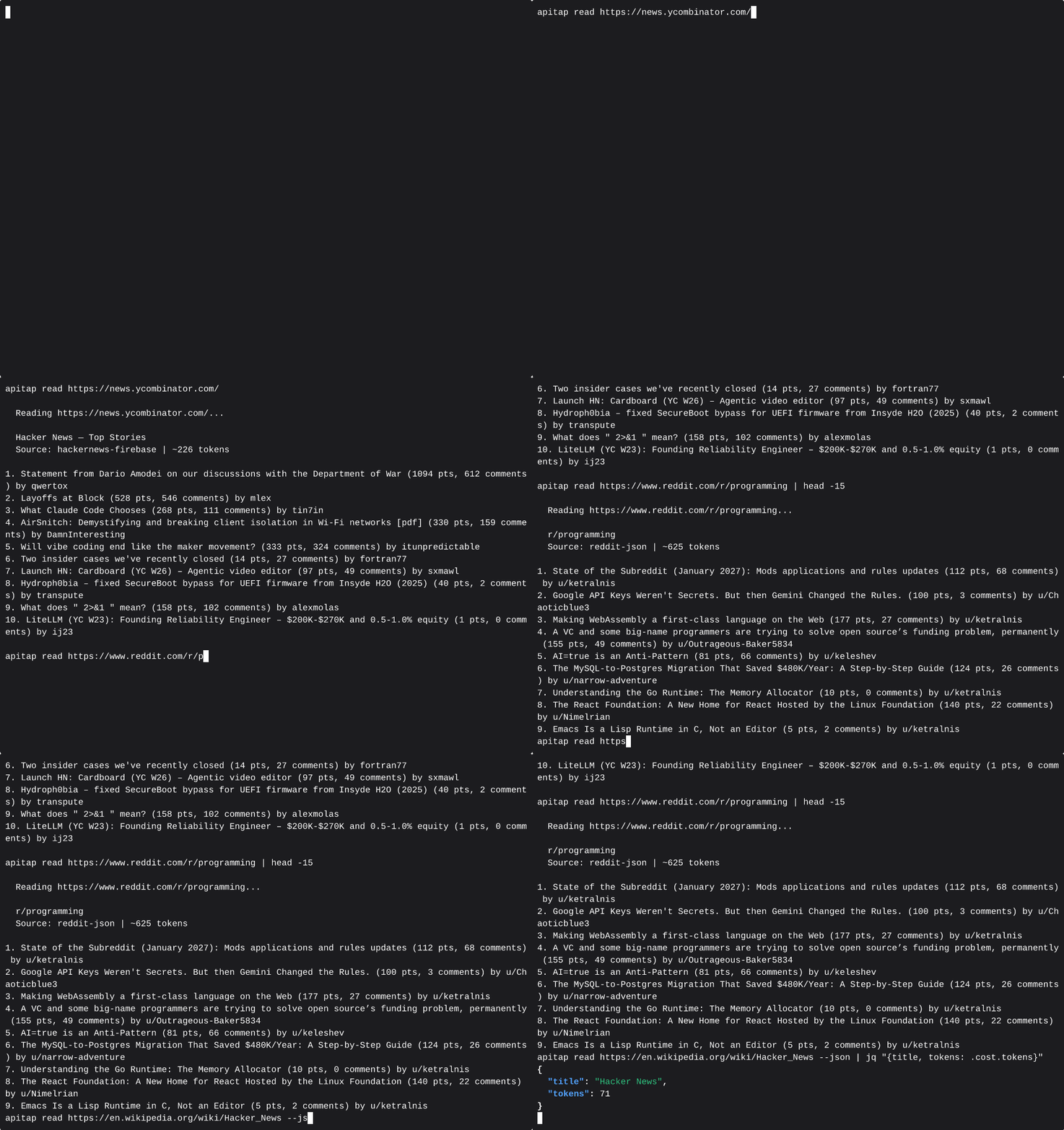
# Or read content directly
apitap read https://en.wikipedia.org/wiki/Node.js
  ✓ Wikipedia decoder: ~127 tokens (vs ~4,900 raw HTML)
No scraping. No browser. Just the API.
How It Works
ApiTap has three ways to build its API knowledge:
- Import (instant) — Import OpenAPI/Swagger specs from the APIs.guru directory of 2,500+ public APIs, or from any spec URL/file. Endpoints get a confidence score based on spec quality. No browser needed.
- Capture (30 seconds) — Launch a browser, visit a site, browse normally. ApiTap intercepts all network traffic via CDP, filters noise, and generates a skill file. Or use
apitap attachto capture from your already-running Chrome. - Discover (automatic) — ApiTap auto-detects frameworks (WordPress, Next.js, Shopify) and probes for OpenAPI specs at common paths. Works without a browser.
All three paths produce the same artifact: a skill file — a portable JSON map of an API's endpoints, stored at ~/.apitap/skills/.
Import:   OpenAPI spec → Converter → Merge → skill.json (confidence 0.6-0.85)
Capture:  Browser → CDP listener → Filter → Skill Generator → skill.json (confidence 1.0)
Attach:   Running Chrome → CDP attach → Filter → skill.json (confidence 0.8-1.0)
Replay:   Agent → Replay Engine (skill.json) → fetch() → API → JSON response
                                                ↑ no browser in this path
Confidence Model
Every endpoint tracks how it was discovered:
| Source | Confidence | Meaning |
|---|---|---|
| Captured with response body | 1.0 | Full capture — response shape verified |
| OpenAPI import, high quality | 0.85 | Spec has response examples |
| CDP skeleton (real traffic, no body) | 0.8 | Endpoint exists, body was evicted from Chrome buffer |
| OpenAPI import, base | 0.6 | Thin spec, no examples |
Imported endpoints auto-upgrade to confidence 1.0 on first successful replay. The merge is additive — captured data is never overwritten by imports, imports fill gaps that capture missed.
Install
npm install -g @apitap/core
Claude Code — one command to wire it up:
claude mcp add -s user apitap -- apitap-mcp
That's it. 12 MCP tools, ready to go. Requires Node.js 20+.
Optional: To use
captureandbrowse(which open a real browser), also run:npx playwright install chromiumThe
read,peek,discover, andimporttools work without it.
Quick Start
Import APIs instantly
# Import from the APIs.guru directory (2,500+ public APIs)
apitap import --from apis-guru --limit 100

# Import a specific API by name
apitap import --from apis-guru --search stripe

# Import a single OpenAPI spec from URL
apitap import https://api.apis.guru/v2/specs/stripe.com/2022-11-15/openapi.json

# Import a local spec file (JSON or YAML)
apitap import ./my-api-spec.json

# Skip auth-required APIs (open endpoints only)
apitap import --from apis-guru --limit 500 --no-auth-only

# Preview what would be imported
apitap import --from apis-guru --search twilio --dry-run

# Update previously imported APIs (skip unchanged)
apitap import --from apis-guru --update
Import produces a diff showing what changed:
Importing api.stripe.com from OpenAPI 3.0 spec...

  ✓ 12 existing captured endpoints preserved
  + 34 new endpoints added from OpenAPI spec
  ~ 8 endpoints enriched with spec metadata
  · 0 skipped (already imported)

  Skill file: ~/.apitap/skills/api.stripe.com.json (54 endpoints)
Captured endpoints are never overwritten. Import fills gaps and adds metadata (descriptions, response schemas, query param enums) from the spec.
Capture API traffic
# Capture from a single domain (default)
apitap capture https://polymarket.com

# Capture all domains (CDN, API subdomains, etc.)
apitap capture https://polymarket.com --all-domains

# Include response previews in the skill file
apitap capture https://polymarket.com --preview

# Stop after 30 seconds
apitap capture https://polymarket.com --duration 30
ApiTap opens a browser window. Browse the site normally — click around, scroll, search. Every API call is captured. Press Ctrl+C when done.
Attach to a running Chrome
# Launch Chrome with remote debugging enabled
google-chrome --remote-debugging-port=9222

# Attach to your signed-in Chrome — captures all tabs
apitap attach --port 9222

# Filter to specific domains
apitap attach --port 9222 --domain *.github.com

# Ctrl+C to stop — generates signed skill files for each captured domain
No separate browser, no re-login. Captures from your real Chrome sessions with all your cookies and auth tokens. When response bodies are evicted from Chrome's buffer (common on high-traffic pages), skeleton endpoints are written at confidence 0.8 instead of being dropped.
List and explore APIs
# List all skill files
apitap list
  ✓ api.stripe.com             446 endpoints   5m ago   [imported-signed]
  ✓ gamma-api.polymarket.com     3 endpoints   2h ago   [signed]
  ✓ api.github.com             499 endpoints   1h ago   [imported-signed]

# Show endpoints for a domain
apitap show api.stripe.com
  [ ] GET    /v1/account                    object (22 fields)
  [ ] GET    /v1/charges                    object (4 fields)
  [ ] GET    /v1/customers/:customer        object (30 fields)

# Search across all skill files
apitap search stripe
Replay an endpoint
# Replay with captured defaults
apitap replay gamma-api.polymarket.com get-events

# Override parameters
apitap replay gamma-api.polymarket.com get-events limit=5 offset=10

# Machine-readable JSON output
apitap replay gamma-api.polymarket.com get-events --json
Text-Mode Browsing
ApiTap includes a text-mode browsing pipeline — peek and read — that lets agents consume web content without launching a browser. Seven built-in decoders extract structured content from popular sites at a fraction of the token cost:
| Site | Decoder | Typical Tokens | vs Raw HTML |
|---|---|---|---|
reddit |
~627 | 93% smaller | |
| YouTube | youtube |
~36 | 99% smaller |
| Wikipedia | wikipedia |
~127 | 97% smaller |
| Hacker News | hackernews |
~200 | 90% smaller |
| Grokipedia | grokipedia |
~150-5000+ | varies by article length |
| Twitter/X | twitter |
~80 | 95% smaller |
| Any other site | generic |
varies | ~74% avg |
Average token savings: 74% across 83 tested domains.
# Triage first — zero-cost HEAD request
apitap peek https://reddit.com/r/programming
  ✓ accessible, recommendation: read

# Extract content — no browser needed
apitap read https://reddit.com/r/programming
  ✓ Reddit decoder: 12 posts, ~627 tokens

# Works for any URL — falls back to generic HTML extraction
apitap read https://example.com/blog/post
For MCP agents, apitap_peek and apitap_read are the fastest way to consume web content — use them before reaching for apitap_browse or apitap_capture.
Pre-Loaded APIs
ApiTap can instantly import from the APIs.guru directory of 2,500+ public API specs. A single command populates your local pattern database:
apitap import --from apis-guru --limit 500
Some of the APIs available out of the box:
| API | Endpoints | Auth |
|---|---|---|
| Stripe | 446 | API Key |
| GitHub | 499 | OAuth |
| Jira/Atlassian | 487 | API Key |
| Twilio | 199+ | API Key |
| Slack | 175 | OAuth |
| DigitalOcean | 290 | Bearer |
| Linode | 350 | Bearer |
| SendGrid | 334 | API Key |
| Spotify | 90 | OAuth |
| Square | 200 | OAuth |
| Plaid | 198 | API Key |
| Asana | 167 | Bearer |
| 163 | OAuth | |
| Vimeo | 326 | OAuth |
| OpenAI | 28 | API Key |
Auth-required APIs import as endpoint maps with response schemas — you can explore what's available and see response shapes before setting up credentials. First successful replay with real auth auto-upgrades the endpoint to full captured status.
Why ApiTap?
Why not just use the public API? Most sites don't have one, or it's heavily rate-limited. The internal API that powers the SPA is often richer, faster, and already handles auth.
Why not just use Playwright/Puppeteer? Browser automation costs 50-200K tokens per page for an AI agent. ApiTap captures the API once, then your agent calls it directly at 1-5K tokens. No DOM, no selectors, no flaky waits.
Why not reverse-engineer the API manually? You could open DevTools and copy headers by hand. ApiTap does it in 30 seconds and gives you a portable file any agent can use.
Why not just use an OpenAPI spec? You can! apitap import converts OpenAPI/Swagger specs directly into skill files. But many sites don't publish specs — ApiTap captures their APIs from live traffic.
Isn't this just a MITM proxy? No. ApiTap is read-only — it uses Chrome DevTools Protocol to observe responses. No certificate setup, no request modification, no code injection.
Replayability Tiers
Every captured endpoint is classified by replay difficulty:
| Tier | Meaning | Replay |
|---|---|---|
| Green | Public, permissive CORS, no signing | Works with fetch() |
| Yellow | Needs auth, no signing/anti-bot | Works with stored credentials |
| Orange | CSRF tokens, session binding | Fragile — may need browser refresh |
| Red | Request signing, anti-bot (Cloudflare) | Needs full browser |
GET endpoints are auto-verified during capture by comparing Playwright responses with raw fetch() responses.
MCP Server
ApiTap includes an MCP server with 12 tools for Claude Desktop, Cursor, Windsurf, and other MCP-compatible clients.
# Start the MCP server
apitap-mcp
Claude Code — see Install above.
Claude Desktop / Cursor / Windsurf — add to your MCP config:
{
  "mcpServers": {
    "apitap": {
      "command": "apitap-mcp"
    }
  }
}
VS Code (GitHub Copilot) — add .vscode/mcp.json:
{
  "servers": {
    "apitap": {
      "command": "apitap-mcp"
    }
  }
}
MCP Tools
| Tool | Description |
|---|---|
apitap_browse |
High-level "just get me the data" (discover + replay in one call) |
apitap_peek |
Zero-cost URL triage (HEAD only) |
apitap_read |
Extract content without a browser (7 decoders) |
apitap_discover |
Detect a site's APIs without launching a browser |
apitap_search |
Search available skill files |
apitap_replay |
Replay a captured API endpoint |
apitap_replay_batch |
Replay multiple endpoints in parallel across domains |
apitap_capture |
Capture API traffic via instrumented browser |
apitap_capture_start |
Start an interactive capture session |
apitap_capture_interact |
Interact with a live capture session (click, type, scroll) |
apitap_capture_finish |
Finish or abort a capture session |
apitap_auth_request |
Request human authentication for a site |
You can also serve a single skill file as a dedicated MCP server with apitap serve <domain> — each endpoint becomes its own tool.
Chrome Extension
Optional. ApiTap works fully without the extension. Install it if you want passive API discovery or want to capture from your already-logged-in browser sessions.
The extension captures API traffic directly from your browser — no Playwright, no auth dance, no browser popups. It also silently builds a map of every API you visit in the background.
Why use the extension?
- You're already logged into Spotify, Discord, Reddit — the extension captures from your live session
- No
apitap auth requestneeded — real tokens are captured automatically - Passively builds a map of every API you visit, so your agents know what's available before asking
Setup
Step 1 — Install ApiTap CLI (if you haven't already):
npm install -g @apitap/core
Step 2 — Get the extension source:
git clone https://github.com/n1byn1kt/apitap.git
cd apitap
Step 3 — Build the extension:
cd extension && npm install && npm run build
Step 4 — Load into Chrome:
- Open
chrome://extensions - Enable Developer mode (toggle, top right)
- Click Load unpacked
- Select the
extension/folder inside the cloned repo
You should see the ApiTap icon appear in your toolbar.
Step 5 — Wire up native messaging (one-time):
apitap extension install --extension-id <your-extension-id>
Find your extension ID on the chrome://extensions page (shown under the extension name after loading).
Step 6 — Verify the connection:
Click the ApiTap icon in Chrome. The popup should show "CLI: Connected". If it shows disconnected, re-run Step 5 with the correct extension ID.
Passive Index (always-on)
Once installed, the extension silently observes API traffic as you browse — no infobar, no CDP, no performance impact. It builds a lightweight index of every domain's API shape: endpoints, HTTP methods, auth type, pagination patterns.
# See everything the extension has discovered
apitap index

# Filter to a specific domain
apitap index discord.com
The index lives at ~/.apitap/index.json and is automatically read by the apitap_discover MCP tool — so your agents can ask "what do you know about Discord's API?" and get a useful answer without triggering a full capture.
Promoting to a Full Skill File
The index is a map — it knows what endpoints exist but not their response shapes. To get a full replayable skill file, promote a domain:
From the popup: Click the ApiTap icon -> find the domain -> Generate skill file
Via agent: Your agent can request a capture automatically. You'll get a notification to approve, the extension briefly attaches CDP, captures response shapes, then detaches. The full skill file saves to ~/.apitap/skills/.
Auto-learn (opt-in): In the extension popup -> Settings -> enable Auto-learn. The extension will automatically promote domains you visit frequently. Off by default.
Manual Capture
For one-off captures without the passive index:
- Click the ApiTap icon -> Start Capture
- Browse the site — extension records API traffic
- Click Stop -> skill file auto-saves to
~/.apitap/skills/
The popup shows CLI connection status and live capture stats. Auth tokens are encrypted with AES-256-GCM in session storage and automatically persisted to ~/.apitap/auth.enc via the native host, with [stored] placeholders in the exported skill files.
Note: Chrome Web Store submission coming soon. For now, load as an unpacked extension in Developer mode.
Auth Management
ApiTap automatically detects and stores auth credentials (Bearer tokens, API keys, cookies) during capture. Credentials are encrypted at rest with AES-256-GCM.
# View auth status
apitap auth api.example.com

# List all domains with stored auth
apitap auth --list

# Refresh expired tokens via browser
apitap refresh api.example.com

# Force fresh token before replay
apitap replay api.example.com get-data --fresh

# Clear stored auth
apitap auth api.example.com --clear
Skill Files
Skill files are JSON documents stored at ~/.apitap/skills/<domain>.json. They contain everything needed to replay an API — endpoints, headers, query params, request bodies, pagination patterns, and response shapes.
{
  "version": "1.2",
  "domain": "gamma-api.polymarket.com",
  "baseUrl": "https://gamma-api.polymarket.com",
  "endpoints": [
    {
      "id": "get-events",
      "method": "GET",
      "path": "/events",
      "queryParams": { "limit": { "type": "string", "example": "10" } },
      "headers": {},
      "responseShape": { "type": "object", "fields": ["id", "title", "slug"] },
      "confidence": 1.0,
      "endpointProvenance": "captured"
    }
  ]
}
Skill files are portable and shareable. Auth credentials are stored separately in encrypted storage — never in the skill file itself.
Import / Export
# Import a skill file from someone else
apitap import ./reddit-skills.json

# Import an OpenAPI spec (JSON or YAML)
apitap import ./stripe-openapi.json
apitap import https://api.apis.guru/v2/specs/stripe.com/2022-11-15/openapi.json

# Import validates: signature check / SSRF scan / format detection / confirmation
Imported files are re-signed with your local key. OpenAPI specs are automatically detected and converted using the same merge logic — captured endpoints are preserved, imports fill gaps.
Security
ApiTap handles untrusted skill files from the internet and replays HTTP requests on your behalf. That's a high-trust position, and we treat it seriously.
Defense in Depth
- Auth encryption — AES-256-GCM with PBKDF2 key derivation, keyed to your machine
- PII scrubbing — Emails, phones, IPs, credit cards, SSNs detected and redacted during capture
- SSRF protection — Multi-layer URL validation blocks access to internal networks (see below)
- Header injection protection — Allowlist prevents skill files from injecting dangerous HTTP headers (
Host,X-Forwarded-For,Cookie,Authorization) - Redirect validation — Manual redirect handling with SSRF re-check prevents redirect-to-internal-IP attacks
- DNS rebinding prevention — Resolved IPs are pinned to prevent TOCTOU attacks where DNS returns different IPs on second lookup
- Skill signing — HMAC-SHA256 signatures detect tampering; four-state provenance tracking (self/imported/imported-signed/unsigned)
- Atomic writes — Skill files are written to a temp file then renamed, preventing corruption from mid-write crashes
- Safe JSON parsing — Server responses parsed with
safeParseJson()that returns raw text on malformed JSON instead of crashing - Spec fetch hardening — OpenAPI spec imports are SSRF-validated, size-limited (10MB), timeout-limited (30s), and reject redirects
- External $ref rejection — Only local document
#/references are resolved;file://and remote$refpointers are blocked - No phone-home — Everything runs locally. No external services, no telemetry
- Read-only capture — Playwright intercepts responses only. No request modification or code injection
Why SSRF Protection Matters
Since skill files can come from anywhere — shared by colleagues, downloaded from GitHub, or imported from untrusted sources — a malicious skill file is the primary threat vector. Here's what ApiTap defends against:
The attack: An attacker crafts a skill file with baseUrl: "http://169.254.169.254" (the AWS/cloud metadata endpoint) or baseUrl: "http://localhost:8080" (your internal services). When you replay an endpoint, your machine makes the request, potentially leaking cloud credentials or hitting internal APIs.
The defense: ApiTap validates every URL at multiple points:
Skill file imported
  -> validateUrl(): block private IPs, internal hostnames, non-HTTP schemes
  -> validateSkillFileUrls(): scan baseUrl + all endpoint example URLs

OpenAPI spec imported
  -> resolveAndValidateUrl(): SSRF check on spec URL before fetching
  -> resolveAndValidateUrl(): SSRF check on extracted API domain
  -> validateSkillFile(): validate merged skill file before writing

Endpoint replayed
  -> resolveAndValidateUrl(): DNS lookup + verify resolved IP isn't private
  -> IP pinning: fetch uses resolved IP directly (prevents DNS rebinding)
  -> Header filtering: strip dangerous headers from skill file
  -> Redirect check: if server redirects, validate new target before following
Blocked ranges: 127.0.0.0/8, 10.0.0.0/8, 172.16.0.0/12, 192.168.0.0/16, 169.254.0.0/16 (cloud metadata), 100.64.0.0/10 (CGNAT/Tailscale), 198.18.0.0/15 (benchmarking), 240.0.0.0/4 (reserved), 0.0.0.0, IPv6 equivalents (::1, fe80::/10, fc00::/7, ::ffff: mapped addresses), localhost, .local, .internal, file://, javascript: schemes. Alternative IP representations (decimal integer, octal, hex) are normalized before checking.
This is especially relevant now that MCP servers are being used as attack vectors in the wild — Google's Threat Intelligence Group recently documented underground toolkits built on compromised MCP servers. ApiTap is designed to be safe even when processing untrusted inputs.
CLI Reference
All commands support --json for machine-readable output.
| Command | Description |
|---|---|
apitap browse <url> |
Discover + replay in one step |
apitap peek <url> |
Zero-cost URL triage (HEAD only) |
apitap read <url> |
Extract content without a browser |
apitap discover <url> |
Detect APIs without launching a browser |
apitap capture <url> |
Capture API traffic from a website |
apitap attach --port <port> |
Attach to running Chrome and capture API traffic |
apitap import <url-or-file> |
Import OpenAPI spec or skill file |
apitap import --from apis-guru |
Bulk import from APIs.guru directory |
apitap list |
List available skill files |
apitap show <domain> |
Show endpoints for a domain |
apitap search <query> |
Search skill files by domain or endpoint |
apitap replay <domain> <id> [key=val...] |
Replay an API endpoint |
apitap refresh <domain> |
Refresh auth tokens via browser |
apitap auth [domain] |
View or manage stored auth |
apitap serve <domain> |
Serve a skill file as an MCP server |
apitap inspect <url> |
Discover APIs without saving |
apitap stats |
Show token savings report |
apitap index [domain] |
View passive index from Chrome extension |
apitap audit |
Audit stored skill files and credentials |
apitap forget <domain> |
Remove skill file and credentials for a domain |
apitap --version |
Print version |
Import flags
| Flag | Description |
|---|---|
--from apis-guru |
Bulk import from APIs.guru directory |
--search <query> |
Filter APIs.guru by provider or title |
--limit <N> |
Max APIs to import (default: 100) |
--no-auth-only |
Skip APIs requiring authentication |
--dry-run |
Show what would be imported without writing |
--update |
Skip APIs unchanged since last import |
--force |
Always reimport regardless of history |
Capture flags
| Flag | Description |
|---|---|
--all-domains |
Capture traffic from all domains (default: target domain only) |
--preview |
Include response data previews |
--duration <sec> |
Stop capture after N seconds |
--port <port> |
Connect to specific CDP port |
--launch |
Always launch a new browser |
--attach |
Only attach to existing browser |
--no-scrub |
Disable PII scrubbing |
--no-verify |
Skip auto-verification of GET endpoints |
--domain <glob> |
Filter traffic by domain glob (attach mode, e.g. *.github.com) |
Development
git clone https://github.com/n1byn1kt/apitap.git
cd apitap
npm install
npm test          # ~1299 tests, Node built-in test runner
npm run typecheck # Type checking
npm run build     # Compile to dist/
npx tsx src/cli.ts capture <url>  # Run from source
Contact
Questions, feedback, or issues? -> [email protected]
License
Business Source License 1.1 — free for all non-competing use (personal, internal, educational, research, open source). Cannot be rebranded and sold as a competing service. Converts to Apache 2.0 on February 7, 2029.
Reviews (0)
Sign in to leave a review.
Leave a reviewNo results found