TokenBar-Tauri
Health Pass
- License — License: MIT
- Description — Repository has a description
- Active repo — Last push 0 days ago
- Community trust — 16 GitHub stars
Code Fail
- process.env — Environment variable access in landing/astro.config.mjs
- rm -rf — Recursive force deletion command in package.json
Permissions Pass
- Permissions — No dangerous permissions requested
No AI report is available for this listing yet.
TokenBar legacy (Tauri 2) — superseded by the native Swift rewrite at Nanako0129/TokenBar
TokenBar
AI token usage monitor for the macOS menu bar.




TokenBar is a local-first AI token usage monitor for the macOS menu bar. It sits in the menu bar — no Dock icon, no telemetry, no account — and reads your local AI coding session logs on-device to show what you're spending across 25+ AI coding agents (Claude Code, Codex CLI, Cursor, OpenCode, Gemini CLI, Copilot CLI, Amp, Droid, Hermes, Goose, Kilo/KiloCode, Roo Code, Qwen, Kimi, Crush, Zed, Kiro, Trae, Warp, and more).
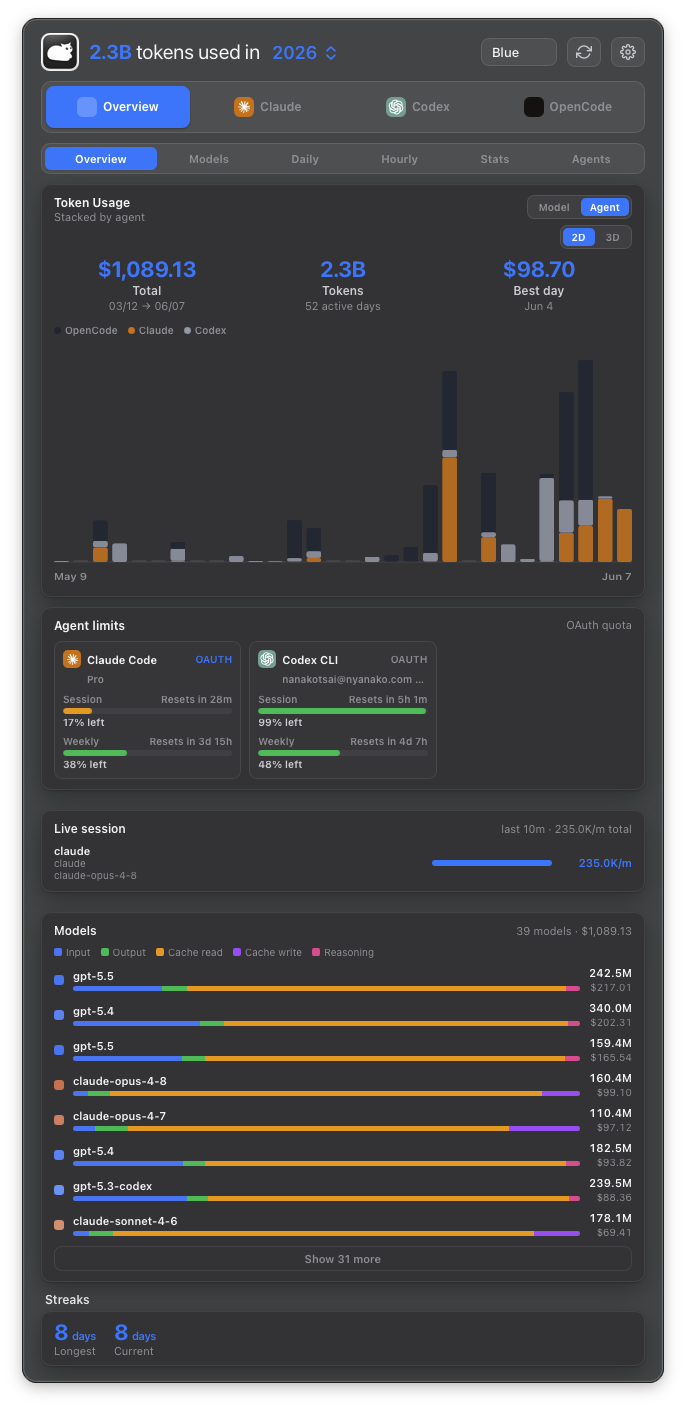
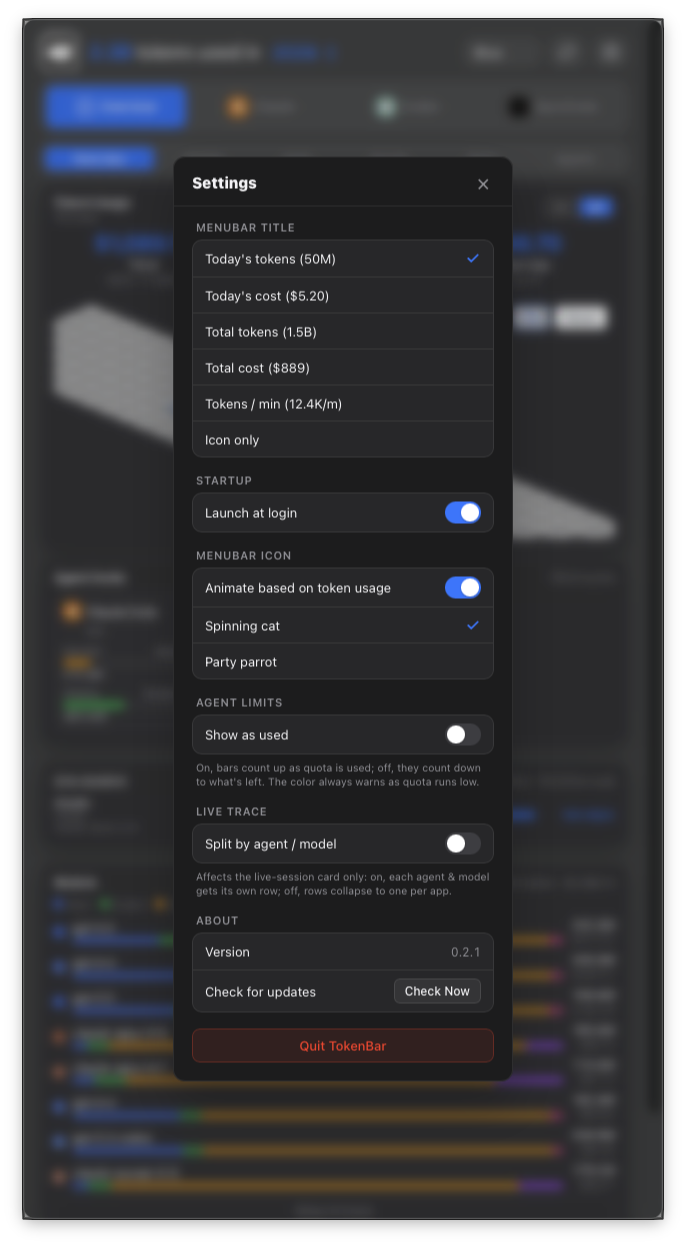
The menu-bar title is configurable — today's tokens, today's cost, lifetime totals, live tokens/min, or icon-only. And the menu-bar cat spins faster the more tokens you burn — your throughput as a single glanceable critter. The spinning cat is the signature creative touch of the original tokcat by handlecusion, kept here with gratitude.
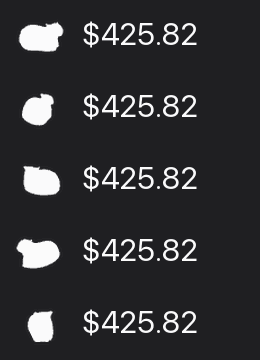
The dashboard
Clicking the menu-bar icon opens a frosted-glass popover. A row of app tabs
(Overview / Claude / Codex / …) filters which agents you're looking at, and a
view switch picks how that data is broken down — inspired by
tokscale's TUI:
| View | What it shows |
|---|---|
| Overview | The contribution chart (2D stacked token bars or an interactive 3D GitHub-style year graph), agent limits, the live session trace, the model breakdown, and streaks |
| Models | Every model ranked by cost, with its cost share and a dim In · Out · CR · CW token split |
| Daily | Active days newest-first; select a day to drill into that day's per-model breakdown |
| Hourly | A 24-hour-of-day rhythm — when in the day your tokens are actually spent |
| Stats | The contribution graph over a headline summary: total spend, active days, streaks, favorite model, best day |
| Agents | Sub-agents ranked by cost, with their source apps, message count, and tokens |
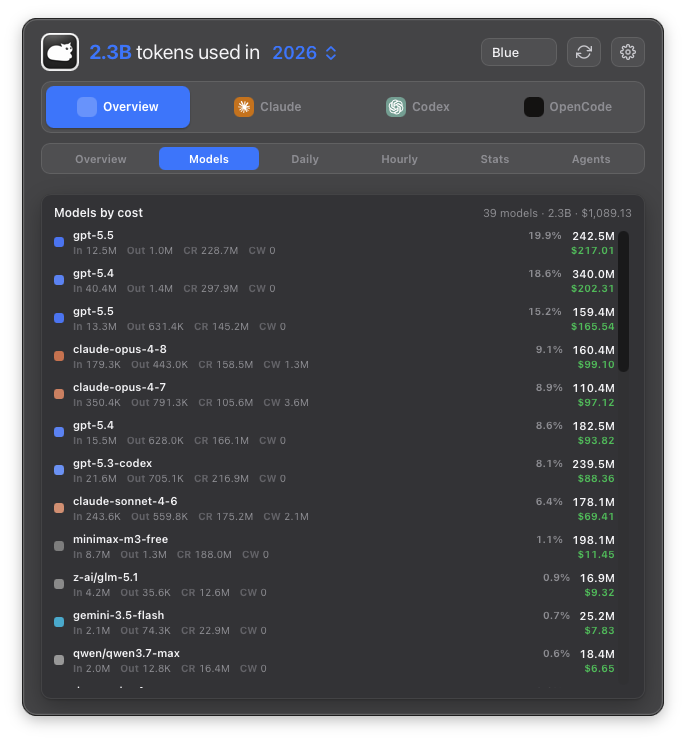 Models — by cost |
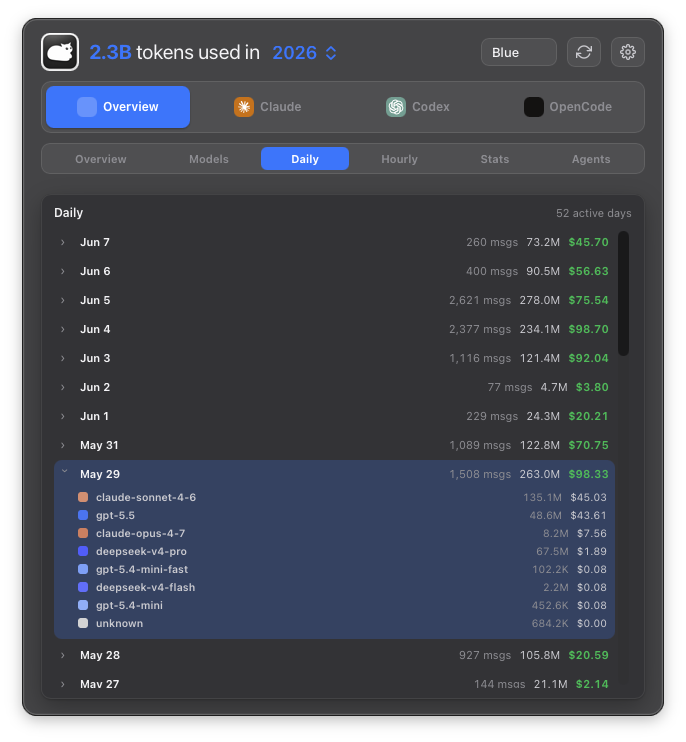 Daily — with day drill-down |
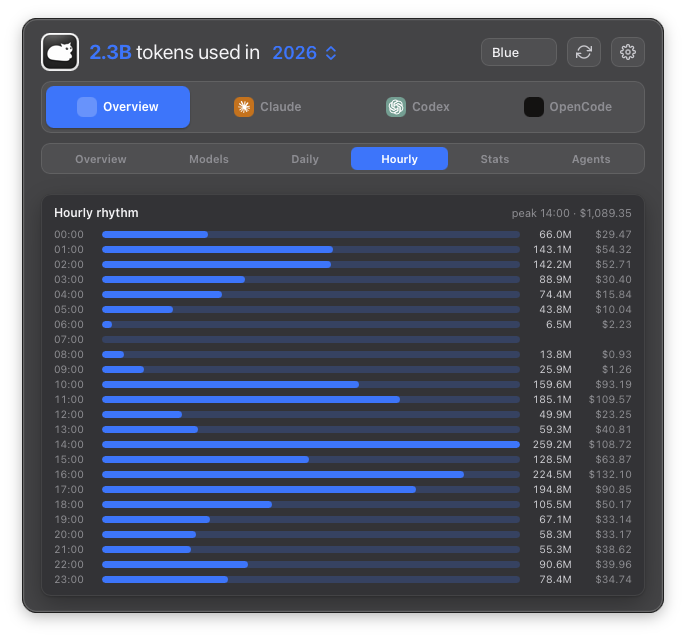 Hourly — 24-hour rhythm |
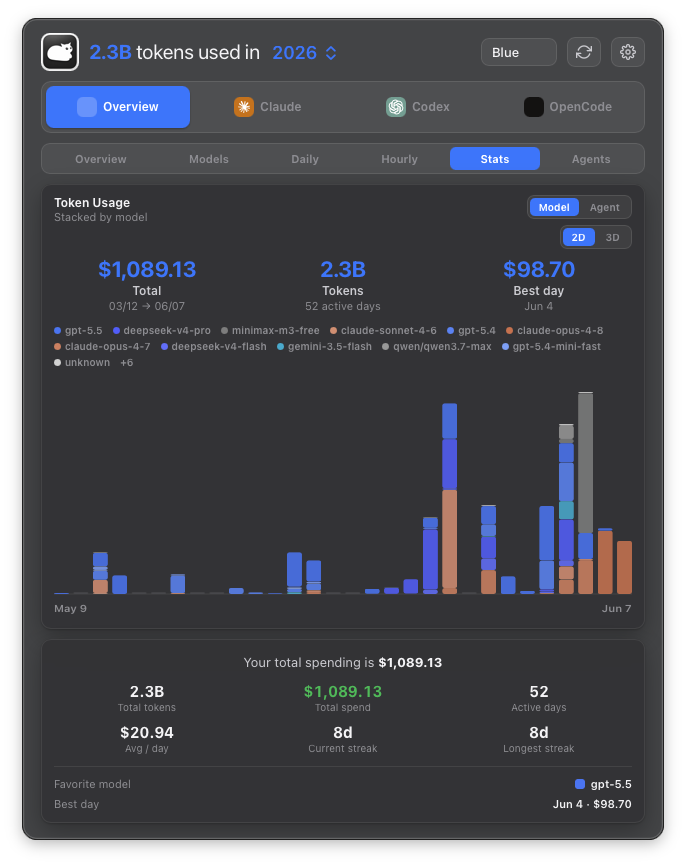 Stats — headline summary |
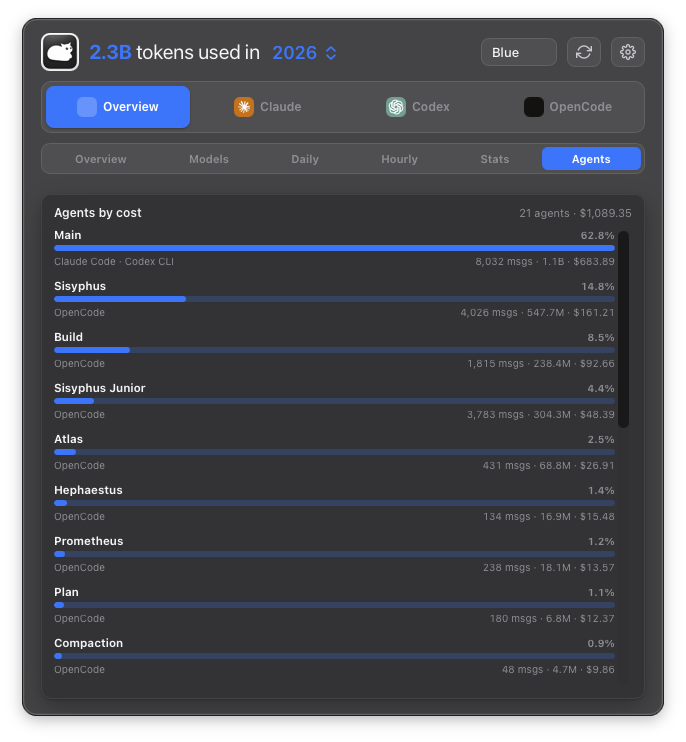 Agents — sub-agents by cost |
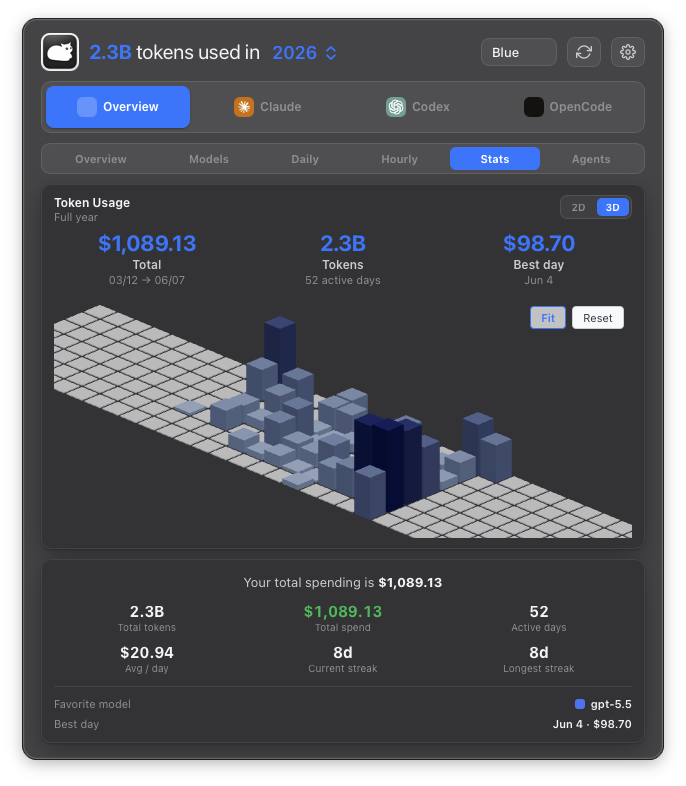 3D — GitHub-style year graph |
The contribution chart stacks tokens by model (tokscale-style provider
shades) or by agent (brand colors), toggled in the chart header. Agent limit
bars are color-coded by remaining quota and can count up by amount used or
down to what's left (Settings → Agent limits).
Install
brew install --cask nanako0129/tokenbar/tokenbar
The fully-qualified
owner/tap/caskform auto-taps
nanako0129/homebrew-tokenbar
— no separatebrew tapstep needed (Homebrew lowercases the tap owner).
If you installed TokenBar before v0.4.2, reinstall the cask once:
brew reinstall --cask nanako0129/tokenbar/tokenbar
Code signing & Gatekeeper
TokenBar is not Apple-notarized yet. It is a free, source-available project, and
the Apple Developer Program fee is not justified at this stage. Because of that,
the Homebrew cask removes the com.apple.quarantine attribute on install so the
app launches without a Gatekeeper first-launch prompt. In practical terms, the
cask bypasses Gatekeeper's first-launch check for TokenBar.
Why you can still audit and trust it:
- TokenBar is MIT-licensed and source-available; you can build it yourself with
npm run install:local. - No telemetry, no account; session logs are read locally and never leave your machine.
- Network access is limited to the update manifest and public model-pricing data.
- In-app updates are verified against an embedded minisign public key before install.
Prefer to keep Gatekeeper in charge? Build from source instead of using the cask.
The in-app updater checks GitHub Releases on launch and every 30 minutes; signed
artifacts are verified against the embedded public key before install.
How it works
TokenBar is a Tauri 2 app: a Rust shell + a React/Vite frontend. All session
parsing, dedup, and cost calculation are delegated to tokscale-core (vendored
under vendor/tokscale-core), so every agent tokscale supports lights up at once,
with mature LiteLLM/OpenRouter pricing. The Rust backend:
- builds the contribution graph from local logs (
usage_graph.rs→tokscale_core::generate_local_graph_report), - samples a live tokens/min rate + trace (
usage_tail.rs→tokscale_core::parse_local_clients, cache-backed), - produces a per-model report (
model_report.rs→tokscale_core::get_model_report), - produces per-hour and per-agent reports (
hourly_report.rs,agents_report.rs), - fetches Claude/Codex OAuth rate-limit windows (
agent_usage.rs).
Usage history is read locally from session logs on disk. No telemetry, no cloud
sync, no account. Network access is limited to the GitHub Releases updater
manifest and public model-pricing data.
Build from source
Requires Rust (stable) and Node ≥ 22.
npm install
npm run tauri:dev      # run in development
npm run install:local  # release build → /Applications/TokenBar.app
Releases are signed for the in-app updater via TAURI_SIGNING_PRIVATE_KEY
(see tauri signer generate).
Credits & acknowledgements
TokenBar stands on the work of others:
- tokcat by handlecusion — the
original macOS menu-bar token monitor that TokenBar is forked from. The Tauri
shell, native tray, and overall dashboard design originate there — including
the spinning menu-bar cat that digests your tokens, handlecusion's
signature creative flourish, which TokenBar proudly keeps. The running
menu-bar pet itself traces back to the original
RunCat by Takuto Nakamura. - tokscale by Junho Yeo — its
tokscale-corecrate powers TokenBar's multi-agent session parsing,
deduplication, and pricing. The multi-view dashboard (Models / Daily / Hourly /
Stats / Agents) is inspired by tokscale's TUI. - CodexBar by Peter Steinberger
— the quota-pace presentation (ahead of / behind your window, projected
run-dry time) references its approach.
Thank you to these projects and their maintainers.
License
MIT. See LICENSE. Original tokcat code © its respective authors,
also under MIT.
Reviews (0)
Sign in to leave a review.
Leave a reviewNo results found