claudecodenotify
Health Warn
- No license — Repository has no license file
- Description — Repository has a description
- Active repo — Last push 0 days ago
- Low visibility — Only 5 GitHub stars
Code Fail
- rm -rf — Recursive force deletion command in Scripts/build-app.sh
- rm -rf — Recursive force deletion command in Scripts/make-dmg.sh
- rm -rf — Recursive force deletion command in Scripts/make-icon.sh
- network request — Outbound network request in website/script.js
Permissions Pass
- Permissions — No dangerous permissions requested
No AI report is available for this listing yet.
A macOS menu bar app that pops a floating notification in the center of your screen when Claude Code needs you.

ClaudeCodeNotify
Desktop notifications when Claude Code needs you —
one keystroke back to your terminal.



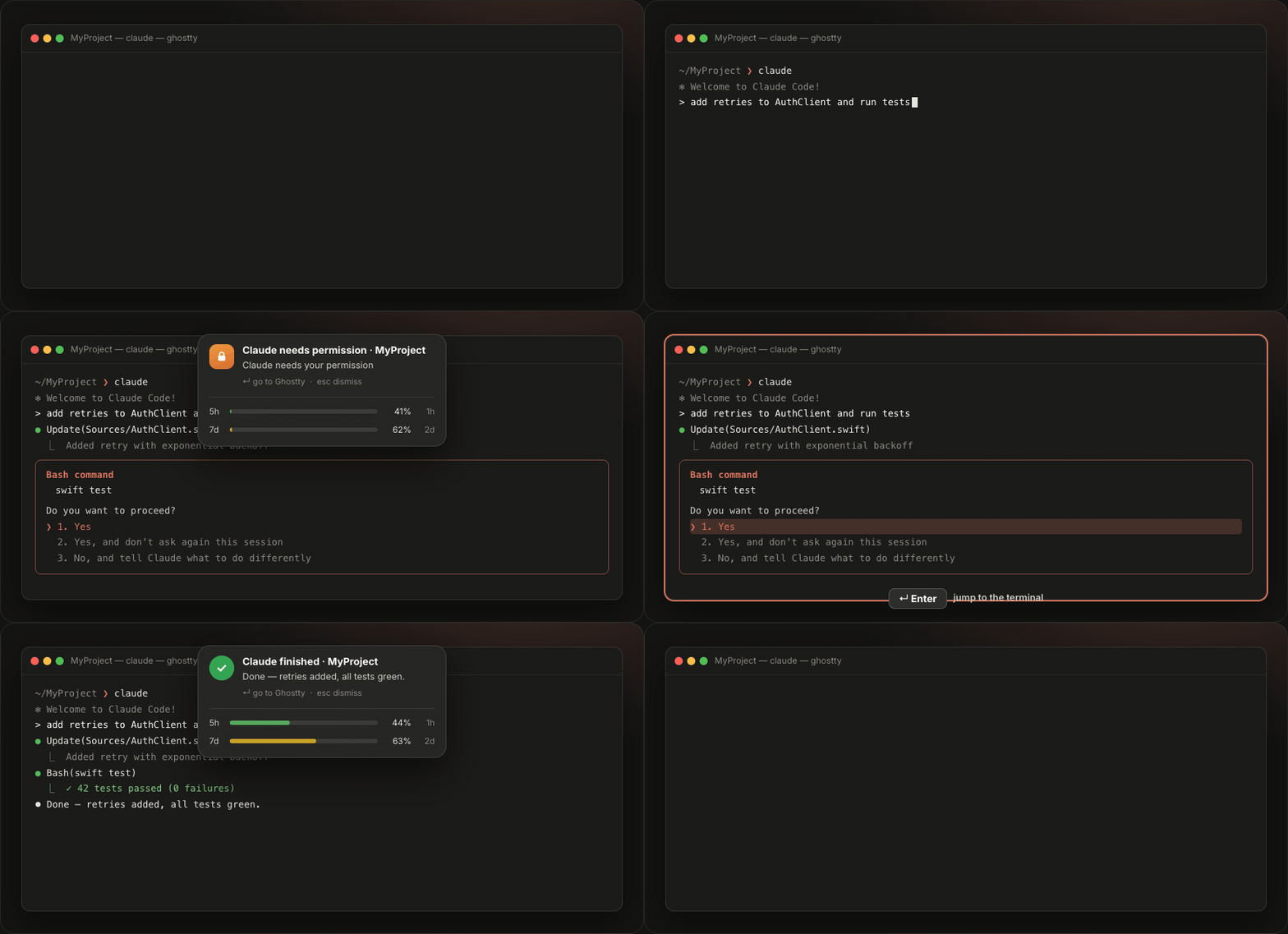
A macOS menu bar app that pops a floating notification in the center of your screen when Claude Code needs you — when it asks for permission, is idle waiting for input, or finishes a task. Press Enter (or click) and it jumps you straight to the terminal where Claude is running. Built for people who leave Claude Code working and don't want to babysit the terminal.
It's a notifier, not a gatekeeper. It doesn't block tools or decide permissions — you still approve/deny in the terminal. It just makes sure you notice and gets you there fast.
Contents
How it works
Claude Code (terminal)
  │  Notification hook (permission / idle)  +  Stop hook (task finished)
  ▼
bridge.sh ── POST (127.0.0.1 + token, fire-and-forget) ──►  ClaudeCodeNotify (menu bar, always on)
                                                              │ shows a floating notification, on top of everything
  press Enter / click ────────────────────────────────────────┘ → brings the terminal where Claude runs to the front
When shown, the notification appears centered at the top, over anything (including fullscreen apps), and captures the keyboard so a single Enter takes you to Claude. Esc, a click, or the per-type timeout dismisses it. Nothing is blocked — Claude keeps showing its native prompt in the terminal; this just gets you there.
Features
- 🔔 Three event types, each with its own icon and color:
- 🟠 Claude needs permission
- 🟡 Claude is idle (waiting for input)
- 🟢 Claude finished the task (shows a short summary)
- ↵ Enter → jump to the terminal — detects the host app (Ghostty, iTerm, Terminal, Cursor, VS Code, WezTerm, …) via
$TERM_PROGRAMand brings it to the front. - 🎚️ Make it yours — per-type duration (
0= stays until dismissed) and sound (system sounds or none, with preview); plus how the card/sound behaves while Claude's terminal or editor is already focused. - 📊 Lives in your menu bar — a bell icon with a green/red connection dot; connect or disconnect anytime. No Dock icon.
- ⚡ Live usage bars — every notification and the menu show your Claude Code 5-hour rolling and weekly usage, color-coded (green → yellow → orange → red) with a reset countdown. Reads your OAuth token directly from the macOS Keychain — no API key needed. Requires the Claude Code CLI to be installed.
- 👥 Multi-account profiles — use a personal and a work Claude account on the same machine and switch instantly, from the menu or with a global hotkey per profile. The active profile's emoji shows next to the menu bar icon, a confirmation card pops with that account's fresh usage bars, and inactive profiles keep their last-seen usage in the menu. Set it up in Preferences → Accounts: capture the account you're logged into, run
claude /loginwith the other one, capture it too — done. Credentials are snapshotted in your macOS Keychain (never on disk), and switching never logs anyone out. Single-account users see no change at all. - 🔒 Local & private — a tiny server listening only on
127.0.0.1, validated with a token. Nothing leaves your machine. - 🚀 Open at Login — via
SMAppServiceon macOS 13+, a LaunchAgent on macOS 12.
Installation
Requires macOS 12+ (Monterey or later). The app is a Universal binary — it runs natively on both Intel and Apple Silicon.
Option 1: Homebrew (Recommended)
The easiest way to install and avoid Gatekeeper (quarantine) warnings:
brew install narlei/tap/claudecodenotify
Option 2: Manual Download
- Download and open the latest
ClaudeCodeNotify.dmg. - Drag
ClaudeCodeNotify.appinto your Applications folder. - First launch — the app is unsigned (no paid Apple account), so macOS blocks a double-click once. Do it once:
- right-click the app → Open → Open in the dialog; or
- in a terminal:
xattr -dr com.apple.quarantine /Applications/ClaudeCodeNotify.app && open /Applications/ClaudeCodeNotify.app
- A bell icon appears in the menu bar. Click it → Connect Claude Code (installs the hooks in
~/.claude/settings.json, with an automatic backup). - Optional: Open at Login to start it with your system.
To stop it: Disconnect Claude Code in the menu.
First launch
On first launch a welcome screen explains how it works and lets you Connect Claude Code, toggle Open at Login, and open Preferences right away. Reopen it anytime from the menu (Welcome…).
Everything lives in the menu bar (the bell icon). The menu shows a green/red dot for the connection status, plus Connect/Disconnect, Welcome, Preferences, Check for Updates, and Open at Login.
The app generates a token on first run and writes
bridge.shto~/.ccnotify/; its store (token, port, preferences) lives in~/Library/Application Support/ClaudeCodeNotify/. Everything is local and only listens on127.0.0.1.
Build (development)
Requires the Xcode/Swift toolchain. Everything goes through the Makefile:
make build      # compile (swift build)
make app        # assemble ClaudeCodeNotify.app (Info.plist + icon + ad-hoc sign)
make install    # build and open the app — then use the menu "Connect Claude Code"
make zip        # package into dist/ClaudeCodeNotify-<version>.zip
make dmg        # build a drag-to-Applications dist/ClaudeCodeNotify.dmg
make uninstall  # remove the hooks from ~/.claude/settings.json (with backup)
make help       # list all targets
make dmg uses dmgbuild (installed by make setup) to build the styled disk image headlessly — no Finder automation needed. Scripts/make-icon.sh regenerates Resources/AppIcon.icns when the icon changes (it's checked into the repo).
Distribution
Unsigned app (no paid Apple account): ad-hoc signed, shipped on GitHub Releases as a drag-to-Applications ClaudeCodeNotify.dmg (make dmg) or a versioned .zip (make zip). The stable DMG name powers the website's latest-release download link. First launch needs right-click → Open (Gatekeeper). Universal binary (Intel + Apple Silicon).
Support
If ClaudeCodeNotify saves you trips to the terminal, consider buying me a coffee ☕
- Ko-fi: ko-fi.com/narlei
- PayPal: paypal.me/narlei
- Pix:
[email protected]
You can also support it from the app: menu bar → Support ClaudeCodeNotify ☕.
Made by Narlei Moreira · for people who let Claude Code cook.
GitHub ·
LinkedIn ·
X ·
Instagram
Reviews (0)
Sign in to leave a review.
Leave a reviewNo results found