chad
Health Warn
- License — License: MIT
- Description — Repository has a description
- Active repo — Last push 0 days ago
- Low visibility — Only 5 GitHub stars
Code Fail
- exec() — Shell command execution in benchmarks/tb2/harbor_chad_tb2.py
Permissions Pass
- Permissions — No dangerous permissions requested
No AI report is available for this listing yet.
Local MLX coding agent for Apple Silicon — Claude-Code-style tools + TUI on a laptop-sized model 🗿
chad — a local, MLX-backed coding agent

Claude can do anything, for anyone, anywhere. chad does one thing. 🗿
Coding under supervision.
A single-user coding agent that runs entirely locally on Apple Silicon via
MLX. Claude-Code-style tool use (bash, read, write,
edit, glob, grep), plan mode, and a full-screen TUI — driven by a local model on your
laptop instead of a frontier model in a datacenter. No Docker, no API key, no model picker.
Quickstart
Apple Silicon Mac + uv. One command — no clone, no config:
uvx chad-code          # runs chad anywhere — the command is still `chad`
uvx chad-code prove    # 2-min offline smoke test: 4 tiny fix-it tasks, verified, timed 🗿
First run picks the right Ornith model for your RAM (9B under 32 GB, 35B at 32 GB+), asks,
and downloads it once (~5 GB / ~13 GB, resumable) into the shared Hugging Face cache. While
it downloads, cd into a project and think of a scoped first ask — "fix the failing test
in tests/test_x.py" lands; "improve my codebase" flails.
The PyPI package is
chad-code; barechadis an unrelated squatted package. Other
ways in (PATH install, bleeding-edgemain, dev clone) are in
Installing & upgrading.
chad is not a baby Claude
He has some of the same moves — tool use, plan mode, a real TUI — but he's a blunter
instrument:
| Claude | chad 🗿 | |
|---|---|---|
| Range | every workflow, every person, incredible nuance | one job: code, on your machine |
| Runs | anywhere — cloud, IDE, terminal, phone | your mac. that's it. |
| Brain | a frontier model in a datacenter | Ornith model |
| Disposition | understands what you meant | does what you said |
| Harness | open-ended, anything you can imagine | plan. execute. nothing else. |
| When wrong | reasons a way out | already shipped |

Real session, unedited (cold model load cut): a local 35B reasons through the failure,
edits the file, reruns the tests, confirms green.
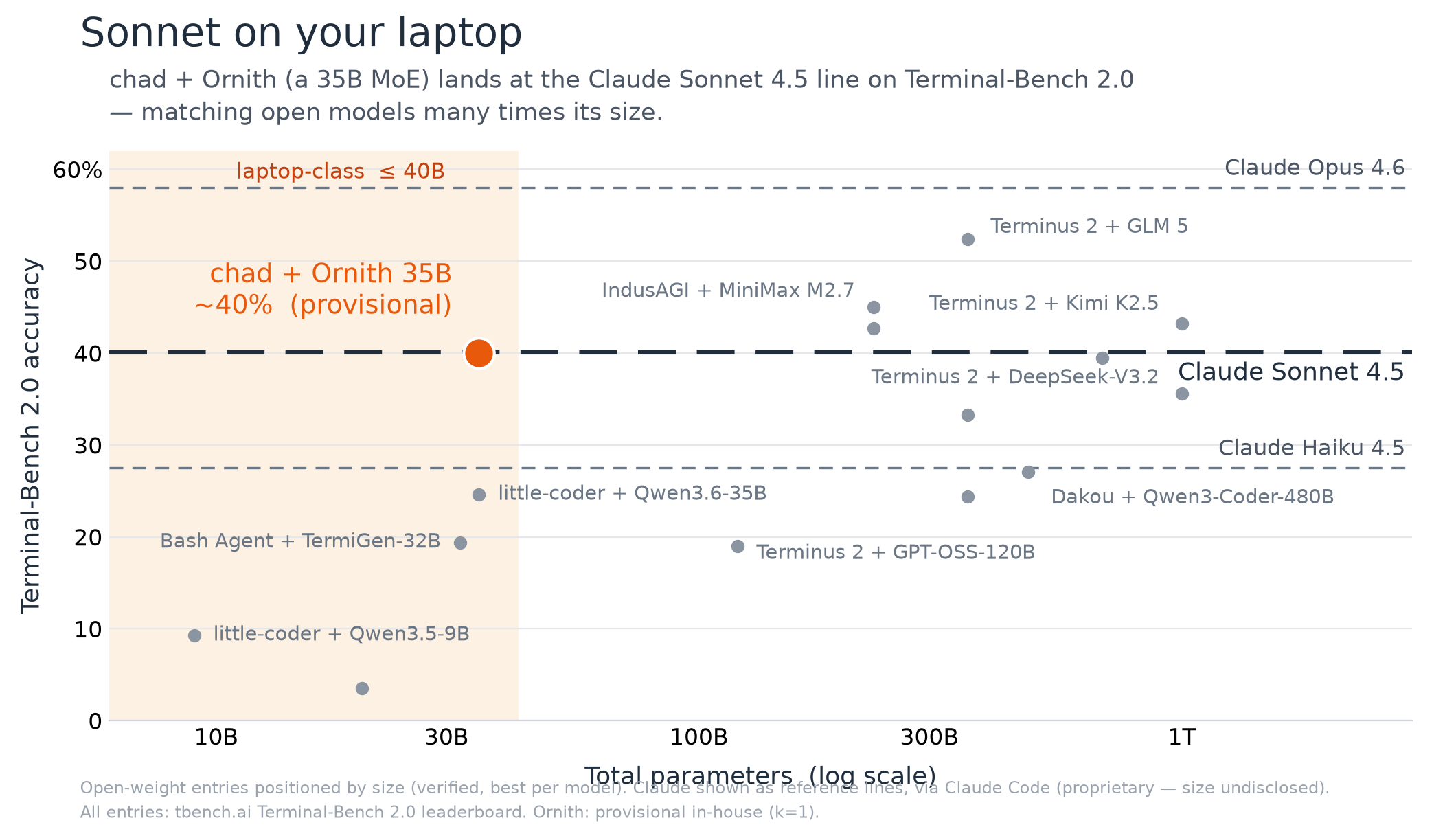
Sonnet on your laptop
The exam is Terminal-Bench, the standard benchmark for
CLI coding agents. chad won't top it — the A students are frontier models in datacenters.
The number worth looking at is how much capability chad wrings out of 35B parameters:
on Terminal-Bench 2.1, chad + Ornith lands around the Claude Sonnet 4.5 line, matching
open models many times its size and beating every open model in its own weight class by a
wide margin. On a laptop, capability per parameter is the axis you actually compete on —
and that's where chad + Ornith is out on the frontier alone.
Placeholder number — the full verified run is still in flight (
≈50%, k=1). The whole
benchmark is publicly reproducible from a Mac: the exact Harbor adapter, the runner,
and the recipe live inbenchmarks/tb2/. Check it, don't
trust it.
The bet: at this end of the report card, the harness beats the model
Every serious coding harness was built for a frontier model behind a datacenter API — which
bakes in two assumptions that are both false on a laptop: the model is an A student, and
prefill is somebody else's electricity. A C+ student emits tool calls with typos, quotes
edits it never applies, and rambles — and every token of transcript it drags around must be
re-read by your GPU at a few hundred tokens a second.
So chad's thesis isn't "run a model locally" — plenty of tools do that. It's that for a
small model, harness quality is worth more than a model upgrade, and the harness and
inference engine have to be designed together. The failure modes are all nameable: the
model pours its edit into the reasoning channel and the harness drops it; asks for a tool
the harness doesn't ship; balloons the context until cache reuse hits 0% and decode falls to
2 tok/s. chad handles each inside the harness — tool calls parsed in four dialects and
repaired, arguments schema-coerced with a self-repair loop, edits run through a forgiveness
cascade, and above all the transcript kept a strict token-prefix of the live KV cache so
prefill never re-reads what it already read. That co-design is the whole moat. The full
story is in Design & internals.
Installing & upgrading
The one-line quickstart (uvx chad-code) is up top. The other ways in:
uv tool install chad-code   # install for good — then it's just `chad`
uvx --from git+https://github.com/nathansutton/chad chad   # bleeding-edge main, no clone
Or from a clone (the dev path):
uv sync                      # install deps + the `chad` entrypoint (one time)
uv run chad                  # full-screen TUI
uv run chad "add a --json flag to main.py and update the tests"   # one-shot, headless
uv run chad -c               # resume this directory's last conversation
The model. chad picks one for you by RAM and downloads it once into the shared Hugging
Face cache (~/.cache/huggingface, reused across every project). No picker, no flags —
override with CHAD_MODEL=<repo or local dir> if you must.
| Your Mac | Model | Footprint |
|---|---|---|
| ≥ 32 GB | Ornith-1.0-35B UD-Q2_K_XL — 35B MoE, 2-bit experts |
~13 GB resident (~16 GB with KV) |
| 16 / 18 / 24 GB | Ornith-1.0-9B UD-Q4_K_XL — 4-bit AWQ |
~5 GB |
The 35B's working set needs headroom a 24 GB Mac doesn't have (it SIGKILLs mid-turn), so its
floor is 32 GB; 24 GB and below run the 9B. Quant names follow
Unsloth's dynamic-quant convention (UD-…).
Upgrading — depends on how you installed: uv tool upgrade chad-code; uvx --refresh chad-code; or git pull && uv sync for a clone. What changed lands inCHANGELOG.md. Model weights are versioned separately — a code upgrade never
re-downloads the model.
Development. uv sync once, then uv run pytest -q — the fast unit gate loads no
model weights, runs in seconds, and is what CI runs. Throughput on your own machine:uv run chad-bench (see Throughput & performance). LSP-precise
find-references / rename need the lsp extra (uv tool install 'chad-code[lsp]'); without
it chad uses the tree-sitter fallback automatically.
Interactive UX
uv run chad launches a full-screen terminal UI (built on prompt_toolkit):
- shift-tab cycles permission modes —
normal(confirm each bash/write/edit) →auto-accept edits→plan mode(read-only: investigate + propose a numbered plan) → back. - type-ahead message queue — keep typing while the agent works; messages run in order.
- ctrl-c interrupts the running turn without killing the session.
- live status line — model, mode, context %, a state glyph + verb, elapsed seconds, and
↑prefilled / ↓generated token counts (with an advancing % on an unavoidable full
re-prefill, so it's never silent). - slash commands —
/init,/skills,/mcp,/accept,/resume,/compact,/model,/mode,/help,/exit. Same set in the--replline interface. @file/@dirmentions and!commandshell passthrough — pull a file into
context inline, or run a shell command without invoking the model.
Usage. uv run chad --help is the source of truth:
| Flag | What it does |
|---|---|
-c, --continue |
resume this directory's most recent session (non-destructive) |
--resume |
list recent sessions, pick one by number (interactive TTY only) |
--plan |
start in read-only plan mode (investigate + propose, edits blocked) |
--yolo |
auto-approve bash/write/edit (skip confirm prompts) |
--no-think |
skip Ornith's <think> blocks — faster on well-scoped work |
--repl |
plain line REPL instead of the TUI |
A headless task (positional, or piped with no TTY) auto-approves mutating tools; the model
runs greedy (temp 0). Every conversation is persisted under ~/.chad/sessions/, and every
resume forks a new branch rather than overwriting — details in
Configuration. The rarely-touched tuning knobs
(CHAD_MAX_CONTEXT, CHAD_KV_BITS, turn-budget/think-cap, safety opt-outs) all live in
environment variables, fully documented there.
Extending chad
chad speaks the same two extension formats as Claude Code:
- Agent Skills — drop a
SKILL.mdfolder in./.claude/skills/
and chad discovers it, loading the full instructions only when a task matches. - MCP servers — configure stdio or HTTP servers in
./.mcp.jsonto expose external tools (GitHub, Postgres, Linear, Slack, …) alongside
chad's builtins, with static-token and OAuth auth.
Both are covered in full in the Configuration reference.
Documentation
- Design & internals — why prefill is the bill, the persistent prefix
cache, the trimmable/append-only trade, and the ideas borrowed from other agents. - Throughput & performance — prefill / decode / warm-step numbers
you can reproduce withchad-bench. - Terminal-Bench 2.0 reproduction — the exact Harbor adapter
and runner behind the chart; serve Ornith yourself and check the number. - Configuration reference — Agent Skills, MCP servers, the
context window, every environment variable, and the safety opt-outs. - Troubleshooting — when a session rambles, loops, or slows:
the symptom→knob map for a small local model. - Contributing — what lands easily, and what needs a conversation first.
Reviews (0)
Sign in to leave a review.
Leave a reviewNo results found