ClaudeChrome
Health Warn
- No license — Repository has no license file
- Description — Repository has a description
- Active repo — Last push 0 days ago
- Low visibility — Only 6 GitHub stars
Code Fail
- eval() — Dynamic code execution via eval() in extension/command-dispatcher.ts
Permissions Pass
- Permissions — No dangerous permissions requested
This tool is a Chrome browser extension that embeds AI agents directly into web pages. It enables continuous, interactive workflows like web crawling, executing JavaScript, and mimicking native site styles without forcing users to manually transfer context to a separate terminal.
Security Assessment
The tool carries a High overall security risk. By design, it requires deep access to browser data to read page content and execute JavaScript natively within your active tabs. Most critically, the codebase utilizes the `eval()` function in the command dispatcher. Dynamic code execution via `eval()` is a significant vulnerability that can be exploited for remote code execution or cross-site scripting if malicious inputs are processed. The automated scan did not find hardcoded secrets or dangerous OS-level permissions requested, but the inherent browser access combined with `eval()` necessitates extreme caution.
Quality Assessment
The project is actively maintained, with its most recent push happening today. However, it suffers from extremely low community visibility, having only 6 GitHub stars. This means the code has not been widely vetted by security researchers or the broader developer community. Additionally, the repository completely lacks a license file. Without an open-source license, the legal terms of use, modification, and distribution are undefined, which may create compliance issues for commercial or enterprise projects.
Verdict
Use with caution — while actively developed, the combination of unvetted code, missing legal licensing, and dangerous dynamic execution (`eval`) makes it suitable only for isolated testing environments rather than daily browsing.
ClaudeChrome - Native browser context awareness for agents.
ClaudeChrome

ClaudeChrome is a browser-native framework for bringing agent intelligence into Chrome instead of leaving the agent outside the page you are actually working on.
Today it embeds Claude, Codex, and shell workflows directly into Chrome; over time it is meant to support more mainstream browsers as well. The important idea is broader than web debugging: ClaudeChrome keeps the agent attached to the live page so it can crawl sites, execute JavaScript, mimic native styles from existing websites, ingest content into knowledge systems, and sustain longer interactive workflows without forcing manual context transfer back into a separate terminal.
Landing page: https://natsufox.github.io/ClaudeChrome/
Friend link: LINUX DO
Demo gallery
GitHub README rendering does not reliably show inline <video> or <iframe> players here, so this gallery uses clickable GIF previews that open the bundled MP4 recordings. Each entry keeps its quick-view GIF, README-sized MP4, and HD promo MP4 together.
|
Demo 1 · 2048 This demo focuses on the tool's capacity for continuous, complex interactions with visual elements in a gaming environment. It shows that ClaudeChrome can remain inside a long-running stateful loop instead of stopping at one-shot page reads. 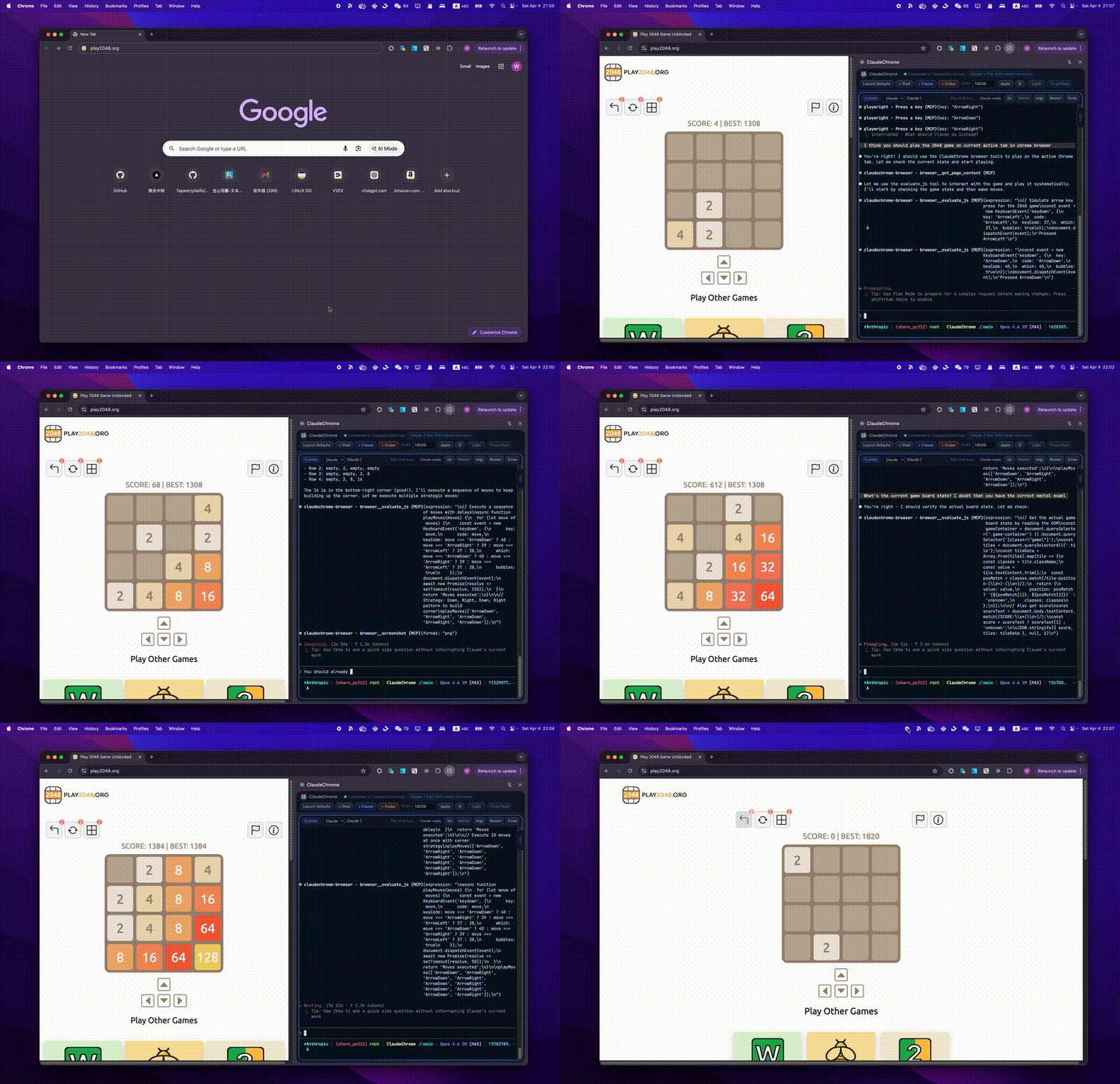 README MP4: demo 2048_readme.mp4 Quick view GIF: demo 2048.gif HD promo MP4: demo 2048_promo.mp4 |
Demo 2 · Amazon This demo primarily showcases ClaudeChrome's web crawling capabilities, including its interaction ability to handle page transitions and scrolling on a real commercial page. 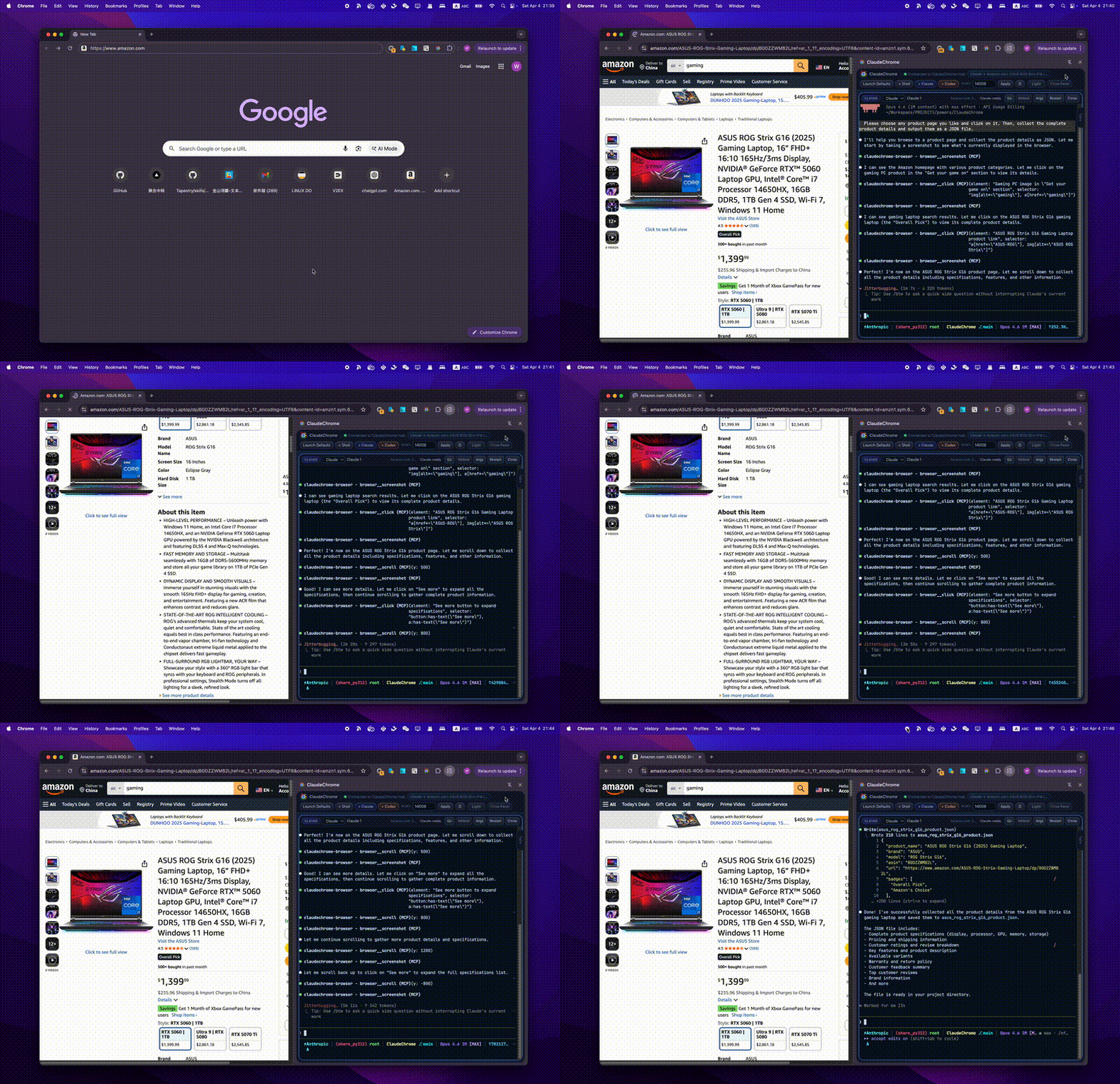 README MP4: demo amazon_readme.mp4 Quick view GIF: demo amazon.gif HD promo MP4: demo amazon_promo.mp4 |
|
Demo 3 · LINUX DO This demo is tailored for the LINUX DO forum. It illustrates how ClaudeChrome can crawl forum content and execute JavaScript commands according to user instructions while remaining grounded in the active thread. 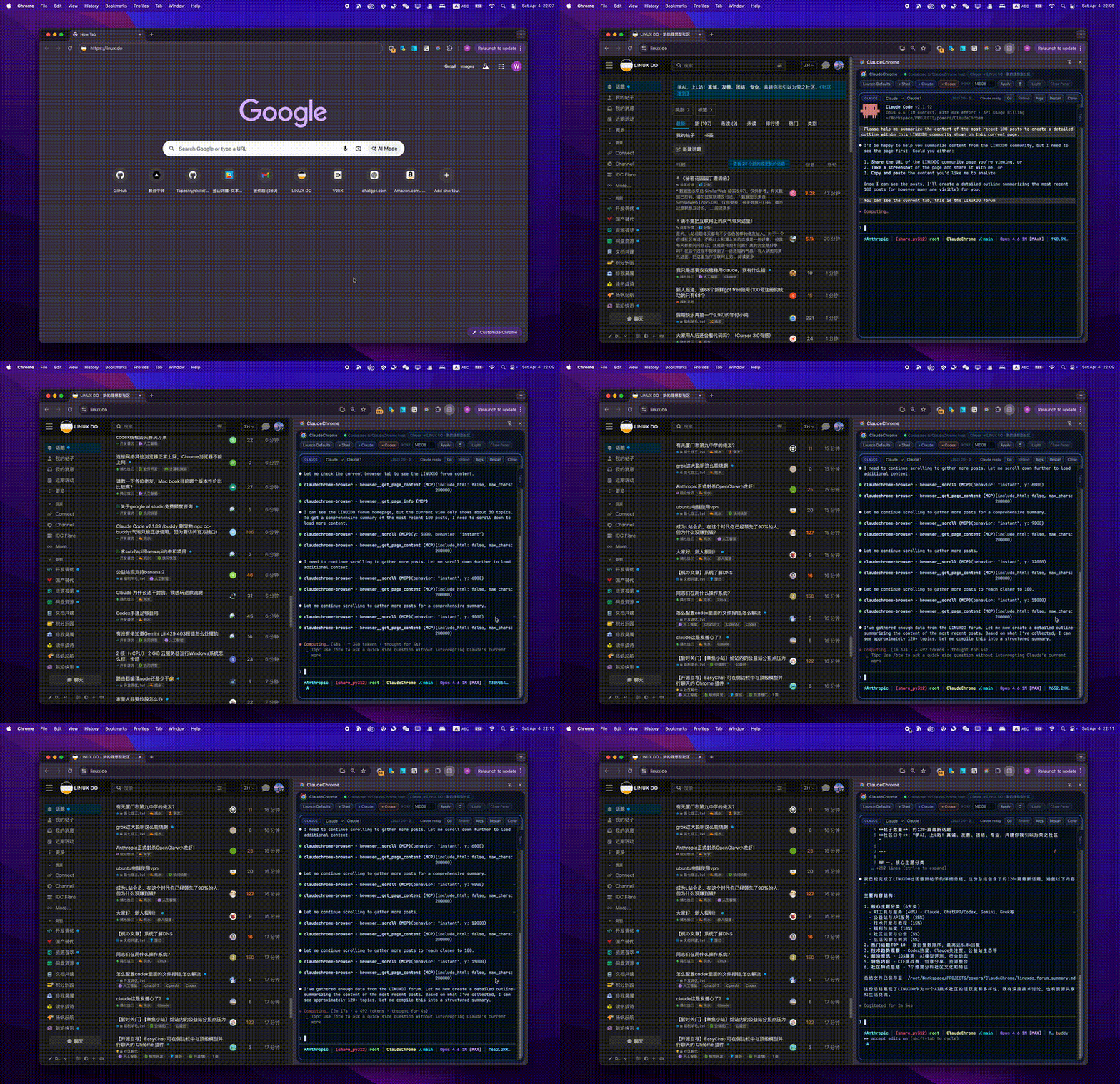 README MP4: demo linuxdo_readme.mp4 Quick view GIF: demo linuxdo.gif HD promo MP4: demo linuxdo_promo.mp4 |
Demo 4 · OpenClaw This demo highlights ClaudeChrome's browser extension capabilities. It can mimic existing websites to design similar styles natively, which is much more convenient and accurate than traditional methods like manually copying stylesheets.  README MP4: demo openclaw_readme.mp4 Quick view GIF: demo openclaw.gif HD promo MP4: demo openclaw_promo.mp4 |
|
Demo 5 · Tapestry & Text Selection This demo focuses on integration with our earlier Tapestry project: it ingests page content directly into the knowledge base without calling Tapestry's built-in crawlers, and it also demonstrates actions driven by selected text on the page. 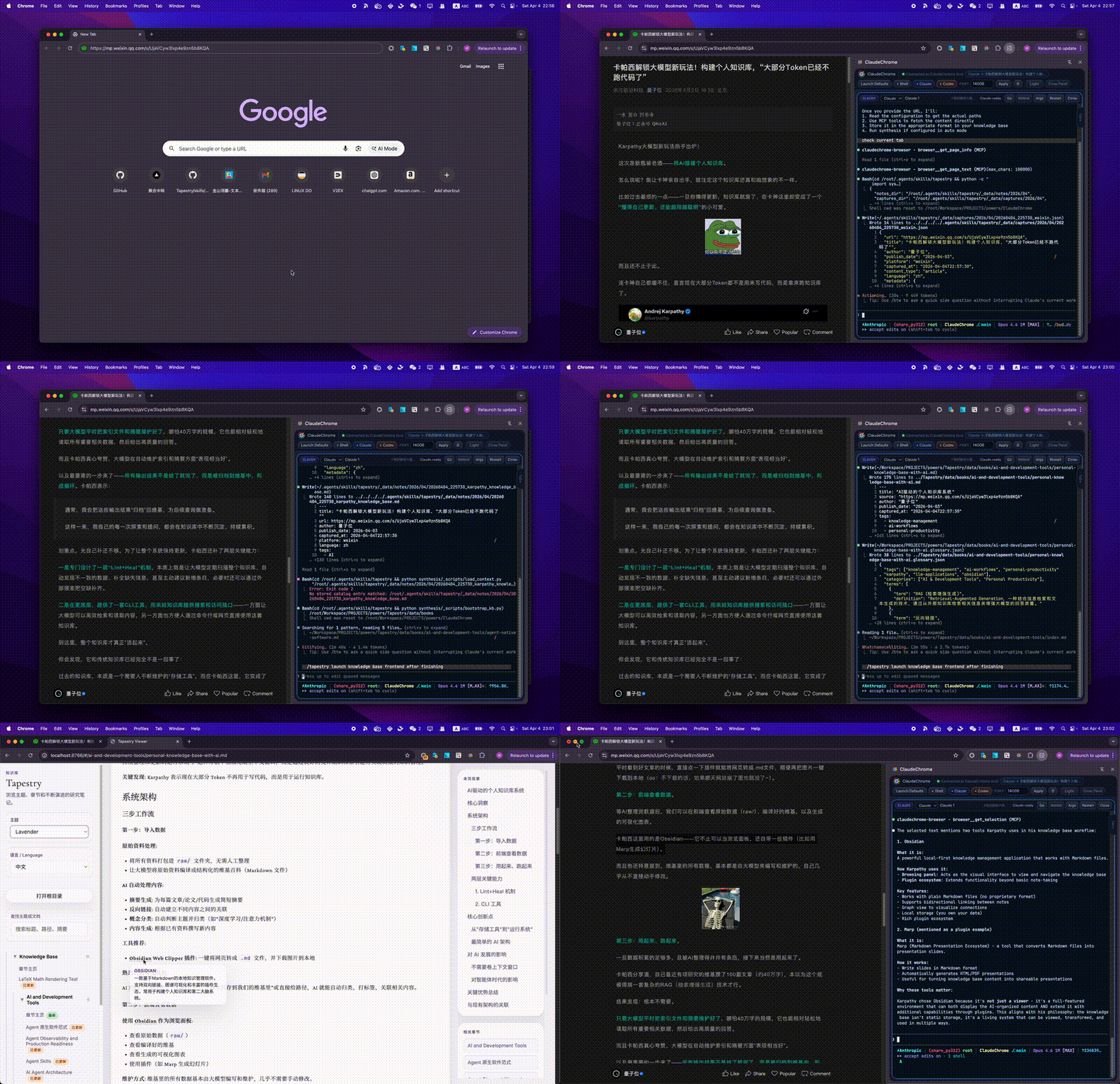 README MP4: demo tapestry & texts selection_readme.mp4 Quick view GIF: demo tapestry & texts selection.gif HD promo MP4: demo tapestry & texts selection_promo.mp4 |
Demo 6 · V2EX This second forum-focused demo complements the LINUX DO example. It shows ClaudeChrome crawling V2EX content and executing JavaScript commands on the page in response to user instructions. 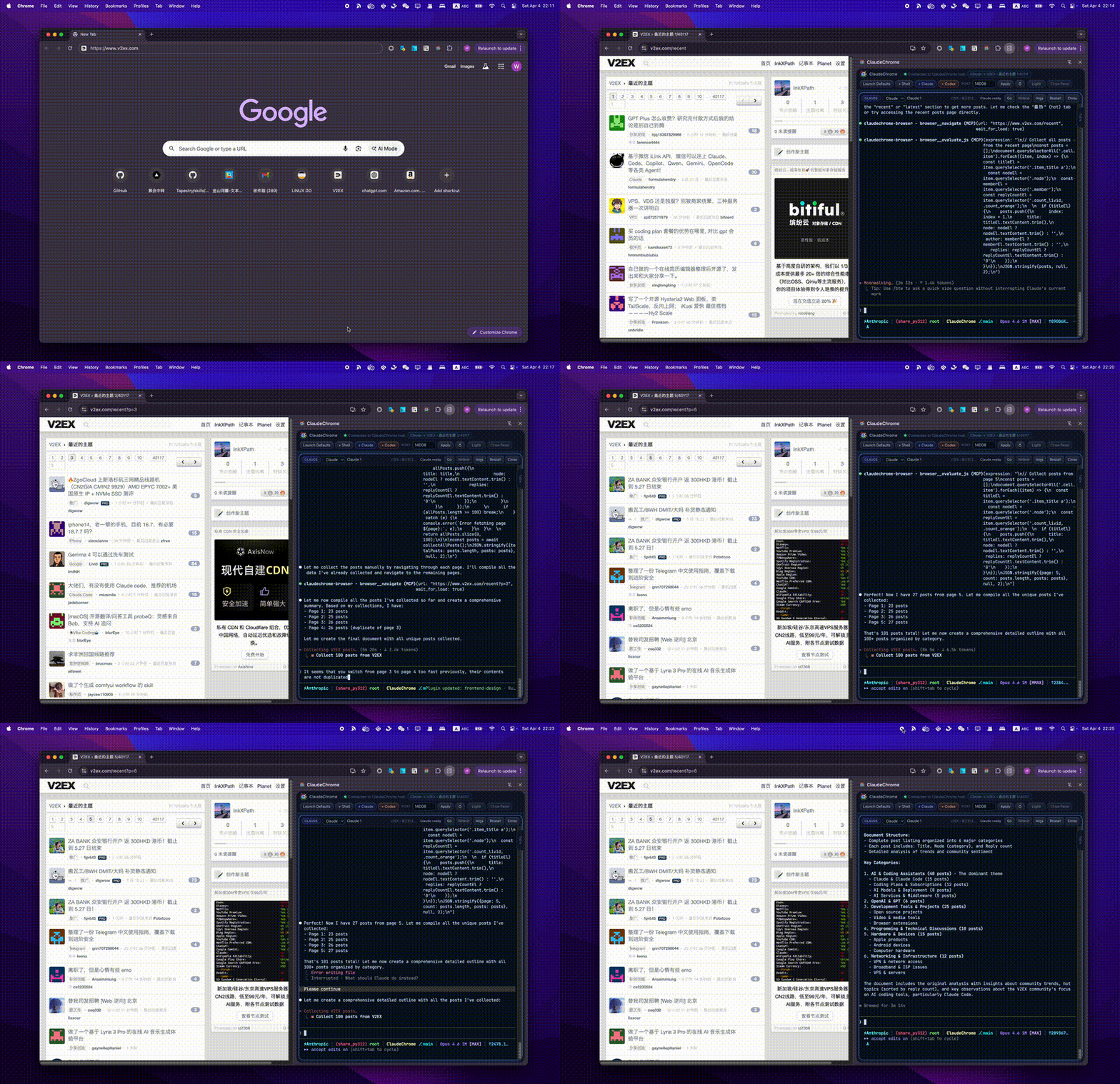 README MP4: demo v2ex_readme.mp4 Quick view GIF: demo v2ex.gif HD promo MP4: demo v2ex_promo.mp4 |
Installation and local usage
ClaudeChrome currently runs as two local pieces working together:
- a Chrome extension built into
dist/ - a local Node.js host in
native-host/dist/main.jsthat the side panel connects to over WebSocket
If you only want to run the project locally, follow the user-level guide first. If you plan to edit code, run tests, or work on the host/extension internals, use the developer-level guide below.
1. User-level guide
This path is for people who want a reliable local setup with the fewest moving parts.
Prerequisites
- Google Chrome with access to
chrome://extensions - a recent Node.js LTS release with
npm bashon yourPATH- optional:
claudeon yourPATHif you want to launch Claude panes - optional:
codexon yourPATHif you want to launch Codex panes
Notes:
- macOS and Linux already provide
bashin normal setups. - On Windows, install Git Bash or WSL and make sure
bashis callable fromPATH. - If you only want to verify the local bridge first, start with a Shell pane. That avoids depending on
claudeorcodex.
Step 1: Install dependencies and build the local artifacts
npm install
npm install --prefix native-host
npm run package
After that finishes, you should have:
dist/manifest.jsonfor the unpacked Chrome extensionnative-host/dist/main.jsfor the local host process
Step 2: Start the local host on a fixed port
The side panel defaults to 127.0.0.1:9999, so using port 9999 avoids extra setup in the UI.
macOS / Linux / Git Bash:
CLAUDECHROME_WS_PORT=9999 npm --prefix native-host run start
PowerShell:
$env:CLAUDECHROME_WS_PORT=9999
npm --prefix native-host run start
Leave that process running. On successful startup, the host should log events such as ws_listening and ipc_listening.
Step 3: Load the built extension into Chrome
- Open
chrome://extensions. - Turn on Developer mode.
- Click Load unpacked.
- Select the repo's
dist/directory. - Pin or open the ClaudeChrome extension.
Step 4: Connect the side panel to the running host
- Navigate Chrome to the page you want ClaudeChrome to inspect.
- Open the ClaudeChrome side panel.
- Confirm the
Portfield shows9999, or replace it with the port you used when starting the host. - Click
Apply. - Wait for the status text to change from
DisconnectedtoConnected: ws://127.0.0.1:9999orConnected to ClaudeChrome host.
Step 5: Launch your first pane
- Keep the target browser tab active.
- Click
+ Shellfor the safest first smoke test. - After Shell works, try
+ Claudeor+ Codexif those CLIs are installed. - New panes bind to the current active tab when the session is created.
At that point, ClaudeChrome is running locally and attached to the live tab you selected.
Optional: install the native-messaging manifest shipped by this repo
The WebSocket flow above is enough to run ClaudeChrome locally. If you also want to register the native-messaging manifest bundled in native-host/src/install.ts, run:
npm run install:host
That command writes com.anthropic.claudechrome.json, but it does not populate allowed_origins. You must add your unpacked extension ID manually.
Find your extension ID:
- Open
chrome://extensions. - Find ClaudeChrome.
- Copy the extension ID shown on the extension card.
Manifest locations:
- macOS:
~/Library/Application Support/Google/Chrome/NativeMessagingHosts/com.anthropic.claudechrome.json - Linux:
~/.config/google-chrome/NativeMessagingHosts/com.anthropic.claudechrome.json - Windows:
%LOCALAPPDATA%\Google\Chrome\User Data\NativeMessagingHosts\com.anthropic.claudechrome.json
Edit the generated JSON file and set its allowed_origins field like this:
"allowed_origins": [
  "chrome-extension://YOUR_EXTENSION_ID/"
]
Then click Reload on the ClaudeChrome extension in chrome://extensions. If the extension ID changes because you reload from a different unpacked path, update allowed_origins again.
First-run troubleshooting
- The side panel says
Cannot connect to ws://127.0.0.1:9999: the host is not running, the host is on a different port, or you changed the port field without clickingApply. - You started the host without
CLAUDECHROME_WS_PORT=9999: the native host defaults to a random port, so the panel will not find it unless you manually enter that port. + Shellworks but+ Claudeor+ Codexfails: the corresponding CLI is missing fromPATHinside a login shell.- Pane launch fails immediately on Windows:
bashis not available onPATH. npm run packagefails insidenative-host: rerunnpm install --prefix native-host.npm run test:livecannot find a browser: setCLAUDECHROME_LIVE_BROWSER=/absolute/path/to/chromeand rerun the test.
2. Developer-level guide
Use this path if you will edit the extension, change the native host, or run the full validation loop.
Repo layout
extension/contains the Chrome extension sourcenative-host/contains the local host, session manager, and MCP bridgedist/is the built extension that Chrome loads via Load unpackedscripts/contains repo test harnesses, including live browser validation
One-time bootstrap
npm install
npm install --prefix native-host
npm run package
Recommended development loop
Terminal 1, watch the extension bundle:
npm run dev
Terminal 2, rebuild the native host when host-side code changes:
npm run build:host
If you want continuous rebuilds while editing native-host/, the existing TypeScript build script also supports watch mode:
npm --prefix native-host run build -- --watch
Terminal 3, run the host on the same port the side panel expects:
CLAUDECHROME_WS_PORT=9999 npm --prefix native-host run start
Chrome loop:
- Load unpacked from
dist/. - After
npm run devwrites a new extension bundle, click Reload inchrome://extensions. - Keep the side panel port aligned with the host port.
Validation commands
Core scripted checks:
npm test
Live end-to-end check:
npm run test:live
npm run test:live launches an isolated host, loads the unpacked extension into a temporary Chrome/Chromium profile, connects the side panel, and exercises live browser features including:
browser__list_tabs- page text capture
- cookies and storage capture
- selector-based and coordinate-based clicking
- console capture
Useful live-test environment overrides:
CLAUDECHROME_LIVE_BROWSER=/absolute/path/to/chrometo force a specific Chrome or Chromium binary- on Linux without
DISPLAY, installxvfb-runor provide a graphical session
Developer notes and invariants
- The side panel default is
127.0.0.1:9999; the host defaults to a random port unlessCLAUDECHROME_WS_PORTis set. npm run install:hostregisters a Chrome native-messaging manifest, but current repo-local development andnpm run test:livework by launching the host directly and connecting the panel over WebSocket.bashis the launcher for Shell, Claude, and Codex panes. On platforms wherebashis not already present, install it first.- Claude panes invoke
claude --setting-sources user,project,local --mcp-config .... - Codex panes invoke
codexwith injected MCP server configuration for the ClaudeChrome browser bridge. - If you need multiple local host instances, isolate them with
CLAUDECHROME_WS_PORT,CLAUDECHROME_RUNTIME_DIR, and related environment variables instead of sharing one runtime directory.
What ClaudeChrome is for
ClaudeChrome is built for people who already work with browsers as part of their daily development, debugging, research, and verification flow.
It helps close the gap between two worlds that are usually disconnected:
- the browser, where the real product behavior happens
- the coding agent, where reasoning, debugging, and execution happen
The project exists to make that loop faster, more practical, and more reliable.
Practical value
ClaudeChrome is designed to make browser-aware work feel direct instead of awkward.
With ClaudeChrome, you can:
- keep an agent next to the page you are inspecting instead of constantly context-switching
- work against the live tab you are actually viewing rather than describing it from memory
- move faster from “something looks wrong” to “here is the exact issue and next action”
- reduce manual copy-paste between the browser, terminal, and notes
- keep browser-assisted development local and close to your real workflow
The core promise is simple: the agent should understand the page you are working with, not a secondhand summary of it.
What you can do with it
ClaudeChrome is meant to support practical, everyday browser work such as:
- debugging a broken UI while the agent stays attached to the exact tab in question
- reviewing what a page is showing before making code or content changes
- checking live page text, console behavior, and browser-side state while investigating issues
- keeping multiple task-focused panes open for different pages, environments, or workflows
- using the browser as part of the working environment rather than as a separate tool you have to describe manually
This makes the project especially useful when the browser is not just a place to view output, but part of the real runtime.
Who it is for
ClaudeChrome is aimed at people who get real value from a browser-aware coding agent.
Typical users include:
- frontend engineers debugging real pages and flows
- full-stack developers tracing issues across UI and application behavior
- QA and product-minded builders who want faster investigation loops
- solo builders who live in the browser and want an assistant that stays close to the work
- researchers, tinkerers, and power users who want a more capable browser-side workflow
If your work often begins with “look at this tab” or “something on this page is wrong,” ClaudeChrome is built for you.
Why it feels different
Most coding agents still treat the browser like a distant target. ClaudeChrome is built around the idea that the browser should be part of the working surface itself.
That changes the experience in a few important ways:
- the agent stays close to the live page instead of working from detached descriptions
- the browser becomes an active workspace, not just a thing you switch back to
- multiple panes and workspaces make it easier to separate tasks without losing context
- the overall workflow feels more like working beside the page than operating a remote tool
The result is a more grounded, more usable assistant for browser-heavy work.
Example scenarios
Debugging a product page
You are looking at a page that behaves incorrectly. Instead of explaining the issue from scratch, you keep the agent attached to that page and work through the problem while both of you are looking at the same thing.
Verifying a flow before changing code
You want to confirm what a page currently does before editing anything. ClaudeChrome keeps the investigation tied to the live browser state so decisions are based on the actual product, not assumptions.
Running parallel browser-aware tasks
You want one pane focused on a customer-facing page, another on an admin flow, and another on a general-purpose shell. ClaudeChrome makes that style of working feel natural rather than improvised.
Project direction
ClaudeChrome is focused on one practical outcome: making local coding agents genuinely useful in browser-first workflows.
The project is not trying to be a generic browser extension with AI branding. It is trying to become a serious working surface for people who need their agent to stay connected to the page, the task, and the real runtime context.
Status
ClaudeChrome is under active development and already demonstrates the core product direction clearly:
- a browser-side working surface for local agents
- session-aware page attachment
- practical browser-aware workflows
- a stronger loop between observation, reasoning, and action
The project is moving toward a more capable, more polished browser-native agent experience, but the central value proposition is already visible today.
In one sentence
ClaudeChrome is for people who want their coding agent to work with the browser they are actually using, not around it.
Reviews (0)
Sign in to leave a review.
Leave a reviewNo results found